
如何還原從 Google 雲端硬碟刪除的檔案
不小心刪除了 Google 雲端硬碟中的檔案,可能會讓您的工作在幾秒內停擺。您可能會遺失報告、試算表、PDF 檔案、照片、影片或共享專案檔案。所幸,該檔案可能仍存在於「垃圾桶」、共享位置、同步資料夾或本機備份中。. 本指南說明 如何還原從 Google 雲端硬碟中刪除的檔案 並依循明確的步驟。首先,請嘗試 Google 的還原選項。接著,請檢查 Workspace 管理員還原功能。然後,如果該檔案曾同步或下載至您的 Windows 電腦、USB 隨身碟、SD 卡或其他本機儲存位置,您可以透過 Magic Data Recovery.
一旦 Google 永久刪除檔案,任何第三方工具都無法直接從 Google 的雲端儲存空間中提取這些檔案。不過,有個 刪除的檔案復原 如果曾經存在過本地副本,這個工具就能派上用場。因此,, 如何還原從 Google 雲端硬碟中刪除的檔案 這取決於雲端狀態和本地儲存記錄。.
支援 Windows 7/8/10/11 和 Windows Server
目錄
快速解答:如何還原從 Google 雲端硬碟刪除的檔案
如果您需要 如何還原從 Google 雲端硬碟中刪除的檔案 快點,就從這裡開始吧。.
情況 | 最佳解決方案 |
檔案仍在「垃圾桶」中 | 從 Google 雲端硬碟的「垃圾桶」中還原 |
「垃圾桶」中不再顯示該檔案 | 試試 Google 的帳戶恢復支援功能 |
工作或學校帳戶 | 向 Google Workspace 管理員諮詢 |
檔案已同步至 Windows | 使用 Magic Data Recovery 掃描已同步的資料夾 |
檔案已儲存至 USB 隨身碟或 SD 卡 | 使用 Magic Data Recovery 掃描該裝置 |
雲端或本機均無副本 | 可能無法恢復 |
因此,請先嘗試最簡單的選項。如果「垃圾桶」功能無法解決問題,請依序嘗試帳戶恢復、管理員協助以及本地端恢復。.
方法 1:如何還原從 Google 雲端硬碟垃圾桶中刪除的檔案
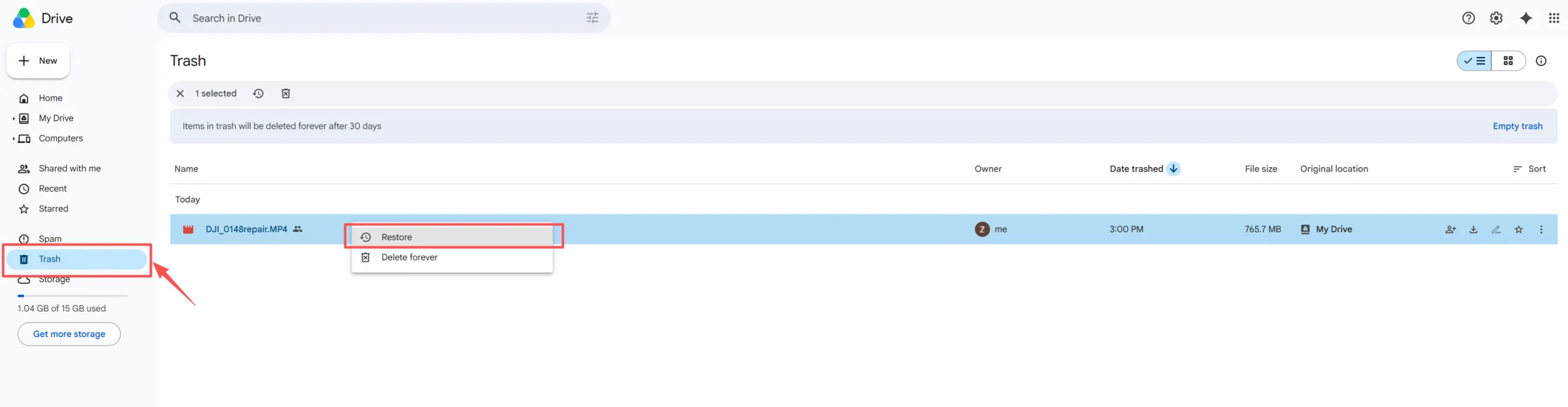
恢復已刪除的 Google 雲端硬碟檔案最簡單的方法是 從 Google 雲端硬碟的「垃圾桶」中還原已刪除的檔案. 當檔案仍出現在「垃圾桶」中時,此方法便有效。.
- 開啟 Google Drive.
- 請點擊左側選單中的「垃圾桶」。.
- 搜尋該檔案,或依移至垃圾桶的日期排序。.
- 用滑鼠右鍵按一下檔案。.
- 點擊「還原」。“
之後,「我的雲端硬碟」通常會將檔案放回原始資料夾。若您找不到該檔案,請在「我的雲端硬碟」中以檔案名稱進行搜尋。.
此方法可解答 如何還原從 Google 雲端硬碟中刪除的檔案 在大多數最近刪除的情況下。不過,如果您已清空「垃圾桶」,請繼續嘗試下一種解決方案。.
方法 2:如何還原從 Google 雲端硬碟永久刪除的檔案
方法 3:如何在 Workspace 管理員的協助下還原從 Google 雲端硬碟刪除的檔案
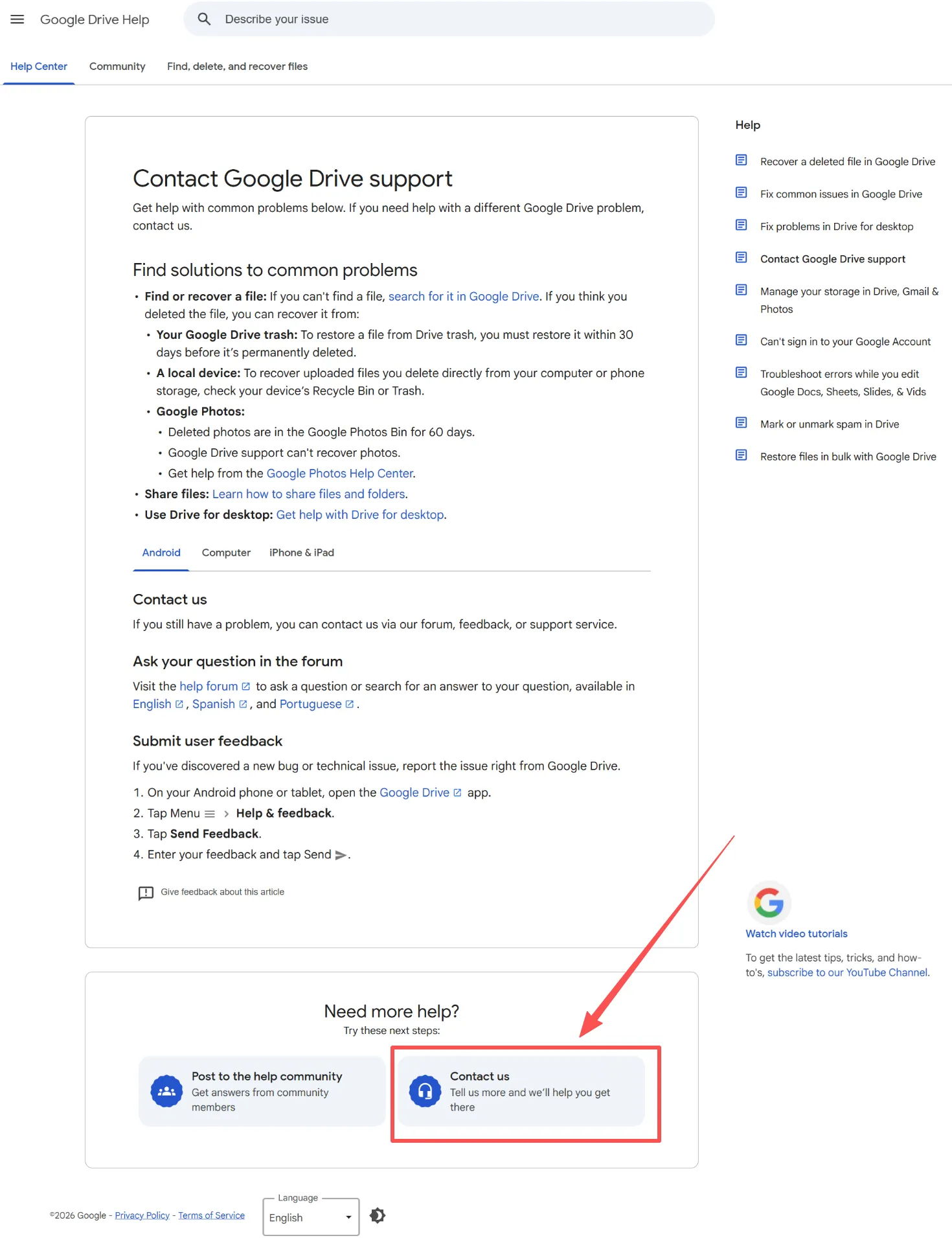
如果您的 Google 雲端硬碟隸屬於公司、學校或組織,請聯絡您的 Google Workspace 管理員。當該檔案不再顯示於「垃圾桶」中時,管理員的復原功能可能會有所幫助。.
Google Workspace 文件指出,當使用者清空「垃圾桶」後,管理員可在 25 天內還原 Drive 中的項目。為協助您的管理員加快處理速度,請提供檔案名稱、擁有者、資料夾路徑及刪除日期。這是最有效的處理方式,用以 Google Workspace 管理員還原 Drive 檔案 搜尋。因此,一旦發現遺失,請立即尋求協助。.
方法 4:如何使用 Magic Data Recovery 還原從 Google 雲端硬碟刪除的檔案
當 Google 的雲端還原選項失敗時,本地還原仍可能有效。. Magic Data Recovery 當遺失的檔案曾經存在於您的 Windows 電腦、已同步的 Google 雲端硬碟資料夾、USB 隨身碟、SD 卡或其他本機儲存位置時,此方法會有所幫助。.
此方法並非用來取代 Google 雲端硬碟的資料恢復功能,而是填補了其中的空白。Google 著重於雲端端的資料恢復,而 Magic Data Recovery 則會掃描本機儲存空間。根據 Amagicsoft, 該工具支援 5000 多種檔案類型,並可與硬碟、固態硬碟、USB 隨身碟、SD 卡等裝置相容。.
當您使用 Google 雲端硬碟(桌面版)、將檔案同步至 Windows、在刪除前已下載該檔案、清空 Windows 資源回收筒,或無法透過 Google 雲端硬碟的「垃圾桶」恢復檔案時,請使用 Magic Data Recovery。例如,如果您同時刪除了雲端檔案和已下載的 PDF 檔案,此工具可掃描最後的本地儲存位置。.
如何使用 Magic Data Recovery
步驟 1:下載並安裝 Magic Data Recovery
請下載 Magic Data Recovery,並將其安裝在與您上次儲存遺失的 Google 雲端硬碟檔案位置不同的磁碟機上。此步驟有助於防止意外覆寫,並保護遺失的資料。.
支援 Windows 7/8/10/11 和 Windows Server
步驟 2:選擇要掃描的磁碟機或已同步的 Google 雲端硬碟資料夾
啟動程式。接著,在主介面中選擇先前曾存放該刪除檔案的磁碟、分割區或已同步的 Google 雲端硬碟資料夾。之後,開始掃描。.

步驟 3:掃描已刪除的 Google 雲端硬碟檔案
該軟體會掃描所選的位置。同時,隨著掃描進程的推進,它會列出可恢復的檔案。您可以等待掃描完成,也可以在掃描過程中查看結果。.

步驟 4:復原前預覽刪除的檔案
接著,請使用預覽功能來確認檔案內容。此步驟可協助您僅還原實際需要的文件、照片、影片、PDF 或其他檔案。.

步驟 5:將檔案復原至安全位置
最後,請選取目標檔案,並將其儲存至另一個安全的位置。請勿將檔案還原至原始位置,因為這樣做可能會覆寫已刪除的資料,或降低恢復其他遺失檔案的機會。.

雲端復原與本地復原
瞭解 如何還原從 Google 雲端硬碟中刪除的檔案, 比較雲端復原與本地端復原。.
復原類型 | 最適合 |
Google 雲端硬碟的「垃圾桶」 | 最近刪除的檔案 |
Google 還原支援 | 最近刪除的個人檔案 |
工作區管理員還原 | 工作或學校的檔案 |
Magic Data Recovery | 已同步、已下載或已複製的檔案 |
如果 Google 仍保留該雲端檔案,請優先使用 Google 的工具。然而,如果雲端副本已不存在,但先前曾有過本機副本,Magic Data Recovery 則為您提供另一種實用的解決方案。.
如何恢復從 Google 雲端硬碟刪除且已超過 30 天的檔案
許多使用者搜尋 在 30 天後恢復 Google 雲端硬碟檔案 因為「垃圾桶」已無法派上用場。首先,請確認您是否使用 Google Workspace。若是,請立即聯絡您的系統管理員。接著,請搜尋 Google 雲端硬碟、共享資料夾、電子郵件附件、下載項目、USB 隨身碟、SD 卡以及舊電腦。.
若找不到任何可見的副本,請使用 Magic Data Recovery 掃描本機儲存位置。越早進行掃描,成功機率就越高。不過,如果該檔案僅存在於 Google 的雲端中,且 Google 已將其永久移除, 恢復工具無法從 Google 伺服器中將其取回。.
總結
現在您知道了 如何還原從 Google 雲端硬碟中刪除的檔案 透過「垃圾桶」、Google 支援、Workspace 管理員說明以及本地端還原功能。請先從「垃圾桶」開始檢查。如果檔案在「垃圾桶」中已找不到,請嘗試使用 Google 還原支援或管理員說明。.
最後,請檢查本機資料夾、下載資料夾、USB 隨身碟、SD 卡以及備份檔案。. Magic Data Recovery 值得在這份指南中佔有一席之地,因為它解決了一個實際的 刪除的檔案復原 缺口:當雲端還原失敗時,本地副本可能仍會殘留。若您需要更有效的後續處理方式,請嘗試「Magic Data Recovery」方法,並掃描該遺失檔案最後存在的位置。.
支援 Windows 7/8/10/11 和 Windows Server
關於如何還原從 Google 雲端硬碟刪除的檔案的常見問題
30 天後還能恢復 Google 雲端硬碟的檔案嗎?
是的,但 30 天後可選的方案就會變少。首先,請確認您是否使用 Google Workspace 帳戶,因為在 Google 的資料恢復期限內,系統管理員仍可能提供協助。接著,請檢查下載資料、備份檔案、USB 隨身碟及 SD 卡。如果曾經有過本機副本,Magic Data Recovery 或許能派上用場。.
Magic Data Recovery 能否恢復已永久刪除的 Google 雲端硬碟檔案?
Magic Data Recovery 無法直接從 Google 的雲端伺服器還原檔案。不過,若這些檔案曾同步、下載或儲存至本機儲存空間,該工具仍可協助從 Google 雲端硬碟中恢復已永久刪除的檔案。因此,請在檢查過 Google 雲端硬碟的「垃圾桶」、Google 還原支援服務以及 Workspace 管理員選項後,再使用此工具。.
還原後的 Google 雲端硬碟檔案會存放在哪裡?
Google 雲端硬碟通常會將還原的檔案放回原始資料夾。不過,如果原始資料夾已不存在,或是您無法存取該資料夾,請在「我的雲端硬碟」中以檔案名稱進行搜尋。此外,若該項目屬於其他人,請檢查「最近使用的項目」、「與我共享」以及檔案擁有者的雲端硬碟。.
刪除 Drive 檔案後,我應該立即做些什麼?
首先,請停止在相關位置刪除、同步或儲存新檔案。接著檢查 Google 雲端硬碟的「垃圾桶」、Windows 的「資源回收筒」、已同步的資料夾以及「下載」資料夾。若上述檢查均未找到檔案,請聯絡 Google 支援團隊或您的 Workspace 管理員。最後,若該檔案曾存在於您的裝置上,請使用 Magic Data Recovery 掃描本機儲存空間。.
我可以從 Google 雲端硬碟的共享資料夾中還原檔案嗎?
是的,在某些情況下可以。首先,請確認檔案的所有者是誰。如果檔案由其他人擁有,請該所有者檢查「垃圾桶」或恢復共享權限。若為 Workspace 帳戶中的共享磁碟機,請盡快聯絡管理員。檔案能否恢復取決於權限設定、刪除時間以及帳戶類型。.
Google Drive 的「垃圾桶」和 Windows 的「資源回收筒」是一樣的嗎?
不。Google 雲端硬碟的「垃圾桶」屬於您的雲端帳戶,而 Windows 的「資源回收筒」則屬於您的電腦。因此,如果您使用的是 Google 雲端硬碟桌面版,請同時檢查這兩處。檔案可能已從雲端硬碟中消失,但仍可能保留在 Windows 資源回收筒、同步資料夾或其他本機位置。.

Vasilii 是一位在該領域擁有約 10 年實務經驗的資料復原專家。在他的職業生涯中,他已成功解決數千個複雜的個案,包括刪除的檔案、格式化的硬碟機、遺失的磁碟分割和 RAW 檔案系統。他的專業知識涵蓋使用十六進位編輯器等專業工具的手動復原方法,以及使用復原軟體的進階自動解決方案。Vasilii 的使命是讓 IT 專業人士和一般使用者都能獲得可靠的資料復原知識,協助他們保護寶貴的數位資產。.