
Comment récupérer des fichiers supprimés de Google Drive
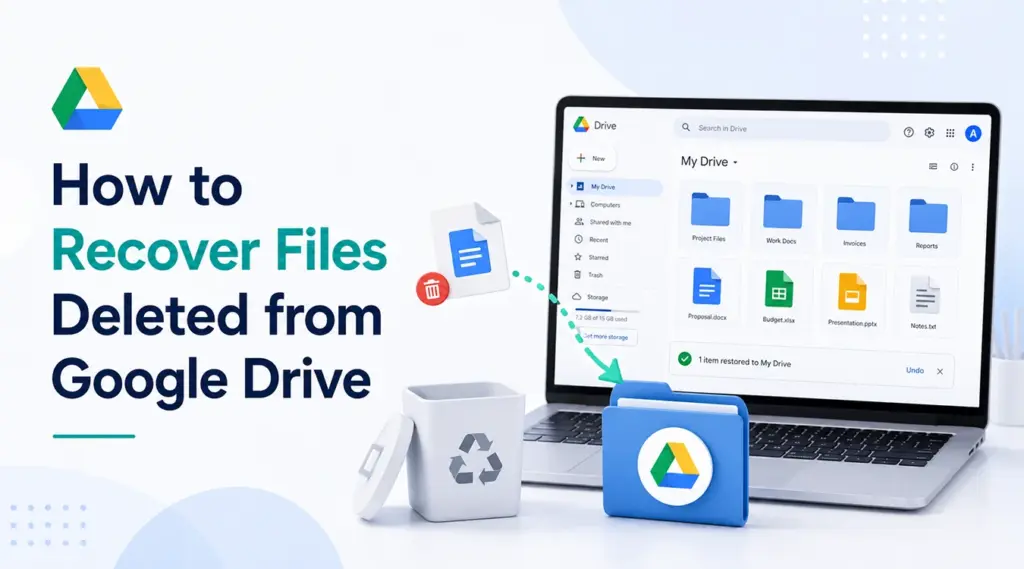
La suppression accidentelle d'un fichier sur Google Drive peut interrompre votre travail en quelques secondes. Vous risquez de perdre un rapport, une feuille de calcul, un fichier PDF, une photo, une vidéo ou un fichier de projet partagé. Heureusement, le fichier peut encore se trouver dans la Corbeille, dans un emplacement partagé, dans un dossier synchronisé ou dans une sauvegarde locale. Ce guide explique Comment récupérer des fichiers supprimés de Google Drive en suivant des étapes claires. Tout d’abord, vous allez essayer les options de récupération de Google. Ensuite, vous allez vérifier les options de récupération de l’administrateur Workspace. Puis, si le fichier a déjà été synchronisé ou téléchargé sur votre ordinateur Windows, une clé USB, une carte SD ou un autre emplacement de stockage local, vous pouvez le rechercher à l’aide de Magic Data Recovery.
Aucun outil tiers ne peut récupérer des fichiers directement depuis le cloud de Google une fois que celui-ci les a supprimés définitivement. Cependant, un récupération de fichiers effacés Cet outil peut s'avérer utile si une copie locale a déjà existé. Ainsi, Comment récupérer des fichiers supprimés de Google Drive Cela dépend à la fois de l'état du cloud et de l'historique du stockage local.
Prise en charge de Windows 7/8/10/11 et Windows Server
Table des matières
Réponse rapide : Comment récupérer des fichiers supprimés de Google Drive
Si vous avez besoin Comment récupérer des fichiers supprimés de Google Drive Si vous voulez aller vite, commencez par là.
Situation | Meilleure solution |
Le fichier se trouve toujours dans la corbeille | Le restaurer depuis la corbeille de Google Drive |
La corbeille n'affiche plus le fichier | Essayez l'option d'assistance à la récupération de Google |
Compte professionnel ou scolaire | Demander à un administrateur Google Workspace |
Fichier synchronisé avec Windows | Analyser le dossier synchronisé avec Magic Data Recovery |
Fichier enregistré sur une clé USB ou une carte SD | Analysez cet appareil avec Magic Data Recovery |
Il n'existe aucune copie, ni dans le cloud ni en local | Il se peut que la récupération ne soit pas possible |
Par conséquent, commencez par vérifier la solution la plus simple. Si la corbeille ne fonctionne pas, passez à la récupération de compte, à l'aide de l'administrateur et à la récupération locale.
Méthode 1 : Comment récupérer des fichiers supprimés de la corbeille de Google Drive
La manière la plus simple de récupérer des fichiers supprimés sur Google Drive consiste à récupérer des fichiers supprimés de la corbeille de Google Drive. Cette méthode fonctionne lorsque le fichier figure toujours dans la Corbeille.
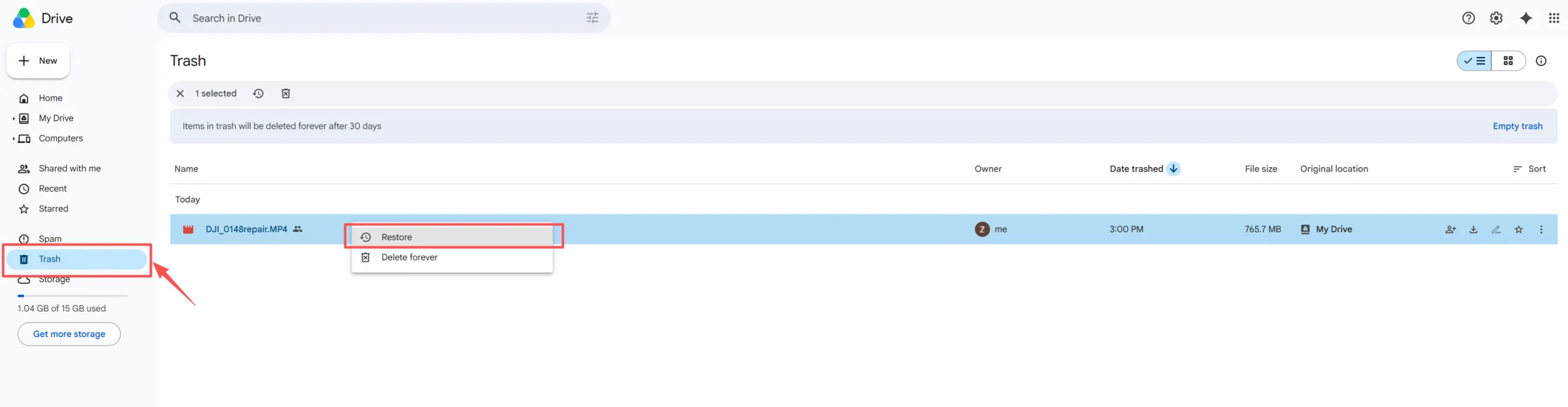
- Ouvrir Google Drive.
- Cliquez sur “ Corbeille ” dans le menu de gauche.
- Recherchez le fichier ou triez les résultats par date de suppression.
- Cliquez avec le bouton droit de la souris sur le fichier.
- Cliquez sur “ Restaurer ”.”
Ensuite, Drive replace généralement le fichier dans son dossier d'origine. Si vous ne le trouvez pas, effectuez une recherche dans « Mon Drive » en indiquant le nom du fichier.
Cette méthode répond à Comment récupérer des fichiers supprimés de Google Drive dans la plupart des cas de suppression récente. Toutefois, si vous avez vidé la corbeille, passez à la solution suivante.
Méthode n° 2 : Comment récupérer des fichiers supprimés définitivement de Google Drive
Méthode 3 : Comment récupérer des fichiers supprimés de Google Drive avec l'aide de l'administrateur de Workspace
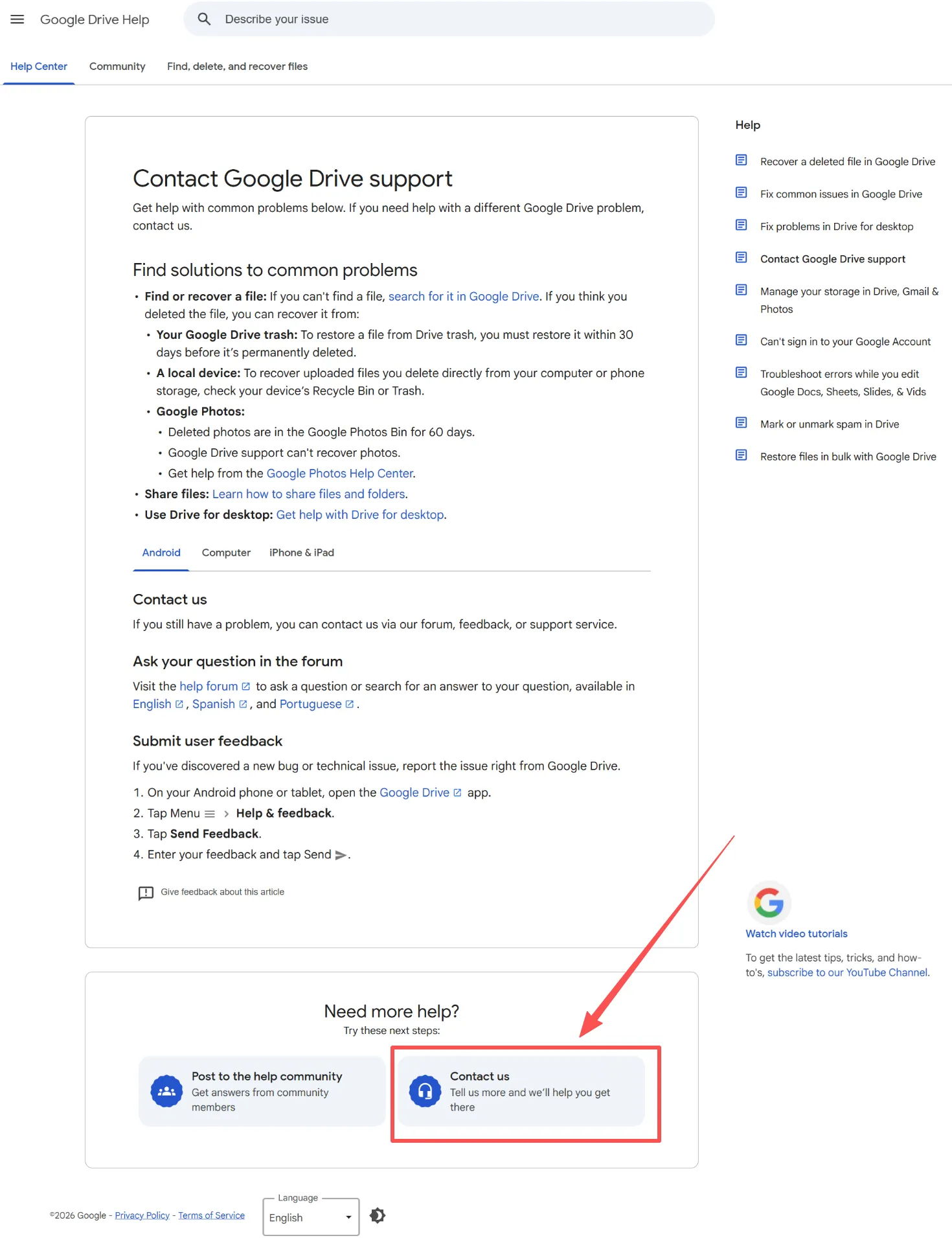
Si votre Drive appartient à une entreprise, un établissement scolaire ou une organisation, contactez votre administrateur Google Workspace. Une intervention de l'administrateur peut s'avérer utile lorsque le fichier n'apparaît plus dans la Corbeille.
Selon la documentation de Google Workspace, les administrateurs peuvent restaurer des éléments de Drive dans les 25 jours suivant la vidange de la corbeille par un utilisateur. Pour aider votre administrateur à intervenir plus rapidement, indiquez-lui le nom du fichier, son propriétaire, le chemin d'accès au dossier et la date de suppression. C'est la meilleure façon de procéder pour Restauration des fichiers Drive par l'administrateur de Google Workspace recherches. C'est pourquoi il faut demander de l'aide dès que vous constatez la perte.
Méthode n° 4 : Comment récupérer des fichiers supprimés de Google Drive avec Magic Data Recovery
Lorsque les options de restauration dans le cloud de Google échouent, la restauration locale peut tout de même fonctionner. Magic Data Recovery Cela s'avère utile lorsque le fichier manquant se trouvait auparavant sur votre ordinateur Windows, dans un dossier Google Drive synchronisé, sur une clé USB, sur une carte SD ou sur un autre support de stockage local.
Cette méthode ne remplace pas la fonctionnalité de récupération de Google Drive. Elle vient plutôt combler une lacune. Google se concentre sur la récupération dans le cloud, tandis que Magic Data Recovery analyse le stockage local. Selon Amagicsoft, cet outil prend en charge plus de 5 000 types de fichiers et fonctionne avec les disques durs, les SSD, les clés USB, les cartes SD et bien d'autres supports encore.
Utilisez Magic Data Recovery si vous avez utilisé Google Drive sur votre ordinateur, synchronisé le fichier avec Windows, téléchargé celui-ci avant de le supprimer, vidé la corbeille de Windows ou si vous n'avez pas réussi à le récupérer via la corbeille de Google Drive. Par exemple, si vous avez supprimé à la fois le fichier stocké dans le cloud et le PDF téléchargé, l'outil peut analyser le dernier emplacement de stockage local.
Comment utiliser Magic Data Recovery
Étape 1 : Télécharger et installer Magic Data Recovery
Téléchargez Magic Data Recovery et installez-le sur un disque différent de celui où vous avez enregistré pour la dernière fois le fichier Google Drive manquant. Cette étape permet d'éviter tout écrasement accidentel et de protéger les données perdues.
Prise en charge de Windows 7/8/10/11 et Windows Server
Étape 2 : Sélectionnez le disque ou le dossier Google Drive synchronisé à analyser
Lancez le programme. Ensuite, depuis l'interface principale, sélectionnez le disque, la partition ou le dossier Google Drive synchronisé où se trouvait auparavant le fichier supprimé. Lancez ensuite l'analyse.

Étape 3 : Recherche des fichiers supprimés sur Google Drive
Le logiciel analyse l'emplacement sélectionné. Parallèlement, il répertorie les fichiers récupérables au fur et à mesure de l'analyse. Vous pouvez attendre la fin de l'analyse ou consulter les résultats pendant le processus.

Étape 4 : Prévisualisation des fichiers supprimés avant la récupération
Utilisez ensuite la fonction d'aperçu pour vérifier le contenu des fichiers. Cette étape vous permet de ne récupérer que les documents, photos, vidéos, fichiers PDF ou autres fichiers dont vous avez réellement besoin.

Étape 5 : Récupération des fichiers vers un emplacement sûr
Enfin, sélectionnez les fichiers cibles et enregistrez-les dans un autre emplacement sûr. Ne restaurez pas les fichiers à leur emplacement d'origine, car cela risquerait d'écraser les données supprimées ou de réduire les chances de récupérer d'autres fichiers manquants.

Restauration dans le cloud ou restauration locale ?
Pour comprendre Comment récupérer des fichiers supprimés de Google Drive, comparez la restauration dans le cloud à la restauration locale.
Type de récupération | Meilleur pour |
Corbeille de Google Drive | Fichiers récemment supprimés |
Assistance à la récupération de Google | Fichiers personnels récemment supprimés |
Restauration par l'administrateur de l'espace de travail | Fichiers professionnels ou scolaires |
Magic Data Recovery | Fichiers synchronisés, téléchargés ou copiés |
Si Google conserve toujours le fichier dans le cloud, commencez par utiliser les outils de Google. Toutefois, si la copie dans le cloud a disparu et qu’il existait auparavant une copie locale, Magic Data Recovery vous propose une autre solution pratique.
Comment récupérer des fichiers supprimés de Google Drive après 30 jours
De nombreux utilisateurs effectuent des recherches récupérer des fichiers Google Drive après 30 jours car la corbeille ne sert plus à rien. Commencez par vérifier si vous utilisez Google Workspace. Si c'est le cas, contactez immédiatement votre administrateur. Ensuite, effectuez une recherche dans Drive, les dossiers partagés, les pièces jointes aux e-mails, les fichiers téléchargés, les clés USB, les cartes SD et vos anciens ordinateurs.
Si vous ne trouvez aucune copie visible, effectuez une analyse de l'espace de stockage local à l'aide de Magic Data Recovery. Plus vous effectuez cette analyse tôt, plus vous avez de chances de réussir. Cependant, si le fichier n'existait que dans le cloud de Google et Google l'a supprimé définitivement, les outils de récupération ne peuvent pas le récupérer depuis les serveurs de Google.
Conclusion
Maintenant vous savez Comment récupérer des fichiers supprimés de Google Drive via la Corbeille, l'assistance Google, l'aide à l'administration de Workspace et la récupération locale. Commencez par consulter la Corbeille. Si le fichier n'y figure plus, essayez ensuite l'assistance à la récupération de Google ou l'aide à l'administration.
Enfin, vérifiez les dossiers locaux, les téléchargements, les clés USB, les cartes SD et les sauvegardes. Magic Data Recovery mérite sa place dans ce guide car il apporte une solution pratique à un problème récupération de fichiers effacés Lacune : en cas d'échec de la restauration depuis le cloud, une copie locale peut subsister. Si vous recherchez une solution plus efficace, essayez la méthode « Magic Data Recovery » et analysez l'emplacement où le fichier manquant se trouvait en dernier.
Prise en charge de Windows 7/8/10/11 et Windows Server
Foire aux questions sur la récupération de fichiers supprimés de Google Drive
Puis-je récupérer des fichiers Google Drive après 30 jours ?
Oui, mais les possibilités sont plus limitées au-delà de 30 jours. Commencez par vérifier si vous utilisez un compte Google Workspace, car un administrateur pourrait encore vous aider tant que la période de récupération prévue par Google n’est pas écoulée. Ensuite, fouillez dans vos téléchargements, vos sauvegardes, vos clés USB et vos cartes SD. S’il existait autrefois une copie locale, Magic Data Recovery pourrait vous aider.
Magic Data Recovery permet-il de récupérer des fichiers supprimés définitivement sur Google Drive ?
Magic Data Recovery ne permet pas de restaurer directement des fichiers à partir des serveurs cloud de Google. Cependant, il peut aider à récupérer des fichiers supprimés définitivement de Google Drive lorsque ces fichiers ont déjà été synchronisés, téléchargés ou enregistrés sur un espace de stockage local. Par conséquent, utilisez-le après avoir vérifié la corbeille de Google Drive, l'assistance à la récupération de Google et les options d'administration de Workspace.
Où sont enregistrés les fichiers restaurés depuis Google Drive ?
Google Drive place généralement les fichiers restaurés dans leur dossier d'origine. Toutefois, si ce dossier n'existe plus ou si vous n'y avez plus accès, effectuez une recherche dans « Mon Drive » en indiquant le nom du fichier. Vérifiez également les rubriques « Récents », « Partagés avec moi » et le Drive du propriétaire du fichier si celui-ci appartenait à quelqu'un d'autre.
Que dois-je faire immédiatement après avoir supprimé un fichier sur Drive ?
Commencez par cesser de supprimer, de synchroniser ou d'enregistrer de nouveaux fichiers dans les emplacements concernés. Vérifiez ensuite la corbeille de Google Drive, la corbeille de Windows, les dossiers synchronisés et le dossier « Téléchargements ». Si ces vérifications s'avèrent infructueuses, contactez l'assistance Google ou votre administrateur Workspace. Enfin, effectuez une analyse de votre espace de stockage local à l'aide de Magic Data Recovery si le fichier a déjà existé sur votre appareil.
Puis-je récupérer des fichiers à partir d'un dossier partagé sur Google Drive ?
Oui, dans certains cas. Commencez par vérifier à qui appartient le fichier. S'il appartient à quelqu'un d'autre, demandez à cette personne de vérifier la Corbeille ou de rétablir l'accès partagé. Pour les disques partagés d'un compte Workspace, contactez rapidement l'administrateur. La récupération dépend des autorisations, du moment de la suppression et du type de compte.
La corbeille de Google Drive est-elle identique à la corbeille de Windows ?
Non. La corbeille de Google Drive fait partie de votre compte cloud, tandis que la corbeille de Windows se trouve sur votre ordinateur. Par conséquent, vérifiez ces deux emplacements si vous utilisez Google Drive sur votre ordinateur de bureau. Un fichier peut disparaître de Drive tout en restant dans la corbeille de Windows, dans un dossier synchronisé ou à un autre emplacement local.

Vasilii est un spécialiste de la récupération de données qui possède une dizaine d'années d'expérience pratique dans ce domaine. Tout au long de sa carrière, il a résolu avec succès des milliers de cas complexes impliquant des fichiers supprimés, des disques formatés, des partitions perdues et des systèmes de fichiers RAW. Son expertise couvre à la fois les méthodes de récupération manuelle à l'aide d'outils professionnels tels que les éditeurs hexagonaux et les solutions automatisées avancées à l'aide de logiciels de récupération. La mission de Vasilii est de rendre accessible aux professionnels de l'informatique et aux utilisateurs quotidiens des connaissances fiables en matière de récupération de données, afin de les aider à sauvegarder leurs précieuses ressources numériques.