
GPT Partition Entry: Structure, Array, and GUID Fields
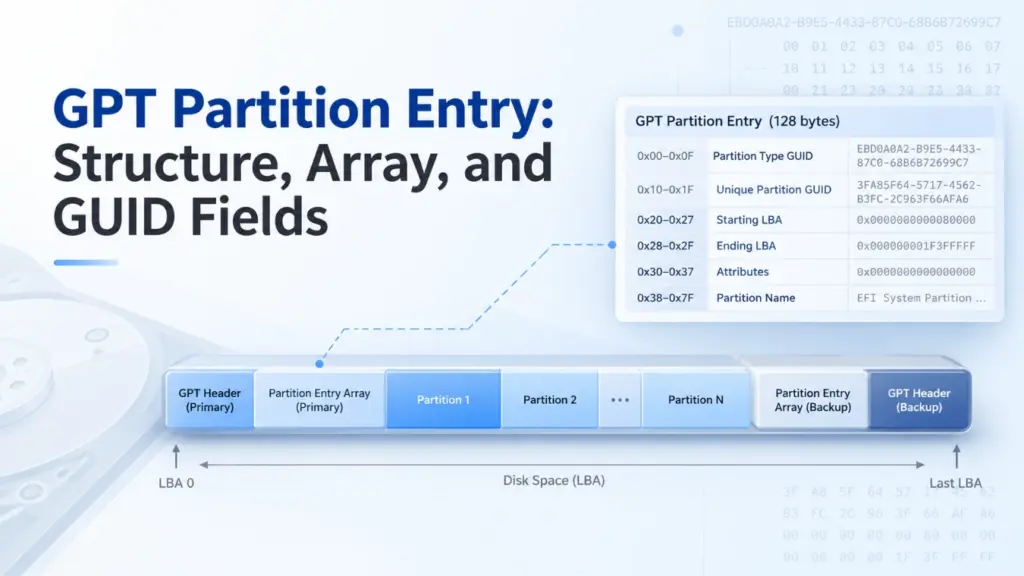
A GPT partition entry is a record that describes one partition on a GUID Partition Table (GPT) disk. It identifies the partition’s type, unique GUID, starting and ending logical block addresses (LBAs), attributes, and name. The usual GPT partition entry structure occupies 128 bytes. By decoding these fields, you can locate a partition, calculate its size, and check whether its metadata makes sense.
This guide follows UEFI Specification 2.10 and uses Windows 10, Windows 11, and Windows Server as practical examples. The underlying GPT format also applies to other compatible operating systems. Every byte example below is synthetic, not a capture from a real disk.
Índice
What Is a GPT Partition Entry?
A GPT partition entry defines a partition’s identity and boundaries; it does not contain the partition’s files. To see where it fits, separate three structures:
Estrutura | What it stores |
GPT Header | Array location, entry count and size, usable LBA range, and checksums |
GPT Partition Entry Array | A sequence of partition records, including unused slots |
GPT partition entry | One partition’s GUIDs, boundaries, attributes, and name |
The entry directs the operating system to a region of logical blocks. That region may hold NTFS, FAT32, exFAT, another file system, or data without a conventional file system.
For the overall disk layout, see Amagicsoft’s GUID Partition Table (GPT) overview.
GPT Partition Entry Structure: Six Fields and Their Offsets
UEFI Specification 2.10, Section 5.3.3 defines the standard 128-byte GPT partition entry structure:
Campo | Relative offset | Comprimento | Significado |
|
| 16 bytes | Intended partition type |
|
| 16 bytes | Identifier for this specific partition |
|
| 8 bytes | First logical block |
|
| 8 bytes | Last logical block, inclusive |
|
| 8 bytes | 64-bit attribute mask |
|
| 72 bytes | Name stored as UTF-16LE code units |
These offsets start at the beginning of one entry, not at the beginning of the disk. Also, 128 bytes is the common entry size, not the only legal one. Under UEFI 2.10, SizeOfPartitionEntry must equal 128 × 2^n, with nonnegative integer n. For larger entries, bytes beyond offset 0x7F are reserved and must be zero.
The two GUID fields
PartitionTypeGUID tells software what kind of partition an entry describes. UniquePartitionGUID identifies the particular partition. For example, two Basic Data partitions may share a type GUID but should not share a unique partition GUID.
Neither field is the GPT disk identifier. The DiskGUID belongs to the GPT Header.
LBA boundaries and partition size
A GPT partition entry stores both endpoints as unsigned, little-endian 64-bit integers. Because EndingLBA is inclusive, calculate the block count and capacity as follows:
Block count = EndingLBA − StartingLBA + 1
Size in bytes = Block count × Logical block size
If a partition runs from LBA 2048 through LBA 4095, it spans 2,048 blocks. With 512-byte logical blocks, its size is 1 MiB. With 4096-byte logical blocks, its size is 8 MiB. Never assume that an LBA always represents 512 bytes.
Attributes and partition name
O Atributos field holds a 64-bit mask. UEFI defines bit 0 as Required Partition, bit 1 as No Block I/O Protocol, and bit 2 as Legacy BIOS Bootable. Under UEFI 2.10, bits 3–47 are reserved, while bits 48–63 are partition-type-specific.
For applicable Windows partition types, Microsoft’s GPT partition information documentation defines high-bit flags, including read-only (bit 60), shadow copy (61), hidden (62), and no default drive letter (63). Do not apply those Windows meanings indiscriminately to every partition type.
PartitionName contains 36 UTF-16 code units (72 bytes). A shorter name uses null termination. Importantly, this GPT name is distinct from the volume label stored within a file system. Reading a GPT partition entry alone does not establish the label that Windows displays for a mounted volume.
How the GPT Partition Entry Array Works
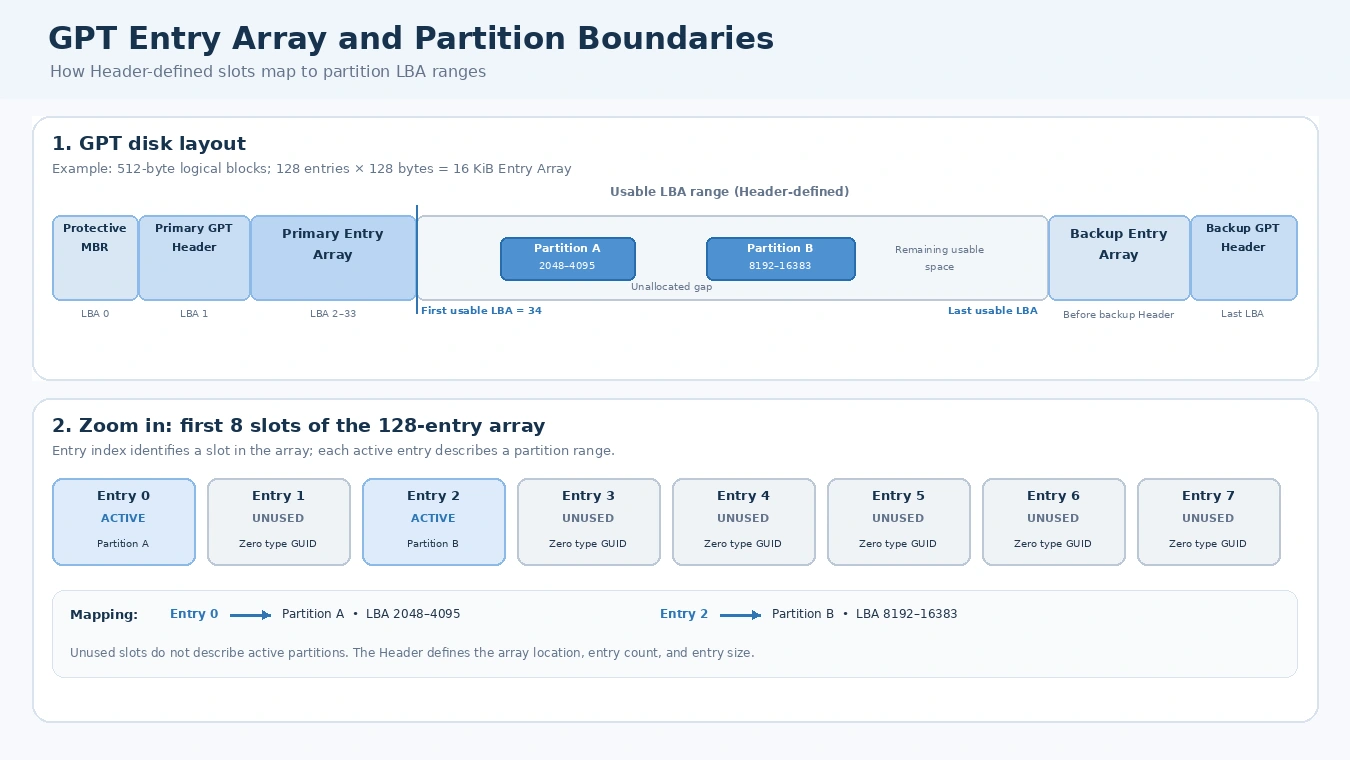
O GPT partition entry array holds consecutive slots of equal size. Its GPT Header specifies PartitionEntryLBA, NumberOfPartitionEntries, e SizeOfPartitionEntry. Therefore, software reads the Header before it can reliably locate a particular record.
Array bytes = NumberOfPartitionEntries × SizeOfPartitionEntry
Array logical blocks = ceiling(Array bytes ÷ Logical block size)
UEFI 2.10 requires at least 16,384 bytes of space for the Entry Array. A common configuration uses 128 slots of 128 bytes each. Consequently, it occupies 32 blocks on a 512-byte logical-block disk, or four blocks on a 4096-byte disk. However, 128 is not a universal partition limit. The Header specifies the entry count.
An unused slot has a zero PartitionTypeGUID; its other bytes should also be zero in a properly maintained array. So 128 available slots do não mean 128 active partitions.
Find a specific entry by index
To find entry i, where i begins at zero, use:
Absolute byte offset = (PartitionEntryLBA × Logical block size) + (i × SizeOfPartitionEntry)
Por exemplo, suponha que PartitionEntryLBA = 2, SizeOfPartitionEntry = 128, e i = 5.
Logical block size | Calculated absolute offset | Position on disk |
512 bytes |
| LBA 3, byte 128 |
4096 bytes |
| LBA 2, byte 640 |
These are calculations for a declared example, not observations of two physical devices. Notice that the same GPT partition entry index can fall in different LBAs when the device’s logical block size changes.
Primary and backup arrays
A conventional GPT disk places its primary Header at LBA 1 and its backup Header at the final LBA. The primary Entry Array normally follows the primary Header; the backup array sits before the backup Header. Their locations come from the respective Header fields, not a universal hard-coded sector range.
Nosso GPT Header structure and CRC32 guide explains these Header fields and the relationship between the two arrays in detail.
GPT Partition Type GUID vs. Unique Partition GUID
A GPT partition type GUID describes the intended use of the partition. A Unique Partition GUID identifies a particular partition, while the Disk GUID identifies the GPT disk. These three identifiers are related but are not interchangeable.
Common Windows-related type GUIDs include:
Partition type | Type GUID |
Partição do sistema EFI |
|
Microsoft Reserved |
|
Microsoft Basic Data |
|
Microsoft Recovery |
|
A type GUID does não directly identify a file system. For example, a Microsoft Basic Data partition could hold NTFS, FAT32, or exFAT. To recognize its file system, software must inspect data inside the partition.
Likewise, not every GPT disk has an EFI System Partition. An ordinary GPT data disk may not need one.
When copying disks, duplicate unique identifiers can also matter. UEFI requires GPT-aware copying software to generate appropriate new Disk GUIDs and Unique Partition GUIDs. A raw clone may preserve identifiers instead, so never assume that an exact copy has newly generated GUIDs.
Decode a GPT Partition Entry from Hex
Here is the article’s worked technical example: a synthetic GPT partition entry built from the UEFI field layout. It is internally consistent as a single entry, but it is not a complete GPT disk image or a real-world experiment.
Campo | Decoded example |
Tipo | Microsoft Basic Data |
Type GUID |
|
Unique GUID |
|
Starting LBA | 2048 |
Ending LBA | 4095 |
Atributos |
|
Partition Name |
|
Synthetic Basic Data partition entry, not a WinHex capture or a reading from your device. The entry is internally consistent; no complete disk layout or GPT header CRC is asserted.
Step 1: Decode the type GUID
The first 16 bytes are:
A2 A0 D0 EB E5 B9 33 44 87 C0 68 B6 B7 26 99 C7
The on-disk GUID representation uses little-endian byte order for its first 4-byte, 2-byte, and 2-byte components. Therefore:
A2 A0 D0 EBtorna-seEBD0A0A2.E5 B9torna-seB9E5.33 44torna-se4433.- The remaining eight bytes produce
87C0-68B6B72699C7.
The complete value is the Microsoft Basic Data type GUID. See Microsoft’s GUID representation specification for the underlying encoding.
Step 2: Decode the LBA fields
At relative offset 0x20, the bytes 00 08 00 00 00 00 00 00 represent decimal 2048 in little-endian order.
Em 0x28, FF 0F 00 00 00 00 00 00 represents decimal 4095. Therefore, this GPT partition entry describes 2,048 logical blocks, not 2,047.
If the device exposes 512-byte logical blocks, the starting byte offset equals 2048 × 512 = 1,048,576. If it exposes 4096-byte blocks, the corresponding offset is 8,388,608.
Step 3: Decode attributes and name
The example’s attribute bytes are all zero, so no attribute bits are set. At relative offset 0x38, the name starts with 44 00 41 00 54 00 41 00, which decodes to DATA in UTF-16LE.
A hex editor’s ASCII column may show D.A.T.A. because it treats the zero bytes as nonprintable characters. However, those periods are not part of the partition name.
Together, these steps let you move from raw bytes to a readable GPT partition entry without treating GUID text, LBA values, and UTF-16LE text as if they shared one encoding.
How to Validate a GPT Partition Entry
A decoded GPT partition entry is not necessarily a valid description of the disk. Check its fields against the GPT Header and other active entries.
Verificar | O que verificar | Por que é importante |
Active slot |
| All-zero type marks an unused slot |
LBA order |
| Rejects reversed or empty ranges |
Usable range | Both endpoints fall between | Keeps partitions out of reserved GPT space |
Overlap | Active entries describe disjoint ranges | Avoids conflicting partition descriptions |
Identifiers | Appropriate nonduplicate Unique Partition GUIDs | Avoids identity conflicts |
Reserved bits | Required reserved bits and bytes are zero | Checks compliance with the entry format |
These checks reveal metadata consistency, not the original cause of a failure. A GPT partition entry is only one part of a broader disk-layout check. A boundary can be invalid even when its two 64-bit fields decode without error.
CRC32 checks cover the whole Entry Array
GPT does not store a CRC32 in each entry. Instead, the Header stores PartitionEntryArrayCRC32, calculated over exactly NumberOfPartitionEntries × SizeOfPartitionEntry bytes. This range includes unused entry slots, but excludes any logical-block padding after the declared array length.
If software modifies a GPT partition entry, it must update the Array CRC32 and then the corresponding Header CRC32. A matching checksum means that the bytes agree with the recorded checksum. It does não prove the partition boundaries, identifiers, or file system are correct.
For a complete integrity review, also compare the primary and backup GPT metadata. However, do not assume that a backup always preserves an older partition layout.
GPT validity is not file-system validity
A GPT partition entry may accurately point to a partition whose NTFS or exFAT structures are damaged. Conversely, a deleted entry may leave much of the underlying data untouched. The partition table and the file system occupy different structural layers, so they require different checks.
Missing or Corrupted GPT Partition Entry: What Changes?
An unused slot, a deleted partition definition, and a damaged record are not identical:
- Unused: Its type GUID is zero, and a properly cleared slot has zero values in the remaining fields.
- Excluído: A partitioning operation removes the definition from the active GPT layout. Depending on what else the operation does, the old file-system data may remain.
- Corrompido: A record contains inaccurate or conflicting information, such as an incorrect LBA boundary or GUID.
Windows may show the affected region as Unallocated or fail to mount a volume. Still, those symptoms alone cannot identify which GPT partition entry field changed.
A valid backup array can sometimes help determine the intended layout. Yet a normal deletion may update both arrays, and an outdated backup may contain obsolete addresses. Therefore, restoring a record solely because it appears in a backup is unsafe.
If important data is at risk, avoid formatting, initializing, running destructive partition commands, or rewriting GPT metadata before preserving the source. If the drive repeatedly disconnects or reports serious read errors, stop unnecessary access.
GPT Partition Entry vs. MBR Partition Entry
O GPT partition entry provides more metadata than an MBR partition record, which occupies only 16 bytes.
Recurso | GPT | MBR |
Typical entry size | 128 bytes | 16 bytes |
Partition type | 128-bit GUID | 8-bit type code |
Partition identifier | Unique Partition GUID | No equivalent per-entry GUID |
Range | 64-bit starting and ending LBAs | 32-bit starting LBA and sector count |
Nome | UTF-16LE field | No partition-name field |
Built-in metadata redundancy | Primary and backup structures | No built-in backup partition table |
MBR supports extended partitions to provide additional logical volumes. GPT instead uses an array whose slot count is declared in the Header. See the MBR partition table for its record format.
GPT vs. MBR: See the Structural Difference
Compare the disk layouts and inspect the structure of each partition record.
GPT disk layout
Modern structurePrimary and backup metadata; partition records live in arrays.
Common GPT layout. Exact array locations and sizes are defined by the headers.
MBR disk layout
Legacy structureThe first sector contains boot code and four partition-table entries.
Conceptual MBR layout. Extended partitions are optional.
Partition record fields: 128 bytes vs. 16 bytes
Record size at a common scale
At this shared scale, one GPT entry is eight times the size of one MBR entry. The colored field blocks in the two cards below are interactive.
GPT partition entry · 128 bytes (common)
Six defined fields describe type, identity, boundaries, attributes, and name.
MBR partition entry · 16 bytes
Four slots are stored in the MBR sector. Each slot uses a compact legacy record.
What changes when you use GPT instead of MBR?
| Recurso | GPT | MBR |
|---|---|---|
| Record size | 128 bytes is common; Header defines entry size and count. | 16 bytes per entry; four top-level slots in the MBR. |
| Partition type | 128-bit GUID | 8-bit type code |
| Abordando | 64-bit starting and ending LBA | 32-bit starting LBA and sector count |
| Partition count | Depends on the Entry Array size | Four primary-table slots; one may be an extended partition |
| Metadata redundancy | Primary and backup GPT metadata | No built-in backup partition table |
GPT is not simply a larger partition record. It uses a Header-defined array, GUID-based identifiers, 64-bit LBA boundaries, and backup metadata. MBR uses a compact 16-byte record and a four-slot table in the first sector.
Teaching example based on the GPT format defined by UEFI and the legacy MBR partition-record layout. The diagrams summarize structure; they do not read or modify a disk.
Conclusão
A GPT partition entry connects a partition’s identity to its logical-block range. Its six fields explain what the partition is meant to be, where it resides, and which attributes apply. By combining the GPT partition entry structure, Header-defined array offsets, GUID decoding, and boundary checks, you can interpret GPT metadata without confusing it with the file system or assuming that a valid CRC32 proves the data is healthy.
PERGUNTAS FREQUENTES
Is every GPT partition entry exactly 128 bytes?
128 × 2^n bytes. The Header's SizeOfPartitionEntry field tells a parser the actual size. Thus, a parser that always jumps forward exactly 128 bytes may read larger entries incorrectly.Can a GPT partition entry array hold more than 128 partitions?
Does the GPT partition type GUID tell me whether a partition is NTFS?
Why does the GUID appear reversed in a hex editor?
Is the GPT Partition Name the same as a volume label?
Can a GPT partition entry pass CRC32 validation but still be wrong?
Does deleting a GPT partition entry erase the files?

Vasilii é um especialista em recuperação de dados com cerca de 10 anos de experiência prática na área. Ao longo de sua carreira, ele resolveu com sucesso milhares de casos complexos envolvendo arquivos excluídos, unidades formatadas, partições perdidas e sistemas de arquivos RAW. Sua experiência abrange métodos de recuperação manual usando ferramentas profissionais, como editores hexadecimais, e soluções automatizadas avançadas com software de recuperação. A missão do Vasilii é tornar o conhecimento confiável sobre recuperação de dados acessível tanto para profissionais de TI quanto para usuários comuns, ajudando-os a proteger seus valiosos ativos digitais.