
《Zero Assumption 資料恢復》評測與替代方案
零假設資料復原 (ZAR) 曾是一款廣受歡迎的 Windows 實用工具,用於恢復已刪除的檔案、已格式化的分割區,以及來自受損檔案系統的資料。然而,開發者已停止維護此軟體。若您在較舊的推薦清單中看到 ZAR,您應該繼續使用它,還是選擇一款現代的替代方案呢?
答案取決於您的儲存裝置、檔案系統、預算以及技術經驗。本評測將探討 ZAR 的官方功能說明、過往的獨立測試結果、功能限制,以及目前的替代方案。針對硬碟(HDD)的特定情境,我們的 硬碟復原解決方案 說明刪除、格式化及硬體問題如何影響資料恢復的選項。.
我們採用一致的標準來比較各項工具,包括可用性、免費還原次數上限、易用性,以及支援的還原情境。更重要的是,我們會區分經實證的產品功能與實際還原測試結果,而非將行銷宣傳視為證據。.
目錄
零假設資料恢復:快速評析
零假設資料復原 為進階使用者提供了實用的功能,尤其是 RAID 重建與受損檔案系統分析。然而,由於該軟體已停止維護,因此很難在 2026 年推薦用於新安裝。.
您的優先事項 | 建議選項 | 為何值得考慮 |
現有的 ZAR 許可證 | 舊版南非蘭特 | 在相容的舊款儲存裝置上可能仍可運作 |
進階 RAID 復原 | 克萊內特復原計畫 | 具備先進儲存分析功能的官方後繼產品 |
完全免費的 Windows 系統還原 | Windows 檔案復原 | 微軟的命令列復原工具 |
免費檔案簽名復原 | 照片記錄 | 開源、跨平台的實用工具 |
Windows 檔案還原向導 | Magic Data Recovery | 圖形化掃描與檔案預覽工作流程 |
總而言之: 現有的 ZAR 使用者,若其安裝版本仍與系統相容,可繼續使用該可信賴的安裝版本。新使用者則應根據自身的資料恢復需求,選擇目前仍可用的工具。.
這些是基於情境的建議,並非根據實際測得的復原成功率所得出的排名。.
何謂「零假設資料復原」?
零假設資料復原, 俗稱 ZAR 資料復原, ,是由 Alexey V. Gubin 開發的。.
與備份軟體不同,ZAR 會分析儲存結構,以找出在刪除、格式化或邏輯檔案系統受損後可能殘留的檔案。.
根據該 ZAR 官方網站, 該軟體支援 Windows 的 FAT 和 NTFS 磁碟區,以及 Linux 的 ext2/3/4 和 XFS 檔案系統。.
其主要資料恢復功能包括已刪除的檔案、已格式化的磁碟、遺失的分割區、數位相機儲存媒體,以及某些 RAID 配置。.
已刪除的檔案、已格式化的磁碟機及 RAW 分區
ZAR 能夠檢查 Windows 已無法正常存取的儲存空間。.
例如,當檔案系統受損時,NTFS 硬碟可能會突然顯示為 RAW。RAW 表示 Windows 無法在該磁區上辨識出可用的檔案系統。不過,部分原始資料可能仍然存在。.
在這種情況下、, 零假設資料復原 試圖辨識尚存的檔案結構及可復原的內容。.
儘管如此,它仍無法還原已被覆寫的資料。.
免費數位影像復原
ZAR 的一項獨特功能,便是其歷史悠久的免費影像還原模式。.
此模式專門針對儲存於相機、記憶卡及類似裝置中的已刪除照片,並支援影片檔案。.
然而,開發商的 影像復原文件 說明舊方法主要能恢復連續的檔案。.
因此,碎片化的照片可能會出現變形,而碎片化的影片則可能無法開啟。.
對於反覆使用的 SD 卡而言,這項限制至關重要,尤其是用來儲存大型影片的 SD 卡。.
RAID 重建與磁碟映像
ZAR 資料復原 此外,還提供了進階功能,包括 RAID 重建、手動 RAID 配置、遺失分割區搜尋,以及磁碟映像檔處理。.
重要的是,該 官方《ZAR X》手冊 記錄了 建立影像檔案 和 Load image file functions.
Therefore, older reviews claiming ZAR had no disk-imaging capability do not accurately describe every documented version.
Disk imaging can preserve a source for later analysis. However, ordinary imaging software cannot repair mechanical or electronic hardware damage.
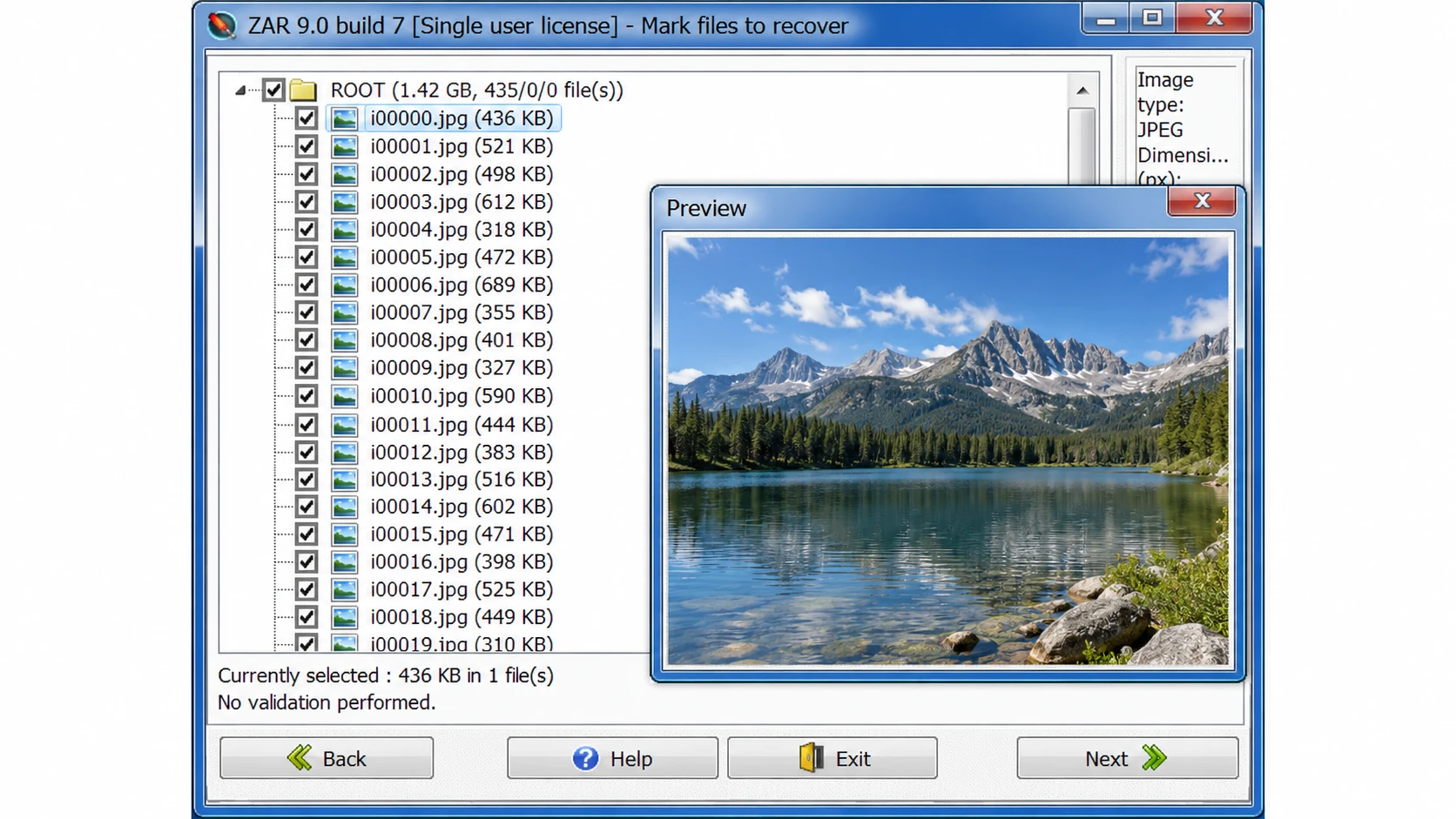
Verified interface evidence: The developer’s historical ZAR screenshot shows the recovered-file list and photograph preview in a legacy ZAR 9.0 interface. This is an authentic historical example, not a screenshot from a new 2026 test.

Is Zero Assumption Data Recovery Discontinued?
Yes. The developer explicitly states that 零假設資料復原 has been discontinued after approximately twenty years.
的 official download page no longer provides a current installer, while the 購買頁面 confirms that new licenses are unavailable.
Instead, the developer recommends Klennet Recovery for general data recovery and Klennet Carver for specialized fragmented media recovery.
Can You Still Download ZAR Data Recovery?
Third-party websites continue to list older ZAR installers.
例如:, Softonic displays version 9.0 in its application details while describing version 8.1 elsewhere on the same page.
Such inconsistencies make it difficult to establish exactly which build a download contains.
Moreover, a recently updated catalog page does not mean the developer released a new software version.
For security, avoid unofficial modified installers and preserve any legitimate installation files you already own.
What About Existing ZAR Licenses?
There is one useful exception for former customers.
According to the developer, users who purchased ZAR on or after July 1, 2022, can request a Klennet Recovery license without additional cost by submitting their original ZAR order number.
This benefit may make migration more practical for eligible customers.
Zero Assumption Data Recovery Performance: What Do Independent Tests Show?
Historical reviews offer useful context about 零假設資料復原. However, their results require careful interpretation.
Published Test Observations
Review Source | Test Environment | Reported Observation |
8 GB USB flash drive | Approximately 30-minute scan | |
4 GB USB image-recovery test | Approximately 20-minute scan | |
Data Rescue Tools | Windows 10 via Boot Camp | General-data recovery failed to progress beyond drive detection |
These observations suggest that ZAR scanning could be slow and that certain environments presented compatibility problems.
However, the tests used different devices, operating environments, and scanning modes.
Consequently, their scan times cannot establish a controlled performance comparison.
Furthermore, locating a file does not prove that its recovered contents are usable.
Strengths and Limitations
優勢 | 限制條件 |
Supports several Windows and Linux file systems | Officially discontinued |
Includes RAID reconstruction | Technical interface |
Provides disk-image capabilities | Modern Windows compatibility uncertain |
Historical free image-recovery mode | Fragmented files may be incomplete |
Supports file filtering and previews | No current official installer |
評估: ZAR’s advanced features remain valuable historically. Nevertheless, its lack of maintenance and uncertain compatibility outweigh those advantages for many new users.
How We Evaluated ZAR and Its Alternatives
All five tools were evaluated using the same criteria, regardless of commercial affiliation.
Evaluation Criteria and Evidence
We compared ZAR, Klennet Recovery, Windows File Recovery, PhotoRec, and Magic Data Recovery across five factors:
- 相容性: Operating systems, file systems, and supported devices.
- Recovery capabilities: Deleted files, formatted partitions, RAW volumes, and advanced functions.
- Usability: Scanning workflow, file filtering, and previews.
- Free limits and pricing: Free scanning versus actual file export.
- 限制: Overwriting, physical damage, and unsupported scenarios.
We prioritized official developer documentation, software manuals, and published independent reviews. Version information and licensing terms were checked against available official sources on October 23, 2026.
Testing Methodology and Limitations
Historical ZAR test observations from Handy Recovery and Data Rescue Tools are discussed above. Their environments differ, so the results cannot establish comparative recovery performance.
A reproducible benchmark would require identical NTFS/exFAT test images, controlled deletion and formatting scenarios, consistent scan procedures, and SHA-256 integrity checks.
Found, previewable, recovered, and intact files must be measured separately.
No new head-to-head recovery benchmark was conducted for this article. Therefore, our recommendations reflect verified features, usability, licensing, and scenario suitability—not unverified recovery success rates.
Zero Assumption Data Recovery vs Modern Alternatives
The following comparison applies the same basic criteria to every candidate.
軟體 | 平台 | Free Export | 主要優勢 | 主要限制 |
ZAR | 視窗 | Historical image mode; limited general-data trial | RAID and file-system analysis | Discontinued |
克萊內特復原計畫 | Windows 10+ | 沒有 | Advanced RAID, file systems, and imaging | Higher cost and complexity |
Windows 檔案復原 | Windows 10/11 | 是 | 免費的 Microsoft 系統還原工具 | 指令行介面 |
照片記錄 | Windows、macOS、Linux | 是 | 基於簽名的復原 | Original names and folders often lost |
Magic Data Recovery | 視窗 | Up to 500 MB advertised | Guided scan and supported-file preview | No dedicated RAID reconstruction |
Features and licensing reviewed October 23, 2026. Free recovery limits are not equivalent to free scanning or previewing. No recovery-performance ranking is implied.
ZAR Data Recovery — Best for Existing Legacy Installations
最適合 Users who already own an authentic copy and have compatible storage.
工作流程: Select a recovery mode, identify the source, scan the volume, review discovered files, and export them elsewhere.
優勢: Broad legacy file-system coverage, RAID configuration tools, and disk-image support.
限制: Discontinued, no current official download, and uncertain support for modern hardware.
Licensing: Historical free image mode and a four-folder general-data trial. New paid licenses are unavailable.
判決: An existing installation may still be useful, but ZAR is not a practical default recommendation for new users.
Klennet Recovery — Best for Advanced File-System Recovery
克萊內特復原計畫 is ZAR’s official successor.
最適合 Users working with complex RAID, ZFS, damaged file systems, and disk images.
工作流程: Identify disks, analyze partitions or RAID layouts, scan recoverable structures, review validation results, and export files.
優勢: Supports NTFS, exFAT, EXT, XFS, ZFS, and additional file systems. It also provides RAID analysis, file validation, and disk imaging.
限制: Requires Windows 10 or later, at least 8 GB RAM, and an internet connection. Advanced tasks can require substantial expertise.
Licensing: Evaluation mode cannot export files. Personal licensing costs $399.
判決: The closest successor for users who relied on ZAR’s technical features rather than basic undelete recovery.
Windows File Recovery — Best for Free Windows Recovery
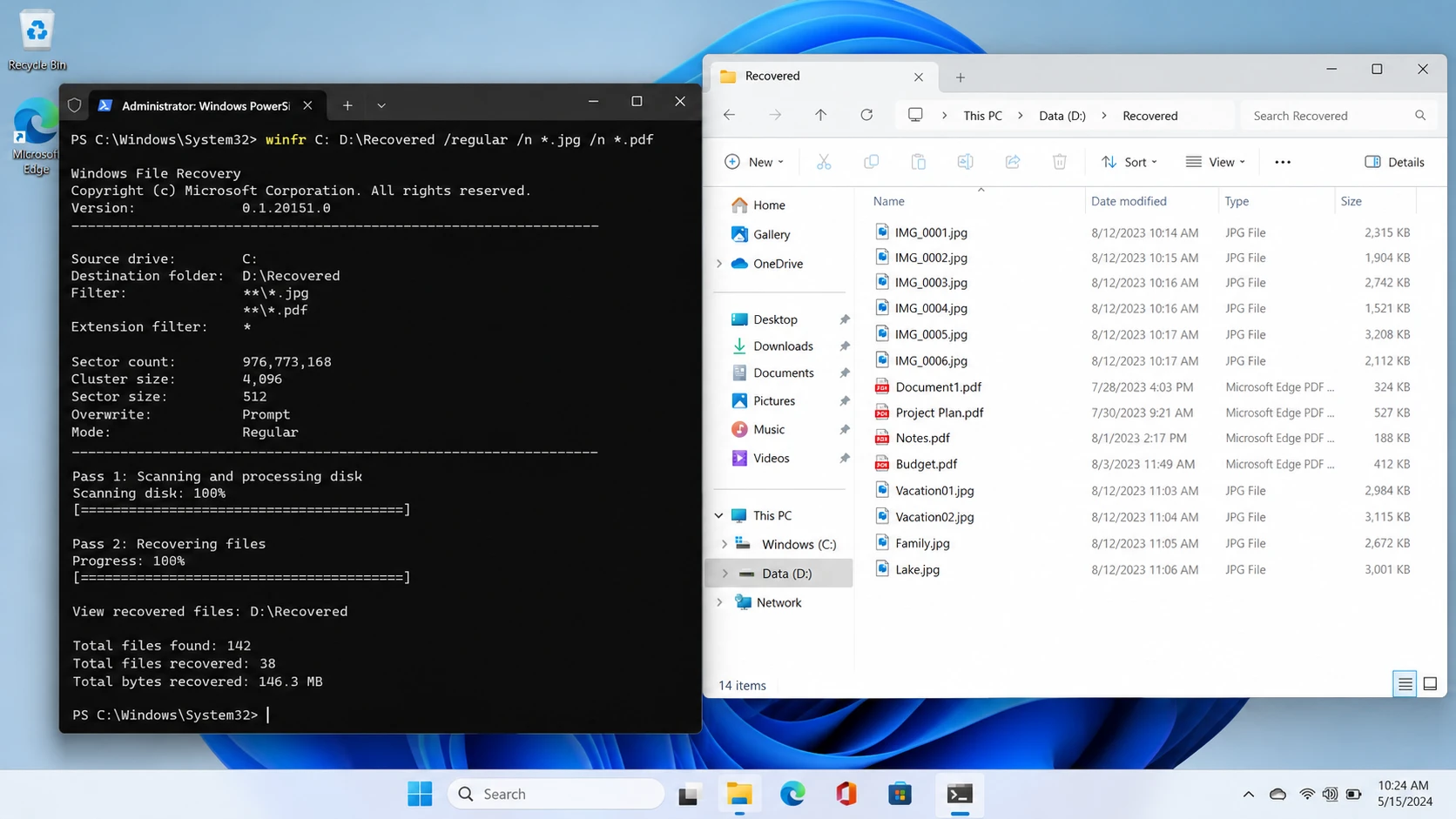
Windows 檔案復原 is Microsoft’s command-line recovery application.
最適合 Windows users comfortable with commands who want a free recovery option.
工作流程: Select a source and separate destination drive, choose Regular or Extensive mode, and run the recovery command.
優勢: Free, officially documented, and useful for supported deleted-file scenarios.
限制: No conventional graphical file-preview interface. It also does not recover files directly from cloud storage or network shares.
Licensing: Free.
判決: A practical first option when the file system is supported and command-line operation is acceptable.
PhotoRec — Best for Free File-Signature Recovery
照片記錄 is an open-source utility distributed with TestDisk.
最適合 Users retrieving recognizable file types when normal file-system records are damaged or missing.
工作流程: Select the storage device, configure the scan, search for file signatures, and save recovered files separately.
優勢: Completely free, cross-platform, and able to examine storage independently of normal directory structures.
限制: Original filenames and folder layouts are often unavailable. Fragmented files may remain incomplete.
Licensing: Free and open source.
判決: Useful when recovering file contents matters more than preserving the original folder structure.
Magic Data Recovery — Best for Guided Windows Recovery
Magic Data Recovery is a Windows recovery application developed by Amagicsoft.
最適合 Users recovering deleted files, accidentally formatted partitions, and data from supported logically inaccessible drives.
工作流程: Select the device, scan, filter results, preview supported files, and export the selected data.
優勢: Graphical drive selection, file-type filtering, and previews for supported documents and media.
限制: No dedicated RAID reconstruction comparable to ZAR or Klennet. It cannot repair physical damage or retrieve overwritten content.
Licensing: Up to 500 MB of free recovery is advertised. Paid licenses are available for larger recovery tasks.
判決: A reasonable choice for ordinary Windows logical data loss when users prefer a guided interface instead of command-line or advanced RAID tools.
ZAR Alternatives: Pricing and Licensing Comparison
Pricing can change, so license type matters as much as the advertised amount.
工具 | Current Cost | License or Free Limit |
舊版南非蘭特 | Not sold | Historical trial restrictions only |
克萊內特復原計畫 | 399 Personal / 899 Commercial | One-time purchase; eligible versions released within one year |
Windows 檔案復原 | 免費 | No paid recovery license |
照片記錄 | 免費 | Open-source file recovery |
Magic Data Recovery | 49.95 one year / 69.95 perpetual | Promotional Pro pricing; one PC |
Prices checked October 23, 2026. Taxes, promotions, and license terms may change. Klennet licenses permit indefinite use of eligible versions, while newer releases outside the one-year version entitlement require an update purchase. Magic Data Recovery’s perpetual plan advertises lifetime upgrades.
The most important distinction is between free scanning, free preview, and free recovery.
For example, Klennet’s evaluation edition supports analysis but cannot export files. Meanwhile, Windows File Recovery and PhotoRec provide free file export.
Therefore, compare what you can actually recover before purchasing a license.
Which ZAR Alternative Should You Choose?
The right choice depends on the original storage problem.
For Permanently Deleted Windows Files
First, check Recycle Bin, File History, and cloud backups.
If no copy exists, Windows File Recovery offers a free option. Users who prefer visual browsing and previews may consider a compatible graphical scanner.
For Formatted or RAW Volumes
立即停止寫入裝置。.
A quick format may leave file content recoverable, while repeated formatting or overwriting can destroy it.
Choose software that supports the original file system and the specific storage configuration.
For RAID or Complex NAS Storage
Klennet Recovery is better suited to advanced RAID reconstruction and file-system analysis than basic undelete utilities.
However, avoid changing RAID metadata or rebuilding an uncertain array before securing the original disks.
For Deleted SD Card Photos and Videos
PhotoRec provides a free signature-based approach.
Nevertheless, fragmented video files may require specialized reconstruction software, such as Klennet Carver.
For Physically Damaged Drives
Do not continue trying different scanning tools if the drive clicks, repeatedly disconnects, or disappears from BIOS.
Software cannot repair failed read heads, damaged controllers, or serious electronic faults.
Instead, consider professional recovery.
Before Paying for Any Recovery Software
Not every file-loss scenario requires another recovery application.
- 資源回收筒: Restore files that still exist there.
- Backups: Check File History, cloud version history, and independent backup drives.
- Unsaved files: Look for application AutoRecover and temporary files. Autosave does not necessarily create a permanent backup.
- 已刪除的檔案: Avoid writing new data to the original storage.
- SSD deletion: TRIM and garbage collection can make deleted blocks inaccessible.
- Overwritten files: No recovery utility can recreate overwritten information.
- 硬體故障: Stop repeated scans and seek hardware-level assistance.
If the built-in recovery options no longer work, a logical recovery tool may be appropriate. However, always confirm that the storage remains readable.
How to Use Magic Data Recovery When Built-in Options Fail
For supported logical data loss on Windows, Magic Data Recovery provides a five-step process. The 官方使用指南 documents its recovery workflow.
步驟 1:下載並安裝 Magic Data Recovery
Download the installer from Amagicsoft and install it on a healthy drive or another computer.
Do not install recovery software on the partition containing the missing files. Doing so may overwrite recoverable data.
支援 Windows 7/8/10/11 和 Windows Server
Step 2: Select the Drive Where the Files Were Lost
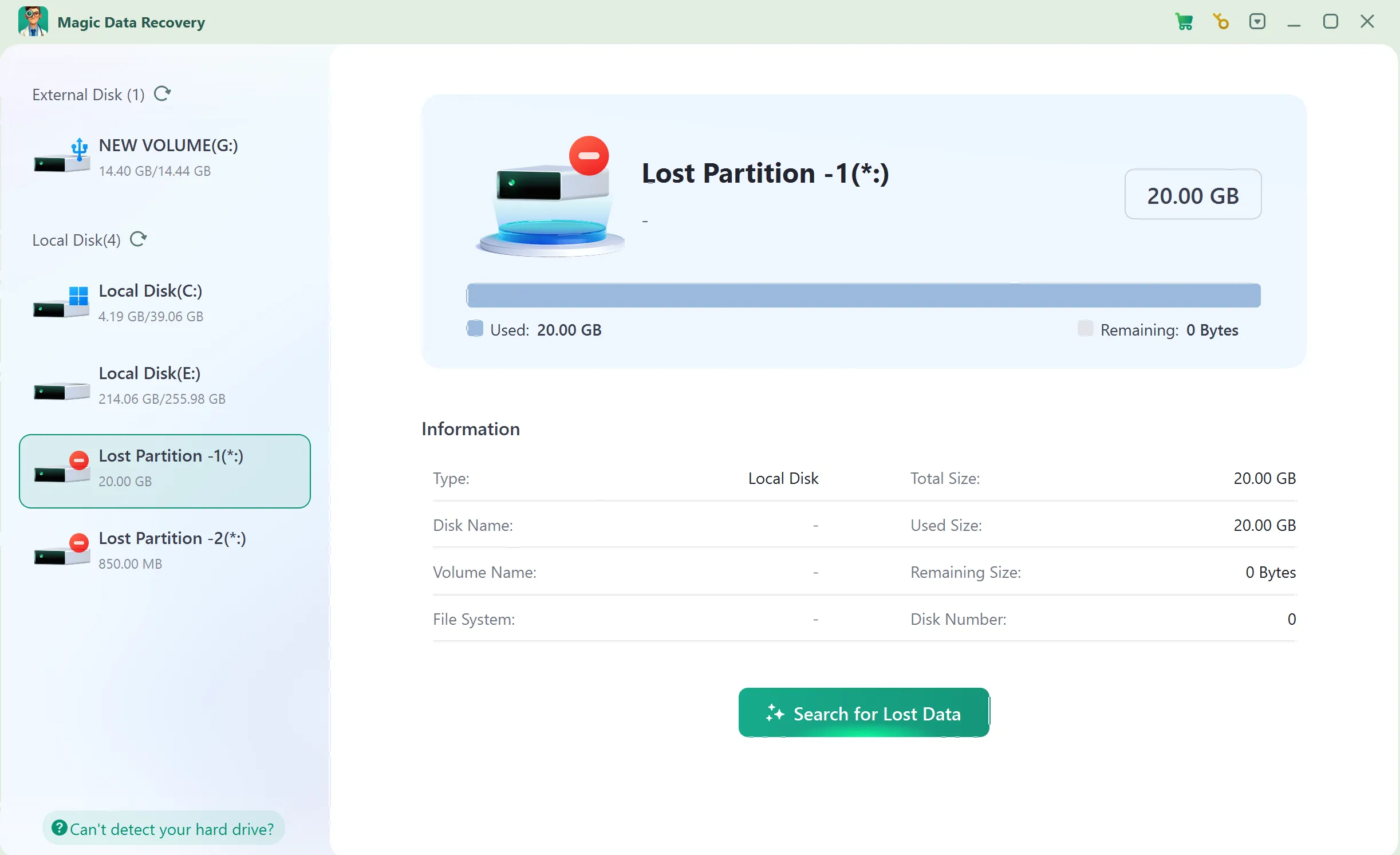
Launch Magic Data Recovery and choose the HDD partition, USB drive, or memory card that previously stored your files.
Confirm its capacity and start scanning.
步驟 3:掃描遺失或已刪除的檔案
Allow the application to analyze the selected storage.
Review the discovered documents, photos, videos, or other relevant file types as results appear.
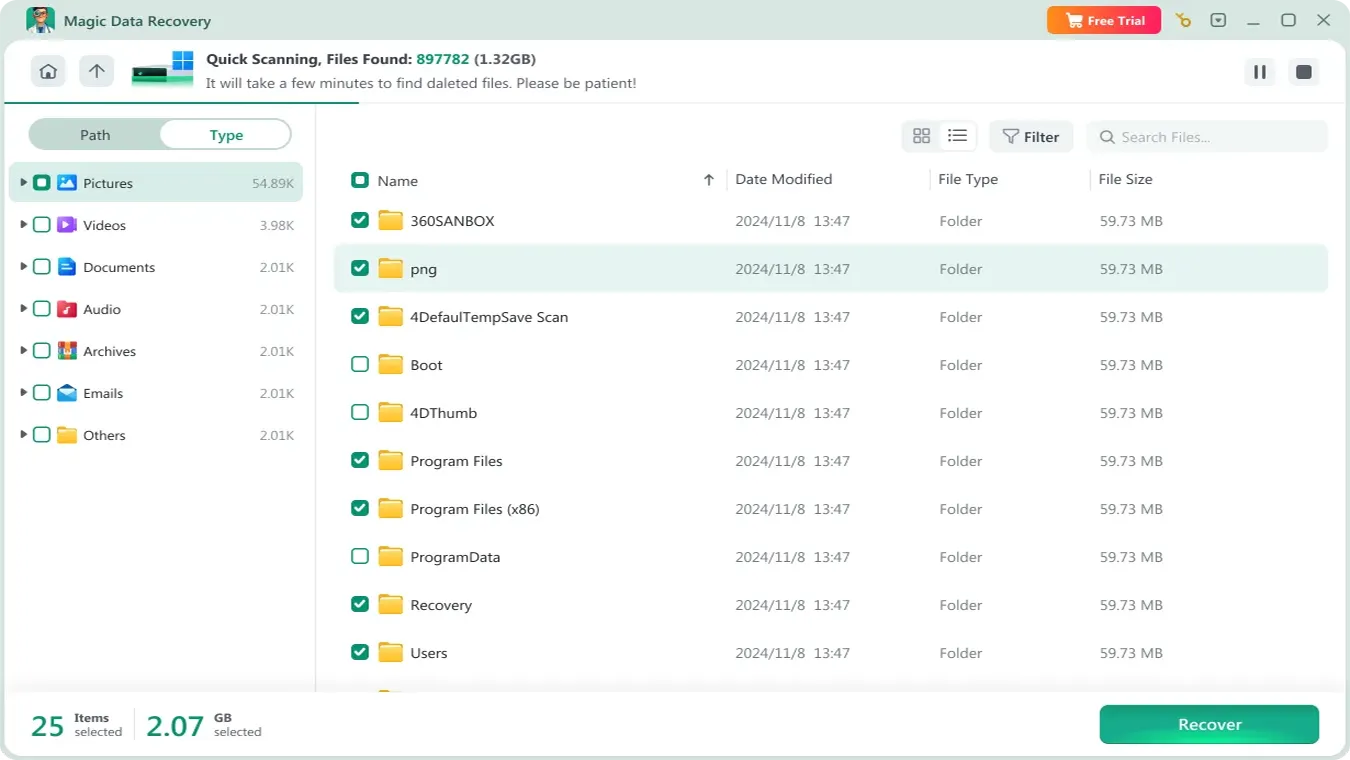
步驟 4:復原前預覽檔案
Use Preview when available to inspect supported files.
Check filenames, sizes, paths, and visible contents. However, some formats or damaged files may not preview correctly.

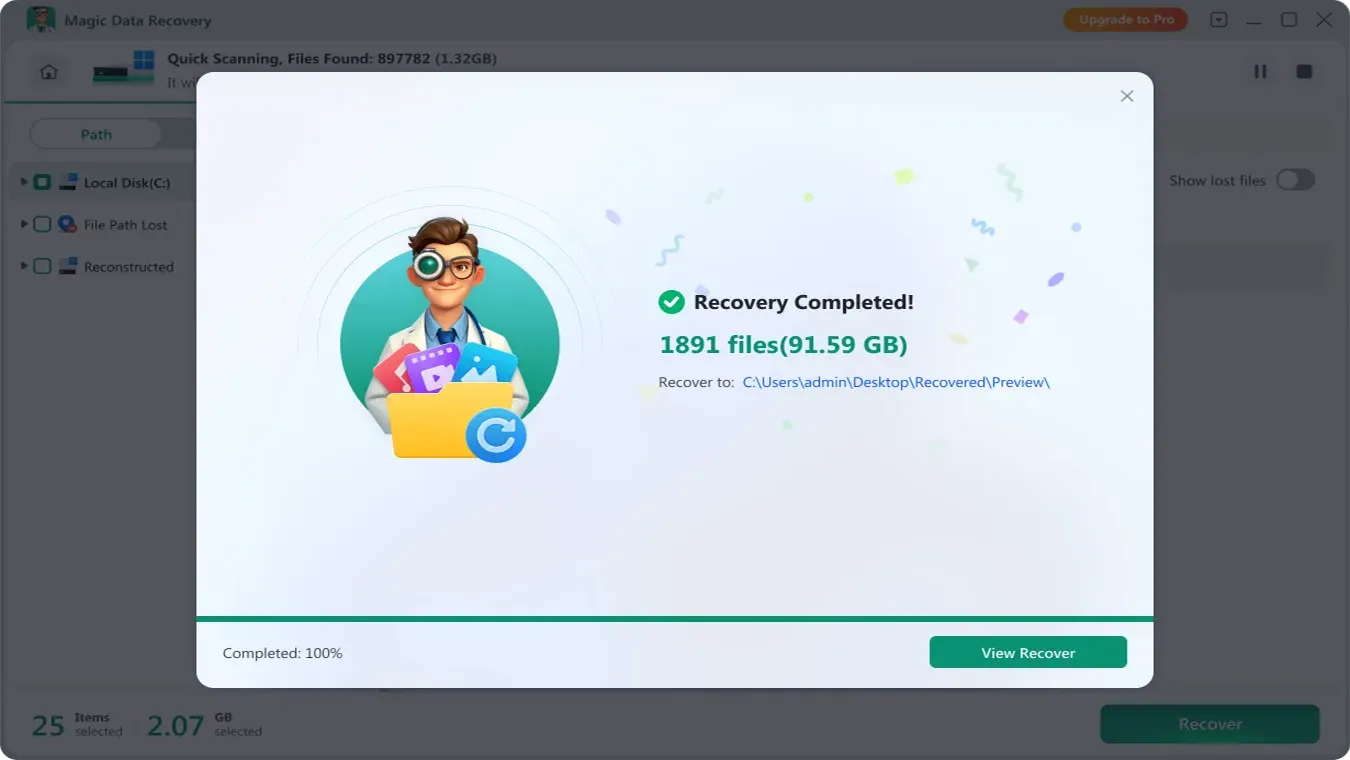
步驟 5:將檔案復原至安全位置
Select the required files and recover them to a different physical disk.
Afterward, open representative files to verify their contents before reusing the original storage.
Conclusion: Is Zero Assumption Data Recovery Still Worth Using?
零假設資料復原 once provided valuable capabilities for deleted files, formatted drives, RAID reconstruction, and disk imaging. However, the developer has discontinued ZAR, making it less suitable for new installations.
For advanced recovery, Klennet Recovery offers the closest continuation of ZAR’s functionality. Windows File Recovery and PhotoRec provide free alternatives for compatible recovery tasks.
For users who need a guided Windows workflow after backups and built-in options fail, Magic Data Recovery may be suitable for supported logical data loss.
However, no software can guarantee recovery of overwritten data or repair physical hardware damage. For additional guidance on HDD-related problems, explore our 硬碟復原解決方案.
支援 Windows 7/8/10/11 和 Windows Server
常見問題
「零假設資料恢復」服務將於 2026 年停止提供嗎?
ZAR 資料恢復是免費的嗎?
「零假設資料恢復」能恢復已格式化的硬碟嗎?
在 Windows 11 上,基於零假設的資料恢復是否有效?
除了「零假設資料復原」之外,還有什麼更好的替代方案嗎?
在 SSD 執行 TRIM 後,資料恢復軟體還能恢復檔案嗎?
從第三方網站下載舊版的 ZAR 安裝程式安全嗎?

Vasilii 是一位在該領域擁有約 10 年實務經驗的資料復原專家。在他的職業生涯中,他已成功解決數千個複雜的個案,包括刪除的檔案、格式化的硬碟機、遺失的磁碟分割和 RAW 檔案系統。他的專業知識涵蓋使用十六進位編輯器等專業工具的手動復原方法,以及使用復原軟體的進階自動解決方案。Vasilii 的使命是讓 IT 專業人士和一般使用者都能獲得可靠的資料復原知識,協助他們保護寶貴的數位資產。.