
Zero Assumption Data Recovery Review & Alternatives
Zero assumption data recovery (ZAR) was once a popular Windows utility for recovering deleted files, formatted partitions, and data from damaged file systems. However, the developer has discontinued the software. If you encounter ZAR in an older recommendation, should you still use it or choose a modern alternative?
The answer depends on your storage device, file system, budget, and technical experience. This review examines ZAR’s documented features, historical independent tests, limitations, and current alternatives. For HDD-specific scenarios, our hard drive recovery solutions explain how deletion, formatting, and hardware problems affect recovery options.
We compare tools using consistent criteria, including availability, free recovery limits, usability, and supported recovery scenarios. More importantly, we distinguish verified product capabilities from actual recovery-test results rather than treating marketing claims as evidence.
Table of Contents
Zero Assumption Data Recovery: Quick Verdict
Zero assumption data recovery offered useful capabilities for advanced users, particularly RAID reconstruction and damaged file-system analysis. However, its discontinued status makes it difficult to recommend for new installations in 2026.
Your Priority | Recommended Option | Why Consider It |
Existing ZAR license | Legacy ZAR | May still work with compatible older storage |
Advanced RAID recovery | Klennet Recovery | Official successor with advanced storage analysis |
Completely free Windows recovery | Windows File Recovery | Microsoft’s command-line recovery tool |
Free file-signature recovery | PhotoRec | Open-source, cross-platform utility |
Guided Windows file recovery | Magic Data Recovery | Graphical scanning and file-preview workflow |
Bottom line: Existing ZAR users may continue using a trusted installation when it remains compatible. New users should select an actively available tool based on their recovery needs.
These are scenario-based recommendations, not rankings derived from measured recovery success rates.
What Is Zero Assumption Data Recovery?
Zero assumption data recovery, commonly known as ZAR data recovery, was developed by Alexey V. Gubin.
Unlike backup software, ZAR analyzed storage structures to locate files that might remain after deletion, formatting, or logical file-system damage.
According to the official ZAR website, the software supported Windows FAT and NTFS volumes alongside Linux ext2/3/4 and XFS.
Its main recovery functions included deleted files, formatted drives, missing partitions, digital camera media, and certain RAID configurations.
Deleted Files, Formatted Drives, and RAW Partitions
ZAR could examine storage volumes that Windows could no longer access normally.
For example, an NTFS hard drive might suddenly appear as RAW after file-system damage. RAW means Windows cannot recognize a usable file system on that volume. However, some original data may remain.
In such cases, zero assumption data recovery attempted to identify surviving file structures and recoverable content.
Nevertheless, it could not reconstruct data that had already been overwritten.
Free Digital Image Recovery
One distinctive ZAR feature was its historical free image-recovery mode.
This mode targeted deleted photographs and supported videos stored on cameras, memory cards, and similar devices.
However, the developer’s image recovery documentation explains that the older method primarily recovered contiguous files.
Therefore, fragmented photographs could appear distorted, while fragmented videos might not open.
This limitation matters for repeatedly reused SD cards, especially those storing large videos.
RAID Reconstruction and Disk Imaging
ZAR data recovery also provided advanced features, including RAID reconstruction, manual RAID configuration, missing-partition searches, and disk-image handling.
Importantly, the official ZAR X manual documents the Create image file and Load image file functions.
Therefore, older reviews claiming ZAR had no disk-imaging capability do not accurately describe every documented version.
Disk imaging can preserve a source for later analysis. However, ordinary imaging software cannot repair mechanical or electronic hardware damage.
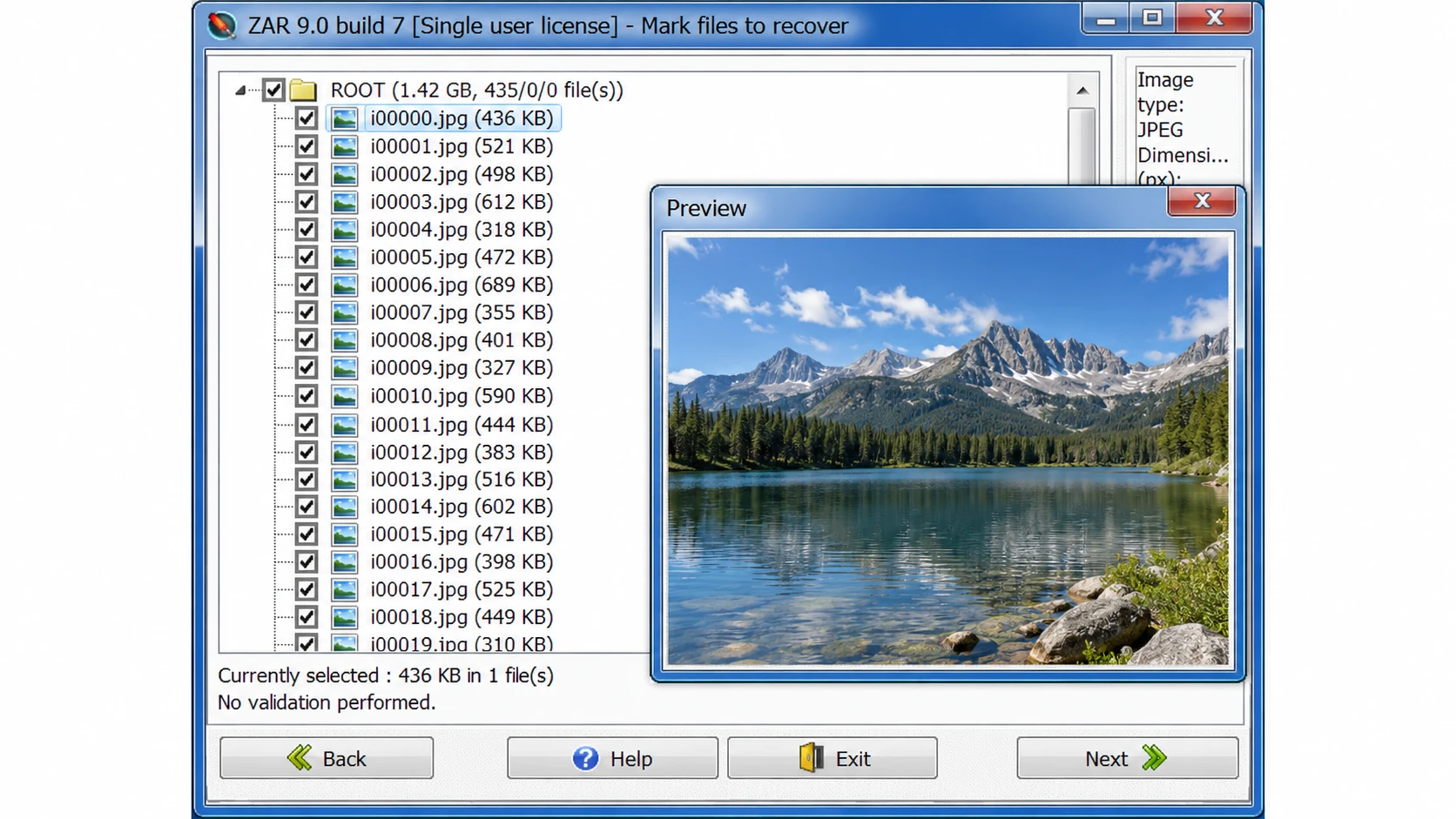
Verified interface evidence: The developer’s historical ZAR screenshot shows the recovered-file list and photograph preview in a legacy ZAR 9.0 interface. This is an authentic historical example, not a screenshot from a new 2026 test.

Is Zero Assumption Data Recovery Discontinued?
Yes. The developer explicitly states that zero assumption data recovery has been discontinued after approximately twenty years.
The official download page no longer provides a current installer, while the purchase page confirms that new licenses are unavailable.
Instead, the developer recommends Klennet Recovery for general data recovery and Klennet Carver for specialized fragmented media recovery.
Can You Still Download ZAR Data Recovery?
Third-party websites continue to list older ZAR installers.
For example, Softonic displays version 9.0 in its application details while describing version 8.1 elsewhere on the same page.
Such inconsistencies make it difficult to establish exactly which build a download contains.
Moreover, a recently updated catalog page does not mean the developer released a new software version.
For security, avoid unofficial modified installers and preserve any legitimate installation files you already own.
What About Existing ZAR Licenses?
There is one useful exception for former customers.
According to the developer, users who purchased ZAR on or after July 1, 2022, can request a Klennet Recovery license without additional cost by submitting their original ZAR order number.
This benefit may make migration more practical for eligible customers.
Zero Assumption Data Recovery Performance: What Do Independent Tests Show?
Historical reviews offer useful context about zero assumption data recovery. However, their results require careful interpretation.
Published Test Observations
Review Source | Test Environment | Reported Observation |
8 GB USB flash drive | Approximately 30-minute scan | |
4 GB USB image-recovery test | Approximately 20-minute scan | |
Data Rescue Tools | Windows 10 via Boot Camp | General-data recovery failed to progress beyond drive detection |
These observations suggest that ZAR scanning could be slow and that certain environments presented compatibility problems.
However, the tests used different devices, operating environments, and scanning modes.
Consequently, their scan times cannot establish a controlled performance comparison.
Furthermore, locating a file does not prove that its recovered contents are usable.
Strengths and Limitations
Strengths | Limitations |
Supports several Windows and Linux file systems | Officially discontinued |
Includes RAID reconstruction | Technical interface |
Provides disk-image capabilities | Modern Windows compatibility uncertain |
Historical free image-recovery mode | Fragmented files may be incomplete |
Supports file filtering and previews | No current official installer |
Assessment: ZAR’s advanced features remain valuable historically. Nevertheless, its lack of maintenance and uncertain compatibility outweigh those advantages for many new users.
How We Evaluated ZAR and Its Alternatives
All five tools were evaluated using the same criteria, regardless of commercial affiliation.
Evaluation Criteria and Evidence
We compared ZAR, Klennet Recovery, Windows File Recovery, PhotoRec, and Magic Data Recovery across five factors:
- Compatibility: Operating systems, file systems, and supported devices.
- Recovery capabilities: Deleted files, formatted partitions, RAW volumes, and advanced functions.
- Usability: Scanning workflow, file filtering, and previews.
- Free limits and pricing: Free scanning versus actual file export.
- Limitations: Overwriting, physical damage, and unsupported scenarios.
We prioritized official developer documentation, software manuals, and published independent reviews. Version information and licensing terms were checked against available official sources on October 23, 2026.
Testing Methodology and Limitations
Historical ZAR test observations from Handy Recovery and Data Rescue Tools are discussed above. Their environments differ, so the results cannot establish comparative recovery performance.
A reproducible benchmark would require identical NTFS/exFAT test images, controlled deletion and formatting scenarios, consistent scan procedures, and SHA-256 integrity checks.
Found, previewable, recovered, and intact files must be measured separately.
No new head-to-head recovery benchmark was conducted for this article. Therefore, our recommendations reflect verified features, usability, licensing, and scenario suitability—not unverified recovery success rates.
Zero Assumption Data Recovery vs Modern Alternatives
The following comparison applies the same basic criteria to every candidate.
Software | Platform | Free Export | Main Strength | Main Limitation |
ZAR | Windows | Historical image mode; limited general-data trial | RAID and file-system analysis | Discontinued |
Klennet Recovery | Windows 10+ | No | Advanced RAID, file systems, and imaging | Higher cost and complexity |
Windows File Recovery | Windows 10/11 | Yes | Free Microsoft recovery utility | Command-line interface |
PhotoRec | Windows, macOS, Linux | Yes | Signature-based recovery | Original names and folders often lost |
Magic Data Recovery | Windows | Up to 500 MB advertised | Guided scan and supported-file preview | No dedicated RAID reconstruction |
Features and licensing reviewed October 23, 2026. Free recovery limits are not equivalent to free scanning or previewing. No recovery-performance ranking is implied.
ZAR Data Recovery — Best for Existing Legacy Installations
Best for: Users who already own an authentic copy and have compatible storage.
Workflow: Select a recovery mode, identify the source, scan the volume, review discovered files, and export them elsewhere.
Strengths: Broad legacy file-system coverage, RAID configuration tools, and disk-image support.
Limitations: Discontinued, no current official download, and uncertain support for modern hardware.
Licensing: Historical free image mode and a four-folder general-data trial. New paid licenses are unavailable.
Verdict: An existing installation may still be useful, but ZAR is not a practical default recommendation for new users.
Klennet Recovery — Best for Advanced File-System Recovery
Klennet Recovery is ZAR’s official successor.
Best for: Users working with complex RAID, ZFS, damaged file systems, and disk images.
Workflow: Identify disks, analyze partitions or RAID layouts, scan recoverable structures, review validation results, and export files.
Strengths: Supports NTFS, exFAT, EXT, XFS, ZFS, and additional file systems. It also provides RAID analysis, file validation, and disk imaging.
Limitations: Requires Windows 10 or later, at least 8 GB RAM, and an internet connection. Advanced tasks can require substantial expertise.
Licensing: Evaluation mode cannot export files. Personal licensing costs $399.
Verdict: The closest successor for users who relied on ZAR’s technical features rather than basic undelete recovery.
Windows File Recovery — Best for Free Windows Recovery
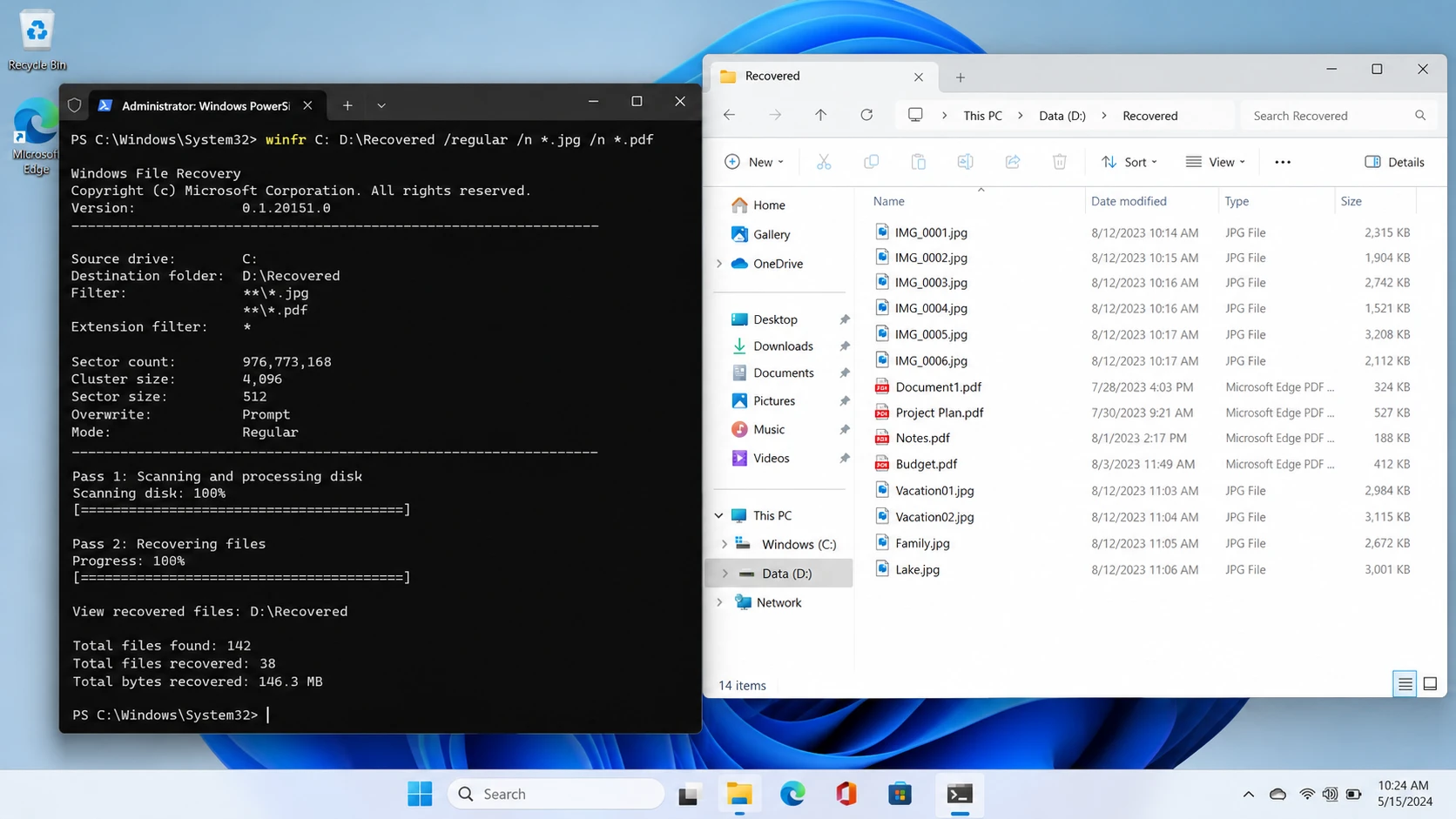
Windows File Recovery is Microsoft’s command-line recovery application.
Best for: Windows users comfortable with commands who want a free recovery option.
Workflow: Select a source and separate destination drive, choose Regular or Extensive mode, and run the recovery command.
Strengths: Free, officially documented, and useful for supported deleted-file scenarios.
Limitations: No conventional graphical file-preview interface. It also does not recover files directly from cloud storage or network shares.
Licensing: Free.
Verdict: A practical first option when the file system is supported and command-line operation is acceptable.
PhotoRec — Best for Free File-Signature Recovery
PhotoRec is an open-source utility distributed with TestDisk.
Best for: Users retrieving recognizable file types when normal file-system records are damaged or missing.
Workflow: Select the storage device, configure the scan, search for file signatures, and save recovered files separately.
Strengths: Completely free, cross-platform, and able to examine storage independently of normal directory structures.
Limitations: Original filenames and folder layouts are often unavailable. Fragmented files may remain incomplete.
Licensing: Free and open source.
Verdict: Useful when recovering file contents matters more than preserving the original folder structure.
Magic Data Recovery — Best for Guided Windows Recovery
Magic Data Recovery is a Windows recovery application developed by Amagicsoft.
Best for: Users recovering deleted files, accidentally formatted partitions, and data from supported logically inaccessible drives.
Workflow: Select the device, scan, filter results, preview supported files, and export the selected data.
Strengths: Graphical drive selection, file-type filtering, and previews for supported documents and media.
Limitations: No dedicated RAID reconstruction comparable to ZAR or Klennet. It cannot repair physical damage or retrieve overwritten content.
Licensing: Up to 500 MB of free recovery is advertised. Paid licenses are available for larger recovery tasks.
Verdict: A reasonable choice for ordinary Windows logical data loss when users prefer a guided interface instead of command-line or advanced RAID tools.
ZAR Alternatives: Pricing and Licensing Comparison
Pricing can change, so license type matters as much as the advertised amount.
Tool | Current Cost | License or Free Limit |
Legacy ZAR | Not sold | Historical trial restrictions only |
Klennet Recovery | 399 Personal / 899 Commercial | One-time purchase; eligible versions released within one year |
Windows File Recovery | Free | No paid recovery license |
PhotoRec | Free | Open-source file recovery |
Magic Data Recovery | 49.95 one year / 69.95 perpetual | Promotional Pro pricing; one PC |
Prices checked October 23, 2026. Taxes, promotions, and license terms may change. Klennet licenses permit indefinite use of eligible versions, while newer releases outside the one-year version entitlement require an update purchase. Magic Data Recovery’s perpetual plan advertises lifetime upgrades.
The most important distinction is between free scanning, free preview, and free recovery.
For example, Klennet’s evaluation edition supports analysis but cannot export files. Meanwhile, Windows File Recovery and PhotoRec provide free file export.
Therefore, compare what you can actually recover before purchasing a license.
Which ZAR Alternative Should You Choose?
The right choice depends on the original storage problem.
For Permanently Deleted Windows Files
First, check Recycle Bin, File History, and cloud backups.
If no copy exists, Windows File Recovery offers a free option. Users who prefer visual browsing and previews may consider a compatible graphical scanner.
For Formatted or RAW Volumes
Stop writing to the device immediately.
A quick format may leave file content recoverable, while repeated formatting or overwriting can destroy it.
Choose software that supports the original file system and the specific storage configuration.
For RAID or Complex NAS Storage
Klennet Recovery is better suited to advanced RAID reconstruction and file-system analysis than basic undelete utilities.
However, avoid changing RAID metadata or rebuilding an uncertain array before securing the original disks.
For Deleted SD Card Photos and Videos
PhotoRec provides a free signature-based approach.
Nevertheless, fragmented video files may require specialized reconstruction software, such as Klennet Carver.
For Physically Damaged Drives
Do not continue trying different scanning tools if the drive clicks, repeatedly disconnects, or disappears from BIOS.
Software cannot repair failed read heads, damaged controllers, or serious electronic faults.
Instead, consider professional recovery.
Before Paying for Any Recovery Software
Not every file-loss scenario requires another recovery application.
- Recycle Bin: Restore files that still exist there.
- Backups: Check File History, cloud version history, and independent backup drives.
- Unsaved files: Look for application AutoRecover and temporary files. Autosave does not necessarily create a permanent backup.
- Deleted files: Avoid writing new data to the original storage.
- SSD deletion: TRIM and garbage collection can make deleted blocks inaccessible.
- Overwritten files: No recovery utility can recreate overwritten information.
- Physical failure: Stop repeated scans and seek hardware-level assistance.
If the built-in recovery options no longer work, a logical recovery tool may be appropriate. However, always confirm that the storage remains readable.
How to Use Magic Data Recovery When Built-in Options Fail
For supported logical data loss on Windows, Magic Data Recovery provides a five-step process. The official user guide documents its recovery workflow.
Step 1: Download and Install Magic Data Recovery
Download the installer from Amagicsoft and install it on a healthy drive or another computer.
Do not install recovery software on the partition containing the missing files. Doing so may overwrite recoverable data.
Supports Windows 7/8/10/11 and Windows Server
Step 2: Select the Drive Where the Files Were Lost
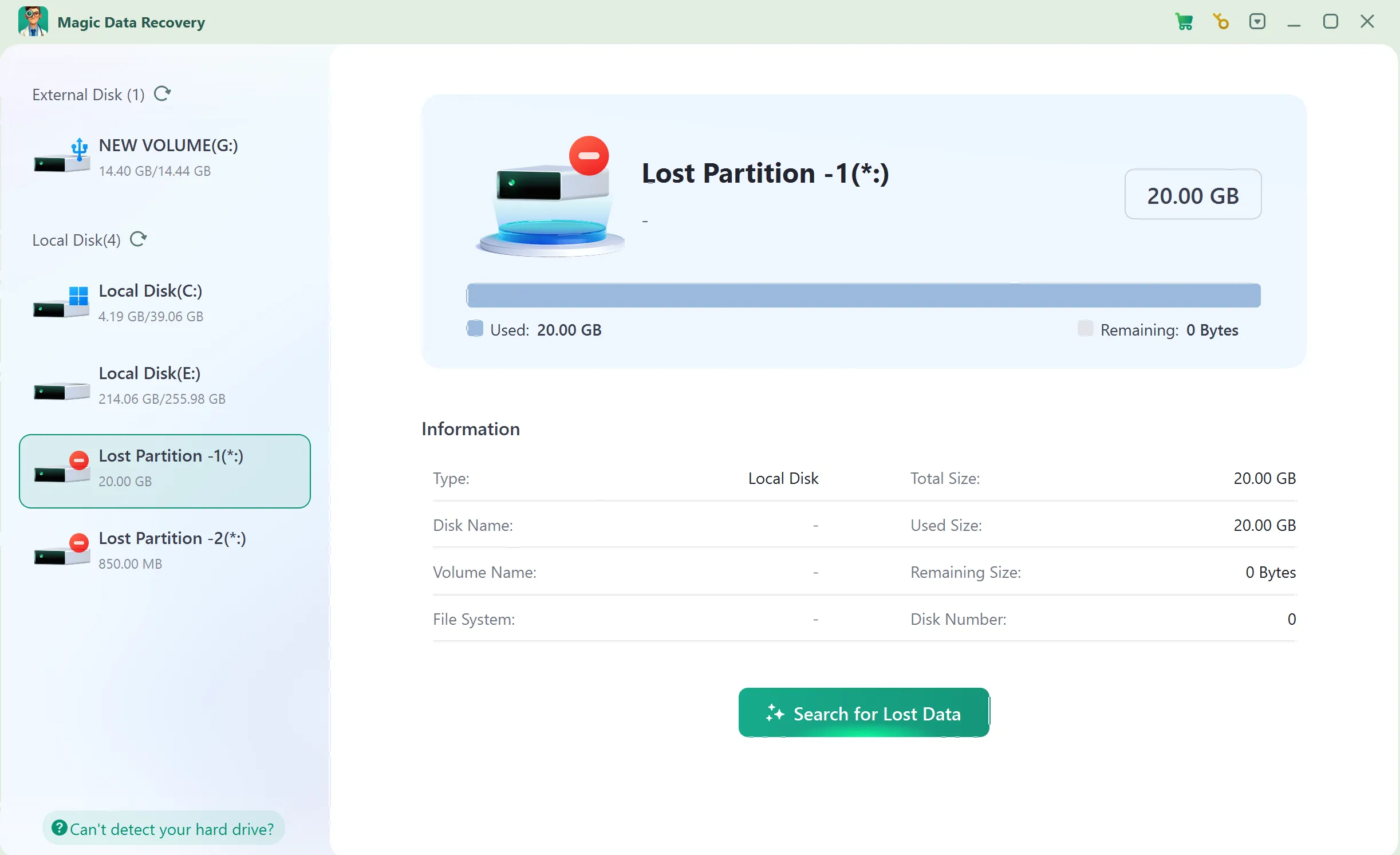
Launch Magic Data Recovery and choose the HDD partition, USB drive, or memory card that previously stored your files.
Confirm its capacity and start scanning.
Step 3: Scan for Lost or Deleted Files
Allow the application to analyze the selected storage.
Review the discovered documents, photos, videos, or other relevant file types as results appear.
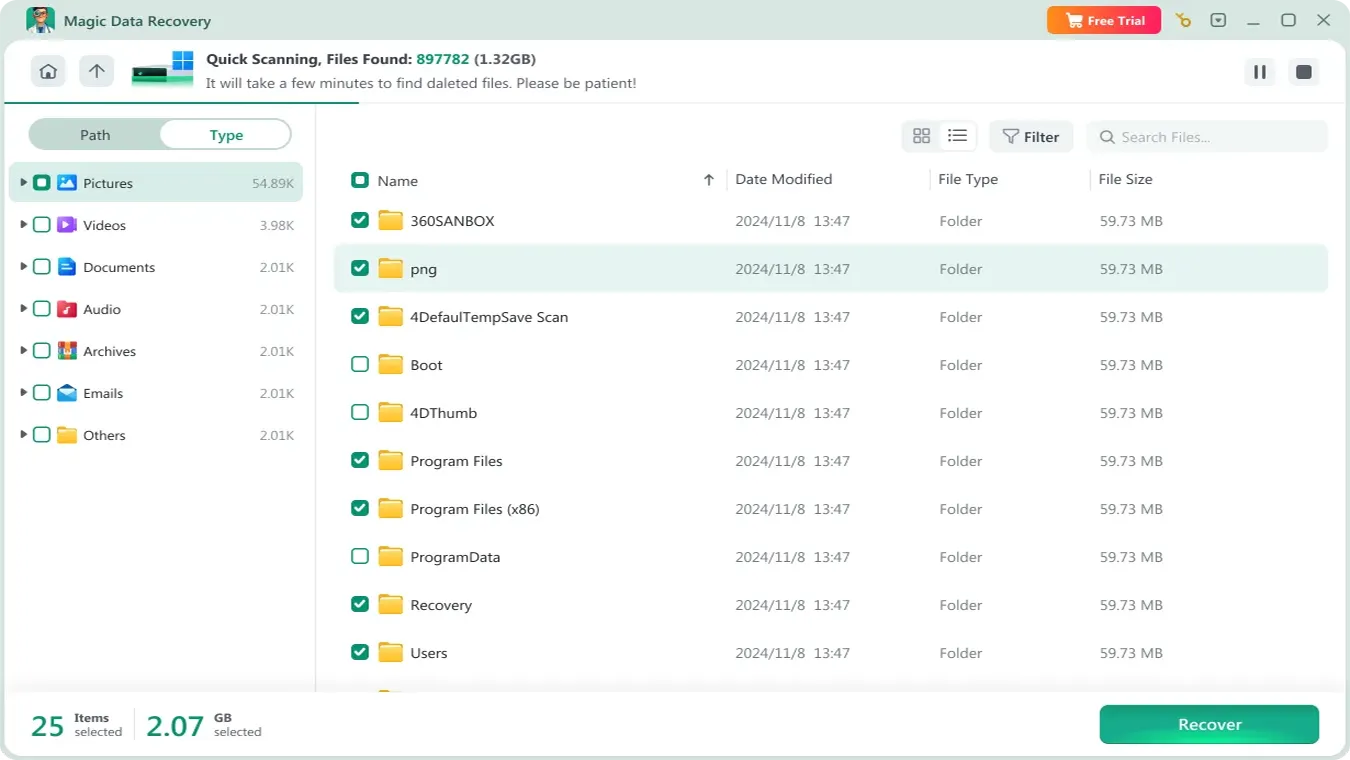
Step 4: Preview Files Before Recovery
Use Preview when available to inspect supported files.
Check filenames, sizes, paths, and visible contents. However, some formats or damaged files may not preview correctly.

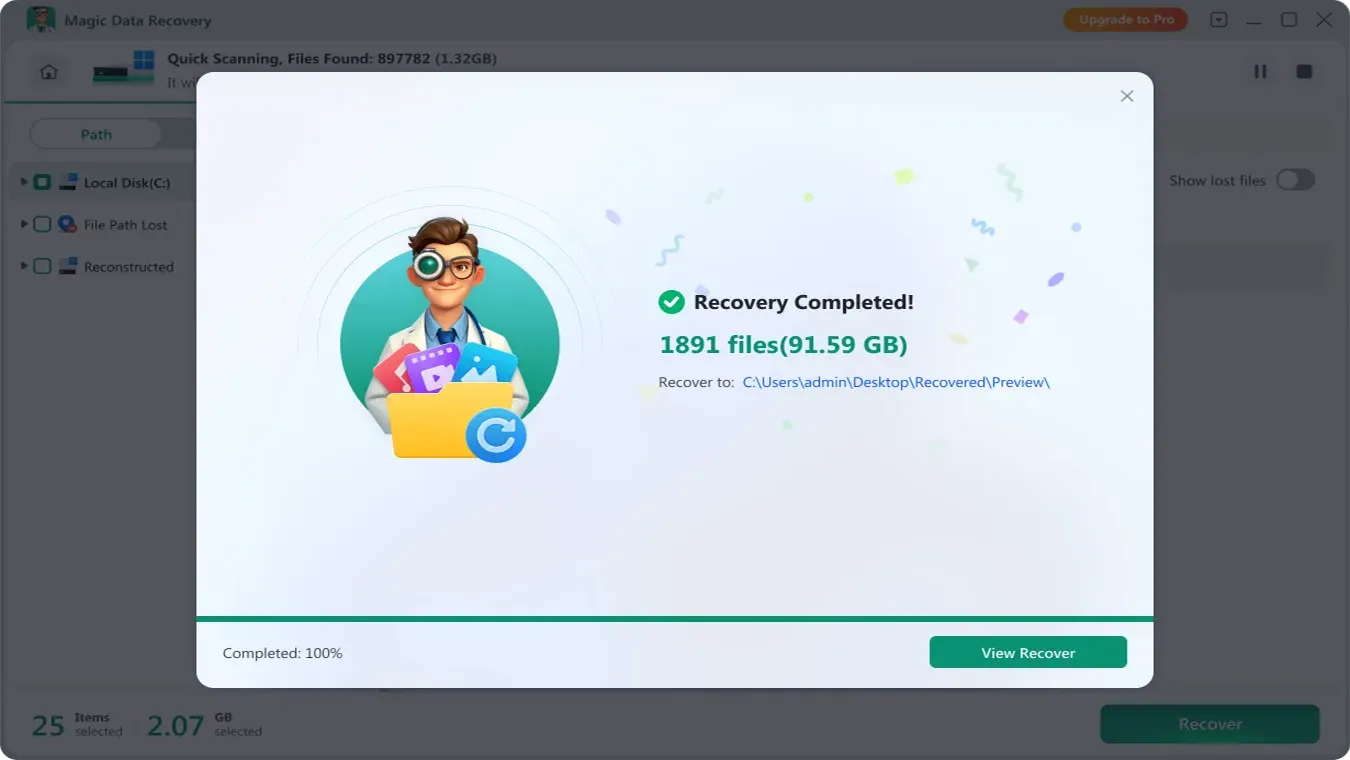
Step 5: Recover Files to a Safe Location
Select the required files and recover them to a different physical disk.
Afterward, open representative files to verify their contents before reusing the original storage.
Conclusion: Is Zero Assumption Data Recovery Still Worth Using?
Zero assumption data recovery once provided valuable capabilities for deleted files, formatted drives, RAID reconstruction, and disk imaging. However, the developer has discontinued ZAR, making it less suitable for new installations.
For advanced recovery, Klennet Recovery offers the closest continuation of ZAR’s functionality. Windows File Recovery and PhotoRec provide free alternatives for compatible recovery tasks.
For users who need a guided Windows workflow after backups and built-in options fail, Magic Data Recovery may be suitable for supported logical data loss.
However, no software can guarantee recovery of overwritten data or repair physical hardware damage. For additional guidance on HDD-related problems, explore our hard drive recovery solutions.
Supports Windows 7/8/10/11 and Windows Server
FAQ
Is zero assumption data recovery discontinued in 2026?
Is ZAR data recovery free?
Can zero assumption data recovery recover a formatted hard drive?
Does zero assumption data recovery work on Windows 11?
What is the best alternative to zero assumption data recovery?
Can recovery software restore files after SSD TRIM?
Is downloading old ZAR installers from third-party websites safe?

Vasilii is a data recovery specialist with around 10 years of hands-on experience in the field. Throughout his career, he has successfully solved thousands of complex cases involving deleted files, formatted drives, lost partitions, and RAW file systems. His expertise covers both manual recovery methods using professional tools like hex editors and advanced automated solutions with recovery software. Vasilii's mission is to make reliable data recovery knowledge accessible to both IT professionals and everyday users, helping them safeguard their valuable digital assets.