
「Zero Assumption Data Recovery」のレビューと代替ソフト
仮定を一切置かないデータ復旧 (ZAR) はかつて、削除されたファイルやフォーマットされたパーティション、破損したファイルシステムからのデータを復元するための人気のある Windows ユーティリティでした。しかし、開発者はこのソフトウェアの開発を終了しています。古い推奨事項で ZAR を見かけた場合、それでも使い続けるべきでしょうか、それとも最新の代替ツールを選ぶべきでしょうか?
答えは、お使いのストレージデバイス、ファイルシステム、予算、および技術的な経験によって異なります。本レビューでは、ZARの公式に公表されている機能、過去の独立系テスト結果、制限事項、および現在の代替ツールについて検証します。HDD特有のシナリオについては、当サイトの ハードドライブ回復ソリューション 削除、フォーマット、およびハードウェアの問題が、復元オプションにどのような影響を与えるかを説明してください。.
各ツールを、利用可能性、無料復元の上限、使いやすさ、対応する復元シナリオなど、一貫した基準に基づいて比較しています。さらに重要な点として、マーケティング上の主張を証拠として扱うのではなく、検証済みの製品機能と実際の復元テスト結果を明確に区別しています。.
目次
「ゼロ・アサンプション・データ復旧」:総評
仮定を一切置かないデータ復旧 上級ユーザー向けに、特にRAIDの再構築や破損したファイルシステムの分析といった有用な機能を提供していました。しかし、販売が終了していることから、2026年時点での新規導入を推奨するのは難しいでしょう。.
お客様の優先事項 | おすすめのオプション | 検討すべき理由 |
既存のZARライセンス | 旧ZAR | 互換性のある旧型のストレージであれば、引き続き動作する可能性があります |
高度なRAID復旧 | クレネット・リカバリー | 高度なストレージ分析機能を備えた公式の後継製品 |
完全無料のWindows復元ツール | Windowsファイル復元 | マイクロソフトのコマンドライン復旧ツール |
ファイル署名の無料復元 | フォトレック | オープンソースのクロスプラットフォームユーティリティ |
Windowsファイル復元ガイド | Magic Data Recovery | グラフィカルなスキャンおよびファイルプレビューのワークフロー |
結論として: 既存のZARユーザーは、互換性が維持されている限り、信頼できるインストール環境を引き続き使用することができます。新規ユーザーは、復旧のニーズに応じて、現在利用可能なツールを選択してください。.
これらはシナリオに基づいた推奨事項であり、測定された復旧成功率から導き出されたランキングではありません。.
「ゼロアサンプション・データ復旧」とは何ですか?
仮定を一切置かないデータ復旧, 通称 ZARのデータ復旧, はアレクセイ・V・グビンによって開発されました。.
バックアップソフトウェアとは異なり、ZARはストレージ構造を分析し、削除、フォーマット、あるいはファイルシステムの論理的な破損の後にも残っている可能性のあるファイルを特定しました。.
によると、 ZARの公式ウェブサイト, 、このソフトウェアは、WindowsのFATおよびNTFSボリュームに加え、Linuxのext2/3/4およびXFSにも対応していました。.
その主な復元機能には、削除されたファイル、フォーマットされたドライブ、消失したパーティション、デジタルカメラの記憶媒体、および特定のRAID構成などが含まれていました。.
削除されたファイル、フォーマットされたドライブ、およびRAWパーティション
ZAR を使用すれば、Windows では通常はアクセスできなくなったストレージボリュームを調査することが可能です。.
たとえば、ファイルシステムが破損すると、NTFS 形式のハードドライブが突然「RAW」として表示されることがあります。「RAW」とは、Windows がそのボリューム上で使用可能なファイルシステムを認識できないことを意味します。ただし、元のデータの一部が残っている場合もあります。.
そのような場合, 仮定を一切置かないデータ復旧 残存しているファイル構造や復元可能なコンテンツを特定しようと試みた。.
とはいえ、すでに上書きされてしまったデータを復元することはできなかった。.
無料のデジタル画像復元
ZARの際立った特徴の一つは、かつて搭載されていた無料の画像復元モードでした。.
このモードは、カメラやメモリーカード、および類似のデバイスに保存されていた削除済みの写真や対応する動画を対象としていました。.
しかし、開発者の 画像復元に関するドキュメント それによると、従来の方法では主に連続したファイルが復元されていたとのことです。.
そのため、断片化された写真は歪んで表示される場合があり、断片化された動画は再生されない可能性があります。.
この制限は、繰り返し再利用されるSDカード、特に大容量の動画を保存しているカードにとっては重要な問題となります。.
RAIDの再構築とディスクイメージの作成
ZARのデータ復旧 また、RAIDの再構築、手動によるRAID設定、欠落パーティションの検索、ディスクイメージの取り扱いなど、高度な機能も備えていました。.
重要なのは、 『ZAR X』公式マニュアル を記録している 画像ファイルを作成する そして 画像ファイルを読み込む 関数。.
したがって、ZARにはディスクイメージング機能がないと主張する過去のレビューは、文書化されているすべてのバージョンを正確に反映しているとは言えません。.
ディスクイメージングを行うことで、後で分析できるようソースを保存しておくことができます。ただし、一般的なイメージングソフトウェアでは、ハードウェアの機械的または電子的な損傷を修復することはできません。.
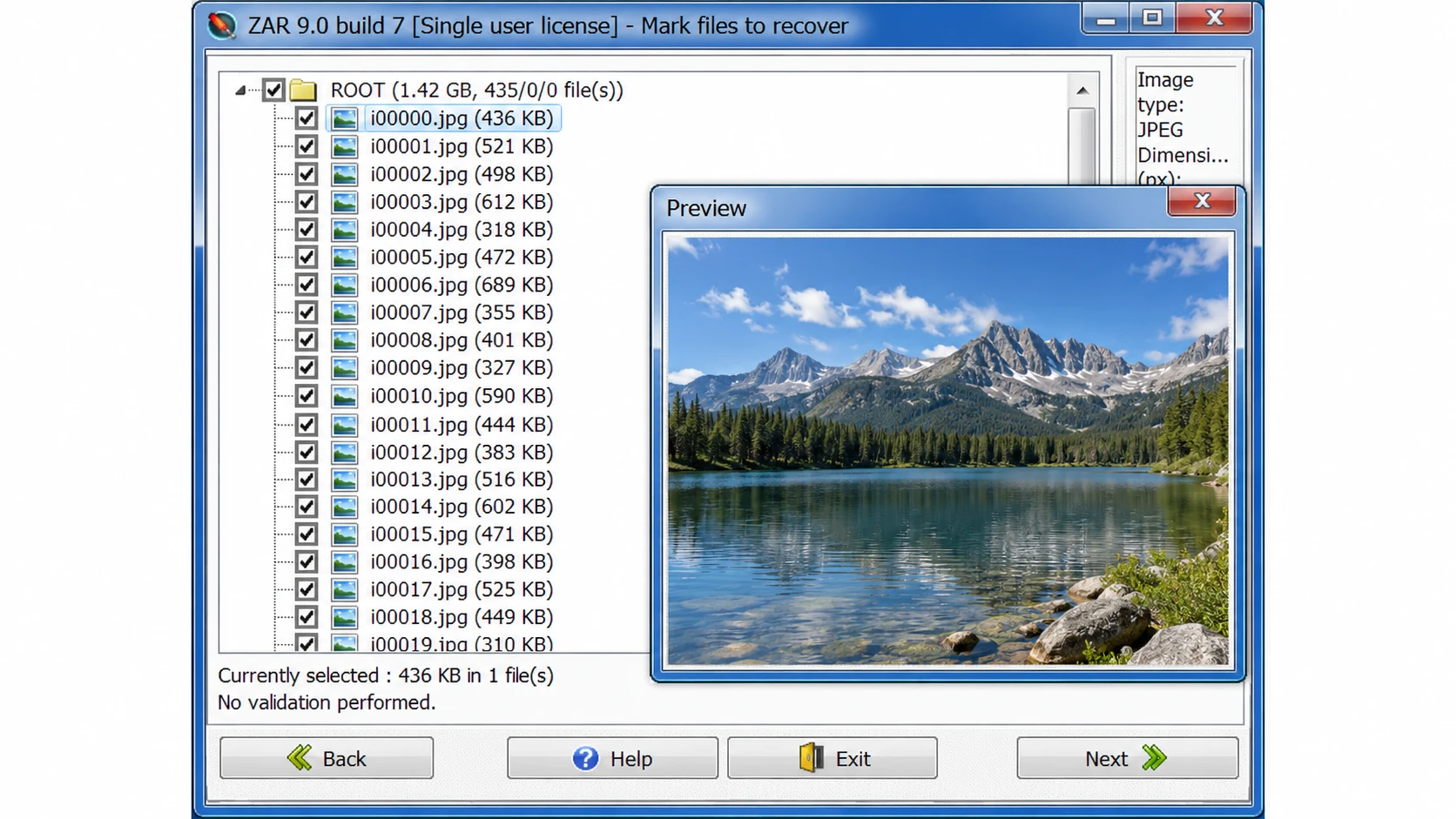
検証済みのインターフェースの証拠: 開発者の ZARの過去のスクリーンショット 従来のZAR 9.0のインターフェースで、復元されたファイルの一覧と写真のプレビューが表示されています。これは本物の歴史的な例であり、2026年の新しいテストのスクリーンショットではありません。.

「Zero Assumption Data Recovery」は販売終了になったのでしょうか?
はい。開発者は次のように明示的に述べています。 仮定を一切置かないデータ復旧 約20年の歴史を経て、製造が終了しました。.
について 公式ダウンロードページ 現在、最新のインストーラーは提供されていませんが、一方、 購入ページ 新しいライセンスが入手できないことが確認されました。.
その代わりに、開発元は、一般的なデータ復旧には「Klennet Recovery」を、断片化したメディアの復旧といった特殊なケースには「Klennet Carver」を推奨しています。.
「ZAR Data Recovery」はまだダウンロードできますか?
サードパーティのウェブサイトには、旧バージョンのZARインストーラーが依然として掲載され続けている。.
例えば、こうだ、, Softonic アプリケーションの詳細にはバージョン 9.0 と表示されている一方で、同じページの別の箇所ではバージョン 8.1 と記載されている。.
こうした不整合があるため、ダウンロードされたファイルがどのビルドのものかを正確に特定することが困難になります。.
さらに、カタログページが最近更新されたからといって、開発者が新しいソフトウェアバージョンをリリースしたとは限りません。.
セキュリティ上の理由から、非公式の改変インストーラーの使用は避け、すでに所有している正規のインストールファイルは大切に保管してください。.
既存のZARライセンスについてはどうなりますか?
かつての顧客に関しては、1つだけ有益な例外があります。.
開発者によると、ZARを以下に示す日付以降に購入したユーザーは、 2022年7月1日, 、元のZAR注文番号を提出することで、追加費用なしでKlennet Recoveryのライセンスを申請することができます。.
この特典により、対象となるお客様にとって移行がより現実的な選択肢となる可能性があります。.
「ゼロアサンプション」データ復旧のパフォーマンス:独立したテストではどのような結果が示されているのか?
歴史的考察は、以下の点について有益な背景情報を提供してくれる。 仮定を一切置かないデータ復旧. 。ただし、これらの結果については慎重な解釈が必要である。.
公表された試験結果
レビューの出典 | テスト環境 | 報告された観測結果 |
8 GBのUSBメモリ | 約30分のスキャン | |
4 GB USBイメージ復元テスト | 約20分のスキャン | |
データ復旧ツール | Boot Camp 経由の Windows 10 | 「一般データ復旧」がドライブの検出の段階で先に進めませんでした |
これらの観察結果から、ZARスキャンは処理速度が遅くなる可能性があり、特定の環境では互換性の問題が生じる可能性があることが示唆される。.
しかし、これらのテストでは、異なるデバイス、動作環境、およびスキャンモードが使用されていた。.
したがって、これらのスキャン時間だけでは、厳密な性能比較を行うことはできない。.
さらに、ファイルが見つかったからといって、復元された内容が実際に使用できるとは限りません。.
長所と限界
強み | 制限事項 |
WindowsおよびLinuxの複数のファイルシステムに対応しています | 正式に販売終了となりました |
RAIDの再構築が含まれます | Technical interface |
Provides disk-image capabilities | Modern Windows compatibility uncertain |
Historical free image-recovery mode | Fragmented files may be incomplete |
Supports file filtering and previews | No current official installer |
評価: ZAR’s advanced features remain valuable historically. Nevertheless, its lack of maintenance and uncertain compatibility outweigh those advantages for many new users.
How We Evaluated ZAR and Its Alternatives
All five tools were evaluated using the same criteria, regardless of commercial affiliation.
Evaluation Criteria and Evidence
We compared ZAR, Klennet Recovery, Windows File Recovery, PhotoRec, and Magic Data Recovery across five factors:
- 互換性: Operating systems, file systems, and supported devices.
- Recovery capabilities: Deleted files, formatted partitions, RAW volumes, and advanced functions.
- Usability: Scanning workflow, file filtering, and previews.
- Free limits and pricing: Free scanning versus actual file export.
- 制限事項 Overwriting, physical damage, and unsupported scenarios.
We prioritized official developer documentation, software manuals, and published independent reviews. Version information and licensing terms were checked against available official sources on October 23, 2026.
Testing Methodology and Limitations
Historical ZAR test observations from Handy Recovery and Data Rescue Tools are discussed above. Their environments differ, so the results cannot establish comparative recovery performance.
A reproducible benchmark would require identical NTFS/exFAT test images, controlled deletion and formatting scenarios, consistent scan procedures, and SHA-256 integrity checks.
Found, previewable, recovered, and intact files must be measured separately.
No new head-to-head recovery benchmark was conducted for this article. Therefore, our recommendations reflect verified features, usability, licensing, and scenario suitability—not unverified recovery success rates.
Zero Assumption Data Recovery vs Modern Alternatives
The following comparison applies the same basic criteria to every candidate.
ソフトウェア | プラットフォーム | Free Export | 主な強み | 主な制限 |
ZAR | ウィンドウズ | Historical image mode; limited general-data trial | RAID and file-system analysis | Discontinued |
クレネット・リカバリー | Windows 10+ | いいえ | Advanced RAID, file systems, and imaging | Higher cost and complexity |
Windowsファイル復元 | Windows 10/11 | はい | Microsoftの無料復元ユーティリティ | コマンドライン・インターフェイス |
フォトレック | Windows、macOS、Linux | はい | 署名ベースのリカバリ | Original names and folders often lost |
Magic Data Recovery | ウィンドウズ | Up to 500 MB advertised | Guided scan and supported-file preview | No dedicated RAID reconstruction |
Features and licensing reviewed October 23, 2026. Free recovery limits are not equivalent to free scanning or previewing. No recovery-performance ranking is implied.
ZAR Data Recovery — Best for Existing Legacy Installations
最高だ: Users who already own an authentic copy and have compatible storage.
ワークフロー: Select a recovery mode, identify the source, scan the volume, review discovered files, and export them elsewhere.
強みだ: Broad legacy file-system coverage, RAID configuration tools, and disk-image support.
制限事項 Discontinued, no current official download, and uncertain support for modern hardware.
Licensing: Historical free image mode and a four-folder general-data trial. New paid licenses are unavailable.
評決: An existing installation may still be useful, but ZAR is not a practical default recommendation for new users.
Klennet Recovery — Best for Advanced File-System Recovery
クレネット・リカバリー is ZAR’s official successor.
最高だ: Users working with complex RAID, ZFS, damaged file systems, and disk images.
ワークフロー: Identify disks, analyze partitions or RAID layouts, scan recoverable structures, review validation results, and export files.
強みだ: Supports NTFS, exFAT, EXT, XFS, ZFS, and additional file systems. It also provides RAID analysis, file validation, and disk imaging.
制限事項 Requires Windows 10 or later, at least 8 GB RAM, and an internet connection. Advanced tasks can require substantial expertise.
Licensing: Evaluation mode cannot export files. Personal licensing costs $399.
評決: The closest successor for users who relied on ZAR’s technical features rather than basic undelete recovery.
Windows File Recovery — Best for Free Windows Recovery
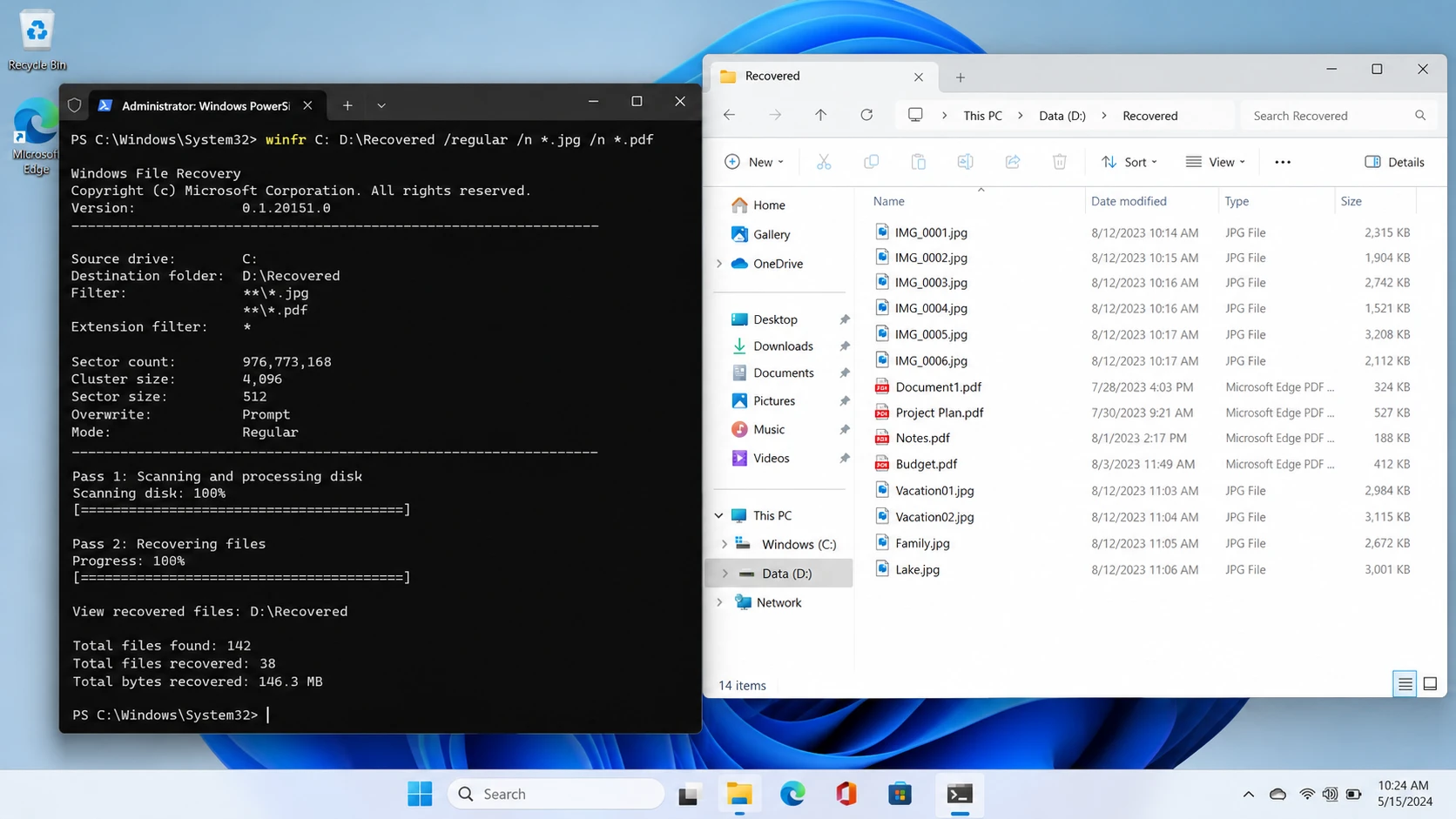
Windowsファイル復元 is Microsoft’s command-line recovery application.
最高だ: Windows users comfortable with commands who want a free recovery option.
ワークフロー: Select a source and separate destination drive, choose Regular or Extensive mode, and run the recovery command.
強みだ: Free, officially documented, and useful for supported deleted-file scenarios.
制限事項 No conventional graphical file-preview interface. It also does not recover files directly from cloud storage or network shares.
Licensing: Free.
評決: A practical first option when the file system is supported and command-line operation is acceptable.
PhotoRec — Best for Free File-Signature Recovery
フォトレック is an open-source utility distributed with TestDisk.
最高だ: Users retrieving recognizable file types when normal file-system records are damaged or missing.
ワークフロー: Select the storage device, configure the scan, search for file signatures, and save recovered files separately.
強みだ: Completely free, cross-platform, and able to examine storage independently of normal directory structures.
制限事項 Original filenames and folder layouts are often unavailable. Fragmented files may remain incomplete.
Licensing: Free and open source.
評決: Useful when recovering file contents matters more than preserving the original folder structure.
Magic Data Recovery — Best for Guided Windows Recovery
Magic Data Recovery is a Windows recovery application developed by Amagicsoft.
最高だ: Users recovering deleted files, accidentally formatted partitions, and data from supported logically inaccessible drives.
ワークフロー: Select the device, scan, filter results, preview supported files, and export the selected data.
強みだ: Graphical drive selection, file-type filtering, and previews for supported documents and media.
制限事項 No dedicated RAID reconstruction comparable to ZAR or Klennet. It cannot repair physical damage or retrieve overwritten content.
Licensing: Up to 500 MB of free recovery is advertised. Paid licenses are available for larger recovery tasks.
評決: A reasonable choice for ordinary Windows logical data loss when users prefer a guided interface instead of command-line or advanced RAID tools.
ZAR Alternatives: Pricing and Licensing Comparison
Pricing can change, so license type matters as much as the advertised amount.
工具 | Current Cost | License or Free Limit |
旧ZAR | Not sold | Historical trial restrictions only |
クレネット・リカバリー | 399 Personal / 899 Commercial | One-time purchase; eligible versions released within one year |
Windowsファイル復元 | 無料 | No paid recovery license |
フォトレック | 無料 | Open-source file recovery |
Magic Data Recovery | 49.95 one year / 69.95 perpetual | Promotional Pro pricing; one PC |
Prices checked October 23, 2026. Taxes, promotions, and license terms may change. Klennet licenses permit indefinite use of eligible versions, while newer releases outside the one-year version entitlement require an update purchase. Magic Data Recovery’s perpetual plan advertises lifetime upgrades.
The most important distinction is between free scanning, free preview, and free recovery.
For example, Klennet’s evaluation edition supports analysis but cannot export files. Meanwhile, Windows File Recovery and PhotoRec provide free file export.
Therefore, compare what you can actually recover before purchasing a license.
Which ZAR Alternative Should You Choose?
The right choice depends on the original storage problem.
For Permanently Deleted Windows Files
First, check Recycle Bin, File History, and cloud backups.
If no copy exists, Windows File Recovery offers a free option. Users who prefer visual browsing and previews may consider a compatible graphical scanner.
For Formatted or RAW Volumes
デバイスへの書き込みを直ちに停止する。.
A quick format may leave file content recoverable, while repeated formatting or overwriting can destroy it.
Choose software that supports the original file system and the specific storage configuration.
For RAID or Complex NAS Storage
Klennet Recovery is better suited to advanced RAID reconstruction and file-system analysis than basic undelete utilities.
However, avoid changing RAID metadata or rebuilding an uncertain array before securing the original disks.
For Deleted SD Card Photos and Videos
PhotoRec provides a free signature-based approach.
Nevertheless, fragmented video files may require specialized reconstruction software, such as Klennet Carver.
For Physically Damaged Drives
Do not continue trying different scanning tools if the drive clicks, repeatedly disconnects, or disappears from BIOS.
Software cannot repair failed read heads, damaged controllers, or serious electronic faults.
Instead, consider professional recovery.
Before Paying for Any Recovery Software
Not every file-loss scenario requires another recovery application.
- Recycle Bin: Restore files that still exist there.
- Backups: Check File History, cloud version history, and independent backup drives.
- Unsaved files: Look for application AutoRecover and temporary files. Autosave does not necessarily create a permanent backup.
- 削除されたファイル: Avoid writing new data to the original storage.
- SSD deletion: TRIM and garbage collection can make deleted blocks inaccessible.
- Overwritten files: No recovery utility can recreate overwritten information.
- 物理的な故障: Stop repeated scans and seek hardware-level assistance.
If the built-in recovery options no longer work, a logical recovery tool may be appropriate. However, always confirm that the storage remains readable.
How to Use Magic Data Recovery When Built-in Options Fail
For supported logical data loss on Windows, Magic Data Recovery provides a five-step process. The 公式ユーザーガイド documents its recovery workflow.
ステップ1: Magic Data Recoveryのダウンロードとインストール
Download the installer from Amagicsoft and install it on a healthy drive or another computer.
Do not install recovery software on the partition containing the missing files. Doing so may overwrite recoverable data.
Windows 7/8/10/11およびWindows Serverをサポート
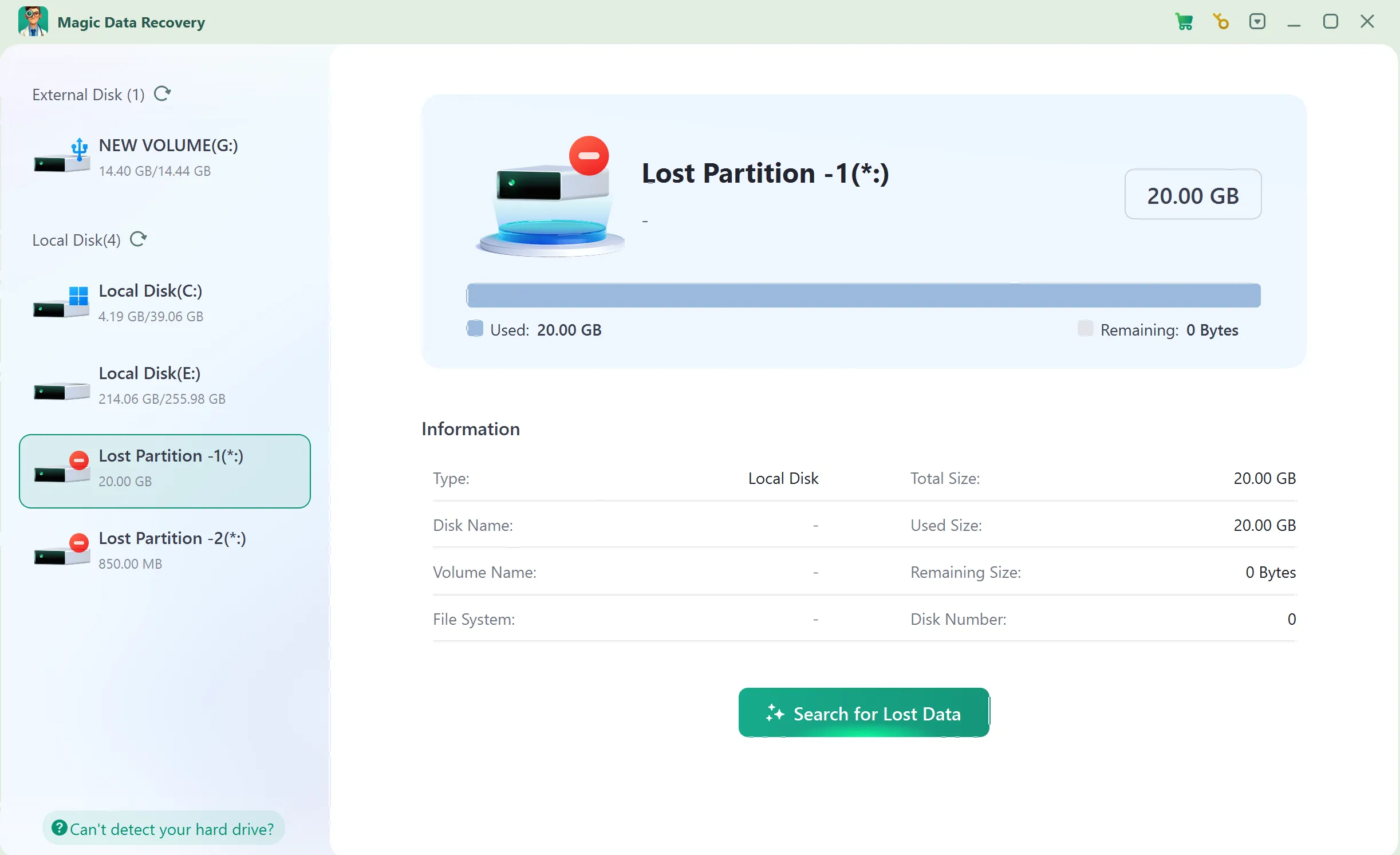
Step 2: Select the Drive Where the Files Were Lost
Launch Magic Data Recovery and choose the HDD partition, USB drive, or memory card that previously stored your files.
Confirm its capacity and start scanning.
ステップ3:紛失または削除されたファイルをスキャンする
Allow the application to analyze the selected storage.
Review the discovered documents, photos, videos, or other relevant file types as results appear.
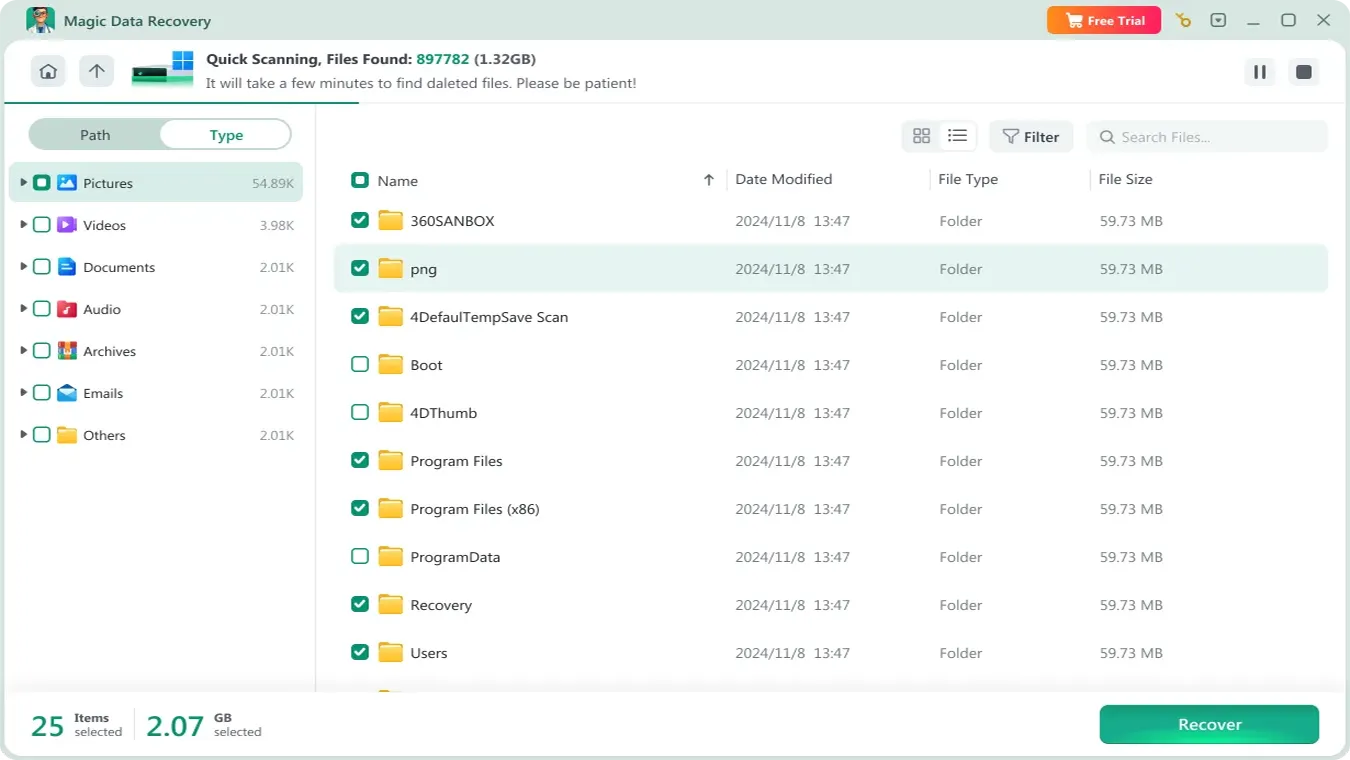
ステップ4:リカバリーの前にファイルをプレビューする
Use Preview when available to inspect supported files.
Check filenames, sizes, paths, and visible contents. However, some formats or damaged files may not preview correctly.

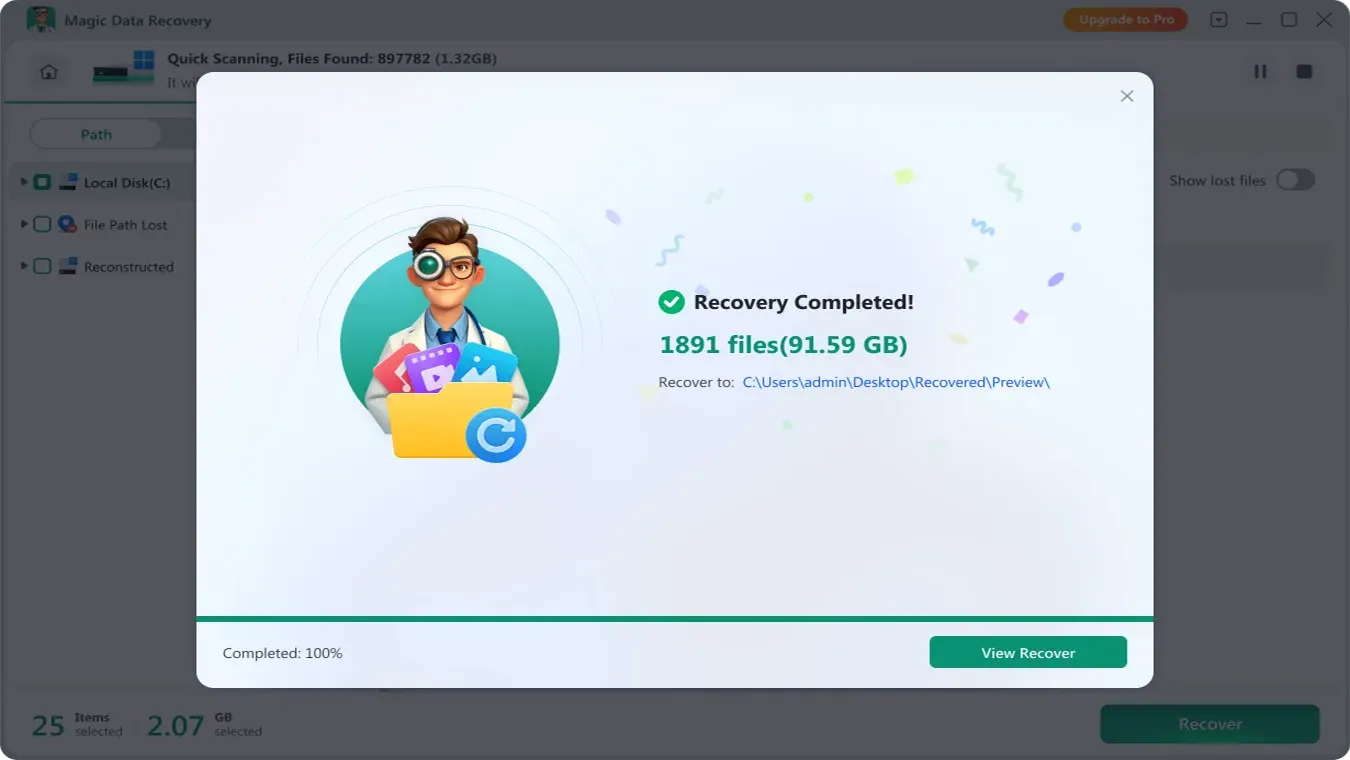
ステップ5:ファイルを安全な場所に復元する
Select the required files and recover them to a different physical disk.
Afterward, open representative files to verify their contents before reusing the original storage.
Conclusion: Is Zero Assumption Data Recovery Still Worth Using?
仮定を一切置かないデータ復旧 once provided valuable capabilities for deleted files, formatted drives, RAID reconstruction, and disk imaging. However, the developer has discontinued ZAR, making it less suitable for new installations.
For advanced recovery, Klennet Recovery offers the closest continuation of ZAR’s functionality. Windows File Recovery and PhotoRec provide free alternatives for compatible recovery tasks.
For users who need a guided Windows workflow after backups and built-in options fail, Magic Data Recovery may be suitable for supported logical data loss.
However, no software can guarantee recovery of overwritten data or repair physical hardware damage. For additional guidance on HDD-related problems, explore our ハードドライブ回復ソリューション.
Windows 7/8/10/11およびWindows Serverをサポート
よくある質問
「ゼロアサンプション」データ復旧サービスは2026年に終了するのでしょうか?
ZARのデータ復旧は無料ですか?
「ゼロアサンプション」方式のデータ復旧では、フォーマットされたハードドライブのデータを復旧できますか?
ゼロアサンプションによるデータ復旧は、Windows 11でも機能しますか?
「ゼロ仮定データ復旧」に代わる最良の方法は何でしょうか?
SSDのTRIM処理後でも、復元ソフトでファイルを復元することはできますか?
サードパーティのウェブサイトから古いZARインストーラーをダウンロードしても安全ですか?

バシリイは、この分野で約10年の実務経験を持つデータ復元のスペシャリストです。そのキャリアを通じて、彼は削除されたファイル、フォーマットされたドライブ、失われたパーティション、RAWファイルシステムを含む何千もの複雑なケースの解決に成功してきました。彼の専門知識は、16進エディタなどの専門ツールを使用した手動復元方法と、復元ソフトウェアを使用した高度な自動化ソリューションの両方をカバーしています。バシリの使命は、信頼できるデータ復元知識をITプロフェッショナルと一般ユーザーの双方が利用できるようにし、貴重なデジタル資産を保護できるようにすることです。.