
¿Te han desaparecido los archivos de Google Drive? 12 soluciones
En Han desaparecido los archivos de Google Drive, no des por hecho que se hayan eliminado. Los archivos pueden encontrarse en otra cuenta, haberse trasladado a otra carpeta, haber perdido el acceso compartido, no haberse sincronizado o haber desaparecido únicamente de la sección «Sugeridos». Esta guía te muestra cómo encontrar Los archivos han desaparecido de Google Drive, restaurar archivos eliminados de Google Drive puede conservar y manipular Los archivos sugeridos por Google Drive han desaparecido. También explica cuándo Magic Data Recovery puede recuperar una copia local de tu disco duro.
Compatible con Windows 7/8/10/11 y Windows Server
Índice
¿Han desaparecido tus archivos de Google Drive? Primero, identifica el problema
Antes de modificar la configuración, compara Google Drive en línea con la carpeta de tu ordenador. Esta comprobación muestra dónde Han desaparecido los archivos de Google Drive.
Lo que ves | Causa probable | Primer paso |
Lo único que falta en «Sugerido» | Cambio en la página de inicio | Buscar en Mi unidad |
Está en línea, pero no aparece en el ordenador | Problema de streaming o sincronización | Descarga Drive para ordenador |
En PC, pero sin conexión a Internet | Error al subir el archivo | Revisar la actividad de sincronización |
Falta el archivo compartido | Se ha modificado el permiso | Ponte en contacto con el propietario |
Archivo en la papelera | Eliminación accidental | Restaurarlo |
Desaparecido en todas partes | Pérdida en la nube o local | Utilizar la recuperación avanzada |
Lo más importante es que copies los archivos no sincronizados de forma segura antes de modificar o reinstalar Drive para ordenador.
Por qué Han desaparecido los archivos de Google Drive
Hay varios factores que pueden provocar que Han desaparecido los archivos de Google Drive parecen permanentes.
Cuenta de Google incorrecta
Los usuarios suelen alternar entre cuentas personales, laborales y académicas. Por lo tanto, comprueba la dirección de correo electrónico en el navegador y en Drive para ordenador.
Archivo Movimiento o Cambios en los permisos
Un colaborador puede mover, renombrar o dejar de compartir un archivo. Un administrador de la unidad compartida también puede modificar tus permisos de acceso. Busca por nombre, propietario, tipo y fecha antes de dar por hecho que se ha eliminado.
Sin organizar Archivos
Un archivo puede perder su carpeta original aunque siga estando en Drive. Busca «is:unorganized» y, a continuación, mueve cualquier resultado a una carpeta de la que tengas control.
Problemas de sincronización en el ordenador de sobremesa
Una subida en pausa, un problema de red, un error de cuenta o un problema de permisos pueden interrumpir la sincronización. Como consecuencia, es posible que un archivo permanezca en el ordenador pero nunca llegue a la nube.
Transmisión y Cambios en el espejo
Los archivos «Stream» se almacenan principalmente en la nube, mientras que los archivos «Mirror» conservan copias completas tanto en línea como localmente. Por lo tanto, un cambio de modo puede modificar la ubicación del archivo local y la posibilidad de recuperación local.
Cómo solucionar la desaparición de archivos de Google Drive
En primer lugar, utiliza las herramientas de Google. A continuación, comprueba la sincronización con el ordenador. Por último, intenta realizar una recuperación local solo para los archivos que alguna vez existieron en Windows.
1. Buscar en Google Drive con filtros
Busca el nombre completo, parte del nombre o una frase del documento. A continuación, filtra por propietario, ubicación, personas, fecha o tipo de archivo. Echa también un vistazo a «Mi unidad», «Recientes», «Destacados», «Compartidos conmigo» y «Unidades compartidas».
2. Confirma que la cuenta es la correcta
Abre cada una de las cuentas de Google que utilices. Mientras tanto, compara cada cuenta con Drive para ordenador. Esta comprobación suele resolver el Han desaparecido los archivos de Google Drive problema.
3. Recuperar archivos de la papelera
Abre la Papelera, haz clic con el botón derecho del ratón sobre el elemento que falta y selecciona «Restaurar». Google suele conservar los archivos de la Papelera durante 30 días, a menos que alguien los elimine definitivamente antes. Por lo tanto, comprueba primero la Papelera cuando intentes recuperar archivos borrados de Google Drive.
4. Revisar la actividad de conducción
Abre el panel de información y selecciona «Actividad». La línea de tiempo puede mostrar un traslado, un cambio de nombre, una eliminación o un cambio en los permisos de uso compartido. Además, puede indicar quién realizó el cambio.
5. Buscar archivos desordenados
Entre en es: desorganizado en el cuadro de búsqueda. Si aparece el elemento que buscas, muévelo a una carpeta. Esto suele ser de ayuda cuando Los archivos han desaparecido de Google Drive tras un cambio en la carpeta principal.
6. Comprobar los archivos compartidos
Abre las carpetas «Compartido conmigo» y «Unidades compartidas». Si el archivo sigue sin aparecer, ponte en contacto con el propietario o con el administrador del espacio de trabajo. El software de recuperación no puede restaurar los permisos de acceso.
7. Reseña de Drive para ordenador
Abre «Drive para escritorio» desde la bandeja del sistema de Windows. A continuación, comprueba la cuenta, el estado de la sincronización, las subidas en pausa, la actividad y los errores. Antes de cerrar sesión, copia los archivos que no estén sincronizados en otra ubicación.
8. Comparar «Stream» y «Mirror»
Abre Drive en el escritorio, selecciona «Configuración» y revisa las «Preferencias».
Modo | Ubicación principal | Probabilidad de recuperación local |
Reproducir archivos | Principalmente en la nube | Limitado |
Archivos de copia de seguridad | Nube y disco local | Más alto |
Si Han desaparecido los archivos de Google Drive Desde una carpeta duplicada, un programa de recuperación local podría encontrar los datos eliminados. Sin embargo, es posible que un archivo transmitido exclusivamente desde la nube nunca haya existido como un archivo local completo.
9. Revisa la Papelera de reciclaje y las copias de seguridad de Windows
Busca en la Papelera de reciclaje, el Historial de archivos, las Versiones anteriores, el Escritorio, Documentos, Descargas y las carpetas de copias de seguridad. Esto es importante cuando un archivo local ha desaparecido antes de que Drive lo haya subido.
10. Ponte en contacto con Google o con un administrador de Workspace
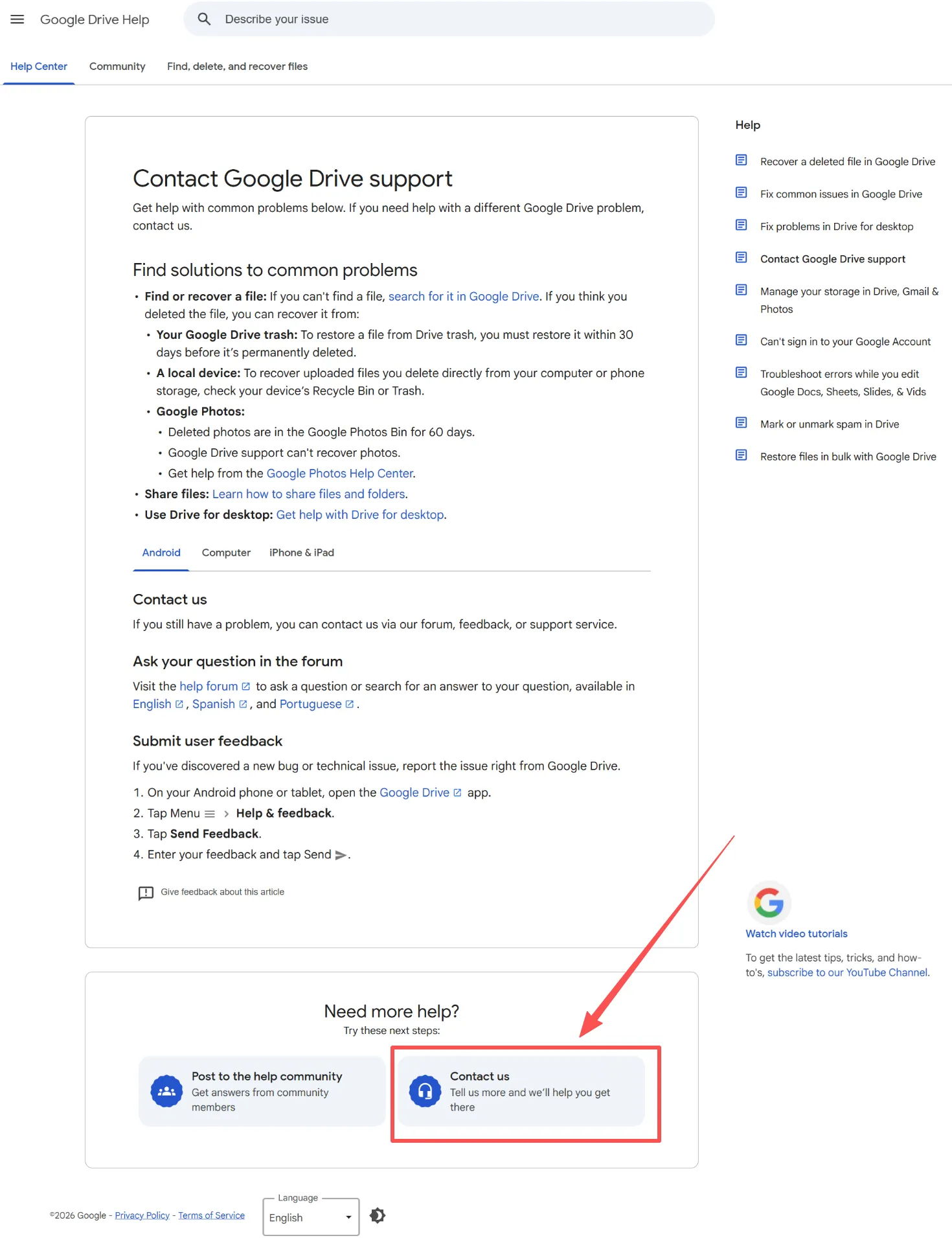
Si «Búsqueda», «Papelera», «Actividad» y las ubicaciones compartidas no ofrecen ninguna respuesta, Ponte en contacto con el servicio de asistencia de Google. Indica el nombre del archivo, el propietario, la carpeta y la fecha aproximada en la que desapareció.
11. Deja de escribir datos nuevos en la unidad
Los archivos nuevos pueden sobrescribir el contenido eliminado. Por lo tanto, evita realizar descargas, instalaciones y transferencias de archivos de gran tamaño en la partición afectada.
12. Recuperar una copia local
En Han desaparecido los archivos de Google Drive tras haber existido a nivel local, Magic Data Recovery puede analizar la unidad de Windows en busca de archivos duplicados, descargados, exportados o no sincronizados.
Los archivos sugeridos de Google Drive han desaparecido: ¿se han eliminado?
En Los archivos sugeridos por Google Drive han desaparecido, los archivos suelen quedarse en «Mi unidad». La sección «Programas recomendados» muestra sugerencias en la página de inicio; no muestra todos los archivos.
En primer lugar, abre la página de inicio. A continuación, busca en «Mi unidad», «Recientes» y «Compartidos». Comprueba también la configuración de la página de inicio. Si la función de búsqueda encuentra el elemento, no es necesario recuperarlo. Por lo tanto, trata el Los archivos sugeridos por Google Drive han desaparecido se considerará un problema de navegación hasta que confirmes la eliminación definitiva.
¿Puede Magic Data Recovery recuperar los archivos que han desaparecido de Google Drive?
Magic Data Recovery soluciona la pérdida local cuando Han desaparecido los archivos de Google Drive. Google Trash puede restaurar archivos almacenados en la nube, pero no puede recuperar un archivo de Windows que nunca se haya subido o que haya desaparecido de una carpeta duplicada.
El programa analiza el almacenamiento de Windows en busca de archivos eliminados y perdidos. Es compatible con documentos, archivos multimedia, archivos comprimidos y otros formatos. Además, la función de vista previa permite comprobar el contenido antes de la recuperación.
Úsalo cuando:
- Has eliminado archivos de una carpeta de Google Drive con copia de seguridad.
- No se ha podido subir un archivo del escritorio o de la carpeta «Documentos».
- Has eliminado un archivo descargado de Drive.
- Has exportado archivos de Google en formato DOCX, XLSX, PPTX o PDF.
- Usted ha vaciado la Papelera de reciclaje de Windows.
Cómo utilizar Magic Data Recovery para recuperar copias locales perdidas de Google Drive
Antes de empezar, deja de guardar datos nuevos en la unidad en la que se encontraban los archivos que faltan.
Paso 1: Descargar e instalar Magic Data Recovery
Descarga Magic Data Recovery e instálalo en una unidad o partición distinta a aquella en la que se encontraban los archivos perdidos. Por ejemplo, si los archivos han desaparecido de la unidad C:, utiliza otra unidad siempre que sea posible. Este método reduce el riesgo de sobrescribir datos recuperables.
Compatible con Windows 7/8/10/11 y Windows Server
Paso 2: Seleccione la unidad a escanear
Inicia el programa. A continuación, selecciona la unidad o partición local en la que se hayan almacenado los archivos duplicados, descargados, exportados o desincronizados de Google Drive. Después, inicia el análisis.

Paso 3: Analizar la unidad en busca de archivos que falten
Magic Data Recovery inicia automáticamente un análisis avanzado. Mientras tanto, los archivos recuperables van apareciendo a medida que avanza el análisis. Puedes revisar las carpetas y las categorías de archivos antes de que finalice el análisis.

Paso 4: Vista previa Archivos Antes de la recuperación
A continuación, selecciona un archivo y previsualiza su contenido. También puedes filtrar los resultados por nombre, tipo, tamaño, fecha o ruta original. De este modo, podrás identificar los documentos, fotos, vídeos y demás archivos correctos antes de proceder a su recuperación.

Paso 5: Recuperar archivos a una ubicación segura
Por último, selecciona los archivos e inicia la recuperación. Guarda los datos recuperados en una ubicación diferente, no en la partición original. De lo contrario, los datos recuperados podrían sobrescribir otros archivos que el software aún podría restaurar.

Cómo evitar que desaparezcan los archivos de Google Drive
Guarda una copia de seguridad independiente de los archivos importantes. Además, utiliza «Archivos duplicados» para crear copias sin conexión, revisa los errores de sincronización antes de eliminar los originales locales y exporta los documentos importantes de Google. Copia siempre los archivos no sincronizados antes de desconectar Drive para ordenador.
Conclusión: cómo recuperar de forma segura los archivos desaparecidos de Google Drive
En Han desaparecido los archivos de Google Drive, empieza por «Buscar», la cuenta correcta, la Papelera, la Actividad, las ubicaciones compartidas y los ajustes de sincronización. A continuación, comprueba si el archivo solo existía en la nube o también en el ordenador.
Magic Data Recovery ofrece un siguiente paso fiable, ya que se centra en recuperación de datos perdidos de unidades locales en lugar de prometer una recuperación en la nube. Su flujo de trabajo, que incluye análisis, filtrado, vista previa y guardado seguro, es adecuado para archivos duplicados, descargados, exportados y no sincronizados. Por lo tanto, si las herramientas de Google no encuentran nada y en algún momento existió una copia local, prueba Magic Data Recovery.
Compatible con Windows 7/8/10/11 y Windows Server
PREGUNTAS FRECUENTES
¿Por qué han desaparecido de repente mis archivos de Google Drive?
En Han desaparecido los archivos de Google Drive El problema puede deberse a una cuenta incorrecta, un archivo movido, un acceso eliminado, un archivo desorganizado o un fallo en la sincronización. En primer lugar, busca en «Mi unidad» y comprueba la Papelera, la Actividad, «Compartido conmigo» y las unidades compartidas. A continuación, compara la versión web con la aplicación de Drive para ordenador para determinar si falta la copia en la nube o la local.
¿Cómo puedo recuperar archivos eliminados de Google Drive?
Abre la Papelera de reciclaje, busca el elemento, haz clic con el botón derecho del ratón sobre él y selecciona «Restaurar». Normalmente, Google conserva los archivos enviados a la Papelera de reciclaje durante 30 días. Sin embargo, si la Papelera de reciclaje está vacía, ponte en contacto rápidamente con el servicio de asistencia de Google o con tu administrador de Workspace. Comprueba también las descargas locales, las carpetas duplicadas, la Papelera de reciclaje de Windows, el Historial de archivos y las copias de seguridad para ver si hay alguna otra copia.
¿Se pueden recuperar los archivos eliminados definitivamente de Google Drive?
La recuperación depende del tipo de cuenta, la titularidad, el momento en que se produjo el incidente y las copias de seguridad disponibles. Ponte en contacto con el servicio de asistencia de Google o con un administrador de Workspace lo antes posible. Mientras tanto, busca en las carpetas duplicadas, los archivos descargados, los documentos exportados, el Historial de archivos y las unidades de copia de seguridad. Magic Data Recovery solo puede ser de ayuda si el archivo existió en algún momento en un almacenamiento de Windows.
¿Por qué los archivos se ven en Internet pero no aparecen en mi ordenador?
La aplicación Drive para ordenador puede utilizar archivos en streaming, conectarse a otra cuenta, pausar la sincronización o notificar un error. Por lo tanto, abre su menú y revisa la cuenta, las preferencias y la actividad de sincronización. Los archivos en streaming permanecen principalmente en la nube, por lo que es posible que algunos elementos no aparezcan como archivos locales completos a menos que los hagas disponibles sin conexión.
¿Por qué no aparecen los archivos locales en Google Drive Online?
Es posible que la subida se haya detenido o haya fallado debido a un problema de red, de cuenta, de almacenamiento, de permisos o relacionado con los archivos. En primer lugar, copia los archivos originales locales en una carpeta segura. A continuación, comprueba en Drive si hay actividad de sincronización en el escritorio. No elimines la carpeta de origen ni reinstales la aplicación hasta que Google haya subido todos los archivos importantes.
¿Qué debo hacer si han desaparecido los archivos sugeridos por Google Drive?
«Inicio», «Mi unidad», «Recientes» y «Compartidos conmigo». A continuación, busca el nombre del archivo y aplica filtros por tipo, propietario, ubicación o fecha. Los archivos sugeridos son recomendaciones, por lo que su desaparición no implica una pérdida de datos. Si el archivo aparece en otro lugar, vuelve a abrirlo, márcalo con una estrella o reorganízalo en lugar de utilizar un programa de recuperación.
¿Puede Magic Data Recovery recuperar archivos perdidos de Google Drive?
En Han desaparecido los archivos de Google Drive, puede recuperar copias locales de Windows, incluidos archivos duplicados, descargas, exportaciones y fuentes no sincronizadas. Sin embargo, no puede escanear los servidores en la nube de Google ni restaurar permisos eliminados. Por lo tanto, utiliza primero las herramientas de recuperación de Google y recurre a Magic Data Recovery solo después de confirmar la pérdida de datos locales.

Vasilii es un especialista en recuperación de datos con unos 10 años de experiencia práctica en este campo. A lo largo de su carrera, ha resuelto con éxito miles de casos complejos relacionados con archivos borrados, unidades formateadas, particiones perdidas y sistemas de archivos RAW. Su experiencia abarca tanto métodos de recuperación manual con herramientas profesionales como editores hexadecimales como soluciones automatizadas avanzadas con software de recuperación. La misión de Vasilii es poner los conocimientos sobre recuperación de datos al alcance tanto de los profesionales informáticos como de los usuarios de a pie, ayudándoles a salvaguardar sus valiosos activos digitales.