
How to Recover Deleted Bookmarks Chrome Safely
Si vous avez besoin de recover deleted bookmarks Chrome after accidentally removing a link or an entire bookmark folder, do not assume the bookmarks are permanently gone. Chrome may still let you undo a recent deletion, another device may hold an older copy, or your local profile may contain a usable backup.
Whether you can recover deleted bookmarks Chrome depends on what actually disappeared. A bookmark deleted inside Chrome is different from a Windows Bookmarks file that was deleted from the drive. Likewise, Chrome Sync can make bookmarks available across devices, but it is not the same as a versioned backup.
For now, avoid reorganizing bookmarks or reconnecting a device that may still contain the old collection. If the local Chrome bookmark file itself was deleted, also reduce writes to that drive. For the broader principles behind recovering deleted local files, see Amagicsoft’s guide de récupération des fichiers effacés.
Table des matières
Important: Protect Existing Chrome Bookmark Copies First
Avant d'essayer de recover deleted bookmarks Chrome, preserve whatever data may still exist.
If Chrome is still open after the deletion, try Undo before restarting it. If another computer still shows the missing bookmarks, keep that device offline until you export them. If you plan to replace Bookmarks avec Bookmarks.bak, first copy both files to another safe folder.
This distinction matters:
- Bookmark-level deletion: Chrome removed one bookmark or folder from its bookmark data.
- File-level deletion: Windows lost the actual
Bookmarks,Bookmarks.bak, or Chrome profile files.
Recovery software is mainly relevant to the second situation.
Quick Answer: Which Recovery Situation Fits You?
Que s'est-il passé ? | Ce que cela signifie généralement | Essayez d'abord |
You deleted a bookmark moments ago | Chrome may still retain the action | Undo with |
All bookmarks disappeared after switching accounts | The wrong Chrome profile may be open | Check profiles |
Another device still shows the bookmarks | It may hold an older unsynced copy | Keep it offline and export |
| A local backup may still exist | Test the |
You exported bookmarks earlier | You already have an independent backup | Import the HTML file |
You only remember the websites | The URLs may still appear in History | Rebuild from History |
The Chrome bookmark file itself was deleted | This is local file loss | Check backups, then file recovery |
This diagnosis-first approach helps you recover deleted bookmarks Chrome without scanning the drive when the bookmarks are simply stored in another profile.
Check Whether Your Chrome Bookmarks Are Really Deleted
Before selecting a recovery method, confirm whether Chrome is showing the correct profile and account.
Check the Chrome Profile
Chrome profiles keep bookmarks, browsing history, passwords, and other data separate. Therefore, switching from a personal profile to a work profile can make a complete bookmark collection appear missing.
Click the profile icon in Chrome and inspect the profiles you normally use.
For a more precise check, enter:
chrome://version
Then find Profile Path.
On Windows, Chrome profile data is commonly stored beneath:
%LOCALAPPDATA%\Google\Chrome\User Data\
The active profile may be named Default, Profile 1, Profile 2, or something similar.
Check Your Google Account
Chrome can save bookmarks to your Google Account and make them available on other signed-in devices.
However, synchronization is not version history. If a deletion has already synced, another connected device may show the same missing bookmarks.
Therefore, an offline device that still contains the old collection can be much more useful than a device that has already synchronized.
Method 1: Recover Deleted Bookmarks Chrome with Undo
Meilleur pour : A bookmark or folder deleted moments ago.
Why try it first: Undo directly reverses the Chrome bookmark action without replacing files or scanning storage.
Open Bookmark Manager:
Ctrl + Shift + O
Click inside Bookmark Manager and press:
Ctrl + Z
Repeat carefully if you deleted several items in sequence.
This method can also recover deleted bookmark folder Chrome data because undoing a folder deletion may restore the folder together with the bookmarks stored inside it.
Limitation : Undo is most useful immediately after deletion. Restarting Chrome or making many later bookmark changes may remove that opportunity.
Résultat attendu : The missing bookmark or folder appears again in Bookmark Manager.
Method 2: Recover an Older Bookmark Copy from Another Device
Meilleur pour : Users who use the same Chrome bookmarks on several computers and one device still contains the deleted items.
An existing intact copy is more reliable than trying to reconstruct deleted data.
If another PC or laptop may still contain the bookmarks, disconnect it from the internet before opening Chrome. Then inspect Bookmark Manager.
If the old bookmarks remain:
- Open Bookmark Manager.
- Open its menu.
- Choisir Export bookmarks.
- Save the HTML file somewhere safe.
- Reconnect the device only after the export finishes.
Chrome officially supports exporting bookmarks as an HTML file.
Limitation : If the deletion already synchronized to that device, it may no longer contain the previous collection.
Résultat attendu : You obtain a separate HTML copy that you can import into Chrome.
Method 3: Recover Deleted Bookmarks Chrome from Bookmarks.bak
Meilleur pour : Windows users whose Chrome profile still contains an older bookmark backup.
Open the correct profile directory beneath:
%LOCALAPPDATA%\Google\Chrome\User Data\
Cherchez :
Bookmarks
and:
Bookmarks.bak
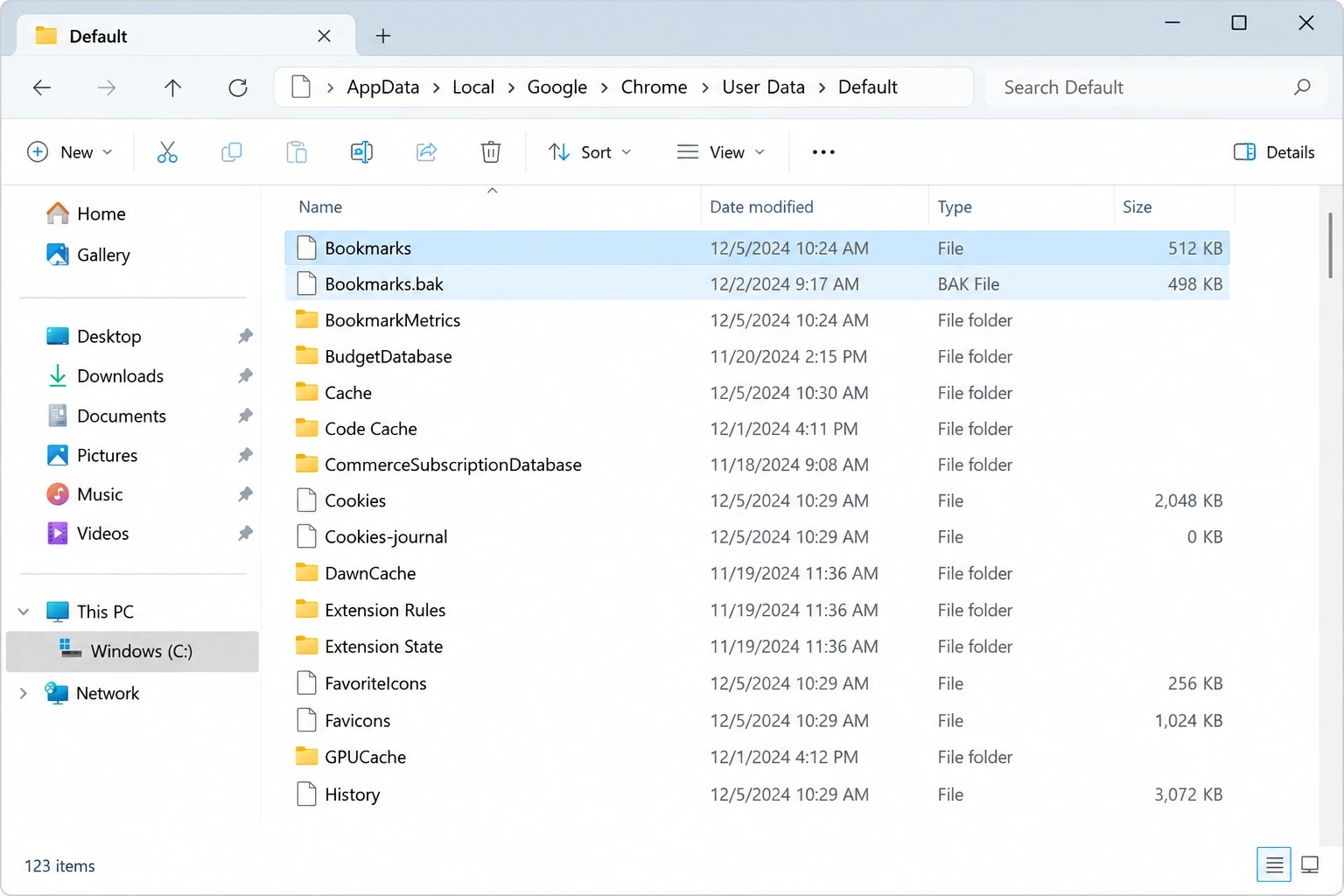
Puis :
- Close Chrome completely.
- Copie
BookmarksetBookmarks.bakto another folder. - Check their modification dates.
- Rename the current
Bookmarksfichier versBookmarks.current. - Make a copy of
Bookmarks.bak. - Rename that copy to
Bookmarks. - Reopen Chrome.
- Check Bookmark Manager.
Cela peut recover deleted bookmarks Chrome lorsque le .bak file still represents an earlier bookmark state.
Limitation : Bookmarks.bak is not a permanent archive. If Chrome updated it after the deletion, the backup may already contain the unwanted state.
Résultat attendu : Chrome loads an older bookmark collection from the backup file.
Method 4: Import an Earlier HTML Bookmark Backup
Meilleur pour : Anyone who exported bookmarks before the deletion.
An HTML export is one of the safest ways to recover deleted bookmarks Chrome because it gives you a separate copy that does not depend on deleted storage data.
In Chrome, open:
More > Bookmarks and lists > Import bookmarks and settings
Then choose your saved HTML file.
If bookmarks already exist, Chrome may place imported entries into a separate imported folder.
Limitation : The file only contains bookmarks that existed when you created the export. Anything added later will not be present.
Résultat attendu : The saved bookmark collection appears in Chrome again.
Method 5: Rebuild Deleted Bookmarks from Chrome History
Meilleur pour : A small number of missing links when no bookmark backup exists.
Chrome History cannot truly recover deleted bookmarks, but it may help you rediscover websites you previously visited.
Presse :
Ctrl + H
Rechercher par :
- Website name
- Domain
- Page title
- Keywords you remember
Once you find a page, open it and create a new bookmark.
Limitation : History does not normally restore the original folder structure, custom bookmark names, or websites that no longer appear in browsing history.
Résultat attendu : You recover the important URLs manually even though the original bookmark records remain deleted.
Method 6: Restore an Older Chrome Bookmark File from Windows Backup
Meilleur pour : Users who previously backed up their Chrome profile.
If File History, a disk image, or another backup system included Chrome’s profile directory, search the backup for an older Bookmarks fichier.
Instead of immediately replacing your current profile, restore the old file to another folder first.
Then compare its modification date and preserve both versions.
Cette méthode peut recover deleted bookmarks Chrome without scanning deleted disk space.
Limitation : It only works when the backup included the correct Chrome profile before the bookmarks disappeared.
Résultat attendu : You obtain an older Bookmarks file that can be tested safely.
When Does File Recovery Software Make Sense?
If Undo, another device, Bookmarks.bak, HTML exports, History, and Windows backups do not solve the problem, determine whether the underlying Chrome file itself is gone.
If you deleted one bookmark inside an otherwise healthy Chrome profile, disk recovery software is usually not the correct next step.
However, file recovery becomes relevant when:
Bookmarkswas deleted from Windows.Bookmarks.bakwas removed.- The entire Chrome profile directory disappeared.
- A cleanup or reset removed local Chrome data.
- An older bookmark file existed locally but is no longer accessible.
When Windows deletes a normal local file, its storage space may remain recoverable until later data overwrites it. Amagicsoft explains this process in Where Do Deleted Files Go?.
In this specific situation, Magic Data Recovery can scan accessible Windows storage for deleted local files.
It differs from Undo, Sync, and bookmark imports because it works at the storage level rather than reversing an action inside Chrome.
Si les options de récupération intégrées ne fonctionnent plus, vous pouvez essayer Magic Data Recovery avant que de nouvelles données ne viennent écraser les fichiers supprimés.
Comment utiliser Magic Data Recovery pour Recover Deleted Bookmarks Chrome Dossiers
Étape 1 : Télécharger et installer Magic Data Recovery
Install Magic Data Recovery on a different drive or partition from the one containing the deleted Chrome profile whenever possible. Installing software onto the affected partition may overwrite recoverable data.
For the standard workflow, you can also check the Magic Data Recovery guide de l'utilisateur.
Prise en charge de Windows 7/8/10/11 et Windows Server
Step 2: Select the Drive Where Chrome Stored the Bookmark File
Launch Magic Data Recovery and select the Windows drive that contained the Chrome profile.
For many Windows systems, the relevant directory is beneath:
%LOCALAPPDATA%\Google\Chrome\User Data\
Lancez l'analyse.

Step 3: Scan for Lost Chrome Bookmark Files
Allow the scan to search for deleted local files. Potential candidates may include:
Bookmarks
Bookmarks.bak
Finding the filename does not automatically mean the content remains intact. Treat scan results as candidates until you verify them.

Step 4: Recover Bookmark Files to a Safe Location
Recover promising files to a different drive or safe location. Do not save them directly over your current Chrome profile.
First preserve the recovered copies. Then close Chrome and test the appropriate file separately.

How to Verify Recovered Chrome Bookmark Files
A scan finding a file named Bookmarks does not mean you have successfully recovered usable bookmark data.
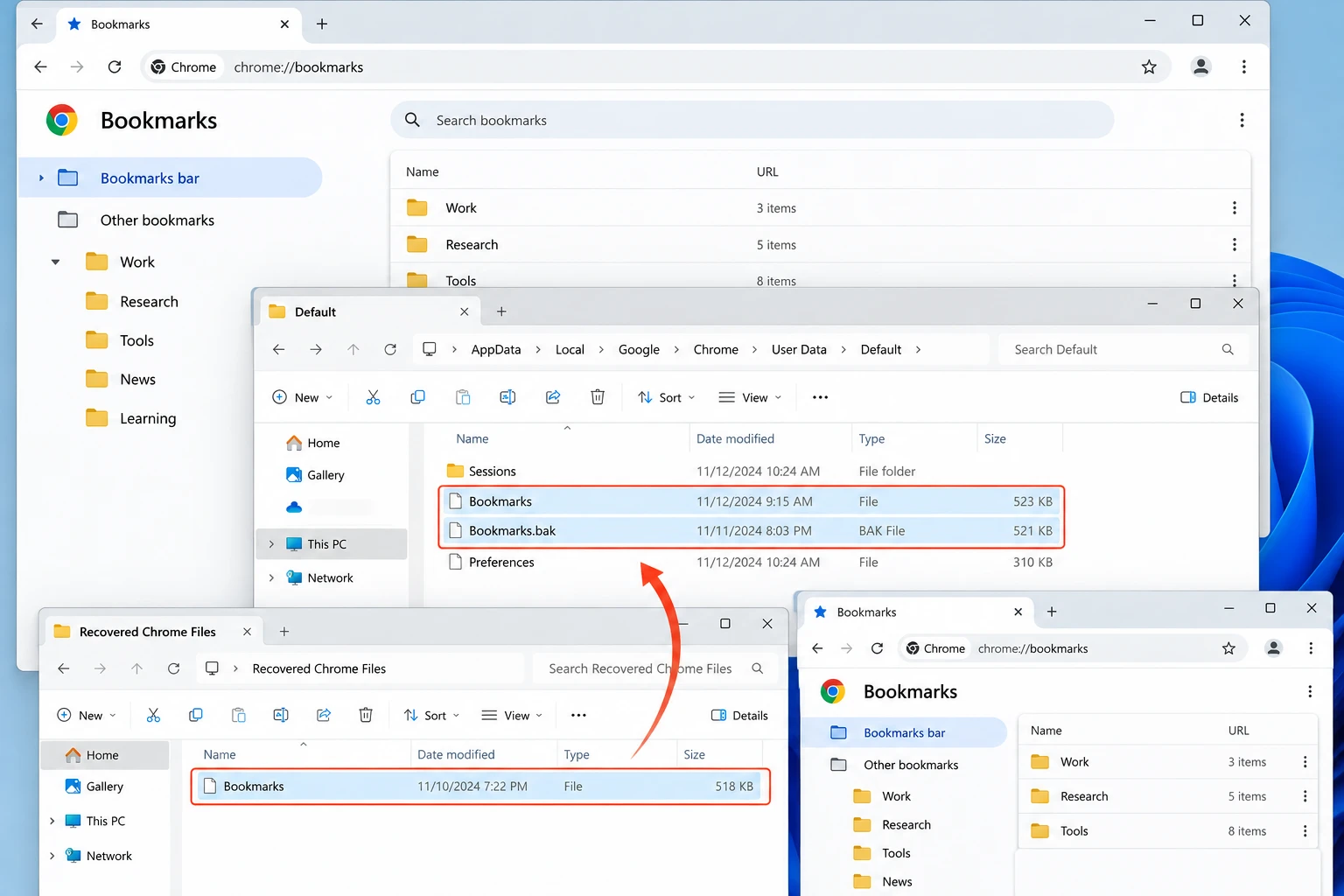
Après la convalescence :
- Keep the recovered file outside the active Chrome profile.
- Compare its file size and modification date with the deletion timeline.
- Back up the current Chrome
Bookmarksfichier. - Close Chrome completely.
- Test the recovered version.
- Open several restored bookmark folders and URLs.
If the file exists but Chrome cannot load its bookmark data correctly, part of the deleted content may have been overwritten.
Limits of Recover Deleted Bookmarks Chrome Methods
No recovery method can guarantee that every deleted bookmark will return. If a deletion synchronized across all devices and no independent copy exists, Chrome Sync may not provide the previous state.
Likewise, data recovery software cannot restore local file data after it has been overwritten. SSDs create an additional limitation. The Commande TRIM allows an SSD to process storage blocks that the operating system no longer needs. As a result, deleted Chrome profile files may become unrecoverable even before substantial new user data is written.
Therefore, storage scanning should remain a last step after Chrome-level and backup-based recovery methods.
How to Prevent Chrome Bookmark Loss
Une fois que vous recover deleted bookmarks Chrome, create an independent recovery point.
Export Bookmarks Regularly
Use Bookmark Manager to export bookmarks as an HTML file.
Par exemple :
chrome-bookmarks-2026-09.html
Keep the export outside the Chrome profile directory.
Use Chrome Sync for Availability, Not Version History
Chrome Sync is useful when you need the same bookmarks on several devices.
However, synced deletion can also propagate. Therefore, do not rely on synchronization as your only backup.
Back Up Important Chrome Profiles
If your bookmarks contain years of research, work resources, or carefully organized folders, include the Chrome profile in your normal Windows backup routine.
Having both an HTML export and an older profile backup gives you more recovery options.
Conclusion
Pour recover deleted bookmarks Chrome, identify the loss before choosing a recovery method. Use Undo for a recent deletion. If the collection only appears missing, check the Chrome profile and Google Account. When another device, Bookmarks.bak, an HTML export, or a Windows backup contains an older copy, restore that copy before attempting disk-level recovery.
This follows the same recovery-first approach explained in Amagicsoft’s guide de récupération des fichiers effacés: use the safest existing copy before trying to reconstruct deleted storage data.
If the actual Chrome Bookmarks or profile file has been deleted and no backup remains, Magic Data Recovery can be a reasonable next step. Recover files to another location and verify the result before replacing the active Chrome profile. Overwriting and SSD TRIM can still make recovery impossible.
Prise en charge de Windows 7/8/10/11 et Windows Server
FAQ
Can Chrome bookmarks still be recovered several weeks after deletion?
Bookmarks.bak may still restore the bookmarks weeks later. For disk-level recovery, later writes and SSD TRIM matter more because they may overwrite or clear the local Chrome bookmark file data.Does Chrome keep deleted bookmarks in a trash folder?
Bookmarks.bak, an HTML export, an older Windows backup, or recovery of the local Chrome profile file.What happens if I delete an entire bookmark folder?
Is there a free way to recover deleted bookmarks without recovery software?
Bookmarks.bak, import an earlier HTML export, and search browsing History. Existing Windows backups may also restore an older bookmark file. Recovery software becomes relevant mainly when the local Chrome bookmark file itself was deleted and no usable backup remains.Can Chrome Sync restore an older version of deleted bookmarks?
Does SSD TRIM affect Chrome bookmark recovery?
Bookmarks or profile file was deleted from an SSD. TRIM can allow the SSD to clear storage blocks that Windows no longer considers necessary, reducing file-level recovery chances. TRIM does not prevent Chrome Undo or an existing HTML export from restoring bookmarks because those methods do not rely on deleted disk sectors.Should I immediately replace Bookmarks with Bookmarks.bak?
Bookmarks.bak contains the missing items without creating another data-loss problem.
Vasilii est un spécialiste de la récupération de données qui possède une dizaine d'années d'expérience pratique dans ce domaine. Tout au long de sa carrière, il a résolu avec succès des milliers de cas complexes impliquant des fichiers supprimés, des disques formatés, des partitions perdues et des systèmes de fichiers RAW. Son expertise couvre à la fois les méthodes de récupération manuelle à l'aide d'outils professionnels tels que les éditeurs hexagonaux et les solutions automatisées avancées à l'aide de logiciels de récupération. La mission de Vasilii est de rendre accessible aux professionnels de l'informatique et aux utilisateurs quotidiens des connaissances fiables en matière de récupération de données, afin de les aider à sauvegarder leurs précieuses ressources numériques.