
Peut-on récupérer des fichiers récemment supprimés ?
Si vous avez supprimé par erreur un document de travail, un dossier de photos, une archive ZIP ou un fichier de projet, vous vous demanderez sans doute immédiatement : Est-il possible de récupérer des fichiers supprimés récemment ?? Dans de nombreux cas, oui. Cependant, la méthode à suivre dépend du fait que le fichier se trouve encore dans la Corbeille, qu’il ait été supprimé définitivement, sauvegardé, synchronisé sur le cloud ou déjà écrasé.
Commencez par utiliser les options de récupération intégrées à Windows, car elles permettent de restaurer les copies existantes sans analyser l'espace disque supprimé. Si ces méthodes échouent et que le fichier d'origine se trouvait sur le stockage local, Magic Data Recovery peut analyser le disque à la recherche de données supprimées pouvant être récupérées. Vous pouvez également consulter notre guide plus complet guide de récupération des fichiers effacés pour d'autres cas de suppression.
Prise en charge de Windows 7/8/10/11 et Windows Server
Table des matières
Peut-on récupérer des fichiers récemment supprimés ? Que se passe-t-il après la suppression ?
La réponse à Est-il possible de récupérer des fichiers supprimés récemment ? Cela dépend en grande partie de la manière dont ils ont été supprimés.
Lorsqu'on supprime un fichier d'un disque interne sous Windows, celui-ci est généralement envoyé dans la Corbeille. À ce stade, le fichier n'a pas encore été définitivement supprimé ; sa restauration est donc très simple.
Cependant, la situation change une fois que vous :
- Vider la corbeille
- Appuyez sur Maj + Suppr
- Supprimer des fichiers de certains périphériques amovibles
- Supprimer un fichier du corbeille du cloud
- Supprimer un fichier et continuer à écrire de nouvelles données sur le disque
Après une suppression définitive, le système de fichiers peut marquer l'espace de stockage occupé comme disponible pour de nouvelles données. Microsoft recommande donc de limiter au maximum l'utilisation de l'ordinateur pendant la tentative de récupération des fichiers supprimés, car de nouvelles écritures pourraient écraser cet espace libre.
Pour découvrir d'autres exemples spécifiques à Windows, consultez notre guide consacré à Récupérer des fichiers récemment supprimés sous Windows 11.
Que s'est-il passé ? | La meilleure première étape |
Le fichier vient d'être supprimé | Essayez Ctrl + Z |
Le fichier se trouve dans la corbeille | Restaurez-le directement |
La corbeille a été vidée | Consultez l'historique des fichiers ou les outils de récupération |
On a utilisé la combinaison Maj + Suppr | Vérifiez les sauvegardes, puis lancez une analyse du disque dur |
Le fichier stocké dans le cloud a été supprimé | Vérifiez la corbeille ou le dossier « Éléments récemment supprimés » du service |
Le fichier SSD a été supprimé | Cessez immédiatement d'utiliser le SSD |
Le disque dur présente des problèmes matériels | Envisagez de faire appel à des professionnels pour vous remettre sur pied |
Que faire avant d'essayer de récupérer des fichiers supprimés ?
Si Est-il possible de récupérer des fichiers supprimés récemment ? Si c'est votre préoccupation immédiate, évitez d'aggraver la situation.
Tout d'abord, cessez toute activité inutile sur le disque concerné. Ne téléchargez pas de fichiers volumineux, n'installez pas d'applications, n'utilisez pas de logiciels de nettoyage de disque et ne copiez pas de nouvelles données sur ce disque.
Si vous décidez finalement d'utiliser un logiciel de récupération, n'installez pas ce logiciel sur la même partition que celle qui contenait les fichiers supprimés. De même, les fichiers récupérés doivent être enregistrés sur un autre disque.
Cette précaution est importante, car l'écrasement des données constitue l'une des principales limites de la récupération des fichiers supprimés.
Les utilisateurs de SSD doivent redoubler de prudence
Les fichiers récemment supprimés sur un SSD posent un défi supplémentaire : la commande TRIM.
La fonction TRIM indique à un SSD que certains blocs ne contiennent plus de données nécessaires. Le contrôleur du SSD peut ensuite effacer ces blocs lors d’une opération de maintenance interne. Il est donc important d’empêcher toute nouvelle écriture, mais le simple fait d’éviter l’écrasement des données ne garantit pas à lui seul que les données du SSD resteront récupérables.
Pour plus de détails, voir Comment récupérer des fichiers supprimés sur un SSD.
Méthode 1 : Annuler la suppression récente d'un fichier à l'aide de la combinaison Ctrl + Z
Si vous venez de supprimer le fichier il y a quelques instants, la réponse la plus rapide à Est-il possible de récupérer des fichiers supprimés récemment ? peut-être Ctrl + Z.
Ouvrez le dossier dans lequel le fichier a été supprimé, puis appuyez sur :
Ctrl + Z
Vous pouvez également cliquer avec le bouton droit de la souris sur une zone vide du dossier et rechercher Annuler Supprimer.
Cette méthode est plus efficace immédiatement après la suppression. Elle risque de ne plus fonctionner après un redémarrage de Windows, après avoir effectué plusieurs autres opérations sur des fichiers ou après avoir fermé la session concernée.
Comme cette méthode n'analyse pas le disque dur et ne modifie pas les sauvegardes, elle devrait figurer parmi les premières que vous essayez.
Méthode 2 : Récupérer les fichiers récemment supprimés à partir de la corbeille
Pour la plupart des utilisateurs de Windows qui se posent la question Est-il possible de récupérer des fichiers supprimés récemment ?, la corbeille est le prochain endroit à vérifier.
- Ouvrir Corbeille depuis le bureau.
- Recherchez le fichier ou le dossier manquant.
- Trier par Date de suppression si nécessaire.
- Cliquez avec le bouton droit de la souris sur l'élément.
- Sélectionner Restaurer.
Windows replace le fichier dans son dossier d'origine.
Si la corbeille a déjà été vidée, consultez notre guide dédié pour savoir comment récupérer les fichiers supprimés de la corbeille.
Il ne faut pas confondre la restauration d'un fichier à partir de la Corbeille avec la récupération d'un fichier supprimé définitivement. Bien que ces deux opérations concernent des données supprimées, le processus de récupération sous-jacent est différent.
Méthode 3 : Vérifiez la corbeille du cloud ou le dossier “ Éléments récemment supprimés ”
Parfois Est-il possible de récupérer des fichiers supprimés récemment ? fait référence à OneDrive, Google Drive, Dropbox ou tout autre service de synchronisation, plutôt qu'au stockage local de Windows.
Dans ce cas, connectez-vous au service concerné et vérifiez d'abord sa corbeille, son bac de recyclage ou la section « Éléments récemment supprimés ».
Cette distinction est importante pour des recherches telles que Peut-on récupérer des fichiers supprimés à partir du dossier « Éléments récemment supprimés » ?. Si un fichier a déjà été supprimé de la corbeille secondaire d'un service, il se peut qu'il ne figure pas dans la corbeille locale de Windows.
Par exemple, les utilisateurs de Google Drive peuvent consulter les options disponibles au niveau du compte dans notre guide consacré à récupérer des fichiers supprimés définitivement sur Google Drive.
Si le fichier avait également été téléchargé ou synchronisé sur votre PC, il se peut toutefois qu'une copie locale récupérable existe encore.
Important : Si le dossier “ Supprimés récemment ” se réfère à la mémoire interne d'un téléphone ou d'une tablette, les logiciels de récupération de disque sous Windows ne doivent pas être considérés comme un substitut aux options de récupération intégrées fournies par le fabricant de l'appareil.
Méthode 4 : Utiliser l'historique des fichiers ou les versions précédentes
Si le fichier ne se trouve plus dans la Corbeille, il convient de procéder à des sauvegardes avant de lancer l'analyse du disque.
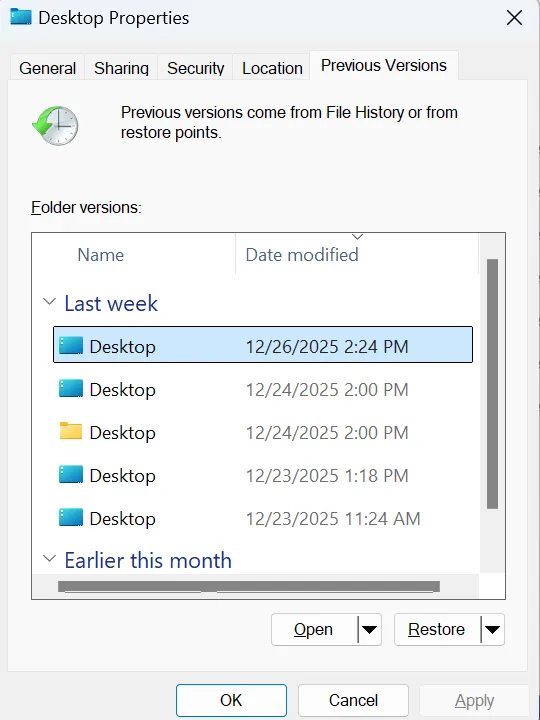
L'historique des fichiers peut conserver des copies antérieures des dossiers protégés s'il a été configuré avant la suppression. Microsoft confirme que les utilisateurs peuvent parcourir les versions précédentes d'un dossier et restaurer une copie antérieure contenant le fichier supprimé.
A vérifier :
- Ouvrir Explorateur de fichiers.
- Accédez au dossier qui contenait auparavant le fichier supprimé.
- Cliquez avec le bouton droit de la souris sur le dossier.
- Choisir Restaurer les versions précédentes.
- Sélectionnez une version antérieure à la suppression.
- Ouvrez-le d'abord si vous souhaitez vérifier son contenu.
- Restaurez le fichier ou le dossier souhaité.
Il est généralement préférable d'utiliser des sauvegardes lorsqu'elles sont disponibles, car elles permettent de restaurer une copie existante plutôt que de tenter de reconstituer des données supprimées.
Ne confondez pas l'historique des fichiers avec la restauration du système
La fonctionnalité « Restauration du système » est principalement destinée à rétablir l'état antérieur des fichiers système de Windows, des paramètres du Registre, des pilotes et des applications installées. Elle ne doit pas constituer votre méthode principale pour récupérer un document personnel, une photo ou une vidéo supprimés par inadvertance.
Méthode 5 : Essayez la fonction de récupération de fichiers de Windows
Si les sauvegardes ne suffisent pas à résoudre le problème Est-il possible de récupérer des fichiers supprimés récemment ?, Microsoft propose une autre option appelée « Récupération de fichiers Windows ».
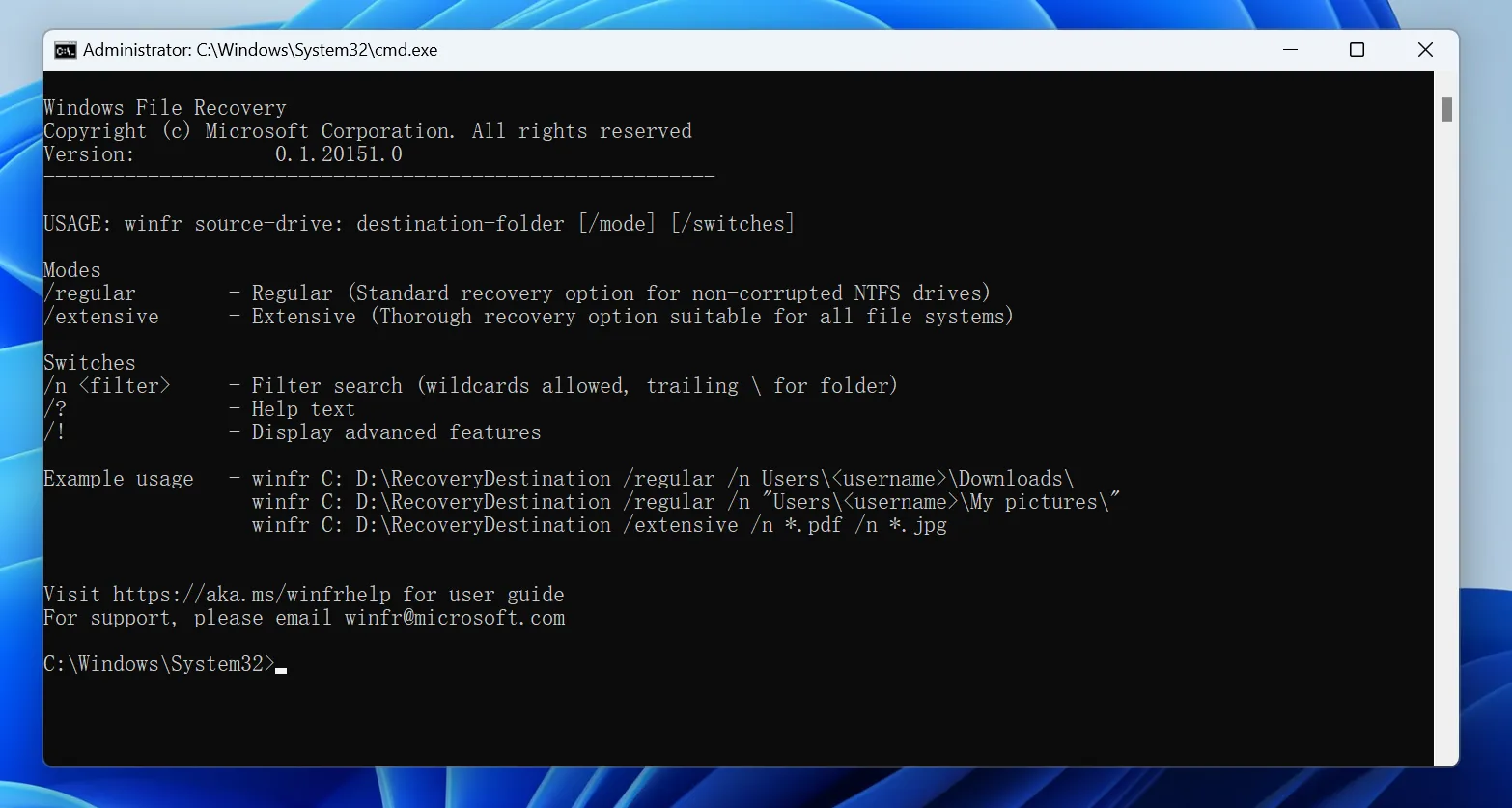
Il s'agit d'une application de récupération en ligne de commande permettant de récupérer des fichiers supprimés sur des périphériques de stockage locaux, notamment les disques durs internes, les disques durs externes et les clés USB. Elle ne permet pas de récupérer les fichiers stockés exclusivement dans le cloud ni ceux situés sur des partages réseau.
Sa syntaxe de base est la suivante :
winfr lecteur-source : lecteur-destination : /mode /n filtre
Par exemple :
winfr C: E: /regular /n *.docx
Les disques source et de destination doivent être différents.
Microsoft propose deux modes principaux :
- Régulière — Convient aux fichiers récemment supprimés sur un volume NTFS en bon état.
- Très large — effectue une recherche plus approfondie lorsque le mode « Normal » ne donne pas de résultat ou lorsque la situation de suppression est plus complexe.
Les utilisateurs qui préfèrent une interface graphique peuvent trouver la restauration en ligne de commande moins pratique.
Si c'est un dossier entier qui a disparu, et non un seul fichier, notre Guide de récupération des dossiers supprimés aborde également des exemples de récupération de fichiers sous Windows.
Méthode n° 6 : Récupérer des fichiers supprimés définitivement avec Magic Data Recovery
Supposons que vous ayez déjà essayé la Corbeille, la récupération dans le cloud, l'Historique des fichiers et les autres options disponibles sous Windows. Vous vous demandez peut-être encore : Est-il possible de récupérer des fichiers supprimés récemment ? une fois que Windows ne les affiche plus ?
Si les données d'origine n'ont pas été écrasées ou effacées par le périphérique de stockage, un logiciel de récupération de fichiers peut analyser le disque concerné à la recherche de données récupérables.
Magic Data Recovery est conçu pour faire face à des situations de perte de données au niveau local, telles que :
- Fichiers supprimés à l'aide de la combinaison de touches Maj + Suppr
- Une corbeille vidée
- Dossiers supprimés par erreur
- Fichiers supprimés sur des disques durs, des SSD, des clés USB et des cartes mémoire
- Les fichiers qui ne sont plus accessibles via les méthodes habituelles de restauration de Windows
Pour la combinaison de touches Maj + Suppr en particulier, consultez notre guide sur récupérer des fichiers supprimés à l'aide de la combinaison Maj + Suppr.
Contrairement à la Corbeille ou à l'Historique des fichiers, un logiciel de récupération ne dépend pas du fait que Windows conserve une copie visible ni de la création préalable d'une sauvegarde. Il recherche plutôt sur le périphérique de stockage les données de fichiers récupérables qui s'y trouvent encore.
Toutefois, il ne peut pas restaurer des données écrasées, annuler un effacement TRIM déjà effectué sur un SSD, ni réparer du matériel endommagé physiquement.
Si les options de récupération intégrées ne fonctionnent plus, vous pouvez essayer Magic Data Recovery avant que de nouvelles données ne viennent écraser les fichiers supprimés.
Comment utiliser Magic Data Recovery pour récupérer des fichiers récemment supprimés
Étape 1 : Télécharger et installer Magic Data Recovery
Téléchargez et installez Magic Data Recovery sur un disque dur ou une partition en bon état.
Faire pas Ne l'installez pas sur la même partition que celle où se trouvaient les fichiers supprimés. L'installation d'un nouveau logiciel à cet emplacement risquerait d'écraser des données récupérables.
Prise en charge de Windows 7/8/10/11 et Windows Server
Étape 2 : Sélectionnez le disque sur lequel étaient stockés les fichiers supprimés
Lancez Magic Data Recovery et identifiez le disque ou la partition d'origine qui contenait les fichiers manquants.
Sélectionnez cet emplacement et lancez l'analyse.

Étape 3 : Recherche des fichiers supprimés récemment ou définitivement
Laissez le logiciel analyser le périphérique de stockage sélectionné.
Des résultats récupérables peuvent s'afficher au fur et à mesure de l'analyse. Utilisez les filtres disponibles (type de fichier, chemin d'accès ou critères de recherche) pour affiner les résultats si nécessaire.

Étape 4 : Prévisualisation des fichiers avant la récupération
Sélectionnez un fichier candidat, puis utilisez Avant-première lorsque le format et l'état du fichier le permettent.
La prévisualisation peut vous aider à vérifier que vous avez bien sélectionné le document, la photo, la vidéo ou tout autre fichier souhaité avant de procéder à la récupération. Cependant, tous les fichiers endommagés ou non pris en charge ne peuvent pas nécessairement être prévisualisés.

Étape 5 : Récupération des fichiers vers un emplacement sûr
Sélectionnez les fichiers dont vous avez besoin et copiez-les sur un autre disque dur ou dans un emplacement de stockage sécurisé.
Ne sauvegardez pas les fichiers récupérés à l'emplacement d'origine où la perte de données s'est produite pendant le processus de récupération.

Que se passe-t-il si vous supprimez des fichiers avec la combinaison Maj + Suppr ?
La combinaison de touches Maj + Suppr permet de contourner le processus habituel de la Corbeille.
Par conséquent, si Est-il possible de récupérer des fichiers supprimés récemment ? Cela fait référence à un élément supprimé à l'aide de la combinaison Maj + Suppr ; vérifier la Corbeille ne sera généralement d'aucune utilité. Cherchez plutôt dans l'Historique des fichiers, une autre sauvegarde, la fonction de récupération de fichiers de Windows ou les données récupérables sur le disque d'origine.
Vous pouvez également consulter notre guide plus détaillé expliquant comment restaurer les fichiers définitivement effacés.
Le point essentiel est que l'expression “ supprimé définitivement ” ne signifie pas automatiquement “ récupérable ” ou “ irrécupérable ”. Le résultat dépend de ce qu'il est advenu des données sous-jacentes par la suite.
Pourquoi les fichiers récemment supprimés ne peuvent parfois pas être récupérés
Le mot “ récemment ” peut prêter à confusion.
Un fichier supprimé hier sur un disque dur inactif peut parfois rester récupérable, tandis qu'un fichier supprimé il y a quelques minutes sur un SSD actif peut déjà avoir été affecté par la commande TRIM ou par une activité de stockage ultérieure.
Parmi les causes courantes d'échec de la récupération, on peut citer :
- Les secteurs d'origine ont été écrasés par de nouvelles données
- La fonction TRIM du SSD et le processus de nettoyage ont effacé les blocs concernés
- Le fichier a été effacé de manière sécurisée
- Il ne reste qu'un fragment de fichier incomplet ou endommagé
- Le périphérique de stockage présente des dommages physiques
- Il n'y a jamais eu de copie locale
- Le fournisseur de services cloud a supprimé définitivement la seule copie
Par conséquent, aucune méthode de récupération légitime ne devrait promettre une récupération garantie.
Quand faut-il cesser d'utiliser un logiciel de récupération ?
Les logiciels sont adaptés aux pertes de données d'ordre logique, mais pas à tous les problèmes de stockage.
Cessez d'analyser l'appareil à plusieurs reprises si vous constatez des symptômes tels que :
- Bruits de cliquetis ou de grincement provenant du disque dur
- Déconnexions répétées
- Un disque qui disparaît du BIOS
- Choc violent ou dégât causé par un liquide
- Odeur de brûlé ou dommage électrique
- Un périphérique de stockage qui ne s'allume plus
Dans ces cas-là, continuer à utiliser le support peut aggraver la situation. Il peut être préférable de faire appel à un laboratoire spécialisé dans la récupération de données.
Comment éviter que ce problème ne se reproduise à l'avenir
Après avoir résolu Est-il possible de récupérer des fichiers supprimés récemment ?, réduire le risque qu'une nouvelle suppression accidentelle ne se transforme en situation d'urgence.
Conservez au moins une sauvegarde indépendante de vos fichiers importants. L'historique des fichiers Windows, un autre système de sauvegarde programmée, ainsi que l'historique des versions dans le cloud peuvent offrir différents niveaux de protection.
N'oubliez pas non plus que la sauvegarde automatique n'est pas synonyme de sauvegarde permanente. La sauvegarde automatique peut protéger les modifications récentes au sein des applications prises en charge, mais elle ne conserve pas nécessairement une copie distincte après une suppression.
Enfin, vérifiez attentivement les fichiers avant de vider la Corbeille ou d'utiliser la combinaison de touches Maj + Suppr.
Conclusion
Ainsi, Est-il possible de récupérer des fichiers supprimés récemment ?? Souvent, oui — mais commencez par la solution la moins invasive. Essayez Ctrl + Z, vérifiez la Corbeille, consultez la corbeille du cloud et recherchez l'« Historique des fichiers » ou les « Versions précédentes ». La fonctionnalité de récupération de fichiers de Windows est une autre option lorsque ces méthodes échouent.
Si les fichiers ont été supprimés définitivement et qu'il ne reste aucune sauvegarde, Magic Data Recovery peut analyser le stockage local à la recherche de données de fichiers récupérables. Toutefois, l'écrasement des données, la fonction TRIM des SSD, la suppression sécurisée et les dommages physiques peuvent limiter ou empêcher la récupération.
La règle la plus importante est de cesser dès que possible d'écrire de nouvelles données sur le support de stockage concerné. Pour en savoir plus sur les scénarios de suppression associés et découvrir d'autres méthodes de récupération, rendez-vous sur le site de Amagicsoft guide de récupération des fichiers effacés.
Prise en charge de Windows 7/8/10/11 et Windows Server
FAQ
Est-il possible de récupérer des fichiers récemment supprimés après avoir vidé la Corbeille ?
Est-il possible de récupérer un élément supprimé de la liste « Éléments récemment supprimés » après l'avoir supprimé une nouvelle fois ?
Peut-on récupérer ses fichiers « récemment supprimés » sans logiciel ?
Pendant combien de temps un fichier récemment supprimé peut-il être récupéré ?
La fonction TRIM des SSD peut-elle empêcher la récupération de fichiers récemment supprimés ?
Magic Data Recovery permet-il de récupérer des fichiers supprimés définitivement ?
Quel est le moyen le plus sûr de récupérer un fichier récemment supprimé ?

Vasilii est un spécialiste de la récupération de données qui possède une dizaine d'années d'expérience pratique dans ce domaine. Tout au long de sa carrière, il a résolu avec succès des milliers de cas complexes impliquant des fichiers supprimés, des disques formatés, des partitions perdues et des systèmes de fichiers RAW. Son expertise couvre à la fois les méthodes de récupération manuelle à l'aide d'outils professionnels tels que les éditeurs hexagonaux et les solutions automatisées avancées à l'aide de logiciels de récupération. La mission de Vasilii est de rendre accessible aux professionnels de l'informatique et aux utilisateurs quotidiens des connaissances fiables en matière de récupération de données, afin de les aider à sauvegarder leurs précieuses ressources numériques.