
È possibile recuperare i file cancellati di recente?
Se hai cancellato per sbaglio un documento di lavoro, una cartella di foto, un archivio ZIP o un file di progetto, potresti chiederti subito: È possibile recuperare i file cancellati di recente?? In molti casi, sì. Tuttavia, il metodo corretto dipende dal fatto che il file si trovi ancora nel Cestino, sia stato eliminato definitivamente, sia stato sottoposto a backup, sia stato sincronizzato sul cloud o sia già stato sovrascritto.
Inizia con le opzioni di ripristino integrate in Windows, poiché consentono di ripristinare le copie esistenti senza eseguire la scansione dello spazio su disco cancellato. Se tali metodi non funzionano e il file originale era presente nell'archivio locale, Magic Data Recovery può eseguire una scansione dell'unità alla ricerca di dati cancellati recuperabili. Puoi anche consultare la nostra più ampia Guida al recupero dei file cancellati per altri casi di cancellazione.
Supporta Windows 7/8/10/11 e Windows Server
Indice dei contenuti
È possibile recuperare i file cancellati di recente? Cosa succede dopo la cancellazione?
La risposta a È possibile recuperare i file cancellati di recente? dipende in gran parte dal modo in cui sono stati cancellati.
Quando si elimina normalmente un file da un'unità interna di Windows, il file viene solitamente spostato nel Cestino. A questo punto, il file non è stato ancora eliminato definitivamente, quindi è possibile ripristinarlo facilmente.
Tuttavia, la situazione cambia dopo che:
- Svuotare il cestino
- Premi Shift + Canc
- Eliminare i file da determinati dispositivi rimovibili
- Rimuovere un file dal cestino del cloud
- Eliminare un file e continuare a scrivere nuovi dati sull'unità
Dopo la cancellazione definitiva, il file system può contrassegnare lo spazio di archiviazione occupato come disponibile per nuovi dati. Microsoft raccomanda pertanto di ridurre al minimo l'utilizzo del computer mentre si tenta di recuperare i file cancellati, poiché nuove operazioni di scrittura potrebbero sovrascrivere tale spazio libero.
Per ulteriori esempi specifici per Windows, consulta la nostra guida su ripristinare i file cancellati di recente in Windows 11.
Che cosa è successo? | Il primo passo migliore |
Il file è stato appena eliminato | Prova a premere Ctrl + Z |
Il file si trova nel Cestino | Ripristinalo direttamente |
Il cestino è stato svuotato | Controlla la Cronologia dei file o gli strumenti di ripristino |
È stata utilizzata la combinazione Shift + Canc | Controlla i backup, poi esegui una scansione del disco |
Il file nel cloud è stato eliminato | Controlla il cestino/gli elementi eliminati di recente del servizio |
Il file SSD è stato eliminato | Smettete immediatamente di utilizzare l'SSD |
L'unità presenta problemi fisici | Valuta la possibilità di ricorrere a un servizio di recupero dati professionale |
Cosa fare prima di provare a recuperare i file cancellati
Se È possibile recuperare i file cancellati di recente? è la tua priorità immediata, evita di peggiorare la situazione.
Innanzitutto, interrompete qualsiasi attività non necessaria sull’unità interessata. Non scaricate file di grandi dimensioni, non installate applicazioni, non eseguite software di pulizia del disco e non copiate nuovi dati su di essa.
Se alla fine dovessi utilizzare un software di recupero dati, non installarlo sulla stessa partizione che conteneva i file cancellati. Allo stesso modo, i file recuperati dovrebbero essere salvati su un’altra unità.
Questa precauzione è importante perché la sovrascrittura rappresenta uno dei principali limiti del recupero dei file cancellati.
Gli utenti di SSD devono prestare particolare attenzione
I file cancellati di recente su un SSD pongono un'ulteriore sfida: il TRIM.
Il comando TRIM comunica all’SSD che determinati blocchi non contengono più dati necessari. Il controller dell’SSD potrebbe in seguito cancellare tali blocchi durante la manutenzione interna. Pertanto, sebbene sia importante interrompere le nuove operazioni di scrittura, il semplice fatto di evitare la sovrascrittura non garantisce che i dati presenti sull’SSD rimangano recuperabili.
Per una spiegazione più approfondita, si veda Come recuperare i file cancellati da un SSD.
Metodo 1: annullare l'eliminazione recente di un file con Ctrl + Z
Se hai cancellato il file solo pochi istanti fa, la risposta più veloce a È possibile recuperare i file cancellati di recente? potrebbe essere Ctrl + Z.
Apri la cartella in cui è stato eliminato il file e premi:
Ctrl + Z
In alternativa, clicca con il tasto destro del mouse su un’area vuota della cartella e cerca Annullamento Cancella.
Questo metodo funziona al meglio subito dopo la cancellazione. Potrebbe non funzionare più dopo aver riavviato Windows, aver eseguito diverse altre operazioni sui file o aver chiuso la sessione in questione.
Poiché non esegue la scansione del disco né modifica i backup, dovrebbe essere uno dei primi metodi da provare.
Metodo 2: Ripristinare i file eliminati di recente dal Cestino
Per la maggior parte degli utenti Windows che chiedono È possibile recuperare i file cancellati di recente?, il Cestino è il prossimo posto da controllare.
- Aperto Cestino dal desktop.
- Individua il file o la cartella mancante.
- Ordina per Data Cancellata se necessario.
- Fare clic con il tasto destro del mouse sull'elemento.
- Selezionare Ripristino.
Windows riporta il file nella cartella di origine.
Se il Cestino è già stato svuotato, consulta la nostra guida dedicata su come recuperare i file eliminati dal Cestino.
Non bisogna confondere il ripristino di un file dal Cestino con il recupero di un file cancellato definitivamente. Sebbene in entrambi i casi si tratti di dati cancellati, il processo di recupero alla base è diverso.
Metodo 3: Controlla il Cestino cloud o la cartella “Elementi eliminati di recente”
A volte È possibile recuperare i file cancellati di recente? si riferisce a OneDrive, Google Drive, Dropbox o un altro servizio di sincronizzazione anziché all’archivio locale di Windows.
In questo caso, accedi al servizio in questione e controlla innanzitutto il Cestino, il Cestino di riciclaggio o l'area "Elementi eliminati di recente".
Questa distinzione è importante per ricerche quali È possibile recuperare i file eliminati dalla cartella "Eliminati di recente"?. Se un file è già stato rimosso dal cestino secondario di un servizio, è possibile che non sia presente nel Cestino locale di Windows.
Ad esempio, gli utenti di Google Drive possono consultare le opzioni disponibili a livello di account nella nostra guida su recuperare i file cancellati definitivamente da Google Drive.
Se il file fosse stato scaricato o sincronizzato anche sul tuo PC, tuttavia, potrebbe esserci ancora una copia locale recuperabile.
Importante: Se la cartella “Eliminati di recente” si riferisce alla memoria interna di uno smartphone o di un tablet, il software di recupero dati di Windows non deve essere considerato un sostituto delle opzioni di recupero integrate dal produttore del dispositivo.
Metodo 4: Utilizzare la Cronologia dei file o le versioni precedenti
Se il file non si trova più nel Cestino, è opportuno eseguire i backup prima di avviare la scansione del disco.
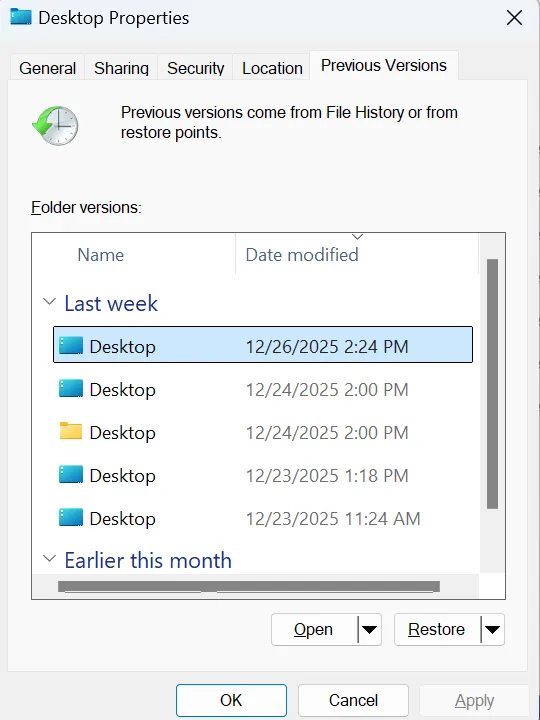
La Cronologia dei file può conservare copie precedenti delle cartelle protette, purché sia stata configurata prima dell'eliminazione. Microsoft conferma che gli utenti possono sfogliare le versioni precedenti di una cartella e ripristinare una copia precedente contenente il file eliminato.
Per controllare:
- Aperto Esplora file.
- Accedi alla cartella che in precedenza conteneva il file eliminato.
- Fare clic con il tasto destro del mouse sulla cartella.
- Scegliere Ripristino delle versioni precedenti.
- Seleziona una versione precedente alla cancellazione.
- Se vuoi verificarne il contenuto, aprilo prima.
- Ripristina il file o la cartella desiderati.
Di norma è preferibile ricorrere ai backup, quando disponibili, poiché consentono di ripristinare una copia già esistente anziché tentare di ricostruire i dati cancellati.
Non confondere la Cronologia dei file con il Ripristino configurazione di sistema
La funzione "Ripristino configurazione di sistema" è pensata principalmente per ripristinare i file di sistema di Windows, le impostazioni del Registro di sistema, i driver e le applicazioni installate. Non dovrebbe essere il metodo principale da utilizzare per recuperare documenti personali, foto o video cancellati accidentalmente.
Metodo 5: Prova il recupero file di Windows
Se i backup non risolvono il problema È possibile recuperare i file cancellati di recente?, Microsoft offre un'altra opzione denominata "Windows File Recovery".
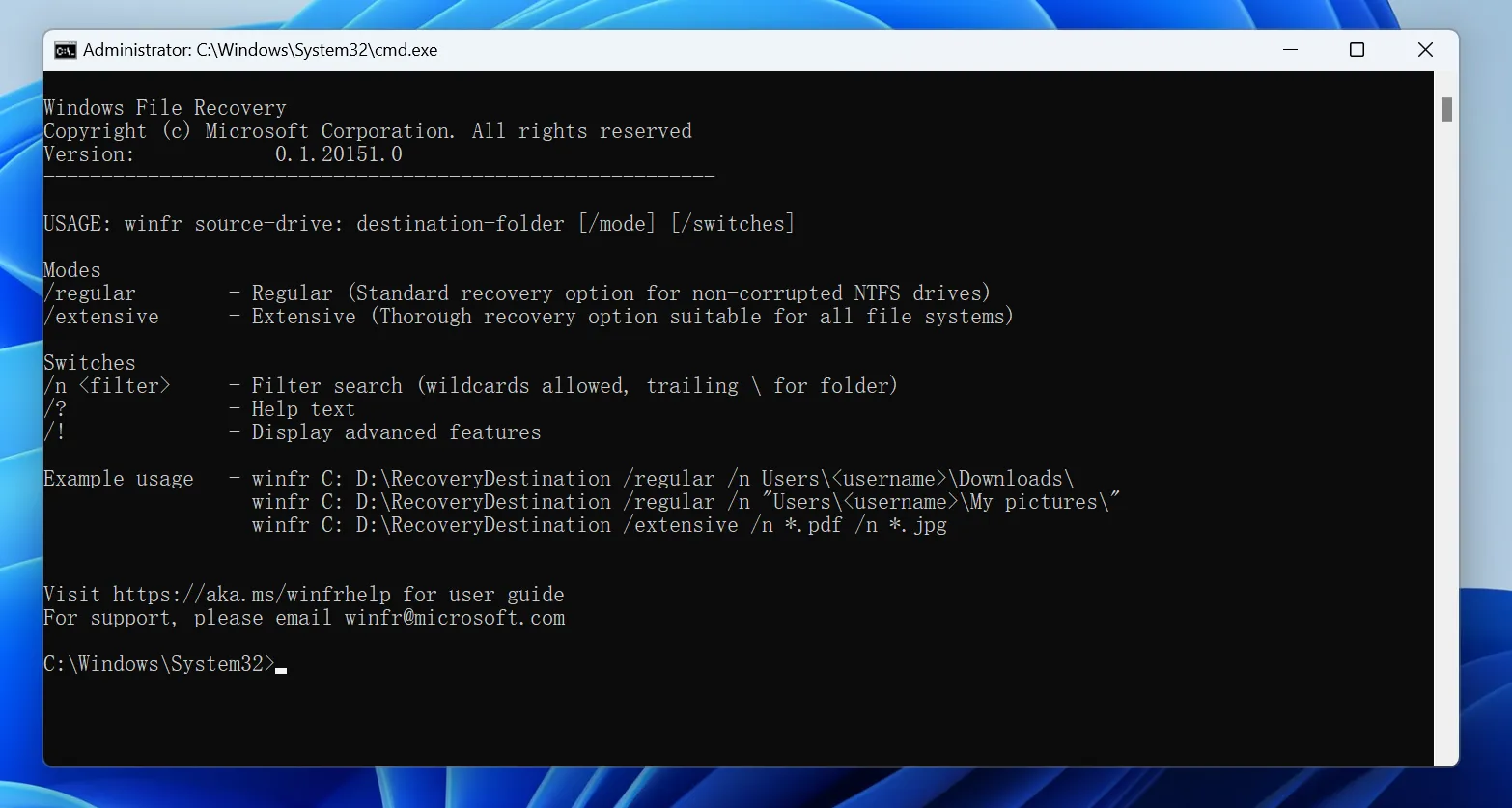
Si tratta di un'applicazione di recupero da riga di comando per i file cancellati dai dispositivi di archiviazione locali, inclusi dischi interni, dischi esterni e dispositivi USB. Non recupera i file presenti esclusivamente nel cloud né le condivisioni di rete.
La sua sintassi di base è:
winfr unità-di-origine: unità-di-destinazione: /modalità /n filtro
Ad esempio:
winfr C: E: /regular /n *.docx
Le unità di origine e di destinazione devono essere diverse.
Microsoft offre due modalità principali:
- Regolare — adatto ai file cancellati di recente su un volume NTFS integro.
- Ampio — esegue una ricerca più ampia quando la modalità Normale non funziona o quando la situazione relativa alla cancellazione è più complessa.
Gli utenti che preferiscono un'interfaccia grafica potrebbero trovare il ripristino tramite riga di comando meno pratico.
Se fosse scomparsa un'intera cartella anziché un singolo file, il nostro Guida al recupero delle cartelle cancellate tratta anche esempi relativi al recupero di file in Windows.
Metodo 6: Recuperare i file cancellati definitivamente con Magic Data Recovery
Supponiamo che tu abbia già provato il Cestino, il recupero dal cloud, la Cronologia file e altre opzioni disponibili in Windows. Potresti comunque chiederti: È possibile recuperare i file cancellati di recente? dopo che Windows non li mostra più?
Se i dati originali non sono stati sovrascritti o cancellati dal dispositivo di archiviazione, un software di recupero file può eseguire una scansione dell'unità interessata alla ricerca di dati recuperabili.
Magic Data Recovery è progettato per far fronte a situazioni di perdita di dati a livello locale, quali:
- File eliminati con Shift + Canc
- Un cestino svuotato
- Cartelle cancellate per sbaglio
- File cancellati su dischi rigidi, SSD, chiavette USB e schede di memoria
- File a cui non è più possibile accedere tramite i normali metodi di ripristino di Windows
Per quanto riguarda in particolare Shift + Canc, consulta la nostra guida su ripristinare i file eliminati con Shift+Canc.
A differenza del Cestino o della Cronologia dei file, un software di recupero dati non dipende dal fatto che Windows conservi una copia visibile o che sia stato creato in precedenza un backup. Al contrario, esegue una ricerca sul dispositivo di archiviazione alla ricerca di dati di file recuperabili ancora presenti.
Tuttavia, non è in grado di recuperare i dati sovrascritti, di annullare la cancellazione TRIM già completata su un SSD né di riparare componenti hardware danneggiati fisicamente.
Se le opzioni di recupero integrate non funzionano più, puoi provare Magic Data Recovery prima che i nuovi dati sovrascrivano i file eliminati.
Come utilizzare Magic Data Recovery per recuperare i file cancellati di recente
Passo 1: Scaricare e installare Magic Data Recovery
Scarica e installa Magic Data Recovery su un'unità o una partizione in buone condizioni.
Fare non Installalo sulla stessa partizione in cui erano memorizzati i file eliminati. L'installazione di un nuovo software in quella posizione potrebbe sovrascrivere i dati recuperabili.
Supporta Windows 7/8/10/11 e Windows Server
Passaggio 2: Selezionare l'unità su cui erano memorizzati i file eliminati
Avvia Magic Data Recovery e individua l'unità o la partizione originale che conteneva i file mancanti.
Seleziona quella posizione e avvia la scansione.

Fase 3: Ricerca dei file eliminati di recente o in modo definitivo
Consenti al software di eseguire la scansione del dispositivo di archiviazione selezionato.
Man mano che la scansione procede, potrebbero comparire risultati recuperabili. Se necessario, utilizza i filtri disponibili per tipo di file, percorso o ricerca per restringere i risultati.

Passo 4: Anteprima dei file prima del recupero
Seleziona un file candidato e utilizza Anteprima quando il formato e lo stato del file lo consentono.
L'anteprima può aiutarti a verificare di aver selezionato il documento, la foto, il video o altro file desiderato prima del recupero. Tuttavia, non tutti i file danneggiati o non supportati possono necessariamente essere visualizzati in anteprima.

Passo 5: Recuperare i file in una posizione sicura
Seleziona i file che ti servono e salvali su un'altra unità o in una posizione di archiviazione sicura.
Durante il processo di recupero, non salvare i file recuperati nella stessa posizione in cui si è verificata la perdita dei dati.

Cosa succede se si cancellano i file con Shift + Canc?
La combinazione di tasti Maiusc + Cancella aggira il normale flusso di lavoro del Cestino.
Pertanto, se È possibile recuperare i file cancellati di recente? si riferisce a un elemento eliminato con Shift+Canc; controllare il Cestino di solito non serve. Cerca invece in "Cronologia file", in un altro backup, in "Recupero file di Windows" o i dati recuperabili sull'unità originale.
Puoi anche leggere la nostra guida più dettagliata su come ripristinare i file eliminati in modo permanente.
Il punto fondamentale è che l’espressione “cancellato definitivamente” non implica automaticamente che i dati siano “recuperabili” o “irrecuperabili”. Il risultato dipende da ciò che è accaduto in seguito ai dati sottostanti.
Perché a volte i file eliminati di recente non possono essere recuperati
La parola “di recente” può trarre in inganno.
Un file cancellato ieri da un disco rigido inattivo può talvolta essere ancora recuperabile, mentre un file cancellato pochi minuti fa da un SSD attivo potrebbe essere già stato modificato dal comando TRIM o da successive attività di archiviazione.
Tra i motivi più comuni per cui il recupero non va a buon fine vi sono:
- I settori originali sono stati sovrascritti da nuovi dati
- La funzione TRIM dell'SSD e la garbage collection hanno liberato i blocchi in questione
- Il file è stato cancellato in modo sicuro
- Rimane solo un frammento di file incompleto o danneggiato
- Il dispositivo di archiviazione presenta danni fisici
- Non è mai esistita alcuna copia locale
- Il fornitore di servizi cloud ha eliminato definitivamente l'unica copia
Pertanto, nessun metodo di recupero legittimo dovrebbe promettere un recupero garantito.
Quando è il caso di smettere di usare i software di recupero dati
Il software è indicato per la perdita logica dei dati, non per ogni tipo di problema di archiviazione.
Interrompi la scansione ripetuta del dispositivo se noti sintomi quali:
- Rumori simili a clic o stridii provenienti dall'HDD
- Disconnessioni ripetute
- Un'unità che scompare dal BIOS
- Urto violento o danni causati da liquidi
- Odore di bruciato o danni all'impianto elettrico
- Un dispositivo di archiviazione che non si accende più
In questi casi, continuare a utilizzare il dispositivo potrebbe peggiorare la situazione. Potrebbe essere più opportuno rivolgersi a un laboratorio specializzato nel recupero dei dati.
Come evitare che lo stesso problema si ripeta in futuro
Dopo aver risolto È possibile recuperare i file cancellati di recente?, ridurre il rischio che un’altra cancellazione accidentale si trasformi in un’emergenza.
Conserva almeno un backup indipendente dei file importanti. La Cronologia dei file di Windows, un altro sistema di backup pianificato, e la cronologia delle versioni nel cloud possono offrire diversi livelli di protezione.
Ricorda inoltre che il salvataggio automatico non equivale a un backup permanente. Il salvataggio automatico può proteggere le modifiche recenti all’interno delle applicazioni supportate, ma non garantisce necessariamente la conservazione di una copia separata dopo la cancellazione.
Infine, controlla attentamente i file prima di svuotare il Cestino o di utilizzare la combinazione di tasti Maiusc + Canc.
Conclusione
Quindi, È possibile recuperare i file cancellati di recente?? Spesso sì, ma è meglio iniziare con l'opzione meno invasiva. Prova con Ctrl + Z, controlla il Cestino, verifica il cestino nel cloud e cerca in "Cronologia file" o "Versioni precedenti". Se questi metodi non funzionano, puoi ricorrere a "Recupero file di Windows".
Se i file sono stati eliminati definitivamente e non è rimasta alcuna copia di backup, Magic Data Recovery può eseguire una scansione della memoria locale alla ricerca di dati recuperabili. Tuttavia, la sovrascrittura, la funzione TRIM degli SSD, la cancellazione sicura e i danni fisici possono limitare o impedire il recupero.
La regola più importante è quella di smettere il prima possibile di scrivere nuovi dati sullo spazio di archiviazione interessato. Per scenari di cancellazione correlati e ulteriori metodi di recupero, visita il sito di Amagicsoft Guida al recupero dei file cancellati.
Supporta Windows 7/8/10/11 e Windows Server
Domande frequenti
È possibile recuperare i file cancellati di recente dopo aver svuotato il Cestino?
È possibile recuperare un file eliminato dalla cartella “Eliminati di recente” dopo averlo eliminato nuovamente?
È possibile recuperare i file eliminati di recente senza utilizzare alcun software?
Per quanto tempo un file appena cancellato rimane recuperabile?
La funzione TRIM degli SSD può impedire il recupero dei file cancellati di recente?
Magic Data Recovery è in grado di recuperare i file cancellati in modo definitivo?
Qual è il modo più sicuro per recuperare un file cancellato di recente?

Vasilii è uno specialista del recupero dati con circa 10 anni di esperienza pratica nel settore. Nel corso della sua carriera, ha risolto con successo migliaia di casi complessi riguardanti file cancellati, unità formattate, partizioni perse e file system RAW. La sua esperienza copre sia i metodi di recupero manuale utilizzando strumenti professionali come gli editor esadecimali, sia le soluzioni automatiche avanzate con i software di recupero. La missione di Vasilii è quella di rendere accessibile la conoscenza del recupero dati affidabile sia ai professionisti IT che agli utenti di tutti i giorni, aiutandoli a salvaguardare i loro preziosi beni digitali.