
Table de fichiers maîtres (MFT) : de quoi s'agit-il et comment le système NTFS l'utilise-t-il ?
Les Tableau des fichiers principaux (MFT) Il s'agit d'un fichier système NTFS contenant des enregistrements qui décrivent les fichiers et les dossiers présents sur un volume. Ces enregistrements contiennent des métadonnées, telles que les noms de fichiers et les horodatages, ainsi que les informations nécessaires pour récupérer le contenu des fichiers. Windows utilise cette table pour localiser et gérer les fichiers sur les supports de stockage formatés en NTFS.
Les Table des fichiers principaux NTFS appartient à la Système de fichiers NTFS. Il établit un lien entre les noms visibles dans l'Explorateur de fichiers et les enregistrements ainsi que les emplacements de stockage qui leur correspondent. Il s'agit de métadonnées essentielles du système de fichiers, et non d'un fichier que les utilisateurs ouvrent ou gèrent habituellement eux-mêmes.
Table des matières
Tableau des fichiers maîtres : en bref
Objet | Explication |
Abréviation | MFT |
Nom de fichier système | $MFT |
Catégorie technique | Fichier de métadonnées NTFS |
Champ d'application | Un volume NTFS |
Objectif principal | Décrire les fichiers, les répertoires et la manière dont leur contenu est stocké |
Couverture record | Au moins un enregistrement pour chaque fichier ou répertoire, y compris la table elle-même |
Stockage des données | Le contenu d'un fichier peut se trouver à l'intérieur d'un enregistrement ou ailleurs sur le volume, sans y être résident |
Entretien courant | Aucune suppression ni modification manuelle n'est nécessaire |

La table des fichiers maîtres expliquée en termes simples
Considérez un volume NTFS comme une bibliothèque. Les documents, les photos et les vidéos sont les livres ; le Tableau du fichier principal C'est le catalogue qui permet de les identifier et de les localiser.
Cette analogie présente toutefois une limite importante. Le contenu d'un fichier suffisamment petit peut être stocké directement dans son enregistrement. La table ne se contente donc pas de pointer vers d'autres emplacements : elle contient parfois les données elles-mêmes.
Un nom de fichier tel que rapport.docx est utile à un utilisateur, mais le système NTFS doit également savoir dans quel répertoire il se trouve et comment en extraire le contenu. La table fournit les enregistrements qui décrivent ces relations.
Fonctionnement de la table des fichiers maîtres
Le moyen le plus simple de comprendre ce mécanisme consiste à suivre le parcours d'un fichier depuis sa création jusqu'à son ouverture, sa mise à jour et sa suppression.
Création d'un fichier
Lorsqu'une application crée un fichier, le système de fichiers NTFS lui attribue un enregistrement de fichier de base et y stocke ses attributs. Ces attributs décrivent différents aspects du fichier, notamment son nom et ses données.
Si tous les attributs ne peuvent pas tenir dans l'enregistrement de base, le système NTFS peut utiliser des enregistrements supplémentaires. Une liste d'attributs indique où se trouvent les attributs du fichier. Par conséquent, un fichier ne correspond pas toujours exactement à un seul enregistrement dans le Tableau du fichier principal.
Ouverture d'un fichier : un exemple simple
Supposons qu'une application s'ouvre C:\Projets\rapport.docx. Pour simplifier, le système de fichiers NTFS obéit aux relations suivantes :
- Déterminez le chemin d'accès au répertoire. Les index de répertoires identifient les entrées situées le long du chemin demandé.
- Recherchez la référence du fichier. L'entrée pour
rapport.docxfait référence à son enregistrement de fichier de base. - Lire les attributs du fichier. NTFS interprète l'enregistrement ainsi que tous les enregistrements d'extension associés.
- Récupérer les données demandées. L'attribut $DATA contient soit le contenu, soit une description de son stockage en dehors de l'enregistrement.
Cela illustre le rôle de la Tableau du fichier principal lors de l'accès aux fichiers. Cela ne signifie pas pour autant que chaque opération d'ouverture implique une relecture physique de l'intégralité de la table ; Windows peut mettre en cache les informations du système de fichiers.
Formulaire de saisie des données | Où sont stockés les contenus ? | Comment le système de fichiers NTFS les récupère |
Résident | Contenu de l'enregistrement de fichier | Lit la valeur de l'attribut |
Non-résident | En grappes à d'autres endroits du volume | Uses the attribute’s mapping information |
A cluster is an allocation unit on the volume. These mappings describe logical storage locations, not the physical arrangement of flash cells inside an SSD. Microsoft’s documentation explains the distinction through resident and nonresident attribute structures.
Updating a File
Saving changes can alter file contents, file size, timestamps, or allocation information. NTFS updates the relevant data and metadata to reflect those changes. The exact changes depend on the operation: renaming a file and appending data affect different attributes.
Les Tableau du fichier principal is therefore an active structure used during normal file operations, rather than a catalog created once and left unchanged.
Deleting a File
Once a file is actually deleted from the file system, its records can become available for reuse. Moving a file to the Recycle Bin is not the same as completing this deletion.
The record header includes a sequence number that changes when a record is freed. Together with the record number, it helps distinguish a current file reference from an obsolete one. A reusable record should not be interpreted as a permanent archive of the deleted file.
What Does a Master File Table Record Contain?
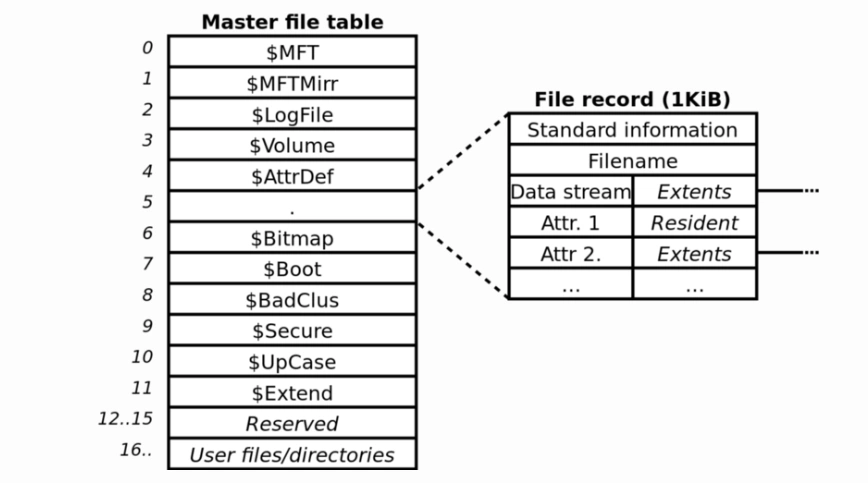
Each record starts with a header and contains attributes. The header describes the record; the attributes describe aspects of the file.
Component or information | Objectif |
Record header | Describes record status and information needed to interpret it |
$STANDARD_INFORMATION | Holds basic metadata, including timestamps and file flags |
$FILE_NAME | Stores a filename and a reference to its parent directory |
$DATA | Represents file contents, either resident or nonresident |
File size and allocation information | Describes the data stream’s logical length and allocated storage |
$ATTRIBUTE_LIST, when required | Locates attributes distributed across multiple records |
Security identifier | Connects the file to its security information |
These are selected components, not an exhaustive list. For a deeper explanation, see the guide to Master File Table records.
File Size Is Different From Allocated Size
File size is the logical length of a data stream. Allocated size describes the storage allocated to it. For an ordinary nonresident, uncompressed file, allocation occurs in whole clusters, so allocated storage may exceed the logical file length.
For example, on a volume with 4,096-byte clusters, an ordinary 5,000-byte nonresident data stream needs two clusters, or 8,192 bytes of allocated storage. This is an illustrative calculation, not a universal rule for resident, compressed, or sparse data.
A Filename Is Different From a Full Path
The $FILE_NAME attribute contains a name and a parent-directory reference. It does not simply store C:\Projets\rapport.docx as one complete path field.
A parser can reconstruct a path through directory relationships. This explains why a report may show a full path even though that path is not stored as a single attribute in the Tableau du fichier principal.
Permissions Use Related Security Metadata
In NTFS 3.x, $STANDARD_INFORMATION includes a security identifier, while the $Secure metadata file stores security descriptors. Each record does not need to contain a separate, complete copy of every permission setting.
Why the Master File Table Matters
Comprendre la Tableau du fichier principal helps distinguish a file’s identity from its contents. A filename found in a metadata report does not, by itself, establish that the complete document remains readable.
It also helps interpret technical output. For example, an MFT starting cluster identifies where the table begins on a volume. It does not identify the location of every user file or prove that the table is healthy.
The practical lesson is to read each field for what it actually describes. Names, parent references, data mappings, and timestamps answer different questions; none is a substitute for a separate backup.
Master File Table vs NTFS and FAT
NTFS is the file system; the Master File Table is one of its central structures. The terms describe different levels of the storage system.
Terme | Signification |
NTFS | The file system organizing files and directories on a volume |
MFT | The table of records describing those objects |
$MFT | The NTFS metadata file containing the table |
Dossier MFT | An individual record within that table |
GRAISSE | A File Allocation Table used by FAT-family file systems to track cluster chains |
En FAT32, directory entries hold file information, while the FAT links the clusters allocated to files. NTFS uses file records and attributes, including mappings for nonresident data. The MFT is therefore not simply another name for a FAT.
NTFS has other bookkeeping structures too. The volume’s $Bitmap tracks cluster allocation, while $MFT has its own bitmap for tracking record use. These answer different questions: which storage clusters are allocated, and which records are occupied.
Where Is the Master File Table Located?
Les Tableau du fichier principal resides on the NTFS volume it describes. Its special filename is $MFT, represented at the volume root—for example, C:\$MFT for a volume mounted as C:.
That is a logical location, not a fixed physical address shared by every drive. NTFS volume information exposes the starting logical cluster number through MftStartLcn.
The MFT zone is space reserved to accommodate table growth. It is distinct from the allocated records inside $MFT. For more detail about logical paths and cluster locations, read the Master File Table location guide.
How to View Master File Table Information in Windows
On Windows 10 or Windows 11, open an administrator Command Prompt or Terminal and run:
- fsutil fsinfo ntfsinfo C :
Remplacer C : with the appropriate NTFS drive letter. This command queries volume information; it does not repair or rebuild the table.
Depending on the Windows version, the output can include these fields:
Champ d'application | What it tells you |
Bytes Per FileRecord Segment | The record size used on this volume |
Mft Start Lcn | The starting logical cluster number of the table |
Mft Zone Start / End | The boundaries of the reserved growth zone |
For example, a record size of 1,024 bytes describes one record segment. It does not mean every file is 1,024 bytes long or that the entire table occupies that amount of space.
Microsoft documents the query in its fsutil fsinfo command reference. Viewing these summary fields is different from parsing individual records and checking file contents.
Common Misconceptions and Safety
The MFT Is Not a Complete Backup
$MFTMirr duplicates a limited initial portion of the table, not every file record. Neither it nor the Tableau du fichier principal provides a separate backup of all user files.
Its Presence Does Not Indicate Malware
$MFT is an expected NTFS metadata file. However, an unrelated downloaded file with “MFT” in its name should not automatically be treated as this system object. Identify the context before drawing conclusions about an unfamiliar filename.
Do Not Delete or Disable It
Manually deleting, overwriting, or editing $MFT can prevent NTFS from interpreting files correctly. It is not a cleanup target or an optional feature that can be switched off.
If a drive becomes inaccessible, protect important data before choosing a repair workflow. CHKDSK repair options modify the file system; they are different from the information query shown above.
What Happens If the Master File Table Is Corrupted?
Une personne corrompue Tableau du fichier principal can prevent NTFS from locating or interpreting files correctly. Files or folders may become inaccessible even when some underlying contents remain on the drive. However, a RAW volume or startup failure alone does not prove that the MFT is damaged.
If important files are affected, prioritize data protection before attempting repairs. Avoid formatting the volume or immediately running chkdsk X : /f, which modifies the file system. Where possible, secure a backup or disk image first. For further guidance, see the RAW drive troubleshooting guide.
When to Use a Related Guide
If the goal is to understand the Tableau du fichier principal, no maintenance action is required.
For genuinely deleted files, continue with the guide de récupération des fichiers effacés. For a RAW volume or a related CHKDSK message, use the RAW drive troubleshooting guide.
Detailed repair, table size, disk usage, fragmentation, and mirror analysis remain separate topics. They should be evaluated against the actual symptoms rather than added to a general definition.
Conclusion
Les Tableau du fichier principal supplies the records NTFS needs to describe files and retrieve their contents. Its attributes connect names, directory relationships, and data storage. Understanding those connections makes technical reports easier to interpret and explains why metadata, file contents, and backups serve different purposes.
Master File Table FAQs
Le fichier $MFT est-il un fichier ordinaire doté d'une extension .mft ?
exemple.mft peut appartenir à une application sans rapport avec celle-ci. Vérifiez son contexte et son rôle avant de supposer qu'il fait partie de la table principale des fichiers NTFS.Chaque volume NTFS dispose-t-il de sa propre table ?
Les dossiers possèdent-ils eux aussi des enregistrements MFT ?
Plusieurs noms de fichiers peuvent-ils désigner le même fichier ?
Qu'est-ce qui identifie l'entrée d'un fichier dans la table ?
Le MFT correspond-il à l'index de recherche Windows ?
Le fait qu'un nom de fichier figure dans la liste prouve-t-il que ce fichier est récupérable ?
Un horodatage permet-il de déterminer à quel moment un fichier a été ouvert ?

Vasilii est un spécialiste de la récupération de données qui possède une dizaine d'années d'expérience pratique dans ce domaine. Tout au long de sa carrière, il a résolu avec succès des milliers de cas complexes impliquant des fichiers supprimés, des disques formatés, des partitions perdues et des systèmes de fichiers RAW. Son expertise couvre à la fois les méthodes de récupération manuelle à l'aide d'outils professionnels tels que les éditeurs hexagonaux et les solutions automatisées avancées à l'aide de logiciels de récupération. La mission de Vasilii est de rendre accessible aux professionnels de l'informatique et aux utilisateurs quotidiens des connaissances fiables en matière de récupération de données, afin de les aider à sauvegarder leurs précieuses ressources numériques.