
Comment récupérer les fichiers supprimés de la corbeille ?
La suppression accidentelle de fichiers est l'un des scénarios les plus courants qui provoquent la panique, surtout lorsque l'on se rend compte que vous avez supprimé définitivement la corbeille. Qu'il s'agisse de documents importants, de photos chéries ou de fichiers de travail critiques, leur perte peut être dévastatrice. La bonne nouvelle, c'est que même après avoir vidé la corbeille, il est encore possible de récupérer les fichiers de la corbeille. Dans cet article, nous expliquerons comment récupérer les fichiers supprimés de la corbeille, qui comprend des méthodes détaillées de récupération des fichiers supprimés pour ceux qui ont déjà vidé leur corbeille.
Si vous vous demandez comment restaurer les fichiers de la corbeille vidée, continuez à lire. Nous vous guiderons à travers les étapes et vous recommanderons la meilleure solution.Magic Data Recovery.
Prise en charge de Windows 7/8/10/11 et Windows Server
Vous vous demandez si vos fichiers peuvent être récupérés ? En savoir plus en quelques secondes grâce à notre vérification rapide ci-dessous.
Évaluation de la récupération des données
Répondez à 3 questions rapides pour évaluer vos chances de guérison
Table des matières
Comment récupérer les fichiers supprimés de la corbeille (même après l'avoir vidée) ?
Méthode 1 : Restaurer les fichiers de la corbeille (si elle n'a pas été vidée)
Si vous n'avez pas encore vidé la corbeille, la récupération des fichiers supprimés est simple. Voici ce qu'il faut faire comment récupérer les fichiers supprimés de la corbeille:
1. Ouvrir la corbeille en double-cliquant sur l'icône qui se trouve sur votre bureau.
2. Parcourez les fichiers.
3. Cliquer avec le bouton droit de la souris sur le fichier à restaurer.
4. Sélectionner Restaurer, et le fichier sera renvoyé à son emplacement d'origine.
Cette méthode fonctionne bien tant que vous n'avez pas vidé la corbeille. Mais que se passe-t-il si vous avez déjà vidé la corbeille ou si vous avez supprimé définitivement les fichiers ? Essayez les méthodes suivantes.
Méthode 2 : Utilisation de la sauvegarde ou de l'historique des fichiers
Si vous avez activé Historique du dossier ou Restauration du système, La récupération des fichiers supprimés devient alors plus facile :
1. Ouvrir Explorateur de fichiers et naviguez jusqu'au dossier dans lequel le fichier supprimé se trouvait à l'origine.
2. Cliquer avec le bouton droit de la souris le dossier et choisissez Restaurer les versions précédentes.
3. Sélectionnez une sauvegarde antérieure à la suppression du fichier et restaurez-la.
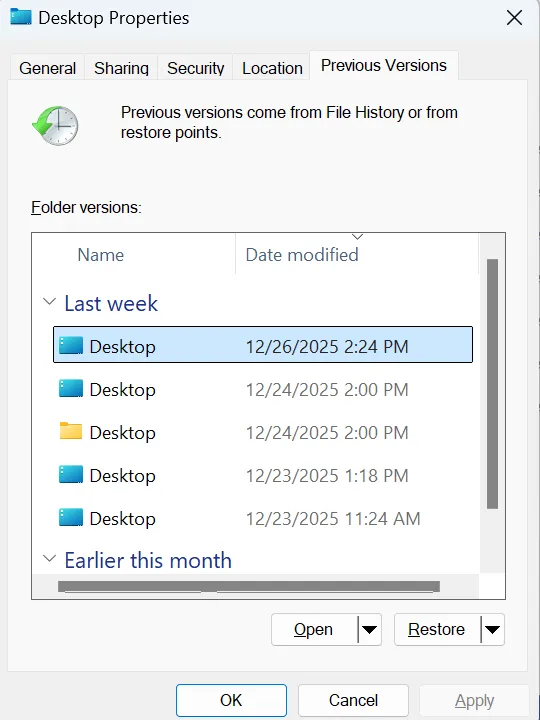
Cette méthode repose sur des sauvegardes et doit être mise en place à l'avance, mais elle peut s'avérer efficace pour récupérer des fichiers supprimés, y compris les fichiers retiré de la corbeille.
Méthode 3 : Récupérer les fichiers de la corbeille vidés à l'aide de Magic Data Recovery
Une fois la corbeille vidée, les fichiers ne sont pas nécessairement perdus à jamais. L'utilisation d'un logiciel de récupération de données tel que Magic Data Recovery, vous pouvez facilement récupérer les fichiers supprimés de la corbeille. Le logiciel recherche les fichiers supprimés sur votre disque et les récupère même après l'avoir supprimée de la corbeille.
Marche à suivre pour utiliser Magic Data Recovery :
1. Téléchargez Magic Data Recovery depuis le site officiel et installez-le.
Prise en charge de Windows 7/8/10/11 et Windows Server
2. Sélectionnez le lecteur sur lequel vous supprimez les fichiers et lancez une analyse.

3. Attendez que l'analyse soit terminée.
Magic Data Recovery exécute automatiquement une analyse avancée. Il affiche tous les fichiers après l'analyse.

4. Après l'analyse, aperçu les fichiers récupérables.
Grâce à cette fonction, vous pouvez facilement confirmer qu'il s'agit bien des fichiers que vous recherchez.

5. Sélectionnez les fichiers que vous souhaitez restaurer et cliquez sur Récupérer.
Enregistrez les fichiers sur un autre disque. NE PAS les réenregistrer sur le disque d'origine, car cela risquerait d'écraser les fichiers perdus.

Magic Data Recovery est une solution idéale pour les utilisateurs qui ont besoin de récupérer les fichiers supprimés de la corbeille, même après l'avoir vidé. Le logiciel garantit un taux de récupération élevé pour un large éventail de types de fichiers.
Pourquoi Magic Data Recovery est le meilleur outil pour récupérer les fichiers effacés de la corbeille
Si vous avez vidé la corbeille et que vous avez besoin de récupérer ces fichiers supprimés, Magic Data Recovery est l'outil qu'il vous faut. Voici pourquoi :
- Taux de réussite élevé en matière de récupération: Magic Data Recovery excelle à récupération des fichiers supprimés de la corbeille, même après avoir supprimé définitivement les fichiers.
- Analyse complète: Le logiciel analyse tous les lecteurs de stockage et toutes les partitions, garantissant ainsi la récupération de tous les fichiers.
- Interface conviviale: Magic Data Recovery a été conçu dans un souci de facilité d'utilisation. Vous n'avez pas besoin de compétences techniques pour récupérer les fichiers supprimés de la corbeille; il suffit de suivre les étapes simples.
- Prévisualisation et sélection: Après l'analyse, vous pouvez prévisualiser les fichiers supprimés et sélectionner ceux à récupérer, ce qui vous permet d'obtenir exactement ce dont vous avez besoin.
- Prise en charge de plusieurs types de fichiers: Magic Data Recovery peut récupérer différents formats de fichiers, notamment des documents, des images, des vidéos et des courriels, ce qui en fait un outil polyvalent répondant à tous les besoins de récupération.
Si vous vous êtes déjà demandé comment récupérer les fichiers supprimés de la corbeille après l'avoir vidée, ce logiciel offre une solution très fiable et efficace.
Meilleures pratiques pour éviter les pertes de données à l'avenir
Il est toujours préférable de prévenir la perte de données plutôt que d'y faire face plus tard. Voici quelques conseils pour vous aider à protéger vos fichiers :
1. Sauvegardes régulières: Prenez l'habitude de sauvegarder vos fichiers à l'aide de services en nuage ou de dispositifs de stockage externes.
2. Régler les paramètres de la corbeille: Définissez votre Corbeille pour conserver les fichiers pendant une période plus longue avant de les supprimer définitivement.
3. Activer l'historique des fichiers: Allumer Historique du dossier pour sauvegarder automatiquement vos fichiers afin de les récupérer facilement à l'avenir.
En suivant ces étapes, vous pouvez éviter la frustration liée à la perte de fichiers et vous assurer que vous êtes toujours prêt en cas de suppression accidentelle.
Conclusion
En conclusion, si vous vous demandez comment récupérer les fichiers supprimés de la corbeille, vous n'avez pas à vous inquiéter. Même après avoir vidé votre corbeille, vous avez toujours la possibilité de récupérer vos fichiers avec le bon logiciel de récupération. Solutions de récupération de la corbeille. Magic Data Recovery est la solution la plus efficace à cette fin. Elle offre un taux de récupération élevé et est incroyablement facile à utiliser, ce qui en fait le choix idéal pour les utilisateurs avertis comme pour les débutants. Ne laissez pas vos fichiers supprimés se perdre à jamais. Essayez Magic Data Recovery dès aujourd'hui et restaurez sans effort vos précieux fichiers.
Prise en charge de Windows 7/8/10/11 et Windows Server
FAQ
Pouvez-vous récupérer des fichiers définitivement supprimés de la corbeille ?
Les fichiers supprimés sont-ils stockés en permanence dans la corbeille ?
Comment récupérer des fichiers supprimés accidentellement ?
Où la corbeille est-elle restaurée ?
Les fichiers définitivement supprimés ont-ils vraiment disparu ?
Puis-je voir les fichiers définitivement supprimés ?
Où vont les fichiers après avoir été définitivement supprimés ?
Puis-je récupérer des fichiers définitivement supprimés dans Windows ?

Vasilii est un spécialiste de la récupération de données qui possède une dizaine d'années d'expérience pratique dans ce domaine. Tout au long de sa carrière, il a résolu avec succès des milliers de cas complexes impliquant des fichiers supprimés, des disques formatés, des partitions perdues et des systèmes de fichiers RAW. Son expertise couvre à la fois les méthodes de récupération manuelle à l'aide d'outils professionnels tels que les éditeurs hexagonaux et les solutions automatisées avancées à l'aide de logiciels de récupération. La mission de Vasilii est de rendre accessible aux professionnels de l'informatique et aux utilisateurs quotidiens des connaissances fiables en matière de récupération de données, afin de les aider à sauvegarder leurs précieuses ressources numériques.