
Il recupero dati di Geek Squad vale la pena?
La perdita dei dati è un’esperienza estremamente stressante che può verificarsi in qualsiasi momento. Che si tratti di una raccolta di foto di famiglia insostituibili o di documenti aziendali fondamentali, un improvviso guasto del dispositivo di archiviazione scatena immediatamente il panico. Quando un dispositivo smette di rispondere, molti utenti frustrati pensano subito di recarsi da Best Buy per avvalersi di Recupero dati Geek Squad servizi.
Tuttavia, prima di caricare il computer in macchina, è necessario capire esattamente cosa succede dietro il bancone. Per la stragrande maggioranza degli utenti comuni, l’assistenza tecnica offerta dai negozi tradizionali si rivela inaspettatamente costosa, incredibilmente lenta e del tutto superflua per i comuni recupero del disco rigido scenari. Questa guida completa analizzerà in dettaglio i costi effettivi, le dinamiche e i potenziali rischi di un Recupero dati dal disco rigido con Geek Squad dimostrando al contempo come un’utilità specializzata come Magic Data Recovery ti permette di prendere una decisione consapevole e conveniente per recuperare i tuoi file in tutta sicurezza.
Supporta Windows 7/8/10/11 e Windows Server
Indice dei contenuti
Che cos’è il servizio di recupero dati di Geek Squad e come funziona?
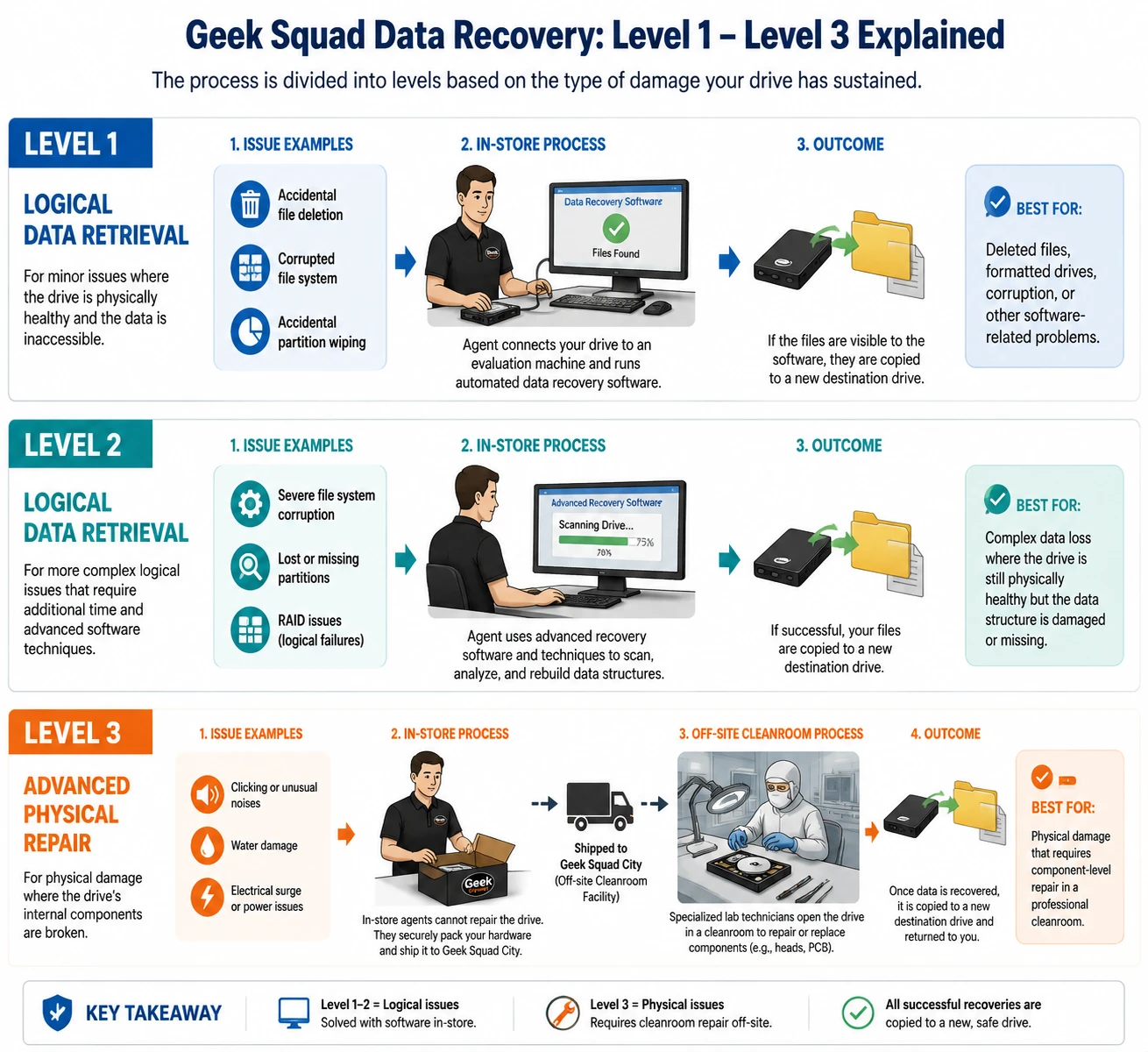
Geek Squad offre assistenza tecnica nei punti vendita tramite Best Buy, e il loro reparto di recupero dati opera secondo un modello a più livelli. Quando si porta un dispositivo guasto presso la loro sede, gli agenti non smontano immediatamente l’unità in una camera bianca specializzata. Al contrario, suddividono l’intero processo in livelli operativi distinti in base al tipo di danno subito dal supporto.
Livello 1 e Livello 2: Recupero logico dei dati
Problemi logici si verificano quando il disco rigido è fisicamente integro, ma i dati stessi vanno persi o vengono formattati. Esempi comuni includono la cancellazione accidentale di file, file system danneggiati, oppure la cancellazione accidentale di una partizione. Durante un Livello 1 o un Livello 2 Recupero dati Geek Squad In tal caso, gli addetti del negozio si limitano a collegare l’unità a un computer di analisi ed eseguono un software automatizzato per il recupero dei dati commerciali. Se i file sono visibili al programma, li copiano su una nuova unità di destinazione.
Livello 3: Riparazioni fisiche avanzate
I problemi fisici indicano che i componenti meccanici interni del tuo disco rigido sono danneggiati. Se il tuo disco rigido emette rumori di clic insoliti, ha subito danni causati dall’acqua o è stato esposto a un picco di tensione, il software non può aiutarti. In queste situazioni critiche, un tecnico del negozio non è in grado di riparare il dispositivo in loco. Di conseguenza, dovrà imballare l’hardware e spedirlo a una struttura centralizzata fuori sede, dotata di camera bianca, nota come Geek Squad City. Lì, tecnici di laboratorio specializzati apriranno l’alloggiamento dell’unità per sostituire le testine di lettura/scrittura o i circuiti stampati danneggiati.
I 3 principali rischi legati alla scelta del servizio di recupero dati da disco rigido di Geek Squad
Sebbene le grandi catene di negozi offrano una piacevole sensazione di familiarità, ricorrere a un fornitore di servizi all’interno del punto vendita espone i tuoi dati personali e i tuoi impegni a diverse vulnerabilità ben distinte.
Grave interruzione dell'attività del progetto
Quando si consegna un dispositivo presso un negozio, si rimane senza il proprio dispositivo per giorni, se non addirittura settimane. Le scansioni logiche effettuate in negozio richiedono spesso dai tre ai sette giorni a causa delle code accumulate a livello aziendale. Inoltre, se il disco rigido richiede un controllo fisico di livello 3 Recupero dati dal disco rigido con Geek Squad, la spedizione del dispositivo a un laboratorio centrale allunga i tempi di elaborazione a tre o quattro settimane. Questo ritardo prolungato può avere conseguenze devastanti per i lavoratori da remoto o le piccole imprese che necessitano di un accesso immediato ai propri file operativi.
Costi elevati per le correzioni automatizzate
Come già sottolineato, i servizi di Livello 1 e Livello 2 si basano interamente su strumenti software automatizzati. Pagare centinaia di dollari per un servizio che si potrebbe facilmente svolgere da soli a casa è estremamente inefficiente. Molti utenti si rendono conto troppo tardi di aver speso una parte significativa del proprio stipendio per un processo tecnico che non richiede competenze ingegneristiche specialistiche.
Privacy dei dati e vulnerabilità relative alla divulgazione
Affidare un dispositivo di archiviazione a terzi significa consentire a estranei di accedere senza restrizioni alla propria vita privata. Il tuo disco rigido contiene documenti finanziari riservati, messaggi privati, dichiarazioni dei redditi e fotografie di famiglia intime. Nel corso degli anni, le principali testate giornalistiche hanno riportato casi di dipendenti del settore tecnologico che hanno violato la privacy degli utenti curiosando nei file dei clienti. Tenere il proprio hardware sotto controllo è l’unico modo per garantire la totale riservatezza.
Quando è davvero opportuno ricorrere al servizio di recupero dati di Geek Squad?
Nonostante gli svantaggi, in determinate circostanze i servizi di laboratorio professionali rimangono indispensabili. Pertanto, è necessario valutare le condizioni fisiche dell’hardware prima di scegliere un metodo di recupero.
Se il tuo disco rigido ha subito un danno, la soluzione giusta è rivolgersi a un laboratorio specializzato grave trauma fisico. Se il tuo portatile è caduto sul cemento, è sopravvissuto a un incendio domestico o è stato immerso nell’acqua, non collegarlo a un computer. Tentare di accendere un disco meccanico deformato fisicamente può graffiare i piatti magnetici interni, causando la distruzione permanente dei dati. In queste precise condizioni, pagare per un servizio di livello 3 Recupero dati dal disco rigido con Geek Squad Il servizio di pulizia delle camere bianche è un investimento giustificato.
Al contrario, se il disco rigido continua a girare normalmente e viene visualizzato in Gestione disco di Windows, o in caso di una semplice cancellazione accidentale, non è necessario ricorrere a un costoso laboratorio fisico. È possibile evitare tranquillamente di rivolgersi a un negozio, utilizzando una soluzione software professionale comodamente da casa propria.
L'alternativa intelligente: risolvere i problemi logici con Magic Data Recovery
Se il tuo disco è fisicamente funzionante ma i tuoi file sono andati persi, puoi risparmiare centinaia di dollari prendendo in mano la situazione da solo. Invece di dover affrontare i costi elevati, le lunghe code e le preoccupazioni relative alla privacy di un negozio al dettaglio, puoi utilizzare Magic Data Recovery.
Questo potente strumento rappresenta la soluzione fai-da-te definitiva per Recupero dati Geek Squad alternative. Affronta esattamente gli stessi problemi logici per la cui risoluzione i negozi al dettaglio chiedono centinaia di dollari, consentendoti di eseguire la scansione del tuo dispositivo in autonomia.
Perché scegliere una scansione locale? Le soluzioni tradizionali ti costringono a spedire il tuo disco rigido altrove. Al contrario, un’utilità software locale mantiene i tuoi dati interamente all’interno della tua abitazione.
Vantaggi
- Protezione totale della privacy: Il software esegue l'intero processo di scansione localmente sul tuo computer. Le tue foto di famiglia, i documenti fiscali e i file aziendali sensibili non escono mai dal tuo campo visivo, garantendo così la massima privacy.
- Algoritmi avanzati di scansione approfondita: Lo strumento utilizza una tecnologia di ricostruzione altamente sofisticata per ricomporre file frammentati, partizioni danneggiate e file system illeggibili.
- Tempi di ripristino immediato: Non devi aspettare settimane per ricevere un pacco. Ti basta scaricare il programma, avviare la scansione e vedere i tuoi file riapparire in tempo reale.
- Prova gratuita senza impegno: A differenza dei negozi al dettaglio che richiedono una quota di valutazione non rimborsabile di $49.99, questo software offre un limite di 500 MB di dati gratuiti per il recupero dei file. Ciò ti consente di verificare che i tuoi file siano completamente recuperabili prima di investire denaro.
Casi pratici per questa soluzione
Consideriamo alcune situazioni comuni in cui questo software offre vantaggi rispetto a una visita in negozio:
- La scheda di memoria formattata: Hai cliccato per sbaglio su “Formatta tutto” sulla tua fotocamera digitale, cancellando centinaia di foto del matrimonio. Invece di andare da Best Buy e aspettare una settimana, puoi inserire la scheda SD nel computer, avviare il software e recuperare le immagini in pochi minuti.
- Il disco rigido illeggibile: L'unità di backup esterna visualizza improvvisamente un errore del tipo “Accesso negato” o “File system RAW”. Il software aggira i blocchi logici del sistema operativo per leggere i settori di dati grezzi, consentendoti di copiare i tuoi file in una posizione sicura.
- Svuotamento accidentale dei rifiuti: Hai cancellato un'importante presentazione di lavoro e hai svuotato il Cestino. Lo strumento è in grado di eseguire una scansione dello spazio non allocato sul tuo disco per individuare e ricostruire immediatamente le intestazioni dei file cancellati.
Se stai cercando una soluzione più efficiente e sicura, ti consigliamo di provare questo strumento professionale.
Come recuperare i dati dal disco rigido a casa (passo dopo passo)
L'utilizzo di questo software professionale è un processo incredibilmente semplice che non richiede alcuna competenza tecnica preliminare. Seguendo questa semplice guida, potrai evitare del tutto di rivolgerti a un negozio specializzato e ripristinare immediatamente i tuoi file:
1.Scaricare e installare Magic Data Recovery
Per prima cosa, visita il sito web ufficiale per scaricare in tutta sicurezza il pacchetto di installazione. È necessario installare Magic Data Recovery su una partizione integra, come l'unità interna C:, anziché sul disco rigido danneggiato. Questo approccio prudente previene efficacemente la sovrascrittura accidentale e garantisce la totale sicurezza dei dati persi.
Supporta Windows 7/8/10/11 e Windows Server
2. Selezionare il disco rigido da scansionare
Avvia il programma per accedere all'interfaccia utente intuitiva. Dalla schermata principale, individua e seleziona il disco rigido su cui si trovavano i tuoi file, quindi avvia il processo di scansione.

3. Eseguire una scansione del disco rigido alla ricerca di file persi
Il software esegue automaticamente una scansione avanzata estremamente approfondita dei supporti di memorizzazione. Man mano che l'algoritmo procede attraverso i settori dell'unità, visualizza sullo schermo un elenco in tempo reale di tutti i file recuperabili.

4. Anteprima dei file prima del recupero
A questo punto, approfitta della funzione di anteprima visiva integrata per esaminare gli elementi recuperati. Questa utile fase di verifica ti garantisce di dedicare tempo al ripristino solo delle immagini, dei documenti o dei video di cui hai effettivamente bisogno.

5. Recuperare i file in una posizione sicura
Infine, seleziona le caselle di controllo accanto ai file desiderati e fai clic sul pulsante di recupero per salvarli. Scegli sempre un dispositivo di archiviazione o una lettera di unità diversa come destinazione, poiché il salvataggio dei file sul disco rigido compromesso comporta il rischio di un danneggiamento irreversibile dei dati.

Analisi dettagliata dei prezzi del servizio di recupero dati di Geek Squad: ne vale la pena?
La lamentela più comune dei consumatori riguardo ai servizi di recupero dati professionali è il costo elevato. Per pianificare il budget per questo servizio al dettaglio è necessario tenere conto sia delle spese non rimborsabili che dei prezzi applicati in base al livello di servizio.
Per cominciare, ogni singolo cliente deve versare un importo non rimborsabile $49.99 - Tariffa per la diagnosi solo per consentire a un tecnico di valutare il disco. Anche se i tecnici stabiliscono che i tuoi dati sono completamente irrecuperabili, Best Buy trattiene questo acconto iniziale. Inoltre, se l'intervento ha esito positivo, il costo finale aumenta rapidamente a seconda della complessità dell'intervento.
Livello di servizio | Tipo di danno | Costo stimato | Tempi di consegna |
Diagnosi iniziale | Quota di valutazione | $49,99 (non rimborsabile) | 1-2 giorni |
Livello 1 / 2 | Cancellazione accidentale / Unità formattata | $200 – $450+ | 3-7 giorni |
Livello 3 | Rumori provenienti dal disco rigido / SSD guasto / Danni fisici | $450 - $1.500+ | 2-4 settimane |
Magic Data Recovery | Tutti gli scenari di perdita dei dati logici | Gratis – $69.95 | Istantaneo (fai da te) |
Di conseguenza, i servizi logici di Livello 1 e Livello 2 variano generalmente da da $200 a $450+. In sostanza, stai pagando centinaia di dollari affinché un addetto al punto vendita clicchi su “scansiona” in un’interfaccia software di base. Se il tuo dispositivo richiede un intervento in camera bianca per una pulizia approfondita Recupero dati dal disco rigido con Geek Squad, il prezzo sale regolarmente alle stelle, raggiungendo valori compresi tra $450 e $1.500+, a volte superando $3,000 per array aziendali ad alta capacità. Infine, questi prezzi esorbitanti non includono il costo di un nuovo disco di destinazione, che aggiunge alla fattura un ulteriore $60 o $150.
Conclusione: il verdetto finale sul servizio di recupero dati di Geek Squad
Mentre Recupero dati Geek Squad Sebbene sia fondamentale in caso di supporti meccanici danneggiati, bruciati o completamente inutilizzabili, rappresenta un enorme spreco di tempo e denaro in caso di semplice perdita di file. Pagare ricarichi esorbitanti al dettaglio per semplici errori logici è del tutto inutile quando sono facilmente disponibili strumenti professionali.
Se al momento ti trovi ad affrontare una partizione danneggiata, una formattazione accidentale o una cartella smarrita, dovresti optare per una soluzione più efficiente soluzione per il disco rigido. Consigliamo vivamente di scaricare Magic Data Recovery per controllare prima il tuo disco rigido. Elimina i lunghi tempi di attesa, garantisce la totale riservatezza dei tuoi documenti privati e offre 500 MB di spazio gratuito per testarne le funzionalità prima di spendere un centesimo. Non lasciare che un'officina troppo cara metta a dura prova il tuo portafoglio: prendi il controllo della tua vita digitale e recupera i tuoi dati in tutta sicurezza da casa tua, già da oggi.
Supporta Windows 7/8/10/11 e Windows Server
Domande frequenti sul servizio di recupero dati di Geek Squad
Quanto costa il recupero dati di Geek Squad?
I prezzi del recupero dati di Geek Squad dipendono interamente dalla gravità del danno. Per iniziare, è necessario pagare una tariffa di diagnostica non rimborsabile di $49,99. Se l'unità presenta errori logici, il prezzo varia da $200 a $450. Tuttavia, le riparazioni fisiche che richiedono una camera bianca costano tra $450 e $1.500+, a volte superando $3.000.
Geek Squad fa pagare se non riesce a recuperare i dati?
Sì, Best Buy addebita un costo di diagnostica non rimborsabile $49,99 in anticipo. Anche se i tecnici di Best Buy stabiliscono che i file sono completamente andati o non recuperabili, i soldi vengono trattenuti. Tuttavia, se il tentativo non va a buon fine, non si dovranno pagare i costi aggiuntivi del servizio di recupero di livello 1, 2 o 3.
Quanto tempo richiede il recupero di un disco rigido Geek Squad?
I tempi di consegna variano a seconda del tipo di danno. Per le scansioni logiche in negozio, il recupero di un disco rigido Geek Squad richiede solitamente dai tre ai sette giorni. Tuttavia, se il disco rigido presenta danni fisici e deve essere spedito al laboratorio off-site di Geek Squad City, l'intero processo richiede dalle tre alle quattro settimane.
Geek Squad può recuperare i dati da un disco rigido morto?
Sì, possono recuperare i dati da dispositivi di archiviazione morti o scattanti grazie al loro servizio di livello 3. Spediscono il dispositivo a una struttura specializzata in camera bianca per sostituire manualmente le parti interne rotte. Tuttavia, questo processo meccanico è incredibilmente costoso e in genere supera i $1.000 euro.
I miei dati sono privati durante un processo di recupero dati di Geek Squad?
Sebbene Best Buy si attenga a rigorose politiche sulla privacy dei dati, spedire il dispositivo o lasciarlo in un negozio al dettaglio crea sempre rischi di esposizione dei dati. I dipendenti del reparto tecnico avranno accesso illimitato ai vostri file. Per garantire la totale riservatezza, l'utilizzo di un software alternativo fai-da-te a casa è un'opzione molto più sicura.
Posso recuperare i file da solo senza andare da Best Buy?
Assolutamente sì. Se il disco rigido gira ancora e viene riconosciuto dal computer, non è necessario recarsi in un negozio. Potete tranquillamente utilizzare un software professionale per eseguire una scansione locale del dispositivo. Questo metodo domestico risolve gli stessi problemi logici risparmiando centinaia di dollari.

Vasilii è uno specialista del recupero dati con circa 10 anni di esperienza pratica nel settore. Nel corso della sua carriera, ha risolto con successo migliaia di casi complessi riguardanti file cancellati, unità formattate, partizioni perse e file system RAW. La sua esperienza copre sia i metodi di recupero manuale utilizzando strumenti professionali come gli editor esadecimali, sia le soluzioni automatiche avanzate con i software di recupero. La missione di Vasilii è quella di rendere accessibile la conoscenza del recupero dati affidabile sia ai professionisti IT che agli utenti di tutti i giorni, aiutandoli a salvaguardare i loro preziosi beni digitali.