
Tutti i miei file sono scomparsi su Windows 10? Ecco come risolvere il problema
Se hai cercato Tutti i miei file sono scomparsi su Windows 10, devi sapere dove sono finiti i file e se puoi recuperarli dai dischi rigidi. Fortunatamente, Windows potrebbe semplicemente nascondere i file, spostarli in un altro profilo, sincronizzarli tramite OneDrive oppure renderne impossibile l'accesso a causa di un problema al disco.
Innanzitutto, smettete di scrivere nuovi dati sull’unità interessata. I nuovi file potrebbero sovrascrivere i dati recuperabili. Pertanto, questa guida inizia con alcuni controlli di sicurezza per poi passare al recupero con Magic Data Recovery solo quando Windows non riesce a trovare i file.
Supporta Windows 7/8/10/11 e Windows Server
Indice dei contenuti
Tutti i miei file sono scomparsi su Windows 10: cosa devo controllare per prima cosa?
Quando I file sono scomparsi su Windows 10, individua il sintomo prima di provare soluzioni a caso.
Cosa noti | Probabile causa | Il miglior primo passo |
I file sul desktop sono scomparsi | Profilo, OneDrive, file nascosti | Controlla il profilo e gli elementi nascosti |
I file sono scomparsi dopo un aggiornamento | Modifica del profilo o della cartella | Cerca in questo PC |
Una cartella sembra vuota | File nascosti, spostati o eliminati | Mostra gli elementi nascosti |
I file sono scomparsi dal disco rigido di Windows 10 | Problema relativo alla lettera di unità, alla partizione o al file system | Controllare la gestione del disco |
I file non si trovano nel Cestino | Potrebbe essersi verificata una cancellazione definitiva | Utilizzare un software di recupero |
In breve, si inizi con la spiegazione più semplice. Si passi poi al ripristino solo se tali verifiche non danno esito positivo.
1. Ricerca dei file mancanti in Windows 10
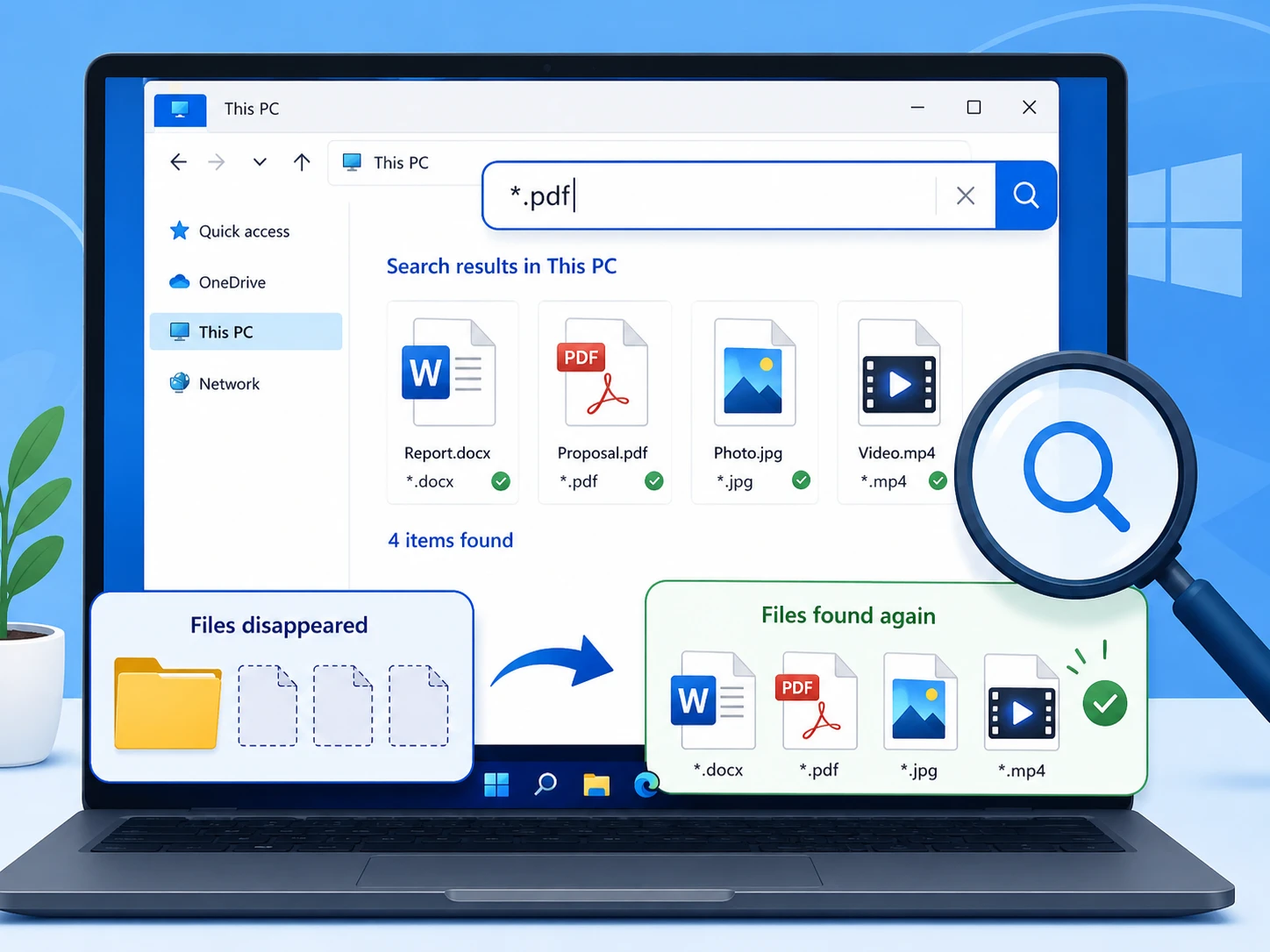
Per gli utenti che cercano Tutti i miei file sono scomparsi su Windows 10, Esplora file dovrebbe avere la priorità perché i file potrebbero ancora trovarsi altrove.
Apri Esplora file, seleziona Questo PC, e cerca il nome del file. Se non te lo ricordi, prova a *.docx, *.xlsx, *.jpg, o *.pdf.
Successivamente, fai clic con il tasto destro del mouse su un risultato e seleziona Apri posizione del file per verificare dove Windows l'abbia salvato.
2. Controlla il Cestino
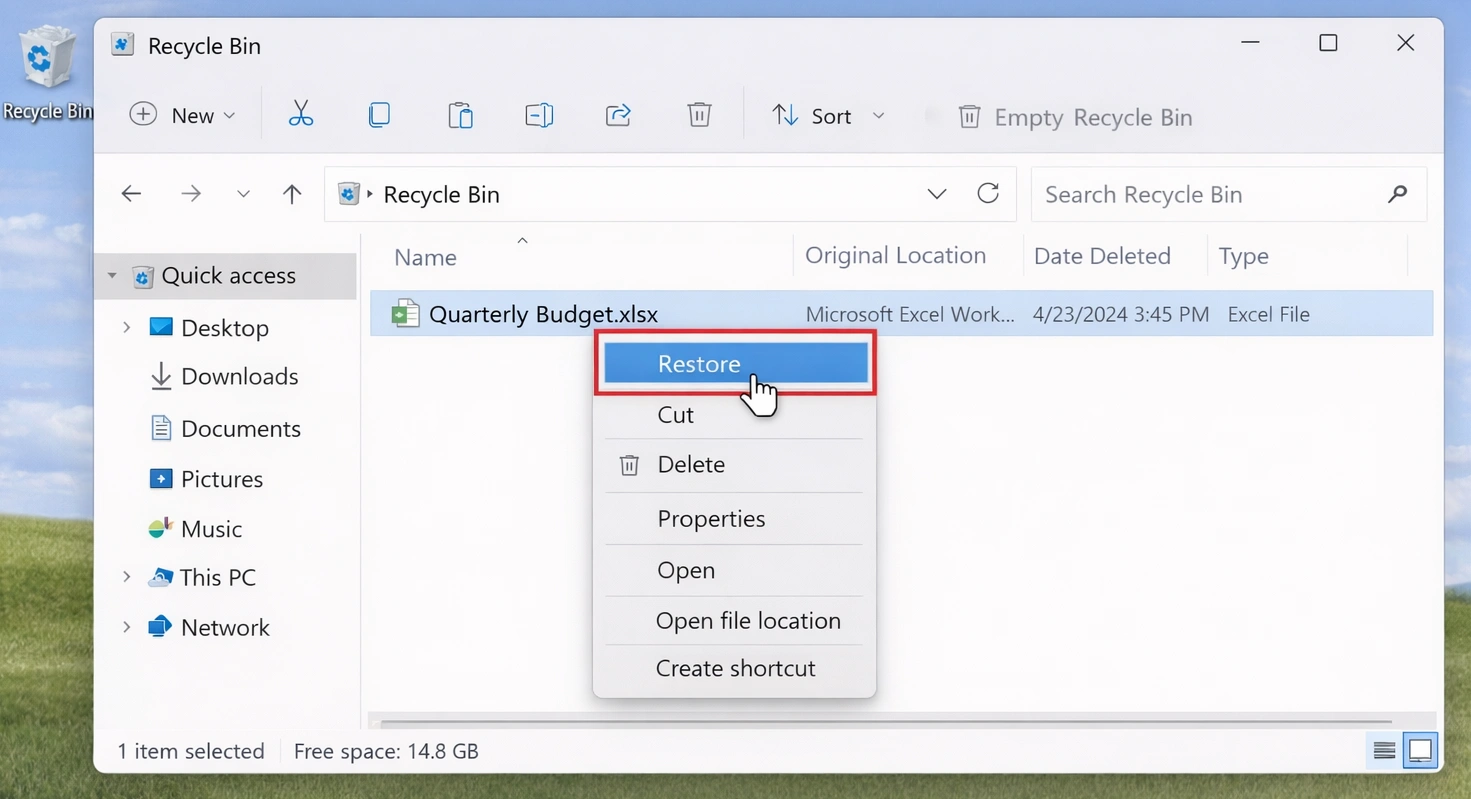
La cancellazione accidentale può causare Tutti i miei file sono scomparsi su Windows 10 sembrano indicare un grave malfunzionamento del sistema.
Apri il Cestino e cerca i file mancanti. Se li trovi, fai clic con il tasto destro del mouse e seleziona Ripristino.
Tuttavia, Maiuscolo + Canc, un Cestino svuotato, oppure la formattazione potrebbe non seguire questa procedura. In tal caso, evitare di aggiungere nuovi dati all'unità interessata.
3. Mostra file e cartelle nascosti
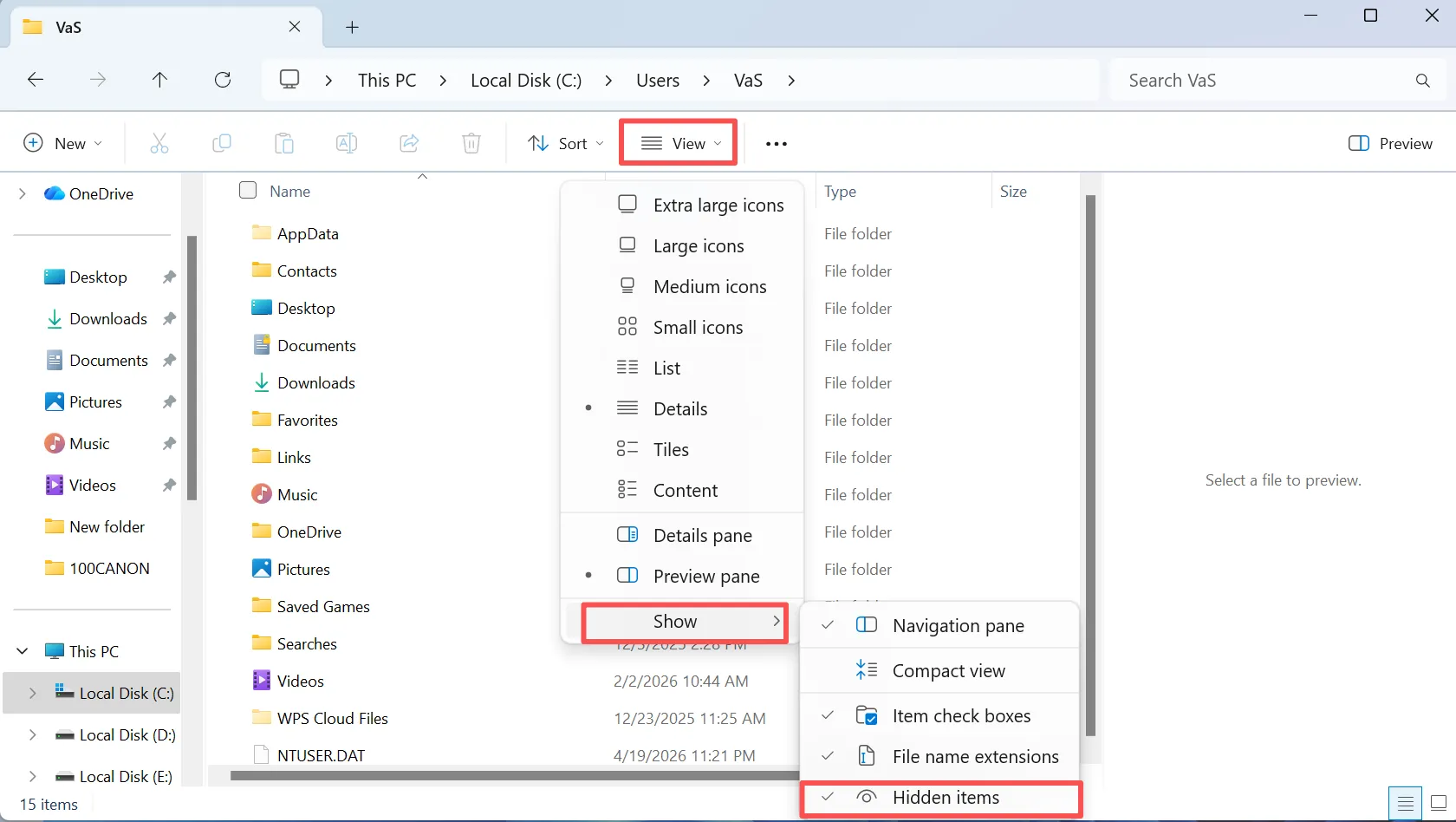
Per gli utenti che cercano Tutti i miei file sono scomparsi su Windows 10, gli elementi nascosti sono un'altra spiegazione comune: Windows potrebbe nascondere i file invece di eliminarli.
Apri Esplora file, seleziona Vista, e abilitare Oggetti nascosti. Quindi torna alla cartella che sembra vuota. Se i file ricompaiono, spostali o rendili visibili a seconda delle necessità.
Inoltre, controlla le opzioni di Esplora file per impostazioni di visibilità più ampie.
4. Verificare che il profilo utente di Windows sia corretto
Un cambiamento nel profilo può spiegare tutti i file sono scomparsi in Windows 10, soprattutto dopo un aggiornamento o in caso di problemi con l'accesso.
Aperto C:\Utenti\ e controlla le cartelle "Desktop", "Documenti", "Download", "Immagini" e "Video" sia nel profilo attuale che in quelli precedenti.
Ad esempio, i file potrebbero trovarsi ancora in un profilo precedente. Pertanto, è opportuno verificare il percorso prima di dare per scontato che i dati siano andati persi.
5. Controlla OneDrive, Windows.old e i backup
Se tutti i tuoi I file sono scomparsi e il problema è iniziato dopo la sincronizzazione o un aggiornamento; potrebbe già esistere un'altra copia.
Per prima cosa, controlla su OneDrive se utilizzi il servizio di archiviazione cloud di Microsoft. Successivamente, verifica C:\Windows.old dopo un aggiornamento importante di Windows. Infine, controlla la Cronologia file e gli altri backup.
Se il backup contiene il file, ripristinare prima quella copia.
6. I file continuano a mancare? Recuperali con Magic Data Recovery
Se i metodi precedenti non funzionano, è possibile che la cancellazione definitiva, la formattazione o un danneggiamento del file system abbiano impedito l'accesso normale ai file. A questo punto, la normale funzione di ricerca di Windows potrebbe non essere più d'aiuto.
Magic Data Recovery esegue una scansione dell'unità interessata alla ricerca di dati recuperabili. Amagicsoft dichiara di supportare oltre 5.000 formati di file, nonché HDD, SSD, unità USB e schede di memoria. Inoltre, il flusso di lavoro è semplice: seleziona, esegui la scansione, visualizza l'anteprima e recupera.
Questo approccio è utile quando I file sono scomparsi dal disco rigido di Windows 10, dopo una cancellazione definitiva o dopo una formattazione accidentale. A differenza della Cronologia file, non richiede un backup precedente. Tuttavia, i dati sovrascritti potrebbero non essere più recuperabili. Pertanto, è bene agire tempestivamente.
Passo 1: Scaricare e installare Magic Data Recovery
Scarica Magic Data Recovery e installalo su un'unità diversa da quella in cui sono scomparsi i file. Questa scelta riduce le operazioni di scrittura sull'unità di origine e contribuisce a proteggere i dati recuperabili.
Supporta Windows 7/8/10/11 e Windows Server
Fase 2: Selezionare l'unità da cui sono scomparsi i file
Avvia Magic Data Recovery. Dall'interfaccia principale, seleziona l'unità o la partizione in cui erano originariamente memorizzati i file mancanti. Quindi avvia la scansione.

Fase 3: Esegui una scansione dell'unità alla ricerca di file mancanti o cancellati
Il programma avvia una scansione avanzata sull'unità selezionata. Nel frattempo, man mano che la scansione procede, vengono visualizzati i file recuperabili, consentendoti di esaminare i dati individuati durante il processo.

Passo 4: Anteprima dei file prima del recupero
Successivamente, utilizza la funzione di anteprima per verificare il contenuto dei file. Questo passaggio ti aiuta a confermare che i documenti, le foto, i video o gli altri file selezionati siano quelli corretti prima del recupero.
In un caso di recupero di file persi con numerosi risultati di scansione, l'anteprima rende il processo più facile da gestire.

Passo 5: Recuperare i file in una posizione sicura
Infine, seleziona i file desiderati e salvali su un'altra unità o in un'altra posizione di archiviazione. Non ripristinarli sull'unità di origine finché mancano ancora altri dati, poiché nuove operazioni di scrittura potrebbero sovrascrivere i contenuti recuperabili.
Questa regola è particolarmente importante quando I file sono scomparsi dal disco rigido di Windows 10 e la scansione individua altri file che devono ancora essere recuperati.

7. I file sono scomparsi dal disco rigido di Windows 10? Controlla “Gestione disco”
Se un'intera partizione o un'unità sembra vuota o mancante, apri Gestione del disco prima di formattarlo o ripartizionarlo.
L'unità non ha una lettera di unità
Una partizione integra priva di lettera di unità potrebbe risultare nascosta in Esplora file. Se il volume appare per il resto normale, assegnagli una lettera non utilizzata.
L'unità viene visualizzata come RAW
Il messaggio "RAW" indica che Windows non è in grado di leggere correttamente il file system. Pertanto, è necessario recuperare i file importanti prima di formattare o riparare il volume.
Lo spazio viene visualizzato come non allocato
Lo spazio non allocato potrebbe indicare la perdita delle informazioni relative alle partizioni. Si consiglia quindi di eseguire una scansione dell'unità prima di creare una nuova partizione.
Quando I file sono scomparsi dal disco rigido di Windows 10, se possibile, recuperare i dati importanti prima di procedere alla riparazione.
8. Ripristinare i file mancanti con la Cronologia file
La cronologia dei file può essere utile per Tutti i miei file sono scomparsi su Windows 10 se avevi attivato i backup prima della perdita.
Apri la cartella originale, fai clic con il tasto destro del mouse su di essa e seleziona Ripristino delle versioni precedenti. A questo punto, controlla le copie disponibili e ripristina la versione che ti serve.
Tuttavia, la funzione "Cronologia file" non è in grado di creare una copia precedente in caso di perdita dei dati. Pertanto, se non è presente alcuna cronologia utilizzabile, scegliere un altro metodo di ripristino.
Perché sono scomparsi tutti i miei file su Windows 10?
La ricerca Tutti i miei file sono scomparsi in Windows 10 descrive un sintomo, non una causa specifica. Tra le cause più comuni figurano la cancellazione, gli attributi nascosti, le modifiche al profilo o a OneDrive, la formattazione, la perdita di partizioni e i problemi relativi al file system.
Pertanto, occorre distinguere tra “file mancanti” e “file cancellati”. La funzione di ricerca individua i file esistenti, i backup ne ripristinano le copie e i software di recupero sono utili quando Windows non riesce più ad accedervi normalmente.
Cosa non fare quando i file scompaiono su Windows 10
Quando i file importanti scompaiono, la tua prossima mossa può influire sul recupero.
In primo luogo, evitate di effettuare download di grandi dimensioni o di copiare file sull’unità interessata. In secondo luogo, non formattate una partizione RAW solo perché Windows ve lo richiede. In terzo luogo, non create una nuova partizione sopra i dati importanti non allocato spazio.
Infine, non salvare i file recuperati sull'unità di origine fino al completamento del recupero.
Come evitare che i file scompaiano in Windows 10
Dopo aver risolto un Tutti i miei file sono scomparsi in Windows 10, ridurre il rischio di un'altra perdita.
Per prima cosa, attiva la Cronologia dei file o un altro sistema di backup programmato. Successivamente, conserva un’altra copia dei file essenziali su un supporto di archiviazione separato o su un servizio cloud affidabile.
Inoltre, esegui periodicamente dei backup di prova. Infine, presta attenzione a errori ricorrenti del file system, alla scomparsa di partizioni o a disconnessioni impreviste.
Conclusione
Se tutti i file sono scomparsi su Windows 10, inizia con alcune verifiche a basso rischio: controlla il PC, ispeziona il Cestino, visualizza i file nascosti, verifica il tuo profilo e controlla i backup.
Successivamente, controlla in “Gestione disco” se un’unità o una partizione è scomparsa. Se Windows continua a non riuscire a individuare i file, recupera i dati importanti prima di formattare o ricostruire le partizioni.
Magic Data Recovery è adatto a questa fase perché esegue una scansione alla ricerca di dati cancellati o inaccessibili e consente agli utenti di visualizzare in anteprima i file prima del recupero. Pertanto, prima individuare, poi recuperare e infine riparare. Se I file sono scomparsi dal disco rigido di Windows 10 In assenza di un backup utilizzabile, Magic Data Recovery offre una soluzione pratica recupero del disco rigido un metodo senza promesse esagerate.
Supporta Windows 7/8/10/11 e Windows Server
FAQ
Perché i miei file sono scomparsi all'improvviso in Windows 10?
Diversi fattori possono causare la scomparsa dei file in Windows 10, tra cui i file nascosti, le modifiche al profilo, le modifiche a OneDrive, la cancellazione accidentale, la formattazione o problemi al file system. Innanzitutto, effettua una ricerca sul PC e controlla gli elementi nascosti, le cartelle utente e i backup. Se questi passaggi non danno esito positivo, riduci al minimo le operazioni di scrittura sull'unità interessata e valuta l'utilizzo di un software di recupero dati.
I file possono scomparire in Windows 10 senza essere stati eliminati?
Sì. Quando i file scompaiono da Windows 10, è possibile che Windows li conservi ancora sul disco. Attributi nascosti, modifiche al profilo, sincronizzazione con OneDrive, cartelle spostate o problemi relativi alle lettere delle unità possono far sembrare che i file siano andati persi. Pertanto, prima di considerare il problema come una perdita definitiva dei dati, controlla Esplora file, gli elementi nascosti, i profili utente, l'archiviazione cloud e Gestione disco.
Come posso recuperare i file che sono scomparsi dal disco rigido?
Se alcuni file sono scomparsi dal disco rigido di Windows 10, verifica innanzitutto che l'unità sia presente in "Gestione disco". Controlla quindi la lettera dell'unità, lo stato del file system e la struttura delle partizioni. Se Windows continua a non riuscire a trovare i file e non è disponibile alcun backup, smetti di scrivere nuovi dati su quell'unità ed esegui una scansione con uno strumento di recupero come Magic Data Recovery.
È possibile recuperare i file dopo aver svuotato il Cestino?
È possibile. Lo svuotamento del Cestino impedisce l'accesso normale a Windows, ma i dati dei file potrebbero rimanere presenti fino a quando nuove informazioni non sovrascrivono lo stesso spazio di archiviazione. Pertanto, si consiglia di ridurre al minimo l'utilizzo dell'unità di origine. Se i file sono scomparsi dopo aver svuotato il Cestino, una scansione di recupero potrebbe comunque individuare contenuti recuperabili.
File History è in grado di recuperare i file cancellati definitivamente?
La Cronologia dei file può ripristinare una copia precedente solo se Windows ha creato quel backup prima della cancellazione. Non è in grado di creare una versione precedente a posteriori. Pertanto, controlla innanzitutto la Cronologia dei file se l'hai abilitata in precedenza. Se non esiste alcun backup utilizzabile e tutti i file sono scomparsi, una scansione di recupero potrebbe rappresentare un'altra opzione praticabile.
Devo formattare un disco quando Windows me lo chiede?
No, non se l'unità contiene file importanti che sono andati persi. La formattazione modifica le strutture del file system e potrebbe limitare le possibilità di recupero. Quando i file scompaiono dal disco rigido di Windows 10 e il volume viene visualizzato come RAW o illeggibile, è necessario recuperare prima i dati importanti. Dopo aver messo al sicuro i file, è possibile riparare o riformattare l'unità con minori rischi.
Perché utilizzare Magic Data Recovery invece degli strumenti di Windows?
La Ricerca di Windows, il Cestino, la Cronologia file e i controlli del profilo funzionano bene quando i file rimangono accessibili o è presente un backup. Tuttavia, non sono in grado di risolvere tutti i casi di cancellazione o formattazione. Quando i file scompaiono in Windows 10 e i metodi standard non funzionano, Magic Data Recovery è in grado di eseguire una scansione dell'unità interessata, visualizzare in anteprima i file recuperabili e ripristinare i dati selezionati senza ricorrere a procedure di recupero da riga di comando.

Vasilii è uno specialista del recupero dati con circa 10 anni di esperienza pratica nel settore. Nel corso della sua carriera, ha risolto con successo migliaia di casi complessi riguardanti file cancellati, unità formattate, partizioni perse e file system RAW. La sua esperienza copre sia i metodi di recupero manuale utilizzando strumenti professionali come gli editor esadecimali, sia le soluzioni automatiche avanzate con i software di recupero. La missione di Vasilii è quella di rendere accessibile la conoscenza del recupero dati affidabile sia ai professionisti IT che agli utenti di tutti i giorni, aiutandoli a salvaguardare i loro preziosi beni digitali.