
Come recuperare un file Excel cancellato in modo sicuro ed efficace
L'eliminazione accidentale di un file Excel importante può essere stressante, soprattutto se contiene rapporti di lavoro, documenti finanziari o dati aziendali critici. Molti utenti pensano che una volta che un file Excel viene eliminato, o addirittura cancellato definitivamente, sia andato per sempre. In realtà, questo non è sempre vero. È ancora possibile recuperare file Excel cancellati se si prende correttamente metodi di recupero dei documenti.
Questa guida si concentra su file Excel cancellato recupero scenari di Windows, tra cui l'eliminazione accidentale, lo svuotamento del Cestino e la perdita di dati legata al sistema. Imparerete innanzitutto i metodi di recupero pratici e integrati che funzionano davvero. Quando queste opzioni falliscono, spieghiamo quando e perché diventa necessario un software di recupero professionale e come strumenti come Magic Data Recovery può aiutare a recuperare i file Excel in modo sicuro ed efficiente.
Supporta Windows 7/8/10/11 e Windows Server
Vi chiedete se i vostri file possono essere recuperati? Scoprire in pochi secondi con il nostro controllo rapido qui sotto.
Valutazione del recupero dati
Rispondete a 3 rapide domande per valutare le vostre possibilità di recupero
Indice dei contenuti
È possibile recuperare un file Excel cancellato?
Nella maggior parte dei casi, sì. Quando si elimina un file Excel, Windows di solito rimuove il riferimento al file invece di cancellare immediatamente i dati. Finché i nuovi dati non sovrascrivono lo spazio, il recupero dei dati cancellati rimane possibile.
Tuttavia, il successo dipende da diversi fattori:
- Come è stato eliminato il file Excel
- Se la posizione di archiviazione è stata riutilizzata
- La rapidità con cui viene tentato il recupero
La comprensione di queste nozioni di base aiuta a scegliere il metodo di recupero giusto, invece di perdere tempo con soluzioni inefficaci.
Scenari comuni di cancellazione di file Excel
Scenari di eliminazione diversi richiedono approcci di recupero diversi. Di seguito sono riportate le situazioni più comuni che gli utenti si trovano ad affrontare.
File Excel cancellato accidentalmente
Ciò accade spesso quando si selezionano più file o si utilizza per errore il tasto Canc. In questo caso, il recupero è generalmente semplice.
File Excel cancellato in modo permanente
File eliminati utilizzando Maiuscolo + Canc o dopo aver svuotato il Cestino sono considerati definitivamente eliminati dall'interfaccia utente, ma possono ancora esistere sul disco.
File Excel cancellato dopo un crash o un aggiornamento del sistema
Arresti imprevisti o aggiornamenti di Windows possono rimuovere o corrompere i file Excel, soprattutto se erano aperti o non salvato.
File Excel cancellato da un archivio esterno
I file Excel memorizzati su unità USB, schede SD o dischi rigidi esterni sono soggetti a un rischio maggiore di perdita permanente in caso di sovrascrittura.
Come recuperare un file Excel cancellato senza software
Prima di utilizzare qualsiasi software di recupero, è sempre consigliabile provare le opzioni di recupero integrate in Windows e in Excel. Questi metodi sono gratuiti ed efficaci in molti casi.
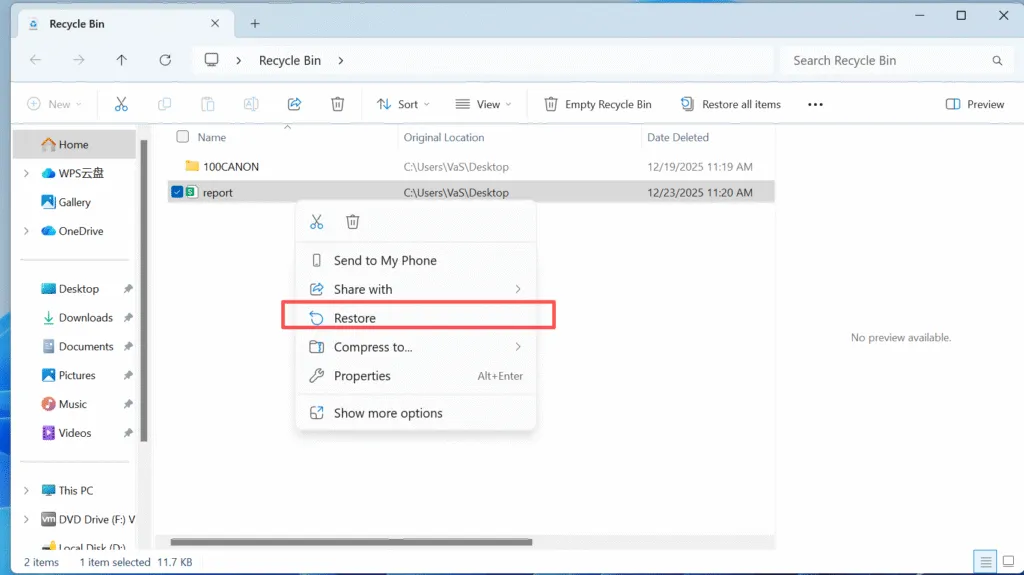
Ripristino di un file Excel dal cestino
Se il file Excel è stato eliminato normalmente:
1. Aprire il Cestino
2. Individuare il file Excel eliminato
3. Fare clic con il tasto destro del mouse e scegliere Ripristino
Il file tornerà alla sua posizione originale.
Recuperare file Excel da versioni precedenti
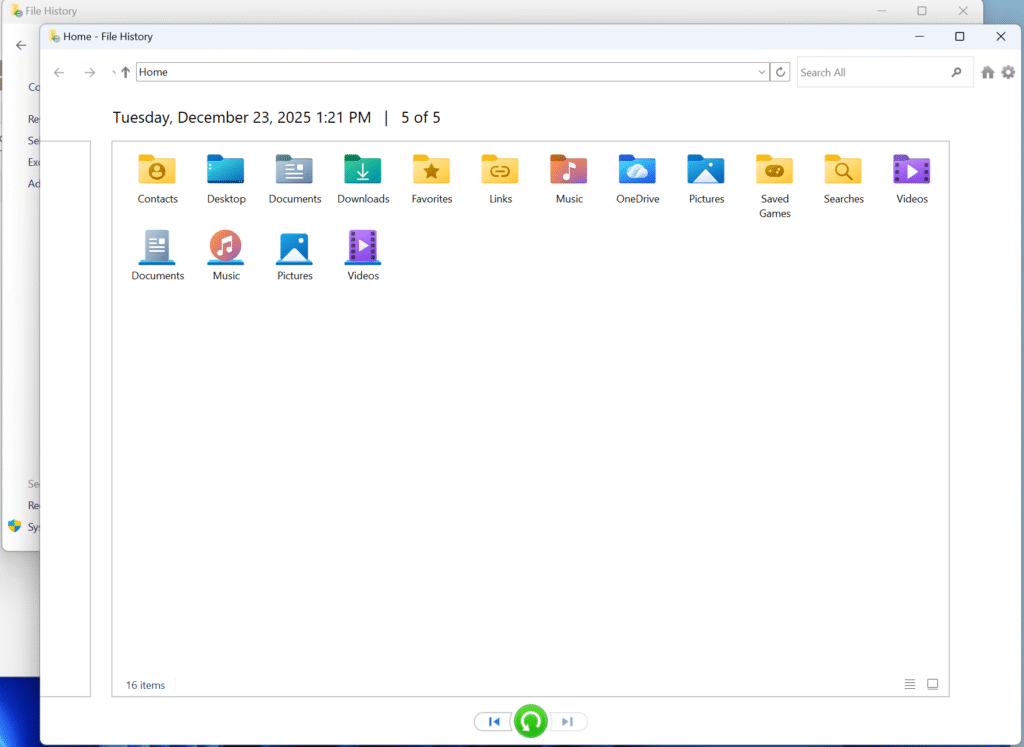
La Cronologia file di Windows o i punti di ripristino del sistema potrebbero contenere versioni precedenti del file Excel.
1. Passare alla cartella originale
2. Fare clic con il tasto destro del mouse e selezionare Ripristino delle versioni precedenti
3. Scegliere una versione creata prima dell'eliminazione
Questo metodo funziona bene se la Cronologia file è stata attivata.
Utilizzare il recupero automatico di Excel e i file temporanei
Microsoft Excel crea automaticamente dei backup temporanei:
- Aprire Excel
- Vai a File > Info > Gestisci cartella di lavoro
- Controllo Recuperare le cartelle di lavoro non salvate
È anche possibile cercare manualmente .tmp o .asd nella cartella temporanea del sistema.
Perché i metodi integrati a volte falliscono
Le opzioni di recupero gratuite falliscono quando:
- Il file Excel è stato cancellato definitivamente molto tempo fa
- Lo spazio di memoria è stato sovrascritto
- La cronologia dei file non è stata attivata
- I file temporanei di Excel sono stati cancellati
- L'unità è un SSD abilitato TRIM
In questi casi, un software di recupero specializzato diventa la soluzione più affidabile.
Come recuperare un file Excel cancellato utilizzando Magic Data Recovery
Quando i metodi di recupero standard falliscono, Magic Data Recovery fornisce un modo pratico per recuperare file Excel cancellati dati senza complessi passaggi tecnici.
Perché l'Magic Data Recovery è efficace
Magic Data Recovery si concentra sulla localizzazione delle strutture dei file anziché dei nomi dei file. Ciò consente di recuperare i file Excel anche dopo l'eliminazione o la formattazione permanente.
I vantaggi principali includono:
- Supporta i formati XLS, XLSX, XLSM e CSV.
- Tecnologia di scansione profonda per i file eliminati in modo permanente
- Anteprima dei file Excel prima del recupero
- Scansione in sola lettura per evitare ulteriori danni ai dati
Passo dopo passo: Recuperare i file Excel cancellati in modo sicuro
1. Scaricare e installare Magic Data Recovery su un'altra unità. NON installarlo nella stessa unità in cui è stato eliminato il file.
Supporta Windows 7/8/10/11 e Windows Server




Quando l'Magic Data Recovery è la scelta migliore
Suggerimenti per aumentare il successo del recupero dei file Excel
Per migliorare le possibilità di recupero:
- Interrompere immediatamente l'utilizzo dell'unità interessata
- Evitare di installare il software di recupero sulla stessa unità.
- Non salvare i file Excel recuperati nella posizione originale.
- Eseguire il recupero il prima possibile
Queste best practice riducono in modo significativo il rischio di perdita permanente dei dati.
Conclusione
Recupero di un file Excel cancellato è spesso possibile se si agisce rapidamente e si sceglie il metodo giusto. Finestre integrate e opzioni di recupero dei documenti dovrebbero sempre essere il primo passo da compiere, perché sono gratuiti e facili da usare. Tuttavia, quando questi metodi falliscono, soprattutto in caso di cancellazione permanente, è necessariouno strumento professionale diventa necessario.
Magic Data Recovery si distingue perché si concentra sulla scansione sicura, sull'ampio supporto dei formati di file e su pratici flussi di lavoro di recupero. Se vi trovate ad affrontare una situazione difficile di perdita di file Excel e avete bisogno di una soluzione affidabile, Magic Data Recovery è una scelta ragionevole ed efficace.
Supporta Windows 7/8/10/11 e Windows Server
FAQ: Recuperare un file Excel cancellato
Come posso recuperare un file Excel eliminato in modo permanente?
Come posso recuperare un file che ho cancellato per sbaglio?
Come recuperare online i file Excel cancellati?
Come si annulla in Excel dopo l'eliminazione?
È possibile recuperare i file eliminati in modo permanente?
È possibile recuperare un file Excel?
I file cancellati possono davvero essere recuperati?
Come recuperare i file Excel eliminati in Windows 11?

Vasilii è uno specialista del recupero dati con circa 10 anni di esperienza pratica nel settore. Nel corso della sua carriera, ha risolto con successo migliaia di casi complessi riguardanti file cancellati, unità formattate, partizioni perse e file system RAW. La sua esperienza copre sia i metodi di recupero manuale utilizzando strumenti professionali come gli editor esadecimali, sia le soluzioni automatiche avanzate con i software di recupero. La missione di Vasilii è quella di rendere accessibile la conoscenza del recupero dati affidabile sia ai professionisti IT che agli utenti di tutti i giorni, aiutandoli a salvaguardare i loro preziosi beni digitali.