
Guida al recupero dei file cancellati dal disco rigido
L'eliminazione accidentale di file importanti da un disco rigido è uno degli scenari più comuni e stressanti di perdita di dati. Molti utenti pensano che una volta eliminati i file, o addirittura cancellati in modo permanente, i dati siano andati perduti per sempre. In realtà, Recupero dei file cancellati dal disco rigido è spesso possibile se si adottano tempestivamente le misure giuste.
Questa guida spiega cosa succede effettivamente quando i file vengono eliminati, quali sono i metodi di recupero che vale davvero la pena provare prima e quando soluzione specializzata per il recupero dei file cancellati diventano necessari. Comprendendo queste opzioni, è possibile prendere decisioni informate invece di rischiare ulteriori perdite di dati. Più avanti nell'articolo, spiegheremo anche perché strumenti come Magic Data Recovery possono essere utili in situazioni specifiche.
Supporta Windows 7/8/10/11 e Windows Server
Vi chiedete se i vostri file possono essere recuperati? Scoprire in pochi secondi con il nostro controllo rapido qui sotto.
Valutazione del recupero dati
Rispondete a 3 rapide domande per valutare le vostre possibilità di recupero
Indice dei contenuti
È possibile recuperare i file cancellati dal disco rigido?
Sì, in molti casi, Recupero dei file cancellati dal disco rigido è possibile. Quando si elimina un file, il sistema operativo di solito rimuove il suo riferimento dalla tabella dei file, ma non cancella i dati effettivi, che rimangono sul disco fino a quando nuove informazioni non li sovrascrivono.
Tuttavia, il successo del recupero dipende da diversi fattori:
- Quanto è stato utilizzato il disco rigido dopo la sua eliminazione
- Se l'unità è stata formattata
- Il tipo di file system (NTFS, FAT32, exFAT)
- Se i blocchi di dati sono stati sovrascritti
La comprensione di questi fattori aiuta a determinare se Recupero dati da hard disk è realistico o già compromesso.
Cosa fare immediatamente dopo l'eliminazione dei file
Le azioni intraprese subito dopo la perdita dei dati possono influenzare in modo significativo il successo del recupero. Sulla base di scenari di recupero reali, le seguenti operazioni sono considerate le migliori pratiche:
- Interrompere immediatamente l'utilizzo del disco rigido interessato
- Non installare nuovi programmi sulla stessa unità
- Evitare di copiare o scaricare file su quel disco.
- Se possibile, scollegare l'unità in modo sicuro
Questi passaggi impediscono la sovrascrittura, che è la ragione più comune file cancellati dal disco rigido recupero fallisce.
Metodi manuali per recuperare i file cancellati dal disco rigido
Prima di ricorrere a un software specializzato, è ragionevole provare le opzioni integrate. Questi metodi funzionano meglio per le eliminazioni recenti o non permanenti.
Controllate il cestino o il cestino
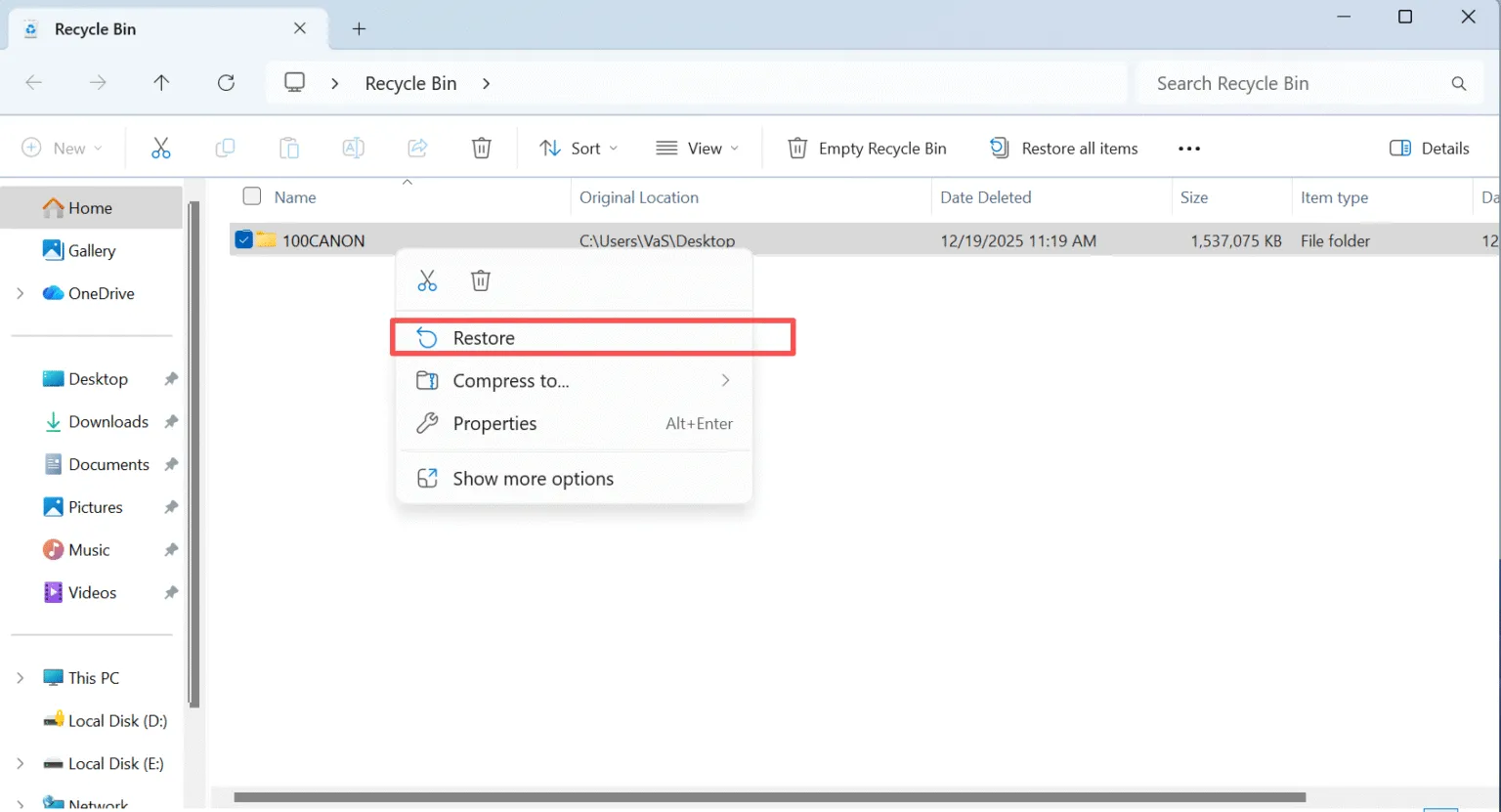
Se i file sono stati eliminati normalmente, è possibile che si trovino ancora nel Cestino o nella cartella di destinazione. Ripristinarli da lì è veloce e privo di rischi.
1. Aprire il Cestino
2. Individuare il file Excel eliminato
3. Fare clic con il tasto destro del mouse e scegliere Ripristino
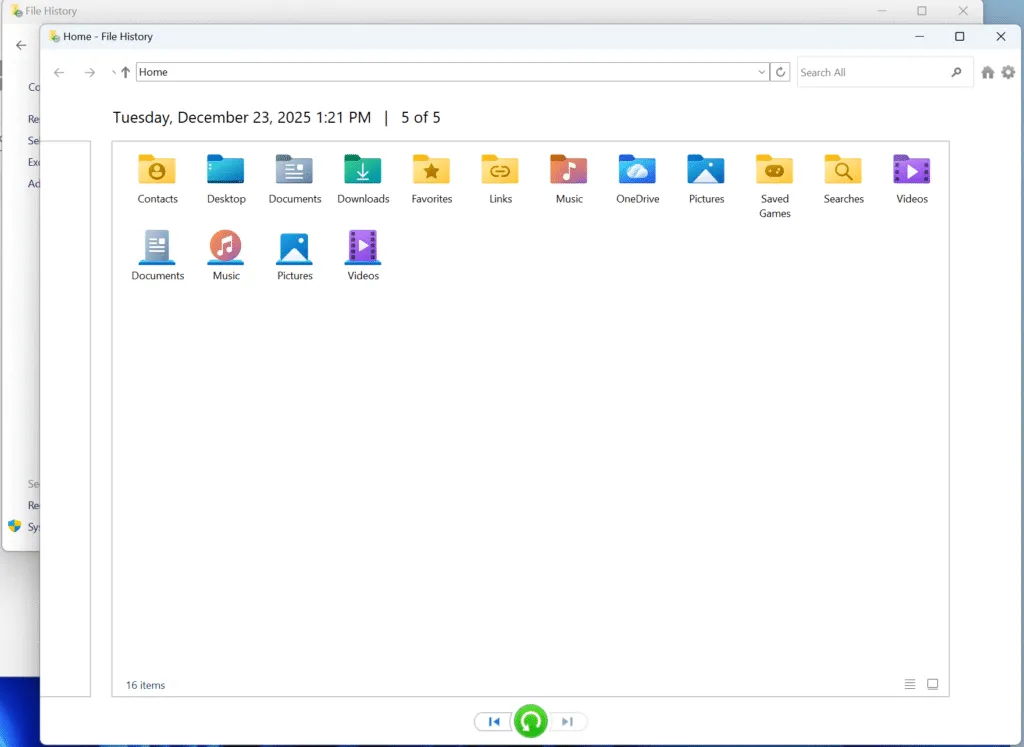
Recuperare i file eliminati dal disco rigido dal backup o dalla cronologia dei file
Utilizzare il Ripristino del sistema o le versioni precedenti
Nei sistemi Windows, le versioni precedenti possono esistere se i punti di ripristino (Protezione del sistema-about-sistema) erano attivi. Anche se limitato, questo metodo può aiutare a recuperare alcuni documenti senza strumenti aggiuntivi.

Quando il metodo manuale non è sufficiente per recuperare i file cancellati dal disco rigido
Negli scenari reali, le soluzioni manuali spesso falliscono. Ad esempio, raramente funzionano dopo un'eliminazione permanente, una formattazione del disco o un'operazione di corruzione della partizione. Inoltre, hanno problemi con le unità RAW o inaccessibili.
In queste situazioni, si rende necessaria una scansione più approfondita a livello di disco. Di conseguenza, gli utenti si affidano spesso a strumenti di recupero di livello professionale come Magic Data Recovery, che analizzano i settori grezzi del disco invece dei record del file system.
Come Magic Data Recovery aiuta a recuperare i file cancellati dal disco rigido
Quando le opzioni manuali sono esaurite, Magic Data Recovery offre un modo strutturato e più sicuro di approcciare Recupero dei file cancellati dal disco rigido.
I problemi principali che risolve
- Recupera i file eliminati in modo permanente dai dischi rigidi
- Esegue la scansione di partizioni formattate o danneggiate
- Supporti NTFS, FAT32, exFAT, HFS, file system ext
Perché è più affidabile degli strumenti di base
A differenza delle utility di sistema, Magic Data Recovery esegue scansioni di sola lettura. Questo approccio riduce al minimo il rischio di sovrascrivere i dati recuperabili, individuando i file persi in base alle firme dei file e alla struttura del disco.
Passi per recuperare i file cancellati dal disco rigido con Magic Data Recovery
1. Scaricare e installare il software in modo sicuro
Scaricare Magic Data Recovery dal sito ufficiale e installarlo su un'unità. diverso da quello in cui sono stati eliminati i file. L'installazione del software di recupero sul disco rigido interessato può sovrascrivere i dati eliminati, riducendo in modo permanente le possibilità di recupero.
Supporta Windows 7/8/10/11 e Windows Server
2. Selezionare l'unità originale da sottoporre a scansione
Avviare il programma e selezionare il disco rigido o la partizione in cui erano originariamente memorizzati i file eliminati. Dopo aver selezionato la posizione corretta, avviare la scansione.

3. Attendere il completamento della scansione
Magic Data Recovery esegue automaticamente una scansione avanzata che cerca i file eliminati e le cartelle perse a livello di disco. Man mano che la scansione procede, gli elementi recuperabili appaiono gradualmente nei risultati. Per una maggiore precisione, si consiglia di lasciare che la scansione termini completamente.

4. Anteprima dei file eliminati prima del recupero
Prima di ripristinare i dati, utilizzare la funzione di anteprima per verificare l'integrità e la pertinenza dei file. L'anteprima consente di verificare se i documenti, le foto o i video sono ancora utilizzabili, evitando così di ripristinare file danneggiati o non necessari durante il ripristino. Recupero dati da hard disk operazioni.

5. Recuperare i file in una posizione sicura
Selezionare i file necessari e recuperarli su un'altra periferica di archiviazione o su un altro disco interno. Evitare di salvare i dati recuperati nell'unità originale, poiché ciò potrebbe sovrascrivere altri file recuperabili e ridurre il successo complessivo del recupero.

Errori comuni che riducono il successo del recupero
In base all'esperienza del settore, questi errori riducono spesso i tassi di recupero:
- Continuare a utilizzare il disco rigido interessato
- Reinstallazione del sistema operativo
- Esecuzione di più strumenti di recupero sullo stesso disco
Evitare queste azioni aumenta le possibilità di successo. Recupero dati da hard disk.
Conclusione
Recuperare i file eliminati da un disco rigido è spesso possibile, ma il successo dipende dal tempismo e dalle azioni corrette. Iniziare con metodi di recupero manuali aiuta a minimizzare i rischi. Quando queste opzioni falliscono, gli strumenti dedicati diventano una soluzione pratica per Recupero dei file cancellati dal disco rigido.
Magic Data Recovery si distingue per l'offerta di scansioni in sola lettura, un ampio supporto per i file system e un processo di recupero progettato in base a scenari di perdita di dati reali. Per gli utenti che devono affrontare problemi complessi di cancellazione o formattazione, offre un'opzione equilibrata tra sicurezza ed efficacia. Se siete alla ricerca di una soluzione più efficiente dopo che il recupero manuale non è riuscito, si può considerare di provare Magic Data Recovery.
Supporta Windows 7/8/10/11 e Windows Server
Domande frequenti sul recupero dei file cancellati dal disco rigido
Come recuperare i file eliminati in modo permanente da un disco rigido?
È possibile recuperare i dati cancellati da un disco rigido?
È possibile recuperare i file dell'unità eliminati in modo permanente?
Come recuperare i file cancellati dal disco rigido?
Posso comunque recuperare i file eliminati in modo permanente?
Qual è il software di recupero del disco rigido completamente gratuito?
Come fanno i professionisti a recuperare i dati da un disco rigido?
È possibile cancellare definitivamente un disco rigido?

Vasilii è uno specialista del recupero dati con circa 10 anni di esperienza pratica nel settore. Nel corso della sua carriera, ha risolto con successo migliaia di casi complessi riguardanti file cancellati, unità formattate, partizioni perse e file system RAW. La sua esperienza copre sia i metodi di recupero manuale utilizzando strumenti professionali come gli editor esadecimali, sia le soluzioni automatiche avanzate con i software di recupero. La missione di Vasilii è quella di rendere accessibile la conoscenza del recupero dati affidabile sia ai professionisti IT che agli utenti di tutti i giorni, aiutandoli a salvaguardare i loro preziosi beni digitali.