
Ripristinare i file eliminati in modo permanente: Metodi comprovati
Hai premuto per sbaglio Shift + Canc, hai svuotato il Cestino o hai cancellato file importanti da un dispositivo di archiviazione? In molti casi, puoi ancora ripristinare i file eliminati in modo permanente se Windows non ha sovrascritto i dati originali e il TRIM dell'SSD non li ha già cancellati.
La prima regola è semplice: smettete di utilizzare l'unità interessata. Quindi controllate i backup di Windows, le "Versioni precedenti", l'archiviazione cloud e la funzione "Recupero file di Microsoft Windows". Se questi metodi non consentono di individuare i file, Magic Data Recovery può eseguire una scansione del dispositivo di archiviazione originale alla ricerca di dati recuperabili.
Questa guida si concentra specificatamente sulla cancellazione definitiva. Per una spiegazione più approfondita dei diversi scenari di cancellazione e delle opzioni di recupero, si consiglia di consultare la guida di Amagicsoft Guida al recupero dei file cancellati.
Di seguito scoprirai cinque modi pratici per recuperare i file eliminati in modo permanente, quando ciascuna soluzione è efficace e cosa è bene evitare prima del recupero.
Supporta Windows 7/8/10/11 e Windows Server
Vi chiedete se i vostri file possono essere recuperati? Scoprire in pochi secondi con il nostro controllo rapido qui sotto.
Valutazione del recupero dati
Rispondete a 3 rapide domande per valutare le vostre possibilità di recupero
Indice dei contenuti
Risposta rapida: È possibile recuperare i file cancellati definitivamente?
Sì. Potresti riuscire a ripristinare i file eliminati in modo permanente, ma il metodo corretto dipende da come sono scomparsi i file e da cosa è successo in seguito.
Prova questi metodi in ordine:
- Ripristina i file con Cronologia file.
- Controlla le versioni precedenti.
- Utilizza la funzione di recupero file di Windows.
- Controlla su OneDrive o in un altro backup.
- Esegui una scansione del disco originale con un software di recupero dati.
Il ripristino basato sul backup dovrebbe avere la priorità, poiché non dipende dalla presenza dei dati cancellati sul disco di origine.
Tuttavia, anche se non esiste alcun backup, il recupero potrebbe comunque essere possibile. Su un HDD, il contenuto dei file cancellati spesso rimane fino a quando nuovi dati non sovrascrivono lo spazio di archiviazione occupato. Gli SSD sono meno prevedibili perché le funzioni TRIM e di garbage collection possono cancellare i blocchi eliminati.
Pertanto, evitate di salvare nuovi file, installare software, formattare l'unità o eseguire strumenti di riparazione prima di aver individuato il metodo di recupero più sicuro.
Cosa succede quando i file vengono eliminati definitivamente?
Un file viene eliminato definitivamente quando Windows non è più in grado di ripristinarlo direttamente dal Cestino.
Le situazioni più comuni includono:
- Stampa Maiuscolo + Canc
- Svuotare il cestino
- Eliminazione dei file che non vengono inviati al Cestino
- Rimozione di file da alcuni dispositivi di archiviazione esterni
- Utilizzo di un'applicazione che elimina direttamente i file
Sui dischi rigidi tradizionali, la cancellazione definitiva di solito rimuove il riferimento nel file system e contrassegna lo spazio di archiviazione come disponibile. Windows può quindi riutilizzare quello spazio per nuovi file.
Tuttavia, il contenuto effettivo del file potrebbe rimanere fino a quando non viene sostituito da un’altra operazione di scrittura. Ecco perché a volte è possibile ripristinare i file eliminati in modo permanente anche se Esplora file non li mostra più.
Se i tuoi file sono scomparsi proprio dopo aver svuotato il cestino di Windows, consulta la guida dettagliata su come recuperare i file dal Cestino svuotato.
Perché la cancellazione definitiva su SSD è diversa
Gli SSD gestiscono i dati cancellati in modo diverso rispetto agli HDD tradizionali.
Windows può inviare un comando TRIM dopo l'eliminazione per comunicare all'SSD che determinati blocchi non contengono più dati utili. Il controller dell'SSD potrà successivamente cancellare tali blocchi tramite la garbage collection.
Pertanto, il recupero dei dati da un SSD può rivelarsi difficile anche se i file non sono stati sovrascritti manualmente.
Tuttavia, non tutti i file SSD mancanti sono immediatamente irrecuperabili. Il comportamento della funzione TRIM, l’attività dell’unità, il comportamento del controller e la causa della perdita dei dati sono tutti fattori rilevanti. Se i file cancellati erano memorizzati su un’unità a stato solido, leggi come recuperare i file cancellati da un SSD prima di procedere alle operazioni di riparazione.
È possibile recuperare i file eliminati definitivamente?
Sì, a volte è possibile recuperare i file eliminati in modo permanente, ma nessun metodo può garantire il successo.
In genere hai maggiori possibilità quando:
- Hai smesso di utilizzare l'unità interessata poco dopo la cancellazione.
- Windows non ha sovrascritto i dati eliminati.
- La cronologia dei file o un altro backup contiene una copia precedente.
- Il dispositivo di archiviazione risulta integro e leggibile.
- La funzione TRIM dell'SSD non ha cancellato i blocchi in questione.
- Non hai cancellato o eliminato i dati in modo sicuro.
Al contrario, il recupero diventa meno probabile dopo un uso intensivo del disco, una cancellazione sicura, scritture ripetute o una garbage collection dell'SSD completata con successo.
Un altro fattore importante è il tipo di perdita di dati.
Un file che è scomparso a causa di una cancellazione accidentale richiede un approccio diverso rispetto a un file perso a causa di un guasto fisico del disco. Se il disco emette rumori metallici, si disconnette ripetutamente, scompare dal BIOS o segnala gravi errori di I/O, interrompi i tentativi di recupero tramite software e valuta la possibilità di rivolgerti a un professionista.
Prima di ripristinare i file eliminati definitivamente
Le azioni che intraprendi subito dopo la cancellazione possono influire direttamente sul recupero dei dati.
Interrompi la scrittura dei dati sull'unità di origine
Supponiamo che tu abbia cancellato dei file importanti dall'unità D:. Evita di scaricare, copiare, estrarre archivi o installare programmi sull'unità D:.
I nuovi dati possono riutilizzare lo stesso spazio su disco che in precedenza ospitava i file eliminati.
Non ripristinare i file sulla stessa unità
Scegliere sempre un'altra unità su cui salvare i dati recuperati.
Ad esempio, se la fonte è un disco rigido esterno, salva i file recuperati sul disco interno o su un altro dispositivo esterno.
Evitare i comandi di formattazione o di riparazione
Non formattare un'unità solo perché Windows ti chiede di farlo.
Allo stesso modo, evitate di eseguire CHKDSK come prima misura quando mancano file importanti. Gli strumenti di riparazione modificano le strutture del file system, il che in alcune situazioni potrebbe rendere più difficile il recupero successivo.
Recupera prima i dati importanti. Ripara il dispositivo di archiviazione in un secondo momento.
Come recuperare i file cancellati definitivamente: 5 metodi
Non esiste un unico metodo ideale valido per tutti i casi di cancellazione. Inizia con soluzioni gratuite basate sul backup, poi passa alla scansione del disco se non esiste alcuna copia utilizzabile.
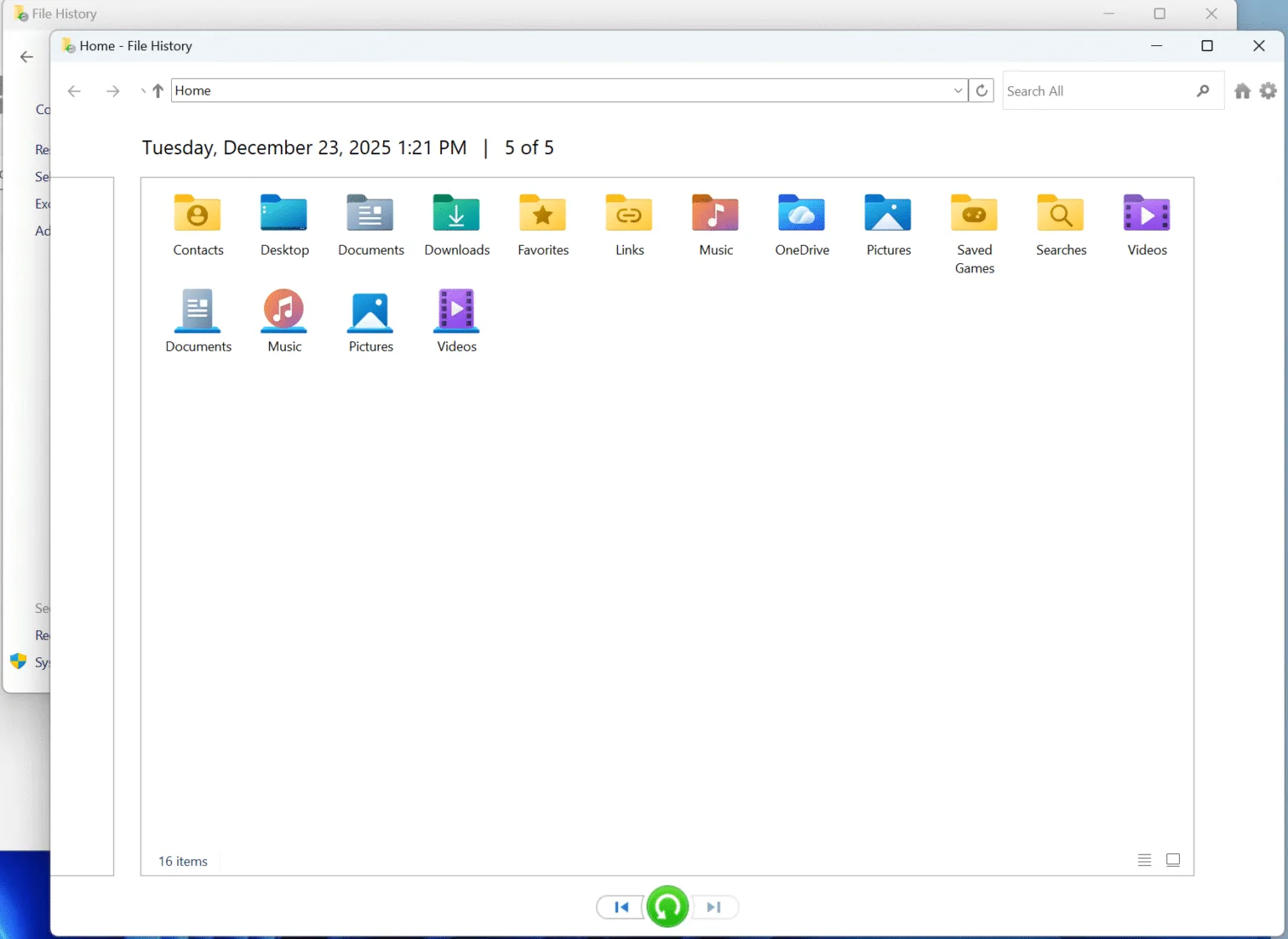
Metodo 1: Ripristinare i file eliminati definitivamente con la Cronologia dei file
La Cronologia dei file rappresenta uno dei modi più sicuri per ripristinare i file eliminati in modo permanente se hai attivato la funzione prima che avvenisse la cancellazione.
Seguire questi passaggi:
- Aperto Pannello di controllo.
- Selezionare Sistema e sicurezza.
- Aperto Storia del file.
- Cliccare Ripristino dei file personali.
- Accedi alla cartella originale.
- Scorri le date di backup disponibili.
- Seleziona i file o le cartelle che ti servono.
- Ripristinali.
La Cronologia dei file non ricostruisce i settori del disco eliminati. Recupera invece una copia salvata in precedenza.
Questa distinzione rende questo metodo affidabile quando è disponibile un backup adeguato.
Tuttavia, la Cronologia dei file non può essere d'aiuto se non l'hai mai attivata o se il file richiesto non era incluso in un backup disponibile.
Metodo 2: Ripristino dei file eliminati definitivamente dalle versioni precedenti
La sezione "Versioni precedenti" offre un altro metodo integrato per ripristinare i file eliminati in modo permanente se Windows ha conservato una versione precedente della cartella originale.
- Aperto Esplora file.
- Accedi alla cartella in cui si trovava in precedenza il file.
- Fare clic con il tasto destro del mouse sulla cartella.
- Scegliere Proprietà.
- Aprire la sezione Versioni precedenti scheda.
- Seleziona una versione precedente alla cancellazione.
- Cliccare Aperto per esaminarne il contenuto.
- Copiare i file necessari in una posizione sicura.
Ad esempio, supponiamo che tu abbia eliminato definitivamente una cartella di lavoro di Excel da:
C:\Utenti\Il tuo nome\Documenti\Progetti
Anziché cercare la singola cartella di lavoro eliminata, fai clic con il pulsante destro del mouse sulla cartella "Progetti" o "Documenti" e verifica se Windows ne possiede una versione precedente.
Se la scheda "Versioni precedenti" è vuota, passare al metodo successivo anziché sostituire inutilmente il disco di origine.
Metodo 3: Recuperare i file eliminati definitivamente con la funzione di recupero file di Windows
Microsoft mette a disposizione un'utilità ufficiale da riga di comando denominata "Windows File Recovery".
Può essere d'aiuto recuperare i file eliminati in modo permanente da unità interne locali, dischi esterni e dispositivi di archiviazione USB quando i file non sono più presenti nel Cestino.
Il formato generale del comando è:
winfr unità sorgente: unità destinazione: [/mode] [/switches]
Ad esempio:
winfr C: E: /regular /n ´Users´{Documenti
In questo esempio:
C:è l'unità di origine.E:è la destinazione di ripristino./normaleseleziona la modalità Normale./nconsente di specificare il file o la cartella da cercare.
Utilizzo Modalità normale come prima opzione per i file eliminati di recente su un’unità NTFS funzionante.
Per casi di cancellazione risalenti a molto tempo fa, file system diversi da NTFS o situazioni di recupero più complesse, Modalità estesa effettua una ricerca più ampia.
È fondamentale che l'unità di origine e quella di destinazione siano diverse. Non recuperare i file sulla stessa unità su cui stai eseguendo la scansione.
Windows File Recovery è gratuito, ma utilizza comandi anziché un'interfaccia grafica. Pertanto, gli utenti che non hanno dimestichezza con il Prompt dei comandi potrebbero preferire un'applicazione di recupero visiva.
Metodo 4: Recuperare i file eliminati definitivamente da OneDrive o da un backup
Prima di eseguire la scansione del disco, verificare se esiste già un'altra copia.
Tra le possibili sedi figurano:
- OneDrive
- Backup di Windows
- Un disco esterno di backup
- Un NAS
- Un altro servizio cloud
- Una copia salvata su un altro computer
OneDrive merita un'attenzione particolare perché molti utenti Windows sincronizzano automaticamente le cartelle “Desktop”, “Documenti” e “Immagini”.
Se i dati mancanti provengono da una cartella sincronizzata, controlla innanzitutto il Cestino di OneDrive e le funzionalità di recupero disponibili. La nostra guida dedicata spiega come fare ripristinare i file cancellati da OneDrive.
Il ripristino dal cloud e il ripristino dal disco locale risolvono problemi diversi.
Ad esempio, un file OneDrive disponibile solo online potrebbe non essere mai stato salvato per intero sul PC. In tal caso, un software di recupero dati locale non è in grado di ricreare dati che non sono mai esistiti sull'unità locale.
Tuttavia, se OneDrive aveva precedentemente scaricato o sincronizzato il file a livello locale, il disco locale potrebbe comunque contenere tracce recuperabili dopo la cancellazione.
Metodo 5: Ripristinare i file eliminati definitivamente con Magic Data Recovery
Se “Cronologia file”, “Versioni precedenti”, “Ripristino file di Windows” e i backup non riescono a individuare i file mancanti, la scansione a livello di disco diventa la successiva opzione praticabile.
Magic Data Recovery è progettato per situazioni di perdita logica dei dati quali:
- Maiuscolo + Canc
- Cestino svuotato
- Eliminazione accidentale di file
- File persi su dischi rigidi
- File cancellati dalle unità USB
- File cancellati dalle schede SD
- File persi da un supporto di archiviazione esterno
- Alcuni problemi relativi al file system
A differenza dei metodi basati sul backup, il software di ripristino esegue una scansione del dispositivo di archiviazione originale alla ricerca dei record del file system e dei dati dei file accessibili.
Questo approccio può essere d'aiuto ripristinare i file eliminati in modo permanente quando Windows non dispone più di un riferimento regolare a essi.
Magic Data Recovery offre anche un'interfaccia grafica. Gli utenti possono selezionare un'unità, eseguire una scansione, filtrare i risultati, visualizzare in anteprima i file supportati e scegliere esattamente ciò che desiderano ripristinare.
Questo flusso di lavoro è particolarmente utile quando il recupero dei file di Windows risulta troppo tecnico o quando è necessario esaminare numerosi risultati della scansione prima del recupero.
L'attuale versione gratuita consente di utilizzare fino a 500 MB di recupero dati, che può anche aiutarti a testare il processo di recupero con file più piccoli prima di decidere se ne servono altri.
Passo 1: installare il software in modo sicuro
Scarica l'applicazione, ma non installarla sullo stesso disco su cui si trovavano i file persi.
Se i file sono stati cancellati da un disco rigido esterno, installa invece il programma sul tuo disco di sistema Windows abituale.
Per i casi specifici relativi ai dischi esterni, puoi anche leggere come recuperare i file cancellati da un disco rigido esterno.
Supporta Windows 7/8/10/11 e Windows Server
Fase 2: Selezionare l'unità di origine
Apri Magic Data Recovery e seleziona l'unità in cui si trovavano originariamente i file.
Non limitarti a scegliere il disco più capiente. Individua la sorgente corretta in base alla lettera dell'unità, alla capacità e al dispositivo di archiviazione.

Fase 3: Ricerca dei dati cancellati
Avvia la scansione e consenti al software di eseguire la ricerca sul dispositivo di archiviazione selezionato.
Dopo la scansione, restringi i risultati in base al nome del file, al tipo di file, al percorso o ad altri filtri disponibili.

Fase 4: Anteprima dei file
Quando possibile, visualizza l'anteprima dei file supportati prima del recupero. Un'anteprima corretta può aiutarti a verificare di aver selezionato il file giusto e che il suo contenuto sia ancora leggibile.
Questo passaggio risulta particolarmente utile quando la scansione individua diversi file con nomi simili.

Passo 5: Ripristino su un'altra unità
Seleziona i file che ti servono e salvali in una posizione diversa dall'unità di origine.
Non riscrivere i dati recuperati sul disco interessato finché non avrai recuperato tutto ciò che è importante.

Quale metodo di recupero dovresti scegliere?
Sfrutta la situazione stessa per scegliere il punto di partenza più sicuro.
Situazione | Primo metodo consigliato |
La cronologia dei file è stata attivata | Storia del file |
Esiste già una copia più vecchia della cartella | Versioni precedenti |
I file locali sono stati eliminati definitivamente | Recupero file di Windows |
I file sono stati sincronizzati sul cloud | OneDrive o backup su cloud |
Non esiste alcun backup utilizzabile | Software di recupero dati |
I dati sono stati cancellati da un SSD | Interrompere l'attività dell'unità e verificare lo stato TRIM |
È stato coinvolto un disco esterno | Lasciarlo collegato solo quando necessario per il ripristino |
L'unità presenta problemi hardware | Smetti di cercare da solo e rivolgiti a un professionista |
In generale, i metodi basati sul backup meritano di essere provati per primi, poiché consentono di ripristinare copie già esistenti senza dover cercare nello spazio su disco occupato in precedenza.
Tuttavia, se tali copie non esistono, una scansione accurata del dispositivo originale potrebbe comunque recuperare i file eliminati in modo permanente.
Consigli per migliorare il recupero dei file permanenti
Se hai ancora bisogno di ripristinare i file eliminati in modo permanente, segui alcune semplici linee guida.
- Smettete di utilizzare l'unità di origine il prima possibile.
- Evita di installare strumenti di ripristino su quell’unità.
- Non formattare un'unità prima di aver recuperato i dati importanti.
- Evitare operazioni CHKDSK o di riparazione non necessarie.
- Recuperare i file su un altro dispositivo di archiviazione fisico.
- Visualizza in anteprima i file importanti, se lo strumento di recupero lo supporta.
- Non eseguire ripetutamente la scansione di un'unità fisicamente instabile.
- Tieni il dispositivo spento quando non lo stai utilizzando attivamente per il recupero dei dati.
Questi passaggi non garantiscono il recupero dei dati. Servono invece a ridurre il rischio di compiere azioni evitabili che potrebbero sovrascrivere o alterare dati che potrebbero ancora essere recuperabili.
Come evitare la perdita definitiva dei file in futuro
Una volta che avrai completato con successo recuperare i file eliminati in modo permanente, la prevenzione risulta molto più semplice rispetto a un altro tentativo di recupero.
Attiva "Cronologia file" o un altro sistema di backup automatico. Inoltre, conserva almeno un backup su un dispositivo separato.
Per le cartelle di lavoro importanti, la sincronizzazione su cloud può aggiungere un ulteriore livello di protezione. Tuttavia, è bene ricordare che la sincronizzazione non equivale sempre a un backup. A volte, la cancellazione di un file può essere sincronizzata su tutti i dispositivi.
Per documenti, foto, video e file di progetto insostituibili, conservane più copie in luoghi diversi.
Un backup utilizzabile trasforma la cancellazione definitiva in una normale operazione di ripristino, anziché in un problema incerto di recupero dei dati dal disco.
Conclusione
Spesso è possibile ripristinare i file eliminati in modo permanente, ma la soluzione giusta dipende da dove erano stati memorizzati i dati, dall’esistenza o meno di un backup, dall’intensità di utilizzo del dispositivo dopo la cancellazione e dal fatto che tecnologie come il TRIM degli SSD abbiano già cancellato i dati.
Inizia con “Cronologia file”, “Versioni precedenti”, “Ripristino file di Windows” e i backup su cloud o su dispositivi esterni. Queste opzioni sono gratuite e dovrebbero essere utilizzate prima di procedere a una scansione più approfondita del disco.
Se non esiste alcun backup utilizzabile, Magic Data Recovery offre un modo più intuitivo per eseguire la scansione del dispositivo di archiviazione originale, filtrare i risultati, visualizzare in anteprima i file supportati e recuperare i dati selezionati in un'altra posizione. Il suo flusso di lavoro grafico e la quota gratuita di recupero di 500 MB lo rendono particolarmente utile quando le opzioni integrate di Windows non riescono a risolvere il problema.
Tuttavia, nessuno strumento è in grado di recuperare informazioni che sono già state sovrascritte o cancellate in modo sicuro. Pertanto, limitare al minimo l’attività non necessaria del disco rimane il primo passo più importante.
Per ulteriori informazioni sui casi di cancellazione di Windows, sui principi di recupero e sulle guide correlate, visita il sito di Amagicsoft recupero dei file cancellati risorsa.
Supporta Windows 7/8/10/11 e Windows Server
Domande frequenti sul ripristino dei file eliminati in modo permanente
È possibile recuperare i file eliminati in modo permanente?
Come posso recuperare i file eliminati definitivamente in Windows 11?
È possibile recuperare file cancellati definitivamente senza un backup?
Posso recuperare gratuitamente i file cancellati in modo definitivo?
Dove vanno a finire i file eliminati in modo permanente?
Windows File Recovery è in grado di recuperare i file eliminati con Shift + Canc?
È possibile recuperare i file cancellati definitivamente da un SSD?

Vasilii è uno specialista del recupero dati con circa 10 anni di esperienza pratica nel settore. Nel corso della sua carriera, ha risolto con successo migliaia di casi complessi riguardanti file cancellati, unità formattate, partizioni perse e file system RAW. La sua esperienza copre sia i metodi di recupero manuale utilizzando strumenti professionali come gli editor esadecimali, sia le soluzioni automatiche avanzate con i software di recupero. La missione di Vasilii è quella di rendere accessibile la conoscenza del recupero dati affidabile sia ai professionisti IT che agli utenti di tutti i giorni, aiutandoli a salvaguardare i loro preziosi beni digitali.