
Come recuperare i file da un disco rigido formattato

La formattazione accidentale di un disco rigido può sembrare un vero disastro. Che sia stata causata da un crash del sistema, da un attacco malware o da un clic accidentale durante una nuova installazione di Windows, la perdita di intere partizioni di file critici è un'esperienza stressante. Tuttavia, se siete alla ricerca di un programma altamente affidabile recupero delle unità formattate La strategia, tuttavia, offre una significativa rassicurazione scientifica: una formattazione rapida standard non cancella i dati, ma si limita a distruggere i puntatori alle directory, lasciando i blocchi grezzi completamente intatti fino alla loro sovrascrittura.
Nel momento in cui un disco rigido viene formattato, è necessario interrompere immediatamente tutte le operazioni di scrittura. Non installare nuovo software su quell'unità specifica, non salvare nuovi documenti e non eseguire utility di deframmentazione del disco. Qualsiasi attività di scrittura in background da parte di Windows può sovrascrivere in modo permanente lo spazio non allocato, riducendo a zero la percentuale di successo del ripristino. Per garantire un'elevata percentuale di successo del ripristino per recupero formattato, distribuendo un'utility professionale come Magic Data Recovery dovrebbe essere la prima linea di difesa.
Supporta Windows 7/8/10/11 e Windows Server
Indice dei contenuti
La scienza alla base del recupero delle unità formattate
Per capire come recupero delle unità formattate è fondamentale distinguere tra i due tipi di meccanismi di formattazione presenti nei moderni sistemi operativi. Quando si esegue un comando di formattazione su un'unità disco, Windows richiede una casella di controllo per una “formattazione rapida”. La comprensione di ciò che accade sotto il cofano determina il percorso di recupero.
Formattazione rapida e formattazione completa: Cosa succede ai vostri dati?
Quando si esegue un Formato rapido, Il sistema operativo cancella l'architettura del file system (come la File Allocation Table o la Master File Table in NTFS). Riscrive il settore di avvio del volume e segna tutti i settori contenenti i dati come “spazio libero” o disponibile per la scrittura. I dati fisici - foto, video e database - rimangono perfettamente conservati sui piatti magnetici dell'unità disco. Un motore di recupero dati professionale può bypassare l'MFT mancante, scansionando i settori grezzi per riassemblare i file.
Al contrario, un Formato completo (introdotto come comportamento di sovrascrittura distruttiva in Windows Vista e versioni successive) non cancella solo la struttura del file system, ma scrive zeri sull'intera superficie della partizione. Se è stata eseguita una formattazione completa su un disco rigido meccanico standard, i dati vengono cancellati in modo permanente e non possono essere recuperati con soluzioni software di vendita al dettaglio.
Tipo di formattazione | Impatto del file system | Settori di dati grezzi | Stato di recuperabilità |
Formato rapido | Reinizializza MFT/FAT; cancella le directory dei file. | Intatto e completamente intatto. | Alto tasso di successo tramite algoritmi di recupero specializzati. |
Formato completo | Reinizializza la MFT/FAT; scansiona i settori danneggiati. | Completamente sovrascritto con zeri. | Fisicamente impossibile per il software standard. |

Guida al recupero degli HDD formattati passo dopo passo
A seconda delle vostre competenze tecniche, esistono due percorsi principali per eseguire un'operazione di successo. recupero delle unità formattate su macchine basate su Windows. Di seguito, illustriamo l'approccio manuale avanzato e forense e l'approccio software automatizzato progettato per una rapida distribuzione.
Metodo 1: Recupero manuale avanzato con WinHex (metodo Pro)
1.Aprire l'unità formattata in WinHex. Passare al cluster 2, che normalmente è la cartella principale nel file system FAT32. Tuttavia, la formattazione cancella la cartella principale per FAT32, quindi si può vedere che è vuota.


Metodo 2: Recupero sicuro e automatico dell'unità formattata tramite Amagicsoft
Se si desidera evitare il codice esadecimale grezzo e non correre rischi, software come Magic Data Recovery è un'alternativa più intelligente. Automatizza la scansione avanzata, la ricerca della struttura delle cartelle e il recupero sicuro dei file, con un'interfaccia pulita e facile da usare per i principianti.
Vantaggi principali:
- Recupera i file da HDD, SSD, USB e schede di memoria
- La scansione avanzata trova le cartelle e i file persi da eliminazione, formattazione o partizioni danneggiate.
- Anteprima di immagini, video e documenti prima del ripristino
- Recupero offline, in sola lettura senza rischio di sovrascrittura dei dati
- Non sono necessarie conoscenze tecniche, bastano pochi clic
Come utilizzare Magic Data Recovery per il recupero di unità formattate
Supporta Windows 7/8/10/11 e Windows Server
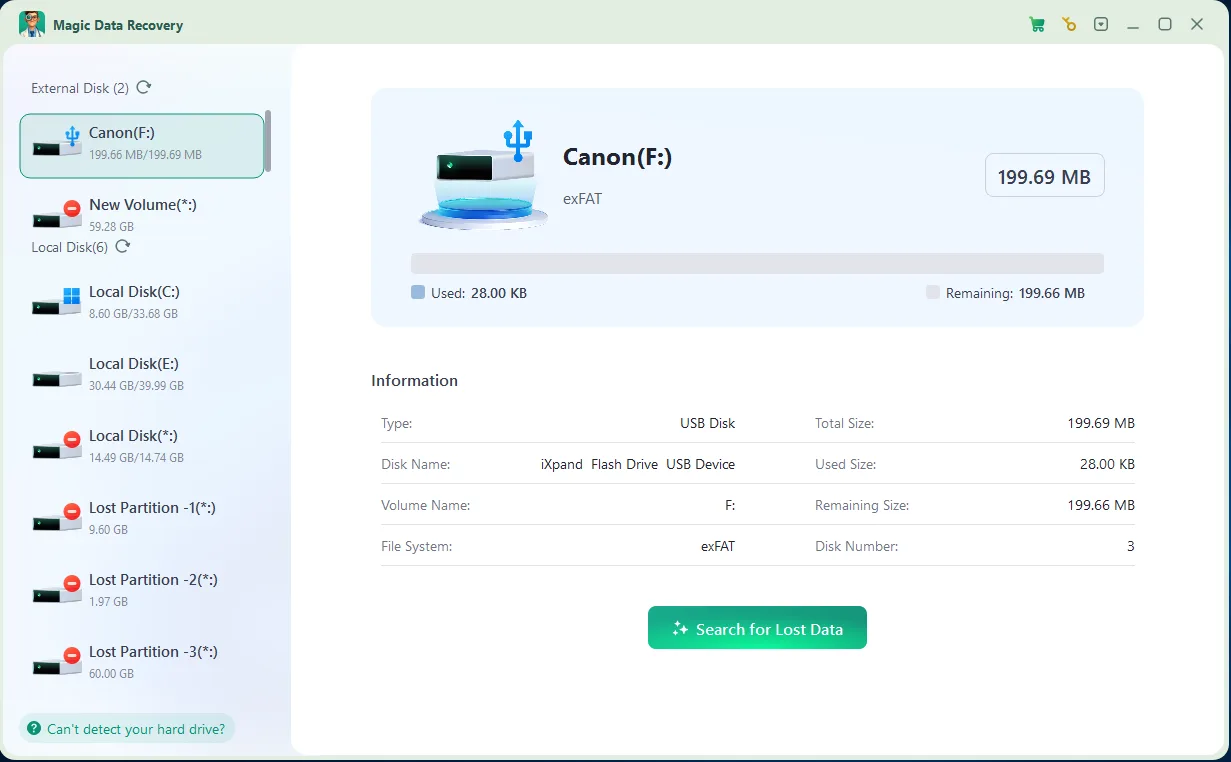
3. Anteprima dei file: Sfogliare l'elenco organizzato dei file rilevati. Utilizzate il riquadro di anteprima dei file integrato per verificare l'integrità strutturale di foto, documenti di testo o archivi zip compressi.

4. Recupero dei file: Selezionate le caselle accanto alle cartelle desiderate, fate clic sul pulsante Recupero e designare un disco di destinazione alternativo per l'output sicuro dei dati ripristinati. Nota: NON salvare i file recuperati nella stessa unità o scheda di memoria, nel caso in cui i file persi vengano danneggiati.

Conclusione
Supporta Windows 7/8/10/11 e Windows Server
FAQ
È possibile recuperare i dati da un'unità formattata con Quick Format?
È possibile eseguire il ripristino di un'unità formattata se è stata eseguita una formattazione completa?
È sicuro installare il software di recupero direttamente sull'unità formattata?
Perché alcuni file recuperati non si aprono o appaiono danneggiati?
È possibile utilizzare Magic Data Recovery per ripristinare i file da un disco rigido RAW?

Vasilii è uno specialista del recupero dati con circa 10 anni di esperienza pratica nel settore. Nel corso della sua carriera, ha risolto con successo migliaia di casi complessi riguardanti file cancellati, unità formattate, partizioni perse e file system RAW. La sua esperienza copre sia i metodi di recupero manuale utilizzando strumenti professionali come gli editor esadecimali, sia le soluzioni automatiche avanzate con i software di recupero. La missione di Vasilii è quella di rendere accessibile la conoscenza del recupero dati affidabile sia ai professionisti IT che agli utenti di tutti i giorni, aiutandoli a salvaguardare i loro preziosi beni digitali.