
How to Recover Files from a Formatted HDD

Accidentally formatting a hard drive can feel like an absolute disaster. Whether it was triggered by a system crash, a malware attack, or an accidental click during a fresh Windows installation, losing entire partitions of critical files is a stressful experience. However, if you are looking for a highly reliable formatted drive recovery strategy, there is significant scientific reassurance: a standard “Quick Format” does not actually erase your data—it merely destroys the directory pointers, leaving the raw blocks completely intact until they are overwritten.
The moment a hard drive is formatted, you must cease all write operations immediately. Do not install new software onto that specific drive, do not save new documents, and do not run disk defragmentation utilities. Any background write activity from Windows can permanently overwrite the unallocated space, dropping your recovery success rate to zero. To ensure a high restoration success rate for formatted recovery, deploying a professional utility like Magic Data Recovery should be your first line of defense.
Supports Windows 7/8/10/11 and Windows Server
Table of Contents
The Science Behind Formatted Drive Recovery
To understand how formatted drive recovery works, it is vital to distinguish between the two types of formatting mechanisms native to modern operating systems. When you execute a formatting command on an HDD, Windows prompts you with a checkbox for a “Quick Format”. Understanding what happens under the hood dictates your path to recovery.
Quick Format vs. Full Format: What Happens to Your Data?
When you perform a Quick Format, the operating system deletes the file system architecture (such as the File Allocation Table or the Master File Table in NTFS). It rewrites the volume boot sector and marks all sectors containing your data as “free space” or available for writing. The physical data bits—your photos, videos, and databases—remain perfectly preserved on the magnetic platters of the HDD. A professional data recovery engine can bypass the missing MFT, scanning the raw sectors to reassemble the files.
Conversely, a Full Format (introduced as a destructive overwrite behavior in Windows Vista and later versions) does more than wipe the file system structure; it writes zeroes across the entire surface of the partition. If a full format has been performed on a standard mechanical hard drive, the data is permanently erased and cannot be recovered by retail software solutions.
Formatting Type | File System Impact | Raw Data Sectors | Recoverability Status |
Quick Format | Reinitializes the MFT/FAT; purges file directories. | Untouched and fully intact. | High Success Rate via specialized recovery algorithms. |
Full Format | Reinitializes the MFT/FAT; scans for bad sectors. | Completely overwritten with zeroes. | Physically Impossible for standard software. |

Step-by-Step Formatted HDD Recovery Guide
Depending on your technical expertise, there are two primary pathways to execute a successful formatted drive recovery on Windows-based machines. Below, we break down both the advanced, forensic manual approach and the automated software approach designed for rapid deployment.
Method 1: Advanced Manual Recovery Using WinHex (Pro Method)
1.Open the formatted drive in WinHex. Jump to Cluster 2, which is normally the root folder in FAT32 file system. However, formatting wipes the root folder for FAT32, so we can see it is empty.


Method 2: Safe & Automatic Formatted Drive Recovery via Amagicsoft
If you want to avoid raw hex code and avoid risk, software like Magic Data Recovery is a smarter alternative. It automates advanced scanning, folder structure searching, and safe file recovery — with a clean, beginner-friendly interface.
Key Benefits:
- Recovers files from HDDs, SSDs, USBs and memory cards
- Advanced Scan finds folders and files lost from deleting, formating, or corrupted partitions.
- Preview images, videos, and documents before restoring
- Offline recovery, Read-only with no risk of overwriting data
- No technical knowledge required — just a few clicks
How to use Magic Data Recovery for Formatted Drive Recovery
Supports Windows 7/8/10/11 and Windows Server
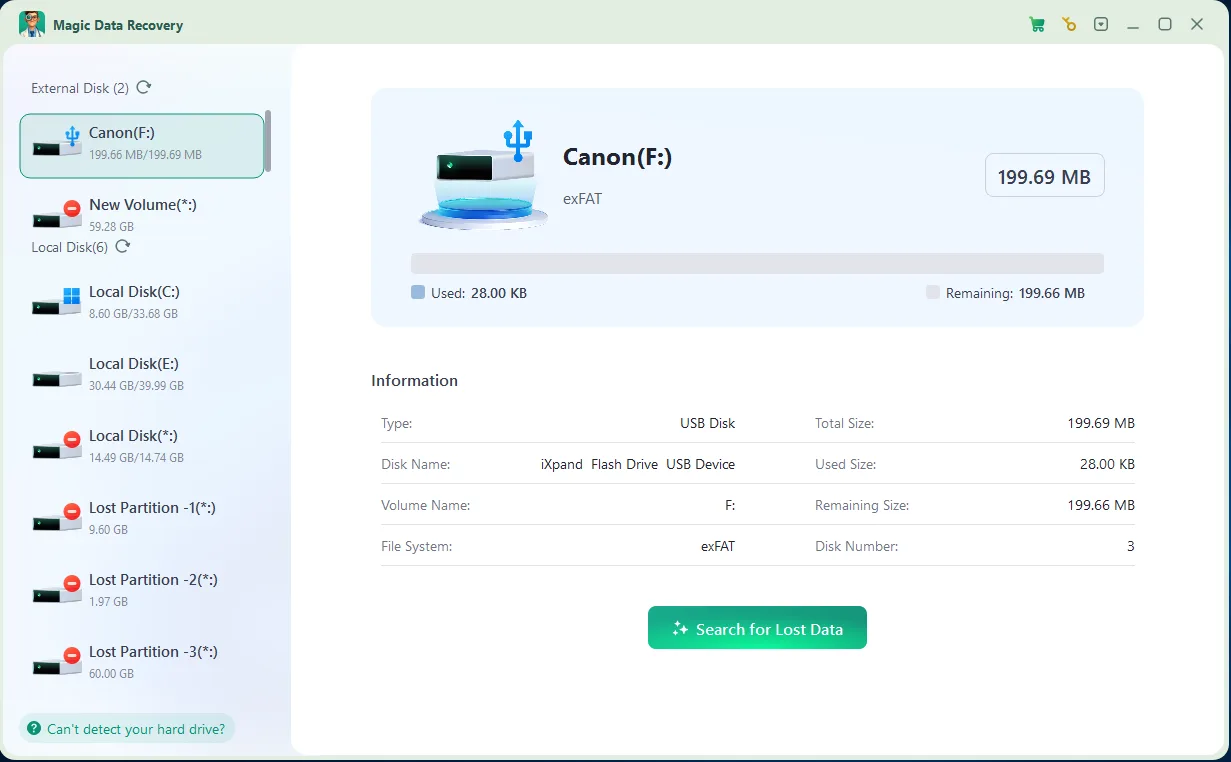
3. Preview Files: Browse through the organized list of detected files. Utilize the built-in file preview pane to check the structural integrity of photos, text documents, or compressed zip archives.

4. Recover Files: Check the boxes next to the folders you require, click the Recover button, and designate an alternative target disk to securely output your restored data. Note: DO NOT save the recovered the files to the same drive or memory card, in case the lost files get damaged.

Conclusion
Supports Windows 7/8/10/11 and Windows Server
FAQ
Can I recover data from a drive that was formatted using Quick Format?
Can I perform a formatted drive recovery if a Full Format was executed?
Is it safe to install the recovery software directly onto the formatted drive?
Why do some recovered files fail to open or appear corrupted?
Can I use Magic Data Recovery to restore files from a RAW hard drive?

Vasilii is a data recovery specialist with around 10 years of hands-on experience in the field. Throughout his career, he has successfully solved thousands of complex cases involving deleted files, formatted drives, lost partitions, and RAW file systems. His expertise covers both manual recovery methods using professional tools like hex editors and advanced automated solutions with recovery software. Vasilii's mission is to make reliable data recovery knowledge accessible to both IT professionals and everyday users, helping them safeguard their valuable digital assets.