
Intestazione ZIP

Definizione
Indice dei contenuti
Capire la struttura dei file ZIP
Un file ZIP è composto da più sezioni che ne definiscono l'organizzazione interna. Queste intestazioni sono fondamentali per garantire l'integrità e l'accessibilità dei dati. I componenti principali includono:
1. Intestazione locale del file (LFH):
Appare prima di ogni file compresso. Contiene dettagli sul nome del file, sul tipo di compressione (ad esempio, Deflate, Store), sulla somma di controllo CRC-32 e sulla dimensione compressa.
2. Dati del file:
I dati compressi effettivi di ciascun file, dopo l'LFH.
3. Descrittore dei dati (opzionale):
Utilizzato quando il CRC-32 e le informazioni sulla dimensione non sono note fino a dopo la compressione.
4. Intestazione della directory centrale (CDH):
Si trova alla fine del file ZIP. Riassume tutte le intestazioni dei file locali, rendendo possibile una rapida navigazione ed estrazione.
5. Fine del record dell'elenco centrale (EOCD):
Segna la fine dell'archivio. Memorizza il numero totale di file, la dimensione della directory centrale e l'offset di inizio.
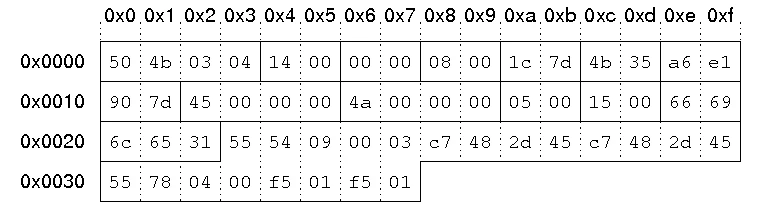
Ciascuna di queste intestazioni segue uno schema rigoroso di byte definito da Specifiche ZIP di PKWARE, a partire dalla firma 0x04034b50 (“PK\x03\x04”) per le intestazioni dei file locali.
Il ruolo dell'intestazione ZIP
Il Intestazione ZIP serve come tabella di marcia del file, consentendo agli strumenti di decompressione di interpretare e ripristinare i dati archiviati. Senza queste intestazioni, le utility ZIP non possono individuare o decomprimere correttamente i file.
- Identificazione del file: L'intestazione identifica l'inizio di ogni file compresso.
- Rilevamento degli errori: I valori CRC-32 aiutano a verificare l'integrità dei dati.
- Compatibilità: Strumenti come WinZip, 7-Zip e Windows Explorer si basano su strutture di intestazione coerenti.
- Guida al recupero: Gli strumenti di recupero dati utilizzano le informazioni sull'intestazione per ricostruire gli archivi ZIP danneggiati.
Firme comuni dell'intestazione dei file ZIP
Tipo di intestazione | Firma esagonale | Descrizione |
Intestazione del file locale |
| Segna l'inizio di una voce del file |
Intestazione dell'elenco centrale |
| Elenca tutte le voci dei file |
Fine dell'elenco centrale |
| Segna la fine dell'archivio ZIP |
Descrittore dei dati |
| Informazioni facoltative su checksum e dimensione |
Queste firme consentono agli strumenti forensi di individuare le strutture ZIP anche quando l'estensione del file è mancante o danneggiata.
Corruzione dell'intestazione ZIP: Cause e sintomi
Un'intestazione ZIP danneggiata impedisce alle utility di estrazione di individuare correttamente i file. Le cause tipiche includono:
- Download o operazioni di copia interrotti
- Settori danneggiati o guasto hardware
- Processo di compressione incompleto
- Corruzione del file system (ad esempio, errori FAT32, NTFS)
Sintomi comuni:
- “Errori ”Formato file ZIP non valido
- Errori di estrazione o file mancanti
- Archivi a zero byte nonostante le grandi dimensioni effettive dei file
Quando l'intestazione è persa o disallineata, è necessaria un'analisi manuale degli esagoni o un software di recupero dati professionale per ricostruire la struttura ZIP.
Recupero dei dati da un file ZIP danneggiato
La riparazione di un archivio ZIP con danni all'intestazione comporta in genere i seguenti passaggi:
1. Identificare le firme di intestazione utilizzando un editor esadecimale o uno strumento forense (50 4B 03 04).
2. Estrarre i segmenti di dati grezzi corrispondenti agli offset noti dei file.
3. Ricostruire la directory centrale in base a intestazioni di file locali valide.
4. Ricostruire l'EOCD con conteggi e offset accurati dei file.
In alternativa, gli strumenti di recupero automatico possono rilevare e ricostruire queste intestazioni.
Quando un danno fisico o logico sul dispositivo di archiviazione causa la perdita dell'intestazione, un programma di recupero dei file come Magic Data Recovery da Amagicsoft può ripristinare l'archivio ZIP eliminato o incompleto prima di iniziare la ricostruzione.
Analisi dell'intestazione ZIP nel recupero dati
Nella digital forensics e nel recupero dei dati, l'analisi delle intestazioni viene spesso utilizzata per scolpire o rimontare file ZIP parzialmente persi. I tecnici del recupero cercano la firma “PK\x03\x04” in un'immagine disco grezza per identificare i cluster di dati compressi.
Se il EOCD gli strumenti di recupero possono ricrearlo in base alle intestazioni dei file locali disponibili, rendendo possibile un recupero parziale anche da unità formattate.
Questo approccio è utilizzato da professionisti e soluzioni software conformi alla documentazione Microsoft e PKWARE, che garantiscono un ripristino accurato dei dati.
Integrazione con gli strumenti di recupero Amagicsoft
Sebbene il software Amagicsoft non modifichi direttamente le intestazioni ZIP, il suo avanzato Magic Data Recovery è in grado di individuare e ripristinare archivi ZIP danneggiati o eliminati contenenti metadati di intestazione danneggiati. Una volta recuperato il file, gli utenti possono utilizzare strumenti di riparazione ZIP esterni per ricostruire le voci di directory mancanti.
Questo flusso di lavoro - prima il ripristino, poi la riparazione - assicura che massima integrità e tracciabilità dei dati, fondamentale per gli scenari di recupero forense, aziendale o personale.
Migliori pratiche per prevenire i danni alle intestazioni ZIP
- Verificare sempre l'integrità del supporto di memorizzazione prima di archiviare file di grandi dimensioni.
- Evitare arresti bruschi o espulsioni durante la compressione.
- Conservare più copie di archivi importanti.
- Utilizzate un software affidabile per creare e gestire i file ZIP.
- Verificate periodicamente l'accessibilità dei vostri archivi.
Conclusione
A Intestazione ZIP è la pietra miliare della struttura degli archivi e dell'organizzazione dei dati. Definisce come i file vengono archiviati, indicizzati e verificati all'interno di un contenitore ZIP. La comprensione dei componenti dell'intestazione, come le intestazioni dei file locali e le voci della directory centrale, è essenziale per il recupero dei file e l'analisi forense.
Quando un'intestazione ZIP viene danneggiata o persa, Magic Data Recovery da Amagicsoft è in grado di recuperare i dati grezzi dell'archivio dalle unità danneggiate, garantendo che nessun file compresso critico venga perso prima di un'ulteriore riparazione.
👉 Proteggete i vostri archivi digitali e ripristinate i file ZIP persi in modo sicuro con Magic Data Recovery - un partner di fiducia per professionisti e privati.
Supporta Windows 7/8/10/11 e Windows Server
FAQ
Che cos'è un'intestazione ZIP?
Cosa succede se un file ZIP è danneggiato?
È possibile riparare manualmente un file ZIP?
Come posso identificare un'intestazione ZIP in un editor esadecimale?
Quali sono le cause del danneggiamento dell'intestazione ZIP?
Come si può evitare la perdita di file ZIP?

Vasilii è uno specialista del recupero dati con circa 10 anni di esperienza pratica nel settore. Nel corso della sua carriera, ha risolto con successo migliaia di casi complessi riguardanti file cancellati, unità formattate, partizioni perse e file system RAW. La sua esperienza copre sia i metodi di recupero manuale utilizzando strumenti professionali come gli editor esadecimali, sia le soluzioni automatiche avanzate con i software di recupero. La missione di Vasilii è quella di rendere accessibile la conoscenza del recupero dati affidabile sia ai professionisti IT che agli utenti di tutti i giorni, aiutandoli a salvaguardare i loro preziosi beni digitali.