
FAT32 파일 시스템이란?
FAT32 File System (File Allocation Table 32) is a disk file system introduced by Microsoft in 1996 as an extension of the original FAT architecture. It uses a 32-bit file allocation table to organize data storage, allowing more efficient space usage than FAT16 while maintaining broad compatibility across operating systems, consumer electronics, and embedded devices.
그리고 FAT32 File System is still commonly used on USB flash drives, SD cards, cameras, game consoles, bootable media, and other removable storage where compatibility is important. Its biggest limitation is that a single file cannot reach 4 GB in size. Therefore, FAT32 remains useful for cross-device storage, but newer file systems such as exFAT and NTFS are often more suitable for large files and modern computers.
목차
FAT32 파일 시스템 작동 방식
그리고 FAT32 File System organizes data using a File Allocation Table, or FAT, that tracks which clusters belong to each file. A cluster is a fixed-size group of disk sectors used as the basic allocation unit for storing data.
FAT32 commonly maintains two copies of the File Allocation Table. The additional copy provides redundancy if one FAT becomes damaged, although it should not be considered a complete backup of the file system.
Each file can occupy one or more clusters. When a file spans several clusters, FAT32 records them as a cluster chain. The system reads entries in the File Allocation Table to determine which cluster comes next until it reaches the end of the file.
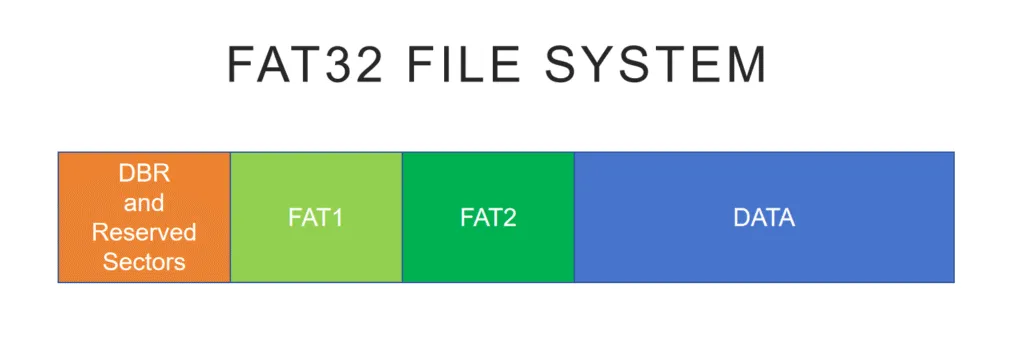
When the operating system reads a file, it uses the directory information to find the file’s starting cluster and then follows the cluster chain recorded in the FAT.
다음과 비교 FAT16, FAT32 can address significantly more clusters. This allows smaller cluster sizes on larger volumes and can reduce wasted storage space.
FAT32 File System Size and Volume Limits
One of the most important characteristics of the FAT32 File System is its 4 GB individual file-size limit.
Technically, the maximum size of a single FAT32 file is 4 GiB minus 1 byte, or 4,294,967,295 bytes. In everyday usage, this is commonly referred to as the 4 GB FAT32 file size limit.
This limitation comes from the 32-bit unsigned field used to store the file size in a standard FAT directory entry. Therefore, the commonly cited 4 GB FAT32 limit refers to the size of an individual file rather than the total capacity of the storage device.
For example, a 128 GB FAT32 USB drive can contain many gigabytes of data, but you cannot copy one 6 GB video file to it.
Volume size is a separate issue. With commonly used 512-byte sectors, FAT32 volumes are typically associated with capacities up to approximately 2 TB. The practical limit can vary depending on sector size, cluster configuration, the operating system, and the tool used to create the file system.
In short:
- Maximum individual file: About 4 GB
- FAT32 volume: Can be much larger than 4 GB
- Formatting limit: Depends partly on the operating system and formatting utility
This distinction is important when choosing FAT32 for modern storage devices.
FAT32 파일 시스템이 여전히 널리 사용되는 이유
Although newer file systems such as NTFS 그리고 exFAT offer support for larger files and more advanced features, the FAT32 File System remains relevant for several practical reasons.
- 범용 호환성: FAT32 is supported by Windows, macOS, Linux, cameras, smart TVs, game consoles, media players, and many embedded systems.
- 오버헤드가 적습니다: Its relatively simple structure makes FAT32 suitable for removable storage and hardware with limited resources.
- 부팅 및 펌웨어 지원: Many BIOS, UEFI, recovery, and firmware-update environments support or require FAT32-formatted media.
- Legacy device support: Older devices may recognize FAT32 even when they cannot read exFAT or NTFS.
As a result, FAT32 is still commonly used when compatibility matters more than advanced file-system functionality.
When Should You Use FAT32 File System?
그리고 FAT32 File System remains a sensible choice when:
- A camera, smart TV, game console, car multimedia system, or other device specifically requires FAT32.
- You are creating compatible boot or firmware-update media.
- A USB drive must work with both newer and older devices.
- You do not need to store individual files larger than 4 GB.
- Cross-platform compatibility is more important than advanced security features.
However, FAT32 is generally less suitable when:
- You regularly work with videos, disk images, archives, or other files larger than 4 GB.
- You are formatting a Windows system or internal drive.
- You need file permissions, encryption, or journaling.
- You use a large external SSD mainly with modern computers.
- Your devices already support exFAT.
In these situations, exFAT or NTFS will usually provide a more practical storage environment.
FAT32와 NTFS
Both FAT32 and NTFS are Microsoft file systems, but they were designed for different purposes.
기능 | FAT32 | NTFS |
Maximum individual file | About 4 GB | Supports much larger files |
일반적인 사용 | USB drives, SD cards, removable media | Windows internal and system drives |
저널링 | 아니요 | 예 |
권한 | 아니요 | 예 |
File-system encryption | 아니요 | 예 |
크로스 플랫폼 지원 | 우수 | More limited outside Windows |
Legacy-device support | 우수 | 제한적 |
FAT32 prioritizes compatibility and simplicity, while NTFS focuses more heavily on reliability, security, permissions, journaling, and support for modern Windows storage.
For an internal Windows HDD or SSD, NTFS is generally more appropriate. However, FAT32 can still be preferable for removable storage that must work with cameras, televisions, game consoles, firmware tools, or older devices.
FAT32 vs exFAT vs NTFS
For modern removable storage, it is also useful to compare FAT32 File System with both exFAT and NTFS.
기능 | FAT32 | exFAT | NTFS |
다음에 가장 적합합니다 | Maximum device compatibility | Modern removable storage | Windows internal storage |
4 GB보다 큰 파일 | 아니요 | 예 | 예 |
저널링 | 아니요 | 아니요 | 예 |
Windows 읽기/쓰기 | 예 | 예 | 예 |
macOS 읽기/쓰기 | 예 | 예 | Limited native NTFS write support |
File permissions | 아니요 | 아니요 | 예 |
Typical devices | USB, SD, cameras, firmware media | USB, SDXC, external SSDs | Windows HDDs and SSDs |
선택 FAT32 File System when maximum compatibility is required or a device specifically requires FAT32.
선택 exFAT when you need removable storage capable of holding files larger than 4 GB while remaining compatible with modern Windows and macOS computers.
선택 NTFS primarily for Windows internal drives or storage that benefits from journaling, permissions, encryption, and other Windows-specific features.
일반적인 FAT32 파일 시스템 제한 사항
동안 FAT32 File System is reliable enough for many removable-storage applications, its relatively simple architecture also creates several limitations.
4 GB Individual File Size Limit
FAT32 cannot store an individual file that reaches 4 GB in size. This can be a major problem for large videos, virtual-machine images, disk images, installation packages, and compressed archives.
No File-Level Security
FAT32 does not support NTFS-style access-control permissions or built-in file-system encryption.
Therefore, it is poorly suited to situations where multiple users require different levels of access to stored files.
No Journaling
FAT32 does not maintain a metadata transaction journal.
As a result, sudden power loss, system crashes, or unsafe drive removal can leave file-system metadata inconsistent and increase the risk of corruption.
조각화
Files can become fragmented after repeated creation, deletion, and modification. On heavily used storage, this can affect performance, particularly on mechanical disks.
Limited Suitability for Modern System Drives
FAT32 lacks many of the reliability, security, and management features expected from a modern desktop operating system.
These limitations make the FAT32 File System unsuitable for many modern internal-storage workloads. However, they do not eliminate its usefulness for removable media, boot drives, embedded systems, and compatibility-focused storage.
USB 드라이브를 FAT32 파일 시스템으로 포맷하는 방법
Formatting creates a new file system on the selected partition. Therefore, back up any important files before starting.
To format a compatible USB drive as FAT32 in Windows:
- USB 드라이브를 삽입합니다.
- 열기 디스크 관리.
- Right-click the USB partition and select 형식.
- 선택 FAT32 를 파일 시스템으로 지정합니다.
- Select the preferred allocation unit size if necessary.
- 작업을 확인하십시오.
For supported USB drives, FAT32 may also be available through File Explorer.
Does Windows Still Have a 32 GB FAT32 Formatting Limit?
The commonly discussed 32 GB limit is not the actual maximum capacity of the FAT32 File System. Instead, it originated from limitations imposed by Windows formatting tools.
Traditional Windows graphical formatting interfaces may not offer FAT32 for partitions larger than 32 GB. However, newer Windows 11 versions have increased the FAT32 creation limit of the command-line 형식 tool to as much as 2 TB.
Therefore, FAT32 formatting behavior may depend on:
- Windows version and build
- The formatting interface being used
- 저장 용량
- Sector size
- Partition configuration
If FAT32 is unavailable for a large USB drive, first check whether the target device specifically requires FAT32.
For modern removable storage that must hold files larger than 4 GB, exFAT is often a better choice.
데이터 안전 고려 사항
FAT32 볼륨이 손상된 또는 실수로 포맷된, important file-system metadata may be damaged or reset while some original file data remains on the storage device.
This is particularly important from a data-recovery perspective. A deleted or formatted FAT32 file may remain recoverable until its clusters are overwritten by new data.
Therefore, if important files suddenly disappear:
- Stop writing new data to the FAT32 drive.
- Avoid formatting the drive again.
- Do not copy new files onto the affected storage.
- Recover important files before attempting file-system repairs.
A controlled, read-only recovery approach can reduce the risk of overwriting recoverable data.
다음과 같은 전문 복구 도구 Magic Data Recovery can scan FAT32 volumes and identify recoverable files after accidental deletion, formatting, or certain logical file-system problems.
If you need to recover data from a FAT32 drive, follow these steps.
1.Download and Install the Software
Install Magic Data Recovery on a different drive so that the installation does not overwrite potentially recoverable files on the affected FAT32 device.
Do not install the software directly on the drive from which you need to recover data.
Windows 7/8/10/11 및 Windows Server 지원
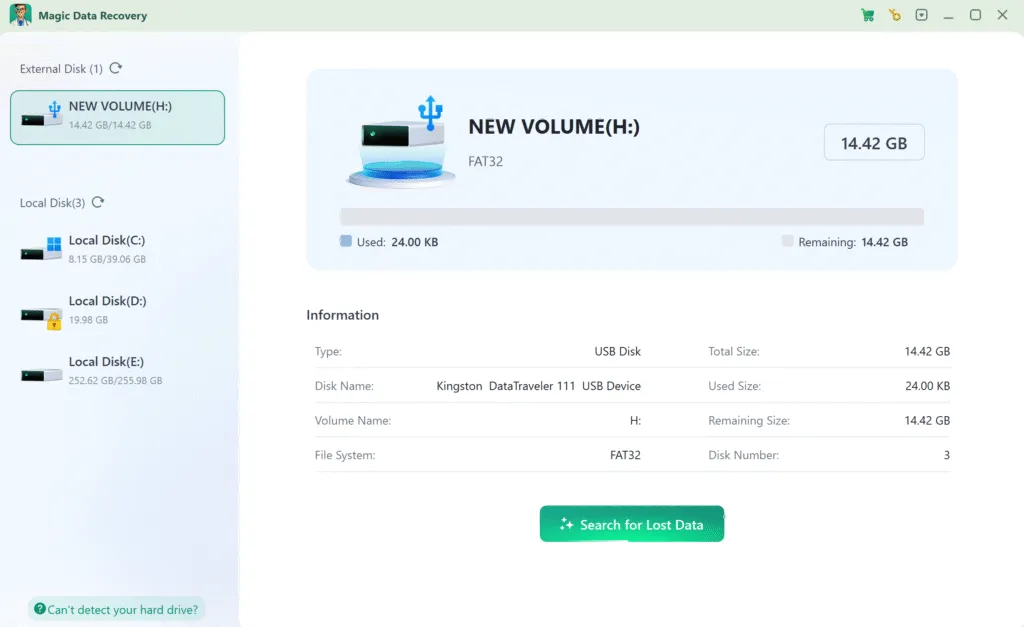
2. FAT32 드라이브를 선택하고 스캔을 시작합니다.
소프트웨어를 시작합니다. 연결된 모든 드라이브를 자동으로 감지합니다.
→ FAT32 드라이브 선택 손실된 파일이 포함되어 있습니다.
→ “검색”을 클릭합니다.” 를 클릭하여 복구 프로세스를 시작하세요.
3. 스캔이 완료될 때까지 기다립니다.
소프트웨어가 고급 스캔을 수행하여 복구 가능한 모든 파일을 찾습니다. 스캔 시간은 주로 드라이브의 용량과 성능에 따라 달라집니다.

4. 복구 전 파일 미리보기
스캔이 완료되면 발견된 모든 파일이 결과 목록에 표시됩니다. “미리보기” 기능을 사용해 파일(예: 사진, 문서)을 열고 손실된 데이터와 일치하는지 확인합니다.

5. 안전하게 데이터 복구
필요한 파일을 선택하고 “복구” 버튼을 클릭하여 다른 드라이브(예: 외장 USB 또는 보조 내장 드라이브)를 선택합니다.
⚠️ 덮어쓰기 및 영구적인 데이터 손실의 위험이 있으므로 절대 원본 FAT32 드라이브에 파일을 복구하지 마세요.

결론
그리고 FAT32 File System remains a practical and widely supported file system for removable storage, particularly when broad device compatibility matters more than advanced security and file-management features.
Its simple design makes FAT32 suitable for USB flash drives, SD cards, cameras, boot media, firmware-update devices, smart TVs, game consoles, and many embedded systems. However, the 4 GB individual file-size limit, lack of journaling, and absence of modern permissions make it less suitable for large files and modern operating-system drives.
For modern removable storage containing large files, exFAT may be more appropriate. For Windows system and internal drives, NTFS provides more advanced reliability and security features.
If unexpected data loss occurs on a FAT32 volume, avoid writing new data to the affected device. You can use Magic Data Recovery to scan the FAT32 storage for recoverable files before attempting repairs or another format.
Windows 7/8/10/11 및 Windows Server 지원
FAT32 파일 시스템 FAQ
FAT32는 USB에서 무엇을 의미하나요?
FAT32와 NTFS 중 어느 것이 더 낫나요?
32GB SD 카드는 모두 FAT32인가요?
FAT32가 여전히 사용되나요?
모든 USB 드라이브가 FAT32를 지원하나요?
USB를 FAT32에 넣으려면 어떻게 하나요?
FAT32의 단점은 무엇인가요?
FAT32를 NTFS로 변환할 수 있나요?

바실리는 이 분야에서 약 10년간 실무 경험을 쌓은 데이터 복구 전문가입니다. 그는 경력 전반에 걸쳐 삭제된 파일, 포맷된 드라이브, 손실된 파티션 및 RAW 파일 시스템과 관련된 수천 건의 복잡한 사례를 성공적으로 해결했습니다. 그의 전문 지식은 헥스 에디터와 같은 전문 도구를 사용한 수동 복구 방법과 복구 소프트웨어를 사용한 고급 자동화 솔루션을 모두 다룹니다. 바실리의 사명은 IT 전문가와 일반 사용자 모두에게 신뢰할 수 있는 데이터 복구 지식을 제공하여 소중한 디지털 자산을 보호할 수 있도록 돕는 것입니다.