
如何從 Illustrator 恢復未儲存的檔案
如果 Illustrator 在您儲存前當機,, 如何從 Illustrator 還原未儲存的檔案 這取決於應用程式在關閉前成功寫入的內容。程式當機可能會留下 Adobe 的恢復資料,而雲端文件則可能包含較早的版本。然而,從未儲存的專案與已儲存的專案情況不同 .ai 該檔案後來已被刪除。.
請先嘗試使用 Illustrator 的內建復原功能,因為這些功能是專為未儲存的工作而設計的。如果已儲存的 Illustrator 檔案或復原副本遭刪除,且上述方法均失敗,, Magic Data Recovery 這可能有助於掃描原始的 Windows 儲存裝置。若要進一步了解檔案刪除後的處理流程,請參閱我們的 已刪除檔案復原指南.
重要: 如果一個已儲存的 .ai 檔案已被刪除,請停止將新資料寫入該磁碟機。新檔案可能會覆寫已刪除的資料,而 SSD 的 TRIM 功能則可能降低在磁碟層級恢復資料的機率。.支援 Windows 7/8/10/11 和 Windows Server
目錄
如何從 Illustrator 還原未儲存的檔案:選擇正確的情況
嘗試之前 如何從 Illustrator 還原未儲存的檔案, 釐清實際發生了什麼情況。未儲存的工作、已刪除的檔案、雲端文件以及損毀的專案,都需要採取不同的解決方案。.
情況 | 最佳的第一種方法 |
Illustrator 當機或卡死 | 重新啟動 Illustrator 並檢查自動還原功能 |
未顯示任何已還原的文件 | 檢查 Illustrator 的 DataRecovery 資料夾 |
雲端文件遺失了最近的編輯記錄 | 使用版本歷史紀錄 |
先前已儲存 | 「資源回收筒」、備份,然後是檔案復原 |
新專案在未儲存的情況下已關閉 | 檢查還原資料,儘管可能不存在任何副本 |
現有 | 請將此情況視為可能的檔案損壞,而非刪除 |
自動儲存與永久備份並不相同。還原資料主要用於防範應用程式當機,而備份則會為您提供獨立的副本,這些副本即使遭遇刪除或儲存問題也能倖存下來。.
方法 1:重新啟動 Illustrator 並使用自動還原功能
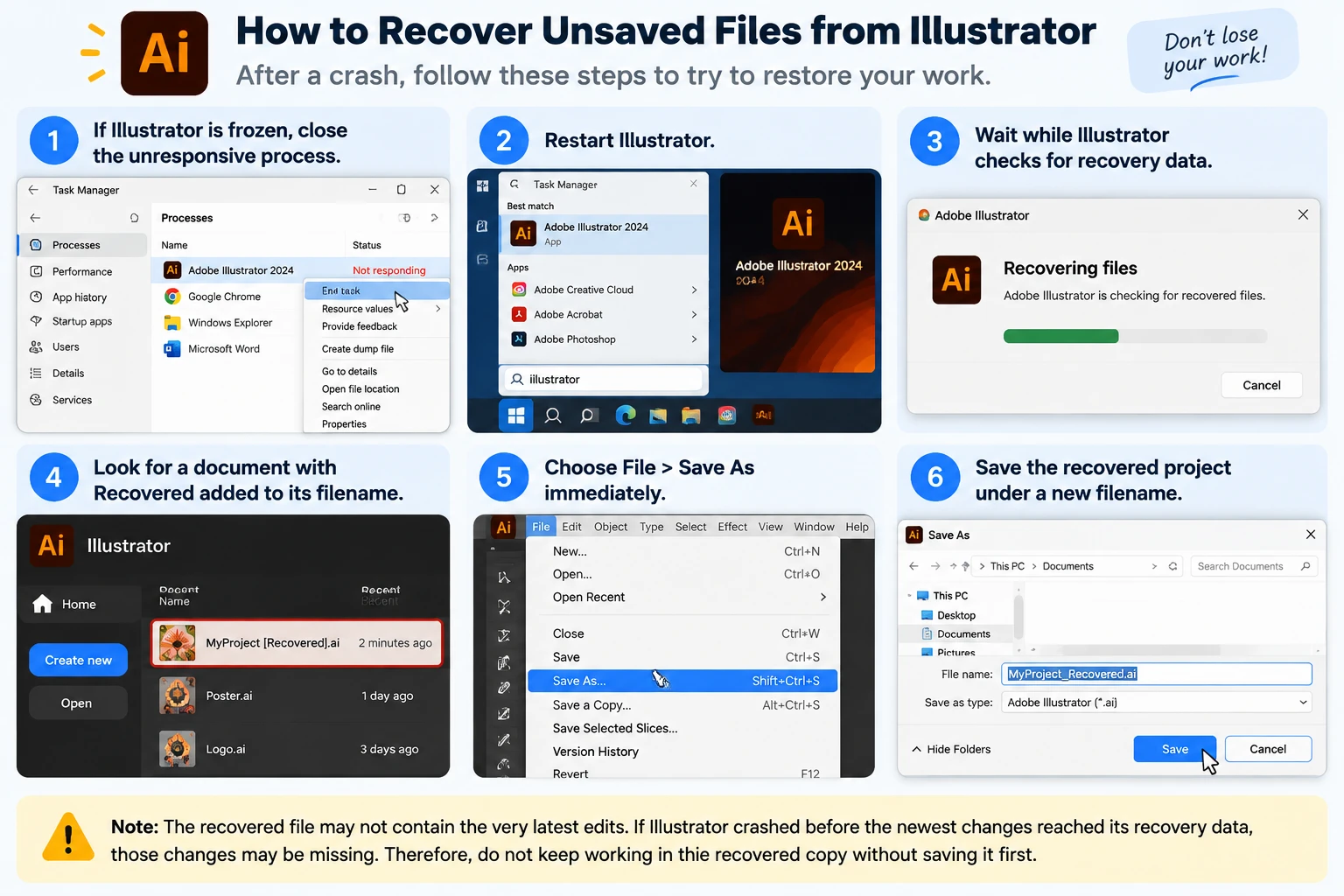
對……最快的回答是 如何從 Illustrator 還原未儲存的檔案 當程式當機後,通常的解決方法是重新開啟 Illustrator。.
- 如果 Illustrator 當機,請關閉該無回應的程序。.
- 重新啟動 Illustrator。.
- 請稍候,Illustrator 正在檢查復原資料。.
- 請尋找一份包含 回收 附加至其檔案名稱中。.
- 選擇 檔案 > 另存新檔 立即。.
- 將還原後的專案以新的檔案名稱儲存。.
Adobe 說明,當存在適當的復原資料時,Illustrator 能在應用程式意外當機後自動復原文件。.
然而,還原後的檔案可能不包含最新的編輯內容。如果 Illustrator 在最新變更尚未寫入還原資料之前發生當機,這些變更可能會遺失。.
因此,請勿在未先儲存的情況下,繼續在已還原的副本上進行編輯。.
方法 2:在 Windows 上檢查 Illustrator 的 DataRecovery 資料夾
如果 Illustrator 未能重新開啟您的專案,請繼續執行下一步: 如何從 Illustrator 還原未儲存的檔案 是手動檢查其還原位置。.
在 Windows 上尋找 Illustrator 還原檔案
- 新聞 贏 + R.
- 輸入:
%AppData%
- 開啟 Adobe 資料夾。.
- 請導航至類似以下的路徑:
Adobe\Adobe Illustrator 設定\\x64\DataRecovery
- 依下列方式排序資料夾 修改日期.
- 尋找最近的 Illustrator 還原檔案。.
- 試著開啟一個可能的
.ai或.aidIllustrator 中的檔案。. - 如果能正常開啟,請使用 另存新檔 並建立一份獨立的副本。.
當 Illustrator 已建立還原資訊,但未自動重新開啟該檔案時,此方法便派上用場。.
Illustrator 29.2–29.8 需特別注意
Adobe 表示,Illustrator 29.2 至 29.8 版本使用 .aishm 還原檔案。這些檔案並非設計用於透過傳統的資料復原工作流程手動開啟。.
因此,如果您使用的是上述任一版本,首選做法應是重新啟動 Illustrator,並讓其自動復原程序執行。.
Illustrator 30.0 也調整了部分復原工作流程。Adobe 現在採用 在背景中儲存 由於新增了快速儲存和自動備份功能,因此針對舊版 Illustrator 所撰寫的部分說明,可能已不再適用於您的版本。.
方法 3:在 macOS 上檢查 Illustrator 還原資料
Mac 用戶也可以試試 如何從 Illustrator 還原未儲存的檔案 透過 Adobe 的還原資料夾。.
- 開啟「Finder」。.
- 選擇 前往 > 前往資料夾.
- 輸入:
~/Library/
- 導覽到
「偏好設定」/「Adobe Illustrator 」設定//DataRecovery
- 依修改日期排序檔案。.
- 查看最近的
.ai或.aid檔案。. - 在 Illustrator 中開啟一個合適的檔案。.
- 如果專案開啟,請立即儲存一份新副本。.
同樣地,Illustrator 29.2–29.8 採用了不同的 .aishm 復原系統,因此自動復原對於這些發行版而言更為合適。.
此外,請避免搜尋每個暫存資料夾,並隨意重新命名 .tmp 檔案至 .ai. Windows 和 macOS 的暫存資料夾中包含由許多程式所建立的檔案。一般的暫存檔並不一定就是 Illustrator 文件。.
方法 4:透過版本歷史記錄還原 Illustrator 雲端文件
如果您正在處理 Illustrator 雲端文件,, 如何從 Illustrator 還原未儲存的檔案 可能涉及 Adobe 版本歷史紀錄,而非本機還原檔案。.
作為 Adobe 雲端工作流程的一部分,雲端文件會自動儲存變更。.
試試這個:
- 開啟 Illustrator 雲端文件。.
- 選擇 檔案 > 版本歷史.
- 檢視可用版本。.
- 請選擇在發生不希望的變更或資料遺失之前所建立的版本。.
- 在適當的時候還原至該版本。.
- 或者,將所需的圖稿複製到一個新文件中。.
當檔案仍然存在,但最近的編輯內容卻不慎被修改或刪除時,「版本歷史」功能便特別有用。.
然而,雲端版本歷史紀錄與本地自動還原是兩個不同的系統。本地 .ai 僅僅因為安裝了 Creative Cloud,文件並不會自動產生雲端版本歷史紀錄。.
方法 5:還原先前儲存的 Illustrator 檔案
使用者正在搜尋 如何從 Illustrator 還原未儲存的檔案 有時甚至會遺失一個已經儲存過的專案。.
這屬於「已刪除檔案」的問題,而非「未儲存檔案」的問題。.
先檢查回收站
如果您刪除了該 .ai 在 Windows 上正常建立檔案:
- 開啟 回收站.
- 搜尋專案名稱或
.ai延伸。. - 用滑鼠右鍵按一下檔案。.
- 選擇 還原.
- 請檢查其原始資料夾。.
這比掃描磁碟更安全,因為 Windows 只是在還原已保留的檔案。我們的 從資源回收筒中恢復已刪除檔案的指南 說明若檔案已不存在時,可採取的各種選項。.
試試「檔案歷史紀錄」或「先前版本」
如果在 Illustrator 檔案消失之前已啟用「檔案歷史紀錄」,Windows 可能還保留著較早的副本。.
- 開啟原本儲存該檔案的資料夾
.ai專案。. - 用滑鼠右鍵按一下資料夾。.
- 選擇 屬性.
- 開啟 先前版本.
- 請檢查該檔案消失前的版本。.
- 開啟或還原所需的版本。.
您也可以瀏覽我們的 Windows 11 最近刪除的檔案恢復指南 如果 Illustrator 專案最近已從 Windows 電腦中移除。.
檢查雲端備份與手動備份
另請搜尋:
- OneDrive
- Dropbox
- Google Drive
- 外部備份硬碟
- 透過電子郵件傳送的專案附件
- 外匯版本
- 共用團隊資料夾
- 較舊的檔案名稱,例如
design-v2.ai或final-old.ai
與其進行磁碟掃描,不如使用有效的備份,因為備份能提供現有資料的完整副本,而非試圖重建已刪除的資料。.
Magic Data Recovery 在何種情況下能從 Illustrator 恢復檔案
Magic Data Recovery 當您需要時,這就變得重要了 從 Illustrator 還原檔案 這些檔案曾經儲存於儲存裝置中,隨後被刪除、永久移除,或從可存取的 Windows 磁碟機中遺失。.
例如,在以下情況下可能適用:
- 的
.ai專案已被刪除;; - 已清空「資源回收筒」;;
- 按下 Shift + Delete 會直接刪除檔案,不會先移至資源回收筒;;
- 備份副本本身已被刪除;;
- 沒有可用的「檔案歷史紀錄」或雲端備份;;
- Windows 仍能偵測到原始儲存裝置。.
Magic Data Recovery 將 Adobe Illustrator AI 列為其支援的圖形檔案類型之一。.
然而,這與 Illustrator 的自動儲存功能解決的問題不同。Adobe 的資料復原功能旨在還原 Illustrator 在編輯過程中先前所建立的資料;而磁碟復原軟體則會搜尋儲存裝置,尋找原本存在於裝置上、但後來無法存取或已被刪除的資料。.
因此,Magic Data Recovery 無法重建僅存在於 RAM 中、且從未寫入儲存裝置的藝術作品。.
如果 Illustrator 專案已被永久刪除,您也可以參考我們的指南,了解如何 還原永久刪除的檔案 以了解為何覆寫與 SSD 的運作方式如此重要。.
如果內建的恢復選項不再有效,請在新的資料覆寫已刪除檔案之前,嘗試使用 Magic Data Recovery。.
如何使用 Magic Data Recovery 處理遭刪除的 Illustrator 檔案
步驟 1:下載並安裝 Magic Data Recovery
請下載 Magic Data Recovery,並將其安裝在與 Illustrator 檔案遺失所在磁碟機或分割區不同的位置。若將資料恢復軟體安裝在受影響的分割區上,可能會將新資料寫入已刪除的磁區中。.
支援 Windows 7/8/10/11 和 Windows Server
步驟 2: 選擇 儲存 Illustrator 檔案的磁碟機
開啟 Magic Data Recovery,並找到原本存放 .ai 專案的磁碟機或分割區。選取該磁碟機,然後開始掃描。.

步驟 3:掃描遺失或已刪除的 Illustrator 檔案
請讓軟體掃描所選的儲存位置。當搜尋結果顯示時,可根據檔案名稱、副檔名、原始資料夾及其他可用篩選條件來尋找 Illustrator 專案。讓掃描過程完整執行,往往能找出快速初步搜尋時可能未顯示的檔案。.

步驟 4: 恢復 將 Illustrator 檔案儲存至安全位置
選取所需的檔案,並將其還原至另一個磁碟機或安全的儲存位置。請勿將還原後的 .ai 在恢復過程中,請勿將項目寫回原始資料遺失的位置。若將資料寫入該處,可能會覆寫其他尚未還原的已刪除資料。.

為何「未儲存的 Illustrator 檔案還原」功能有時會失敗
即使你遵循了所有關於 如何從 Illustrator 還原未儲存的檔案, 有些專案無法恢復。.
未建立任何還原資料
如果 Illustrator 在寫入復原資訊之前就關閉了,可能就沒有本地復原副本。.
對於從未經手動儲存的全新文件而言,這點尤其重要。.
您已正常關閉文件,但未儲存
「當機還原」功能主要設計用於處理意外中斷的情況。如果您刻意關閉新文件且選擇不儲存,Illustrator 可能會移除還原資料,因為應用程式會將此動作解讀為刻意為之。.
已刪除的檔案已被覆寫
永久刪除後,檔案系統可能會將該空間標記為可重複使用。.
儲存下載檔案、安裝程式、複製大型檔案,或繼續進行正常的電腦操作,都可能導致這些磁區被覆寫。.
一旦資料被覆寫,檔案恢復軟體便無法從這些磁區中恢復原先的資訊。.
SSD TRIM 刪除已刪除的資料
固態硬碟(SSD)的資料恢復可能比傳統硬碟(HDD)更為困難。.
當 Windows 傳送 TRIM 指令時,SSD 會將已刪除的區塊視為不再需要,並在稍後於內部將其清除。因此,永久刪除的 Illustrator 檔案可能會在資料恢復軟體能夠存取之前,就已從儲存裝置中消失。.
儲存裝置已發生物理性損壞
資料恢復軟體是專為邏輯性資料遺失而設計的。它無法修復物理性損壞的 SSD、受損的 HDD 讀寫頭、燒毀的電子元件或其他硬體故障。.
若硬碟反覆斷開連接、發出異常的機械聲響,或無法被正確偵測,請停止掃描該硬碟,並考慮尋求專業的資料復原服務。.
如何避免日後發生 Illustrator 專案未儲存的情況
學習 如何從 Illustrator 還原未儲存的檔案 雖然這很有用,但預防資料遺失才是更安全的做法。.
檢查 Illustrator 的復原設定
視您的版本而定,請開啟 Illustrator 的 檔案處理 偏好設定,並檢視其儲存與還原設定。.
在 Illustrator 30.0 中,Adobe 採用 在背景中儲存 作為其快速儲存與自動備份工作流程的一部分。.
在 Milestones 省錢
使用 Ctrl + S 定期進行,特別是在完成主要設計階段之後。.
對於重要專案,請建立如下版本:
poster-v01.aiposter-v02.aiposter-client-review.aiposter-final.ai
版本控制的檔案能保護您免於意外編輯以及系統當機的影響。.
建立獨立的備份
請將專案副本存放在其他儲存位置,或使用具備版本歷史紀錄的雲端服務。.
請記住:
自動儲存 ≠ 永久備份。.
自動儲存主要用於因應中斷的情況。另行建立備份也能防止因意外刪除、硬碟故障、非預期變更及其他資料遺失事件所造成的損失。.
總結
最安全的做法是 如何從 Illustrator 還原未儲存的檔案 首要之務是在採取任何其他行動之前,先釐清資料遺失的情況。發生當機後,請先重新啟動 Illustrator,並檢查其官方的復原資料。若為雲端文件,請檢視「版本歷史紀錄」。若已儲存的專案不翼而飛,請在掃描磁碟之前,先檢查「資源回收筒」、「檔案歷史紀錄」、「先前版本」以及現有的備份。.
當一個先前已儲存的 .ai 若檔案或備份副本已被永久刪除,且這些內建方法已無法發揮作用,, Magic Data Recovery 提供另一種方式來 從 Illustrator 還原檔案 透過掃描原始的 Windows 儲存裝置。然而,, 刪除的檔案復原 這仍取決於是否尚有可用資料,而覆寫或 SSD TRIM 操作可能會導致已刪除的檔案無法恢復。.
支援 Windows 7/8/10/11 和 Windows Server
常見問題
Illustrator 在當機後能否恢復未儲存的檔案?
是的,如果 Illustrator 事先已建立適當的恢復資料,在發生意外當機後,它便可能恢復該專案。若要從 Illustrator 恢復未儲存的檔案,請先重新啟動應用程式,並尋找標示為「已恢復」的文件。請立即儲存該副本,因為恢復檔案可能不包含自 Illustrator 最近一次恢復快照之後所做的編輯內容。.
在 Windows 系統中,Illustrator 的還原檔案儲存於何處?
Illustrator 的還原資料通常儲存於 Adobe Illustrator 設定資料夾下的 %AppData% 目錄中,其中包含一個名為 DataRecovery 的子目錄。 您可能會在該處找到最近的 .ai 或 .aid 檔案。然而,Illustrator 29.2 至 29.8 版本使用 .aishm 格式的還原資料,因此這些版本通常應改為仰賴 Illustrator 的自動還原流程。.
如何在未儲存的情況下關閉 Illustrator 後,恢復未儲存的檔案?
如果您是刻意在未儲存的情況下關閉新的 Illustrator 文件,與系統當機後相比,成功復原的可能性較低。請先檢查 Illustrator 的「DataRecovery」儲存位置,以及任何可用的雲端版本。然而,如果 Illustrator 從未儲存該專案,也未將可用的復原資料寫入儲存裝置,那麼無論是磁碟復原軟體,還是重新命名臨時檔案,都無法重建僅存在於記憶體中的圖稿。.
清空「資源回收筒」後,還能從 Illustrator 恢復檔案嗎?
即使清空了「資源回收筒」,只要先前儲存的 .ai 檔案仍保留在儲存裝置上且未被覆寫,您仍可從 Illustrator 中恢復檔案。請先檢查「檔案歷史紀錄」、「先前版本」以及雲端備份。若無任何備份,磁碟恢復軟體或許能派上用場,不過 SSD 的 TRIM 功能可能會大幅降低成功恢復的機率。.
資料恢復軟體能否恢復一個從未儲存過的 Illustrator 專案?
資料恢復軟體無法重建從未寫入儲存裝置的專案。它會掃描磁碟以尋找現存、已刪除或可恢復的資料,而非重建未儲存的 RAM 內容。 因此,若要從 Illustrator 還原未儲存的檔案,應優先使用 Adobe 自動還原功能、其 DataRecovery 資料夾或雲端自動儲存功能,而非直接使用磁碟層級的檔案還原工具。.
SSD 的 TRIM 功能會影響 Illustrator 檔案的還原嗎?
是的。SSD TRIM 主要影響先前儲存、但後來已被永久刪除的 Illustrator 檔案。刪除後,作業系統會通知 SSD 某些特定區塊已不再需要。隨後,磁碟可能會在內部清除這些區塊。因此,請停止對 SSD 進行不必要的寫入操作,並在依賴刪除檔案恢復功能之前,先檢查 Illustrator 的恢復資料、備份以及雲端版本。.
我該如何避免再次遺失未儲存的 Illustrator 工作?
請針對您安裝的 Illustrator 版本啟用適當的復原選項,在進行重要設計變更後手動儲存檔案,並在主要里程碑時建立帶有版本標記的 .ai 檔案。此外,請在另一顆硬碟或雲端服務上保留獨立的備份。自動儲存功能雖可在應用程式當機後提供協助,但不應被視為重要 Illustrator 專案的永久備份。.

Vasilii 是一位在該領域擁有約 10 年實務經驗的資料復原專家。在他的職業生涯中,他已成功解決數千個複雜的個案,包括刪除的檔案、格式化的硬碟機、遺失的磁碟分割和 RAW 檔案系統。他的專業知識涵蓋使用十六進位編輯器等專業工具的手動復原方法,以及使用復原軟體的進階自動解決方案。Vasilii 的使命是讓 IT 專業人士和一般使用者都能獲得可靠的資料復原知識,協助他們保護寶貴的數位資產。.