Zum Inhalt springen
amagicsoft Logo-Symbol
  • Startseite
  • Produkte
    • Magic Data Recovery
    • Magic Recovery Key
  • Laden Sie
  • Blog
  • Mehr
    • Über Amagicsoft
    • Kontakt US
    • Datenschutzbestimmungen
    • Bedingungen
    • Lizenzvereinbarung
    • Erstattungspolitik
  • Deutsch
    • English
    • 日本語
    • 한국어
    • Français
    • 繁體中文
Wiki

Daten-Pipeline

30. November 2025 Eddie Kommentare deaktiviert für Data Pipeline
Daten-Pipeline

Inhaltsübersicht

From Ad Hoc Scripts to Reliable Data Flow

Many teams start with manual exports, one-off SQL queries, and spreadsheet uploads.
Over time, this patchwork becomes slow, brittle, and hard to debug.

A data pipeline replaces those fragile steps with a defined sequence of transport and transformation processes.
Data moves along a path on a schedule or in near real time, under rules that you can inspect and improve.

Data Pipeline: A Working Definition

A data pipeline describes the end-to-end route that data follows from sources to destinations.
Along that route, each stage performs a specific task and hands structured output to the next stage.

The pipeline might:

  • Read change events from databases and logs

  • Clean and standardize values

  • Enrich records with reference data

  • Load curated outputs into warehouses, lakes, or search indexes

Instead of dozens of isolated jobs, you get one coordinated flow.
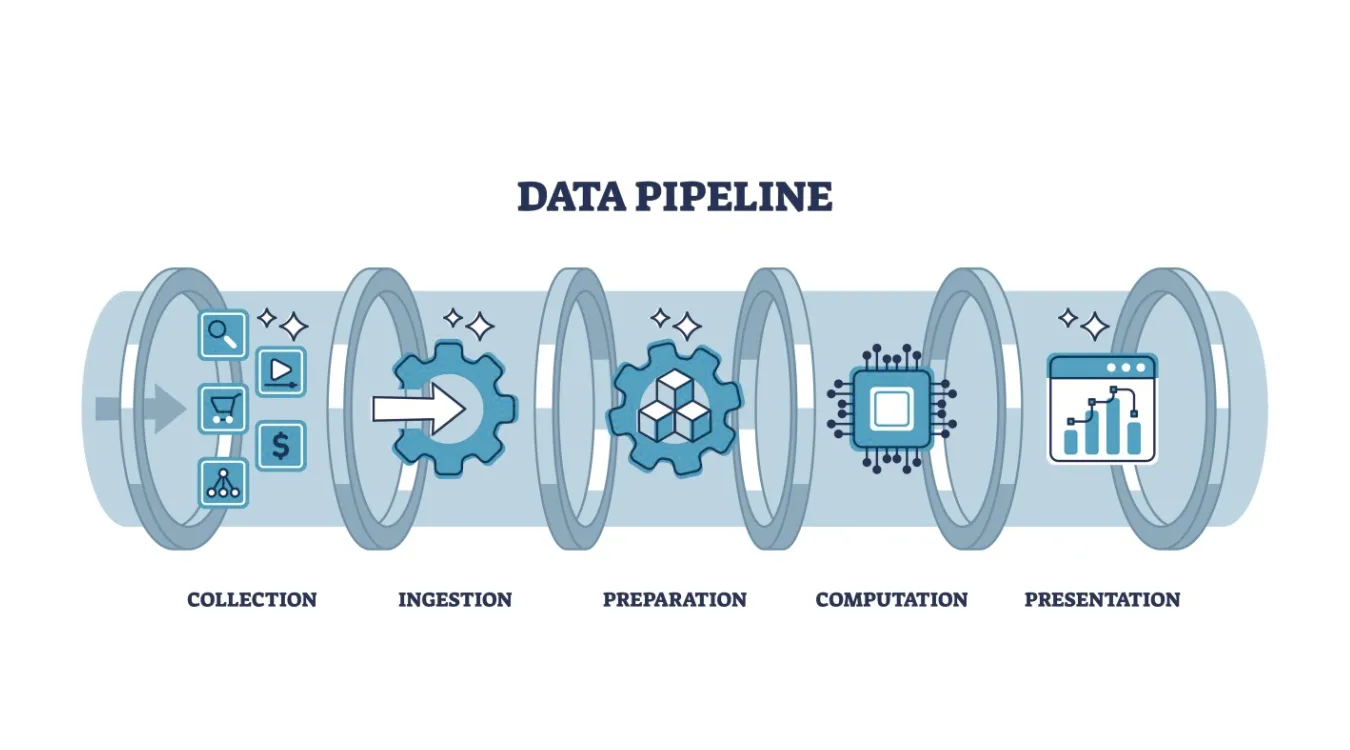
what is Data Pipeline

Core Stages and Their Responsibilities

Most pipelines reuse the same functional building blocks, even when tools differ.

Ingest and Capture

The ingest stage connects to systems that produce data: applications, databases, APIs, devices, or files.
It copies or streams new records into a durable landing zone such as message queues, staging tables, or object storage.

Key goals here:

  • Avoid silent data loss

  • Handle spikes in volume gracefully

  • Preserve original records for replay when needed

Transform, Validate, and Enrich

The transform stage turns raw events into analytics-ready data.
Typical jobs:

  • Normalize types, time zones, and field names

  • Enforce validation rules and drop or quarantine invalid rows

  • Join streams or tables to add context (customers, products, regions)

  • Compute metrics such as totals, averages, and flags

You protect downstream work by enforcing quality at this step instead of inside every report.

Load and Serve

Finally, the pipeline loads cleaned data into target systems:

  • Data warehouses for BI and SQL analytics

  • Data lakes for large, flexible storage

  • Search indexes for log and event exploration

  • Feature stores or APIs for machine learning and applications

Dashboards, alerts, and tools can then read from these consistent, documented structures.

Pipeline Styles: Batch, Streaming, and Mixed Models

Different workloads call for different pipeline styles.

  • Batch pipelines run on a schedule, often every hour or day.
    They suit financial summaries, daily backups, and regulatory reports.

  • Streaming pipelines process events continuously as they arrive.
    They support monitoring, anomaly detection, and near real-time dashboards.

  • Micro-batch pipelines group small time windows for a balance between latency and simplicity.

Many organizations run a hybrid design: streaming for time-sensitive metrics, batch for heavy historical processing.

Reliability, Recovery, and Reprocessing

A data pipeline adds value only when it behaves predictably during failure.
You design it so jobs can restart and reprocess without duplication or corruption.

Important practices:

  • Use checkpoints or offsets to track progress through streams and files.

  • Keep transformations idempotent, so reruns produce the same result.

  • Store raw inputs in a replayable format to support backfills after bugs.

  • Capture detailed error logs and rejected rows for later inspection.

When you follow these rules, recovery from failures looks like routine maintenance instead of crisis work.

Observability and Data Quality Signals

You need visibility into both system health and data quality.
Without that, pipelines can produce wrong numbers quietly.

Useful metrics and checks:

  • Records in versus records out at each stage

  • Processing latency across ingestion and transformation

  • Counts of rejected or quarantined rows by reason

  • Simple profiling metrics such as null rates or value ranges

  • Schema drift detection when upstream systems change fields

Dashboards built on these signals show where bottlenecks, errors, or quality regressions appear.

Data Recovery Logs Inside a Pipeline

Backup and recovery workflows also benefit from pipelines.
Instead of leaving logs scattered across machines, you can treat them as a data source.

For example, when Amagicsoft Datenrettung runs scans and recoveries, you can:

  • Export job logs and summaries to files or a database

  • Ingest those records into a central pipeline

  • Transform them into consistent fields: device IDs, sizes, durations, outcomes

  • Load the results into a warehouse or dashboard

Teams then track recovery success rates, detect patterns in failures, and plan capacity with real evidence.

Unterstützt Windows 7/8/10/11 und Windows Server.

Herunterladen Magic Data Recovery

Unterstützt Windows 7/8/10/11 und Windows Server


Practical Starting Pattern for Small Teams

A sophisticated platform is helpful but not required.
You can build a simple pipeline with common tools.

A starter pattern:

  • Schedule exports or change-capture jobs from core systems.

  • Land raw files in a dedicated staging folder or bucket.

  • Run a script or ETL job that cleans and merges the data into a single model.

  • Load that model into a warehouse table and refresh dashboards from it.

Even this modest structure beats scattered manual steps and makes audits far easier.

Häufig gestellte Fragen


Is data pipeline the same as ETL?

A data pipeline covers the entire route from sources to destinations, including transport, queuing, validation, and delivery. ETL focuses on extract, transform, and load steps that prepare data for storage. Many ETL jobs operate inside larger pipelines that also handle streaming, monitoring, and serving to downstream systems.

What is data pipeline in simple words?

A data pipeline works like a conveyor belt for information. Data enters from systems such as apps or databases, passes through steps that clean and reshape it, then lands in storage or dashboards. The pipeline runs those steps automatically so people do not repeat manual exports and copy-paste tasks.

What are the main 3 stages in a data pipeline?

Many teams organize pipelines into ingestion, processing, and serving. Ingestion collects data from sources, processing cleans and enriches it, and serving writes final outputs to warehouses, lakes, or APIs. This three-stage view keeps responsibilities clear and makes it easier to debug or scale specific parts of the flow.

What is an example of a data pipeline?

Consider a pipeline that gathers sales events from a point-of-sale system every few minutes. It sends those events into a queue, runs a job that validates fields and adds product and region details, then loads daily and hourly summaries into a warehouse. Dashboards read that warehouse to show revenue, volume, and trends.

What are the 4 pipeline stages?

A four-stage description often lists collect, store, transform, and deliver. Collect brings data in, store keeps raw or lightly processed versions, transform cleans and enriches records, and deliver pushes curated datasets into analytics or application layers. The extra “store” stage emphasizes the value of retaining raw inputs for replay and audits.

Is Databricks a data pipeline tool?

Databricks offers a platform for building and running pipelines rather than a single ETL utility. It combines compute, notebooks, workflows, and Delta Lake storage. Teams use it to ingest, transform, and serve data for analytics and machine learning while integrating with schedulers and external orchestration tools.

Is SQL a data pipeline?

SQL itself is not a pipeline; it is a language for querying and transforming data. You embed SQL inside pipeline stages to filter, join, and aggregate in databases or warehouses. Orchestration tools, schedulers, and connectors handle movement and timing, while SQL defines the logic that shapes each dataset.

What are the 5 stages of pipelining?

For data work, a five-stage pattern often includes acquire, ingest, process, store, and present. Acquire connects to new sources, ingest brings data into the platform, process performs validation and enrichment, store holds curated datasets, and present feeds dashboards, alerts, and APIs. Each stage should log metrics and support retries.

Is Excel an ETL tool?

Excel does not act as a full ETL platform, but many users perform small ETL tasks with it. They import files, clean columns, apply formulas, and summarize results in pivot tables and charts. For automated, large-scale pipelines, organizations usually pair Excel views with upstream ETL tools that manage volume, scheduling, and governance.

Is SQL an ETL tool?

SQL supports ETL by expressing extracts, transforms, and loads, but it does not manage automation alone. Database engines run SQL statements that move and reshape data between tables. Dedicated ETL and pipeline frameworks add scheduling, monitoring, error handling, and connectors, while SQL remains the core language for business logic and transformations.
  • WiKi
Eddie

Eddie ist ein IT-Spezialist mit mehr als 10 Jahren Erfahrung, die er bei mehreren bekannten Unternehmen der Computerbranche gesammelt hat. Er bringt tiefgreifende technische Kenntnisse und praktische Problemlösungsfähigkeiten in jedes Projekt ein.

Beitrags-Navigation

Vorherige
Weiter

Suche

Kategorien

  • Bitlocker-Wiederherstellung
  • Wiederherstellung gelöschter Dateien
  • Formatieren der Dateiwiederherstellung
  • Festplattenwiederherstellung
  • Lizenzschlüssel-Wiederherstellung
  • Wiederherstellung verlorener Dateien
  • Wiederherstellung von Speicherkarten
  • Nachrichten
  • Foto-Wiederherstellung
  • SSD-Wiederherstellung
  • Uncategorized
  • USB-Laufwerk-Wiederherstellung
  • Benutzerhandbuch
  • Wiki

Neueste Beiträge

  • Die Vor- und Nachteile von SSDs als externe Festplattenlaufwerke
    Die Vor- und Nachteile von SSDs als externe Festplattenlaufwerke
  • Verwendung des Zieldatenträgermodus und des Freigabemodus auf Mac-Computern
    Verwendung des Zieldatenträgermodus und des Freigabemodus auf Mac-Computern: Eine vollständige Anleitung
  • Duplikat-Finder
    Duplikat-Finder

Tags

Wie man Magic Data Recovery Magic Recovery Key WiKi

Verwandte Beiträge

Duplikat-Finder
Wiki

Duplikat-Finder

2. Dezember 2025 Eddie Noch keine Kommentare

Inhaltsverzeichnis Doppelte Dateien sind keine echten Backups Viele Benutzer legen “zusätzliche Sicherheitskopien” von Dokumenten an, indem sie sie in neue Ordner oder auf externe Laufwerke ziehen, die sich mit der Zeit vervielfältigen und eher zu einem Durcheinander als zu einem Schutz werden. Doppelte Dateien verschwenden Speicherplatz, verlangsamen Backups und machen die Datenwiederherstellung unübersichtlich.Ein Duplicate File Finder hilft, redundante Kopien zu identifizieren, so [...]

Kontextwechsel
Wiki

Kontextwechsel

2. Dezember 2025 Eddie Noch keine Kommentare

Inhaltsverzeichnis CPU-Zeit als gemeinsam genutzte Ressource Moderne Betriebssysteme jonglieren mit Dutzenden oder Hunderten aktiver Threads. Da nur wenige CPU-Kerne vorhanden sind, warten die meisten Threads in Warteschlangen, während eine kleine Teilmenge läuft. Ein Kontextwechsel ermöglicht es dem Scheduler, einen laufenden Thread anzuhalten und einen anderen fortzusetzen. Dieser schnelle Wechsel erzeugt die Illusion von Parallelität [...]

Datenerfassung
Wiki

Datenerfassung

2. Dezember 2025 Eddie Noch keine Kommentare

Inhaltsverzeichnis Schauplatz eines Vorfalls: Vor der Datenerfassung gefährdete Daten Wenn ein Vorfall eintritt, besteht der erste Instinkt oft darin, sich im Live-System “umzusehen”. Ungeplante Klicks, Root-Logins oder Dateikopien können Zeitstempel, Protokolle und nicht zugewiesenen Speicherplatz verändern, bevor jemand einen sauberen Zustand erfasst. Die Datenerfassung löst dieses Problem und konzentriert sich auf die Sammlung von Daten in einem kontrollierten [...]

amagicsoft Logo-Symbol

Unsere Vision ist es, eine weltweit bekannte Softwaremarke und ein Dienstleistungsanbieter zu werden, der seinen Nutzern erstklassige Produkte und Dienstleistungen anbietet.

Produkte
  • Magic Data Recovery
  • Magic Recovery Key
Politik
  • Bedingungen
  • Datenschutzbestimmungen
  • Erstattungspolitik
  • Lizenzvereinbarung
Unternehmen
  • Über Amagicsoft
  • Kontakt US
  • Laden Sie
Folgen Sie uns

Urheberrecht © 2025 Amagicsoft. Alle Rechte vorbehalten.

  • Bedingungen
  • Datenschutzbestimmungen