Skip to content
icône du logo d'amagicsoft
  • Accueil
  • Produits
    • Magic Data Recovery
    • Magic Recovery Key
  • Magasin
  • Blog
  • Plus d'informations
    • À propos d'Amagicsoft
    • Contact US
    • Politique de confidentialité
    • Conditions
    • Accord de licence
    • Politique de remboursement
  • Français
    • English
    • 日本語
    • 한국어
    • Deutsch
    • 繁體中文
Wiki

Pipeline de données

30 novembre 2025 Eddie Commentaires fermés sur Data Pipeline
Pipeline de données

Table des matières

From Ad Hoc Scripts to Reliable Data Flow

Many teams start with manual exports, one-off SQL queries, and spreadsheet uploads.
Over time, this patchwork becomes slow, brittle, and hard to debug.

A data pipeline replaces those fragile steps with a defined sequence of transport and transformation processes.
Data moves along a path on a schedule or in near real time, under rules that you can inspect and improve.

Data Pipeline: A Working Definition

A data pipeline describes the end-to-end route that data follows from sources to destinations.
Along that route, each stage performs a specific task and hands structured output to the next stage.

The pipeline might:

  • Read change events from databases and logs

  • Clean and standardize values

  • Enrich records with reference data

  • Load curated outputs into warehouses, lakes, or search indexes

Instead of dozens of isolated jobs, you get one coordinated flow.
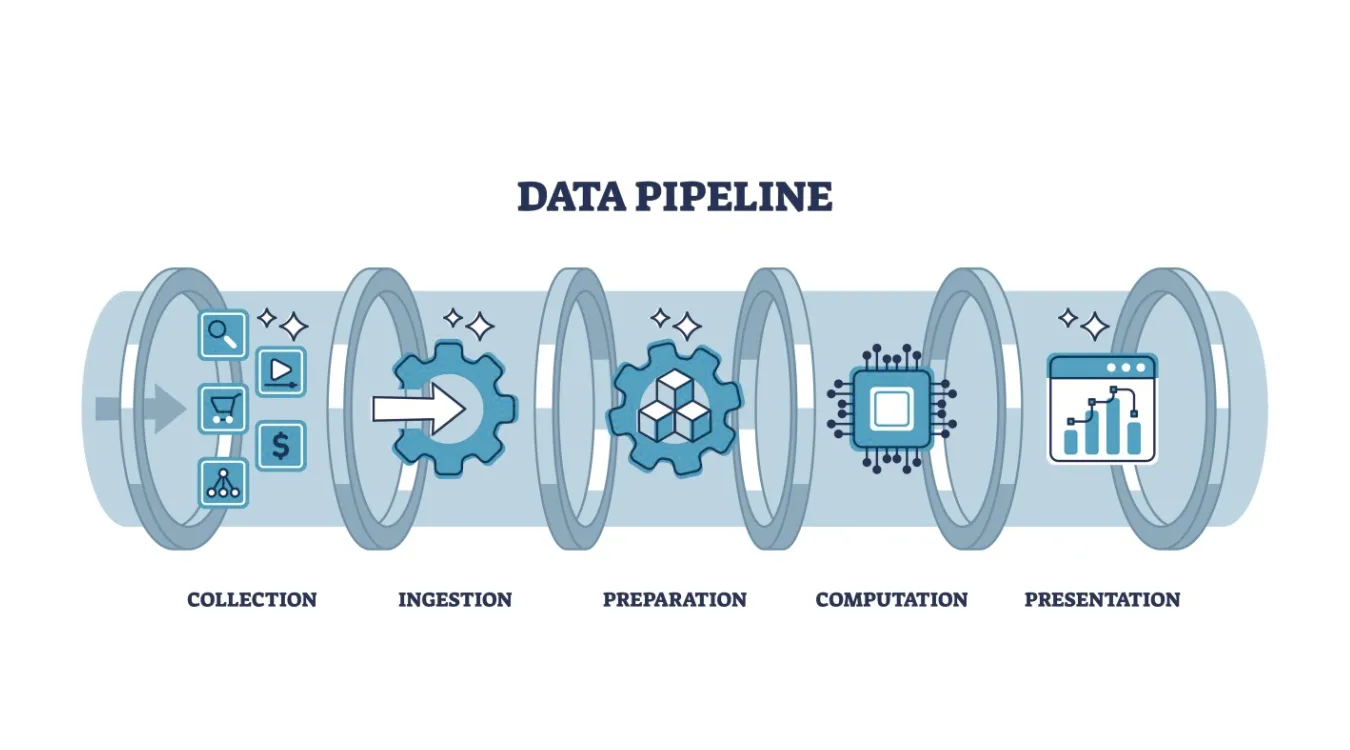
what is Data Pipeline

Core Stages and Their Responsibilities

Most pipelines reuse the same functional building blocks, even when tools differ.

Ingest and Capture

The ingest stage connects to systems that produce data: applications, databases, APIs, devices, or files.
It copies or streams new records into a durable landing zone such as message queues, staging tables, or object storage.

Key goals here:

  • Avoid silent data loss

  • Handle spikes in volume gracefully

  • Preserve original records for replay when needed

Transform, Validate, and Enrich

The transform stage turns raw events into analytics-ready data.
Typical jobs:

  • Normalize types, time zones, and field names

  • Enforce validation rules and drop or quarantine invalid rows

  • Join streams or tables to add context (customers, products, regions)

  • Compute metrics such as totals, averages, and flags

You protect downstream work by enforcing quality at this step instead of inside every report.

Load and Serve

Finally, the pipeline loads cleaned data into target systems:

  • Data warehouses for BI and SQL analytics

  • Data lakes for large, flexible storage

  • Search indexes for log and event exploration

  • Feature stores or APIs for machine learning and applications

Dashboards, alerts, and tools can then read from these consistent, documented structures.

Pipeline Styles: Batch, Streaming, and Mixed Models

Different workloads call for different pipeline styles.

  • Batch pipelines run on a schedule, often every hour or day.
    They suit financial summaries, daily backups, and regulatory reports.

  • Streaming pipelines process events continuously as they arrive.
    They support monitoring, anomaly detection, and near real-time dashboards.

  • Micro-batch pipelines group small time windows for a balance between latency and simplicity.

Many organizations run a hybrid design: streaming for time-sensitive metrics, batch for heavy historical processing.

Reliability, Recovery, and Reprocessing

A data pipeline adds value only when it behaves predictably during failure.
You design it so jobs can restart and reprocess without duplication or corruption.

Important practices:

  • Use checkpoints or offsets to track progress through streams and files.

  • Keep transformations idempotent, so reruns produce the same result.

  • Store raw inputs in a replayable format to support backfills after bugs.

  • Capture detailed error logs and rejected rows for later inspection.

When you follow these rules, recovery from failures looks like routine maintenance instead of crisis work.

Observability and Data Quality Signals

You need visibility into both system health and data quality.
Without that, pipelines can produce wrong numbers quietly.

Useful metrics and checks:

  • Records in versus records out at each stage

  • Processing latency across ingestion and transformation

  • Counts of rejected or quarantined rows by reason

  • Simple profiling metrics such as null rates or value ranges

  • Schema drift detection when upstream systems change fields

Dashboards built on these signals show where bottlenecks, errors, or quality regressions appear.

Data Recovery Logs Inside a Pipeline

Backup and recovery workflows also benefit from pipelines.
Instead of leaving logs scattered across machines, you can treat them as a data source.

For example, when Amagicsoft Récupération de données runs scans and recoveries, you can:

  • Export job logs and summaries to files or a database

  • Ingest those records into a central pipeline

  • Transform them into consistent fields: device IDs, sizes, durations, outcomes

  • Load the results into a warehouse or dashboard

Teams then track recovery success rates, detect patterns in failures, and plan capacity with real evidence.

Prend en charge Windows 7/8/10/11 et Windows Server.

Télécharger Magic Data Recovery

Prise en charge de Windows 7/8/10/11 et Windows Server


Practical Starting Pattern for Small Teams

A sophisticated platform is helpful but not required.
You can build a simple pipeline with common tools.

A starter pattern:

  • Schedule exports or change-capture jobs from core systems.

  • Land raw files in a dedicated staging folder or bucket.

  • Run a script or ETL job that cleans and merges the data into a single model.

  • Load that model into a warehouse table and refresh dashboards from it.

Even this modest structure beats scattered manual steps and makes audits far easier.

FAQ


Is data pipeline the same as ETL?

A data pipeline covers the entire route from sources to destinations, including transport, queuing, validation, and delivery. ETL focuses on extract, transform, and load steps that prepare data for storage. Many ETL jobs operate inside larger pipelines that also handle streaming, monitoring, and serving to downstream systems.

What is data pipeline in simple words?

A data pipeline works like a conveyor belt for information. Data enters from systems such as apps or databases, passes through steps that clean and reshape it, then lands in storage or dashboards. The pipeline runs those steps automatically so people do not repeat manual exports and copy-paste tasks.

What are the main 3 stages in a data pipeline?

Many teams organize pipelines into ingestion, processing, and serving. Ingestion collects data from sources, processing cleans and enriches it, and serving writes final outputs to warehouses, lakes, or APIs. This three-stage view keeps responsibilities clear and makes it easier to debug or scale specific parts of the flow.

What is an example of a data pipeline?

Consider a pipeline that gathers sales events from a point-of-sale system every few minutes. It sends those events into a queue, runs a job that validates fields and adds product and region details, then loads daily and hourly summaries into a warehouse. Dashboards read that warehouse to show revenue, volume, and trends.

What are the 4 pipeline stages?

A four-stage description often lists collect, store, transform, and deliver. Collect brings data in, store keeps raw or lightly processed versions, transform cleans and enriches records, and deliver pushes curated datasets into analytics or application layers. The extra “store” stage emphasizes the value of retaining raw inputs for replay and audits.

Is Databricks a data pipeline tool?

Databricks offers a platform for building and running pipelines rather than a single ETL utility. It combines compute, notebooks, workflows, and Delta Lake storage. Teams use it to ingest, transform, and serve data for analytics and machine learning while integrating with schedulers and external orchestration tools.

Is SQL a data pipeline?

SQL itself is not a pipeline; it is a language for querying and transforming data. You embed SQL inside pipeline stages to filter, join, and aggregate in databases or warehouses. Orchestration tools, schedulers, and connectors handle movement and timing, while SQL defines the logic that shapes each dataset.

What are the 5 stages of pipelining?

For data work, a five-stage pattern often includes acquire, ingest, process, store, and present. Acquire connects to new sources, ingest brings data into the platform, process performs validation and enrichment, store holds curated datasets, and present feeds dashboards, alerts, and APIs. Each stage should log metrics and support retries.

Is Excel an ETL tool?

Excel does not act as a full ETL platform, but many users perform small ETL tasks with it. They import files, clean columns, apply formulas, and summarize results in pivot tables and charts. For automated, large-scale pipelines, organizations usually pair Excel views with upstream ETL tools that manage volume, scheduling, and governance.

Is SQL an ETL tool?

SQL supports ETL by expressing extracts, transforms, and loads, but it does not manage automation alone. Database engines run SQL statements that move and reshape data between tables. Dedicated ETL and pipeline frameworks add scheduling, monitoring, error handling, and connectors, while SQL remains the core language for business logic and transformations.
  • WiKi
Eddie

Eddie est un spécialiste des technologies de l'information avec plus de 10 ans d'expérience dans plusieurs entreprises renommées de l'industrie informatique. Il apporte à chaque projet ses connaissances techniques approfondies et ses compétences pratiques en matière de résolution de problèmes.

Navigation de l’article

Précédent
Suivant

Recherche

Catégories

  • Récupération de Bitlocker
  • Récupération de fichiers effacés
  • Récupération de fichiers formatés
  • Récupération du disque dur
  • Récupération de la clé de licence
  • Récupération des fichiers perdus
  • Récupération de la carte mémoire
  • Actualités
  • Récupération de photos
  • Récupération du SSD
  • Non classé
  • Récupération d'une clé USB
  • Guide de l'utilisateur
  • Wiki

Messages récents

  • Avantages et inconvénients des disques durs externes SSD
    Avantages et inconvénients des disques durs externes SSD
  • Comment utiliser le mode disque cible et le mode partage sur les ordinateurs Mac
    Comment utiliser le mode disque cible et le mode partage sur les ordinateurs Mac : Guide complet
  • Recherche de fichiers en double
    Recherche de fichiers en double

Tags

Comment faire Magic Data Recovery Magic Recovery Key WiKi

Postes connexes

Recherche de fichiers en double
Wiki

Recherche de fichiers en double

2 décembre 2025 Eddie Pas encore de commentaires

Table des matières Les fichiers en double ne sont pas de vraies sauvegardes De nombreux utilisateurs conservent des copies “supplémentaires de sécurité” de leurs documents en les faisant glisser dans de nouveaux dossiers ou sur des disques externes.Au fil du temps, ces copies se multiplient et se transforment en encombrement plutôt qu'en protection. Les fichiers en double gaspillent de l'espace de stockage, ralentissent les sauvegardes et rendent la récupération des données plus confuse.Un outil de recherche de fichiers en double permet d'identifier les copies redondantes afin [...]

Changement de contexte
Wiki

Changement de contexte

2 décembre 2025 Eddie Pas encore de commentaires

Table des matières Le temps CPU en tant que ressource partagée Les systèmes d'exploitation modernes jonglent avec des dizaines ou des centaines de threads actifs. Comme il n'existe que quelques cœurs de CPU, la plupart des threads attendent dans des files d'attente tandis qu'un petit sous-ensemble s'exécute. Un changement de contexte permet au planificateur de mettre en pause un thread en cours d'exécution et d'en reprendre un autre. Ce changement rapide crée l'illusion du parallélisme [...]

Acquisition de données
Wiki

Acquisition de données

2 décembre 2025 Eddie Pas encore de commentaires

Table des matières Scène d'incident : Données à risque avant la collecte Lorsqu'un incident se produit, le premier réflexe consiste souvent à “jeter un coup d'œil” sur le système actif. Des clics non planifiés, des connexions root ou des copies de fichiers peuvent modifier les horodatages, les journaux et l'espace non alloué avant que quelqu'un n'enregistre un état propre. L'acquisition de données résout ce problème, en se concentrant sur la collecte de données dans un environnement contrôlé.

icône du logo d'amagicsoft

Notre vision est de devenir une marque de logiciels et un fournisseur de services de renommée mondiale, offrant des produits et des services de premier ordre à nos utilisateurs.

Produits
  • Magic Data Recovery
  • Magic Recovery Key
Politique
  • Conditions
  • Politique de confidentialité
  • Politique de remboursement
  • Accord de licence
Entreprise
  • À propos d'Amagicsoft
  • Contact US
  • Magasin
Suivez-nous

Copyright © 2025 Amagicsoft. Tous droits réservés.

  • Conditions
  • Politique de confidentialité