
Wie man dauerhaft gelöschte Fotos wiederherstellt

Das versehentliche Löschen wichtiger Bilder kann stressig sein, besonders wenn man den Papierkorb leeren oder feststellen, dass eine Speicherkarte bereits formatiert wurde. Glücklicherweise können Sie möglicherweise trotzdem noch dauerhaft gelöschte Fotos wiederherstellen, je nachdem, wo die Bilder gespeichert waren und was nach dem Löschen passiert ist.
Am sichersten ist es, zunächst die integrierten Wiederherstellungsoptionen und Sicherungskopien zu nutzen. Sollten diese Methoden fehlschlagen und die Fotos auf einem Windows-PC, einer Festplatte, einem USB-Stick oder einer Speicherkarte gespeichert gewesen sein, empfiehlt sich ein Datenwiederherstellungsprogramm wie Magic Data Recovery kann das Speichergerät nach wiederherstellbaren Bilddaten durchsuchen.
Dieser Leitfaden erklärt wie man dauerhaft gelöschte Fotos wiederherstellt anhand von sieben praktischen Methoden. Außerdem werden SSD-TRIM, Google Fotos, die Grenzen der iPhone-Wiederherstellung sowie die Schritte behandelt, die Sie unmittelbar nach einem Fotoverlust unternehmen sollten.
Unterstützt Windows 7/8/10/11 und Windows Server
Inhaltsübersicht
Kann man dauerhaft gelöschte Fotos wiederherstellen?
Ja, das geht manchmal dauerhaft gelöschte Fotos wiederherstellen, aber keine Methode kann in jeder Situation eine Wiederherstellung garantieren.
Wenn Sie eine Datei von vielen herkömmlichen Speichermedien wie einer Festplatte oder einer SD-Karte löschen, entfernt das Betriebssystem in der Regel den Verweis im Dateisystem und markiert den Speicherplatz als verfügbar. Die zugrunde liegenden Daten können jedoch bestehen bleiben, bis dieser Speicherplatz durch neue Informationen überschrieben wird.
Allerdings beeinflussen mehrere Faktoren das Ergebnis:
- ob neue Daten die gelöschten Fotos überschrieben haben
- Unabhängig davon, ob die Fotos auf einer Festplatte, einer SSD, einer SD-Karte oder einem USB-Stick gespeichert waren
- Ob SSD TRIM gelöschte Blöcke bereits bereinigt hat
- Ob „Dateiversionsverlauf“ oder eine andere Sicherung vorhanden ist
- Ob der Cloud-Dienst die gelöschten Fotos noch speichert
- Ob das Speichergerät logische oder physische Schäden aufweist
Stellen Sie daher so schnell wie möglich ein, neue Daten auf das betroffene Speichermedium zu schreiben.
Microsoft empfiehlt außerdem, die Nutzung des Computers nach dem Löschen von Dateien auf ein Minimum zu beschränken, da Windows den von gelöschten Dateien belegten Speicherplatz jederzeit wiederverwenden kann.
Welche Methode zur Wiederherstellung von Fotos sollten Sie zuerst ausprobieren?
Situation bei Fotoverlust | Die beste erste Wahl | Was Sie wissen sollten |
Wird unter Windows wie gewohnt gelöscht | Papierkorb | In der Regel die einfachste Wiederherstellung |
Papierkorb geleert | Dateiversionsverlauf oder Windows-Dateiwiederherstellung | Vermeiden Sie das Speichern neuer Dateien |
Umschalt+Entf verwendet | Tool zur Datensicherung oder -wiederherstellung | Die Datei wird nicht in den Papierkorb verschoben |
Fotos von der SD-Karte oder dem USB-Stick gelöscht | Das Gerät nicht mehr benutzen | Gelöschte Dateien landen in der Regel nicht im Papierkorb |
Löschen von Fotos in Google Fotos | Papierkorb überprüfen | Die Aufbewahrungsdauer hängt vom Backup-Status ab |
iPhone-Foto gelöscht | Kürzlich gelöscht | Apple bewahrt gelöschte Fotos 30 Tage lang auf |
Löschen von Fotos auf einer SSD | Überprüfen Sie zuerst die Backups | TRIM kann die Wiederherstellungschancen verringern |
Formatierte Speicherkarte | Software zur Wiederherstellung von Fotos | Machen Sie nicht zuerst neue Fotos |

Methode 1: Dauerhaft gelöschte Fotos aus dem Papierkorb wiederherstellen
Bevor Sie fortgeschrittene Tools verwenden, vergewissern Sie sich, dass die Fotos tatsächlich endgültig gelöscht sind.
Unter Windows:
- Öffnen Sie Papierkorb.
- Suchen Sie nach den fehlenden JPG-, PNG-, HEIC-, RAW- oder anderen Bilddateien.
- Wählen Sie die gewünschten Fotos aus.
- Klicken Sie mit der rechten Maustaste darauf und wählen Sie Wiederherstellen.
- Windows verschiebt sie zurück in ihre ursprünglichen Ordner.
Diese Methode funktioniert nicht, wenn Sie den Papierkorb bereits geleert haben oder Umschalt+Löschen, oder die Bilder direkt von vielen Wechseldatenträgern gelöscht.
Sollten die Bilder nicht mehr vorhanden sein, greifen Sie bitte auf die unten aufgeführten Sicherungsmethoden zurück, anstatt neue Dateien herunterzuladen oder auf das betroffene Laufwerk zu kopieren.
Methode 2: Dauerhaft gelöschte Fotos mit dem Dateiverlauf wiederherstellen
Die Windows-Dateiversionsgeschichte kann frühere Kopien von Fotos wiederherstellen, sofern Sie diese Funktion vor dem Löschen aktiviert hatten.
Zur Kontrolle:
- Öffnen Sie den Datei-Explorer.
- Navigieren Sie zu dem Ordner, in dem sich Ihre Bilder zuvor befanden.
- Klicken Sie mit der rechten Maustaste auf den Ordner.
- Wählen Sie Weitere Optionen anzeigen > Vorherige Versionen wiederherstellen.
- Wählen Sie eine Version aus, die erstellt wurde, bevor die Fotos verschwunden sind.
- Öffnen Sie die Datei, um die Bilder zu überprüfen.
- Wählen Sie Wiederherstellen oder Zurücksetzen auf.
Microsoft erklärt, dass „Dateiversionsverlauf“ Kopien persönlicher Ordner speichert und gelöschte Dateien oder frühere Versionen wiederherstellen kann, sofern eine geeignete Sicherung vorhanden ist.
Daher sollte „Dateiversionsverlauf“ in der Regel vor Lösungen von Drittanbietern kommen Wiederherstellung gelöschter Fotos Software.
Die größte Einschränkung ist ganz einfach: Es hilft nichts, wenn „Dateiverlauf“ nie aktiviert wurde oder wenn keine geeignete Sicherung die fehlenden Bilder enthält.
Methode 3: Dauerhaft gelöschte Fotos aus Google Fotos wiederherstellen
Falls Ihre fehlenden Bilder aus Google Fotos stammen, scannen Sie Ihren Computer nicht sofort. Das Löschen in der Cloud funktioniert anders als das Löschen auf der lokalen Festplatte.
Öffnen Sie zunächst Google Fotos und überprüfen Sie Papierkorb.
Google gibt derzeit an, dass gelöschte Fotos für folgende Zeiträume im Papierkorb verbleiben:
- 60 Tage wenn Google Fotos sie gesichert hätte
- 30 Tage falls keine Sicherungskopien davon erstellt worden wären
Sie können die Bilder wiederherstellen, solange sie sich noch dort befinden. Sobald Google Fotos ein Element endgültig aus dem Papierkorb löscht, kann es mit dem standardmäßigen Wiederherstellungsprozess von Google nicht mehr wiederhergestellt werden.
Wenn Sie also möchten, dass Dauerhaft gelöschte Fotos aus Google Fotos wiederherstellen, siehe auch:
- Ein anderes Smartphone oder ein anderer Computer, auf dem möglicherweise noch eine lokale Kopie gespeichert ist
- Google Fotos-Archiv
- Andere Google-Konten
- Geräteordner, die nicht synchronisiert wurden
- Externe Sicherungen
- Downloads oder exportierte Fotobibliotheken
Ein Windows-Wiederherstellungsprogramm kann die Cloud-Server von Google nicht durchsuchen. Wenn das Originalbild jedoch auch auf einer SD-Karte, einem PC-Laufwerk oder einem externen Speichermedium gespeichert war, können Sie diesen physischen Speicher separat durchsuchen.
Methode 4: Dauerhaft gelöschte Fotos mit der Windows-Dateiwiederherstellung wiederherstellen
Wenn sich die Bilder weder über den Papierkorb noch über den Dateiverlauf, den Cloud-Speicher oder andere Sicherungskopien wiederherstellen lassen, ist ein Festplattenscan die nächste sinnvolle Option.
Magic Data Recovery ist speziell für diese Situation konzipiert. Es kann unter Windows zugängliche Speichermedien wie Festplatten, SSDs, USB-Sticks, SD-Karten und Speicherkarten von Kameras nach gelöschten oder verlorenen Dateien durchsuchen.
Es unterstützt mehr als 5.000 Dateiformate, darunter gängige Fotoformate wie JPG, PNG, TIFF, WEBP und HEIC sowie Kamera-RAW-Formate wie CR2, CR3, NEF, ARW, RAF und DNG. Mit der aktuellen kostenlosen Version können Nutzer zudem bis zu 500 MB Daten zu Testzwecken wiederherstellen.
Befolgen Sie den nachstehenden Arbeitsablauf, um die besten Wiederherstellungsergebnisse zu erzielen:
1. Magic Data Recovery herunterladen und installieren
Installieren Sie die Software auf einem separaten Laufwerk um das Überschreiben verlorener Dateien zu vermeiden.
Unterstützt Windows 7/8/10/11 und Windows Server
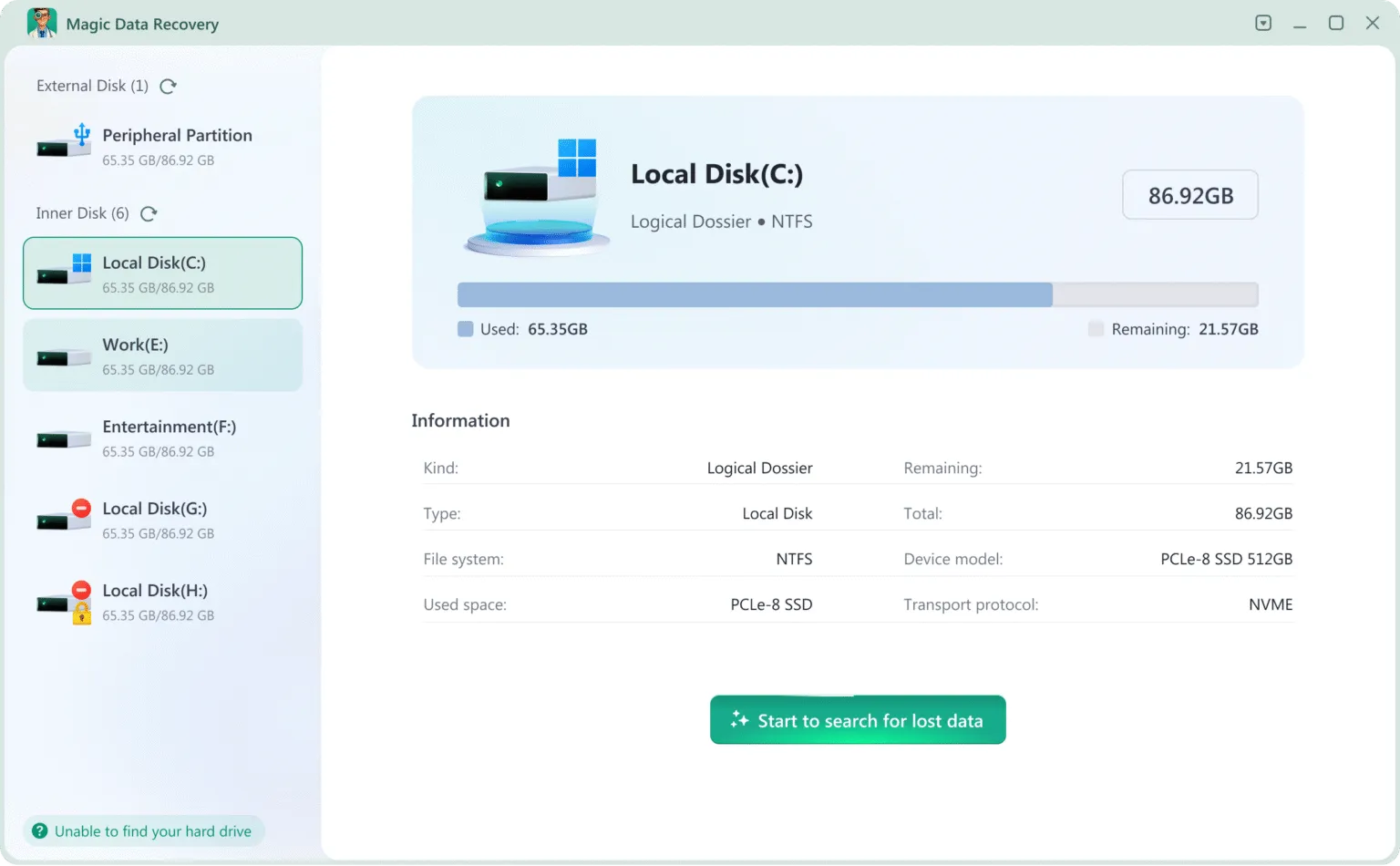
2. Wählen Sie das zu scannende Laufwerk oder Gerät
Wählen Sie den internen Datenträger, die externe HDD/SSD, die SD-Karte, das USB-Laufwerk oder die Kamerakarte, auf der die Fotos gelöscht wurden.
3. Warten Sie, bis der Scanvorgang abgeschlossen ist.
Es führt automatisch einen Deep Scan durch, der die Rohdatensektoren analysiert, um alle Dateien wiederherzustellen.

4. Vorschau Fotos
Sie können die Bildqualität, die Auflösung und die Dateidetails vor der Wiederherstellung anzeigen.

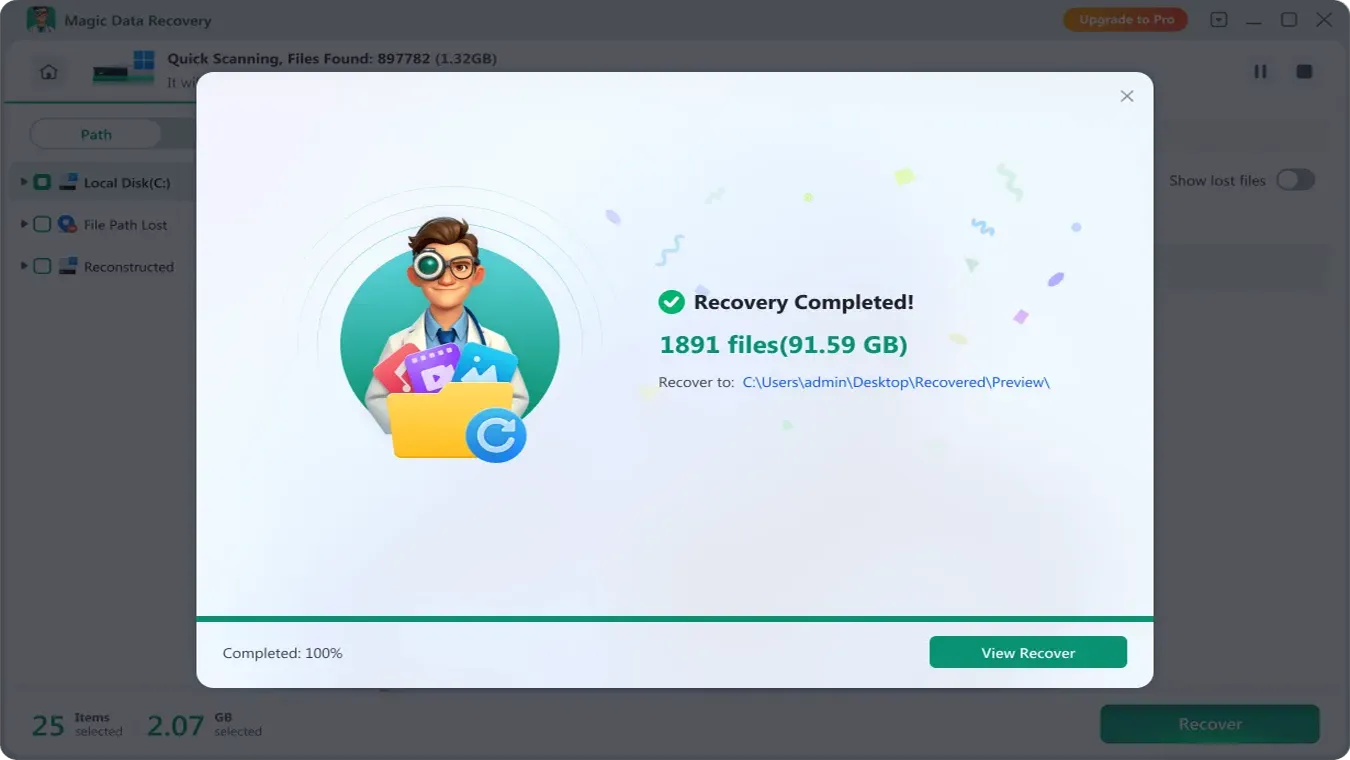
5. Fotos wiederherstellen und an einem sicheren Ort speichern
Speichern Sie wiederhergestellte Fotos auf einem anderen Laufwerk, um die verbleibenden wiederherstellbaren Daten zu schützen.
Warum Magic Data Recovery das beste Werkzeug zur Wiederherstellung von Fotos ist
Magic Data Recovery bietet eine branchenführende Scan- und Fotowiederherstellungsleistung und ist damit sowohl für Privatanwender als auch für professionelle Techniker geeignet. Im Gegensatz zu einfachen Hilfsprogrammen ist es so konzipiert, dass Bilder auch dann wiederhergestellt werden können, wenn das Dateisystem keine Verzeichnisinformationen mehr enthält.
Fähigkeit | Nutzen Sie |
Tiefgreifender Algorithmus für die digitale Forensik | Wiederherstellung von Fotos nach Löschung, Formatierung, RAW/unzugeordnetem Laufwerk und Partitionsverlust |
Unterstützt über 5000 Formate | JPG, PNG, HEIC, CR2, NEF, ARW, RAF, DNG, TIFF und andere professionelle Kamera-RAW-Formate |
Kompatibel mit allen Speichergeräten | HDD / SSD, SD-Karte, USB-Flash-Laufwerk, externe Festplatten, Karten für DSLR- und spiegellose Kameras |
Hohe Erfolgsquote bei der Wiederherstellung | Die Wiederherstellung auf Sektorebene ermöglicht eine Wiederherstellungsrate von 99,7% (wenn es nach dem Datenverlust keine Änderungen auf dem Laufwerk gibt). |
Ob der Fotoverlust verursacht wurde durch versehentliches Löschen, Formatierung, oder Dateisystemfehler, Magic Data Recovery bietet eine vollständige und zuverlässige Lösung, um Bilder sicher zurückzubringen.
Tipps zur Verbesserung der Chancen, dauerhaft gelöschte Fotos wiederherzustellen
Unabhängig davon, für welches Tool Sie sich entscheiden, kommt es auf Ihre weiteren Schritte nach dem Löschen an.
Befolgen Sie diese Regeln:
- Verwenden Sie das betroffene Speichergerät ab sofort nicht mehr.
- Laden Sie keine Dateien auf das betroffene Laufwerk herunter.
- Formatieren Sie eine SD-Karte nicht, nur weil Windows Sie dazu auffordert.
- Führen Sie CHKDSK nicht aus, bevor Sie wichtige Dateien wiederherstellen.
- Erstellen Sie keine neue Partition auf verlorenem oder nicht zugewiesenem Speicherplatz.
- Installieren Sie die Wiederherstellungssoftware auf einem anderen Laufwerk.
- Speichern Sie die wiederhergestellten Fotos an einem anderen Ort.
- Überprüfen Sie die Sicherungskopien, bevor Sie weiterreichende Maßnahmen zur Fehlerbehebung durchführen.
Kurz gesagt: Verwenden Sie ein Erst wiederherstellen, dann reparieren Arbeitsablauf.
Die Wiederherstellung schützt die verbleibenden Daten. Reparaturvorgänge können Dateisystemstrukturen verändern und eine spätere Wiederherstellung erschweren.
Schlussfolgerung
Dauerhaft gelöschte Fotos werden im Moment des Löschens nicht wirklich zerstört. Sofern die Festplattensektoren nicht überschrieben wurden, bleiben die Bilddaten wiederherstellbar - auch nach dem Leeren des Papierkorbs oder dem Formatieren eines Speichergeräts.
Die effektivste und sicherste Lösung ist die Verwendung eines professionellen Fotowiederherstellungstools, das eine Tiefenprüfung auf forensischer Ebene durchführt. Für Benutzer, die die höchste Erfolgsquote mit einem einfachen Arbeitsablauf anstreben, Magic Data Recovery ist eine ideale Wahl. Wenn es zu einem Datenverlust kommt, stellen Sie die Verwendung des betroffenen Geräts sofort ein und führen Sie Fotowiederherstellung so bald wie möglich, um die besten Ergebnisse zu erzielen.
Häufig gestellte Fragen
Können endgültig gelöschte Fotos wirklich wiederhergestellt werden?
Wie kann ich dauerhaft gelöschte Fotos ohne Backup wiederherstellen?
Kann ich dauerhaft gelöschte Fotos wiederherstellen, nachdem ich den Papierkorb geleert habe?
Kann ich dauerhaft gelöschte Fotos aus Google Fotos wiederherstellen?
Kann ich dauerhaft gelöschte Fotos von einem iPhone wiederherstellen?
Können dauerhaft gelöschte Fotos von einer SSD wiederhergestellt werden?
Kann ich dauerhaft gelöschte Fotos von einer formatierten SD-Karte wiederherstellen?

Vasilii ist ein Datenrettungsspezialist mit rund 10 Jahren praktischer Erfahrung in diesem Bereich. Im Laufe seiner Karriere hat er Tausende von komplexen Fällen mit gelöschten Dateien, formatierten Laufwerken, verlorenen Partitionen und RAW-Dateisystemen erfolgreich gelöst. Sein Fachwissen umfasst sowohl manuelle Wiederherstellungsmethoden mit professionellen Tools wie Hex-Editoren als auch fortschrittliche automatische Lösungen mit Wiederherstellungssoftware. Vasilii hat es sich zur Aufgabe gemacht, zuverlässiges Wissen zur Datenwiederherstellung sowohl IT-Fachleuten als auch normalen Nutzern zugänglich zu machen und ihnen dabei zu helfen, ihre wertvollen digitalen Ressourcen zu schützen.