
Come recuperare le foto eliminate in modo permanente

Cancellare per sbaglio delle foto importanti può essere fonte di stress, soprattutto dopo che hai svuotare il Cestino oppure rendersi conto che la scheda della fotocamera è già stata formattata. Fortunatamente, potresti comunque riuscire a recuperare foto cancellate definitivamente, a seconda di dove fossero state salvate le immagini e di cosa sia successo dopo la loro cancellazione.
L'approccio più sicuro consiste nell'utilizzare innanzitutto le opzioni di recupero e i backup integrati. Se tali metodi non dovessero funzionare e le foto fossero state salvate su un PC Windows, un disco rigido (HDD), un'unità USB o una scheda di memoria, è possibile ricorrere a uno strumento di recupero dati come Magic Data Recovery può eseguire una scansione del dispositivo di archiviazione alla ricerca di dati immagine recuperabili.
Questa guida spiega come recuperare le foto cancellate in modo permanente attraverso sette metodi pratici. Il libro tratta inoltre il TRIM degli SSD, Google Foto, i limiti di recupero dati dell’iPhone e le azioni da intraprendere immediatamente dopo la perdita delle foto.
Supporta Windows 7/8/10/11 e Windows Server
Indice dei contenuti
È possibile recuperare le foto cancellate definitivamente?
Sì, a volte è possibile recuperare foto cancellate definitivamente, ma nessun metodo può garantire il recupero in ogni situazione.
Quando si elimina un file da molti dispositivi di archiviazione tradizionali, come un disco rigido (HDD) o una scheda SD, il sistema operativo di solito rimuove il riferimento dal file system e contrassegna lo spazio di archiviazione come disponibile. I dati sottostanti potrebbero rimanere fino a quando nuove informazioni non sovrascrivono quello spazio.
Tuttavia, diversi fattori influenzano il risultato:
- Se i nuovi dati hanno sovrascritto le foto eliminate
- Indipendentemente dal fatto che le foto fossero memorizzate su un disco rigido (HDD), un SSD, una scheda SD o una chiavetta USB
- Se la funzione TRIM dell'SSD ha già cancellato i blocchi eliminati
- Se è presente "Cronologia file" o un altro backup
- Se il servizio cloud conserva ancora le foto eliminate
- Se il dispositivo di archiviazione presenta danni logici o fisici
Pertanto, smettete di scrivere nuovi dati sul dispositivo di archiviazione interessato il prima possibile.
Microsoft raccomanda inoltre di ridurre al minimo l'uso del computer dopo l'eliminazione dei file, poiché Windows può riutilizzare in qualsiasi momento lo spazio occupato dai file eliminati.
Quale metodo di recupero delle foto dovresti provare per primo?
Situazione relativa alla perdita delle foto | La scelta migliore | Cosa c'è da sapere |
Eliminazione normale in Windows | Cestino | Di solito il recupero più semplice |
Cestino svuotato | Cronologia dei file o Ripristino dei file di Windows | Evitare di salvare nuovi file |
È stato utilizzato Shift+Canc | Strumento di backup o ripristino | Il file non viene inviato al Cestino |
Foto cancellate dalla scheda SD o dalla chiavetta USB | Interrompere l'utilizzo del dispositivo | I file eliminati di solito non finiscono nel Cestino |
Eliminazione da Google Foto | Controlla il cestino | La conservazione dipende dallo stato del backup |
Foto dell'iPhone cancellata | Eliminati di recente | Apple conserva le foto eliminate per 30 giorni |
Cancellazione delle foto dall'SSD | Controlla prima i backup | Il TRIM potrebbe ridurre le possibilità di recupero |
Scheda della fotocamera formattata | Software per il recupero delle foto | Non scattare prima delle nuove foto |

Metodo 1: Recuperare le foto eliminate definitivamente dal Cestino
Prima di utilizzare strumenti avanzati, assicurati che le foto siano state effettivamente eliminate in modo definitivo.
Su Windows:
- Aperto Cestino.
- Cerca i file immagine mancanti in formato JPG, PNG, HEIC, RAW o altro.
- Seleziona le foto che ti servono.
- Fai clic con il tasto destro del mouse su di essi e seleziona Ripristino.
- Windows li riporta nelle cartelle originali.
Questo metodo non funzionerà se hai già svuotato il Cestino o se hai utilizzato Maiusc+Canc, oppure ha cancellato le immagini direttamente da molti dispositivi rimovibili.
Se le immagini non sono più presenti, ricorri ai metodi di backup indicati di seguito, invece di scaricare o copiare nuovi file sull'unità interessata.
Metodo 2: recuperare le foto eliminate definitivamente con la Cronologia file
La funzione "Cronologia file" di Windows consente di ripristinare le copie precedenti delle foto, se era stata attivata prima della cancellazione.
Per controllare:
- Aprire Esplora file.
- Accedi alla cartella che in precedenza conteneva le tue immagini.
- Fare clic con il tasto destro del mouse sulla cartella.
- Selezionare Mostra altre opzioni > Ripristina versioni precedenti.
- Scegli una versione creata prima che le foto scomparissero.
- Aprilo per controllare le immagini.
- Selezionare Ripristino o Ripristina a.
Microsoft spiega che "Cronologia file" conserva copie delle cartelle personali e consente di ripristinare i file eliminati o le versioni precedenti, purché sia disponibile un backup adeguato.
Pertanto, “Cronologia file” dovrebbe di norma precedere le applicazioni di terze parti recupero delle foto cancellate software.
Il limite principale è semplice: non è possibile intervenire se la funzione “Cronologia file” non è mai stata attivata o se non esiste un backup adeguato che contenga le immagini mancanti.
Metodo 3: recuperare le foto eliminate definitivamente da Google Foto
Se le foto che non trovi provengono da Google Foto, non eseguire subito una scansione del computer. La cancellazione dal cloud funziona in modo diverso dalla cancellazione dal disco locale.
Per prima cosa, apri Google Foto e controlla Rifiuti.
Google afferma attualmente che le foto eliminate rimangono nel Cestino per:
- 60 giorni se Google Foto ne avesse eseguito il backup
- 30 giorni se non ne fosse stata fatta una copia di sicurezza
È possibile ripristinare le foto finché rimangono lì. Una volta che Google Foto elimina definitivamente un elemento dal Cestino, la procedura di recupero standard di Google non consente di ripristinarlo.
Pertanto, se vuoi recuperare le foto cancellate definitivamente da Google Foto, vedi anche:
- Un altro telefono o computer che potrebbe ancora contenere una copia locale
- Archivio di Google Foto
- Altri account Google
- Cartelle dei dispositivi che non sono state sincronizzate
- Backup esterni
- File scaricati o librerie di foto esportate
Un programma di recupero dati di Windows non è in grado di eseguire la scansione dei server cloud di Google. Tuttavia, se l'immagine originale era presente anche su una scheda SD, su un disco rigido del PC o su un dispositivo di archiviazione esterno, è possibile eseguire separatamente la scansione di quel supporto fisico.
Metodo 4: Recuperare foto cancellate definitivamente con la funzione di recupero file di Windows
Quando il Cestino, la Cronologia dei file, l'archiviazione su cloud e altri backup non consentono di ripristinare le immagini, la scansione del disco diventa la soluzione più praticabile.
Magic Data Recovery è progettato proprio per questa situazione. È in grado di eseguire la scansione di supporti di archiviazione accessibili da Windows, quali dischi rigidi (HDD), SSD, chiavette USB, schede SD e schede di memoria per fotocamere, alla ricerca di file cancellati o persi.
Supporta oltre 5.000 tipi di file, compresi i formati fotografici più diffusi come JPG, PNG, TIFF, WEBP e HEIC, nonché i formati RAW delle fotocamere, tra cui CR2, CR3, NEF, ARW, RAF e DNG. L'attuale versione gratuita consente inoltre agli utenti di recuperare fino a 500 MB di dati a scopo di prova.
Seguite il flusso di lavoro completo riportato di seguito per garantire i migliori risultati di recupero:
1. Scaricare e installare Magic Data Recovery
Installare il software su un'unità separata per evitare di sovrascrivere i file persi.
Supporta Windows 7/8/10/11 e Windows Server
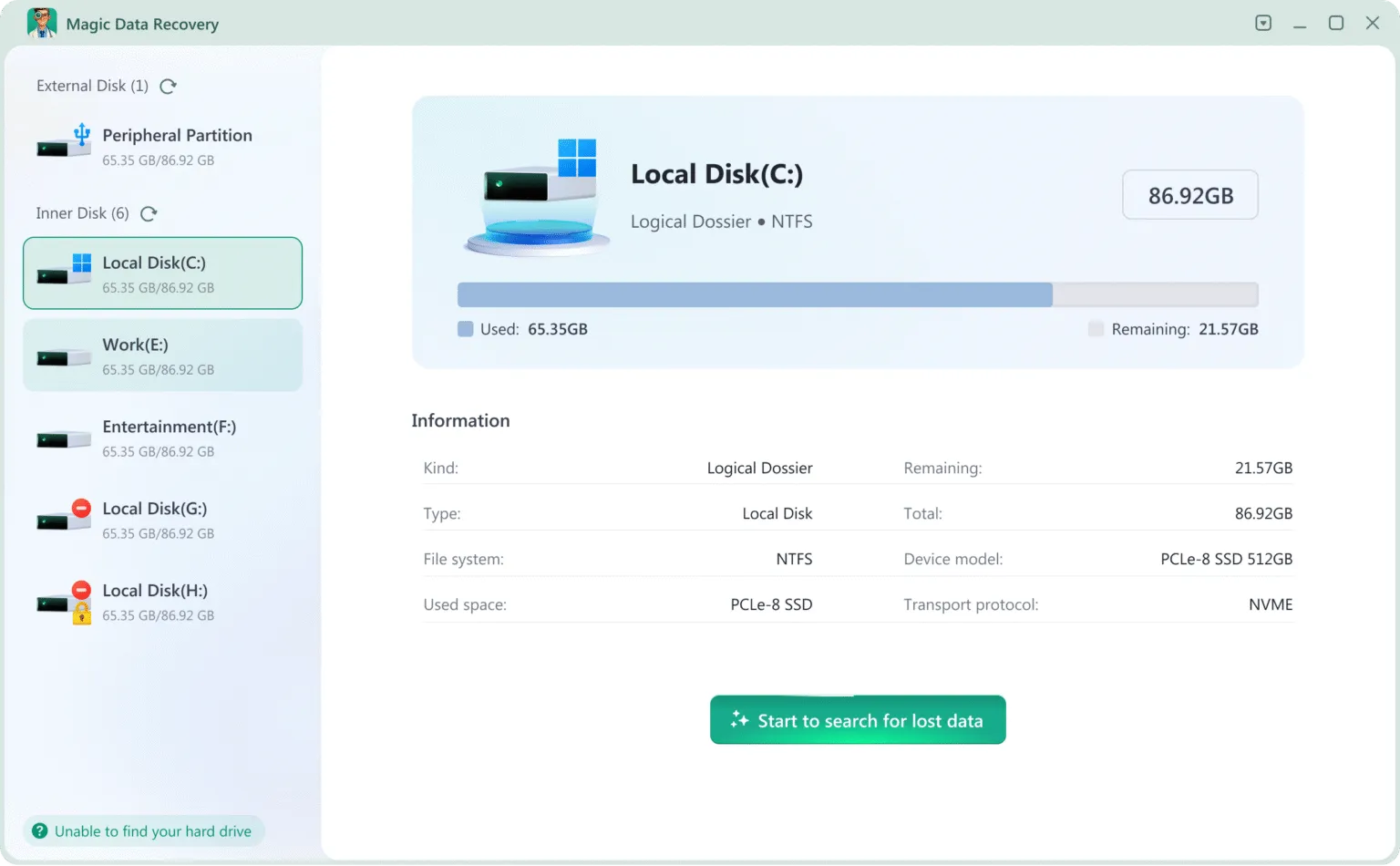
2. Selezionare l'unità o il dispositivo da scansionare
Scegliere il disco interno, l'HDD/SSD esterno, la scheda SD, l'unità USB o la scheda della fotocamera in cui sono state eliminate le foto.
3. Attendere il completamento della scansione.
Esegue automaticamente la scansione profonda, che analizza i settori di dati grezzi per ripristinare tutti i file.
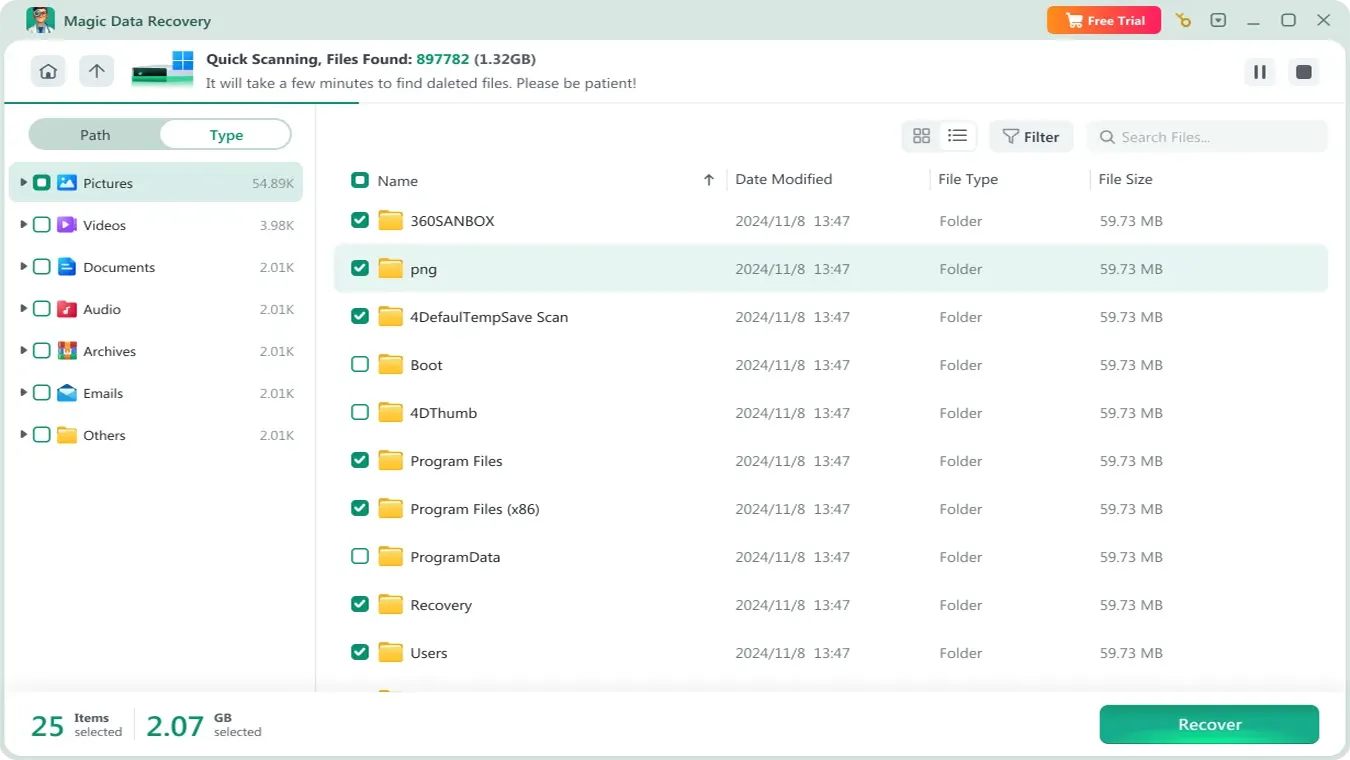
4. Anteprima delle foto
È possibile visualizzare la qualità dell'immagine, la risoluzione e i dettagli del file prima del ripristino.

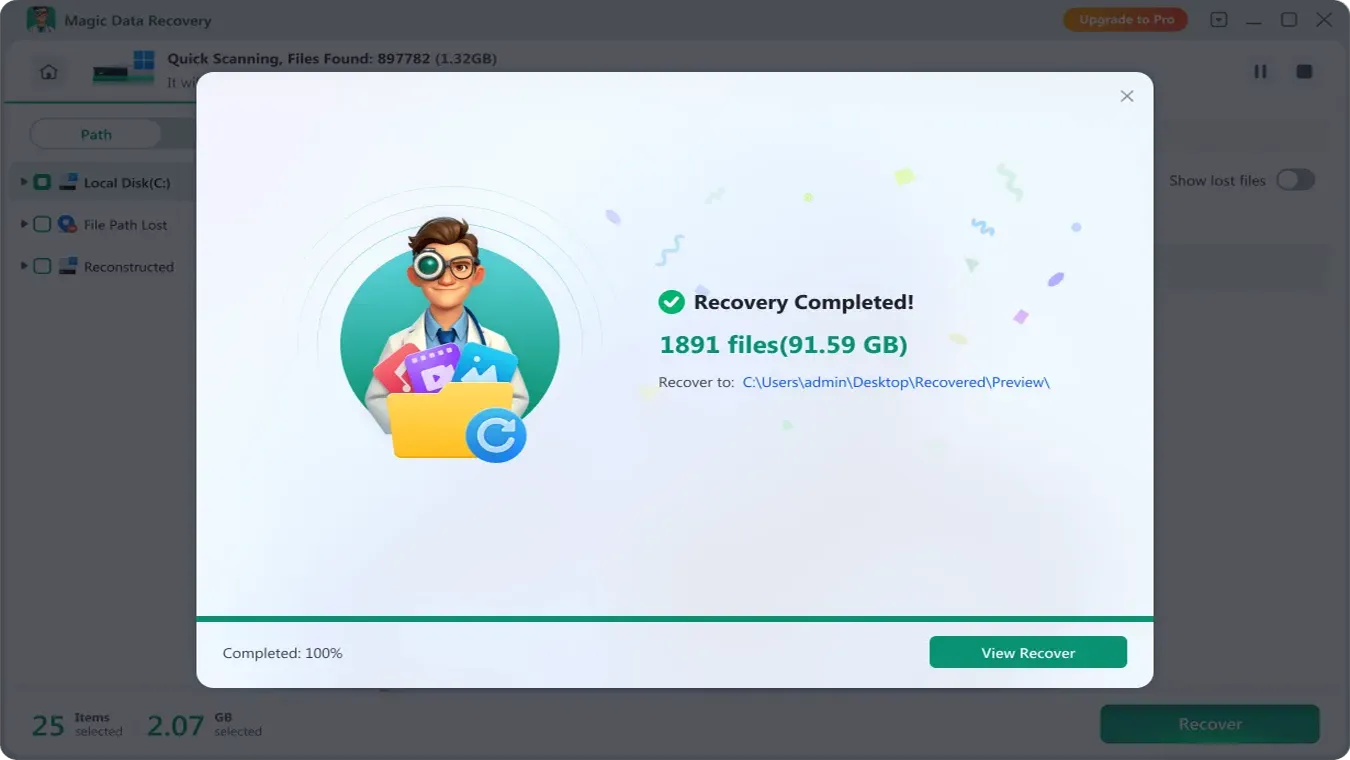
5. Recuperare le foto e salvarle in una destinazione sicura
Archiviare le foto recuperate su un'altra unità per proteggere i dati recuperabili rimanenti.
Perché Magic Data Recovery è il miglior strumento di recupero delle foto
Magic Data Recovery offre prestazioni di scansione e ricostruzione fotografica leader nel settore, rendendolo adatto sia agli utenti privati che ai tecnici professionisti. A differenza delle utility di base, è stato progettato per ripristinare le immagini anche quando il file system non conserva più le informazioni sulla directory.
Capacità | Benefici |
Algoritmo di forensica digitale profonda | Recupera le foto dopo l'eliminazione, la formattazione, l'unità RAW/non allocata e la perdita di partizioni. |
Supporta oltre 5000 formati | JPG, PNG, HEIC, CR2, NEF, ARW, RAF, DNG, TIFF e altri formati RAW di fotocamere professionali |
Compatibile con tutti i dispositivi di archiviazione | HDD / SSD, scheda SD, unità flash USB, dischi rigidi esterni, schede per fotocamere DSLR / mirrorless |
Alto tasso di successo del recupero | Il recupero a livello di settore rende il tasso di recupero del 99,7% (se non ci sono cambiamenti sull'unità dopo la perdita dei dati). |
Se la perdita di foto è stata causata da cancellazione accidentale, formattazione, o errore del file system, Magic Data Recovery offre una soluzione completa e affidabile per riportare le immagini in modo sicuro.
Consigli per aumentare le possibilità di recuperare foto cancellate definitivamente
A prescindere dallo strumento che sceglierai, ciò che farai dopo la cancellazione è fondamentale.
Seguite queste regole:
- Smettete immediatamente di utilizzare il dispositivo di archiviazione interessato.
- Non scaricare file sull'unità interessata.
- Non formattare una scheda SD solo perché Windows te lo chiede.
- Evita di eseguire CHKDSK prima di recuperare i file importanti.
- Non creare una nuova partizione sullo spazio perso o non allocato.
- Installare il software di ripristino su un'altra unità.
- Salva le foto recuperate in un'altra posizione.
- Verificare i backup prima di procedere con operazioni di risoluzione dei problemi più invasive.
In breve, usa un prima il recupero, poi la riparazione flusso di lavoro.
Il recupero protegge i dati rimanenti. Le operazioni di riparazione possono modificare le strutture del file system e rendere più difficile un successivo recupero.
Conclusione
Le foto eliminate in modo permanente non vengono distrutte al momento della cancellazione. A meno che i settori del disco non siano stati sovrascritti, i dati delle immagini rimangono recuperabili, anche dopo aver svuotato il Cestino o formattato un dispositivo di archiviazione.
La soluzione più efficace e sicura è quella di utilizzare uno strumento di recupero foto professionale che esegua una scansione profonda di livello forense. Per gli utenti che cercano la massima percentuale di successo con un flusso di lavoro semplice, Magic Data Recovery è la scelta ideale. Se si verifica una perdita di dati, interrompere immediatamente l'utilizzo del dispositivo interessato ed eseguire recupero foto per ottenere i migliori risultati.
FAQ
È davvero possibile recuperare le foto cancellate definitivamente?
Come posso recuperare delle foto cancellate definitivamente senza un backup?
È possibile recuperare le foto cancellate definitivamente dopo aver svuotato il Cestino?
È possibile recuperare le foto eliminate definitivamente da Google Foto?
È possibile recuperare le foto cancellate definitivamente da un iPhone?
È possibile recuperare le foto cancellate definitivamente da un SSD?
È possibile recuperare le foto cancellate definitivamente da una scheda SD formattata?

Vasilii è uno specialista del recupero dati con circa 10 anni di esperienza pratica nel settore. Nel corso della sua carriera, ha risolto con successo migliaia di casi complessi riguardanti file cancellati, unità formattate, partizioni perse e file system RAW. La sua esperienza copre sia i metodi di recupero manuale utilizzando strumenti professionali come gli editor esadecimali, sia le soluzioni automatiche avanzate con i software di recupero. La missione di Vasilii è quella di rendere accessibile la conoscenza del recupero dati affidabile sia ai professionisti IT che agli utenti di tutti i giorni, aiutandoli a salvaguardare i loro preziosi beni digitali.