
Cómo recuperar datos de una tarjeta SD formateada

Formatear la tarjeta SD equivocada puede hacer que años de fotos, vídeos o archivos de trabajo desaparezcan en cuestión de segundos. Afortunadamente, recuperación de tarjeta SD formateada A menudo es posible cuando la tarjeta no se ha vuelto a utilizar ni se ha sobrescrito. Lo más importante es dejar de utilizar la tarjeta inmediatamente. No hagas nuevas fotos, no copies archivos en ella, no la formatees de nuevo ni ejecutes herramientas de reparación antes de la recuperación.
Esta guía explica cómo recuperación de tarjeta SD formateada cómo funciona, qué cambia realmente con los formatos «rápido» y «completo», y cómo elegir la opción más segura Recuperación de tarjetas SD método. También aprenderás a recuperar datos de una tarjeta SD formateada con copias de seguridad, herramientas de recuperación gratuitas y Magic Data Recovery cuando necesites una solución gráfica más sencilla.
Respuesta rápida: Si usted He formateado una tarjeta SD sin querer, retíralo inmediatamente de la cámara u otro dispositivo. Conéctalo a un ordenador con un lector de tarjetas fiable, escanéalo antes de escribir nada nuevo y guarda siempre los archivos recuperados en una unidad diferente.
Índice
Compatible con Windows 7/8/10/11 y Windows Server
Qué ocurre al formatear una tarjeta SD
Sí, en muchos casos. Recuperación de una tarjeta SD formateada Depende principalmente del tipo de formateo y de si los nuevos datos han sobrescrito los archivos originales.
Un formateo rápido suele reconstruir o borrar estructuras importantes del sistema de archivos, en lugar de sobrescribir intencionadamente cada sector de datos. Microsoft explica que la opción de formateo rápido de Windows elimina la tabla de archivos y el directorio raíz sin realizar un escaneo sector por sector en busca de áreas defectuosas. Por lo tanto, es posible que algunos datos de los archivos originales sigan estando disponibles para su recuperación.
Sin embargo, ningún programa de recuperación puede garantizar un resultado satisfactorio. Si un formateo completo, un borrado seguro o una grabación posterior han sobrescrito los sectores que contenían tus archivos, la recuperación resulta mucho más difícil o incluso imposible.
Situación | Perspectivas de recuperación | Acción recomendada |
Formateo rápido sin añadir archivos nuevos | A menudo bueno | Deja de usar la tarjeta y escanéala |
Formato de la cámara sin fotos nuevas | A menudo es posible | Saca la tarjeta y utiliza un lector de tarjetas |
Nuevas fotos o vídeos grabados posteriormente | Reducido | Deja de utilizar la tarjeta inmediatamente |
Formateo completo u operación de sobrescritura | Bajo a incierto | Prueba con un programa de recuperación de datos y, si no funciona, plantéate acudir a un servicio técnico. |
El ordenador no detecta la tarjeta | Es posible que el software no sirva de ayuda | Prueba con otro lector o busca ayuda profesional |
Daños físicos | La recuperación por cuenta propia es arriesgada | Ponte en contacto con un servicio profesional de recuperación |
Para los mejores Recuperación de una tarjeta SD tras formatearla, inicia el proceso de recuperación antes de copiar, grabar, reparar o formatear cualquier cosa en la tarjeta.
Cómo funciona la recuperación de una tarjeta SD formateada
Para comprender recuperación de tarjeta SD formateada, es útil saber qué elementos de formato cambian realmente.
Una tarjeta SD utiliza un sistema de archivos para gestionar los nombres de los archivos, las carpetas, la ubicación de los archivos y el espacio de almacenamiento disponible. Tras el formateo, es posible que el sistema operativo pierda los metadatos que remiten a tus archivos anteriores. Como consecuencia, esos archivos desaparecen del Explorador de archivos o de tu cámara, aunque parte del contenido de los archivos pueda seguir existiendo.
Es importante destacar que no todas las tarjetas SD utilizan el mismo sistema de archivos. Según la SD Association, las tarjetas SDHC suelen utilizar FAT32, mientras que las tarjetas SDXC y SDUC utilizan exFAT. Por lo tanto, no es correcto dar por sentado que todas las tarjetas de memoria formateadas se basan en las mismas estructuras FAT.
Formato rápido frente a formato completo
A formato rápido modifica rápidamente la información del sistema de archivos y puede dejar intacta gran parte del área de datos anterior. Esto crea mejores condiciones para Recuperación de datos de una tarjeta SD formateada, siempre que ningún dato nuevo haya sustituido a los archivos originales.
A formato completo puede realizar un número significativamente mayor de operaciones de escritura en el dispositivo de almacenamiento. Si ese proceso sobrescribe los sectores que contenían tus antiguas fotos, vídeos o documentos, el software de recuperación no podrá reconstruir la información sobrescrita.
Por lo tanto, el éxito de la recuperación no solo depende de si la tarjeta se formateó, sino también de lo que haya ocurrido con los datos físicos posteriormente.
Recuperación del sistema de archivos frente a la extracción de archivos
El software de recuperación puede emplear diferentes técnicas para localizar archivos perdidos. Cuando aún se conservan metadatos útiles del sistema de archivos, un programa de recuperación puede restaurar los nombres de archivo originales, las estructuras de carpetas, las marcas de tiempo o las ubicaciones de los archivos.
Sin embargo, si esos metadatos han desaparecido, el software puede recurrir al análisis de firmas de archivos, también conocido como «file carving». Esta técnica analiza el almacenamiento sin procesar en busca de patrones reconocibles propios de los formatos JPEG, MP4, DOCX, ZIP y otros.
PhotoRec, por ejemplo, indica que es capaz de ignorar el sistema de archivos y buscar los datos subyacentes incluso cuando el soporte ha sido reformateado o el sistema de archivos está gravemente dañado.
Esta distinción es importante cuando... Recuperar archivos de una tarjeta SD formateada almacenamiento. La recuperación de archivos puede restaurar la foto o el vídeo en sí, aunque se pierda el nombre de archivo original o la ubicación de la carpeta.
Qué hay que hacer antes de recuperar una tarjeta SD formateada
Lo que hagas justo después de formatear puede influir directamente en el resultado. Antes de empezar recuperación de tarjeta SD formateada, Siga estas buenas prácticas:
- Deje de utilizar la tarjeta SD inmediatamente.
- No hagas fotos nuevas ni grabes vídeos.
- No copies archivos nuevos en la tarjeta.
- No formatees la tarjeta de nuevo.
- Evita utilizar herramientas de reparación como CHKDSK antes de recuperar datos importantes.
- Nunca instales software de recuperación en la tarjeta SD afectada.
- Guarda los archivos recuperados en tu ordenador, en una unidad externa o en cualquier otro dispositivo de almacenamiento.
Microsoft también recomienda reducir al mínimo el uso del almacenamiento tras una pérdida de datos, ya que las nuevas operaciones de escritura pueden sobrescribir datos de los archivos que aún podrían recuperarse.
Además, presta atención al estado físico de la tarjeta. Si se desconecta repetidamente, se calienta de forma inusual, desaparece durante el escaneo o provoca que el ordenador se cuelgue, deja de intentar recuperarla una y otra vez. La inestabilidad del hardware puede requerir la intervención de un profesional.
Cómo recuperar datos de una tarjeta SD formateada
No existe un único método de recuperación que sea el mejor para todas las situaciones. El adecuado recuperación de tarjeta SD formateada La solución depende de si existe una copia de seguridad, de si tu ordenador detecta la tarjeta y de tu nivel de familiaridad con las herramientas técnicas de recuperación.
Método 1: Comprueba primero tus copias de seguridad
Antes de escanear la tarjeta formateada, comprueba si ya existe otra copia de los archivos que faltan.
Mira dentro:
- Google Fotos, OneDrive, iCloud u otro servicio en la nube
- Importaciones anteriores de la cámara en tu ordenador
- Discos duros externos
- Carpetas de copia de seguridad del NAS
- Carpetas de proyectos de edición de fotos o vídeos
- Álbumes compartidos
- Aplicaciones de mensajería en las que ya habías enviado los archivos
Una copia de seguridad es la solución más segura, ya que no es necesario realizar lecturas adicionales de la tarjeta afectada. Si no existe ninguna copia de seguridad, recurre a un programa de recuperación.
Método 2: Recuperar una tarjeta SD formateada con Magic Data Recovery
Para los usuarios que prefieran un flujo de trabajo de recuperación visual en lugar de herramientas de línea de comandos, Magic Data Recovery ofrece una forma práctica de recuperar tarjeta SD formateada en Windows.
Magic Data Recovery es compatible con tarjetas SD y microSD que Windows puede detectar a través de un lector de tarjetas. También es compatible con FAT32 y exFAT sistemas de archivos, formateados y RAW almacenamiento, vista previa de archivos y un proceso de escaneo de solo lectura diseñado para evitar que los datos recuperados se vuelvan a escribir en la tarjeta de origen.
¿Por qué utilizar Magic Data Recovery?
Magic Data Recovery resuelve varios problemas habituales a los que se enfrentan los usuarios durante recuperación de tarjeta SD formateada.
Proceso de recuperación sencillo
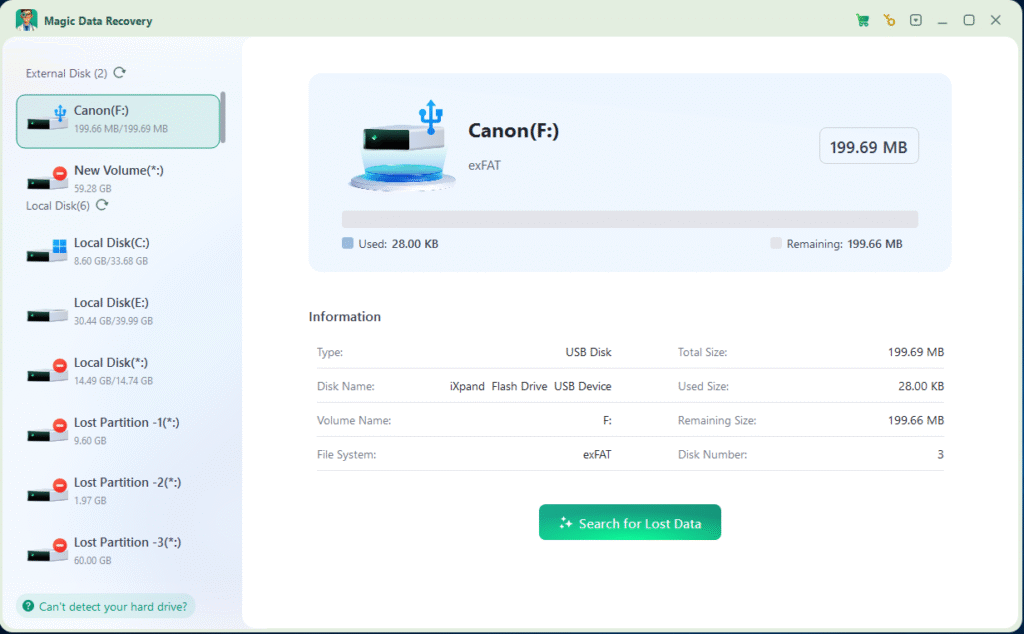
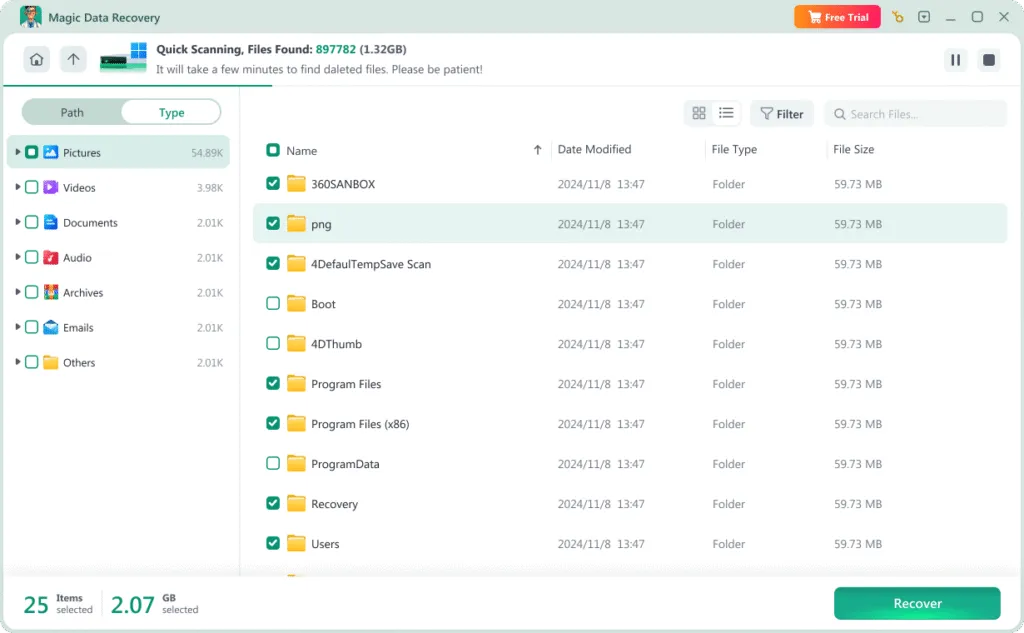
En lugar de trabajar con sectores de disco o comandos complejos, puedes seleccionar la tarjeta, iniciar un análisis, obtener una vista previa de los resultados y recuperar los archivos que necesites.
Compatibilidad con almacenamiento formateado
El software puede buscar en soportes formateados información restante del sistema de archivos y datos de archivos reconocibles.
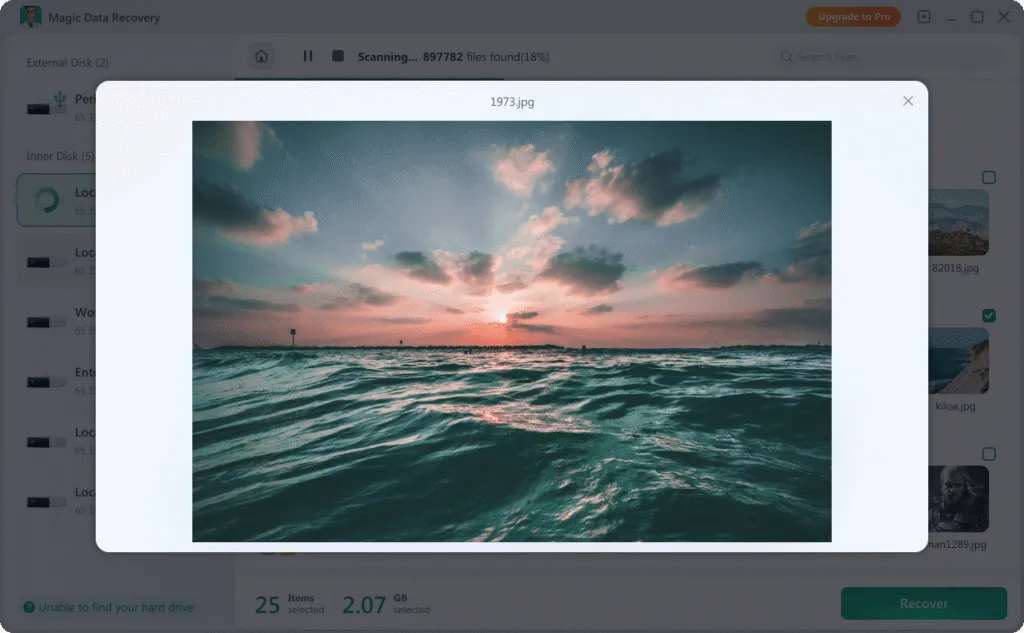
Vista previa del archivo antes de recuperarlo
La vista previa de las fotos, documentos u otros archivos compatibles que se hayan encontrado te ayuda a determinar si los archivos que necesitas aún se pueden recuperar antes de guardarlos.
Compatibilidad con FAT y exFAT
Esto es importante porque las tarjetas SDHC suelen utilizar el sistema de archivos FAT32, mientras que las tarjetas SDXC modernas suelen utilizar exFAT.
Exploración de sólo lectura
Una herramienta de recuperación debe evitar modificar intencionadamente el soporte de origen durante el escaneo. Mantener la tarjeta original sin cambios reduce el riesgo innecesario de sobrescritura.
Útil para los datos habituales de las tarjetas SD
Entre los casos de uso más habituales se incluyen la recuperación de fotos de la tarjeta de una cámara, vídeos de un dron o una cámara de acción, documentos de una tarjeta de memoria o archivos de un tarjeta microSD formateada.
Estas ventajas no significan que Magic Data Recovery pueda recuperar datos sobrescritos. Más bien, el software ofrece un proceso de recuperación más accesible que la edición hexadecimal manual y requiere menos conocimientos técnicos que las utilidades de línea de comandos.
Cómo recuperar una tarjeta SD formateada con Magic Data Recovery
Siga estos pasos para realizar recuperación de tarjeta SD formateada:
Paso 1: Instalar Magic Data Recovery
Descarga e instala Magic Data Recovery en tu ordenador con Windows.
No instales el programa en la propia tarjeta SD formateada. Aunque las aplicaciones suelen instalarse en el disco duro de un ordenador y no en una tarjeta de memoria, asegúrate siempre de que el dispositivo de almacenamiento en cuestión no sufra ningún cambio.
Compatible con Windows 7/8/10/11 y Windows Server

Método 3: Recuperar una tarjeta SD formateada de forma gratuita con la herramienta de recuperación de archivos de Windows
Los usuarios que prefieran una solución gratuita pueden plantearse utilizar Windows File Recovery.
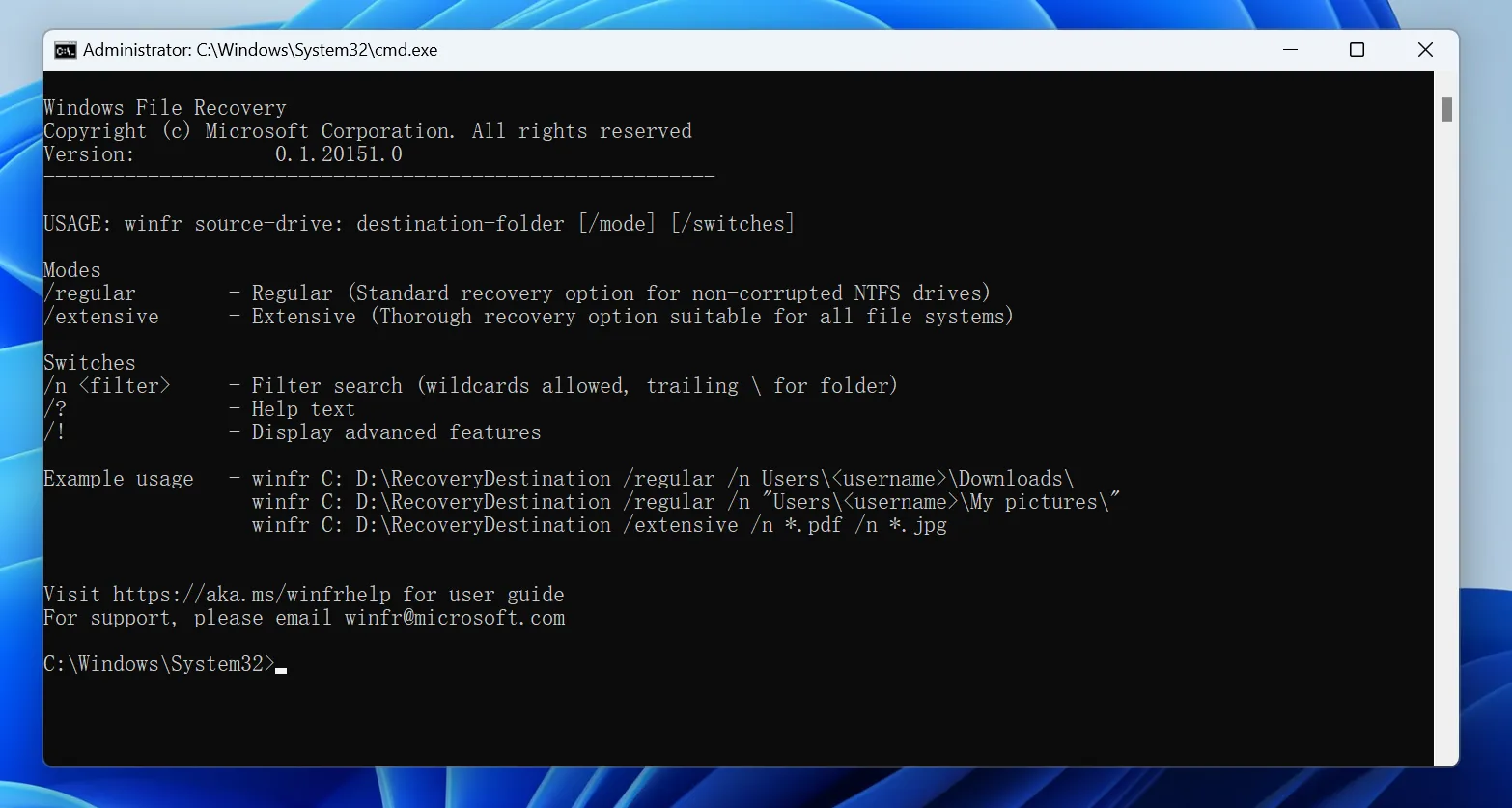
«Windows File Recovery» es la utilidad de línea de comandos de Microsoft para recuperar archivos eliminados o perdidos de dispositivos de almacenamiento locales compatibles. Microsoft indica que, para la recuperación de archivos FAT y exFAT, se debe utilizar el modo «Extensive».
Por ejemplo:
winfr E: D: /extensive /n *.jpg /n *.mp4
En este ejemplo:
E:representa la tarjeta SD formateada.D:representa otra unidad en la que se guardarán los archivos recuperados./extensorealiza un análisis más exhaustivo./nte permite buscar tipos de archivo concretos.
La unidad de origen y la de destino deben ser diferentes.
Windows File Recovery ofrece una útil opción gratuita para recuperación de tarjeta SD formateada, pero requiere introducir datos desde la línea de comandos y no ofrece el mismo flujo de trabajo con vista previa visual que el software de recuperación destinado al público general.
Para los usuarios experimentados de Windows, puede que esto no suponga ningún problema. Sin embargo, para los usuarios con menos conocimientos técnicos, una aplicación gráfica puede facilitar la selección del dispositivo de almacenamiento adecuado y la revisión de los resultados de la recuperación.
Método 4: Utilizar PhotoRec para recuperar archivos mediante su firma
PhotoRec es otra opción gratuita.
Se trata de una herramienta de recuperación de código abierto que funciona en Windows, macOS, Linux y otros sistemas operativos. En lugar de basarse por completo en el sistema de archivos original, PhotoRec busca en el almacenamiento subyacente firmas de archivos conocidas.
Por lo tanto, PhotoRec puede ser de ayuda para recuperación de tarjeta SD formateada cuando no se dispone de la información de directorio original de la tarjeta.
Sin embargo, hay una desventaja importante. Es posible que la recuperación basada en firmas no conserve los nombres originales de los archivos o las carpetas. Es posible que recuperes cientos de fotos con éxito, pero que tengas que organizarlas y renombrarlas después.
PhotoRec también cuenta con una interfaz más técnica que muchos programas de recuperación dirigidos al público general.

Método 5: Recuperación avanzada de una tarjeta SD formateada con WinHex
Los usuarios avanzados y los especialistas en recuperación de datos pueden utilizar un editor hexadecimal, como WinHex, para examinar el contenido sin procesar de una tarjeta de memoria.
Un editor hexadecimal puede ayudar a analizar:
- Estructuras del sistema de archivos
- Información sobre la partición
- Entradas del directorio
- Firmas de archivos sin procesar
- Sectores específicos o compensaciones
Sin embargo, la recuperación manual de datos hexadecimales requiere un profundo conocimiento de las estructuras de almacenamiento.
Para los usuarios normales, WinHex no debería ser la primera opción para Recuperar archivos de una tarjeta SD formateada almacenamiento. Editar la tarjeta original o realizar cambios incorrectos puede complicar la recuperación.
Si utilizas herramientas forenses, trabaja siempre que sea posible a partir de una imagen de disco, en lugar de modificar el dispositivo original.

¿Qué pasa si no se detecta la tarjeta SD formateada?
Basado en software recuperación de tarjeta SD formateada requiere que el ordenador reconozca la tarjeta como un dispositivo de almacenamiento.
Si Windows no lo detecta, prueba a seguir estos pasos:
- Conecta la tarjeta a otro lector de tarjetas.
- Prueba con otro puerto USB.
- Prueba la tarjeta en otro ordenador.
- Abre la herramienta «Administración de discos» de Windows.
- Comprueba si la tarjeta muestra una capacidad más o menos correcta.
- Si la tarjeta aparece sin letra de unidad, no la formatees de nuevo.
- Si se desconecta repetidamente o muestra una capacidad claramente errónea, deja de realizar el escaneo por tu cuenta.
Si la tarjeta no aparece en absoluto en «Administración de discos», es posible que los programas de recuperación habituales no puedan acceder a ella.
En ese caso, recurrir a un servicio profesional de recuperación de datos puede ser la opción más segura, sobre todo cuando los archivos son irreemplazables.
Consejos para mejorar las posibilidades de éxito en la recuperación de una tarjeta SD formateada
Hay varios hábitos sencillos que pueden aumentar las posibilidades reales de recuperación de tarjeta SD formateada:
- Actúa con rapidez. Los nuevos datos pueden sustituir al contenido almacenado anteriormente.
- No modifiques la tarjeta de origen. Evita las reparaciones, el formateo o las escrituras innecesarias.
- Utiliza un lector de tarjetas fiable. Las conexiones inestables pueden interrumpir los escaneos largos.
- Guarda los archivos recuperados en otra ubicación. Nunca utilices la tarjeta de origen como destino de recuperación.
- Deja que finalice un análisis completo. Un análisis más exhaustivo puede detectar archivos que un análisis rápido pasa por alto.
- Previsualiza los archivos importantes. Comprueba que las fotos o documentos importantes se puedan utilizar cuando haya una vista previa disponible.
- Crea una imagen de una carta inestable. Los usuarios con experiencia deberían plantearse realizar una copia de seguridad sector por sector antes de llevar a cabo una recuperación exhaustiva.
- Hay que saber cuándo parar. Un fallo físico requiere un enfoque diferente al de la pérdida lógica de datos.
Piensa en la tarjeta original como una prueba. El software de recuperación debería leerla sin alterar los datos restantes siempre que sea posible.
Conclusión
Recuperación de una tarjeta SD formateada A menudo es posible si se actúa con rapidez, se deja de utilizar la tarjeta y se evita que los nuevos datos sobrescriban los archivos originales.
Los casos de formateo rápido suelen ofrecer mejores condiciones de recuperación que las situaciones en las que se realiza una sobrescritura completa. Por otra parte, las tarjetas de memoria que presentan daños físicos o son inestables pueden requerir una recuperación profesional en lugar de repetidos análisis con software.
Empieza por las copias de seguridad, siempre que estén disponibles. Windows File Recovery y PhotoRec ofrecen soluciones gratuitas muy útiles para los usuarios que se sienten cómodos con las herramientas técnicas.
Para los usuarios que prefieren un flujo de trabajo más sencillo en Windows, Magic Data Recovery merece la pena tenerlo en cuenta porque es compatible con los sistemas de archivos habituales de las tarjetas SD, analiza los dispositivos de almacenamiento formateados, ofrece una vista previa de los archivos y elimina gran parte de la complejidad asociada al uso de la línea de comandos.
Si necesita recuperar tarjeta SD formateada fotos, vídeos o documentos, deja de utilizar la tarjeta y escanéala antes de realizar cualquier otro cambio. Tomar esa precaución es la mejor medida práctica Recuperación de tarjetas SD probabilidad de éxito.
Compatible con Windows 7/8/10/11 y Windows Server
PREGUNTAS FRECUENTES
¿Es posible recuperar realmente una tarjeta SD formateada?
¿Puedo recuperar los datos de una tarjeta SD formateada sin necesidad de software?
¿Es gratuita la recuperación de una tarjeta SD formateada?
¿Puedo recuperar fotos después de formatear una tarjeta SD?
¿El formateo rápido borra definitivamente una tarjeta SD?
¿Se puede recuperar una tarjeta SD formateada por completo?
¿Puede CMD recuperar una tarjeta SD formateada?
¿Dónde debo guardar los archivos recuperados?

Vasilii es un especialista en recuperación de datos con unos 10 años de experiencia práctica en este campo. A lo largo de su carrera, ha resuelto con éxito miles de casos complejos relacionados con archivos borrados, unidades formateadas, particiones perdidas y sistemas de archivos RAW. Su experiencia abarca tanto métodos de recuperación manual con herramientas profesionales como editores hexadecimales como soluciones automatizadas avanzadas con software de recuperación. La misión de Vasilii es poner los conocimientos sobre recuperación de datos al alcance tanto de los profesionales informáticos como de los usuarios de a pie, ayudándoles a salvaguardar sus valiosos activos digitales.