
Qué es el sistema de archivos exFAT
En Sistema de archivos exFAT Es una opción práctica cuando necesitas guardar archivos de gran tamaño en un soporte extraíble y utilizar la misma unidad en diferentes sistemas operativos. Evita FAT32’el límite de 4 GB por archivo, al tiempo que mantiene una estructura más sencilla que NTFS. Por ello, el formato exFAT es habitual en memorias USB, tarjetas SDXC, discos duros externos y SSD portátiles.
Sin embargo, exFAT no es la opción ideal para todas las tareas de almacenamiento. Carece de algunas características de NTFS, como el registro en diario y los permisos avanzados. Esta guía explica ¿Qué es exFAT?, cómo funciona, Compatibilidad con exFAT, exFAT frente a FAT32, exFAT frente a NTFS, y qué hacer si desaparecen los archivos.
Índice
Finalidad y filosofía de diseño del sistema de archivos exFAT
exFAT se introdujo para resolver un problema específico: sistemas de archivos FAT tradicionales eran sencillas y ampliamente compatibles, pero cada vez más inadecuadas para las demandas modernas de almacenamiento. FAT32 no puede almacenar archivos de más de 4 GB, lo que lo hace poco práctico para vídeos de alta resolución, imágenes de disco o copias de seguridad del sistema.
A diferencia de NTFS, exFAT, que incluye registro en diario, listas de control de acceso y complejas estructuras de metadatos, es intencionadamente ligera. Elimina las restricciones heredadas al tiempo que evita la sobrecarga que puede reducir el rendimiento en el almacenamiento extraíble o basado en flash.
Microsoft documenta oficialmente exFAT como sistema de archivos optimizado para dispositivos de memoria flash, en los que minimizar la amplificación de la escritura y la complejidad de los metadatos es fundamental tanto para la velocidad como para la longevidad del dispositivo.
El sistema de archivos exFAT de un vistazo
Característica | exFAT |
Nombre completo | Tabla de asignación de archivos extensible |
Desarrollado por | Microsoft |
Lo mejor para | Dispositivos de almacenamiento extraíbles y archivos de gran tamaño compatibles con varias plataformas |
Límite de tamaño de archivo de 4 GB en FAT32 | No |
Diario | No |
Compatible con Windows | Sí |
Compatibilidad con macOS | Sí |
Compatibilidad con las versiones modernas de Linux | Sí |
Dispositivos habituales | Memorias USB, tarjetas SDXC, discos duros externos, SSD portátiles |
La mejor opción para la unidad del sistema | Normalmente no |
En resumen, el Sistema de archivos exFAT funciona mejor cuando la portabilidad y la compatibilidad con archivos de gran tamaño son más importantes que las funciones avanzadas del sistema de archivos.
Principales características técnicas del sistema de archivos exFAT
- Tamaño máximo del archivo: Hasta 16 EB (límite teórico)
- Tamaño máximo de volumen: Hasta 128 PB (depende de la implementación)
- Sin diario: Mejora el rendimiento pero reduce la resistencia a los choques
- Tamaño del grupo: Admite clústeres de gran tamaño configurables para un almacenamiento eficaz de archivos de gran tamaño.
- Asignación de mapas de bits: Mejora el seguimiento del espacio y reduce la sobrecarga del escaneado de FAT.
Estas características permiten a exFAT gestionar cargas de trabajo modernas, como archivos de vídeo 4K/8K y archivos de gran tamaño, sin los problemas de compatibilidad de NTFS o las restricciones de tamaño de archivo de FAT32.
exFAT, FAT32 y NTFS: ¿cuál es el mejor?
Elegir entre exFAT frente a FAT32 y exFAT frente a NTFS Depende del tamaño del archivo, de la compatibilidad del dispositivo y de los requisitos del sistema operativo.
Característica | FAT32 | exFAT | NTFS |
Archivos de más de 4 GB | No | Sí | Sí |
Lectura/escritura en Windows | Sí | Sí | Sí |
macOS lectura/escritura | Sí | Sí | La compatibilidad con la escritura nativa es más limitada |
Compatibilidad con las versiones modernas de Linux | Sí | Sí | Sí |
Diario | No | No | Sí |
Permisos al estilo NTFS | No | No | Sí |
Compatibilidad con dispositivos más antiguos | Muy fuerte | Varía | Más limitado |
Archivos de gran tamaño multiplataforma | Pobre | Fuerte | Menos práctico para el acceso de escritura en Mac |
Unidad del sistema de Windows | No | No | La mejor opción |
La documentación de Windows de Microsoft también distingue el sistema de archivos exFAT del NTFS en aspectos como el registro en diario, los enlaces, la seguridad y otras funciones del sistema de archivos.
Apple señala asimismo que ExFAT es un formato compatible con Windows, mientras que macOS puede leer unidades NTFS sin ofrecer la misma capacidad de escritura nativa.
exFAT frente a FAT32
Elige FAT32 cuando sea importante garantizar la máxima compatibilidad con hardware antiguo y todos los archivos tengan un tamaño inferior a 4 GB.
Elige exFAT cuando necesites que se admitan archivos de gran tamaño y los dispositivos de destino lo admitan.
Por ejemplo, FAT32 puede seguir siendo una buena opción para un equipo de sonido de coche o un televisor antiguos. Sin embargo, una unidad portátil moderna que contenga vídeos de gran tamaño suele funcionar mejor con exFAT.
exFAT frente a NTFS
Elige NTFS para los discos del sistema de Windows, las unidades internas destinadas a Windows, los permisos y el registro en diario.
Elige exFAT para dispositivos de almacenamiento extraíbles que requieran un acceso sencillo de lectura y escritura tanto en Windows como en macOS.
En pocas palabras, NTFS ofrece funciones más avanzadas, mientras que exFAT se centra más en la portabilidad.
¿Cuándo conviene utilizar el sistema de archivos exFAT?
En Sistema de archivos exFAT es una buena opción cuando:
- Necesitas transferir archivos de más de 4 GB.
- Trasladas un SSD portátil de Windows a macOS.
- Utilizas una tarjeta SDXC en un dispositivo que es oficialmente compatible con exFAT.
- Almacenas vídeos de gran tamaño, archivos, archivos de proyectos o copias de seguridad.
- No necesitas permisos NTFS ni el registro en diario.
Por ejemplo, un videógrafo puede utilizar un SSD portátil para transferir material de vídeo de alta resolución entre un ordenador con Windows y un MacBook.
FAT32 puede fallar debido al límite de 4 GB. Por su parte, NTFS puede hacer que el acceso de escritura nativo en Mac resulte menos cómodo. En ese caso, exFAT ofrece una solución práctica.
Otro ejemplo habitual es el de una memoria USB de gran capacidad que se utiliza para archivos ISO o archivos de vídeo. Si los archivos individuales superan los 4 GB, elegir el sistema de archivos FAT32 supondría una limitación innecesaria.
Riesgos de pérdida de datos en el sistema de archivos exFAT
Aunque exFAT es eficiente, carece de registro diario, lo que significa que no mantiene un registro transaccional de los cambios en el sistema de archivos. Como resultado, es más vulnerables a la corrupción causada por:
- Retirada insegura del dispositivo
- Pérdida de potencia durante las operaciones de escritura
- Errores de conversión o formateo del sistema de archivos
- Corrupción lógica de las tablas de asignación
La buena noticia es que la estructura de metadatos relativamente sencilla de exFAT suele hacer posible la recuperación de datos, siempre que el dispositivo de almacenamiento no se haya sobrescrito.
Cómo almacena y pierde archivos el sistema de archivos exFAT
exFAT utiliza una combinación de tablas de asignación y mapas de bits para realizar un seguimiento de los clústeres utilizados y libres. Cuando se elimina un archivo, su entrada de directorio se marca como no utilizada, pero los clusters de datos subyacentes permanecen intactos hasta que se sobrescriben.
Este comportamiento significa que los archivos borrados no se destruyen inmediatamente. Desde una perspectiva forense y de recuperación, esto permite que herramientas de escaneo de sólo lectura como Magic Data Recovery para recuperar datos si las cadenas de clúster siguen intactas.
Cómo formatear una unidad en exFAT
El formateo modifica el sistema de archivos y puede borrar los datos existentes, por lo que es recomendable hacer primero una copia de seguridad de los archivos importantes.
Cómo formatear un disco en exFAT en Windows
- Conecta la unidad USB, la tarjeta SD o el disco externo de destino.
- Abra el Explorador de archivos.
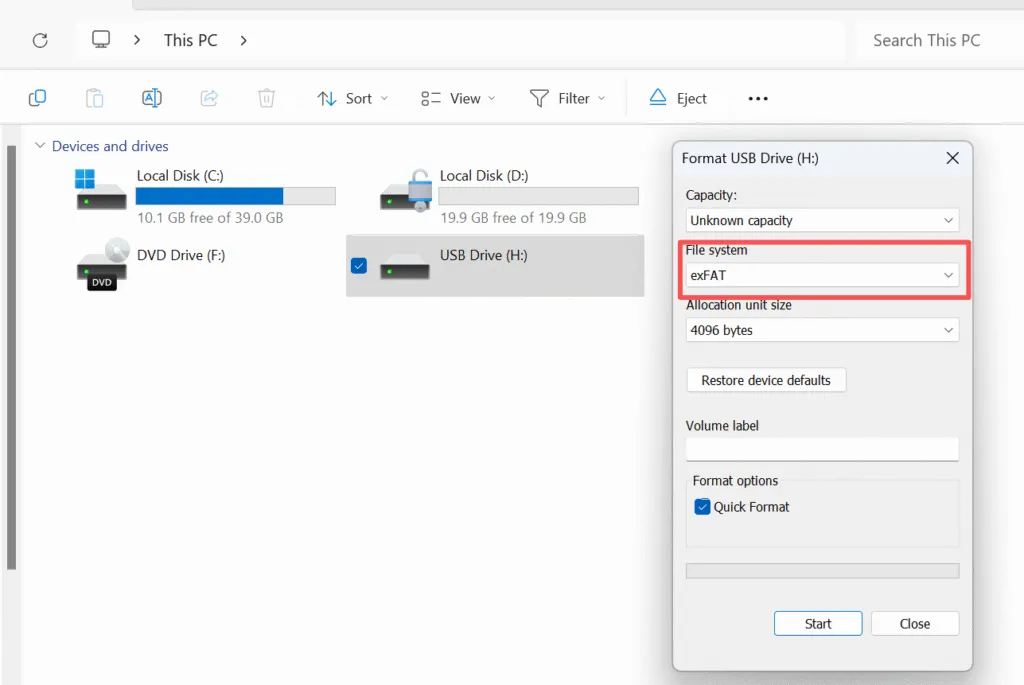
- Haz clic con el botón derecho del ratón en la unidad correcta y selecciona Formato.
- Elija exFAT en «Sistema de archivos».
- Mantén el tamaño predeterminado de la unidad de asignación, a menos que tengas algún requisito específico.
- Haga clic en Inicio y confirme.
Windows es compatible con el sistema de archivos exFAT a través de sus herramientas de formateo estándar. Microsoft también recomienda utilizar la configuración predeterminada de asignación para el formateo de uso general, a menos que una carga de trabajo concreta requiera otro valor.
Comprueba siempre dos veces la letra de la unidad antes de hacer clic en «Inicio». Formatear una unidad equivocada puede provocar una grave pérdida de datos.
Cómo formatear un disco en exFAT en macOS
- Abra la Utilidad de Discos.
- Selecciona la unidad o el volumen correcto.
- Haga clic en Borrar.
- Elija exFAT.
- Selecciona el esquema de particiones adecuado.
- Confirma el proceso de borrado.
Apple ofrece oficialmente ExFAT como opción en la Utilidad de Discos para los dispositivos de almacenamiento que requieran compatibilidad con Windows.
¿Qué provoca la pérdida de datos en exFAT?
En unidad exFAT puede perder el acceso a los archivos debido a:
- Eliminación accidental
- Formateo rápido
- Retirada insegura de la unidad
- Pérdida de alimentación durante una operación de escritura
- Metadatos del sistema de archivos dañados
- Particiones perdidas o inaccesibles
- Malware o errores de software
- Fallo del almacenamiento físico
Un error habitual es seguir copiando archivos en la unidad después de que los datos hayan desaparecido.
Las nuevas operaciones de escritura pueden sobrescribir áreas de almacenamiento que aún contengan datos de archivos recuperables. Por lo tanto, deja de utilizar el dispositivo afectado lo antes posible si desaparecen archivos importantes.
Cómo recuperar datos de una unidad exFAT
Si se pierden datos de un dispositivo formateado en exFAT, que no cunda el pánico. En muchos casos, la recuperación es posible si se actúa con rapidez.
Paso a paso:
1. Deje de utilizar el aparato inmediatamente
El uso continuado aumenta el riesgo de sobrescribir los datos recuperables.
2. Conecte el dispositivo en modo de sólo lectura si es posible
Evite las reparaciones del sistema de archivos o las indicaciones de formateo del sistema operativo.
3. Escanear con una herramienta de recuperación profesional
Herramientas como Magic Data Recovery están diseñados para analizar tablas de asignación exFAT y reconstruir archivos borrados de forma segura sin modificar el soporte original.
4. Vista previa de los archivos recuperables
La vista previa de archivos ayuda a verificar la integridad de los datos antes de restaurarlos.
5. Recuperar a una ubicación de almacenamiento diferente
Nunca restaure archivos en el mismo dispositivo exFAT.
Este proceso lógico y controlado maximiza el éxito de la recuperación al tiempo que minimiza los riesgos adicionales.
Perspectiva profesional
Desde el punto de vista de la recuperación de datos, exFAT es más fácil de analizar que NTFS pero más vulnerable a interrupciones bruscas debido a su falta de registro en el diario. Esta contrapartida es intencionada y aceptable para el almacenamiento portátil, siempre que los usuarios realicen copias de seguridad y sigan unas prácticas de eliminación seguras.
Cuando se producen fallos, es esencial disponer de un software de recuperación profesional que funcione en modo de sólo lectura. Magic Data Recovery se posiciona como una solución fiable y no destructiva para escanear volúmenes exFAT y restaurar datos perdidos de forma segura.
Conclusión
En Sistema de archivos exFAT Es una de las mejores opciones en cuanto a dispositivos de almacenamiento extraíbles modernos cuando necesitas compatibilidad con archivos de gran tamaño y una cómoda compatibilidad con Windows y macOS.
Funciona especialmente bien con memorias USB, tarjetas SDXC, discos duros externos y SSD portátiles.
Utilice NTFS para las unidades del sistema de Windows, FAT32 para garantizar la compatibilidad con dispositivos más antiguos, y exFAT cuando la prioridad sea la portabilidad y los archivos de gran tamaño.
Si ya se han perdido archivos en una unidad exFAT debido a su eliminación, al formateo o a errores del sistema de archivos, deja de escribir nuevos datos en ella.
Magic Data Recovery Merece la pena tenerlo en cuenta porque es compatible con exFAT, permite realizar análisis en modo de solo lectura y ofrece una vista previa de los archivos, además de seguir un flujo de trabajo sencillo: análisis, vista previa y recuperación.
Si buscas una solución más eficaz para la pérdida lógica de datos en exFAT, puedes probar Magic Data Recovery y analizar primero la unidad afectada para ver qué archivos se pueden recuperar.
Compatible con Windows 7/8/10/11 y Windows Server
FAQ: Sistema de archivos exFAT
¿Es exFAT un buen sistema de archivos?
¿Es mejor exFAT que NTFS?
¿Para qué sirve el sistema de archivos exFAT?
¿Es exFAT lo mismo que FAT32?
¿Cuál es la desventaja de exFAT?
¿Está bien exFAT para Windows?
¿Es buena la exFAT para las SSD?
¿Es seguro cambiar exFAT a NTFS?

Vasilii es un especialista en recuperación de datos con unos 10 años de experiencia práctica en este campo. A lo largo de su carrera, ha resuelto con éxito miles de casos complejos relacionados con archivos borrados, unidades formateadas, particiones perdidas y sistemas de archivos RAW. Su experiencia abarca tanto métodos de recuperación manual con herramientas profesionales como editores hexadecimales como soluciones automatizadas avanzadas con software de recuperación. La misión de Vasilii es poner los conocimientos sobre recuperación de datos al alcance tanto de los profesionales informáticos como de los usuarios de a pie, ayudándoles a salvaguardar sus valiosos activos digitales.