
¿Se pueden recuperar archivos tras un restablecimiento de fábrica?
Un restablecimiento de fábrica puede solucionar problemas graves de Windows, pero también puede borrar fotos, documentos, vídeos y archivos de trabajo. Por eso, muchos usuarios se preguntan con urgencia: ¿Se pueden recuperar los archivos tras un restablecimiento a los valores de fábrica?? En muchos casos, la recuperación sigue siendo posible. Sin embargo, el resultado depende de la opción de restablecimiento, el tipo de almacenamiento, el cifrado, las copias de seguridad y el uso que se le haya dado al ordenador desde entonces.
Esta guía explica Cómo recuperar archivos tras un restablecimiento de fábrica en Windows 11 y Windows 10. En primer lugar, aprenderás qué factores influyen en Recuperación de discos duros. A continuación, podrás comparar soluciones de copia de seguridad, programas de recuperación y servicios profesionales. Por último, verás cómo Magic Data Recovery puede serte de ayuda cuando lo necesites Recuperar archivos tras un restablecimiento de fábrica sin copia de seguridad.
Compatible con Windows 7/8/10/11 y Windows Server
Índice
¿Se pueden recuperar archivos tras un restablecimiento de fábrica en Windows 11/10?
Sí, pero ¿Se pueden recuperar los archivos tras un restablecimiento a los valores de fábrica? La respuesta depende de cada caso. Windows ofrece las opciones «Conservar mis archivos» y «Eliminar todo». La opción «Conservar mis archivos» suele conservar los datos personales al tiempo que elimina las aplicaciones y la configuración. Por el contrario, la opción «Eliminar todo» borra los archivos personales de la instalación activa de Windows.
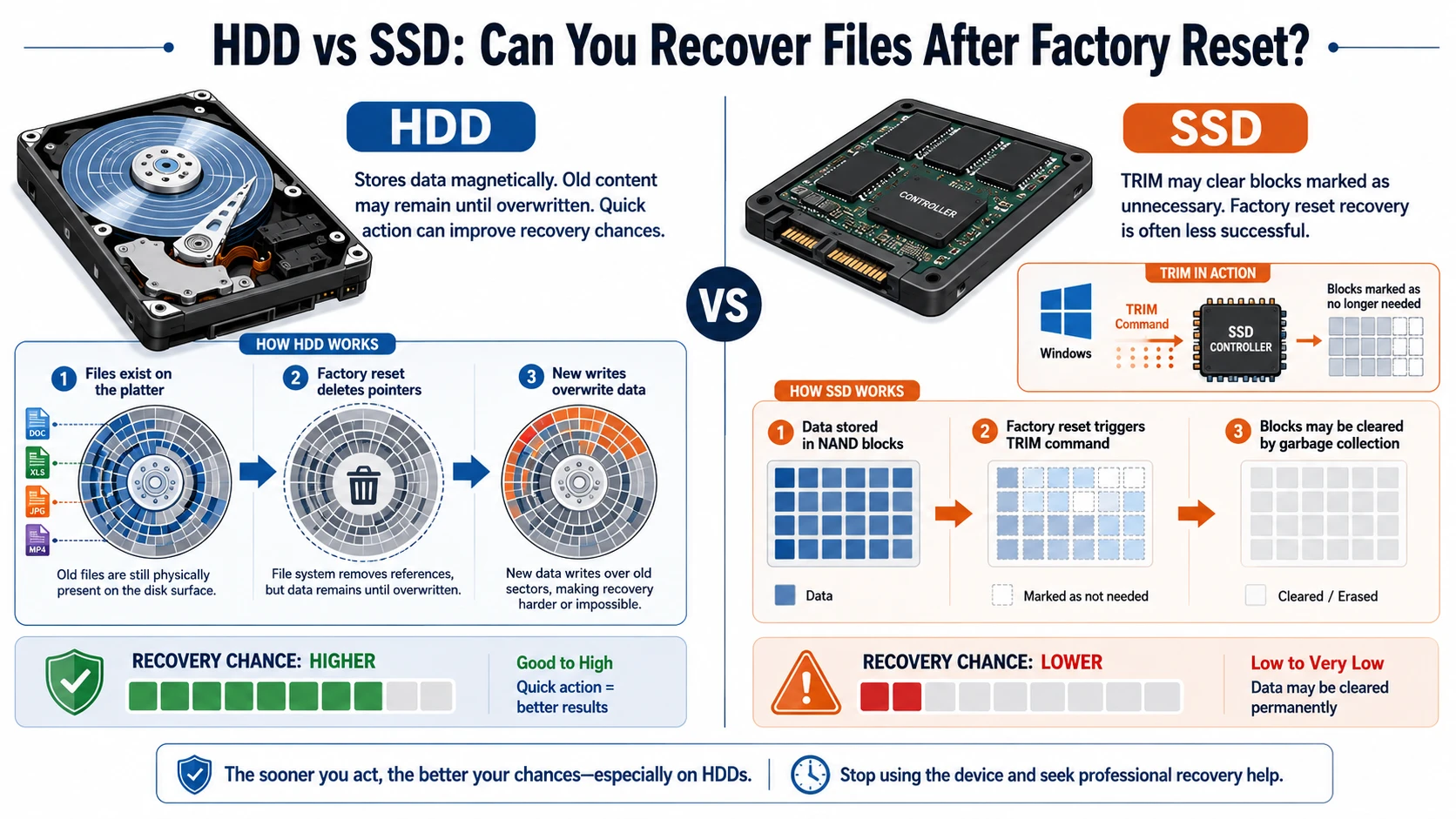
Aun así, un HDD puede conservar el contenido antiguo del archivo hasta que Windows lo sobrescriba. Un SSD, sin embargo, puede utilizar TRIM para borrar los bloques eliminados más rápidamente. Por lo tanto, Recuperación del SSD tras un restablecimiento de fábrica suele resultar más complicado que la recuperación de un disco duro.
Situación | Perspectivas de recuperación | El mejor paso a seguir |
Guardar mis archivos | Normalmente está bien | Comprobar las carpetas de los usuarios |
Borrar todo el contenido de un disco duro | Posible | Deja de usar el ordenador y haz un análisis |
Restablecimiento en un SSD con TRIM | A menudo difícil | Comprueba primero las copias de seguridad |
Limpieza de la unidad activada | Muy bajo | Plantéate acudir a un especialista |
Existe OneDrive o el Historial de archivos | Bien | Restaurar la copia de seguridad |
BitLocker protege la unidad | Se necesita llave | Busca la clave de recuperación |
Lo más importante es que dejes de utilizar la unidad afectada. Las actualizaciones, las descargas y las nuevas instalaciones podrían sobrescribir datos que aún se pueden recuperar. Por lo tanto, la respuesta a ¿Se pueden recuperar los archivos tras un restablecimiento a los valores de fábrica? mejora si actúas con rapidez.
HDD frente a SSD: ¿Se pueden recuperar archivos tras un restablecimiento de fábrica?
El tipo de almacenamiento influye considerablemente en ¿Se pueden recuperar los archivos tras un restablecimiento a los valores de fábrica?. Un disco duro almacena los datos de forma magnética, por lo que el contenido antiguo puede permanecer allí hasta que se sustituya por otra escritura. Por lo tanto, actuar con rapidez puede aumentar las posibilidades de recuperación del disco duro.
Un SSD funciona de forma diferente. Windows puede enviar un comando TRIM, que indica al controlador que determinados bloques ya no contienen datos necesarios. Como resultado, Recuperación del SSD tras un restablecimiento de fábrica suele tener una tasa de éxito más baja.
Qué hay que hacer antes de recuperar archivos tras un restablecimiento de fábrica
Antes de empezar Recuperación de datos tras un restablecimiento de fábrica, proteger los datos que puedan quedar:
- Deja de descargar archivos e instalar programas.
- Poner en pausa Windows Update.
- Evita formatear el disco, limpiarlo y volver a reiniciarlo.
- No instale ningún software de recuperación en la unidad afectada.
- Elige otra unidad o partición para los archivos recuperados.
- Si es posible, utiliza otro ordenador para analizar la unidad.
- Ten a mano tu clave de recuperación de BitLocker.
Estos pasos son importantes porque el software de recuperación no puede recuperar la información sobrescrita. Por lo tanto, una preparación adecuada influye directamente en ¿Se pueden recuperar los archivos tras un restablecimiento a los valores de fábrica?. En otras palabras, ¿Se pueden recuperar los archivos tras un restablecimiento a los valores de fábrica? A menudo depende de lo que evites hacer a continuación.
Cómo afectan las opciones de restablecimiento de Windows a la recuperación de archivos
Conservar mis archivos
La opción «Conservar mis archivos» reinstala Windows conservando los archivos personales en las carpetas de usuario estándar. Sin embargo, Windows elimina las aplicaciones y restablece muchos ajustes. Por lo tanto, comprueba el escritorio, «Documentos», «Descargas», «Imágenes», «Vídeos» y OneDrive antes de utilizar un programa de recuperación.
Borrar todo
La opción «Eliminar todo» borra los archivos del usuario, las aplicaciones y la configuración de la instalación actual. No obstante, un disco duro puede seguir conteniendo datos recuperables hasta que nuevos archivos los sobrescriban. Por lo tanto, los usuarios que necesiten Recuperar archivos tras un restablecimiento de fábrica en Windows 10 o Windows 11 debería dejar de utilizar el dispositivo de inmediato.
Descarga desde la nube, reinstalación local y borrado de datos
La opción «Descarga en la nube» obtiene archivos nuevos de Windows de Microsoft, mientras que la opción «Reinstalación local» utiliza los archivos que ya se encuentran en el ordenador. Ninguna de estas opciones por sí sola determina el éxito de la recuperación. En cambio, el tipo de almacenamiento, la actividad posterior del disco, el cifrado y la opción de restablecimiento son factores más importantes.
Si has activado la limpieza del disco, Windows ha realizado escrituras adicionales para dificultar la recuperación. Por lo tanto, es posible que los programas de recuperación habituales encuentren pocos datos utilizables.
Cifrado con BitLocker
BitLocker cifra la unidad. Por lo tanto, es posible que necesites la clave de recuperación de 48 dígitos para poder acceder a los datos protegidos. Comprueba tu cuenta de Microsoft, tu cuenta de trabajo, los archivos guardados, los documentos impresos o los dispositivos USB. Sin la clave, es posible que los datos, aunque estén intactos, no se puedan leer.
Cómo recuperar archivos tras un restablecimiento de fábrica: cuatro métodos
Cuando te decidas Cómo recuperar archivos tras un restablecimiento de fábrica, empieza por el método más seguro. Este orden ofrece ¿Se pueden recuperar los archivos tras un restablecimiento a los valores de fábrica? una respuesta más práctica y que tenga en cuenta los riesgos. En primer lugar, comprueba las copias existentes. A continuación, utiliza un programa de recuperación cuando no exista ninguna copia de seguridad válida.
Método 1: Comprobar el almacenamiento en la nube
Inicia sesión en OneDrive, Google Drive, Dropbox y el almacenamiento de la empresa. A continuación, revisa la papelera de reciclaje o la papelera de cada servicio. Un restablecimiento de fábrica suele afectar al ordenador local, no a los archivos que ya están almacenados en la nube.
Sin embargo, no des por sentado que todas las carpetas se hayan sincronizado automáticamente. Comprueba si tu copia de seguridad en la nube incluía las carpetas «Escritorio», «Documentos», «Imágenes» y otras carpetas importantes antes del restablecimiento.
Método 2: Restaurar con el historial de archivos
Si habías activado el «Historial de archivos» antes del restablecimiento, conecta la fuente de copia de seguridad y busca las versiones anteriores. A continuación, restaura las carpetas que necesites en una ubicación segura.
Este método suele ser el más fiable solución porque utiliza una copia independiente en lugar de reconstruir los datos eliminados.
Método 3: Buscar otros dispositivos y cuentas
Revisa las memorias USB, las tarjetas SD, los ordenadores antiguos, los archivos adjuntos de los correos electrónicos, las aplicaciones de mensajería y las carpetas compartidas. Por ejemplo, es posible que un compañero de trabajo aún tenga un archivo de proyecto, mientras que tu teléfono puede contener fotos que ya habías transferido al ordenador.
Método 4: Utilizar Magic Data Recovery sin copia de seguridad
Cuando las copias de seguridad no contienen los archivos que faltan, Magic Data Recovery Ofrece un proceso de recuperación de Windows muy claro. Es compatible con Windows 7, Windows 8, Windows 10 y Windows 11. Además, permite realizar análisis en profundidad, aplicar filtros de archivos, obtener vistas previas y llevar a cabo recuperaciones selectivas.
El software resuelve un problema habitual: a menudo, los usuarios no saben si el borrado solo ha eliminado el registro del archivo o si ha sobrescrito el contenido subyacente. Por ello, Magic Data Recovery analiza la unidad afectada y muestra lo que aún puede encontrar.
Sigue estos pasos para Recuperar archivos tras un restablecimiento de fábrica con Magic Data Recovery:
Paso 1: Descargar e instalar Magic Data Recovery
Descarga e instala Magic Data Recovery. Sin embargo, elige una ubicación distinta a la unidad que contenía los archivos perdidos. Esta precaución ayuda a evitar que el instalador sobrescriba los datos recuperables.
Compatible con Windows 7/8/10/11 y Windows Server
Paso 2: Selecciona la unidad afectada por el restablecimiento de fábrica
Inicia el programa y revisa las unidades y particiones en la interfaz principal. A continuación, selecciona la unidad en la que tenías guardados tus archivos antes de restablecer los ajustes de fábrica. Después, inicia el análisis.

Paso 3: Escanear la unidad en busca de archivos perdidos
Magic Data Recovery inicia automáticamente un análisis avanzado. Mientras tanto, muestra una lista de los archivos recuperables a medida que avanza el análisis. Por lo tanto, puedes empezar a revisar los resultados antes de que finalice el análisis.

Paso 4: Vista previa de los archivos antes de la recuperación
A continuación, utiliza la función de vista previa para comprobar el contenido y el estado de cada archivo. Además, filtra los resultados por tipo de archivo, nombre, tamaño o ubicación. Este paso te ayuda a recuperar únicamente los documentos, fotos, vídeos y demás archivos que realmente necesitas.

Paso 5: Recuperar archivos a una ubicación segura
Por último, selecciona los archivos que deseas recuperar e inicia el proceso de recuperación. Guarda los datos recuperados en una unidad o ubicación de almacenamiento diferente. Nunca restaures los archivos en la unidad afectada, ya que las nuevas operaciones de escritura podrían sobrescribir otros datos recuperables o dañar el resultado de la recuperación.

Para los usuarios que pregunten ¿Se pueden recuperar archivos tras un restablecimiento a los valores de fábrica sin tener una copia de seguridad?, este proceso ofrece una forma práctica de comprobar lo que queda. Sin embargo, Magic Data Recovery no puede recuperar archivos tras una sobrescritura, un borrado seguro, una limpieza TRIM completada o la pérdida de la clave de cifrado necesaria.
¿Por qué utilizar Magic Data Recovery para recuperar archivos tras un restablecimiento de fábrica?
Magic Data Recovery es ideal para los usuarios habituales de Windows que prefieren una interfaz gráfica a las herramientas de línea de comandos. En primer lugar, su flujo de trabajo —Seleccionar, Escanear, Previsualizar y Recuperar— permite seguir claramente cada paso. Además, la previsualización ayuda a confirmar el contenido de los archivos, mientras que los filtros facilitan la búsqueda de documentos importantes, fotos, vídeos y archivos comprimidos.
Por ejemplo, un usuario de Windows 11 puede seleccionar «Eliminar todo» y descubrir más tarde que una carpeta importante de un proyecto no tenía copia de seguridad en OneDrive. Si los archivos se encontraban en un disco duro y Windows no los ha sobrescrito, Magic Data Recovery podría localizar contenido utilizable.
En comparación con Restaurar sistema, esta herramienta se centra en la recuperación de archivos personales. La función «Restaurar sistema» se ocupa principalmente de la configuración del sistema, los controladores y las aplicaciones. Además, Magic Data Recovery permite a los usuarios revisar los resultados del análisis antes de proceder a la recuperación.
Sus principales ventajas son:
- Un proceso de recuperación gráfico sencillo
- Escaneo avanzado para casos complejos pérdida de datos casos
- Filtros por tipo de archivo y ubicación
- Previsualización de archivos antes de la recuperación
- Recuperación selectiva en lugar de restaurarlo todo
- Compatibilidad con fotos, vídeos, documentos y archivos habituales
- Compatibilidad con las principales versiones de Windows
Todavía, ¿Se pueden recuperar los archivos tras un restablecimiento a los valores de fábrica? Depende del estado físico de los datos. El software no puede ignorar los sectores sobrescritos, el borrado seguro, los bloques de SSD borrados ni las claves de BitLocker que falten. Esa limitación, reconocida abiertamente, lo convierte en una opción más fiable que las herramientas que prometen resultados imposibles.
Errores habituales al recuperar archivos tras un restablecimiento de fábrica
Evite estos errores:
- Instalación del software de recuperación en la unidad C: afectada
- Descarga de archivos de gran tamaño tras el reinicio
- Realizar otro restablecimiento o formateo
- Volver a guardar los archivos recuperados en la misma unidad
- Iniciar la reparación del disco antes de proteger los datos críticos
- Suponiendo que «Restaurar sistema» contenga documentos personales
- Seguir escaneando un disco con fallos físicos
- Recuperar todos los resultados de un escaneo sin previsualizarlos primero
Por lo tanto, cuando preguntas ¿Se pueden recuperar los archivos tras un restablecimiento a los valores de fábrica?, céntrate en evitar nuevas escrituras antes de comparar herramientas de recuperación.
Cuándo acudir a un profesional de la recuperación de datos
Deja de intentar recuperar los datos por tu cuenta si el disco duro hace ruidos extraños, se desconecta, se sobrecalienta, desaparece de la BIOS o gira de forma irregular. Los problemas físicos requieren equipos especializados, y realizar análisis repetidos puede agravar los daños.
Además, acude a un profesional cuando los archivos tengan un valor excepcional desde el punto de vista empresarial, jurídico, de investigación o personal. Sin embargo, ni siquiera un laboratorio puede recuperar datos sobrescritos ni descifrar el contenido de BitLocker sin la clave correcta.
Conclusión: ¿Se pueden recuperar los archivos tras un restablecimiento de fábrica?
Así que.., ¿Se pueden recuperar los archivos tras un restablecimiento a los valores de fábrica?? En muchos casos, sí, sobre todo cuando existe una copia de seguridad o cuando un disco duro (HDD) aún contiene datos que Windows no ha sobrescrito. Sin embargo, la función TRIM de los SSD, la limpieza de la unidad, el cifrado, los daños físicos y el uso continuado pueden reducir considerablemente las posibilidades de éxito.
En primer lugar, deja de utilizar la unidad afectada. A continuación, comprueba OneDrive, el historial de archivos y otras copias. Si no hay ninguna copia de seguridad, Magic Data Recovery Ofrece un proceso sencillo de análisis, vista previa y recuperación selectiva. Lo recomendamos porque aborda el problema principal sin prometer resultados imposibles.
Por lo tanto, cuando necesites un sistema eficiente solución de recuperación de discos duros, prueba primero Magic Data Recovery, revisa con atención los resultados de la vista previa y guarda los archivos recuperados en otra ubicación.
Compatible con Windows 7/8/10/11 y Windows Server
PREGUNTAS FRECUENTES
¿Se pueden recuperar archivos tras un restablecimiento de fábrica sin tener una copia de seguridad?
Depende de si el dispositivo de almacenamiento aún conserva los datos originales. Deja de utilizar la unidad y escanéala desde otra ubicación cuando sea posible. La recuperación de un disco duro (HDD) puede funcionar antes de que se produzca la sobrescritura, mientras que la recuperación de un SSD suele resultar más difícil una vez que la función TRIM ha borrado los bloques eliminados.
¿Se pueden recuperar archivos tras un restablecimiento de fábrica en Windows 11?
Sí, puedes recuperar archivos tras un restablecimiento de fábrica de Windows 11 comprobando OneDrive, el historial de archivos, otros dispositivos y el disco afectado. En primer lugar, detén las actualizaciones y las nuevas instalaciones. A continuación, restaura una copia de seguridad disponible o analiza la unidad de forma segura. Sin embargo, BitLocker, la función TRIM de los SSD, la limpieza de la unidad y el uso posterior pueden reducir las posibilidades de recuperación.
¿Se pueden recuperar archivos tras un restablecimiento de fábrica en Windows 10?
Para recuperar archivos tras un restablecimiento de fábrica en Windows 10, comprueba primero el almacenamiento en la nube y el «Historial de archivos». Si no contienen los archivos, deja de utilizar el disco y realiza un análisis desde otra ubicación. Guarda los elementos recuperados en otro lugar. No obstante, ninguna herramienta puede restaurar datos tras una sobrescritura completa o un borrado seguro.
¿El restablecimiento de fábrica borra todo de forma definitiva?
No siempre. La opción «Conservar mis archivos» suele mantener los archivos personales, mientras que «Eliminar todo» los borra de la instalación activa de Windows. Sin embargo, es posible que parte del contenido permanezca en un disco duro hasta que se sobrescriba. Por el contrario, la función TRIM de los SSD, la limpieza de la unidad, el cifrado y el uso continuado del ordenador pueden hacer que la recuperación resulte extremadamente difícil o imposible.
¿Se puede revertir un restablecimiento de fábrica?
Windows no dispone de un botón sencillo que permita revertir un restablecimiento ya realizado. En su lugar, restaura los archivos personales desde OneDrive, el Historial de archivos, una imagen del sistema u otra copia de seguridad. Si no existe ninguna copia de seguridad, analiza el disco afectado. Por lo general, tendrás que reinstalar las aplicaciones que se hayan eliminado y volver a configurar los ajustes de Windows.
¿Cuánto tiempo tienes para recuperar los archivos?
No hay un plazo fijo. Sin embargo, las posibilidades de recuperación disminuyen cada vez que Windows escribe nuevos datos en la unidad afectada. Las actualizaciones, las descargas, la navegación por Internet y la instalación de aplicaciones pueden sobrescribir rápidamente el contenido eliminado. Por lo tanto, deja de utilizar el ordenador en cuanto te des cuenta de la pérdida y pon en marcha el método de recuperación más seguro.
¿Es gratuito Magic Data Recovery?
Magic Data Recovery ofrece una versión de prueba que permite escanear, previsualizar y recuperar archivos de hasta 500 MB de forma gratuita. De este modo, los usuarios pueden comprobar si el programa encuentra los archivos que necesitan antes de optar por una opción de pago. Consulta siempre las condiciones de licencia vigentes en la página oficial del producto, ya que las funciones, las limitaciones y los precios pueden sufrir cambios.

Vasilii es un especialista en recuperación de datos con unos 10 años de experiencia práctica en este campo. A lo largo de su carrera, ha resuelto con éxito miles de casos complejos relacionados con archivos borrados, unidades formateadas, particiones perdidas y sistemas de archivos RAW. Su experiencia abarca tanto métodos de recuperación manual con herramientas profesionales como editores hexadecimales como soluciones automatizadas avanzadas con software de recuperación. La misión de Vasilii es poner los conocimientos sobre recuperación de datos al alcance tanto de los profesionales informáticos como de los usuarios de a pie, ayudándoles a salvaguardar sus valiosos activos digitales.