
Comment récupérer des fichiers sur un disque dur formaté
Si vous avez besoin de récupérer des fichiers sur un disque dur formaté, cessez immédiatement d'utiliser ce disque. De nombreux utilisateurs paniquent après avoir formaté un disque, surtout lorsqu'il contient des documents professionnels, des photos de famille, des vidéos ou des fichiers de projet. Cependant, le formatage d'un disque n'entraîne pas toujours une perte définitive des données.
Dans de nombreux cas, le formatage supprime les entrées du système de fichiers au lieu d'effacer tous les fichiers en une seule fois. Par conséquent, vos données perdues peuvent encore exister jusqu'à ce que de nouveaux fichiers les écrasent. Plus vous agissez rapidement, meilleures sont vos chances de récupération.
Ce guide explique comment récupération d'un disque dur formaté comment ça fonctionne, par quoi commencer et comment s'en servir Magic Data Recovery pour analyser, prévisualiser et récupérer en toute sécurité les fichiers perdus. Plutôt que de proposer des raccourcis risqués, cet article met l'accent sur les étapes pratiques, les erreurs courantes et les méthodes fiables récupération d'un disque formaté options destinées aux utilisateurs lambda.
Prise en charge de Windows 7/8/10/11 et Windows Server
Table des matières
Est-il possible de récupérer des fichiers à partir d'un disque dur formaté ?
Oui, vous pouvez encore récupérer des fichiers sur un disque dur formaté, mais le résultat dépend de la manière dont le disque a été formaté et de ce qui s'est passé par la suite. Par exemple, un formatage rapide supprime généralement les index des fichiers et marque l'espace comme disponible. Il n'efface pas toujours immédiatement le contenu original des fichiers.
Cependant, dès que vous enregistrez de nouvelles données sur ce même disque, celles-ci risquent d'écraser les fichiers perdus. La récupération s'en trouve alors compliquée. Si le disque formaté est un SSD, le TRIM Cette fonctionnalité peut également réduire les chances de récupération, car elle peut effacer automatiquement les blocs de données inutilisés.
Pour autant, il ne faut pas en conclure que tout a disparu. Si le disque apparaît toujours sur votre ordinateur et ne présente aucun dommage physique, un logiciel de récupération de données fiable peut analyser le disque et rechercher les fichiers récupérables.
Avant de récupérer des fichiers sur un disque dur formaté, prenez le temps de réfléchir
Avant d'essayer de récupérer des fichiers sur un disque dur formaté, prenez quelques mesures de sécurité. Ces mesures permettent de protéger les données restantes et d'éviter tout écrasement accidentel.
Tout d'abord, ne copiez pas de nouveaux fichiers sur le disque formaté. De même, ne réinstallez pas Windows, ne téléchargez pas de programmes et n'utilisez pas d'outils de réparation de disque sur le disque concerné. Ces opérations risquent d'écraser des données et d'endommager des fichiers qui pourraient encore être récupérés.
Ensuite, préparez un autre emplacement de stockage. Vous devez enregistrer les fichiers récupérés sur un autre disque, une clé USB ou un espace de stockage dans le cloud. De plus, évitez de restaurer les fichiers sur le même disque formaté pendant le processus de récupération.
Suivez ces quelques conseils simples :
- Cessez d'utiliser le disque formaté.
- N'installez pas de logiciel de récupération sur le disque concerné.
- Ne reformatez pas le disque.
- N'enregistrez pas les fichiers récupérés sur le même disque.
- Utilisez un autre périphérique de stockage pour les fichiers restaurés.
Ces étapes peuvent paraître simples, mais elles font souvent la différence entre une récupération réussie et une perte définitive.
Formatage rapide ou formatage complet : quels sont les facteurs qui influencent la récupération ?
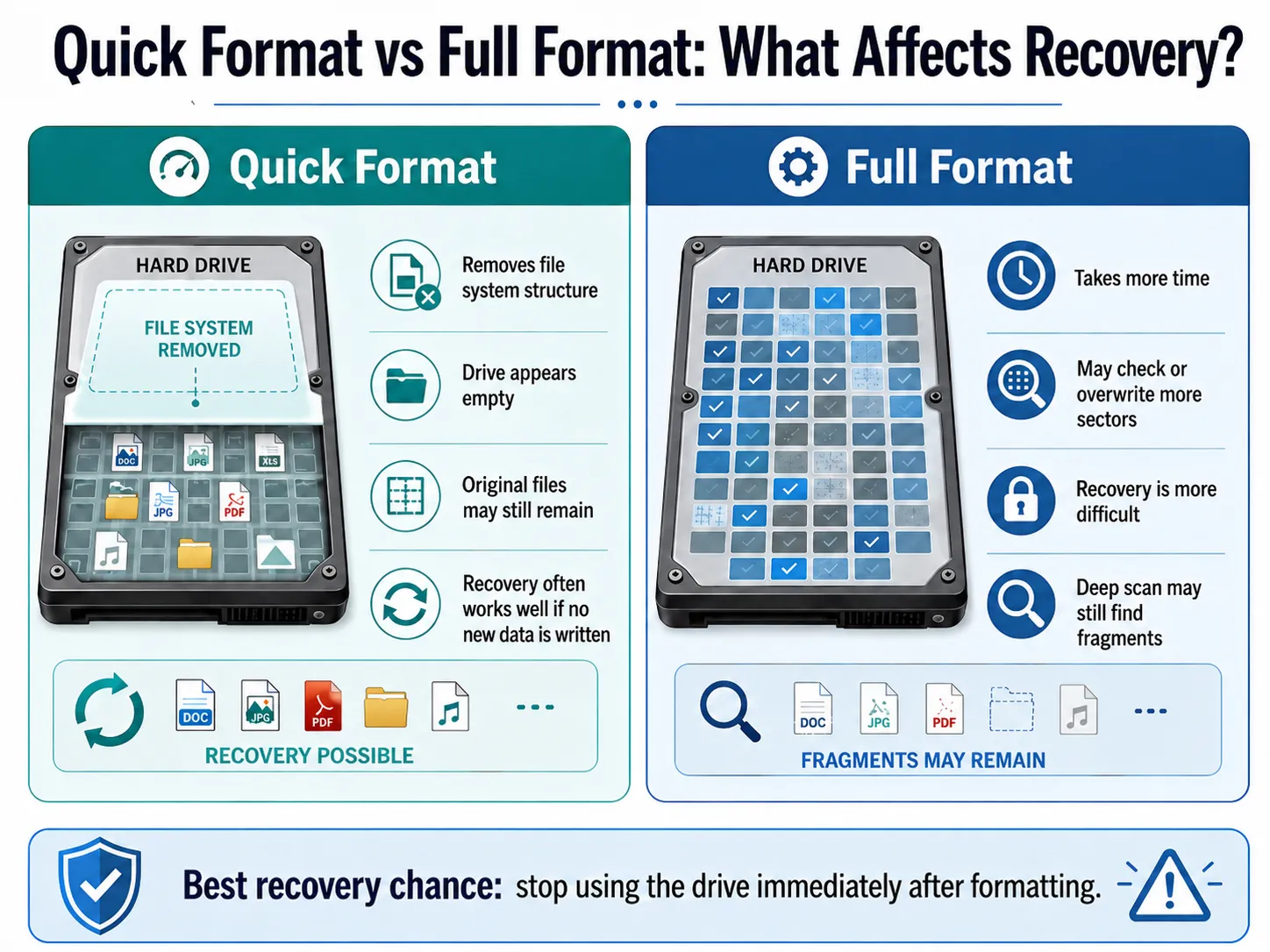
Pour récupérer des fichiers sur un disque dur formaté, vous devez d'abord comprendre le type de formatage. Les différentes méthodes de formatage ont des répercussions variables sur le résultat de la récupération.
Format rapide
A format rapide supprime la structure du système de fichiers et donne l'impression que le disque est vide. Cependant, les fichiers d'origine peuvent rester dans l'espace de stockage jusqu'à ce que de nouvelles données les remplacent. C'est pourquoi, récupération après un formatage rapide Cela fonctionne souvent bien si vous arrêtez rapidement d'utiliser le disque.
Format complet
A format complet cela prend plus de temps et peut entraîner la vérification ou le remplacement d'un plus grand nombre de secteurs du disque. Par conséquent, récupération complète du format peut s'avérer plus difficile. Vous pouvez toutefois lancer une analyse approfondie si les fichiers sont importants. Il arrive parfois que les logiciels de récupération parviennent tout de même à retrouver des fragments de fichiers ou des données résiduelles.
Pourquoi utiliser Magic Data Recovery pour récupérer des fichiers sur un disque dur formaté ?
Lorsque les utilisateurs souhaitent récupérer des fichiers sur un disque dur formaté, ils sont souvent confrontés à deux problèmes. Premièrement, ils ne savent pas si leurs fichiers existent encore. Deuxièmement, ils craignent qu'une opération mal effectuée n'aggrave la situation.
Magic Data Recovery permet de résoudre ces problèmes grâce à un processus de récupération simple. Il analyse le disque formaté, répertorie les fichiers récupérables, vous permet de les prévisualiser et vous aide à enregistrer les fichiers sélectionnés vers un autre emplacement sûr.
Cela en fait un outil utile dans les situations courantes de perte de données, notamment en cas de formatage accidentel, de fichiers supprimés, partitions perdues, les disques RAW, les clés USB, les cartes mémoire et autres problèmes liés au stockage.
Principaux avantages de Magic Data Recovery
Magic Data Recovery offre plusieurs avantages concrets pour récupération d'un disque dur formaté:
- Il analyse les disques formatés et les partitions perdues.
- Il prend en charge les disques durs, les SSD, les clés USB et les cartes SD.
- Il propose une analyse avancée pour une récupération plus approfondie.
- Il répertorie les fichiers récupérables au fur et à mesure de l'analyse.
- Il permet de prévisualiser les fichiers avant leur récupération.
- Il permet aux utilisateurs de filtrer les fichiers par type, nom ou chemin d'accès.
- Il aide les utilisateurs à enregistrer les fichiers récupérés dans un emplacement plus sûr.
Contrairement aux méthodes manuelles risquées, Magic Data Recovery ne nécessite pas de compétences techniques avancées. De plus, il s'attache en priorité à retrouver les fichiers perdus, plutôt que de modifier la structure du disque avant la récupération.
Comment récupérer des fichiers sur un disque dur formaté avec Magic Data Recovery
Si vous voulez récupérer des fichiers sur un disque dur formaté, Magic Data Recovery vous offre un processus simple et sûr. L'essentiel est d'analyser le disque formaté sans y écrire de nouvelles données. Vous pouvez ensuite restaurer les fichiers retrouvés vers un autre emplacement de stockage.
Étape 1 : Télécharger et installer Magic Data Recovery
Commencez par télécharger Magic Data Recovery et installez-le sur un disque différent du disque dur formaté. Cette méthode permet d'éviter tout écrasement accidentel et de protéger les données perdues.
Prise en charge de Windows 7/8/10/11 et Windows Server
Étape 2 : Sélectionner le disque dur formaté à analyser
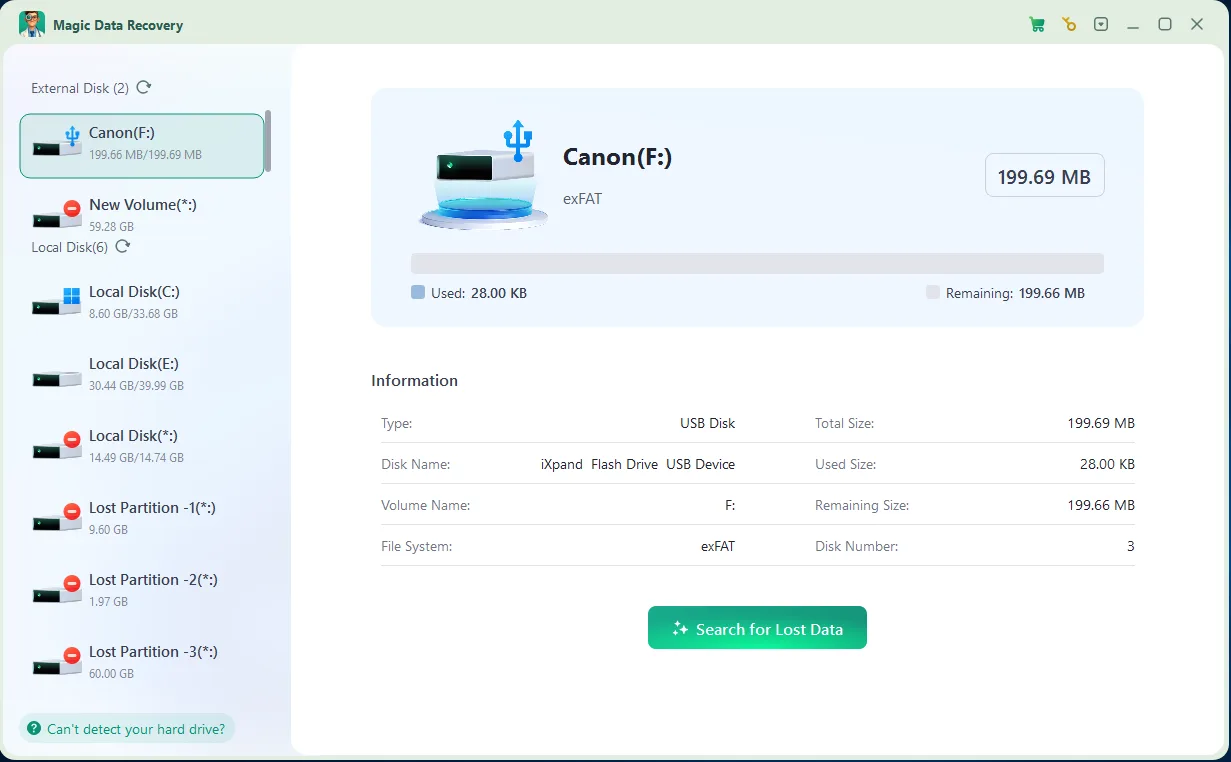
Lancez Magic Data Recovery. Ensuite, depuis l'interface principale, sélectionnez le disque dur formaté ou la partition perdue sur laquelle vos fichiers ont disparu. Lancez ensuite l'analyse pour rechercher les données récupérables.
Étape 3 : Numériser le Formaté Disque dur pour les fichiers perdus
Magic Data Recovery effectue automatiquement une analyse avancée. Parallèlement, il répertorie les fichiers récupérables au fur et à mesure de l'analyse, ce qui vous permet de commencer à consulter les résultats avant même que l'analyse complète ne soit terminée.

Étape 4 : Prévisualisation des fichiers Avant Récupération
Utilisez ensuite la fonction d'aperçu pour vérifier le contenu, les noms, les formats ou les vignettes des fichiers. Cette étape vous permet de ne récupérer que les fichiers dont vous avez réellement besoin et d'éviter de restaurer des données inutiles.

Étape 5 : Récupération des fichiers vers un emplacement sûr
Enfin, sélectionnez les fichiers cibles et enregistrez-les sur un autre disque dur ou périphérique de stockage. Ne restaurez jamais les données sur le même disque dur formaté, car cela pourrait écraser d'autres fichiers perdus ou entraîner une corruption des données.

Autres méthodes pour récupérer des fichiers à partir d'un disque dur formaté
Même si la méthode Magic Data Recovery constitue une bonne option de récupération initiale, vous pouvez également essayer des méthodes basées sur des sauvegardes. En effet, les sauvegardes peuvent constituer le moyen le plus rapide de récupérer des fichiers sur un disque dur formaté si vous les avez créés avant le formatage.
Restauration à partir de l'historique des fichiers
Si vous aviez activé l'historique des fichiers Windows avant le formatage, connectez votre disque de sauvegarde et consultez les versions antérieures des fichiers. Cette méthode est particulièrement efficace pour les documents, les fichiers du bureau, les bibliothèques et les dossiers que Windows sauvegardait régulièrement.
Consulter le stockage dans le cloud
Vérifiez ensuite OneDrive, Google Drive, Dropbox ou un autre service de stockage en ligne. Si vos fichiers avaient été synchronisés avant le formatage, vous pouvez les télécharger à nouveau sans avoir à analyser le disque formaté.
Restauration à partir d'une sauvegarde complète
Si vous avez effectué une sauvegarde complète du système ou des fichiers, commencez par restaurer vos fichiers à partir de cette sauvegarde. Cette méthode évite une analyse supplémentaire et réduit le risque d'écraser le disque formaté.
Faites appel à un service de récupération professionnel
Si le disque dur émet des cliquetis, se déconnecte à plusieurs reprises ou n'apparaît pas dans le système, cessez de l'utiliser. Dans ce cas, un logiciel ne permettra peut-être pas de résoudre le problème. Un professionnel pourra alors inspecter les dommages physiques à l'aide d'outils spécialisés.
Erreurs courantes qui compliquent la récupération de fichiers sur un disque dur formaté
De nombreux utilisateurs réduisent leurs chances de récupération sans s'en rendre compte. Évitez donc ces erreurs courantes avant de récupérer des fichiers sur un disque dur formaté.
Installation de logiciels sur le disque formaté
L'installation d'un logiciel sur le disque formaté risque d'écraser les données perdues. Il est préférable d'installer Magic Data Recovery sur un autre disque, puis d'analyser le disque concerné à partir de celui-ci.
Enregistrer les fichiers sur le même disque
Cette erreur peut endommager des fichiers qui pourraient encore être récupérés. Enregistrez toujours les fichiers récupérés sur un autre périphérique de stockage.
Reformater le disque
Un deuxième formatage pourrait compliquer la récupération. Si Windows vous demande de reformater le disque, ignorez ce message et lancez d'abord une analyse du disque.
Exécution de commandes de réparation aléatoires
Certaines commandes de réparation modifient le système de fichiers. Par conséquent, elles peuvent réduire vos chances de récupération d'un disque formaté. Essayez de récupérer les fichiers avant d'exécuter des commandes qui modifient le disque.
Utilisation normale de l'ordinateur
Si le disque formaté fait partie de votre ordinateur principal, une utilisation normale peut entraîner la création de fichiers temporaires. Ces fichiers risquent d'écraser les données perdues. Par conséquent, limitez son utilisation jusqu'à la fin de la récupération.
Conseils pour augmenter vos chances de récupérer des fichiers sur un disque dur formaté
Vous pouvez améliorer vos résultats lorsque vous récupérer des fichiers sur un disque dur formaté en suivant un plan de reprise minutieux.
Tout d'abord, lancez l'analyse dès que possible. Ensuite, analysez l'intégralité du disque dur plutôt que de vous limiter aux dossiers visibles. Si l'analyse rapide ne permet pas de retrouver vos fichiers, utilisez l'analyse avancée pour effectuer une recherche plus approfondie.
Pensez également à prévisualiser les fichiers avant de les récupérer. Cela vous permettra de vérifier leur qualité et de sélectionner en priorité les données les plus importantes. Enfin, récupérez les fichiers vers un autre emplacement sûr et vérifiez-les une fois la restauration terminée. Voici les conseils les plus utiles :
- Agissez rapidement après le formatage.
- Évitez d'enregistrer de nouvelles données sur le disque.
- Effectuez une analyse approfondie si nécessaire.
- Prévisualisez les fichiers avant de les enregistrer.
- Commencez par récupérer les fichiers importants.
- Enregistrez les fichiers restaurés sur un autre périphérique de stockage.
- Interrompez la récupération des données si le disque dur présente des signes de défaillance physique.
En suivant ces étapes, vous réduisez les risques et donnez au logiciel de récupération davantage de chances de retrouver des fichiers exploitables.
Conclusion
Si vous avez besoin de récupérer des fichiers sur un disque dur formaté, agissez rapidement et évitez d'écrire de nouvelles données sur le disque concerné. Le formatage n'efface pas toujours tous les fichiers immédiatement, mais chaque nouvelle opération risque de réduire vos chances de récupération.
Magic Data Recovery est recommandé car il offre une approche claire et pratique récupération d'un disque dur formaté processus. Il permet aux utilisateurs d'analyser le disque formaté, de prévisualiser les fichiers récupérables, de sélectionner les données utiles et de restaurer les fichiers vers un autre emplacement sûr. Comparé aux méthodes manuelles risquées, il offre aux utilisateurs lambda une solution de récupération plus fiable et plus simple.
Si vous recherchez un simple solution de récupération du disque dur, essayez Magic Data Recovery avant de reformater le disque ou d'utiliser des outils de réparation susceptibles de modifier la structure des données.
Prise en charge de Windows 7/8/10/11 et Windows Server
FAQ : Comment récupérer des fichiers à partir d'un disque dur formaté
Puis-je récupérer des fichiers sur un disque dur formaté après un formatage rapide ?
Oui, il est souvent possible de récupérer des fichiers sur un disque dur formaté après un formatage rapide, surtout si vous cessez immédiatement d'utiliser le disque. Un formatage rapide supprime généralement les enregistrements du système de fichiers sans effacer le contenu des fichiers eux-mêmes. Par conséquent, un logiciel de récupération peut encore retrouver vos documents, photos, vidéos et autres fichiers avant que de nouvelles données ne les écrasent.
Puis-je récupérer des fichiers sur un disque dur formaté après un formatage complet ?
Vous pouvez toujours essayer, mais vos chances de réussite risquent d'être moindres après un formatage complet. Un formatage complet peut vérifier ou écraser davantage de secteurs du disque, ce qui peut endommager les données récupérables. Toutefois, si ces fichiers sont importants, lancez une analyse avancée avec Magic Data Recovery avant d'abandonner ou d'utiliser des outils qui modifient le disque.
Puis-je récupérer des fichiers sur un disque dur formaté sans logiciel ?
Il arrive parfois que vous puissiez restaurer des fichiers sans logiciel si vous disposez de l'Historique des fichiers, d'une synchronisation dans le cloud ou d'une autre sauvegarde. Toutefois, en l'absence de sauvegarde, vous aurez généralement besoin d'un logiciel de récupération de données pour analyser le disque formaté. Magic Data Recovery peut vous aider à localiser les fichiers perdus et à les prévisualiser avant que vous ne décidiez lesquels récupérer.
Le logiciel Magic Data Recovery est-il fiable pour la récupération des données d'un disque dur formaté ?
Magic Data Recovery constitue une solution sûre pour la récupération de données sur un disque dur formaté, à condition de l'installer sur un autre disque et d'enregistrer les fichiers récupérés ailleurs. Il se concentre sur l'analyse, la prévisualisation et la restauration des fichiers, plutôt que de demander aux utilisateurs de recréer manuellement les partitions. Ce processus guidé permet de réduire les erreurs courantes susceptibles d'écraser les données perdues.
Où dois-je enregistrer les fichiers récupérés après le formatage ?
Enregistrez toujours les fichiers récupérés sur un autre disque dur, une clé USB ou un espace de stockage dans le cloud. Ne les enregistrez pas à nouveau sur le même disque dur formaté pendant la récupération. Cette règle est importante, car de nouveaux fichiers risqueraient d'écraser d'autres données perdues. Une fois que vous vous êtes assuré que tous les fichiers importants fonctionnent correctement, vous pouvez les réorganiser en toute sécurité.
CMD permet-il de récupérer des fichiers à partir d'un disque dur formaté ?
CMD ne permet pas de récupérer de manière fiable des fichiers sur un disque dur formaté après le formatage. Il peut aider à corriger certaines erreurs du système de fichiers, mais il n'offre pas de processus complet de récupération des fichiers. Dans de nombreux cas, l'exécution prématurée de commandes de réparation peut modifier la structure du disque. Il est donc recommandé de commencer par rechercher les fichiers perdus.
Que dois-je faire si le disque dur formaté n'est pas détecté ?
Commencez par vérifier le câble, le port, l'alimentation électrique et la gestion des disques. Cependant, n'initialisez pas et ne formatez pas à nouveau le disque. Si le disque n'apparaît toujours pas ou émet des bruits inhabituels, cessez de l'utiliser. Dans ce cas, il peut être plus prudent de faire appel à un professionnel pour la récupération plutôt que d'utiliser un logiciel, car le problème peut être lié à une panne matérielle.

Vasilii est un spécialiste de la récupération de données qui possède une dizaine d'années d'expérience pratique dans ce domaine. Tout au long de sa carrière, il a résolu avec succès des milliers de cas complexes impliquant des fichiers supprimés, des disques formatés, des partitions perdues et des systèmes de fichiers RAW. Son expertise couvre à la fois les méthodes de récupération manuelle à l'aide d'outils professionnels tels que les éditeurs hexagonaux et les solutions automatisées avancées à l'aide de logiciels de récupération. La mission de Vasilii est de rendre accessible aux professionnels de l'informatique et aux utilisateurs quotidiens des connaissances fiables en matière de récupération de données, afin de les aider à sauvegarder leurs précieuses ressources numériques.