
Tous mes fichiers ont disparu sous Windows 10 ? Comment y remédier ?
Si vous avez effectué une recherche Tous mes fichiers ont disparu sous Windows 10, vous devez savoir où les fichiers ont été déplacés et si vous pouvez les récupérer à partir des disques durs. Heureusement, il se peut simplement que Windows masque ces fichiers, les déplace vers un autre profil, les synchronise via OneDrive, ou que l'on ne puisse plus y accéder en raison d'un problème de disque.
Tout d'abord, cessez d'enregistrer de nouvelles données sur le disque concerné. Les nouveaux fichiers risquent d'écraser les données récupérables. C'est pourquoi ce guide commence par des vérifications de sécurité avant de passer à la récupération avec Magic Data Recovery uniquement lorsque Windows ne parvient pas à trouver les fichiers.
Prise en charge de Windows 7/8/10/11 et Windows Server
Table des matières
Tous mes fichiers ont disparu sous Windows 10 : que dois-je vérifier en premier ?
Quand Fichiers disparus sous Windows 10, identifiez le problème avant d'essayer des solutions au hasard.
Ce que vous remarquez | Cause probable | Meilleure première étape |
Les fichiers du bureau ont disparu | Profil, OneDrive, fichiers cachés | Consulter le profil et les éléments masqués |
Des fichiers ont disparu après une mise à jour | Modification du profil ou du dossier | Rechercher sur cet ordinateur |
Un dossier semble vide | Fichiers masqués, déplacés ou supprimés | Afficher les éléments masqués |
Des fichiers ont disparu du disque dur sous Windows 10 | Problème lié à la lettre de lecteur, à la partition ou au système de fichiers | Vérifier la gestion des disques |
Les fichiers ne se trouvent pas dans la corbeille | Une suppression définitive a peut-être eu lieu | Utiliser un logiciel de récupération |
En résumé, commencez par l'explication la plus simple. Ne passez à la procédure de récupération que si ces vérifications s'avèrent infructueuses.
1. Rechercher des fichiers manquants sous Windows 10
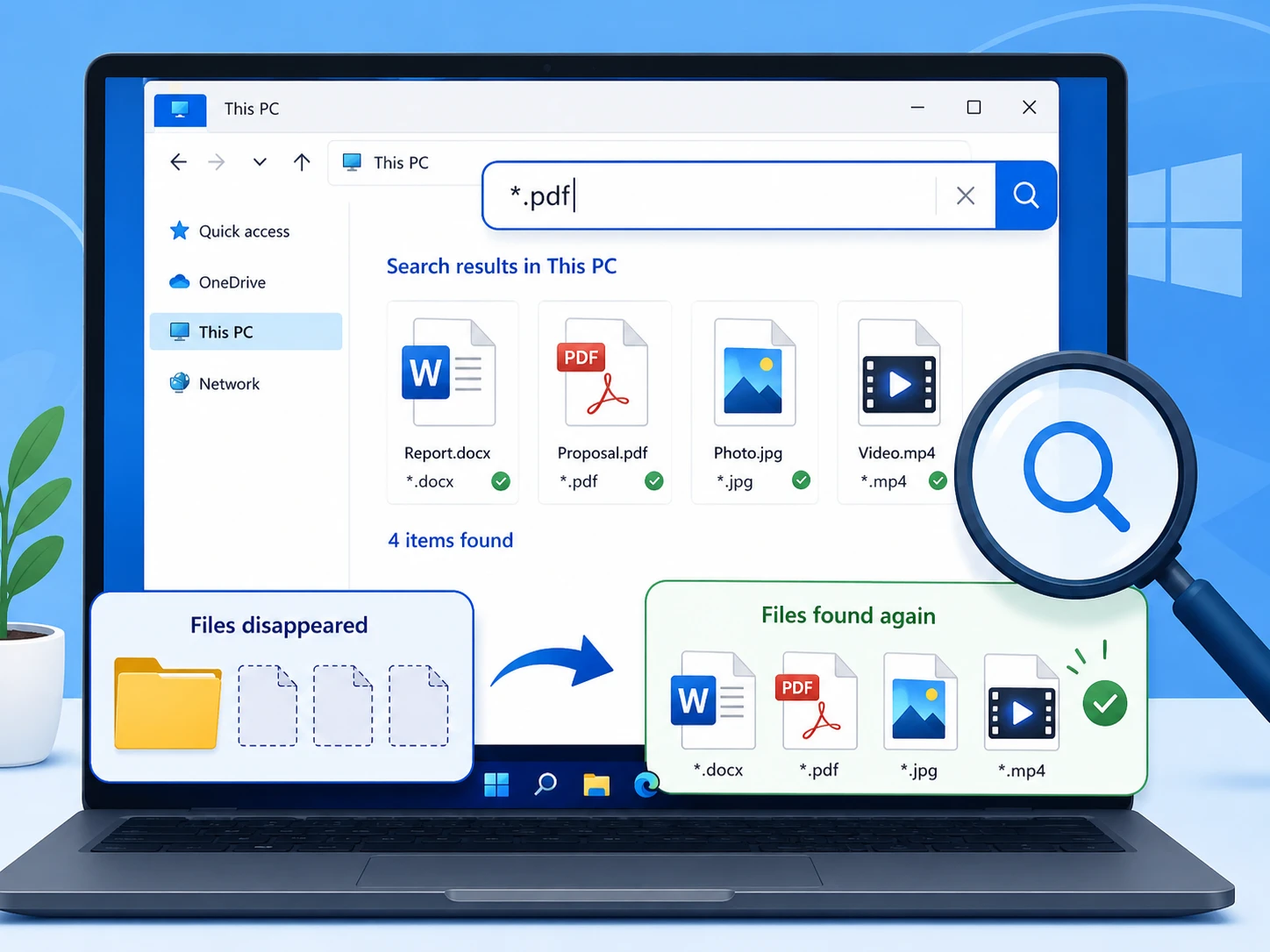
Pour les utilisateurs qui recherchent Tous mes fichiers ont disparu sous Windows 10, il faudrait commencer par l'Explorateur de fichiers, car les fichiers peuvent encore exister ailleurs.
Ouvrez l'Explorateur de fichiers, puis sélectionnez Ce PC, puis recherchez le nom du fichier. Si vous ne vous en souvenez pas, essayez *.docx, *.xlsx, *.jpg, ou *.pdf.
Ensuite, cliquez avec le bouton droit sur un résultat et sélectionnez Ouvrir l'emplacement du fichier pour vérifier où Windows l'a enregistré.
2. Vérifiez la corbeille
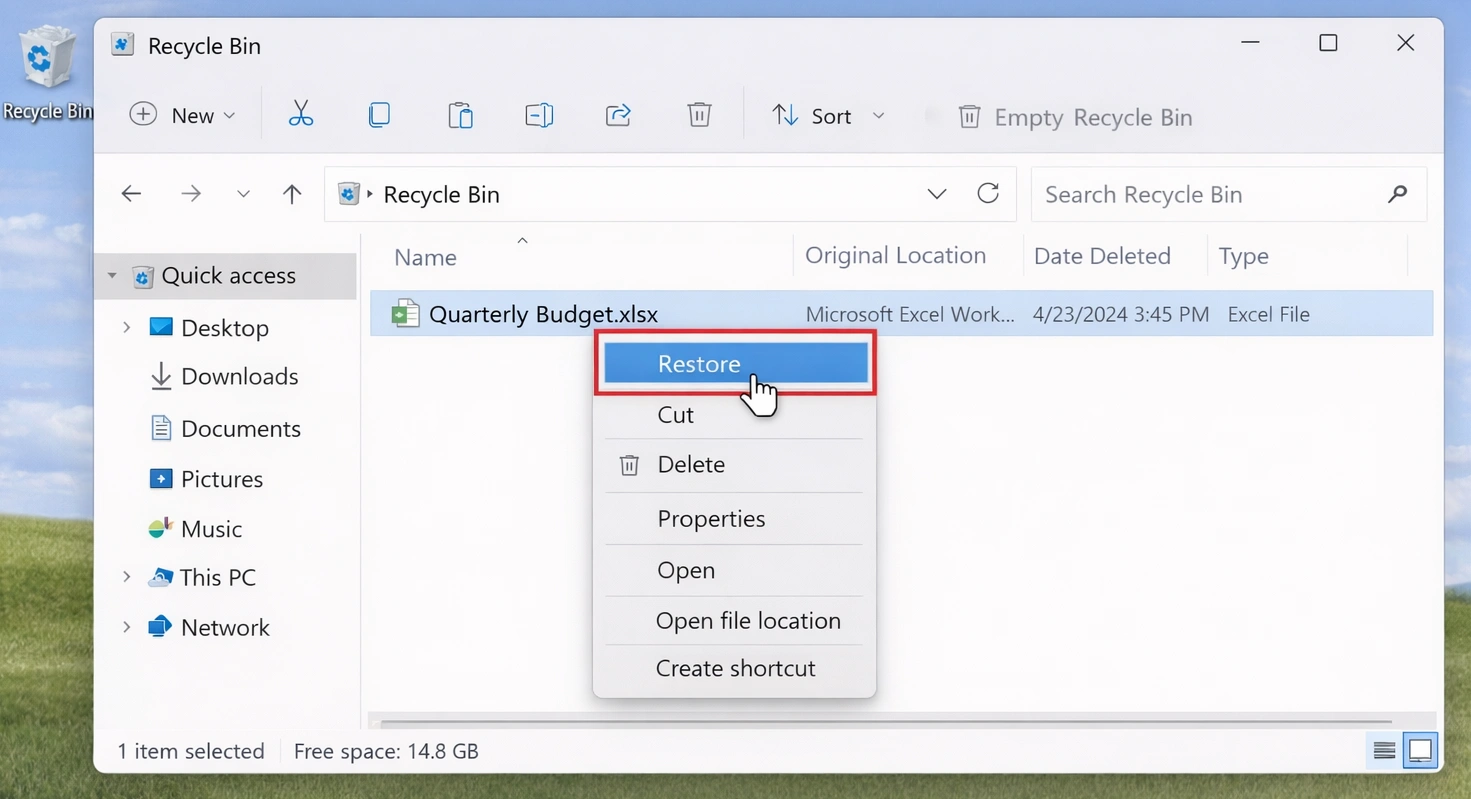
Une suppression accidentelle peut entraîner Tous mes fichiers ont disparu sous Windows 10 Cela ressemble à une grave défaillance du système.
Ouvrez la Corbeille et recherchez les fichiers manquants. Si vous les trouvez, cliquez avec le bouton droit de la souris et sélectionnez Restaurer.
Cependant, Maj + Suppr, un Corbeille vidée, ou le formatage peut contourner cette procédure. Si tel est le cas, évitez d'ajouter de nouvelles données sur le disque concerné.
3. Afficher les fichiers et dossiers cachés
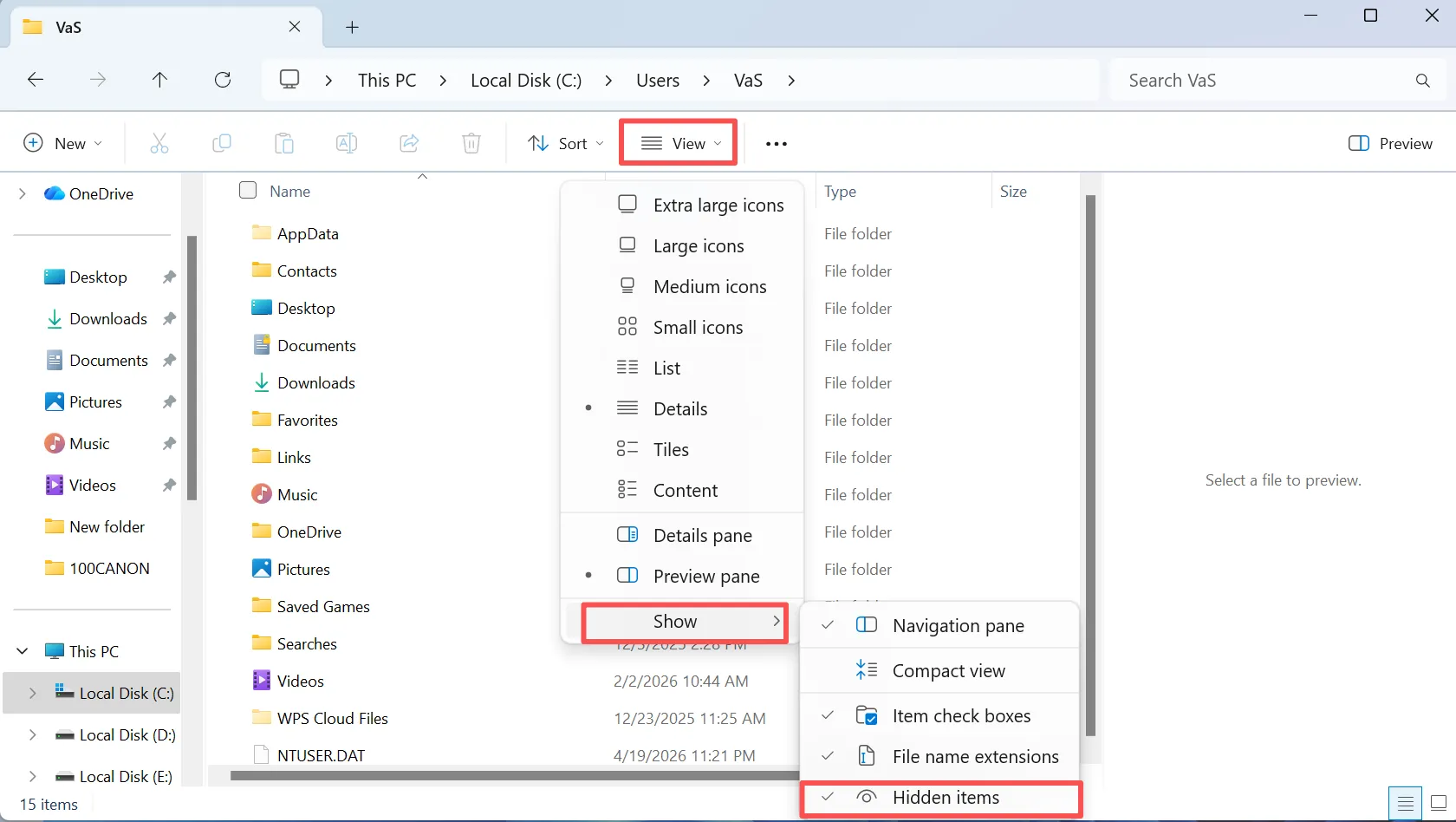
Pour les utilisateurs qui recherchent Tous mes fichiers ont disparu sous Windows 10, les éléments masqués constituent une autre explication courante : Windows peut masquer des fichiers au lieu de les supprimer.
Ouvrez l'Explorateur de fichiers, puis sélectionnez Voir, et activer Objets cachés. Revenez ensuite au dossier qui semble vide. Si les fichiers réapparaissent, déplacez-les ou affichez-les selon vos besoins.
De plus, consultez les options de l'Explorateur de fichiers pour accéder à des paramètres de visibilité plus complets.
4. Vérifiez que le profil utilisateur Windows est correct
Un changement de profil peut expliquer Tous les fichiers ont disparu sous Windows 10, notamment après une mise à jour ou en cas de problème de connexion.
Ouvrir C:\Utilisateurs\ et vérifiez les dossiers « Bureau », « Documents », « Téléchargements », « Images » et « Vidéos » dans le profil actuel et dans les anciens profils.
Par exemple, certains fichiers peuvent se trouver dans un ancien profil. Vérifiez donc le chemin d'accès avant de conclure que les données ont disparu.
5. Vérifiez OneDrive, Windows.old et les sauvegardes
Si toutes vos Si les fichiers ont disparu et que le problème est apparu après une synchronisation ou une mise à jour, il se peut qu'une autre copie existe déjà.
Commencez par vérifier OneDrive si vous utilisez le service de stockage dans le cloud de Microsoft. Ensuite, vérifiez C:\Windows.old après une mise à jour majeure de Windows. Enfin, vérifiez l'historique des fichiers et les autres sauvegardes.
Si une sauvegarde contient ce fichier, restaurez d'abord cette copie.
6. Il vous manque encore des fichiers ? Récupérez-les avec Magic Data Recovery
Si les méthodes précédentes échouent, il se peut que la suppression définitive, le formatage ou une corruption du système de fichiers aient empêché l'accès normal aux fichiers. À ce stade, la fonction de recherche standard de Windows pourrait ne plus être d'aucune utilité.
Magic Data Recovery analyse le disque concerné à la recherche de données récupérables. Amagicsoft indique prendre en charge plus de 5 000 formats de fichiers, ainsi que les disques durs, les SSD, les clés USB et les cartes mémoire. De plus, le processus reste simple : sélectionner, analyser, prévisualiser et récupérer.
Cette approche s'avère utile lorsque Des fichiers ont disparu du disque dur sous Windows 10, après une suppression définitive ou un formatage accidentel. Contrairement à l'historique des fichiers, cette fonctionnalité ne nécessite pas de sauvegarde antérieure. Cependant, les données écrasées risquent de ne plus être récupérables. Il est donc recommandé d'agir rapidement.
Étape 1 : Télécharger et installer Magic Data Recovery
Téléchargez Magic Data Recovery et installez-le sur un disque autre que celui où les fichiers ont disparu. Ce choix permet de limiter les écritures sur le disque d'origine et contribue à préserver les données récupérables.
Prise en charge de Windows 7/8/10/11 et Windows Server
Étape 2 : Sélectionnez le disque sur lequel les fichiers ont disparu
Lancez Magic Data Recovery. Dans l'interface principale, sélectionnez le disque ou la partition sur lequel/laquelle se trouvaient à l'origine les fichiers manquants. Lancez ensuite l'analyse.

Étape 3 : Analyser le disque à la recherche de fichiers manquants ou supprimés
Le programme lance une analyse approfondie sur le disque sélectionné. Au fur et à mesure que l'analyse progresse, les fichiers récupérables s'affichent, ce qui vous permet de passer en revue les données détectées pendant le processus.

Étape 4 : Prévisualisation des fichiers avant la récupération
Ensuite, utilisez la fonction d'aperçu pour vérifier le contenu des fichiers. Cette étape vous permet de vous assurer que les documents, photos, vidéos ou autres fichiers sélectionnés sont bien ceux que vous souhaitez récupérer.
Dans le cas d'une récupération de fichiers perdus générant de nombreux résultats d'analyse, la prévisualisation facilite la gestion du processus.

Étape 5 : Récupération des fichiers vers un emplacement sûr
Enfin, sélectionnez les fichiers souhaités et enregistrez-les sur un autre disque ou dans un autre emplacement de stockage. Ne les restaurez pas sur le disque d'origine tant que d'autres données sont encore manquantes, car de nouvelles écritures pourraient écraser le contenu récupérable.
Cette règle revêt une importance particulière lorsque Des fichiers ont disparu du disque dur sous Windows 10 et l'analyse détecte d'autres fichiers qui doivent encore être récupérés.

7. Des fichiers ont disparu de votre disque dur sous Windows 10 ? Vérifiez la gestion des disques
Si une partition ou un disque entier semble vide ou manquant, ouvrez Gestion des disques avant de le formater ou de le repartitionner.
La partition n'a pas de lettre de lecteur
Une partition en bon état qui ne dispose pas d'une lettre de lecteur peut ne pas apparaître dans l'Explorateur de fichiers. Attribuez-lui une lettre inutilisée si le volume semble par ailleurs normal.
Le disque apparaît comme RAW
Le format RAW signifie que Windows ne peut pas lire le système de fichiers normalement. Par conséquent, récupérez les fichiers importants avant de formater ou de réparer le volume.
L'espace apparaît comme non alloué
L'espace non alloué peut indiquer une perte d'informations relatives à la partition. Il est préférable d'analyser le disque avant de créer une nouvelle partition.
Quand Des fichiers ont disparu du disque dur sous Windows 10, récupérez les données importantes avant la réparation, dans la mesure du possible.
8. Récupérer les fichiers manquants grâce à l'historique des fichiers
L'historique des fichiers peut vous aider à Tous mes fichiers ont disparu sous Windows 10 si vous aviez activé les sauvegardes avant la perte.
Ouvrez le dossier d'origine, cliquez dessus avec le bouton droit de la souris, puis sélectionnez Restaurer les versions précédentes. Passez ensuite en revue les copies disponibles et restaurez la version dont vous avez besoin.
Cependant, l'historique des fichiers ne peut pas créer de copie antérieure après une perte de données. Par conséquent, s'il n'existe aucun historique utilisable, choisissez une autre méthode de récupération.
Pourquoi tous mes fichiers ont-ils disparu sous Windows 10 ?
La recherche Tous mes fichiers ont disparu sous Windows 10 décrit un symptôme, et non une cause. Parmi les causes courantes, on peut citer la suppression de fichiers, les attributs masqués, les modifications apportées au profil ou à OneDrive, le formatage, la perte de partitions et les problèmes liés au système de fichiers.
Il convient donc de distinguer les fichiers “ manquants ” des fichiers “ supprimés ”. La fonction de recherche permet de retrouver les fichiers existants, les sauvegardes permettent de restaurer des copies, et les logiciels de récupération interviennent lorsque Windows ne peut plus y accéder normalement.
Ce qu'il ne faut pas faire lorsque des fichiers disparaissent sous Windows 10
Lorsque des fichiers importants disparaissent, la manière dont vous réagissez peut avoir une incidence sur leur récupération.
Tout d'abord, évitez les téléchargements volumineux ou les copies de fichiers sur le disque concerné. Ensuite, ne formatez pas une partition RAW simplement parce que Windows vous y invite. Enfin, ne créez pas de nouvelle partition par-dessus des données importantes non alloué l'espace.
Enfin, ne copiez pas les fichiers récupérés sur le disque d'origine tant que la récupération n'est pas terminée.
Comment éviter que des fichiers ne disparaissent sous Windows 10
Après avoir résolu un Tous mes fichiers ont disparu sous Windows 10, réduire le risque d'une nouvelle perte.
Commencez par activer l'historique des fichiers ou une autre solution de sauvegarde programmée. Ensuite, conservez une autre copie de vos fichiers essentiels sur un support de stockage distinct ou sur un service cloud fiable.
De plus, effectuez régulièrement des sauvegardes de test. Enfin, soyez attentif aux erreurs récurrentes du système de fichiers, à la disparition de partitions ou aux déconnexions inattendues.
Conclusion
Si Tous les fichiers ont disparu sous Windows 10, commencez par des vérifications à faible risque : fouillez l'ordinateur, inspectez la corbeille, affichez les fichiers cachés, vérifiez votre profil et passez en revue vos sauvegardes.
Vérifiez ensuite dans « Gestion des disques » si un disque ou une partition a disparu. Si Windows ne parvient toujours pas à localiser les fichiers, récupérez les données importantes avant de formater ou de recréer des partitions.
Magic Data Recovery convient à cette étape car il recherche les données supprimées ou inaccessibles et permet aux utilisateurs de prévisualiser les fichiers avant leur récupération. Par conséquent, commencez par localiser les fichiers, puis récupérez-les, et enfin réparez-les. Si Des fichiers ont disparu du disque dur sous Windows 10 En l'absence de sauvegarde exploitable, Magic Data Recovery propose une solution pratique récupération du disque dur une approche sans promesses exagérées.
Prise en charge de Windows 7/8/10/11 et Windows Server
FAQ
Pourquoi mes fichiers ont-ils soudainement disparu sous Windows 10 ?
Plusieurs causes peuvent expliquer la disparition de fichiers sous Windows 10, notamment les fichiers cachés, les modifications apportées au profil utilisateur, les changements liés à OneDrive, les suppressions accidentelles, le formatage ou des problèmes liés au système de fichiers. Commencez par effectuer une recherche sur votre PC et vérifiez les éléments cachés, les dossiers utilisateur et les sauvegardes. Si ces étapes s'avèrent infructueuses, limitez au maximum les écritures sur le disque concerné et envisagez d'utiliser un logiciel de récupération.
Est-il possible que des fichiers disparaissent sous Windows 10 sans avoir été supprimés ?
Oui. Lorsque des fichiers disparaissent sous Windows 10, il se peut que Windows les conserve encore sur le disque. Des attributs cachés, des modifications de profil, la synchronisation OneDrive, des dossiers déplacés ou des problèmes liés aux lettres de lecteur peuvent donner l'impression que les fichiers ont disparu. Par conséquent, vérifiez l'Explorateur de fichiers, les éléments cachés, les profils utilisateur, le stockage dans le cloud et la Gestion des disques avant de considérer qu'il s'agit d'une perte définitive de données.
Comment récupérer des fichiers qui ont disparu d'un disque dur ?
Si des fichiers ont disparu du disque dur sous Windows 10, commencez par vérifier que le disque apparaît bien dans la « Gestion des disques ». Vérifiez ensuite sa lettre de lecteur, l'état de son système de fichiers et la configuration de ses partitions. Si Windows ne parvient toujours pas à retrouver les fichiers et qu'il n'existe aucune sauvegarde, cessez d'écrire de nouvelles données sur ce disque et analysez-le à l'aide d'un outil de récupération tel que Magic Data Recovery.
Puis-je récupérer des fichiers après avoir vidé la corbeille ?
C'est possible. Vider la corbeille empêche l'accès normal à ces fichiers sous Windows, mais les données des fichiers peuvent subsister jusqu'à ce que de nouvelles informations écrasent cet espace de stockage. Par conséquent, limitez autant que possible l'utilisation du disque source. Si les fichiers ont disparu après avoir vidé la corbeille, une analyse de récupération pourrait tout de même permettre de retrouver le contenu récupérable.
L'historique des fichiers permet-il de récupérer des fichiers supprimés définitivement ?
L'historique des fichiers ne permet de restaurer une copie antérieure que si Windows a créé cette sauvegarde avant la suppression. Il ne peut pas créer de version antérieure a posteriori. Par conséquent, vérifiez d'abord l'historique des fichiers si vous l'avez activé auparavant. S'il n'existe aucune sauvegarde utilisable et que tous les fichiers ont disparu, une analyse de récupération peut constituer une autre option envisageable.
Dois-je formater un disque lorsque Windows me le demande ?
Non, pas si le disque contient des fichiers importants manquants. Le formatage modifie la structure du système de fichiers et peut limiter les possibilités de récupération. Lorsque des fichiers disparaissent du disque dur sous Windows 10 et que le volume apparaît comme « RAW » ou illisible, commencez par récupérer vos données importantes. Une fois les fichiers mis en sécurité, vous pourrez réparer ou reformater le disque avec moins de risques.
Pourquoi utiliser Magic Data Recovery plutôt que les outils Windows ?
La recherche Windows, la corbeille, l'historique des fichiers et les vérifications de profil fonctionnent correctement lorsque les fichiers restent accessibles ou qu'une sauvegarde existe. Cependant, ils ne peuvent pas résoudre tous les cas de suppression ou de formatage. Lorsque des fichiers ont disparu sous Windows 10 et que les méthodes habituelles échouent, Magic Data Recovery peut analyser le disque concerné, afficher un aperçu des fichiers récupérables et restaurer les données sélectionnées sans avoir à passer par des étapes de récupération en ligne de commande.

Vasilii est un spécialiste de la récupération de données qui possède une dizaine d'années d'expérience pratique dans ce domaine. Tout au long de sa carrière, il a résolu avec succès des milliers de cas complexes impliquant des fichiers supprimés, des disques formatés, des partitions perdues et des systèmes de fichiers RAW. Son expertise couvre à la fois les méthodes de récupération manuelle à l'aide d'outils professionnels tels que les éditeurs hexagonaux et les solutions automatisées avancées à l'aide de logiciels de récupération. La mission de Vasilii est de rendre accessible aux professionnels de l'informatique et aux utilisateurs quotidiens des connaissances fiables en matière de récupération de données, afin de les aider à sauvegarder leurs précieuses ressources numériques.