
Récupération de photos supprimées : comment récupérer des photos supprimées sous Windows

Récupération de photos supprimées Il est souvent possible de récupérer des photos supprimées par inadvertance sur un PC Windows, une carte SD, une clé USB ou un disque dur externe. Dans la plupart des cas, la suppression d'une photo supprime sa référence dans le système de fichiers plutôt que d'effacer immédiatement les données sous-jacentes. La récupération reste possible tant que de nouvelles données n'ont pas écrasé cet espace de stockage.
Cessez d'utiliser l'appareil concerné dès que vous constatez la perte. Ne prenez pas de nouvelles photos sur la carte SD, ne copiez pas de fichiers sur ce support et n'installez pas de logiciel de récupération à cet emplacement. Ce guide explique comment récupérer des photos supprimées à l'aide de la Corbeille, des services cloud, des sauvegardes Windows, des « Versions précédentes » et Magic Data Recovery.
Pour découvrir d'autres cas de perte de photos, rendez-vous sur notre Récupération de photos guide.
Prise en charge de Windows 7/8/10/11 et Windows Server
Table des matières
Peut-on récupérer des photos supprimées ?
Oui, les photos supprimées peuvent souvent être récupérées si leurs données n'ont pas été écrasées. Commencez par vérifier la Corbeille, la corbeille du cloud et les sauvegardes existantes. Si les photos ont été supprimées définitivement, effacées d'une carte SD ou perdues à la suite d'un formatage, analysez le périphérique de stockage d'origine à l'aide d'un logiciel de récupération de photos.
Les chances de récupération sont généralement plus élevées sur les disques durs, les cartes SD et les clés USB qui n'ont pas été réutilisés. La récupération à partir d'un SSD peut s'avérer plus difficile, car la fonction TRIM peut effacer automatiquement les blocs de stockage supprimés.
| Situation de perte de photos | Première mesure recommandée | Chances de guérison |
|---|---|---|
| Fichiers récemment supprimés sous Windows | Vérifier la corbeille | Haut |
| Supprimé de OneDrive | Vérifier la corbeille de OneDrive | Période de conservation élevée |
| Maj + Suppr | Analyser le disque d'origine | Cela dépend de la réécriture |
| Supprimé d'une carte SD | Ne plus utiliser la carte et la scanner | Souvent de bonne qualité si on ne le réutilise pas |
| Carte ou disque formaté rapidement | Effectuer une analyse approfondie | Possible |
| Supprimé d'un SSD | Cessez immédiatement de l'utiliser | Peut être réduit par la fonction TRIM |
| Appareil endommagé physiquement | Contacter un service de dépannage | Il se peut que ce logiciel ne soit pas adapté |
Pourquoi certaines photos sont-elles supprimées ou deviennent-elles inaccessibles ?
Les photos peuvent disparaître pour différentes raisons, et c'est la cause qui détermine la méthode de récupération la plus appropriée :
- Suppression accidentelle : Les photos sont supprimées à l'aide de la commande « Supprimer », de la combinaison de touches Maj + Suppr ou en vidant la Corbeille.
- Mise en forme d'une carte SD ou d'un disque dur : Un formatage rapide supprime les enregistrements du système de fichiers, mais certaines données relatives aux photos peuvent subsister jusqu’à ce qu’elles soient écrasées.
- Corruption du système de fichiers : Une éjection incorrecte, une coupure de courant ou des erreurs d'écriture peuvent faire en sorte qu'une carte ou un disque apparaisse comme « RAW » ou illisible.
- Partitions manquantes : Une corruption de la table de partition peut entraîner la disparition d'un dossier de photos ou d'un volume entier.
- Logiciels malveillants : Certains logiciels malveillants suppriment des fichiers, tandis que les ransomwares les chiffrent. Les logiciels de récupération ne permettent pas de déchiffrer les photos chiffrées par un ransomware.
- Panne matérielle : Un disque dur qui émet des cliquetis, un périphérique de stockage déconnecté ou une carte mémoire endommagée peuvent nécessiter une récupération effectuée par un professionnel.
Ne formatez pas, n'initialisez pas et n'exécutez pas CHKDSK sur un périphérique contenant des photos manquantes avant de tenter leur récupération.
Comment récupérer des photos supprimées sous Windows
Méthode 1 : Récupérer des photos supprimées à partir de la corbeille
Les photos supprimées d'un disque interne de Windows sont généralement déplacées vers la Corbeille, sauf si vous avez utilisé la combinaison de touches Maj + Suppr ou si vous avez vidé la Corbeille.
- Ouvrez la corbeille.
- Recherchez la photo supprimée par nom, date ou type de fichier.
- Faites un clic droit sur la photo.
- Sélectionner Restaurer.
Windows remet la photo dans son dossier d'origine. Si la photo ne se trouve pas dans la Corbeille, passez à la méthode suivante.
Méthode 2 : Vérifier le dossier « Corbeille » de OneDrive ou d'un autre service de stockage dans le cloud
Si votre dossier « Images » ou « Bureau » a été synchronisé avec OneDrive, Google Drive ou Dropbox, la photo supprimée est peut-être encore disponible dans la corbeille en ligne du service. Connectez-vous via le site officiel, ouvrez la corbeille ou la section « Fichiers supprimés », sélectionnez la photo, puis restaurez-la.
La corbeille du cloud a une durée de conservation limitée ; veillez donc à la vérifier dès que possible.
Méthode 3 : Récupérer des photos à partir de l'historique des fichiers ou des versions précédentes
L'historique des fichiers Windows permet de restaurer une version antérieure d'un dossier si la sauvegarde était activée avant la suppression des photos.
- Ouvrez le dossier qui contenait auparavant les photos.
- Cliquez avec le bouton droit de la souris sur le dossier et sélectionnez Propriétés.
- Ouvrir le Versions précédentes tabulation.
- Sélectionnez une version disponible.
- Cliquez sur Ouvrir pour vérifier son contenu, puis sélectionnez Restaurer.
Cette méthode ne fonctionne que si l'historique des fichiers, les points de restauration ou un autre système de sauvegarde ont été configurés au préalable.
Méthode n° 4 : Récupérer des photos supprimées définitivement avec Magic Data Recovery
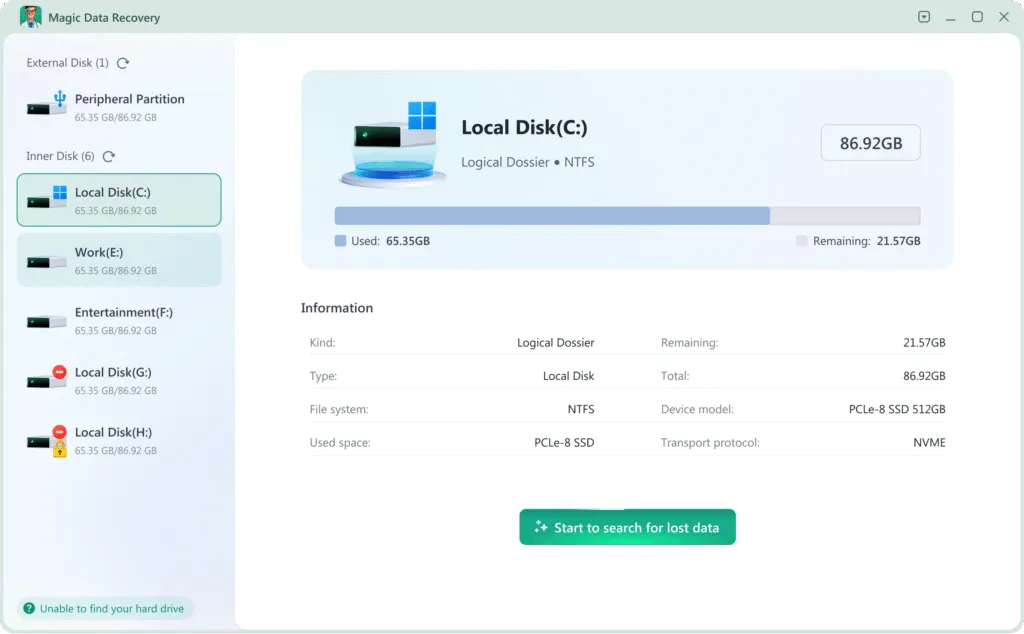
Si les photos ne se trouvent plus dans la Corbeille ni dans les sauvegardes, analysez le périphérique de stockage d'origine à l'aide de Magic Data Recovery. Ce logiciel permet de récupérer des photos supprimées sur des disques Windows, des disques durs externes, des clés USB, des cartes SD et tout autre périphérique de stockage détectable.
Installez le programme sur un disque différent de celui qui contient les photos supprimées. Si vous l'installez sur le disque concerné, vous risquez d'écraser des données récupérables.
En suivant ces étapes, vous mettrez toutes les chances de votre côté pour récupérer des photos supprimées en utilisant Magic Data Recovery:
1. Télécharger et installer en toute sécurité : Télécharger et installer Magic Data Recovery sur un lecteur différent que celui que vous êtes en train de récupérer. Cela permet d'éviter d'écraser les fichiers perdus.
Prise en charge de Windows 7/8/10/11 et Windows Server


Méthode 5 : Contacter un service de récupération professionnel
Cessez d'utiliser le logiciel et contactez un service de récupération professionnel si le périphérique de stockage émet des cliquetis ou des grincements, se déconnecte de manière répétée, n'est pas détecté dans le BIOS ou dans la gestion des disques, ou s'il a subi des dommages causés par l'eau, un incendie ou un choc. Le fait d'allumer à plusieurs reprises un périphérique endommagé physiquement peut réduire les chances de réussite de la récupération.
Réflexions finales
Il est souvent possible de récupérer des photos supprimées, mais la méthode à adopter dépend de l'emplacement où elles étaient stockées et de la manière dont elles ont été perdues. Commencez par vérifier la Corbeille, la corbeille du cloud, l'historique des fichiers et les sauvegardes existantes. Si ces options s'avèrent infructueuses, analysez l'appareil d'origine avant que de nouvelles données ne viennent écraser les photos supprimées.
Magic Data Recovery Il permet d'analyser les disques Windows, les cartes SD, les périphériques USB et les supports de stockage externes à la recherche d'images supprimées ou perdues. Prévisualisez d'abord les photos récupérables, puis enregistrez les fichiers sélectionnés sur un autre disque.
Pour découvrir d'autres cas de perte de photos et obtenir des conseils de récupération, rendez-vous sur notre Récupération de photos page.
Prise en charge de Windows 7/8/10/11 et Windows Server
FAQ
Peut-on récupérer des photos définitivement effacées ?
Puis-je récupérer des photos supprimées il y a plusieurs mois ?
Comment récupérer des photos supprimées sans logiciel ?
Est-il possible de récupérer des photos supprimées sur une carte SD ?
Est-il possible de récupérer des photos après avoir formaté une carte SD ?
Pourquoi certaines photos récupérées sont-elles endommagées ?
Est-il possible de récupérer des photos supprimées sur un SSD ?
Où dois-je enregistrer les photos récupérées ?

Erin Smith est reconnue comme l'une des rédactrices les plus professionnelles d'Amagicsoft. Elle a continuellement perfectionné ses compétences rédactionnelles au cours des 10 dernières années et a aidé des millions de lecteurs à résoudre leurs problèmes techniques.