
Deleted Photo Recovery: How to Recover Deleted Photos on Windows

Deleted photo recovery is often possible when pictures are accidentally deleted from a Windows PC, SD card, USB drive, or external hard drive. In most cases, deleting a photo removes its file system reference rather than immediately erasing the underlying data. Recovery remains possible until new data overwrites the same storage space.
Stop using the affected device as soon as you notice the loss. Do not take new photos on the SD card, copy files to the drive, or install recovery software on the same location. This guide explains how to recover deleted photos using the Recycle Bin, cloud services, Windows backups, Previous Versions, and Magic Data Recovery.
For additional photo-loss scenarios, visit our Photo Recovery guide.
Supports Windows 7/8/10/11 and Windows Server
Table of Contents
Can Deleted Photos Be Recovered?
Yes, deleted photos can often be recovered if their data has not been overwritten. Start by checking the Recycle Bin, cloud trash, and existing backups. If the photos were permanently deleted, removed from an SD card, or lost after formatting, scan the original storage device with photo recovery software.
Recovery chances are usually higher on HDDs, SD cards, and USB drives that have not been reused. Recovery from an SSD may be more difficult because TRIM can clear deleted storage blocks automatically.
| Photo loss situation | Recommended first action | Recovery chance |
|---|---|---|
| Recently deleted on Windows | Check Recycle Bin | High |
| Deleted from OneDrive | Check OneDrive Recycle Bin | High within retention period |
| Shift + Delete | Scan the original drive | Depends on overwriting |
| Deleted from an SD card | Stop using the card and scan it | Often good if not reused |
| Quick-formatted card or drive | Run a deep scan | Possible |
| Deleted from an SSD | Stop using it immediately | May be reduced by TRIM |
| Physically damaged device | Contact a recovery service | Software may not be suitable |
Why Do Photos Get Deleted or Become Inaccessible?
Photos can disappear for different reasons, and the cause determines which recovery method is most appropriate:
- Accidental deletion: Photos are removed through Delete, Shift + Delete, or an emptied Recycle Bin.
- SD card or drive formatting: A quick format removes file system records, but some photo data may remain until overwritten.
- File system corruption: Unsafe ejection, power loss, or write errors can make a card or drive appear RAW or unreadable.
- Missing partitions: Partition table damage may make an entire photo folder or volume disappear.
- Malware: Some malware deletes files, while ransomware encrypts them. Recovery software cannot decrypt ransomware-encrypted photos.
- Hardware failure: A clicking hard drive, disconnected storage device, or damaged memory card may require professional recovery.
Do not format, initialize, or run CHKDSK on a device containing missing photos before attempting recovery.
How to Recover Deleted Photos on Windows
Method 1: Restore Deleted Photos from the Recycle Bin
Photos deleted from an internal Windows drive usually move to the Recycle Bin unless you used Shift + Delete or emptied the bin.
- Open the Recycle Bin.
- Search for the deleted photo by name, date, or file type.
- Right-click the photo.
- Select Restore.
Windows returns the photo to its original folder. If the photo is not in the Recycle Bin, continue with the next method.
Method 2: Check OneDrive or Another Cloud Trash Folder
If your Pictures or Desktop folder was synchronized with OneDrive, Google Drive, or Dropbox, the deleted photo may still be available in the service’s online trash folder. Sign in through the official website, open the Recycle Bin or Deleted Files section, select the photo, and restore it.
Cloud trash has a limited retention period, so check it as soon as possible.
Method 3: Recover Photos from File History or Previous Versions
Windows File History can restore an earlier copy of a folder if backup protection was enabled before the photos were deleted.
- Open the folder that previously contained the photos.
- Right-click the folder and select Properties.
- Open the Previous Versions tab.
- Select an available version.
- Click Open to verify its contents, and then choose Restore.
This method only works when File History, restore points, or another backup system was configured earlier.
Method 4: Recover Permanently Deleted Photos with Magic Data Recovery
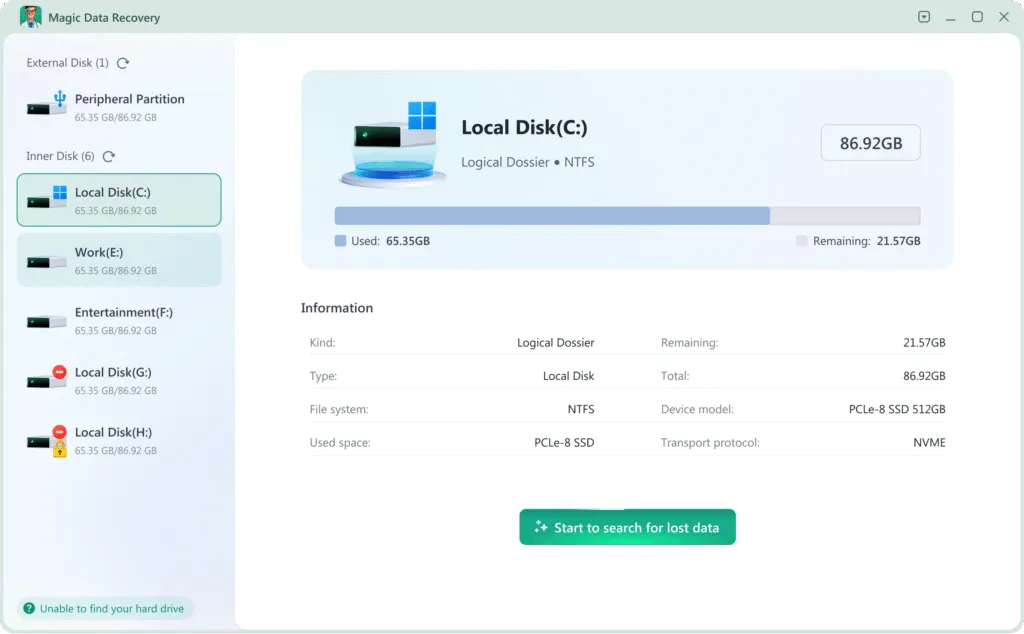
If the photos are no longer in the Recycle Bin or backups, scan the original storage device with Magic Data Recovery. The software supports deleted photo recovery from Windows drives, external hard drives, USB drives, SD cards, and other detectable storage devices.
Install the program on a different drive from the one containing the deleted photos. Installing it on the affected drive could overwrite recoverable data.
Following these steps will give you the best chance to do deleted photo recovery using Magic Data Recovery:
1. Download and Install Safely: Download and install Magic Data Recovery on a different drive than the one you are recovering from. This prevents overwriting lost files.
Supports Windows 7/8/10/11 and Windows Server


Method 5: Contact a Professional Recovery Service
Stop using software and contact a professional recovery service if the storage device makes clicking or grinding sounds, disconnects repeatedly, is not detected in BIOS or Disk Management, or has suffered water, fire, or impact damage. Repeatedly powering on a physically damaged device may reduce the chance of successful recovery.
Final Thoughts
Deleted photo recovery is often possible, but the correct method depends on where the photos were stored and how they were lost. Start with the Recycle Bin, cloud trash, File History, and existing backups. If those options fail, scan the original device before new data overwrites the deleted photos.
Magic Data Recovery can scan Windows drives, SD cards, USB devices, and external storage for deleted and lost images. Preview the recoverable photos first and save selected files to a different drive.
For more photo-loss scenarios and recovery guidance, visit our Photo Recovery page.
Supports Windows 7/8/10/11 and Windows Server
FAQs
Can permanently deleted photos be recovered?
Can I recover photos deleted months ago?
How can I recover deleted photos without software?
Can deleted photos be recovered from an SD card?
Can photos be recovered after formatting an SD card?
Why are some recovered photos corrupted?
Can deleted photos be recovered from an SSD?
Where should I save recovered photos?

Erin Smith is recognized as one of the most professional writers at Amagicsoft. She has continually honed her writing skills over the past 10 years and helped millions of readers solve their tech problems.