
Recupero delle foto cancellate: come recuperare le foto cancellate su Windows

Recupero delle foto cancellate Spesso è possibile recuperare le foto cancellate accidentalmente da un PC Windows, da una scheda SD, da una chiavetta USB o da un disco rigido esterno. Nella maggior parte dei casi, la cancellazione di una foto comporta la rimozione del riferimento nel file system, piuttosto che la cancellazione immediata dei dati sottostanti. Il recupero rimane possibile finché nuovi dati non sovrascrivono lo stesso spazio di archiviazione.
Smetti di utilizzare il dispositivo interessato non appena ti accorgi della perdita. Non scattare nuove foto sulla scheda SD, non copiare file sul dispositivo e non installare software di recupero sulla stessa posizione. Questa guida spiega come recuperare le foto cancellate utilizzando il Cestino, i servizi cloud, i backup di Windows, le Versioni precedenti e Magic Data Recovery.
Per ulteriori scenari relativi alla perdita di foto, visita il nostro Recupero foto guida.
Supporta Windows 7/8/10/11 e Windows Server
Indice dei contenuti
È possibile recuperare le foto cancellate?
Sì, spesso è possibile recuperare le foto cancellate se i relativi dati non sono stati sovrascritti. Inizia controllando il Cestino, il cestino del cloud e i backup esistenti. Se le foto sono state cancellate definitivamente, rimosse da una scheda SD o perse in seguito alla formattazione, esegui una scansione del dispositivo di archiviazione originale con un software di recupero foto.
Le probabilità di recupero sono solitamente maggiori su dischi rigidi (HDD), schede SD e chiavette USB che non sono stati riutilizzati. Il recupero da un SSD può risultare più difficile, poiché la funzione TRIM può cancellare automaticamente i blocchi di memoria eliminati.
| Situazione relativa alla perdita delle foto | Prima azione consigliata | Probabilità di recupero |
|---|---|---|
| Eliminati di recente su Windows | Controlla il Cestino | Alto |
| Eliminato da OneDrive | Controlla il Cestino di OneDrive | Periodo di conservazione elevato |
| Maiuscolo + Canc | Esegui la scansione dell'unità originale | Dipende dalla sovrascrittura |
| Cancellato da una scheda SD | Smettere di usare la carta e scansionarla | Spesso è utile, se non viene riutilizzato |
| Scheda o unità formattata rapidamente | Eseguire una scansione approfondita | Possibile |
| Cancellato da un SSD | Smettete immediatamente di usarlo | Potrebbe essere ridotto tramite TRIM |
| Dispositivo danneggiato fisicamente | Contatta un servizio di recupero | Il software potrebbe non essere adatto |
Perché le foto vengono cancellate o diventano inaccessibili?
Le foto possono scomparire per diversi motivi, e la causa determina quale sia il metodo di recupero più appropriato:
- Cancellazione accidentale: Le foto vengono eliminate tramite il comando "Elimina", la combinazione di tasti "Maiusc + Canc" oppure svuotando il Cestino.
- Formattazione della scheda SD o dell'unità: Una formattazione rapida elimina i record del file system, ma alcuni dati relativi alle foto potrebbero rimanere fino a quando non vengono sovrascritti.
- Corruzione del file system: Un'espulsione non corretta, un'interruzione di alimentazione o errori di scrittura possono far sì che una scheda o un'unità appaiano come RAW o illeggibili.
- Partizioni mancanti: Un danneggiamento della tabella delle partizioni può causare la scomparsa di un'intera cartella di foto o di un intero volume.
- Malware: Alcuni malware cancellano i file, mentre i ransomware li crittografano. I software di recupero non sono in grado di decrittografare le foto crittografate dai ransomware.
- Guasto hardware: Un disco rigido che emette rumori di clic, un dispositivo di archiviazione scollegato o una scheda di memoria danneggiata potrebbero richiedere un intervento di recupero dati da parte di professionisti.
Prima di tentare il recupero, non formattare, inizializzare né eseguire CHKDSK su un dispositivo in cui mancano delle foto.
Come recuperare le foto cancellate su Windows
Metodo 1: Ripristinare le foto eliminate dal Cestino
Le foto eliminate da un'unità interna di Windows vengono solitamente spostate nel Cestino, a meno che non si sia utilizzato il tasto Shift + Canc o non si sia svuotato il Cestino.
- Aprire il Cestino.
- Cerca la foto eliminata per nome, data o tipo di file.
- Fai clic con il tasto destro del mouse sulla foto.
- Selezionare Ripristino.
Windows riporta la foto nella cartella originale. Se la foto non si trova nel Cestino, passare al metodo successivo.
Metodo 2: controllare il cestino di OneDrive o di un altro servizio di archiviazione cloud
Se la cartella "Immagini" o "Desktop" era sincronizzata con OneDrive, Google Drive o Dropbox, la foto eliminata potrebbe essere ancora disponibile nel cestino online del servizio. Accedi tramite il sito web ufficiale, apri la sezione "Cestino" o "File eliminati", seleziona la foto e ripristinala.
I file nel cestino del cloud hanno un periodo di conservazione limitato, quindi controllalo il prima possibile.
Metodo 3: Recuperare le foto dalla Cronologia dei file o dalle versioni precedenti
La funzione "Cronologia file" di Windows consente di ripristinare una copia precedente di una cartella, a condizione che la protezione tramite backup fosse attiva prima che le foto venissero eliminate.
- Apri la cartella che prima conteneva le foto.
- Fare clic con il tasto destro del mouse sulla cartella e selezionare Proprietà.
- Aprire la sezione Versioni precedenti scheda.
- Selezionare una versione disponibile.
- Cliccare Aperto per verificarne il contenuto, quindi selezionare Ripristino.
Questo metodo funziona solo se in precedenza sono stati configurati la Cronologia dei file, i punti di ripristino o un altro sistema di backup.
Metodo 4: Recuperare le foto cancellate definitivamente con Magic Data Recovery
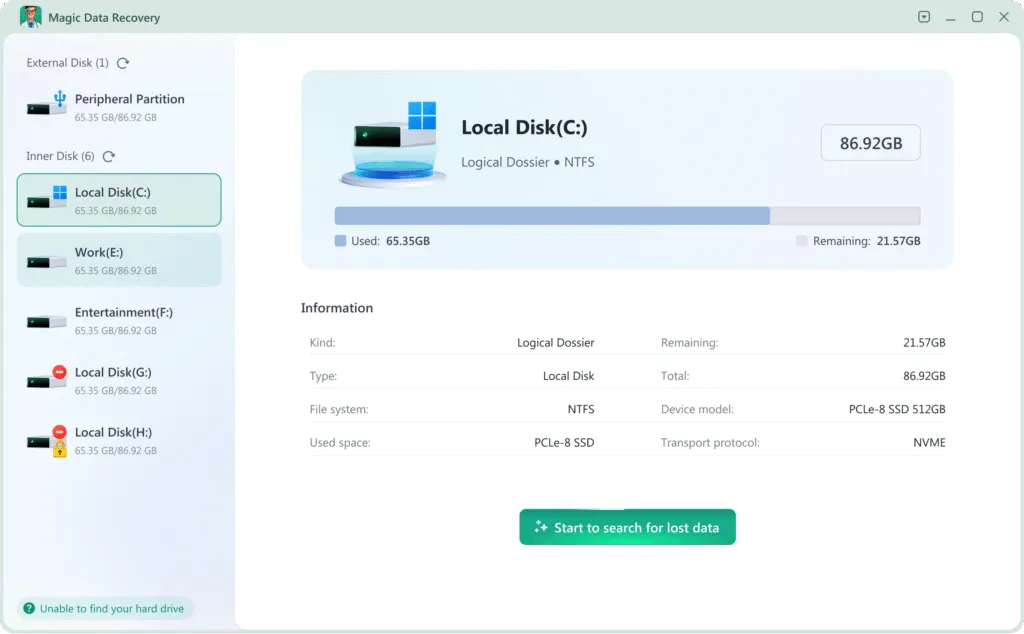
Se le foto non si trovano più nel Cestino o nei backup, esegui una scansione del dispositivo di archiviazione originale con Magic Data Recovery. Il software supporta il recupero delle foto cancellate da unità Windows, dischi rigidi esterni, chiavette USB, schede SD e altri dispositivi di archiviazione rilevabili.
Installa il programma su un'unità diversa da quella che contiene le foto cancellate. Installarlo sull'unità interessata potrebbe sovrascrivere i dati recuperabili.
Seguire questi passaggi vi darà la migliore possibilità di recuperare le foto cancellate utilizzando Magic Data Recovery:
1. Scaricare e installare in modo sicuro: Scaricare e installare Magic Data Recovery su un unità diverse di quello da cui si sta effettuando il recupero. In questo modo si evita di sovrascrivere i file persi.
Supporta Windows 7/8/10/11 e Windows Server


Metodo 5: contattare un servizio di recupero professionale
Smettete di utilizzare il software e rivolgetevi a un servizio di recupero dati professionale se il dispositivo di archiviazione emette rumori simili a scatti o stridii, si disconnette ripetutamente, non viene rilevato nel BIOS o in “Gestione disco”, oppure ha subito danni causati da acqua, fuoco o urti. L’accensione ripetuta di un dispositivo danneggiato fisicamente può ridurre le possibilità di un recupero efficace.
Pensieri finali
Spesso è possibile recuperare le foto cancellate, ma il metodo corretto dipende da dove erano archiviate e da come sono andate perse. Inizia controllando il Cestino, il cestino del cloud, la Cronologia file e i backup esistenti. Se queste opzioni non danno esito positivo, esegui una scansione del dispositivo originale prima che nuovi dati sovrascrivano le foto cancellate.
Magic Data Recovery È in grado di eseguire la scansione di unità Windows, schede SD, dispositivi USB e dispositivi di archiviazione esterni alla ricerca di immagini cancellate o perse. È possibile visualizzare in anteprima le foto recuperabili e salvare i file selezionati su un'altra unità.
Per ulteriori scenari relativi alla perdita di foto e indicazioni sul recupero, visita il nostro Recupero foto pagina.
Supporta Windows 7/8/10/11 e Windows Server
Domande frequenti
È possibile recuperare le foto eliminate in modo permanente?
Posso recuperare le foto cancellate mesi fa?
Come posso recuperare le foto cancellate senza usare alcun software?
È possibile recuperare le foto cancellate da una scheda SD?
È possibile recuperare le foto dopo aver formattato una scheda SD?
Perché alcune foto recuperate risultano danneggiate?
È possibile recuperare le foto cancellate da un SSD?
Dove devo salvare le foto recuperate?

Erin Smith è riconosciuta come una delle scrittrici più professionali di Amagicsoft. Negli ultimi 10 anni ha continuamente affinato le sue capacità di scrittura e ha aiutato milioni di lettori a risolvere i loro problemi tecnologici.