
È possibile recuperare i file dopo un ripristino delle impostazioni di fabbrica?
Il ripristino delle impostazioni di fabbrica può risolvere gravi problemi di Windows, ma potrebbe anche cancellare foto, documenti, video e file di lavoro. Per questo motivo, molti utenti si chiedono con urgenza: È possibile recuperare i file dopo il ripristino delle impostazioni di fabbrica?? In molti casi, il recupero rimane possibile. Tuttavia, il risultato dipende dall'opzione di ripristino, dal tipo di memoria, dalla crittografia, dai backup e dall'intensità con cui il computer è stato utilizzato in seguito.
Questa guida spiega Come recuperare i file dopo il ripristino delle impostazioni di fabbrica su Windows 11 e Windows 10. Innanzitutto, scoprirai quali sono i fattori che influenzano Recupero HDD. Successivamente, potrai confrontare soluzioni di backup, software di ripristino e servizi professionali. Infine, vedrai come Magic Data Recovery può essere d'aiuto quando ne hai bisogno ripristinare i file dopo il ripristino delle impostazioni di fabbrica senza backup.
Supporta Windows 7/8/10/11 e Windows Server
Indice dei contenuti
È possibile recuperare i file dopo un ripristino delle impostazioni di fabbrica su Windows 11/10?
Sì, ma È possibile recuperare i file dopo il ripristino delle impostazioni di fabbrica? La risposta è condizionata. Windows offre le opzioni “Conserva i miei file” e “Rimuovi tutto”. L’opzione “Conserva i miei file” di solito mantiene i dati personali, rimuovendo invece le app e le impostazioni. Al contrario, l’opzione “Rimuovi tutto” elimina i file personali dall’installazione attiva di Windows.
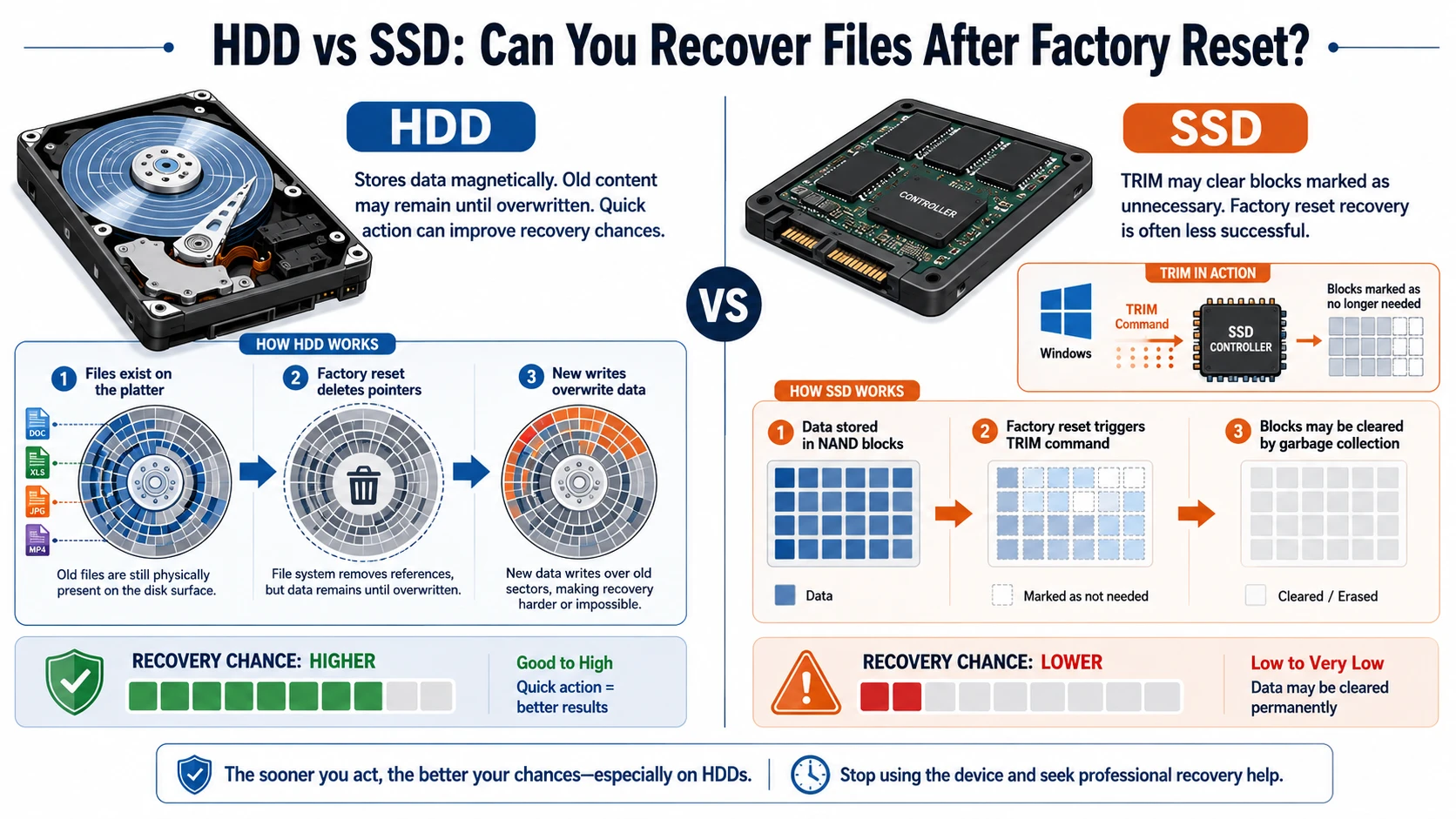
Ciononostante, un HDD potrebbe conservare il contenuto del vecchio file finché Windows non lo sovrascrive. Un SSD, tuttavia, può utilizzare TRIM per liberare più rapidamente i blocchi cancellati. Di conseguenza, Ripristino delle impostazioni di fabbrica e recupero dell'SSD di solito si rivela più difficile del recupero da un disco rigido.
Situazione | Prospettive di ripresa | Il passo successivo più indicato |
Conservare i miei file | Di solito buono | Controlla le cartelle degli utenti |
Eliminare tutto il contenuto di un disco rigido | Possibile | Smetti di usare il PC ed esegui una scansione |
Ripristino su un SSD con TRIM | Spesso difficile | Controlla prima i backup |
Pulizia dell'unità abilitata | Molto basso | Prendi in considerazione un esperto |
È presente OneDrive o Cronologia file | Buono | Ripristina il backup |
BitLocker protegge l'unità | È necessaria la chiave | Trova la chiave di ripristino |
Soprattutto, smettete di utilizzare l'unità interessata. Aggiornamenti, download e nuove installazioni potrebbero sovrascrivere i dati recuperabili. Pertanto, la risposta a È possibile recuperare i file dopo il ripristino delle impostazioni di fabbrica? migliora se si agisce rapidamente.
HDD vs SSD: è possibile recuperare i file dopo un ripristino delle impostazioni di fabbrica?
Il tipo di archiviazione influisce notevolmente su È possibile recuperare i file dopo il ripristino delle impostazioni di fabbrica?. Un disco rigido (HDD) memorizza i dati magneticamente, quindi i vecchi contenuti potrebbero rimanere memorizzati fino a quando non vengono sovrascritti da nuovi dati. Pertanto, intervenire tempestivamente può aumentare le possibilità di recupero dei dati dall'HDD.
Un SSD funziona in modo diverso. Windows può inviare un comando TRIM, che indica al controller che determinati blocchi non contengono più dati necessari. Di conseguenza, Ripristino delle impostazioni di fabbrica e recupero dell'SSD spesso presenta un tasso di successo inferiore.
Cosa fare prima di recuperare i file dopo il ripristino delle impostazioni di fabbrica
Prima di iniziare recupero dei dati dopo il ripristino delle impostazioni di fabbrica, proteggere i dati che potrebbero rimanere:
- Smetti di scaricare file e installare programmi.
- Sospendi Windows Update.
- Evita di applicare formattazioni, di eseguire la pulizia del disco e di effettuare un altro ripristino.
- Non installare software di ripristino sull'unità interessata.
- Scegli un'unità o una partizione diversa per i file recuperati.
- Se possibile, utilizzare un altro computer per eseguire la scansione dell'unità.
- Tieni a portata di mano la chiave di ripristino di BitLocker.
Questi passaggi sono importanti perché i software di recupero dati non sono in grado di ripristinare le informazioni sovrascritte. Di conseguenza, una preparazione accurata influisce direttamente su È possibile recuperare i file dopo il ripristino delle impostazioni di fabbrica?. In altre parole, È possibile recuperare i file dopo il ripristino delle impostazioni di fabbrica? spesso dipende da ciò che eviti di fare in seguito.
In che modo le opzioni di ripristino di Windows influiscono sul recupero dei file
Conserva i miei file
La funzione "Mantieni i miei file" reinstalla Windows conservando i file personali nelle cartelle utente standard. Tuttavia, Windows rimuove le app e ripristina molte impostazioni. Pertanto, controlla le cartelle Desktop, Documenti, Download, Immagini, Video e OneDrive prima di utilizzare un software di ripristino.
Elimina tutto
L'opzione "Rimuovi tutto" elimina i file dell'utente, le app e le impostazioni dall'installazione corrente. Tuttavia, un disco rigido potrebbe comunque contenere dati recuperabili fino a quando non vengono sovrascritti da nuovi file. Pertanto, gli utenti che hanno bisogno di Recuperare i file dopo il ripristino delle impostazioni di fabbrica su Windows 10 oppure Windows 11 dovrebbe smettere immediatamente di utilizzare il dispositivo.
Download dal cloud, reinstallazione locale e cancellazione dei dati
L'opzione "Download dal cloud" scarica i file di Windows aggiornati da Microsoft, mentre l'opzione "Reinstallazione locale" utilizza i file già presenti sul PC. Nessuna delle due opzioni, da sola, determina il successo del ripristino. Sono invece più determinanti il tipo di archiviazione, l'attività successiva del disco, la crittografia e l'opzione di ripristino.
Se hai attivato la pulizia del disco, Windows ha eseguito operazioni di scrittura aggiuntive per rendere più difficile il recupero dei dati. Di conseguenza, i normali software di recupero potrebbero trovare pochi dati utilizzabili.
Crittografia BitLocker
BitLocker crittografa l'unità. Pertanto, potrebbe essere necessario disporre della chiave di ripristino a 48 cifre per poter accedere ai dati protetti. Controlla il tuo account Microsoft, l'account aziendale, i file salvati, i documenti stampati o le unità USB. Senza la chiave, i dati, pur essendo integri, potrebbero risultare illeggibili.
Come recuperare i file dopo il ripristino delle impostazioni di fabbrica: quattro metodi
Quando decidi Come recuperare i file dopo il ripristino delle impostazioni di fabbrica, si inizi con il metodo più sicuro. Questo ordine garantisce È possibile recuperare i file dopo il ripristino delle impostazioni di fabbrica? una soluzione più pratica e consapevole dei rischi. Innanzitutto, controlla le copie esistenti. Poi, ricorri a un software di recupero se non è disponibile alcun backup utilizzabile.
Metodo 1: Controllare l'archivio cloud
Accedi a OneDrive, Google Drive, Dropbox e all'archivio aziendale. Successivamente, controlla il Cestino di ciascun servizio. Il ripristino delle impostazioni di fabbrica di solito riguarda solo il PC locale, non i file già archiviati online.
Tuttavia, non dare per scontato che tutte le cartelle vengano sincronizzate automaticamente. Verifica che il backup su cloud abbia incluso le cartelle “Desktop”, “Documenti”, “Immagini” e altre cartelle importanti prima del ripristino.
Metodo 2: Ripristino tramite Cronologia file
Se hai attivato la Cronologia dei file prima del ripristino, collega la fonte di backup e cerca le versioni precedenti. Quindi, ripristina le cartelle necessarie in una posizione sicura.
Questo metodo offre spesso la soluzione più affidabile soluzione perché utilizza una copia separata invece di ricostruire i dati cancellati.
Metodo 3: Ricerca di altri dispositivi e account
Controlla le chiavette USB, le schede SD, i vecchi computer, gli allegati delle e-mail, le app di messaggistica e le cartelle condivise. Ad esempio, un collega potrebbe ancora avere un file di progetto, mentre sul tuo telefono potrebbero esserci delle foto che in precedenza avevi trasferito sul computer.
Metodo 4: Utilizzare Magic Data Recovery senza backup
Quando i backup non contengono i file mancanti, Magic Data Recovery offre una procedura chiara per il recupero dei dati su Windows. Supporta Windows 7, Windows 8, Windows 10 e Windows 11. Inoltre, offre una scansione approfondita, filtri per i file, anteprima e recupero selettivo.
Il software risolve un problema comune: spesso gli utenti non sanno se il ripristino abbia semplicemente rimosso la voce del file o abbia sovrascritto il contenuto sottostante. Pertanto, Magic Data Recovery esegue una scansione dell'unità interessata e mostra ciò che è ancora possibile recuperare.
Segui questi passaggi per ripristinare i file dopo il ripristino delle impostazioni di fabbrica con Magic Data Recovery:
Passo 1: Scaricare e installare Magic Data Recovery
Scarica e installa Magic Data Recovery. Assicurati però di scegliere una posizione diversa dall'unità che conteneva i file persi. Questa precauzione serve a evitare che il programma di installazione sovrascriva i dati recuperabili.
Supporta Windows 7/8/10/11 e Windows Server
Fase 2: Selezionare l'unità interessata dal ripristino delle impostazioni di fabbrica
Avvia il programma e controlla le unità e le partizioni nell'interfaccia principale. Successivamente, seleziona l'unità su cui erano salvati i tuoi file prima del ripristino delle impostazioni di fabbrica. Infine, avvia la scansione.

Fase 3: scansione dell'unità alla ricerca dei file persi
Magic Data Recovery avvia automaticamente una scansione avanzata. Nel frattempo, man mano che la scansione procede, elenca i file recuperabili. È quindi possibile iniziare a controllare i risultati prima che la scansione sia terminata.

Passo 4: Anteprima dei file prima del recupero
Successivamente, utilizza la funzione di anteprima per verificare il contenuto e lo stato di ciascun file. Inoltre, filtra i risultati in base al tipo di file, al nome, alle dimensioni o alla posizione. Questo passaggio ti aiuta a recuperare solo i documenti, le foto, i video e gli altri file di cui hai effettivamente bisogno.

Passo 5: Recuperare i file in una posizione sicura
Infine, seleziona i file da recuperare e avvia il processo di recupero. Salva i dati recuperati su un'unità o in una posizione di archiviazione diversa. Non ripristinare mai i file sull'unità interessata, poiché nuove operazioni di scrittura potrebbero sovrascrivere altri dati recuperabili o compromettere il risultato del recupero.

Per gli utenti che chiedono È possibile recuperare i file dopo un ripristino delle impostazioni di fabbrica senza backup?, questo processo offre un metodo pratico per verificare cosa rimane. Tuttavia, Magic Data Recovery non è in grado di ripristinare i file in caso di sovrascrittura, cancellazione sicura, completamento della pulizia TRIM o perdita della chiave di crittografia richiesta.
Perché utilizzare Magic Data Recovery per recuperare i file dopo un ripristino delle impostazioni di fabbrica?
Magic Data Recovery è ideale per gli utenti Windows comuni che preferiscono un approccio visivo rispetto agli strumenti da riga di comando. Innanzitutto, il suo flusso di lavoro “Seleziona, Scansiona, Visualizza in anteprima e Recupera” rende chiara ogni fase del processo. Inoltre, l’anteprima consente di verificare il contenuto dei file, mentre i filtri facilitano la ricerca di documenti importanti, foto, video e archivi.
Ad esempio, un utente di Windows 11 potrebbe selezionare l'opzione "Rimuovi tutto" e scoprire in seguito che una cartella contenente un progetto importante non era stata sottoposta a backup su OneDrive. Se i file erano memorizzati su un disco rigido (HDD) e Windows non li ha sovrascritti, Magic Data Recovery potrebbe individuare contenuti utilizzabili.
Rispetto a Ripristino del sistema, questo strumento è pensato per il recupero dei file personali. Il Ripristino configurazione di sistema si occupa principalmente delle impostazioni di sistema, dei driver e delle applicazioni. Inoltre, Magic Data Recovery consente agli utenti di esaminare i risultati della scansione prima del recupero.
I suoi principali vantaggi includono:
- Una semplice procedura di ripristino grafica
- Scansione avanzata per casi complessi perdita di dati casi
- Filtri per tipo di file e posizione
- Anteprima dei file prima del recupero
- Recupero selettivo anziché ripristino completo
- Supporto per foto, video, documenti e archivi di uso comune
- Compatibilità con le principali versioni di Windows
Ancora, È possibile recuperare i file dopo il ripristino delle impostazioni di fabbrica? dipende dallo stato fisico dei dati. Il software non è in grado di aggirare i settori sovrascritti, la cancellazione sicura, i blocchi SSD azzerati o le chiavi BitLocker mancanti. Questa limitazione, riconosciuta apertamente, lo rende un’opzione più affidabile rispetto agli strumenti che promettono risultati impossibili.
Errori comuni nel recupero dei file dopo il ripristino delle impostazioni di fabbrica
Evitate questi errori:
- Installazione del software di ripristino sull'unità C: interessata
- Scaricare file di grandi dimensioni dopo il ripristino
- Eseguire un altro reset o una nuova formattazione
- Salvataggio dei file recuperati sulla stessa unità
- Avvio della riparazione del disco prima di mettere al sicuro i dati critici
- Supponendo che "Ripristino configurazione di sistema" contenga documenti personali
- Continuare la scansione di un disco che presenta problemi fisici
- Recuperare tutti i risultati della scansione senza visualizzarne prima l'anteprima
Pertanto, quando chiedi È possibile recuperare i file dopo il ripristino delle impostazioni di fabbrica?, concentrati sulla prevenzione di nuove operazioni di scrittura prima di confrontare gli strumenti di recupero.
Quando rivolgersi a un professionista del recupero dati
Interrompi il recupero fai-da-te quando l'unità emette un ticchettio, si disconnette, si surriscalda, scompare dal BIOS o gira in modo irregolare. I problemi fisici richiedono attrezzature specializzate e ripetute scansioni potrebbero aggravare il danno.
Inoltre, è consigliabile rivolgersi a un professionista quando i file rivestono un valore eccezionale dal punto di vista aziendale, legale, di ricerca o personale. Tuttavia, nemmeno un laboratorio è in grado di recuperare i dati sovrascritti o decriptare i contenuti protetti da BitLocker senza la chiave corretta.
Conclusione: è possibile recuperare i file dopo un ripristino delle impostazioni di fabbrica?
Quindi, È possibile recuperare i file dopo il ripristino delle impostazioni di fabbrica?? In molti casi sì, soprattutto quando è presente un backup o quando un disco rigido (HDD) contiene ancora dati che Windows non ha sovrascritto. Tuttavia, la funzione TRIM degli SSD, la pulizia dell’unità, la crittografia, i danni fisici e l’uso continuato possono ridurre notevolmente le probabilità di successo.
Per prima cosa, smetti di utilizzare l'unità interessata. Successivamente, controlla OneDrive, Cronologia file e altre copie. Se non è presente alcun backup, Magic Data Recovery offre un flusso di lavoro semplice che comprende scansione, anteprima e recupero selettivo. Lo consigliamo perché affronta il problema alla radice senza promettere risultati impossibili.
Pertanto, quando hai bisogno di un sistema efficiente soluzione di recupero del disco rigido, provate subito Magic Data Recovery, esaminate attentamente i risultati dell'anteprima e salvate i file recuperati in un'altra posizione.
Supporta Windows 7/8/10/11 e Windows Server
FAQ
È possibile recuperare i file dopo un ripristino delle impostazioni di fabbrica senza backup?
Dipende dal fatto che il dispositivo di archiviazione contenga ancora i dati originali. Smetti di utilizzare l'unità e, se possibile, esegui la scansione da un'altra postazione. Il recupero dei dati da un HDD può avere esito positivo prima che avvenga la sovrascrittura, mentre il recupero da un SSD spesso diventa più difficile dopo che il comando TRIM ha cancellato i blocchi eliminati.
È possibile recuperare i file dopo un ripristino delle impostazioni di fabbrica su Windows 11?
Sì, è possibile recuperare i file dopo un ripristino delle impostazioni di fabbrica di Windows 11 controllando OneDrive, la Cronologia file, altri dispositivi e il disco interessato. Innanzitutto, sospendi gli aggiornamenti e le nuove installazioni. Quindi, ripristina un backup disponibile o esegui una scansione del disco in modo sicuro. Tuttavia, BitLocker, la funzione TRIM degli SSD, la pulizia del disco e l'utilizzo successivo potrebbero ridurre le possibilità di recupero.
È possibile recuperare i file dopo un ripristino delle impostazioni di fabbrica su Windows 10?
Per recuperare i file dopo un ripristino delle impostazioni di fabbrica di Windows 10, controlla innanzitutto l'archivio cloud e la Cronologia file. Se i file non sono presenti in questi luoghi, smetti di utilizzare il disco ed esegui una scansione da un'altra posizione. Salva gli elementi recuperati altrove. Tuttavia, nessuno strumento è in grado di ripristinare i dati dopo una sovrascrittura completa o una cancellazione sicura.
Il ripristino delle impostazioni di fabbrica cancella definitivamente tutto?
Non sempre. L'opzione "Conserva i miei file" di norma mantiene i file personali, mentre "Rimuovi tutto" li elimina dall'installazione attiva di Windows. Tuttavia, alcuni contenuti potrebbero rimanere su un disco rigido (HDD) fino a quando non vengono sovrascritti. Al contrario, la funzione TRIM degli SSD, la pulizia dell'unità, la crittografia e l'uso continuato del computer possono rendere il recupero estremamente difficile o impossibile.
È possibile annullare un ripristino delle impostazioni di fabbrica?
Windows non mette a disposizione un semplice pulsante che consenta di annullare un ripristino già completato. È invece necessario ripristinare i file personali da OneDrive, dalla Cronologia file, da un'immagine di sistema o da un altro backup. Se non è presente alcun backup, eseguire una scansione del disco interessato. Di solito sarà necessario reinstallare le app rimosse e configurare nuovamente le impostazioni di Windows.
Quanto tempo hai a disposizione per recuperare i file?
Non esiste una scadenza prestabilita. Le possibilità di recupero diminuiscono ogni volta che Windows scrive nuovi dati sull'unità interessata. Aggiornamenti, download, navigazione e installazioni di app possono sovrascrivere rapidamente i contenuti cancellati. Pertanto, smetti di utilizzare il computer non appena ti accorgi della perdita e avvia il metodo di recupero più sicuro.
Magic Data Recovery è gratuito?
Magic Data Recovery offre una versione di prova che consente di eseguire la scansione, visualizzare in anteprima e recuperare file per un totale di 500 MB gratuitamente. In questo modo, gli utenti possono verificare se il programma individua i file desiderati prima di optare per una versione a pagamento. Si raccomanda di consultare sempre i termini di licenza aggiornati sulla pagina ufficiale del prodotto, poiché le funzionalità, i limiti e i prezzi potrebbero subire variazioni.

Vasilii è uno specialista del recupero dati con circa 10 anni di esperienza pratica nel settore. Nel corso della sua carriera, ha risolto con successo migliaia di casi complessi riguardanti file cancellati, unità formattate, partizioni perse e file system RAW. La sua esperienza copre sia i metodi di recupero manuale utilizzando strumenti professionali come gli editor esadecimali, sia le soluzioni automatiche avanzate con i software di recupero. La missione di Vasilii è quella di rendere accessibile la conoscenza del recupero dati affidabile sia ai professionisti IT che agli utenti di tutti i giorni, aiutandoli a salvaguardare i loro preziosi beni digitali.