
Cos'è il TRIM
Indice dei contenuti
Come funziona TRIM
Quando un file viene eliminato Su un sistema privo di questa funzione, il sistema operativo di solito rimuove solo il riferimento al file system. La memoria flash sottostante contiene ancora i dati originali e l'unità SSD non riconosce quello spazio come riutilizzabile. Nel tempo, questo comportamento aumenta l'amplificazione della scrittura, riduce le prestazioni e accelera l'usura della memoria flash.
Con il supporto abilitato, il sistema operativo notifica attivamente l'SSD quando i file vengono eliminati, i volumi sono formattato, o lo spazio di archiviazione si libera. Queste notifiche specificano gli indirizzi dei blocchi logici che non contengono più dati validi. Il controller SSD può quindi cancellare questi blocchi durante i periodi di inattività, in modo che siano pronti per le scritture future. Le indicazioni ufficiali di Microsoft e dei principali fornitori di SSD confermano che questo approccio migliora la velocità di scrittura sostenuta e riduce i cicli di cancellazione non necessari.
Perché il TRIM è importante per le prestazioni a lungo termine
Questa funzionalità svolge un ruolo essenziale nel mantenere l'efficienza dell'SSD nel tempo:
Prestazioni di scrittura stabili: I blocchi pre-cancellati consentono la scrittura immediata dei dati.
Amplificazione di scrittura inferiore: Si verifica un minor numero di operazioni di copia e cancellazione interna.
Durata migliorata: La riduzione dello stress sulle celle flash NAND ne prolunga la vita utile.
Esperienza utente coerente: Il degrado delle prestazioni nel tempo è ridotto al minimo.
La maggior parte dei sistemi operativi moderni attiva automaticamente questa funzione quando rileva un'unità SSD compatibile.
TRIM a confronto con la Garbage Collection
Anche se spesso vengono citati insieme, questi meccanismi hanno scopi diversi:
Comandi TRIM: Istruzioni inviate dal sistema operativo per indicare i blocchi non utilizzati.
Raccolta dei rifiuti: Un processo interno all'SSD che consolida i dati e cancella i blocchi.
L'accuratezza delle informazioni sui blocchi consente alla garbage collection di operare in modo più efficiente. Senza di esse, il controllore deve dedurre quali blocchi sono sicuri da cancellare, il che comporta un maggiore consumo di risorse e di tempo.
Compatibilità del sistema e del dispositivo
Il supporto dipende da molteplici fattori:
- Hardware di archiviazione: La maggior parte delle unità SSD SATA e NVMe supporta questo set di comandi.
- Sistemi operativi: Windows 7 e successivi, le moderne distribuzioni Linux e macOS offrono un supporto nativo.
- File system: NTFS, ext4, APFS e altri formati moderni sono compatibili.
- Metodi di connessione: Le connessioni SATA e NVMe gestiscono i comandi in modo affidabile, mentre alcuni adattatori USB e i vecchi controller RAID potrebbero bloccarli.
Controllo dello stato di TRIM in Windows
Se si utilizza Windows, il controllo dello stato di TRIM è semplice:
1. Aprire Prompt dei comandi come amministratore.
2. Immettere il seguente comando:
fsutil comportamento query DisableDeleteNotify
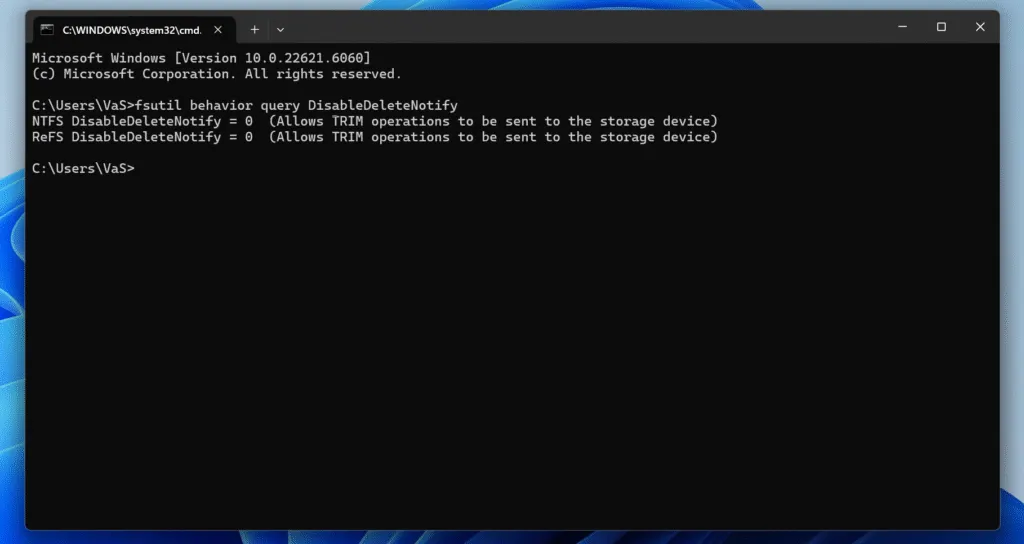
3. Interpretare il risultato:
DisableDeleteNotify = 0→ La funzione è attiva.DisableDeleteNotify = 1→ La funzione è disattivata.
Impatto sul recupero dei dati
Dal punto di vista del recupero, questo comportamento introduce importanti limitazioni. Una volta che i blocchi sono contrassegnati come inutilizzati e cancellati internamente, i dati originali vengono fisicamente rimossi. Di conseguenza:
- I file eliminati possono diventare irrecuperabili in breve tempo.
- Le scansioni tradizionali dello spazio non allocato spesso falliscono dopo la pulizia interna.
- Una risposta rapida dopo una cancellazione accidentale è fondamentale.
Questo risultato riflette una scelta progettuale incentrata sulle prestazioni e sulla sicurezza piuttosto che un difetto. Strumenti professionali come Magic Data Recovery eseguono scansioni di sola lettura e possono identificare i dati recuperabili prima del completamento della pulizia interna. Agire immediatamente aumenta le probabilità di successo.
TRIM in ambienti RAID e virtuali
Il comportamento varia nelle configurazioni di archiviazione avanzate:
RAID 0/1: Molte moderne soluzioni RAID software passano i comandi correttamente.
RAID hardware: I controllori più vecchi spesso li bloccano.
Macchine virtuali: Il supporto del pass-through dipende dall'hypervisor e dalla configurazione.
Gli amministratori dovrebbero verificare il supporto quando le prestazioni costanti e la longevità dell'SSD sono prioritarie.
Considerazioni sulla sicurezza e sulla privacy
Riducendo la possibilità che i dati eliminati rimangano accessibili, questa tecnologia rafforza la sicurezza dei dati. La stessa caratteristica limita anche il recupero dopo un'eliminazione accidentale, il che rende i backup regolari essenziali sia in ambienti personali che aziendali.
Migliori pratiche
- Mantenere backup affidabili prima di formattazione o cancellazioni su larga scala.
- Evitate di disabilitare questa funzione a meno che non ci sia un requisito specifico di tipo forense o legacy.
- Utilizzare un software di recupero professionale subito dopo la perdita accidentale dei dati.
- Confermare la compatibilità quando si utilizzano enclosure esterne o sistemi RAID.
Conclusione
Supporta Windows 7/8/10/11 e Windows Server
Domande frequenti
Che cos'è il TRIM su un'unità SSD?
È bene eseguire il TRIM di un'unità SSD?
Devo attivare o meno il TRIM?
Con quale frequenza si deve eseguire il TRIM di un'unità SSD?
Cosa succede se non si esegue il TRIM di un'unità SSD?
A cosa serve il TRIM?
Qual è la durata media di un SSD?
SSD TRIM elimina i dati?

Vasilii è uno specialista del recupero dati con circa 10 anni di esperienza pratica nel settore. Nel corso della sua carriera, ha risolto con successo migliaia di casi complessi riguardanti file cancellati, unità formattate, partizioni perse e file system RAW. La sua esperienza copre sia i metodi di recupero manuale utilizzando strumenti professionali come gli editor esadecimali, sia le soluzioni automatiche avanzate con i software di recupero. La missione di Vasilii è quella di rendere accessibile la conoscenza del recupero dati affidabile sia ai professionisti IT che agli utenti di tutti i giorni, aiutandoli a salvaguardare i loro preziosi beni digitali.