
I migliori software per il recupero dei dati delle unità flash USB - Strumenti gratuiti e a pagamento

Hai perso dei file da una chiavetta USB? In molti casi, Recupero delle unità flash USB è possibile dopo una cancellazione accidentale, una formattazione rapida, Errori del file system RAW, attacchi di virus o danneggiamento del file system. La regola più importante è smettere immediatamente di utilizzare la chiavetta USB, poiché i nuovi dati potrebbero sovrascrivere i file cancellati e rendere impossibile il recupero.
Questa guida spiega come recuperare i file da una chiavetta USB utilizzando gli strumenti integrati di Windows, metodi di recupero gratuiti e software professionali per il recupero dei dati da chiavette USB come Magic Data Recovery. Scoprirai inoltre quale metodo è più efficace per i file cancellati, le chiavette USB formattate, le unità danneggiate e i dispositivi danneggiati fisicamente.
Supporta Windows 7/8/10/11 e Windows Server
Indice dei contenuti
Scenari comuni di perdita dei dati delle unità flash USB
File cancellati da un'unità USB
La cancellazione accidentale è la causa più comune. I software di recupero dati riescono solitamente a ripristinare questi file, a condizione che il disco non sia stato sovrascritto.
Chiavetta USB formattata
La formattazione rapida spesso rimuove solo la tabella dei file, non i dati stessi. I software di recupero dati sono in grado di scansionare e ripristinare i file da unità formattate.
Chiavetta USB in formato RAW o danneggiata
Una chiavetta USB in formato RAW indica un danneggiamento del file system. Non formattarla; utilizza un software di recupero per recuperare i file in modo sicuro.
La chiavetta USB non viene riconosciuta o mostra 0 byte
Questo accade spesso a causa di file system danneggiati. I software di recupero potrebbero rilevare l'unità anche se Windows non è in grado di farlo.
Rimozione di virus o malware
Alcuni malware nascondono o cancellano i file. Smetti di utilizzare la chiavetta USB ed esegui una scansione antivirus prima di tentare il recupero.
Chiavetta USB danneggiata fisicamente
Il software non è in grado di recuperare i dati da unità fisicamente danneggiate. È necessario ricorrere a servizi di recupero dati professionali.
È possibile recuperare i dati da una chiavetta USB?
Sì. I file eliminati da una chiavetta USB non vengono cancellati immediatamente, ma rimangono sulla chiavetta finché non vengono sovrascritti. Il successo del recupero dipende da:
- Come sono andati persi i file (cancellazione, formattazione, danneggiamento)
- Se sono stati scritti nuovi dati sull'unità
- Il tipo di file system USB (FAT32, exFAT, NTFS)
- Lo stato dell'unità (danno logico o fisico)
Suggerimento: Smetti immediatamente di utilizzare la chiavetta USB e non salvare i file recuperati sullo stesso dispositivo.
Confronto rapido: metodi di recupero dati da chiavette USB
Metodo | Il migliore per | Costo | Difficoltà | Il rischio |
Magic Data Recovery | USB cancellata, formattata, in formato RAW o danneggiata | Scansione gratuita / recupero a pagamento | Facile | Basso |
Cronologia file di Windows | File di cui è stato effettuato in precedenza un backup | Gratuito | Facile | Basso |
Recupero file di Windows | Utenti esperti, file cancellati | Gratuito | Duro | Medio |
CHKDSK | Riparazione del file system, USB inaccessibile | Gratuito | Medio | Medio-Alto |
Servizio professionale | Danni fisici, connettore rotto, danni causati dall'acqua | Pagato | Facile | Basso |
Metodo 1: Ripristino dei file USB dal backup o dalle versioni precedenti
Questo metodo è utile se si dispone di backup o se è attivata la funzione "Versioni precedenti" di Windows.
Passi:
- Controlla la Cronologia file di Windows o la tua soluzione di backup per individuare i file persi.
- Utilizza la funzione "Versioni precedenti" di Windows per ripristinare una versione precedente della cartella o del file.
- Scarica o copia i file dai backup su cloud (OneDrive, Google Drive, Dropbox), se disponibili.
Suggerimento: Eseguire sempre il ripristino dei file in una posizione diversa da quella dell'unità USB originale, per evitare di sovrascrivere i dati recuperabili.

Metodo 2: Utilizzare la funzione di recupero file di Windows (avanzato)
Passi:
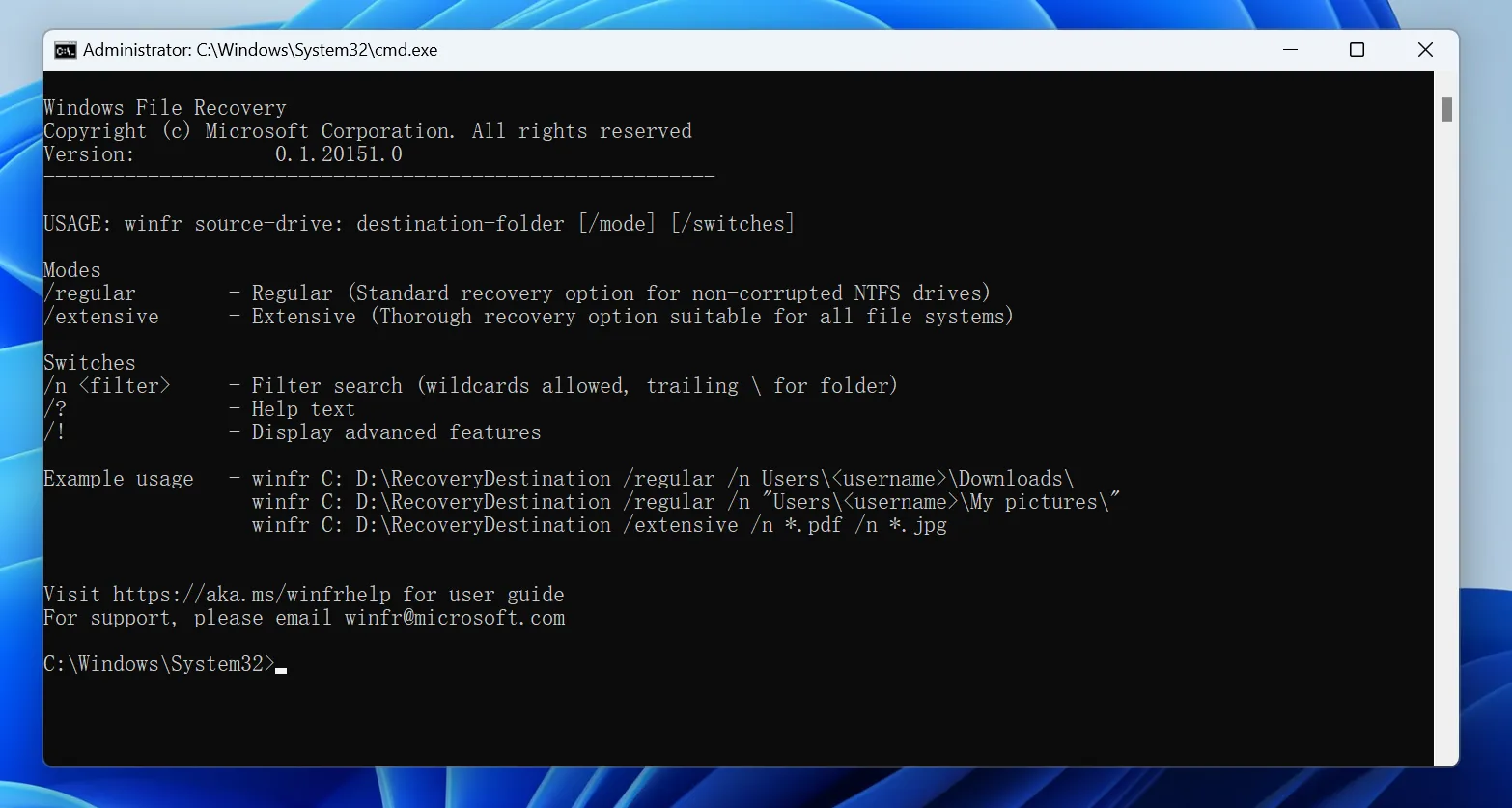
- Installare Recupero file di Windows.
- Apri il Prompt dei comandi e utilizza la sintassi:
winfr X: Y: /n *.docx /r
- X: lettera dell'unità USB
- Y: unità di destinazione
- /r: modalità a segmenti per il ripristino approfondito
- Controlla i file recuperati nella cartella di destinazione.
Nota: Questo strumento è basato sulla riga di comando ed è adatto a utenti esperti.
Metodo 3: Utilizzare CHKDSK con cautela
CHKDSK può correggere gli errori del file system, ma potrebbe sovrascrivere i dati. Utilizzare solo se è necessario accedere a un'unità danneggiata per eseguire una scansione.
chkdsk X: /f
- Sostituire X con la lettera dell'unità USB.
- Eseguire sempre il backup dei file prima di avviare CHKDSK.

Metodo 4: Recuperare i file da una chiavetta USB con Magic Data Recovery
Seguite questi semplici passaggi per recuperare i vostri file:
1. Scaricare e installare: Scaricare e installare Magic Data Recovery dal sito web ufficiale. Avviare l'applicazione.
Supporta Windows 7/8/10/11 e Windows Server



Confronto tra i migliori software per il recupero dei dati da chiavette USB
Software | Il migliore per | OS | Limite gratuito | Anteprima | Difficoltà | Note |
Magic Data Recovery | Ripristino completo tramite USB | Finestre | Scansione/anteprima/prova gratuita di recupero dati | Sì | Facile | Supporta file cancellati, formattati, in formato RAW e danneggiati |
Recuva | Recupero semplice dei file cancellati | Finestre | Gratuito | Limitato | Facile | Meno indicato per casi complessi |
FotoRec | Recupero approfondito delle firme | Win/Mac/Linux | Gratuito | No | Duro | I nomi dei file originali potrebbero andare persi |
Disco di prova | Riparazione della partizione | Win/Mac/Linux | Gratuito | No | Duro | Non è l'ideale per i principianti |
Trapano a disco | Mac e Windows | Win/Mac | Recupero gratuito limitato | Sì | Facile | Interfaccia intuitiva, supporta diversi tipi di file |
Recupero dati EaseUS | Adatto ai principianti | Win/Mac | Recupero gratuito limitato | Sì | Facile | Formato ampio e supporto USB |
Conclusione
Anche se i metodi e i software gratuiti possono essere utili in situazioni minori, la loro efficacia è limitata. Per una soluzione affidabile e con un alto tasso di successo Recupero delle unità flash USB, Uno strumento professionale è spesso l'unico soluzione di recupero dati. Magic Data Recovery offre un perfetto equilibrio tra una potente tecnologia di scansione, un ampio supporto per i formati e un'interfaccia eccezionalmente facile da usare. Software di recupero delle unità flash USB.
Non rischiate la perdita permanente dei dati. Scaricate oggi stesso Magic Data Recovery e ripristinate i vostri file USB persi con facilità.
Supporta Windows 7/8/10/11 e Windows Server
Domande frequenti sul recupero dei dati dalle chiavette USB
È possibile recuperare i dati da una chiavetta USB fisicamente danneggiata?
La formattazione di un'unità USB cancella definitivamente i dati?
È possibile recuperare i file da un'unità USB visualizzata come 'RAW' o con 0 byte?
È possibile recuperare i file cancellati da una chiavetta USB?
Come si recuperano i file da un'unità USB formattata?
È possibile recuperare i file da una chiavetta USB senza utilizzare alcun software?
CHKDSK consente di recuperare i file cancellati da un'unità USB?

Erin Smith è riconosciuta come una delle scrittrici più professionali di Amagicsoft. Negli ultimi 10 anni ha continuamente affinato le sue capacità di scrittura e ha aiutato milioni di lettori a risolvere i loro problemi tecnologici.