
Recupero dei dati cancellati: Guida definitiva al recupero dei file persi

Cancellare per sbaglio un documento, una foto, un video o un file di lavoro importante può essere fonte di stress, soprattutto dopo aver svuotato il Cestino o aver utilizzato la combinazione di tasti Maiusc+Canc. Fortunatamente, recupero dei dati cancellati potrebbe comunque essere possibile, se i dati originali non sono stati sovrascritti. L'approccio più sicuro consiste nel smettere di utilizzare l'unità interessata, verificare innanzitutto le opzioni di recupero integrate e poi utilizzare un'apposita recupero dei file cancellati strumento, quando necessario.
Questa guida spiega come recupero dei dati cancellati come funziona, cosa fare subito dopo la cancellazione, quali metodi di recupero vale la pena provare e quando Magic Data Recovery può offrire una soluzione più semplice per gli utenti Windows. Imparerete inoltre in che modo il recupero dei dati differisce tra HDD e SSD, quali errori evitare e quali fattori influenzano le vostre possibilità di recuperare i file persi.
Supporta Windows 7/8/10/11 e Windows Server
Indice dei contenuti
Che cos'è Recupero dei dati cancellati E i file cancellati possono essere recuperati?
Recupero dei dati cancellati è il processo di ripristino dei file a cui non è più possibile accedere tramite la normale navigazione tra i file.
In molti casi, l'eliminazione di un file non comporta la cancellazione immediata di tutti i suoi dati. Al contrario, il file system contrassegna lo spazio di archiviazione come disponibile per il riutilizzo. Finché nuovi dati non sovrascrivono quello spazio, uno strumento di recupero potrebbe ancora individuare il record del file o identificare contenuti recuperabili.
Tuttavia, nessun metodo di recupero può garantire il successo. Il risultato dipende da diversi fattori, tra cui:
- Come è stato eliminato il file
- Se il dispositivo sia stato utilizzato in seguito
- Il tipo di dispositivo di archiviazione
- Il file system
- Se i dati sono stati sovrascritti
- Se un SSD ha elaborato il comando TRIM
- Se l'unità presenta danni fisici
Pertanto, quanto prima si intervenga in modo corretto, tanto migliori potrebbero essere le condizioni di recupero.
Dove finiscono i dati cancellati?
Su un HDD, Unità USB, o Scheda SD, i contenuti cancellati possono rimanere sul supporto di memorizzazione fino a quando nuove informazioni non sovrascrivono la stessa area.
Un SSD funziona in modo diverso. Gli SSD moderni possono supportare TRIM. Questa funzionalità consente al sistema operativo di indicare all'SSD quali blocchi non sono più necessari. L'SSD potrà successivamente cancellare tali blocchi internamente durante la garbage collection.
Di conseguenza, recuperare i file cancellati da un SSD con la funzione TRIM abilitata può risultare più difficile rispetto al recupero dagli SSD tradizionali HDD.
Cosa fare prima di iniziare Recupero dei dati cancellati
Le prime azioni che intraprendi dopo aver perso un file possono influire in modo significativo sul risultato.
1. Interrompere l'uso dell'unità interessata
Non scaricare file, non installare applicazioni, non copiare dati né creare nuovi documenti sullo stesso dispositivo di archiviazione.
Ogni nuova operazione di scrittura comporta il rischio che Windows riutilizzi lo spazio precedentemente occupato dal file eliminato.
2. Non installare software di ripristino sull'unità di origine
Supponiamo che tu abbia cancellato dei file importanti dall'unità C:. L'installazione di un software di recupero direttamente su quella stessa unità fisica potrebbe sovrascrivere i dati che desideri ripristinare.
Quando possibile, utilizzare un’altra unità fisica o un dispositivo di archiviazione esterno.
3. Salvare i file recuperati in un'altra posizione
Durante il primo tentativo di recupero, non ripristinare i file sull'unità originale.
Salvateli invece su un altro disco rigido (HDD), SSD, chiavetta USB o altra destinazione sicura. In questo modo si evita che i dati recuperati sovrascrivano i file che non sono ancora stati ripristinati.
Il rispetto di queste regole di base garantisce condizioni più sicure per recupero dei dati cancellati.
Come recuperare i dati cancellati: 5 metodi pratici
La soluzione migliore dipende dal modo in cui i file sono scomparsi. Inizia con il metodo più semplice prima di eseguire una scansione di recupero più approfondita.
Metodo 1: Ripristinare i file eliminati dal Cestino
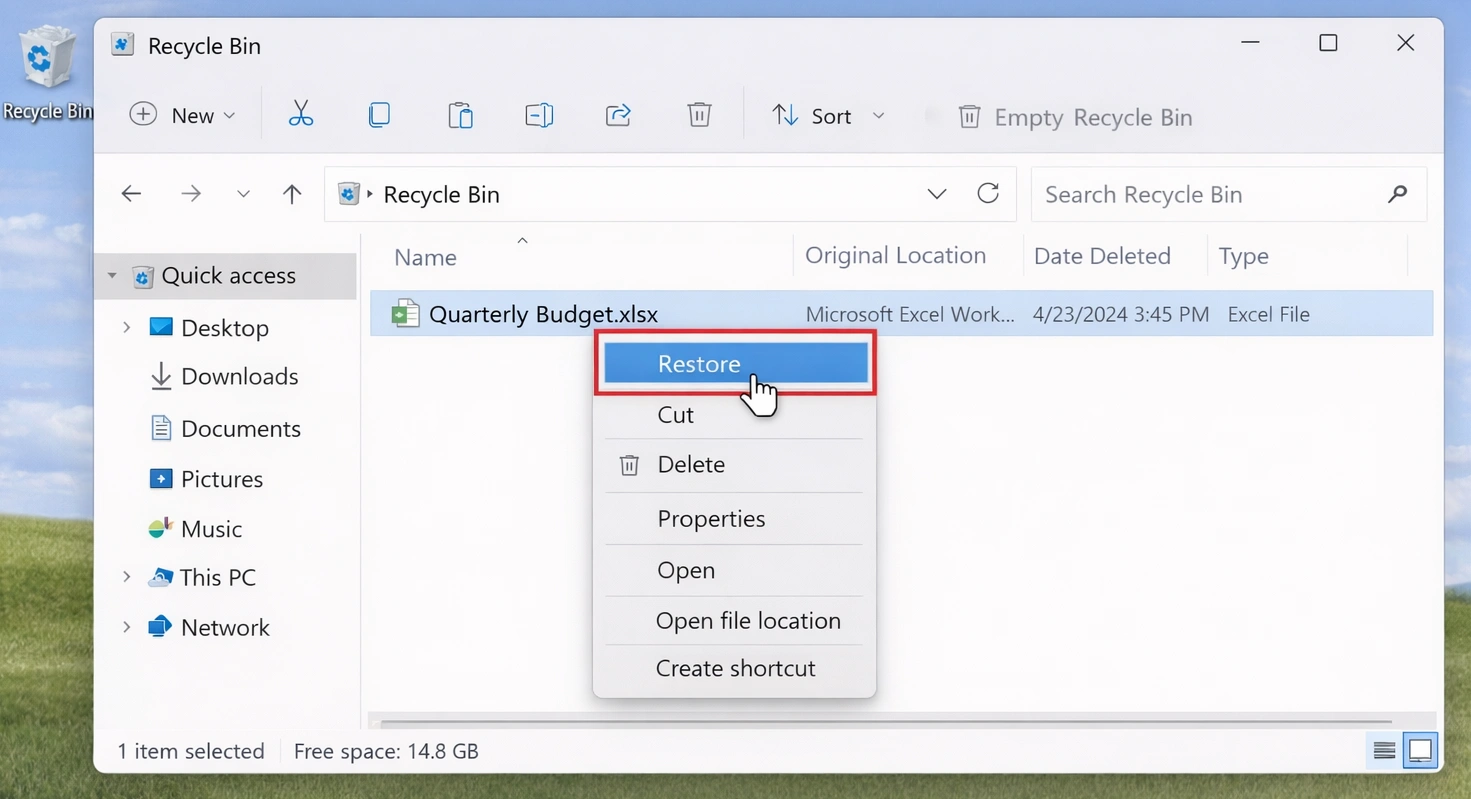
Se hai eliminato un file in modo normale in Windows, controlla il Cestino prima.
- Aprire il Cestino.
- Individua il file o la cartella eliminati.
- Fare clic con il tasto destro del mouse sull'elemento.
- Selezionare Ripristino.
Windows riporterà il file nella sua posizione originale.
Di solito questa è la soluzione più sicura e veloce quando il file non è stato eliminato definitivamente.
Metodo 2: Recuperare i dati cancellati da un backup
Se il file non si trova nel Cestino, controlla eventuali copie di backup disponibili.
Tra le possibili fonti figurano:
- Cronologia file di Windows
- Archiviazione in cloud
- Backup su unità esterne
- Software di backup
- File copiati manualmente
Ad esempio, immagina di aver cancellato per sbaglio una cartella di progetto importante questa mattina. Se il tuo backup contiene una copia della sera precedente, ripristinare quella versione è solitamente più sicuro che eseguire una scansione dell'intero disco.
Un backup valido dovrebbe generalmente rappresentare la prima scelta, poiché consente di ripristinare una copia esistente anziché tentare di ricostruire le informazioni cancellate.
Metodo 3: Prova Recupero file di Windows
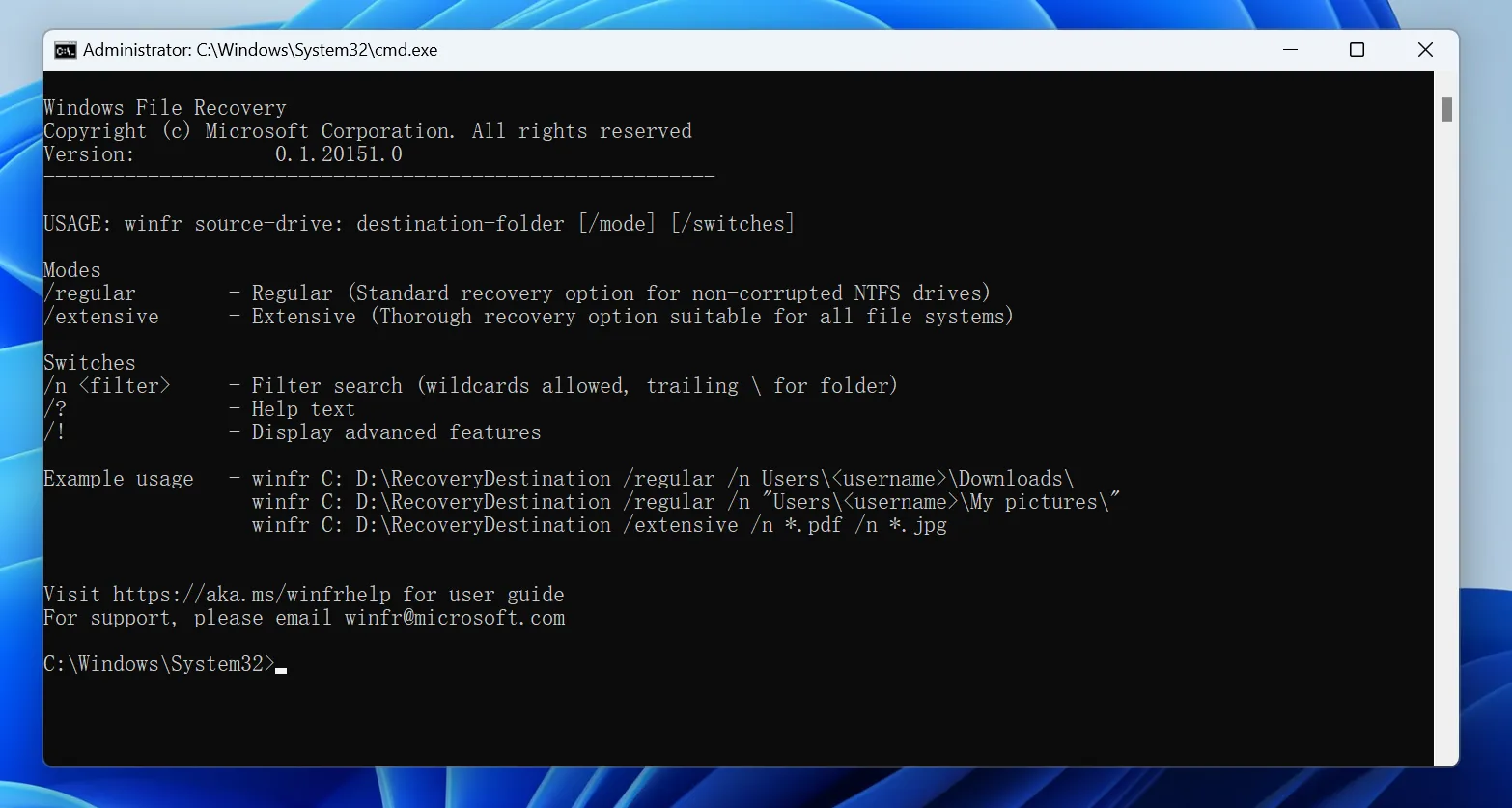
Microsoft fornisce Recupero file di Windows come strumento gratuito da riga di comando per il recupero di file cancellati che non si trovano più nel Cestino.
Per utilizzarlo:
- Installare Recupero file di Windows dal Microsoft Store.
- Collega un’altra unità per salvare i file recuperati.
- Apri lo strumento e inserisci un comando del tipo:
winfr C: E: /regular /n *.docx - Stampa
Yper avviare la scansione e controllare la cartella di recupero sull'unità E:.
Utilizzo Modalità normale per i file eliminati di recente sulle unità NTFS. Se non riesce a trovare i file, prova a Modalità estesa per una scansione più approfondita.
Poiché le unità di origine e di destinazione devono essere diverse e lo strumento richiede l'immissione di comandi da riga di comando, i principianti potrebbero trovare più agevole un'interfaccia grafica recupero dei dati cancellati uno strumento come Magic Data Recovery più facile da usare.
Metodo 4: Utilizzo Software di recupero dati
Quando il Cestino e i backup non riescono a risolvere il problema, è necessario ricorrere a soluzioni dedicate software di recupero dati può eseguire una scansione del dispositivo di archiviazione interessato alla ricerca di contenuti recuperabili.
Questo approccio risulta particolarmente utile dopo:
- Maiusc+Canc
- Svuotare il cestino
- Cancellazione accidentale di una cartella
- Eliminazione di file da un disco rigido esterno
- Perdita di file da una chiavetta USB
- Eliminazione delle foto da una scheda SD
- Alcune situazioni in cui è necessario un formato rapido
Un'applicazione grafica di ripristino può semplificare recupero dei dati cancellati perché è possibile selezionare un'unità, eseguire la scansione, esaminare i risultati, visualizzare l'anteprima dei file e scegliere cosa ripristinare senza dover inserire manualmente i comandi di ripristino.
Metodo 5: Rivolgersi a un servizio professionale di recupero dati
Il software non è adatto a tutte le situazioni di perdita di dati.
Interrompi l'utilizzo dell'unità e valuta di rivolgerti a un servizio di assistenza professionale se:
- L'HDD emette dei clic o rumori meccanici insoliti
- Il dispositivo si disconnette ripetutamente
- Windows non è in grado di rilevare l'unità in modo affidabile
- Il dispositivo di archiviazione ha subito danni causati da acqua, urti o problemi elettrici
- Le informazioni andate perdute sono fondamentali per l’attività e non si può correre alcun rischio
Effettuare ripetute scansioni del software non è una buona idea quando l'hardware presenta guasti fisici.
Come utilizzare Magic Data Recovery per Recupero dei dati cancellati
Utilizzo Magic Data Recovery per recupero dei dati cancellati è semplice, anche per i principianti. Seguite questi passaggi per recuperare i file persi:
1.Scaricare e installare: Non installarlo sull'unità in cui si trovano i file persi.
Supporta Windows 7/8/10/11 e Windows Server
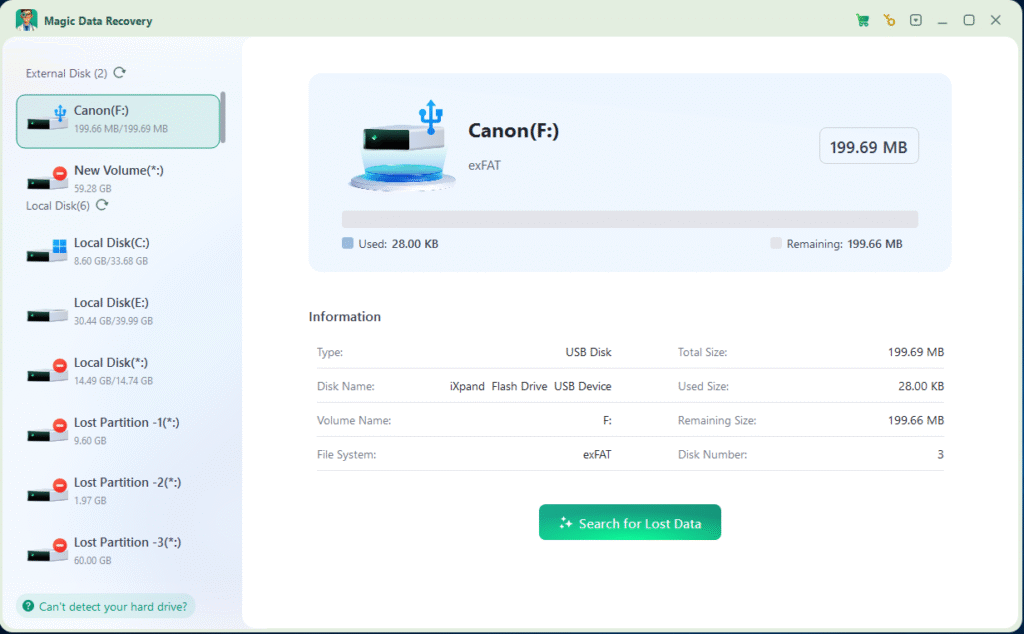
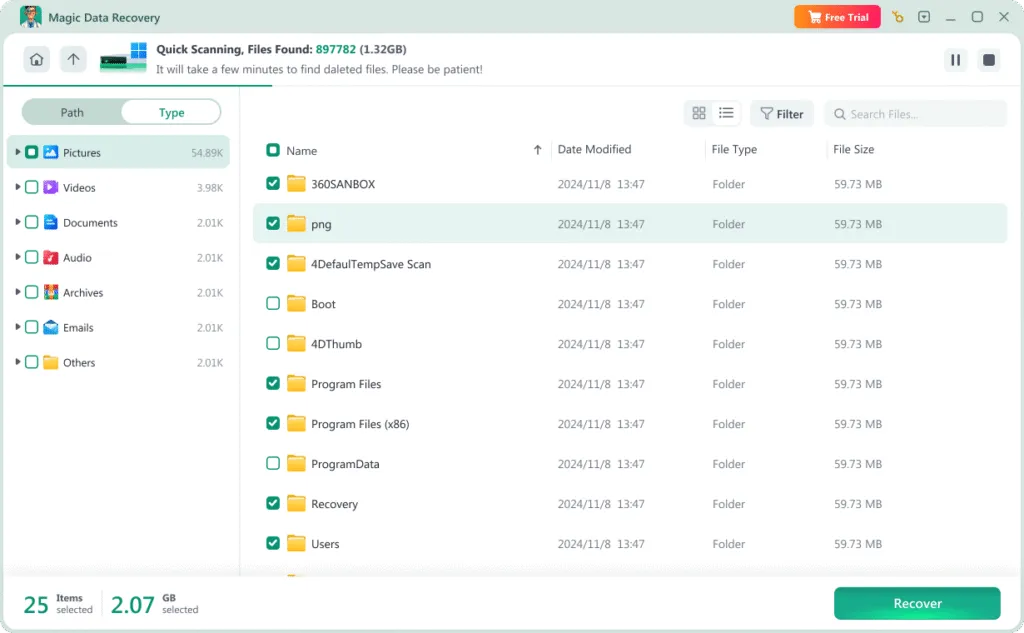

5. Recuperare i file: Selezionare i file desiderati e scegliere un'altra unità per salvarli. In questo modo si evita di sovrascrivere i dati originali. Fare clic su “Recupera” per completare il processo.

Recupero dei dati cancellati HDD vs SSD
La tecnologia di archiviazione svolge un ruolo importante nel determinare se le informazioni cancellate rimangano recuperabili.
Recupero dei dati cancellati da un disco rigido
I dischi rigidi tradizionali spesso offrono migliori possibilità di recupero in caso di cancellazione accidentale.
Quando Windows elimina un file, i dati corrispondenti potrebbero rimanere sul disco fino a quando nuove informazioni non sovrascrivono quei settori.
Pertanto, un file cancellato accidentalmente da un disco rigido potrebbe comunque essere recuperabile se si smette immediatamente di utilizzare l'unità.
Il continuo scaricamento di file, l’installazione di software, gli aggiornamenti di Windows e il trasferimento di file possono ridurre tale possibilità.
Recupero dei dati cancellati da un SSD
Recupero SSD è meno prevedibile.
Molti SSD moderni supportano la funzione TRIM e la garbage collection interna. Dopo la cancellazione, il sistema operativo può comunicare all'SSD che determinati blocchi non sono più necessari. L'SSD può quindi elaborare tali blocchi internamente.
Una volta che i dati originali non sono più accessibili, i software di recupero standard potrebbero non essere in grado di ripristinarli.
Per questo motivo, se devi recuperare file importanti da un SSD, riduci immediatamente l'attività dell'unità.
Comune Recupero dei dati cancellati Errori da evitare
Anche un buon software di recupero dati non è in grado di correggere tutti gli errori commessi dopo la cancellazione.
Evitare quanto segue:
- Installazione del software di ripristino sull'unità fisica interessata
- Ripristino dei file sullo stesso dispositivo di origine
- Continuare a scaricare o copiare i file
- Formattare nuovamente l'unità
- Esecuzione ripetuta della scansione di un disco con problemi fisici
- Partendo dal presupposto che la presenza del nome del file indichi che il file stesso sia integro
- Continuare a utilizzare una scheda SD dopo aver cancellato foto importanti
Una strategia più sicura è semplice: smettere di scrivere nuovi dati, scegliere il metodo di recupero corretto, visualizzare in anteprima i file quando possibile e salvare i contenuti recuperati altrove.
Conclusione
Successo recupero dei dati cancellati Si parte da una regola fondamentale: smettere di scrivere nuove informazioni sul dispositivo di archiviazione interessato.
Successivamente, controlla il Cestino e i backup disponibili. Utilizza le opzioni di ripristino di Windows quando sono adatte alla situazione. Se hai bisogno di una scansione più approfondita, dell'anteprima dei file o di un flusso di lavoro grafico più semplice, un software di recupero dedicato diventa una scelta più pratica.
Magic Data Recovery merita di essere preso in considerazione dagli utenti comuni di Windows perché offre una procedura chiara per selezionare un dispositivo, eseguire la scansione alla ricerca di file cancellati, esaminare i risultati, visualizzare in anteprima i contenuti recuperabili e salvare i dati selezionati in un’altra posizione. Non elimina i limiti tecnici del recupero dati e non può garantire il recupero di file che sono già stati sovrascritti. Tuttavia, il suo flusso di lavoro visivo può rendere il recupero dei file cancellati rendere il processo più facile da comprendere e aiutare gli utenti a evitare gli errori più comuni nella riga di comando.
Se stai cercando una soluzione più efficace in caso di cancellazione accidentale, uso di Shift+Canc, svuotamento del Cestino o perdita di file da supporti rimovibili, ti consigliamo di provare Magic Data Recovery.
Supporta Windows 7/8/10/11 e Windows Server
FAQ
È possibile recuperare i dati cancellati in modo definitivo?
È possibile recuperare i file dopo aver svuotato il Cestino?
È possibile recuperare i file dopo aver premuto Shift+Canc?
È possibile recuperare i file cancellati da un SSD?
Posso recuperare i dati cancellati gratuitamente?
È possibile recuperare i file sovrascritti?
È consigliabile eseguire una scansione di un disco danneggiato fisicamente?

Vasilii è uno specialista del recupero dati con circa 10 anni di esperienza pratica nel settore. Nel corso della sua carriera, ha risolto con successo migliaia di casi complessi riguardanti file cancellati, unità formattate, partizioni perse e file system RAW. La sua esperienza copre sia i metodi di recupero manuale utilizzando strumenti professionali come gli editor esadecimali, sia le soluzioni automatiche avanzate con i software di recupero. La missione di Vasilii è quella di rendere accessibile la conoscenza del recupero dati affidabile sia ai professionisti IT che agli utenti di tutti i giorni, aiutandoli a salvaguardare i loro preziosi beni digitali.