
Best USB Flash Drive Data Recovery Software – Free & Paid Tools

Lost files from a USB flash drive? In many cases, USB flash drive recovery is possible after accidental deletion, quick formatting, RAW file system errors, virus attacks, or file system corruption. The most important rule is to stop using the USB drive immediately, because new data may overwrite the deleted files and make recovery impossible.
This guide explains how to recover files from a USB flash drive using built-in Windows tools, free recovery methods, and professional USB data recovery software like Magic Data Recovery. You’ll also learn which method works best for deleted files, formatted USB drives, corrupted drives, and physically damaged devices.
Supports Windows 7/8/10/11 and Windows Server
Table of Contents
Common USB Flash Drive Data Loss Scenarios
Deleted Files from USB Drive
Accidental deletion is the most common cause. Recovery software can usually restore these files if the drive hasn’t been overwritten.
Formatted USB Flash Drive
Quick format often only removes the file table, not the data itself. Recovery software can scan and restore files from formatted drives.
RAW or Corrupted USB Drive
A RAW USB drive indicates file system corruption. Do not format it; use recovery software to retrieve files safely.
USB Drive Not Recognized or Showing 0 Bytes
This often happens due to corrupted file systems. Recovery software may detect the drive even if Windows cannot.
Virus or Malware Deletion
Some malware hides or deletes files. Stop using the USB drive and scan it with antivirus before attempting recovery.
Physically Damaged USB Drive
Software cannot recover data from physically broken drives. Professional recovery services are needed.
Can You Recover Data from a USB Flash Drive?
Yes. Files deleted from a USB drive are not immediately erased—they remain on the drive until overwritten. Recovery success depends on:
- How the files were lost (deletion, formatting, corruption)
- Whether new data has been written to the drive
- The type of USB file system (FAT32, exFAT, NTFS)
- The condition of the drive (logical vs physical damage)
Tip: Stop using the USB drive immediately and do not save recovered files back to the same device.
Quick Comparison: USB Flash Drive Recovery Methods
Method | Best for | Cost | Difficulty | Risk |
Magic Data Recovery | Deleted, formatted, RAW, corrupted USB | Free scan / paid recovery | Easy | Low |
Windows File History | Files previously backed up | Free | Easy | Low |
Windows File Recovery | Advanced users, deleted files | Free | Hard | Medium |
CHKDSK | File system repair, inaccessible USB | Free | Medium | Medium to High |
Professional service | Physical damage, broken connector, water damage | Paid | Easy | Low |
Method 1: Restore USB Files from Backup or Previous Versions
This method is useful if you have backups or Windows Previous Versions enabled.
Steps:
- Check Windows File History or your backup solution for the lost files.
- Use Windows Previous Versions to restore an earlier version of the folder or file.
- Download or copy files from cloud backups (OneDrive, Google Drive, Dropbox) if available.
Tip: Always restore files to a different location than the original USB drive to avoid overwriting recoverable data.

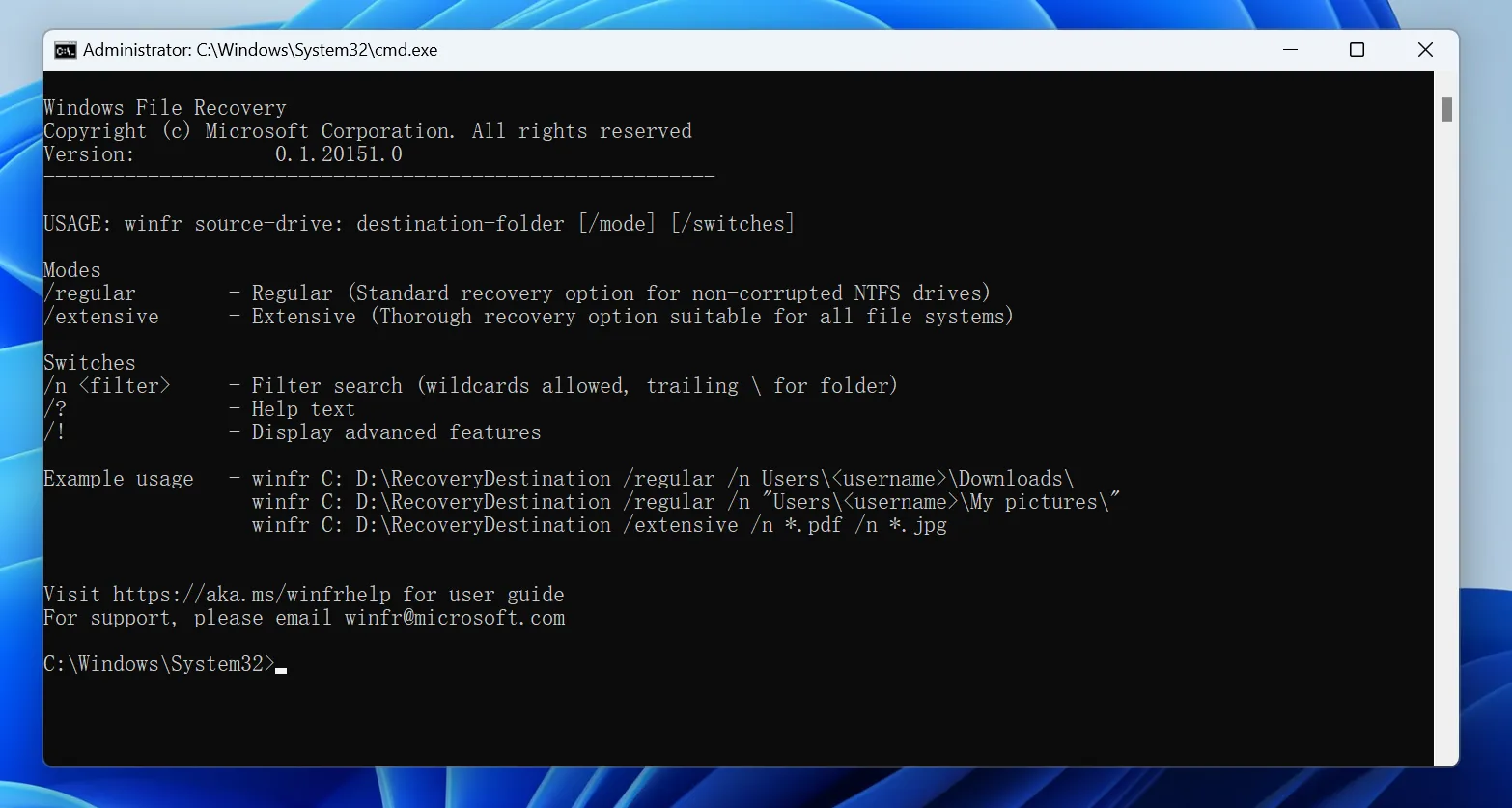
Method 2: Use Windows File Recovery (Advanced)
Steps:
- Install Windows File Recovery.
- Open Command Prompt and use syntax:
winfr X: Y: /n *.docx /r
- X: USB drive letter
- Y: destination drive
- /r: segment mode for deep recovery
- Check recovered files in the destination folder.
Note: This tool is command-line based and suitable for advanced users.
Method 3: Use CHKDSK Carefully
CHKDSK can fix file system errors but may overwrite data. Use only if you need to access a corrupted drive for scanning.
chkdsk X: /f
- Replace X with the USB drive letter.
- Always back up files before running CHKDSK.

Method 4: Recover USB Files with Magic Data Recovery
Follow these simple steps to get your files back:
1. Download & Install: Download and install Magic Data Recovery from the official website. Launch the application.
Supports Windows 7/8/10/11 and Windows Server



Best USB Flash Drive Recovery Software Compared
Software | Best for | OS | Free limit | Preview | Difficulty | Notes |
Magic Data Recovery | Overall USB recovery | Windows | Scan/preview/free test recovery | Yes | Easy | Supports deleted, formatted, RAW, corrupted files |
Recuva | Simple deleted file recovery | Windows | Free | Limited | Easy | Less suitable for complex cases |
PhotoRec | Deep signature recovery | Win/Mac/Linux | Free | No | Hard | May lose original filenames |
TestDisk | Partition repair | Win/Mac/Linux | Free | No | Hard | Not ideal for beginners |
Disk Drill | Mac and Windows | Win/Mac | Limited free recovery | Yes | Easy | Good interface, supports multiple file types |
EaseUS Data Recovery | Beginner-friendly | Win/Mac | Limited free recovery | Yes | Easy | Broad format & USB support |
Conclusion
While free methods and software can help in minor situations, their effectiveness is limited. For a reliable, high-success-rate USB flash drive recovery, a professional tool is often the only data recovery solution. Magic Data Recovery provides the perfect balance of powerful scanning technology, broad format support, and an exceptionally user-friendly interface, making it our top choice for USB flash drive recovery software.
Don’t risk permanent data loss. Download Magic Data Recovery today and restore your lost USB files with ease.
Supports Windows 7/8/10/11 and Windows Server
FAQ About USB Flash Drive Recovery
Is it possible to recover data from a physically damaged USB flash drive?
Does formatting a USB drive permanently erase data?
Can I recover files from a USB drive that shows as 'RAW' or has 0 bytes?
Can I recover deleted files from a USB flash drive?
How do I recover files from a formatted USB drive?
Can I recover USB files without software?
Does CHKDSK recover deleted files from a USB drive?

Erin Smith is recognized as one of the most professional writers at Amagicsoft. She has continually honed her writing skills over the past 10 years and helped millions of readers solve their tech problems.