
Che cos'è il file system FAT16

FAT16 File System (Tabella di allocazione dei file 16) è un primo file system su disco sviluppato da Microsoft e ampiamente utilizzato nel DOS e nei primi sistemi operativi Windows. Rappresenta uno dei primi approcci strutturati alla gestione dei file su dispositivi di archiviazione a blocchi. Sebbene oggi sia in gran parte obsoleto, il file system FAT16 è ancora presente nei sistemi legacy, nei dispositivi embedded, nelle apparecchiature industriali e nei vecchi supporti rimovibili.
Dal punto di vista del recupero dei dati, FAT16 è relativamente semplice rispetto ai moderni file system come NTFS. Questa semplicità può essere un vantaggio durante il recupero, in quanto le strutture dei file sono più facili da interpretare, ma introduce anche limitazioni significative in termini di capacità, affidabilità e tolleranza ai guasti.
Indice dei contenuti
Come funziona il file system FAT16
FAT16 organizza i dati utilizzando un sistema centralizzato di Tabella di allocazione dei file (FAT) che tiene traccia dello stato di ogni cluster sul disco. Ogni voce della tabella ha una larghezza di 16 bit, consentendo un massimo di 65.536 cluster indirizzabili.
I componenti strutturali principali includono:
- Settore di avvio:
Contiene i parametri essenziali del file system, come la dimensione del settore, la dimensione del cluster e la posizione FAT.
- Tabella di allocazione dei file:
Agisce come un elenco collegato che mappa i cluster che appartengono a un file. Ogni voce punta al cluster successivo nella catena o segna la fine del file.
- Directory radice:
Un'area della directory di dimensioni fisse che memorizza i metadati dei file, come il nome del file, le dimensioni, i timestamp e il cluster di partenza.
- Area dati:
L'area in cui viene memorizzato il contenuto effettivo del file.
A differenza di NTFS, FAT16 non utilizza il journaling dei metadati o gli attributi avanzati. La sua struttura è piatta, prevedibile e lineare.

Capacità e limiti del file system FAT16
File system FAT16 è stato progettato per dispositivi di archiviazione di dimensioni ridotte rispetto agli standard moderni. Le sue principali limitazioni includono:
- Dimensione massima del volume: In genere limitato a 2 GB
- Dimensione massima del file: Fino a 2 GB
- Dimensione fissa della directory principale: Numero limitato di iscrizioni
- Niente diario: Aumento del rischio di corruzione in caso di interruzione dell'alimentazione
- Nessuna autorizzazione o crittografia: Controlli di sicurezza minimi
Questi vincoli rendono la FAT16 inadatta ai sistemi operativi moderni, ma restano accettabili in ambienti in cui sono richieste semplicità e compatibilità.
FAT16 vs FAT32
Caratteristica | FAT16 | FAT32 |
Dimensione massima del volume | ~2 GB | ~2 TB |
Diario | No | No |
Autorizzazioni di sicurezza | No | No |
Directory principale | Fisso | Dinamico |
Complessità del recupero | Basso | Medio |
La semplicità di FAT16 riduce l'overhead, ma sacrifica la resilienza e la scalabilità.
Comportamento di cancellazione dei dati del file system FAT16
Quando un file viene eliminato su un volume FAT16:
- Il primo carattere della voce della directory viene sostituito da un marcatore di cancellazione.
- La catena di cluster è segnata come libera nella FAT
- I dati effettivi del file rimangono sul disco fino a quando non vengono sovrascritti.
Questo comportamento consente strumenti di recupero per ricostruire i file eliminati analizzando le voci delle directory, i resti di FAT e i cluster di dati grezzi.
Scenari comuni di perdita di dati FAT16
Poiché il file system FAT16 non dispone di journaling e ridondanza ed è vulnerabile a diverse modalità di guasto comuni:
- Rimozione impropria del dispositivo
- Perdita di potenza durante le operazioni di scrittura
- Corruzione del file system
- Cancellazione accidentale
- Formattazione logica
- Danno al settore di avvio
Se un volume FAT16 diventa illeggibile, il sistema operativo potrebbe segnalarlo come non formattato o inaccessibile. La buona notizia è che spesso i dati sono ancora presenti sul disco anche quando le voci delle directory sono danneggiate. Strumenti professionali come Magic Data Recovery può recuperare facilmente i dati.
Come recuperare i dati dalle unità FAT16?
Magic Data Recovery è specificamente ottimizzato per i file system legacy come FAT16 e può eseguire rapidamente la scansione delle tabelle FAT e delle directory principali. Anche quando i metadati critici del file system sono mancanti o danneggiati, Magic Data Recovery impiega una scansione profonda basata sulle firme per recuperare oltre 5.000 tipi di file riconoscendo i loro modelli binari unici, garantendo elevate percentuali di successo nel recupero da supporti obsoleti o danneggiati. Ecco i passaggi per recuperare i dati:
1. Scaricare e installare Magic Data Recovery.
È necessario installare il software su un'altra unità nel caso in cui i file persi vengano danneggiati.
Supporta Windows 7/8/10/11 e Windows Server
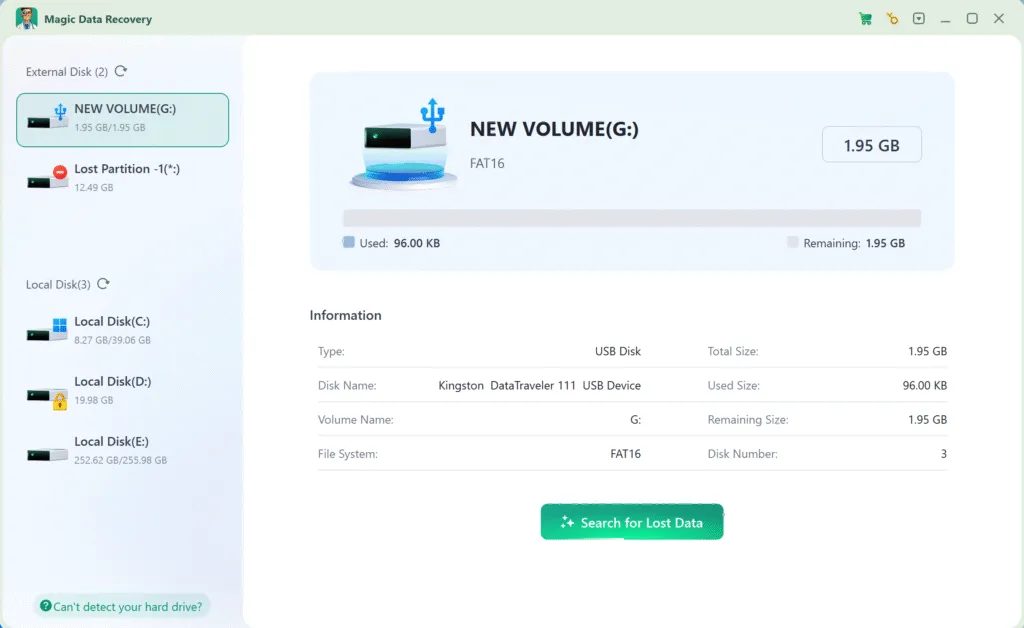
2. Selezionare l'unità FAT16 e avviare una scansione.
Quando si esegue il software, vengono elencate tutte le unità collegate all'unità. Selezionare l'unità FAT16 e avviare la scansione.
3. Attendere il completamento della scansione.
Esegue automaticamente la scansione avanzata per trovare ogni possibile file. Il tempo di scansione dipende principalmente dalla capacità e dalle prestazioni dell'unità.

4. Anteprima dei file.
Al termine della scansione, verranno elencati tutti i file trovati. È possibile utilizzare la funzione Anteprima per controllare il contenuto dei file e confermare se si tratta dei file desiderati.

5. Recuperare i dati.
Selezionare i file necessari e recuperarli su un'altra unità. Non recuperare i dati direttamente sull'unità FAT16 originale nel caso in cui i file vengano danneggiati.

Conclusione
Supporta Windows 7/8/10/11 e Windows Server
FAQ sul file system FAT16
FAT16 è un file system?
FAT32 è meglio di FAT16?
NTFS è uguale a FAT16?
Windows 10 può formattare FAT16?
Cosa è meglio, FAT o NTFS?
Si usa ancora il FAT?

Vasilii è uno specialista del recupero dati con circa 10 anni di esperienza pratica nel settore. Nel corso della sua carriera, ha risolto con successo migliaia di casi complessi riguardanti file cancellati, unità formattate, partizioni perse e file system RAW. La sua esperienza copre sia i metodi di recupero manuale utilizzando strumenti professionali come gli editor esadecimali, sia le soluzioni automatiche avanzate con i software di recupero. La missione di Vasilii è quella di rendere accessibile la conoscenza del recupero dati affidabile sia ai professionisti IT che agli utenti di tutti i giorni, aiutandoli a salvaguardare i loro preziosi beni digitali.