
Che cos'è il file system NTFS
NTFS (New Technology File System) è un file system di journaling proprietario sviluppato da Microsoft e utilizzato come file system predefinito per i moderni sistemi operativi Windows, compresi Windows 10 e Windows 11. È stato progettato per superare i limiti dei file system precedenti, come quelli di Windows 10. È stato progettato per superare le limitazioni dei file system precedenti, come ad esempio FAT32 fornendo maggiore affidabilità, sicurezza, scalabilità e prestazioni per gli ambienti di storage moderni.
Dal punto di vista del recupero dati e della digital forensics, NTFS è considerato un file system robusto e ricco di informazioni. Le sue strutture interne di metadati conservano dettagli approfonditi su file, autorizzazioni e modifiche, il che spesso rende possibile un recupero professionale anche dopo che il file è stato danneggiato. cancellazione accidentale o corruzione del file system.
Indice dei contenuti
Struttura del file system NTFS
NTFS è un file system robusto e altamente strutturato, progettato per la famiglia di sistemi operativi Windows NT. La sua struttura complessiva può essere suddivisa in diverse aree chiave che garantiscono l'organizzazione, la sicurezza e l'integrità dei dati:
1. Settore di avvio (settore di avvio della partizione)
Il volume NTFS inizia con il simbolo Settore di avvio (noto anche come Settore di avvio della partizione, o PBS). Questo settore critico si trova all'inizio del volume.
- Contiene il Codice Bootstrap (il codice necessario per caricare il sistema operativo) e il file Blocco parametri BIOS (BPB).
- Il BPB è fondamentale in quanto definisce le caratteristiche fisiche e logiche del volume, come la dimensione del cluster (unità di allocazione) e, soprattutto, la posizione esatta del volume. Tabella file master (MFT).
2. Tabella file master (MFT)
Il Tabella file master ($MFT) è il cuore del file system NTFS. Si tratta essenzialmente di un indice che registra i metadati per ogni file e directory sul volume, compreso l'MFT stesso.
- Iscrizioni MFT: Ogni file e cartella è rappresentato da un file di 1KB Ingresso MFT. Questa voce memorizza i metadati del file, come il nome, le autorizzazioni di sicurezza, i timestamp e la posizione dei dati.
- Attributi: I dati di una voce MFT sono organizzati in attributi.
- Per file di piccole dimensioni, i dati sono memorizzati direttamente all'interno della voce MFT (una voce di attributo residente).
- Per file più grandi, la voce MFT memorizza puntatori (o “data runs”) che indicano dove si trovano fisicamente i dati del file sul disco (a attributo non residente).
3. Specchio MFT ($MFTMirr)
Il Specchio MFT ($MFTMirr) è una funzione di sicurezza situata vicino alla parte centrale del volume. Memorizza una copia del file prime quattro voci critiche dell'MFT. Se l'MFT primario è danneggiato, il sistema può utilizzare questo mirror per individuare i record MFT rimanenti e tentare di ripristinare la struttura del file system.
4. Area dei file di sistema
NTFS riserva un'area dedicata ai file di metadati speciali, spesso chiamati File di sistema. Questi file iniziano tutti con il segno del dollaro ($) e sono fondamentali per il funzionamento e l'integrità del file system:
- $LogFile: Il File di registro transazionale registra le modifiche ai metadati prima che vengano applicate all'MFT. Questo è essenziale per la capacità del sistema di recuperare la coerenza dopo un'interruzione di corrente o un crash del sistema (Journaling File System).
- $Bitmap: Traccia lo stato di allocazione di ogni cluster sul volume (se è libero o in uso).
- 1TP14Volume: Contiene informazioni generali sul volume, come la versione e l'etichetta.
5. Area dati
La parte restante del volume è la Area dati, che è il luogo in cui sono memorizzati i contenuti effettivi del file (le esecuzioni dei dati). La posizione di questi dati è indicata dagli attributi non residenti nelle voci MFT.
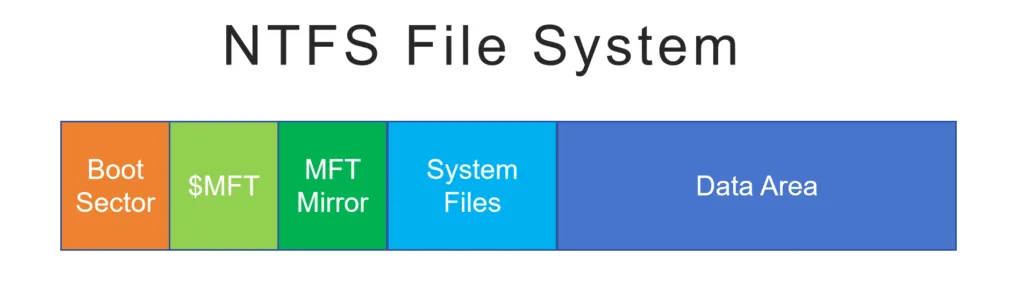
Architettura di base del file system NTFS
NTFS è costruito attorno a una struttura di metadati centralizzata, denominata Tabella file master (MFT). Secondo Documentazione Microsoft, Ogni file e directory di un volume NTFS, compresi i file di sistema, è rappresentato da almeno un record nell'MFT.
I componenti architettonici chiave includono:
- Tabella file master (MFT):
Funge da indice di tutti i file e le directory. Ogni voce contiene attributi che descrivono il nome del file, la dimensione, i timestamp, i permessi e la posizione fisica del disco.
- Attributi del file:
NTFS memorizza i dati come una raccolta di attributi piuttosto che come voci fisse della directory. Gli attributi più comuni sono $STANDARD_INFORMATION, $FILE_NAME e $DATA.
- Cluster e allocazione:
NTFS alloca lo spazio di archiviazione in cluster, in genere 4 KB per impostazione predefinita. I file possono essere memorizzati in modo residente (all'interno del record MFT) o non residente (con riferimento alle estensioni del disco).
Questo design consente a NTFS di gestire in modo efficiente grandi volumi e milioni di file, mantenendo prestazioni costanti.
Diario e affidabilità
Una delle caratteristiche che contraddistinguono NTFS è il suo funzionalità di journaling. NTFS mantiene un registro delle transazioni ($LogFile) che registra le modifiche ai metadati prima che vengano commutate su disco.
Se un sistema si blocca o perde l'alimentazione:
- NTFS riproduce il journal durante l'avvio successivo.
- Le operazioni sui metadati incomplete vengono annullate o completate.
- La coerenza del file system viene ripristinata automaticamente
La buona notizia è che il journaling riduce notevolmente il rischio di corruzione del file system. Sebbene non protegga dai guasti hardware, migliora notevolmente la recuperabilità dopo arresti imprevisti.
Sicurezza e autorizzazioni
NTFS offre meccanismi di sicurezza avanzati e strettamente integrati con Windows:
- Elenchi di controllo degli accessi (ACL):
Definire con precisione le autorizzazioni di lettura, scrittura ed esecuzione per gli utenti e i gruppi.
- Crittografia (EFS):
Consente la crittografia trasparente dei file a livello di file system.
- Proprietà e revisione contabile:
Traccia la proprietà dei file e gli eventi di accesso per la conformità e l'analisi forense.
Queste caratteristiche rendono NTFS adatto agli ambienti aziendali, ma introducono anche una certa complessità durante il recupero dei dati. Gli strumenti professionali devono interpretare correttamente le autorizzazioni e i dati crittografati per evitare ulteriori perdite di dati.
NTFS vs. FAT32 ed exFAT
Rispetto ai vecchi file system, NTFS offre diversi vantaggi evidenti:
Caratteristica | NTFS | FAT32 | exFAT |
Dimensione massima del file | ~16 TB | 4 GB | ~16 EB |
Diario | Sì | No | No |
Permessi | Sì | No | No |
Crittografia | Sì | No | No |
Affidabilità | Alto | Basso | Medio |
Per le unità di sistema interne, la scelta consigliata è NTFS. FAT32 e exFAT sono in genere riservati ai supporti rimovibili o alla compatibilità multipiattaforma.
Problemi comuni legati al file system NTFS
Nonostante la sua robustezza, i volumi NTFS possono comunque presentare problemi, tra cui:
- Eliminazione accidentale di file
- Corruzione del file system con conseguente stato RAW
- Danno MFT dovuto a settori danneggiati
- Perdita della tabella di partizione
- Clonazione o ridimensionamento improprio del disco
Non fatevi prendere dal panico se un'unità NTFS diventa inaccessibile. In molti casi, i dati dei file rimangono intatti sul disco anche se le strutture del file system sono danneggiate.
Recupero dei dati da un'unità NTFS
Se un volume NTFS diventa inaccessibile o mancano dei file, seguire un processo di ripristino controllato:
1. Interrompere immediatamente l'utilizzo dell'unità interessata
L'uso continuato aumenta il rischio di sovrascrivere i dati recuperabili.
2. Evitare l'esecuzione automatica di CHKDSK
Sebbene sia utile in alcuni casi, CHKDSK può rimuovere in modo permanente le voci di metadati danneggiate.
3. Utilizzare un software di recupero in sola lettura
Strumenti come Magic Data Recovery analizzare i metadati NTFS senza modificare l'unità originale.
4. Scansione del volume e anteprima dei file
Verificare la ripristinabilità prima di eseguire qualsiasi operazione di ripristino.
5. Recuperare i dati su un dispositivo di archiviazione separato
Non scrivere mai i file recuperati sull'unità di origine.
Questo approccio metodico riduce al minimo i rischi e massimizza l'accuratezza del recupero.
Il file system NTFS nella scienza forense digitale
NTFS è ampiamente utilizzato nelle indagini forensi perché preserva i dati:
- Timestamp di creazione, modifica e accesso ai file
- Record di file eliminati nell'MFT
- Flussi di dati alternativi (ADS)
- USN Cronologia del diario delle modifiche
Questi artefatti consentono agli investigatori di ricostruire la cronologia delle attività dei file anche dopo la loro eliminazione. Da un punto di vista forense, NTFS fornisce un valore probatorio significativamente maggiore rispetto ai file system che non prevedono la registrazione.
Migliori pratiche per gli utenti NTFS
Per mantenere l'integrità e la recuperabilità di NTFS:
- Mantenere backup regolari
- Monitorare la salute del disco (stato SMART)
- Evitare la rimozione non sicura del disco
- Utilizzare strumenti professionali per la modifica delle partizioni
- Agite rapidamente dopo gli incidenti di perdita dei dati
La preparazione e la risposta adeguata sono le garanzie più efficaci contro la perdita permanente dei dati.
Conclusione
Supporta Windows 7/8/10/11 e Windows Server
Domande frequenti sul file system NTFS
NTFS è buono o cattivo?
Windows utilizza ancora NTFS?
NTFS significa SSD o HDD?
Devo disattivare NTFS?
Cosa succede se formatto l'unità USB in NTFS?

Vasilii è uno specialista del recupero dati con circa 10 anni di esperienza pratica nel settore. Nel corso della sua carriera, ha risolto con successo migliaia di casi complessi riguardanti file cancellati, unità formattate, partizioni perse e file system RAW. La sua esperienza copre sia i metodi di recupero manuale utilizzando strumenti professionali come gli editor esadecimali, sia le soluzioni automatiche avanzate con i software di recupero. La missione di Vasilii è quella di rendere accessibile la conoscenza del recupero dati affidabile sia ai professionisti IT che agli utenti di tutti i giorni, aiutandoli a salvaguardare i loro preziosi beni digitali.