
Che cos'è il file system exFAT
Il Sistema di file exFAT è una scelta pratica quando occorre archiviare file di grandi dimensioni su supporti rimovibili e utilizzare la stessa unità su sistemi operativi diversi. Consente di evitare FAT32’il limite di 4 GB per file, pur mantenendo una struttura più semplice rispetto a NTFS. Di conseguenza, il formato exFAT è comunemente utilizzato su chiavette USB, schede SDXC, dischi rigidi esterni e SSD portatili.
Tuttavia, exFAT non è la soluzione ideale per tutte le attività di archiviazione. Manca infatti di alcune funzionalità presenti in NTFS, tra cui il journaling e i permessi avanzati. Questa guida spiega Che cos’è exFAT?, come funziona, Compatibilità con exFAT, exFAT vs FAT32, exFAT vs NTFS, e cosa fare se i file scompaiono.
Indice dei contenuti
Scopo e filosofia di progettazione del file system exFAT
exFAT è stato introdotto per risolvere un problema specifico: sistemi di file FAT tradizionali erano semplici e ampiamente compatibili, ma sempre più inadatti alle moderne esigenze di archiviazione. FAT32 non può memorizzare file di dimensioni superiori a 4 GB, il che lo rende poco pratico per video ad alta risoluzione, immagini del disco o backup di sistema.
A differenza di NTFS, exFAT, che include journaling, liste di controllo degli accessi e strutture di metadati complesse, è intenzionalmente leggero. Rimuove i vincoli tradizionali evitando l'overhead che può ridurre le prestazioni di uno storage rimovibile o basato su memoria flash.
Microsoft documenta ufficialmente exFAT come file system ottimizzato per i dispositivi di memoria flash, dove la minimizzazione dell'amplificazione della scrittura e della complessità dei metadati è fondamentale sia per la velocità che per la longevità del dispositivo.
Panoramica sul file system exFAT
Caratteristica | exFAT |
Nome completo | Tabella di allocazione dei file estensibile |
Sviluppato da | Microsoft |
Il migliore per | Supporti di archiviazione rimovibili e file di grandi dimensioni compatibili con diverse piattaforme |
Limite di 4 GB per i file in FAT32 | No |
Diario | No |
Supporto per Windows | Sì |
Supporto per macOS | Sì |
Supporto per le versioni moderne di Linux | Sì |
Dispositivi comuni | Chiavette USB, schede SDXC, dischi rigidi esterni, SSD portatili |
La scelta migliore per l'unità di sistema | Di solito no |
In breve, il Sistema di file exFAT funziona al meglio quando la portabilità e il supporto per file di grandi dimensioni sono più importanti rispetto alle funzionalità avanzate del file system.
Caratteristiche tecniche principali del file system exFAT
- Dimensione massima del file: Fino a 16 EB (limite teorico)
- Dimensione massima del volume: Fino a 128 PB (a seconda dell'implementazione)
- Niente diario: Migliora le prestazioni ma riduce la resistenza agli incidenti
- Dimensione del cluster: Supporta cluster di grandi dimensioni configurabili per un'archiviazione efficiente di file di grandi dimensioni.
- Allocazione della bitmap: Migliora il tracciamento dello spazio e riduce l'overhead della scansione FAT
Queste caratteristiche consentono a exFAT di gestire i moderni carichi di lavoro, come i file video 4K/8K e gli archivi di grandi dimensioni, senza i problemi di compatibilità di NTFS o le restrizioni sulle dimensioni dei file di FAT32.
exFAT, FAT32 e NTFS: qual è il migliore?
Scegliere tra exFAT vs FAT32 e exFAT vs NTFS dipende dalle dimensioni del file, dalla compatibilità del dispositivo e dai requisiti del sistema operativo.
Caratteristica | FAT32 | exFAT | NTFS |
File di dimensioni superiori a 4 GB | No | Sì | Sì |
Lettura/scrittura su Windows | Sì | Sì | Sì |
macOS in lettura/scrittura | Sì | Sì | Il supporto nativo per la scrittura è più limitato |
Supporto per le versioni moderne di Linux | Sì | Sì | Sì |
Diario | No | No | Sì |
Permessi in stile NTFS | No | No | Sì |
Compatibilità con i dispositivi meno recenti | Molto forte | Variabile | Più limitato |
File di grandi dimensioni multipiattaforma | Povero | Forte | Meno pratico per l'accesso in scrittura su Mac |
Unità di sistema di Windows | No | No | La scelta migliore |
La documentazione di Windows di Microsoft distingue inoltre l'exFAT dall'NTFS in ambiti quali il journaling, i collegamenti, la sicurezza e altre funzioni del file system.
Apple sottolinea inoltre che ExFAT è un formato compatibile con Windows, mentre macOS può leggere le unità NTFS senza però offrire la stessa capacità di scrittura nativa.
exFAT vs FAT32
Scegli FAT32 quando è importante garantire la massima compatibilità con l'hardware meno recente e ogni file ha una dimensione inferiore a 4 GB.
Scegli exFAT quando hai bisogno del supporto per file di grandi dimensioni e i dispositivi di destinazione lo supportano.
Ad esempio, il formato FAT32 può ancora essere una scelta sensata per un impianto stereo da auto o un televisore di vecchia generazione. Tuttavia, un’unità portatile moderna che contiene video di grandi dimensioni funzionerà solitamente meglio con il formato exFAT.
exFAT vs NTFS
Scegliere NTFS per i dischi di sistema di Windows, le unità interne destinate a Windows, i permessi e la registrazione in journal.
Scegli exFAT per i supporti rimovibili che richiedono un accesso semplice in lettura e scrittura sia su Windows che su macOS.
In parole povere, NTFS offre funzionalità più avanzate, mentre exFAT punta maggiormente sulla portabilità.
Quando è consigliabile utilizzare il file system exFAT?
Il Sistema di file exFAT è una buona scelta quando:
- Devi trasferire file di dimensioni superiori a 4 GB.
- Si trasferisce un SSD portatile da Windows a macOS.
- Si utilizza una scheda SDXC in un dispositivo che supporta ufficialmente il formato exFAT.
- Conservi video di grandi dimensioni, archivi, file di progetto o backup.
- Non sono necessari né i permessi NTFS né la funzione di journaling.
Ad esempio, un videografo potrebbe utilizzare un SSD portatile per trasferire filmati ad alta risoluzione da una workstation Windows a un MacBook.
Il formato FAT32 potrebbe non funzionare a causa del limite di 4 GB. D’altra parte, il formato NTFS può rendere meno pratico l’accesso in scrittura nativo su Mac. In questo caso, il formato exFAT offre una soluzione pratica.
Un altro esempio comune riguarda una chiavetta USB di grande capacità utilizzata per file ISO o archivi video. Se i singoli file superano i 4 GB, scegliere il formato FAT32 comporterebbe una limitazione inutile.
Rischi di perdita dei dati nel file system exFAT
Sebbene exFAT sia efficiente, manca di journaling, ovvero non mantiene un registro transazionale delle modifiche al file system. Di conseguenza, è più vulnerabile alla corruzione causata da:
- Rimozione non sicura del dispositivo
- Perdita di potenza durante le operazioni di scrittura
- Errori di conversione o formattazione del file system
- Corruzione logica delle tabelle di allocazione
La buona notizia è che la struttura relativamente semplice dei metadati di exFAT rende spesso possibile il recupero dei dati, a condizione che il dispositivo di archiviazione non sia stato sovrascritto.
Come il file system exFAT memorizza e perde i file
exFAT utilizza una combinazione di tabelle di allocazione e bitmap per tenere traccia dei cluster utilizzati e liberi. Quando un file viene eliminato, la sua voce di directory è contrassegnata come inutilizzata, ma i cluster di dati sottostanti rimangono intatti finché non vengono sovrascritti.
Questo comportamento significa che i file eliminati non vengono immediatamente distrutti. Dal punto di vista forense e del recupero, questo permette agli strumenti di scansione di sola lettura come Magic Data Recovery per recuperare i dati se le catene di cluster sono ancora intatte.
Come formattare un'unità in exFAT
La formattazione modifica il file system e può impedire l'accesso ai dati esistenti, pertanto è consigliabile eseguire prima un backup dei file importanti.
Come formattare un disco in exFAT su Windows
- Collegare l'unità USB, la scheda SD o il disco esterno di destinazione.
- Aprire Esplora file.
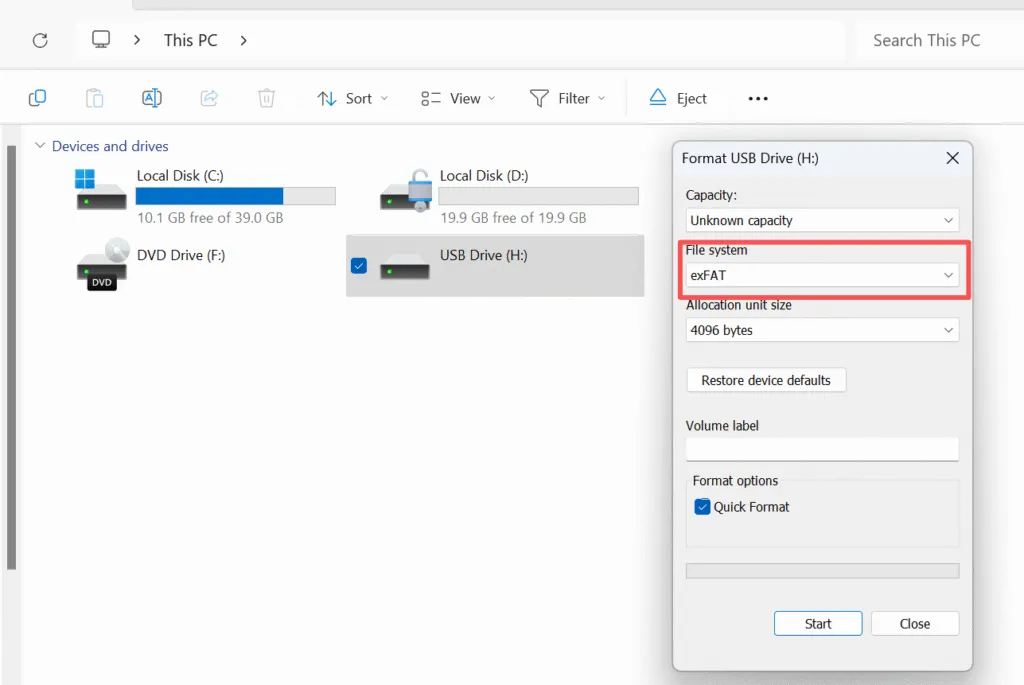
- Fai clic con il tasto destro del mouse sull'unità corretta e seleziona Formato.
- Scegliere exFAT nella sezione "File system".
- Mantenere la dimensione predefinita dell'unità di allocazione, a meno che non vi siano esigenze specifiche.
- Cliccare Inizio e confermare.
Windows supporta il formato exFAT tramite i propri strumenti di formattazione standard. Microsoft raccomanda inoltre di utilizzare le impostazioni di allocazione predefinite per la formattazione generica, a meno che un carico di lavoro specifico non richieda un valore diverso.
Controlla sempre con attenzione la lettera dell'unità prima di fare clic su "Avvia". La formattazione dell'unità sbagliata può causare una grave perdita di dati.
Come formattare un disco in exFAT su macOS
- Aprire Utility Disco.
- Selezionare l'unità o il volume corretto.
- Cliccare Cancella.
- Scegliere exFAT.
- Selezionare lo schema di partizione appropriato.
- Confermare la cancellazione.
Apple offre ufficialmente ExFAT come opzione in Utility Disco per i dispositivi di archiviazione che richiedono la compatibilità con Windows.
Quali sono le cause della perdita di dati in formato exFAT?
Un unità exFAT si può perdere l'accesso ai file a causa di:
- Cancellazione accidentale
- Formattazione rapida
- Rimozione non sicura dell'unità
- Perdita di alimentazione durante un’operazione di scrittura
- Metadati del file system danneggiati
- Partizioni perse o inaccessibili
- Malware o errori del software
- Guasto fisico del dispositivo di archiviazione
Un errore comune è quello di continuare a copiare file sull'unità anche dopo che i dati sono scomparsi.
Le nuove operazioni di scrittura potrebbero sovrascrivere aree di memoria che contengono ancora dati recuperabili. Pertanto, smettete di utilizzare il dispositivo interessato il prima possibile qualora dovessero andare persi file importanti.
Come recuperare i dati da un'unità exFAT
Se si perdono dati da un dispositivo formattato con exFAT, non bisogna farsi prendere dal panico. In molti casi, il recupero è possibile se si agisce rapidamente.
Approccio graduale:
1. Interrompere immediatamente l'uso del dispositivo
L'uso continuato aumenta il rischio di sovrascrivere i dati recuperabili.
2. Collegare il dispositivo in modalità di sola lettura, se possibile.
Evitare le riparazioni del file system o le richieste di formattazione da parte del sistema operativo.
3. Eseguire la scansione con uno strumento di recupero professionale
Strumenti come Magic Data Recovery sono progettati per analizzare le tabelle di allocazione exFAT e ricostruire i file eliminati in modo sicuro senza modificare il supporto originale.
4. Anteprima dei file recuperabili
L'anteprima dei file aiuta a verificare l'integrità dei dati prima del ripristino.
5. Ripristino in un'altra posizione di archiviazione
Non ripristinare mai i file sullo stesso dispositivo exFAT.
Questo processo logico e controllato massimizza il successo del recupero, riducendo al minimo ulteriori rischi.
Prospettiva professionale
Dal punto di vista del recupero dei dati, exFAT è più facile da analizzare rispetto a NTFS ma più vulnerabile a interruzioni improvvise a causa della mancanza di journaling. Questo compromesso è intenzionale e accettabile per l'archiviazione portatile, a condizione che gli utenti mantengano i backup e seguano pratiche di rimozione sicure.
Quando si verificano dei guasti, è essenziale un software di recupero di livello professionale che operi in modalità di sola lettura. Magic Data Recovery è una soluzione affidabile e non distruttiva per la scansione dei volumi exFAT e il ripristino sicuro dei dati persi.
Conclusione
Il Sistema di file exFAT è una delle migliori soluzioni per l'archiviazione rimovibile moderna quando serve il supporto per file di grandi dimensioni e una comoda compatibilità con Windows e macOS.
Funziona particolarmente bene con chiavette USB, schede SDXC, dischi rigidi esterni e SSD portatili.
Utilizzo NTFS per le unità di sistema di Windows, FAT32 per garantire la compatibilità con i dispositivi meno recenti, ed exFAT quando la portabilità e i file di grandi dimensioni sono la priorità.
Se su un'unità exFAT sono già stati persi dei file a causa di cancellazioni, formattazioni o errori del file system, smettete di scriverci nuovi dati.
Magic Data Recovery merita di essere preso in considerazione perché supporta il formato exFAT, offre la scansione in sola lettura e l’anteprima dei file e segue un flusso di lavoro semplice: scansione, anteprima, recupero.
Se stai cercando una soluzione più efficace per il recupero dei dati persi su un'unità exFAT, puoi provare Magic Data Recovery ed eseguire prima una scansione dell'unità interessata per verificare quali file siano ancora recuperabili.
Supporta Windows 7/8/10/11 e Windows Server
FAQ: Sistema di file exFAT
ExFAT è un buon file system?
ExFAT è migliore di NTFS?
A cosa serve il file system exFAT?
ExFAT è la stessa cosa di FAT32?
Qual è lo svantaggio di exFAT?
ExFAT va bene per Windows?
ExFAT va bene per le unità SSD?
È sicuro cambiare exFAT in NTFS?

Vasilii è uno specialista del recupero dati con circa 10 anni di esperienza pratica nel settore. Nel corso della sua carriera, ha risolto con successo migliaia di casi complessi riguardanti file cancellati, unità formattate, partizioni perse e file system RAW. La sua esperienza copre sia i metodi di recupero manuale utilizzando strumenti professionali come gli editor esadecimali, sia le soluzioni automatiche avanzate con i software di recupero. La missione di Vasilii è quella di rendere accessibile la conoscenza del recupero dati affidabile sia ai professionisti IT che agli utenti di tutti i giorni, aiutandoli a salvaguardare i loro preziosi beni digitali.