삭제된 사진 복구: Windows에서 삭제된 사진을 복구하는 방법

Windows에서 삭제된 사진 복구

Deleted photo recovery is often possible when pictures are accidentally deleted from a Windows PC, SD card, USB drive, or external hard drive. In most cases, deleting a photo removes its file system reference rather than immediately erasing the underlying data. Recovery remains possible until new data overwrites the same storage space.

Stop using the affected device as soon as you notice the loss. Do not take new photos on the SD card, copy files to the drive, or install recovery software on the same location. This guide explains how to recover deleted photos using the Recycle Bin, cloud services, Windows backups, Previous Versions, and Magic Data Recovery.

For additional photo-loss scenarios, visit our 사진 복구 가이드.

Windows 7/8/10/11 및 Windows Server 지원

목차

Can Deleted Photos Be Recovered?

Yes, deleted photos can often be recovered if their data has not been overwritten. Start by checking the Recycle Bin, cloud trash, and existing backups. If the photos were permanently deleted, removed from an SD card, or lost after formatting, scan the original storage device with photo recovery software.

Recovery chances are usually higher on HDDs, SD cards, and USB drives that have not been reused. Recovery from an SSD may be more difficult because TRIM can clear deleted storage blocks automatically.

Photo loss situation권장되는 첫 번째 조치회복 확률
Recently deleted on Windows휴지통 확인하기높음
Deleted from OneDriveOneDrive 휴지통 확인하기High within retention period
Shift + 삭제Scan the original driveDepends on overwriting
Deleted from an SD card카드 사용을 중지하고 스캔Often good if not reused
Quick-formatted card or drive심층 스캔 실행가능
Deleted from an SSDStop using it immediatelyMay be reduced by TRIM
Physically damaged device복구 서비스에 문의하기Software may not be suitable

Why Do Photos Get Deleted or Become Inaccessible?

Photos can disappear for different reasons, and the cause determines which recovery method is most appropriate:

  • 실수로 삭제되었습니다: Photos are removed through Delete, Shift + Delete, or an emptied Recycle Bin.
  • SD card or drive formatting: A quick format removes file system records, but some photo data may remain until overwritten.
  • 파일 시스템 손상: Unsafe ejection, power loss, or write errors can make a card or drive appear RAW or unreadable.
  • Missing partitions: Partition table damage may make an entire photo folder or volume disappear.
  • 악성코드: Some malware deletes files, while ransomware encrypts them. Recovery software cannot decrypt ransomware-encrypted photos.
  • Hardware failure: A clicking hard drive, disconnected storage device, or damaged memory card may require professional recovery.

Do not format, initialize, or run CHKDSK on a device containing missing photos before attempting recovery.

How to Recover Deleted Photos on Windows

Method 1: Restore Deleted Photos from the Recycle Bin

Photos deleted from an internal Windows drive usually move to the Recycle Bin unless you used Shift + Delete or emptied the bin.

  1. 휴지통을 엽니다.
  2. Search for the deleted photo by name, date, or file type.
  3. Right-click the photo.
  4. 선택 복원.

Windows returns the photo to its original folder. If the photo is not in the Recycle Bin, continue with the next method.

Method 2: Check OneDrive or Another Cloud Trash Folder

If your Pictures or Desktop folder was synchronized with OneDrive, Google Drive, or Dropbox, the deleted photo may still be available in the service’s online trash folder. Sign in through the official website, open the Recycle Bin or Deleted Files section, select the photo, and restore it.

Cloud trash has a limited retention period, so check it as soon as possible.

Method 3: Recover Photos from File History or Previous Versions

Windows File History can restore an earlier copy of a folder if backup protection was enabled before the photos were deleted.

  1. Open the folder that previously contained the photos.
  2. 폴더를 마우스 오른쪽 버튼으로 클릭하고 속성.
  3. 열기 이전 버전 탭을 클릭합니다.
  4. 사용 가능한 버전을 선택합니다.
  5. 클릭 열기 to verify its contents, and then choose 복원.

This method only works when File History, restore points, or another backup system was configured earlier.

Method 4: Recover Permanently Deleted Photos with Magic Data Recovery

If the photos are no longer in the Recycle Bin or backups, scan the original storage device with Magic Data Recovery. The software supports deleted photo recovery from Windows drives, external hard drives, USB drives, SD cards, and other detectable storage devices.

Install the program on a different drive from the one containing the deleted photos. Installing it on the affected drive could overwrite recoverable data.

다음 단계를 따르면 다음을 수행할 수 있는 최상의 기회를 얻을 수 있습니다. 삭제된 사진 복구 수행 사용 Magic Data Recovery:

1. 안전하게 다운로드하여 설치합니다: 다운로드 및 설치 Magic Data Recovery다른 드라이브 을 복구하려는 파일보다 먼저 설정하세요. 이렇게 하면 손실된 파일을 덮어쓰는 것을 방지할 수 있습니다.

Windows 7/8/10/11 및 Windows Server 지원
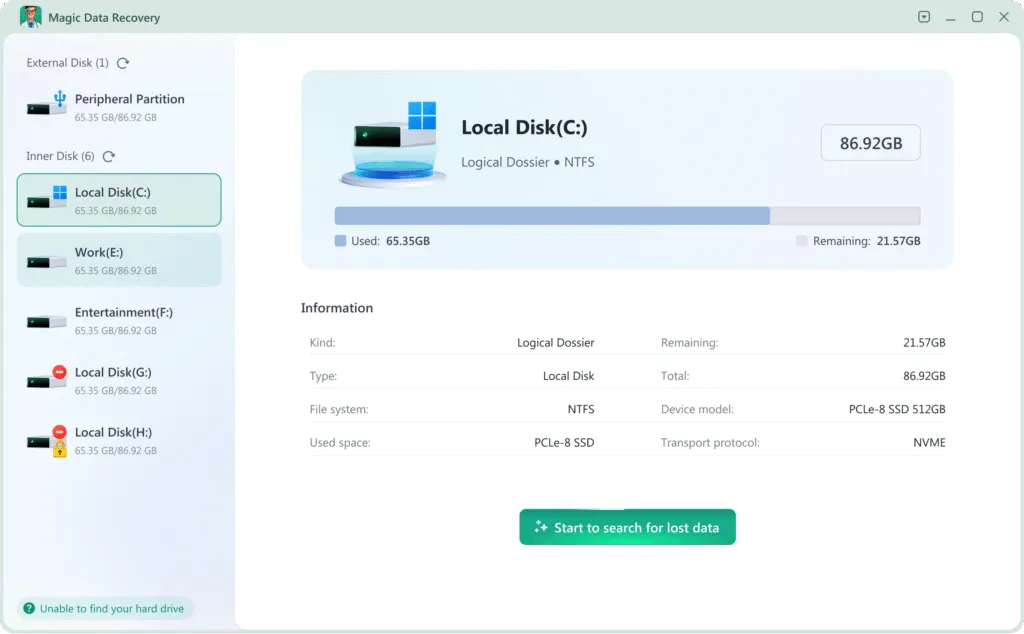
2. 2. 선택 및 스캔합니다: 소프트웨어를 시작합니다. 데이터가 손실된 하드 드라이브를 선택하고 ‘손실된 데이터 검색’. 소프트웨어가 빠른 스캔을 수행한 후 정밀 스캔을 수행합니다.
포맷된 HDD에서 파일을 복구하는 방법
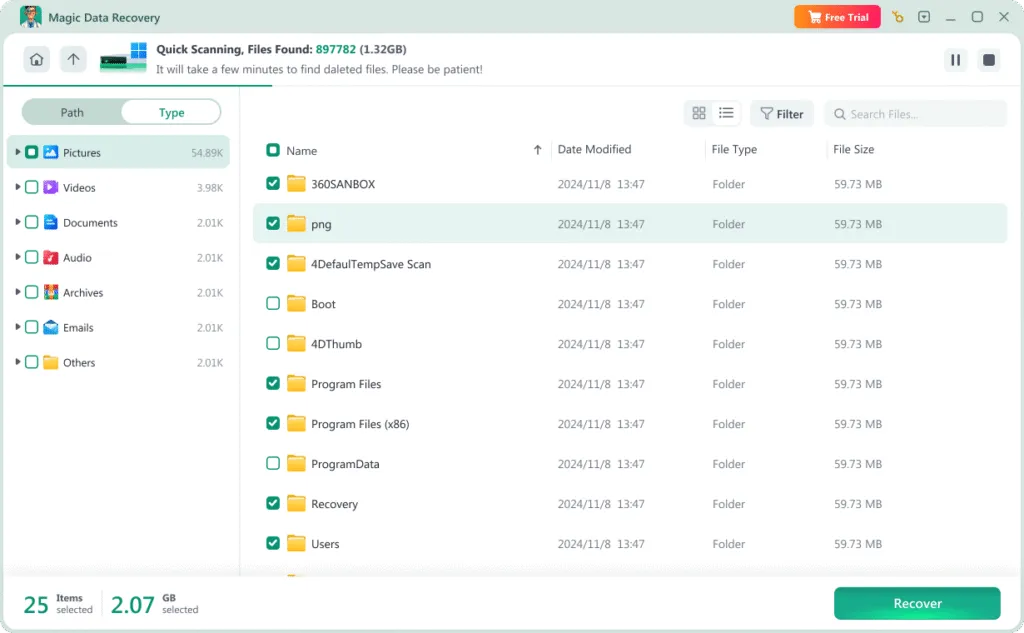
3. 3. 미리 보기 및 선택: 스캔이 끝나면 복구 가능한 파일을 찾아봅니다. 복구할 파일을 미리보기 기능 를 클릭하여 사진이나 문서를 확인합니다.
손실된 데이터 검색
4. 안전한 위치로 복구합니다: 필요한 파일을 선택해 다음 위치에 저장합니다. 다른 건강한 드라이브. 손상된 원래 드라이브에 다시 저장하지 마세요.
복구된 덮어쓰기 파일 저장
💡 전문가 팁: 최상의 결과를 얻으려면 항상 파일을 다른 저장 장치로 복구하여 데이터 덮어쓰기를 방지하세요.
동영상을 통해 Magic Data Recovery의 사용 단계에 대해 알아볼 수도 있습니다.

방법 5: 전문 복구 서비스에 문의

Stop using software and contact a professional recovery service if the storage device makes clicking or grinding sounds, disconnects repeatedly, is not detected in BIOS or Disk Management, or has suffered water, fire, or impact damage. Repeatedly powering on a physically damaged device may reduce the chance of successful recovery.

최종 생각

Deleted photo recovery is often possible, but the correct method depends on where the photos were stored and how they were lost. Start with the Recycle Bin, cloud trash, File History, and existing backups. If those options fail, scan the original device before new data overwrites the deleted photos.

Magic Data Recovery can scan Windows drives, SD cards, USB devices, and external storage for deleted and lost images. Preview the recoverable photos first and save selected files to a different drive.

For more photo-loss scenarios and recovery guidance, visit our 사진 복구 페이지.

Windows 7/8/10/11 및 Windows Server 지원
자주 묻는 질문

영구 삭제된 사진을 복구할 수 있나요?

Permanently deleted photos may be recoverable if their storage space has not been overwritten. Stop using the affected drive, SD card, or USB device immediately and scan it with photo recovery software. Recovery becomes less likely after new files are saved, the device is formatted repeatedly, or SSD TRIM clears the deleted blocks.

몇 달 전에 삭제한 사진을 복구할 수 있나요?

The deletion date alone does not determine whether a photo is recoverable. A photo deleted months ago may still exist on a storage device that has not been reused, while a recently deleted photo can become unrecoverable after extensive writing. The amount of overwritten data matters more than the time elapsed.

How can I recover deleted photos without software?

First check the Windows Recycle Bin, OneDrive Recycle Bin, Google Photos trash, File History, Previous Versions, and any external or cloud backups. If the photo is not available in any of these locations and was permanently deleted from local storage, recovery software is usually required.

Can deleted photos be recovered from an SD card?

Yes. Deleted photos can often be recovered from an SD card if the card is still detectable and has not been reused. Stop taking new photos, remove the card from the camera, connect it to Windows with a card reader, and recover the files to a different drive.

Can photos be recovered after formatting an SD card?

Photos may remain recoverable after a quick format because the operation usually recreates file system structures without immediately overwriting every data block. Run a deep scan before using the card again. Recovery is less likely after a full format, secure erase, or extensive reuse.

Why are some recovered photos corrupted?

A recovered photo may be corrupted when part of its data has been overwritten, the original file was fragmented, or the storage device contains bad sectors. Small previews or thumbnails may survive even when the full-size photo is damaged. Preview files before recovery and compare their dimensions and file sizes.

Can deleted photos be recovered from an SSD?

SSD photo recovery is possible in some cases, but TRIM and garbage collection can erase deleted blocks quickly. Stop using the SSD immediately. Recovery chances depend on the SSD controller, operating system, connection type, file system, TRIM status, and whether new data has been written.

복구된 사진은 어디에 저장해야 할까요?

Always save recovered photos to a different healthy drive, not the original device being scanned. Saving them to the source drive can overwrite other deleted photos that have not yet been recovered. After confirming that the recovered files open correctly, create at least one additional backup.

에린 스미스는 Amagicsoft에서 가장 전문적인 작가 중 한 명으로 인정받고 있습니다. 지난 10년간 꾸준히 글쓰기 기술을 연마해 왔으며 수백만 명의 독자가 기술 문제를 해결하는 데 도움을 주었습니다.