
마스터 파일 테이블이란 무엇이며 MFT 손상을 수정하는 방법
목차
마스터 파일 테이블 이해하기: 파일 시스템의 핵심
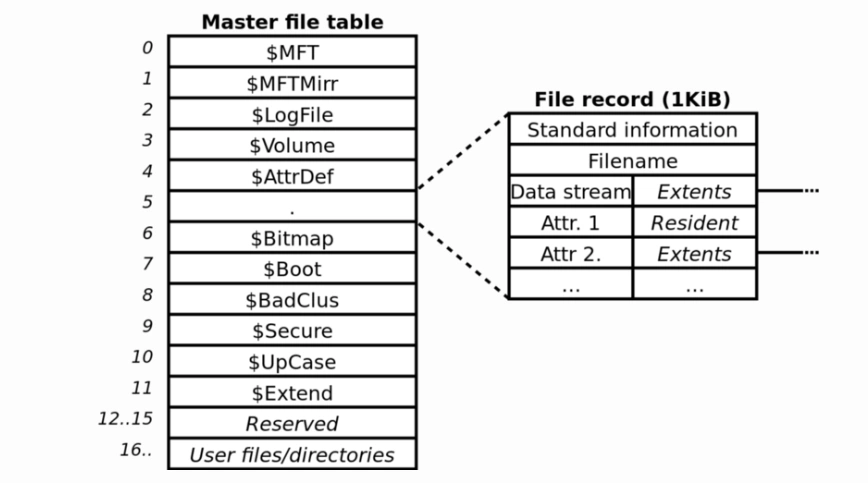
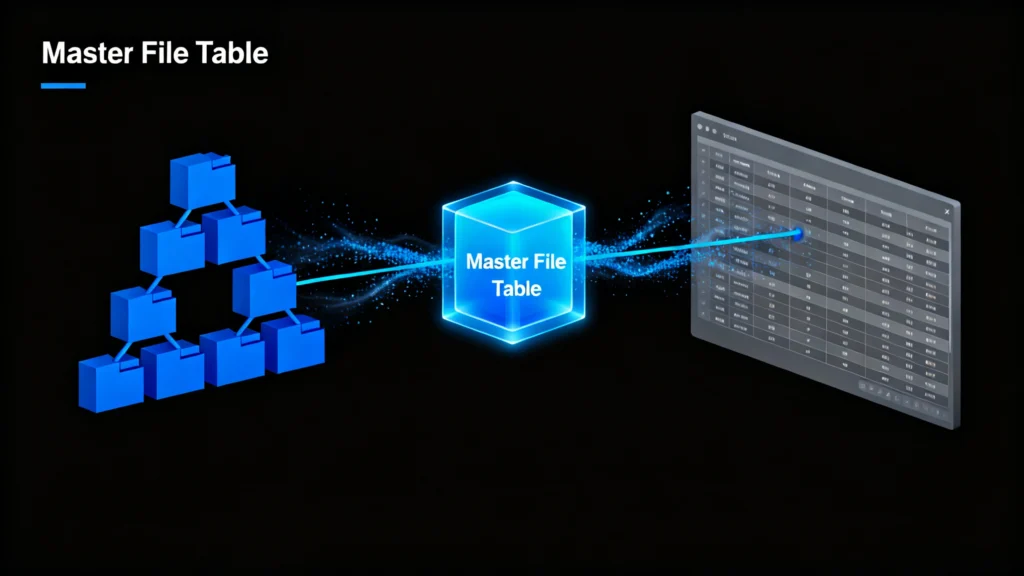
그리고 마스터 파일 테이블 (MFT)의 핵심 구성 요소입니다. NTFS 파일 시스템 Windows에서 사용됩니다. 이름, 크기, 타임스탬프, 실제 위치 포인터 등 드라이브의 모든 파일과 폴더에 대한 필수 메타데이터를 저장하는 상세 인덱스 또는 “파일 시스템 카탈로그'라고 생각하면 됩니다. Microsoft의 NTFS 설명서에 따르면 MFT는 시스템 안정성과 데이터 접근성을 위해 매우 중요합니다. 건강한 MFT가 없으면 운영 체제에서 파일을 찾거나 열 수 없습니다., 데이터가 물리적으로 디스크에 남아 있는 경우에도 마찬가지입니다.
MFT 손상의 일반적인 원인
몇 가지 요인으로 인해 마스터 파일 테이블, 를 포함합니다:
- 갑작스러운 전원 손실 또는 부적절한 종료
- 바이러스 또는 멀웨어 공격
- 스토리지 드라이브의 불량 섹터
- 파일 시스템 오류 또는 디스크 쓰기 실패
- 하드웨어 오작동 또는 드라이브 노후화
MFT가 손상되면 파일 누락과 같은 증상이 나타날 수 있습니다, 액세스할 수 없는 폴더, “원시” 드라이브 상태, 또는 잦은 시스템 충돌이 발생합니다.
MFT 손상을 수정하고 데이터를 복구하는 방법
전문 도구를 사용하기 전에 몇 가지 기본 제공 Windows 솔루션을 시도하여 MFT 관련 문제를 복구할 수 있습니다.
방법 1: Windows CHKDSK 유틸리티 사용
그리고 CHKDSK 명령 드라이브를 스캔하고 사소한 오류를 포함한 파일 시스템 오류를 수정합니다. 마스터 파일 테이블 불일치.
- 관리자 권한으로 명령 프롬프트를 엽니다.
- 유형
chkdsk C: /f를 클릭하고 Enter 키를 누릅니다(C:드라이브 문자와 함께). - 검사가 완료될 때까지 기다렸다가 컴퓨터를 다시 시작합니다.
동안 CHKDSK 일부 논리적 오류를 해결할 수는 있지만 손실된 파일을 복구하는 데는 도움이 되지 않으며 심각한 손상 시에는 데이터를 덮어쓸 수도 있습니다.
방법 2: Magic Data Recovery를 사용한 전문 MFT 손상 복구
기본 제공 도구에 장애가 발생하면 다음과 같은 전용 복구 솔루션이 필요합니다. Magic Data Recovery 는 더 안전하고 효과적인 접근 방식을 제공합니다. 시스템 유틸리티와 달리, Magic Data Recovery 는 읽기 전용 모드로 작동하므로 원본 데이터를 절대 변경하지 않습니다.
단계별 복구 프로세스:
1. 다운로드 및 설치 Magic Data Recovery 공식 웹사이트에서 Amagicsoft를 확인하세요.
Windows 7/8/10/11 및 Windows Server 지원




요약
마스터 파일 테이블 손상은 심각하지만 해결할 수 있는 문제입니다. Windows는 기본적인 복구 옵션을 제공하지만, 이러한 복구 옵션은 데이터에 제한적이고 위험한 경우가 많습니다. 다음과 같은 전문 도구 Magic Data Recovery 는 신뢰성, 안전성, 효율성 추가 손상 없이 파일을 복원할 수 있습니다.
파일이 손실된 것 같더라도 당황하지 마세요. 데이터가 실제로 사라진 것은 아니니까요. 올바른 접근 방식을 사용하면 가장 중요한 것을 복구할 수 있습니다.
다운로드 Magic Data Recovery 를 사용하여 몇 번의 클릭만으로 드라이브를 안전하게 스캔하고, 손상된 MFT 구조를 재구성하고, 액세스할 수 없는 파일을 복원할 수 있습니다.
Windows 7/8/10/11 및 Windows Server 지원
자주 묻는 질문
마스터 파일 테이블의 기능은 무엇인가요?
NTFS와 MFT의 차이점은 무엇인가요?
손상된 마스터 파일 테이블을 복구하는 방법은 무엇인가요?
마스터 파일 데이터란 무엇인가요?
마스터 파일의 용도는 무엇인가요?
손상된 MFT는 어떻게 복구하나요?
MFT는 어떤 용도로 사용되나요?
MFT를 삭제해도 안전한가요?

Jason는 15년 이상의 실무 경험을 갖춘 데이터 복구 및 기술 지원 전문가입니다. 그는 현장 사용자와 폭넓게 협력하며, 까다로운 데이터 손실 사례를 해결하고, 실수로 인한 삭제, 드라이브 포맷, 파일 시스템 손상, 파티션 손실, 시스템 장애 및 기타 긴급 복구 상황에 대한 실용적인 복구 솔루션을 제공해 왔습니다. 또한 백업 및 복원, 파일 복구, 재해 복구 분야에서도 전문성을 갖추고 있으며, 안전하고 신뢰할 수 있으며 기술적으로 정확한 지침을 제공하는 데 중점을 두고 있습니다.