
Backup completo versus backup incremental e diferencial
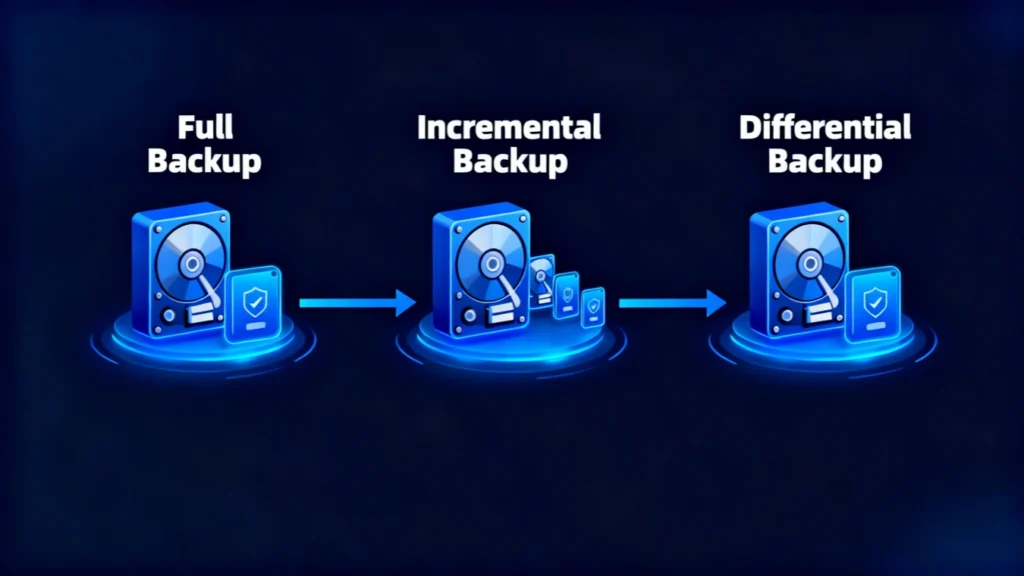
Perda de dados raramente acontece em um momento oportuno. Um disco rígido pode falhar, uma pasta importante pode ser apagada, um ransomware pode danificar arquivos acessíveis ou um conjunto de backups pode acabar sendo incompleto justamente quando você mais precisa dele. Por esse motivo, entender como um backup completo A avaliação das operações é uma das etapas mais importantes na elaboração de um plano confiável de proteção de dados.
A backup completo copia todos os dados selecionados dentro de um escopo de backup definido. Ao contrário de um backup incremental, que salva as alterações feitas desde o backup anterior, ou um backup diferencial, que salva as alterações feitas desde a última cópia completa, um backup completo cria uma linha de base de recuperação autônoma.
No entanto, uma cópia completa nem sempre é o mesmo que uma imagem do sistema. A diferença é importante quando você deseja recuperar arquivos individuais, restaurar um computador inteiro ou criar uma solução prática estratégia de backup.
Este guia explica como cada tipo de backup funciona, suas vantagens e limitações, quando utilizá-los e o que fazer caso seu backup esteja faltando, esteja corrompido ou indisponível.
Índice
O que é um Backup completo?
A backup completo é uma cópia completa de todos os dados selecionados para uma determinada tarefa de backup. Dependendo do software e da configuração, esse escopo pode incluir documentos, fotos, vídeos, bancos de dados, dados de aplicativos, pastas, partições ou um disco inteiro.
A principal vantagem é a independência.
Ao restaurar a partir de um backup completo, normalmente não é necessário ter uma sequência de arquivos incrementais anteriores. O conjunto de backup selecionado já contém os dados capturados naquele momento.
Por exemplo, imagine que uma empresa armazene 500 GB de arquivos de projetos em uma unidade compartilhada. Se ela criar uma cópia completa no domingo, o backup de domingo conterá todos os dados selecionados dos projetos. Se a unidade original apresentar falha na segunda-feira, o administrador poderá restaurar a cópia de domingo sem precisar primeiro reconstruir vários conjuntos de backups diários.
Essa estrutura simples de recuperação torna os backups completos particularmente úteis como pontos de referência para recuperação.
Como funciona um Backup completo Trabalho?
O processo básico geralmente segue quatro etapas:
- O software de backup identifica os arquivos, pastas, partições ou discos incluídos no escopo do backup.
- Ele lê todos os dados selecionados, em vez de apenas os arquivos alterados recentemente.
- Ele copia esses dados para outro local de armazenamento, como um disco externo, um dispositivo NAS, um servidor de backup ou um destino na nuvem.
- O software registra o conjunto de backup para que ele possa ser utilizado posteriormente na recuperação.
Como o software copia todo o conjunto de dados selecionado, um backup completo geralmente exige mais tempo e espaço de armazenamento do que um backup incremental ou backup diferencial.
No entanto, a recuperação costuma ser mais simples, pois há menos dependências.
O que é um Backup completo Incluir?
A resposta depende do que você decidir proteger.
Um erro comum é supor que todo backup completo inclui automaticamente o Windows, os aplicativos instalados, os arquivos pessoais, as configurações do sistema, as informações de inicialização e todas as partições do computador. Isso não é necessariamente verdade.
A palavra “completo” descreve o método de backup dentro do escopo selecionado. Ela não define automaticamente o próprio escopo.
Backup completo em nível de arquivo
Um backup em nível de arquivo pode incluir pastas selecionadas, tais como:
- Documentos
- Arquivos de desktop
- Fotos
- Vídeos
- Pastas de projetos
- Registros comerciais
- Dados da inscrição
Nesse caso, o backup completo contém todos os arquivos selecionados, mas pode não conter o sistema operacional nem a configuração de inicialização.
Backup de partição ou disco
Alguns aplicativos de backup podem proteger uma partição ou um disco inteiro.
Dependendo do software, isso pode incluir:
- Dados do sistema de arquivos
- Aplicações
- Arquivos do usuário
- Arquivos de sistema
- Estruturas de disco
- Partições de recuperação
Esse tipo de backup se aproxima mais do que muitos usuários chamam de backup de imagem.
Backup completo vs. backup incremental vs. backup diferencial
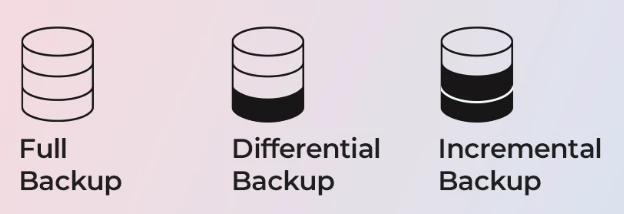
Compreender a diferença entre esses três métodos facilita a escolha do fluxo de trabalho de recuperação adequado.
Tipo de backup | O que ele copia | Velocidade do backup | Uso do espaço de armazenamento | Processo de restauração | Melhor uso |
Backup completo | Todos os dados selecionados | O mais lento | Mais alto | Simples | Backups de referência |
Backup incremental | Alterações desde o backup anterior | Mais rápido | Mais baixo | Requer cadeia de backup | Backups frequentes |
Backup diferencial | Alterações desde o último backup completo | Médio | Médio | Diferencial completo + mais recente | Equilíbrio entre velocidade e recuperação |
Backup completo vs Backup incremental
Um backup incremental armazena apenas os dados que foram alterados desde a operação de backup mais recente.
Por exemplo:
- Domingo: Backup completo
- Segunda-feira: Incremental A
- Terça-feira: Incremental B
- Quarta-feira: C incremental
Se for necessário restaurar os dados na quarta-feira, o processo de recuperação poderá exigir a cópia completa de domingo, além dos conjuntos incrementais de segunda, terça e quarta-feira.
A principal vantagem é a eficiência. Os backups incrementais são pequenos e geralmente são concluídos rapidamente.
A principal desvantagem é a dependência. Se parte da cadeia de backup ficar indisponível ou corrompida, a recuperação pode se tornar mais complicada.
Backup completo vs Backup diferencial
A backup diferencial registra todas as alterações feitas desde a última cópia completa.
Por exemplo:
- Domingo: Backup completo
- Segunda-feira: Mudanças desde domingo
- Terça-feira: Todas as alterações ocorridas desde domingo
- Quarta-feira: Todas as alterações ocorridas desde domingo
Para restaurar o estado de quarta-feira, geralmente é necessário ter o backup completo de domingo e o backup diferencial mais recente de quarta-feira.
Isso resulta em um meio-termo útil. Os conjuntos de backup aumentam ao longo do ciclo, mas o processo de restauração geralmente requer menos arquivos do que uma cadeia incremental.
Backup incremental vs Backup diferencial
Escolha um backup incremental quando a velocidade do backup e a eficiência do armazenamento são fundamentais.
Escolha um backup diferencial quando você prefere um processo de restauração mais simples e não se importa em ter arquivos de backup diários maiores.
Nenhum dos dois substitui uma revisão periódica backup completo. Em vez disso, ambos os métodos costumam usar a cópia completa como referência.
Vantagens e desvantagens de um Backup completo
Nenhum método de backup é ideal para todas as situações. Um método útil estratégia de backup equilibra a velocidade do backup, o custo de armazenamento, a velocidade de recuperação e a perda de dados aceitável.
Vantagens de um Backup completo
Os principais benefícios incluem:
Recuperação simples: Um backup completo normalmente não depende de uma longa cadeia de backups.
Fluxo de trabalho de restauração mais rápido: O software de recuperação muitas vezes consegue restaurar os dados diretamente a partir de um único conjunto completo de backup.
Linha de base de recuperação clara: Os administradores sabem exatamente qual conjunto de dados corresponde a uma data específica de backup completo.
Menor risco de dependência: Danos a um arquivo incremental não interrompem a cadeia que remete à cópia completa.
Útil para a retenção de informações a longo prazo: Cópias completas periódicas podem servir como pontos de recuperação importantes.
Desvantagens de um Backup completo
As vantagens e desvantagens são igualmente importantes.
Mais uso de espaço de armazenamento: Copiar todos os dados selecionados repetidamente consome muito mais espaço.
Janelas de backup mais longas: A leitura e a cópia de discos grandes podem levar um tempo considerável.
Maiores requisitos de largura de banda: Os backups em rede ou na nuvem podem transferir grandes quantidades de dados.
Cópias completas frequentes podem ser ineficientes: Fazer backup de centenas de gigabytes todos os dias pode ser desnecessário se apenas uma pequena quantidade de dados for alterada.
Por esse motivo, muitos usuários combinam backups completos periódicos com backups incrementais ou diferenciais.
Práticas recomendadas para backups confiáveis

Criar backups é apenas a primeira etapa - garantir sua confiabilidade é o que realmente importa. protege seus dados. Um plano de backup deve ser redundante e verificável, A estratégia de backup deve ser baseada em uma combinação de diferentes tipos de armazenamento e testes regulares. Aqui estão várias práticas recomendadas para tornar sua estratégia de backup mais eficaz:
Armazene os backups em pelo menos dois locais
Siga a “regra 3-2-1”: mantenha três cópias de seus dados, em dois tipos diferentes de armazenamento, sendo uma armazenada fora do local ou na nuvem. Por exemplo, mantenha um backup local em uma unidade externa e outro em uma plataforma de nuvem segura para se proteger contra danos físicos ou roubo.
Agende backups automáticos para evitar a perda de dados
O erro humano é uma das causas mais comuns de backups perdidos. Automatize o processo para que o seu sistema execute backups completos, incrementais ou diferenciais em intervalos fixos, sem entrada manual. Isso garante a consistência mesmo durante os períodos de trabalho intenso.
Rotular e organizar claramente as versões de backup
Mantenha o controle das datas e dos tipos de backup nomeando as pastas de forma lógica (por exemplo, “IncrementalBackup_2025-11-10”). Essa prática ajuda a evitar confusão durante a restauração e acelera o processo de recuperação.
Monitorar a integridade do armazenamento
Verifique regularmente as condições de suas unidades externas ou assinaturas de nuvem. Substitua os discos com falhas com antecedência e revise a capacidade de armazenamento para garantir que os novos backups não sejam interrompidos.
A implementação dessas práticas garante que seu Backup completo-e quaisquer backups incrementais ou diferenciais associados - permaneçam consistentes, recuperáveis e seguros a longo prazo.
Recuperar arquivos perdidos quando o backup não é suficiente
Se o seu backup completo Se a unidade não contiver os arquivos ausentes e a unidade original ainda funcionar normalmente no nível do hardware, uma ferramenta de recuperação de dados pode ser outra opção.
Magic Data Recovery de Amagicsoft foi desenvolvido para lidar com situações de perda lógica de dados, como arquivos excluídos, unidades formatadas, dados perdidos e armazenamento inacessível. Sua documentação oficial oferece suporte a dispositivos de armazenamento comuns, incluindo HDDs, SSDs, pen drives e cartões de memória, com um fluxo de trabalho que inclui varredura, visualização e recuperação.
O importante é que os programas de recuperação não substituem um estratégia de backup. Em vez disso, trata de um problema diferente: arquivos que nunca tiveram backup, arquivos perdidos entre os intervalos de backup ou dados que ficam inacessíveis antes que um backup válido possa ser criado.
Conclusão
A backup completo continua sendo um dos fundamentos mais sólidos para a proteção de dados, pois cria uma cópia completa do conjunto de dados selecionado e reduz as dependências de restauração. No entanto, o uso exclusivo de cópias completas pode consumir espaço de armazenamento e tempo desnecessários.
Uma abordagem melhor é construir um equilíbrio estratégia de backup. Use cópias completas periódicas como bases de referência para recuperação, adicione um backup incremental quando a eficiência é importante, ou use um backup diferencial quando você deseja uma cadeia de restauração mais curta. Se a prioridade for a recuperação completa da máquina, avalie se uma imagem do sistema também deveria fazer parte do plano.
Acima de tudo, mantenha mais de uma cópia, armazene os backups essenciais em locais separados do dispositivo original e teste a recuperação regularmente.
Se os dados desaparecerem antes que haja um backup válido, ou se um backup esperado não contiver os arquivos de que você precisa, Magic Data Recovery pode servir como uma opção prática de recuperação para cenários específicos de perda de dados lógicos. Ela não substitui um plano de backup confiável, mas pode ajudar a preencher a lacuna quando a prevenção já não é mais suficiente.
Se você estiver procurando uma solução mais eficiente para casos em que os arquivos já tenham sumido, considere experimentar o Magic Data Recovery antes de continuar usando a unidade afetada.
Compatível com Windows 7/8/10/11 e Windows Server
Perguntas frequentes
O que é um backup completo?
Um backup completo é melhor do que um backup incremental?
Qual é a diferença entre um backup completo e um backup diferencial?
Um backup completo é a mesma coisa que uma imagem do sistema?
Com que frequência devo fazer um backup completo?
Qual tipo de backup é restaurado mais rapidamente?
Os softwares de recuperação de dados podem substituir os backups?

Erin Smith é reconhecida como uma das redatoras mais profissionais do Amagicsoft. Ela aprimorou continuamente suas habilidades de redação nos últimos 10 anos e ajudou milhões de leitores a resolver seus problemas de tecnologia.