
Endereçamento Lógico de Blocos (LBA): Como funcionam os números de setor
Endereçamento de blocos lógicos (LBA) é um método de identificação de blocos de armazenamento por meio de números sequenciais, em vez de coordenadas de cilindro, cabeça e setor. O LBA 0 identifica o primeiro bloco lógico, o LBA 1 identifica o segundo e assim por diante. No entanto, um número de LBA por si só não determina um deslocamento em bytes: também é necessário o tamanho do bloco lógico e a origem do espaço de endereço. Compreender essa relação ajuda a explicar os layouts de disco, os limites das partições e as diferenças entre setores lógicos e físicos.
Índice
Explicação sobre o LBA: Como funcionam os endereços de bloco lógico
O LBA trata os blocos endereçáveis de um dispositivo de armazenamento como uma sequência linear. Em vez de descrever uma localização por meio de três coordenadas, como faz o endereçamento Cylinder-Head-Sector (CHS), ele atribui a cada bloco lógico um índice inteiro.
Por exemplo, os quatro primeiros blocos lógicos são:
LBA | Significado |
0 | Primeiro bloco lógico |
1 | Segundo bloco lógico |
2 | Terceiro bloco lógico |
3 | Quarto bloco lógico |
Um exemplo prático
Imagine um pen drive que exibe blocos lógicos de 512 bytes. Uma ferramenta de disco solicita um bloco pelo seu número de LBA. Selecione um exemplo para ver a qual bloco esse número se refere.
O pedido
“Leia o LBA 3.” Está sendo solicitado à unidade o bloco com o número 3 — e não o terceiro bloco.
Em linguagem simples
LBA 3 = o 4º bloco
Há três blocos antes dele: LBA 0, LBA 1 e LBA 2. Como a contagem começa em zero, o endereço 3 aponta para a posição quatro.
Distinção importante: LBA 3 significa “número do bloco lógico 3”, e não “arquivo número 3” nem “localização física 3”. O intervalo de bytes acima decorre do tamanho do bloco lógico de 512 bytes do exemplo. São necessários os metadados do sistema de arquivos para determinar qual arquivo, se houver, utiliza esse bloco.
Essa numeração começa em zero. Se um dispositivo disponibiliza (N) blocos lógicos, seu último LBA válido é N − 1, supondo que o espaço de endereços comece no LBA 0 e não contenha lacunas na numeração.
Por exemplo, um dispositivo que expõe 2.000.000 de blocos lógicos tem um último LBA de 1,999,999. O número de blocos é, portanto, um a mais do que o último LBA.
O LBA é uma convenção de endereçamento, não um sistema de arquivos. Ele não descreve nomes de arquivos, diretórios nem a alocação de arquivos. As tabelas de partição utilizam endereços de blocos lógicos para descrever onde as partições começam e terminam, enquanto os sistemas de arquivos utilizam seus próprios metadados para organizar os arquivos dentro dessas partições.
A origem do espaço de endereçamento também é importante. Um LBA relativo ao disco e um número de bloco relativo ao volume podem se referir a locais diferentes, mesmo quando seus valores numéricos são idênticos. Verifique sempre se uma ferramenta reporta endereços relativos ao dispositivo como um todo ou a uma partição antes de combinar seus resultados com as informações da tabela de partições.
Como calcular o deslocamento em bytes de um número de setor LBA
Um Número do setor da LBA identifica um bloco lógico, mas a conversão desse número em uma posição de byte requer o tamanho do bloco lógico.
O deslocamento inicial do byte é calculado da seguinte forma:
Deslocamento inicial do byte = LBA × Tamanho do bloco lógico
Se o tamanho do bloco lógico for representado por (B), o intervalo de bytes, incluindo os extremos, de um LBA é:
Start offset = LBA × B
End offset = (LBA + 1) × B − 1
The subtraction of one is necessary because byte offsets are zero-based and the end offset is inclusive.
Example: LBA 50 with different logical block sizes
Consider LBA 50 under two common logical block sizes.
Calculation | 512-byte logical block | 4,096-byte logical block |
Starting offset | 25,600 bytes | 204,800 bytes |
Starting offset in hexadecimal |
|
|
Last byte offset | 26,111 bytes | 208,895 bytes |
Last offset in hexadecimal |
|
|
Total bytes addressed | 512 | 4,096 |
For a 512-byte logical block, LBA 50 starts at byte offset 25,600 and covers bytes 25,600–26,111. That inclusive range contains exactly 512 bytes.
For a 4,096-byte logical block, the same LBA starts at byte offset 204,800 and covers bytes 204,800–208,895, a total of 4,096 bytes.
These are illustrative calculations, not measurements from a physical disk.
The important result is that the same LBA can correspond to different byte offsets when the logical block size changes. You cannot assume that multiplying every LBA by 512 will produce the correct byte offset for every device.
The calculation also assumes that the LBA and logical block size refer to the same address space. If a tool reports a partition-relative block number but you need a disk-relative address, you must account for the partition’s starting LBA and confirm that both values use the same logical block unit.
LBA-to-Byte-Offset Explorer
Change the LBA number to compare the byte range it identifies under two common logical block sizes.
With a 512-byte logical block
Starting byte offset
Inclusive byte range
Last byte offset
With a 4,096-byte logical block
Starting byte offset
Inclusive byte range
Last byte offset
Calculation: start offset = LBA × logical block size
Inclusive end: end offset = (LBA + 1) × logical block size − 1
Teaching example only. This calculator does not read a disk. The calculation assumes the LBA and block size refer to the same logical device, with byte offsets measured from that device's beginning.
LBA vs. CHS Addressing
LBA vs. CHS is primarily a comparison between two ways of expressing a storage address.
CHS stands for Cylinder, Head, and Sector. It represents a location using three coordinates, while LBA assigns the location a single sequential number.
Recurso | LBA | CHS |
Address representation | One linear block number | Cylinder, head, and sector coordinates |
Numbering | LBA starts at 0 | Traditional sector numbers start at 1 |
Address calculation | Multiply the LBA by the logical block size to obtain a byte offset | Requires geometry parameters to translate the coordinates |
Modern disk interpretation | Logical address exposed by the storage interface | May represent translated geometry rather than actual physical geometry |
Partition-table use | Explicit LBA fields are used by modern partitioning structures | Legacy fields remain in MBR entries for compatibility |
How CHS coordinates map to LBA
A traditional CHS-to-LBA conversion requires the number of heads per cylinder and the number of sectors per track.
Using zero-based cylinder and head numbers and a one-based sector number:
LBA = ((Cylinder × Heads per cylinder) + Head) × Sectors per track + (Sector − 1)
For example, suppose a hypothetical geometry has 16 heads per cylinder and 63 sectors per track. The CHS address (1, 2, 3) converts to:
LBA = ((1 × 16) + 2) × 63 + (3 − 1)
LBA = 18 × 63 + 2
LBA = 1,136
This example demonstrates the conversion formula; it does not describe the physical layout of a particular drive.
Modern drives do not necessarily expose a CHS geometry that corresponds to their actual physical tracks and heads. Legacy software may use translated CHS values for compatibility, so those values should not automatically be interpreted as physical locations.
O UEFI specification’s MBR partition-record definition explicitly distinguishes the CHS fields from the LBA fields used by UEFI firmware to determine partition locations.
LBA is simpler to use as a linear addressing scheme, but its addressable capacity still depends on the width of the address field and the storage interface. The term LBA alone does not specify a universal address width.
Logical Block Size vs. Physical Sector Size
An LBA identifies a logical block exposed by the storage device or interface. That logical block is not necessarily the same size as a physical sector on the underlying medium.
Three common hard-drive formats illustrate the distinction:
Formato | Tamanho do setor lógico | Tamanho do setor físico |
512n | 512 bytes | 512 bytes |
512e | 512 bytes | 4.096 bytes |
4Kn | 4.096 bytes | 4.096 bytes |
These are common formats, not an exhaustive list of every block size that a storage interface may report.
In a 512e drive, eight 512-byte logical sectors fit within one 4,096-byte physical sector. The operating system addresses the logical sectors, while the device manages the relationship between those sectors and the physical storage layout.
This difference matters for two reasons:
- Address calculation: Use the logical block size associated with the LBA address space to calculate the byte offset.
- Alignment and performance: Physical sector boundaries can affect how efficiently the device performs writes. If the device’s logical address zero is aligned to a physical boundary, an LBA that is a multiple of eight aligns to a 4,096-byte boundary on a 512e layout. Actual alignment can also depend on device-reported offsets and transfer-granularity requirements.
Microsoft’s documentation on Advanced Format disk compatibility explains why Windows and storage applications need to account for differences between logical and physical sector sizes.
Do not use the physical sector size as a substitute for the logical block size in the basic LBA-to-byte-offset formula. They describe different aspects of the storage layout.
How LBA Is Used in MBR and GPT
LBA becomes especially useful when examining partition tables because these structures use block addresses to describe disk layout.
LBA fields in MBR
The Master Boot Record (MBR) occupies LBA 0 on an MBR-partitioned disk. Its partition table contains four 16-byte partition entries.
Each entry includes two important 32-bit fields:
Início da LBA, at byte offset 8 relative to the beginning of the partition entry, identifies the partition’s starting logical block.SizeInLBA, at byte offset 12 relative to the beginning of the partition entry, specifies the number of logical blocks in the partition.
If the partition size is nonzero, its ending LBA can be calculated as:
Ending LBA = StartingLBA + SizeInLBA − 1
For example, a partition beginning at LBA 2,048 and containing 1,000,000 logical blocks ends at LBA 1,002,047. O Amagicsoft MBR partition table guide explains the partition-entry layout and how the starting address and block count determine partition boundaries.
LBA fields in GPT
The GUID Partition Table (GPT) uses LBA to locate its metadata and define partition ranges.
On a conventional GPT-partitioned disk, the layout includes:
Localização | Estrutura |
LBA 0 | MBR de proteção |
LBA 1 | Primary GPT header |
Acompanhando os LBAs | Primary partition-entry array |
Intervalo de LBA utilizável | Espaço disponível para divisórias |
Near the end of the device | Backup partition-entry array |
Último LBA | Backup GPT header |
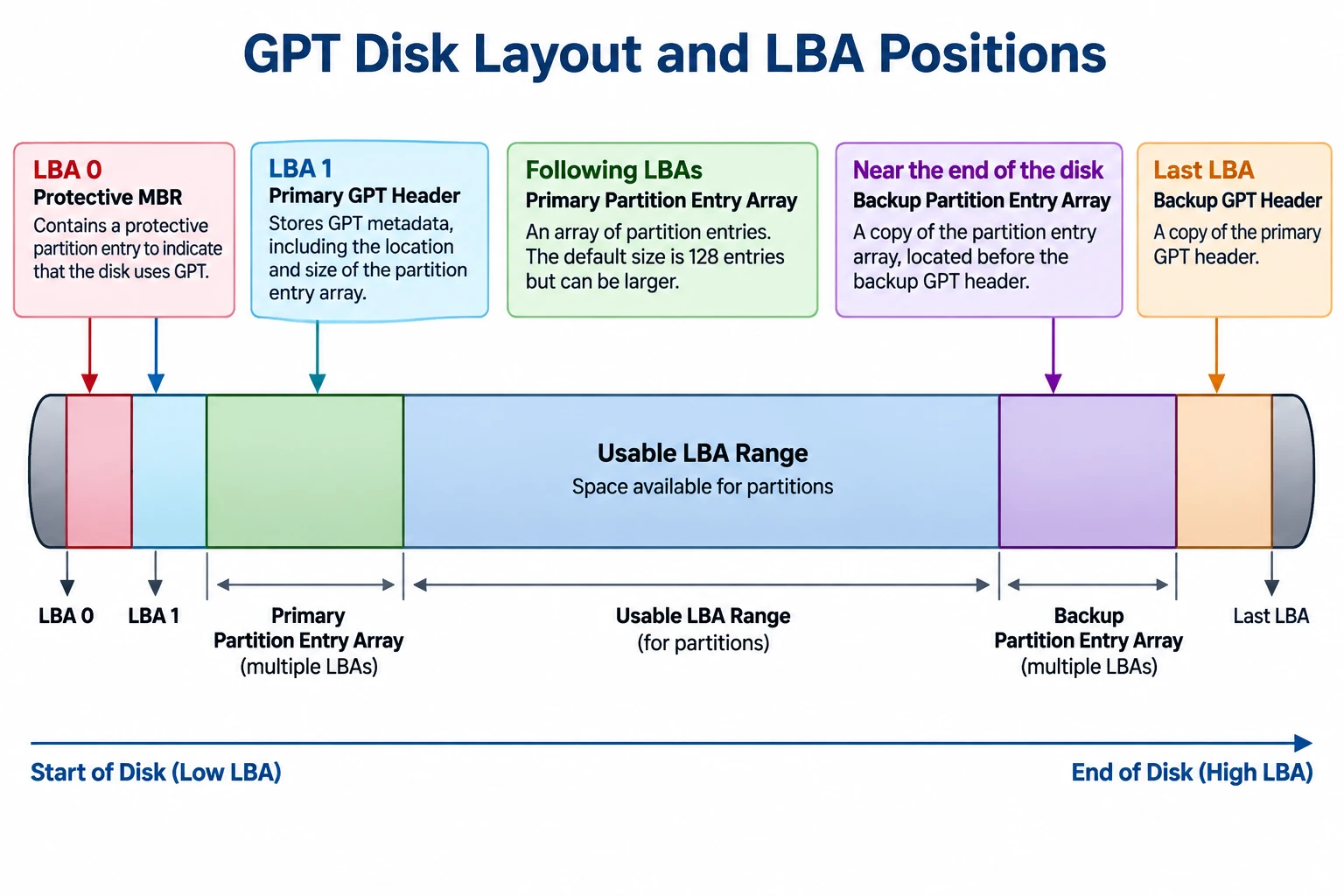
The exact usable range depends on the disk layout, logical block size, and the locations reserved for GPT metadata.
GPT partition entries contain 64-bit Início da LBA e Fim do LBA fields. Both boundaries are inclusive, so the number of logical blocks in a partition is:
Partition size in blocks = EndingLBA − StartingLBA + 1
The GPT header also includes PartitionEntryLBA, which identifies the starting LBA of the associated partition-entry array.
For a field-level explanation of these addresses and the primary and backup headers, see Amagicsoft’s GPT Header guide.
O representante oficial UEFI specification, Section 5, defines the GPT layout and its address fields. It specifies 64-bit LBAs for GPT, whereas MBR partition entries use 32-bit starting-LBA and size fields.
Why MBR and GPT have different addressing limits
With 32-bit sector-address fields, MBR has a commonly encountered capacity boundary of approximately 2 TiB when logical sectors are 512 bytes.
The arithmetic is:
2³² logical blocks × 512 bytes = 2 TiB
This is approximately 2.2 trillion bytes in decimal units. The limit comes from the address-field width and the assumed logical sector size; it is not a universal limit for every device or every possible logical block size.
GPT’s 64-bit LBA fields provide a much larger theoretical address space. Actual usable capacity still depends on the operating system, firmware, drivers, device interface, and partitioning implementation.
Microsoft’s documentation on Windows support for disks exceeding 2 TB explains the relationship between the MBR addressing limitation and GPT.
How to Check Logical and Physical Sector Information in Windows
Windows provides a command for querying sector information reported by the storage device and its driver.
- Abra o prompt de comando.
- Executar
fsutil fsinfo sectorinfo D:, replacingD:com a letra de unidade apropriada. - Examine the reported logical and physical sector information.
Microsoft documents this command in Fsutil fsinfo. Its example output includes fields such as Bytes lógicos por setor e Bytes físicos por setor para atomicidade.
For example, if the system reports LogicalBytesPerSector : 4096, a 4,096-byte logical block size is appropriate for the corresponding LBA-to-byte-offset calculation.
Compare the logical sector size with the reported physical-sector information to understand the device’s addressing and alignment characteristics. The available fields and values may vary with the Windows version, storage device, and driver.
This command queries sector information; it does not read a particular LBA’s raw contents or identify the physical location of a file. It is a useful way to verify an input needed for the calculation, not a complete disk-structure analysis.
LBA Limitations and Common Misconceptions
LBA provides a logical address, but several conclusions cannot be drawn from the address alone.
- An LBA does not identify a file. The file system’s metadata is needed to map files and their allocated clusters to the corresponding storage regions.
- An LBA is not a physical media address. On an SSD, for example, the device’s flash translation layer manages the mapping between host-visible logical addresses and internal flash storage.
- An LBA does not establish whether data is intact. A readable address, an I/O error, or a partition-table inconsistency does not by itself prove that a file is recoverable or that a drive has physical damage.
- A byte offset depends on the correct logical block size. Using an assumed 512-byte size on a device exposing 4,096-byte logical blocks produces an incorrect result.
- Address origins must match. A partition-relative address cannot be treated as a disk-relative address without accounting for the partition’s starting position and confirming the tool’s addressing convention.
These distinctions are important when diagnosing partition layouts, interpreting disk utilities, or studying file-system structures. LBA supplies the address; additional metadata and device information are needed to interpret what is stored there.
Conclusão
Logical block addressing provides a linear way to identify logical storage blocks, but interpreting an LBA requires the correct logical block size and address-space origin. The distinction between logical and physical sectors, the differences between MBR and GPT fields, and the limitations of CHS compatibility values all affect how disk addresses should be understood. For reliable analysis, calculate offsets from verified parameters and interpret them alongside the relevant partition and file-system metadata.
Perguntas frequentes
O LBA é o mesmo que um número de setor?
A numeração LBA começa do zero?
N − 1, não N.Como calculo o deslocamento em bytes de um LBA?
Deslocamento em bytes = LBA × Tamanho do bloco lógico. Por exemplo, o LBA 50 em um dispositivo com blocos lógicos de 512 bytes começa no deslocamento de 25.600 bytes. Verifique o tamanho do bloco lógico antes de utilizar o resultado.Por que um mesmo LBA pode ter diferentes deslocamentos de bytes?
Qual é a diferença entre LBA e CHS?
O LBA identifica a localização física de um arquivo?
Por que o MBR tem um limite de capacidade de 2 TiB?
O Windows consegue exibir o LBA de um arquivo específico?
fsutil fsinfo sectorinfo O comando fornece informações sobre o setor, e não o LBA de um arquivo. Para localizar os dados do arquivo, é necessário interpretar o layout da partição e os metadados do sistema de arquivos, e o resultado pode depender da fragmentação e da convenção de endereçamento da ferramenta.
Vasilii é um especialista em recuperação de dados com cerca de 10 anos de experiência prática na área. Ao longo de sua carreira, ele resolveu com sucesso milhares de casos complexos envolvendo arquivos excluídos, unidades formatadas, partições perdidas e sistemas de arquivos RAW. Sua experiência abrange métodos de recuperação manual usando ferramentas profissionais, como editores hexadecimais, e soluções automatizadas avançadas com software de recuperação. A missão do Vasilii é tornar o conhecimento confiável sobre recuperação de dados acessível tanto para profissionais de TI quanto para usuários comuns, ajudando-os a proteger seus valiosos ativos digitais.