How to Recover Data from a Formatted SD Card Safely

How to Recover Data from a Formatted SD Card Safely

格式化 SD 卡 can make valuable photos, videos, documents, and work files disappear within seconds. Fortunately, learning how to recover data from a formatted SD card may help you restore those files before new data overwrites them. In many cases, a quick format removes the file system records rather than immediately erasing the original content. Therefore, starting the SD 卡復原 process as soon as possible can improve your chances of retrieving the remaining data.

本指南說明 how to recover data from a formatted SD card on Windows and Android. It covers different formatting scenarios, Android storage limitations, common recovery mistakes, and a safe step-by-step solution. You will also learn when Magic Data Recovery 可以幫助 格式化的 SD 卡復原 and when encryption, physical damage, or data overwriting may limit the results. Although no software can restore every overwritten or securely erased file, the right recovery method can prevent further data loss and help you recover accessible files safely.

支援 Windows 7/8/10/11 和 Windows Server

目錄

What to Do Before You Recover Data from a Formatted SD Card

在您嘗試 how to recover data from a formatted sd card, stop every action that could write new information to the card. New photos, downloads, app files, and repair operations may replace recoverable data.

First, remove the card from the phone, camera, drone, or dashcam. Next, cancel any request to format it again. In addition, do not run CHKDSK or install recovery software on the affected card.

遵循這些規則:

  1. 立即停止使用 SD 卡。.
  2. 請使用可靠的讀卡機。.
  3. Scan before trying repair tools.
  4. Install software on another drive.
  5. 請將還原的檔案儲存至其他位置。.
  6. Stop if the card overheats or disconnects repeatedly.

Consequently, the first step in how to recover data from a formatted sd card is preventing further overwriting.

Can You Recover Data from a Formatted SD Card?

A reliable answer to how to recover data from a formatted sd card depends on the format type, later use, encryption, and physical condition.

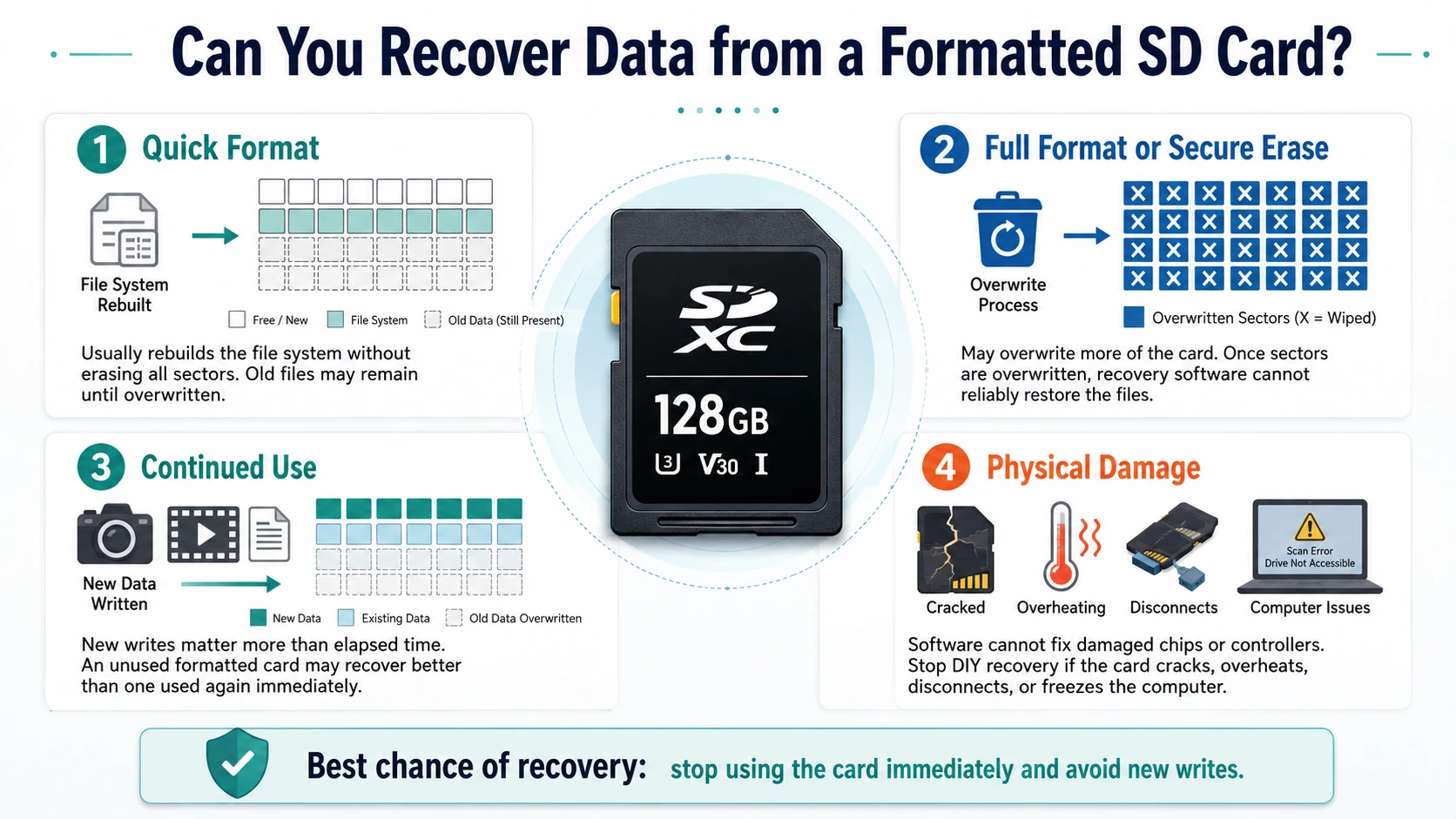
快速格式

A 快速格式 usually rebuilds the file system without overwriting every storage sector. As a result, old files may remain until new data replaces them.

Full Format or Secure Erase

A 完整格式 may overwrite more of the card. Likewise, secure erase tools intentionally replace stored data. Once another process overwrites the original sectors, software cannot recreate them reliably.

Continued Use and Physical Damage

評估時 how to recover data from a formatted sd card, elapsed time matters less than new writes. For example, an unused card formatted one month ago may offer better results than a card filled with new video immediately afterward.

Software also cannot fix broken memory chips or controllers. Therefore, stop DIY recovery if the card cracks, overheats, disappears during scanning, or freezes the computer.

Can-You-Recover-Data-from-a-Formatted-SD-Card

Identify What Was Formatted Before Choosing a Solution

選擇之前 how to recover data from a formatted sd card, identify the storage type.

Removable SD Card

Camera cards and standard microSD cards usually use FAT32 or exFAT. Windows can often scan them through a reader, even when File Explorer shows an empty drive.

Android Portable Storage

A portable Android card works like normal removable media. Therefore, remove it from the phone and scan it on Windows.

Android Internal or Adoptable Storage

Android can encrypt a card and link it to one phone. Consequently, a computer may detect the card but cannot interpret its files without the original device and encryption information.

Factory-Reset Android Phone

A factory reset affects internal flash storage rather than a removable card. Therefore, users searching for recover formatted android phone should check cloud and device backups first.

How to Recover Data from a Formatted SD Card with Magic Data Recovery

For removable media that Windows can detect, Magic Data Recovery offers a direct process for how to recover data from a formatted sd card. It scans the card, lists recoverable files, provides filters and previews, and saves restored data elsewhere.

為什麼 Magic Data Recovery 適合此情況

Formatting often removes the original folder view. Magic Data Recovery addresses this problem by searching for lost file records and recognizable content instead of modifying the card.

主要優勢包括

  • Support for SD cards, microSD cards, USB drives, and external storage
  • Recovery of common photos, videos, documents, archives, and audio
  • Filters for file type, path, name, and size
  • 復原前的檔案預覽
  • A guided workflow for nontechnical users
  • Recovery to a separate location

Compared with CHKDSK or formatting again, this method is more reliable because it focuses on locating files. Moreover, previews help users avoid restoring unnecessary results.

Step 1: Connect the SD Card

Remove the card and connect it through a stable reader. If Windows asks you to format it, cancel the request. Then, confirm its capacity and drive letter.

Step 2: Install Magic Data Recovery Elsewhere

下載 Magic Data Recovery from Amagicsoft. Install it on the computer’s internal drive or another healthy disk. Otherwise, installation files could overwrite data on the card.

支援 Windows 7/8/10/11 和 Windows Server

Step 3: Select and Scan the Card

Open the program and identify the card by capacity, drive letter, and device name. Next, begin the scan and avoid using the card.

Allow the scan to finish. Although early results may appear quickly, a complete scan can find more files after formatting removes the original folders.

How to recover data from a formatted SD card with Magic Data Recovery

步驟 4:篩選和預覽檔案

Filter results by type, size, date, path, or name. For example, photographers can focus on JPG, PNG, CR2, or NEF files, while office users can search for DOCX, XLSX, PDF, and ZIP files.

Then, preview important files when possible. This step helps exclude damaged or irrelevant items.

預覽檔案

步驟 5:將檔案復原至另一個磁碟機

Save selected files to the computer, an external SSD, or another healthy device. Never restore them to the original card.

Finally, open several recovered photos, documents, and videos. Check that larger videos play beyond the first few seconds. This verification completes how to recover data from a formatted sd card 安全。.

檔案復原

How to Recover Formatted SD Card on Android Phone

使用者搜尋 how to recover formatted sd card on android phone should first check whether Android used the card as portable or internal storage.

For portable storage, safely unmount the card, remove it, and connect it to Windows. Then, scan it with Magic Data Recovery and save the results elsewhere.

This method reduces new writes because Android may create cache files, thumbnails, and app folders. Therefore, computer scanning often offers a safer path for how to recover data from a formatted sd card than installing a mobile app.

When following how to recover data from a formatted sd card on Android, apps may find cached images or limited media. However, storage permissions restrict deep access, while app installation may overwrite data. Meanwhile, adoptable storage uses device-linked encryption, so ordinary Windows software may not recover usable files.

How to Recover Formatted Data from Android Phone

這句話 how to recover formatted data from android phone often refers to a factory reset. In that situation, begin with backups instead of removable-card software.

Check Google Photos, Google Drive, Google Contacts, manufacturer cloud services, messaging backups, and previous computer backups. In addition, review Samsung Smart Switch, OneDrive, Dropbox, or similar services.

Magic Data Recovery works best with storage that Windows detects as a drive, including removable SD cards and USB drives. It should not be described as a guaranteed way to bypass Android encryption. This distinction helps users who search recover formatted android phone choose a realistic solution.

Methods That Do Not Recover Formatted SD Card Data

A trustworthy guide to how to recover data from a formatted sd card must explain which popular methods fail.

CHKDSK

CHKDSK checks and repairs file system errors. However, it does not perform the same deep scan as recovery software and may change metadata.

屬性

屬性 reveals files hidden by attributes or malware. Therefore, it cannot restore records removed by formatting.

Formatting Again

A second format does not undo the first. Instead, it changes the file system and may remove useful metadata.

Copy and Move Commands

These commands only handle files that the operating system can identify. They cannot scan unallocated space or rebuild formatted records.

Factors That Affect Recovery Results

瞭解 how to recover data from a formatted sd card, review these conditions:

  • Format type
  • New data written afterward
  • Fragmented photos or videos
  • Bad sectors or unstable readers
  • Android encryption
  • File type and folder damage
  • Recovery destination

For example, an unused camera card after a quick format presents a better scenario than a dashcam card that recorded hours of new footage. Nevertheless, no responsible tool should promise identical results for every card.

Common Mistakes and Prevention Tips

When following how to recover data from a formatted sd card, avoid using the card, installing software on it, saving files back to it, or running repair tools first. In addition, do not root an Android phone without understanding the risks.

完成後 how to recover data from a formatted sd card, create a backup routine. First, keep one working copy. Next, store another copy on an external drive. Finally, use cloud storage for irreplaceable files. Also, verify backups before formatting and replace cards that show frequent errors.

Conclusion: How to Recover Data from a Formatted SD Card

The safest process for how to recover data from a formatted sd card begins with stopping all use of the card. Next, determine whether the problem involves removable storage, Android portable storage, encrypted adoptable storage, or internal phone memory.

For a removable card that Windows can detect, Magic Data Recovery 提供一個實用的 SD 卡復原解決方案. It scans for lost files, offers filters and previews, and restores selected data elsewhere. Moreover, it avoids the risks of formatting again or running repair commands too early.

No software can recover fully overwritten or securely erased data. However, quick action, a protected source card, and a careful scan give Magic Data Recovery a clear role in how to recover data from a formatted sd card.

支援 Windows 7/8/10/11 和 Windows Server

常見問題

Can I Recover an SD Card After Formatting?

Yes, recovery may work after a quick format if the card remains readable and no new data has overwritten the original files. First, stop using it. Then, connect it to a computer and run a complete scan. Save every recovered file to another drive rather than the original SD card.

Can I Recover a Formatted SD Card Without a Computer?

A mobile app may recover cached images or limited media, but it usually has less storage access than desktop software. Therefore, a Windows computer and reliable reader offer a safer approach for removable cards. This method also reduces the chance that a phone will overwrite data with cache or app files.

How Do I Recover a Formatted SD Card on Android?

For how to recover formatted sd card on android phone, first confirm that Android used the card as portable storage. Remove it, connect it to Windows, and scan it with Magic Data Recovery. However, this method may not work when Android encrypted the card as internal or adoptable storage.

Can I Recover Files After a Full Format?

Recovery depends on whether the full format overwrote the original storage sectors. If overwriting occurred, software cannot reliably rebuild the missing files. Nevertheless, stop using the card and perform one careful scan before trying repair commands, creating partitions, or formatting the storage device again.

Can Magic Data Recovery Recover a Formatted microSD Card?

Magic Data Recovery can scan a formatted microSD card when Windows detects it through a compatible reader. It may locate common photos, videos, documents, and archives. However, results depend on later overwriting, encryption, physical damage, file fragmentation, card health, and the type of format used.

Why Are My Recovered Videos Corrupted?

Large videos often occupy several noncontiguous storage areas. If new data overwrites one section, the recovered video may freeze, skip, or fail to open. Therefore, complete the scan, recover all available video files, and test each result with more than one media player before discarding it.

Can I Recover a Factory-Reset Android Phone?

A factory reset usually removes access to encrypted user data on modern Android phones, so direct recovery may remain very limited. First, check Google, manufacturer, messaging, cloud, and computer backups. Magic Data Recovery suits removable SD cards and other storage devices that Windows can detect as drives.

Vasilii 是一位在該領域擁有約 10 年實務經驗的資料復原專家。在他的職業生涯中,他已成功解決數千個複雜的個案,包括刪除的檔案、格式化的硬碟機、遺失的磁碟分割和 RAW 檔案系統。他的專業知識涵蓋使用十六進位編輯器等專業工具的手動復原方法,以及使用復原軟體的進階自動解決方案。Vasilii 的使命是讓 IT 專業人士和一般使用者都能獲得可靠的資料復原知識,協助他們保護寶貴的數位資產。.