
フォーマットされたSDカードからデータを安全に復元する方法
SDカードのフォーマット 貴重な写真、動画、文書、仕事のファイルを、ほんの数秒で消してしまう可能性があります。幸いなことに、その方法を学ぶことで フォーマットされたSDカードからデータを復元する方法 これにより、新しいデータによって上書きされる前に、それらのファイルを復元できる可能性があります。多くの場合、クイックフォーマットでは、元のコンテンツを即座に消去するのではなく、ファイルシステムの記録が削除されるだけです。したがって、 SDカードの回復 できるだけ早くこの手順を実行することで、残りのデータを復元できる可能性が高まります。.
このガイドでは フォーマットされたSDカードからデータを復元する方法 WindowsおよびAndroid向けです。本ガイドでは、さまざまなフォーマットシナリオ、Androidのストレージの制限、復元作業でよくあるミス、そして安全な手順ごとの解決策について解説しています。また、どのような場合に Magic Data Recovery を助けることができる。 フォーマットされたSDカードの復元 また、暗号化、物理的な損傷、またはデータの上書きによって、復元結果が制限される場合があります。上書きされたファイルや安全に消去されたファイルをすべて復元できるソフトウェアは存在しませんが、適切な復元方法を用いれば、それ以上のデータ損失を防ぎ、アクセス可能なファイルを安全に復元することができます。.
Windows 7/8/10/11およびWindows Serverをサポート
目次
フォーマットされたSDカードからデータを復元する前にすべきこと
挑戦する前に フォーマットされたSDカードからデータを復元する方法, 、カードに新しい情報を書き込む可能性のある操作はすべて中止してください。新しい写真の保存、ダウンロード、アプリファイルの保存、および修復操作を行うと、復元可能なデータが上書きされる恐れがあります。.
まず、携帯電話、カメラ、ドローン、またはドライブレコーダーからカードを取り出してください。次に、カードを再度フォーマットするよう求める指示があれば、それをキャンセルしてください。また、 CHKDSK を実行する または、問題のあるカードに復旧ソフトウェアをインストールしてください。.
以下のルールに従うこと:
- すぐにSDカードの使用を中止してください。.
- 信頼性の高いカードリーダーを使用してください。.
- 修復ツールを試す前にスキャンを行ってください。.
- 別のドライブにソフトウェアをインストールしてください。.
- 復元したファイルは別の場所に保存してください。.
- カードが過熱したり、繰り返し接続が切れたりした場合は、使用を中止してください。.
したがって、その第一歩は フォーマットされたSDカードからデータを復元する方法 これにより、それ以上の上書きが防止されています。.
フォーマットされたSDカードからデータを復元することはできますか?
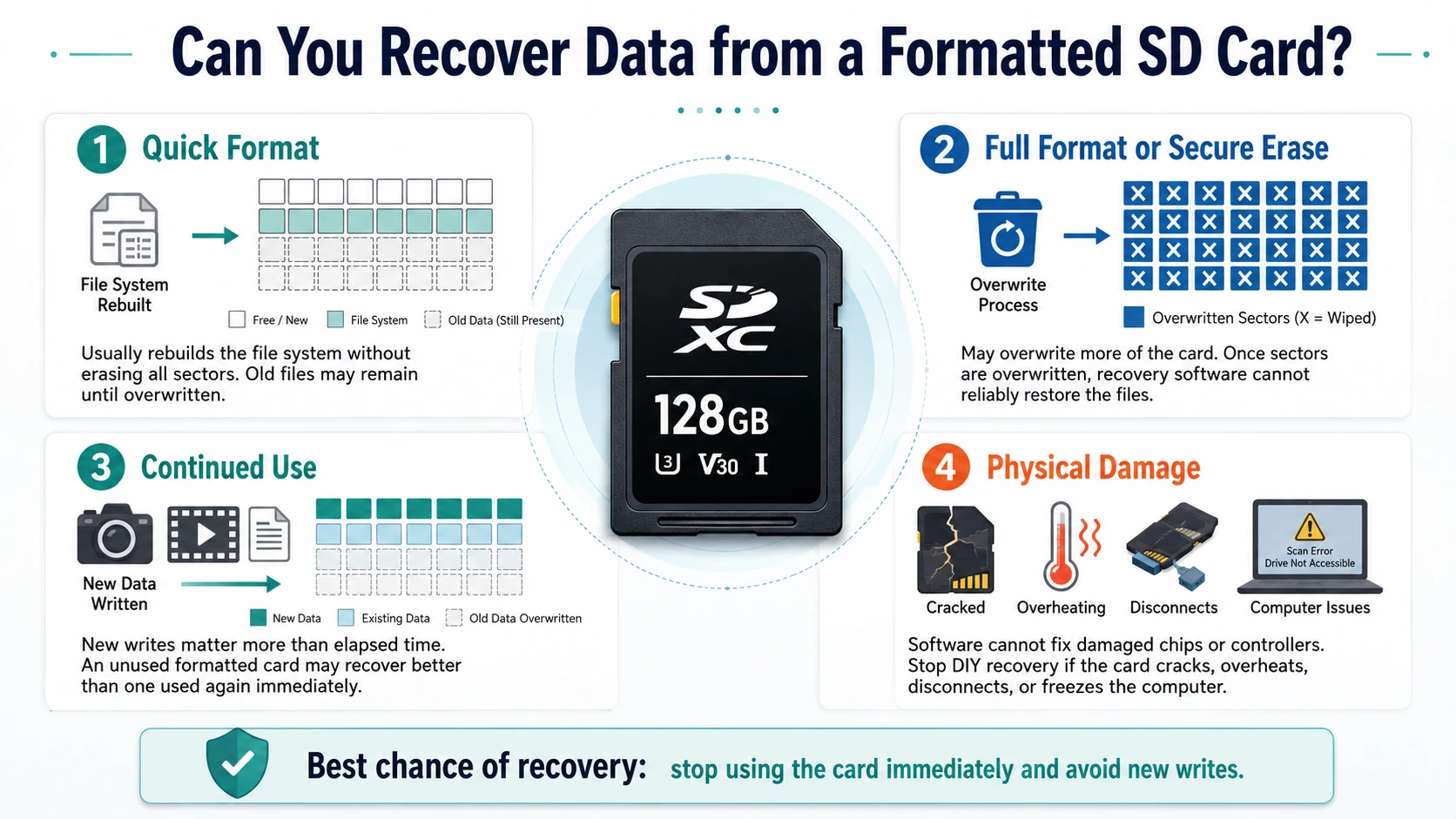
「」に対する確かな答え フォーマットされたSDカードからデータを復元する方法 フォーマットの種類、その後の用途、暗号化の有無、および物理的な状態によって異なります。.
クイック・フォーマット
A クイックフォーマット 通常、ファイルシステムを再構築する際、すべてのストレージセクタを上書きすることはありません。その結果、新しいデータで上書きされるまで、古いファイルが残ってしまうことがあります。.
完全フォーマットまたはセキュア消去
A フルフォーマット カード上のさらに多くの領域を上書きしてしまう可能性があります。同様に、セキュア消去ツールも、保存されたデータを意図的に上書きします。別のプロセスによって元のセクタが上書きされてしまうと、ソフトウェアではそれらを確実に復元することはできなくなります。.
継続的な使用および物理的損傷
評価 フォーマットされたSDカードからデータを復元する方法, 、経過時間よりも新規書き込みの方が重要です。例えば、1か月前にフォーマットされた未使用のカードは、その直後に新しい動画でいっぱいになったカードよりも良い結果が得られる場合があります。.
また、ソフトウェアでは、破損したメモリチップやコントローラを修復することはできません。したがって、カードにひびが入ったり、過熱したり、スキャン中にデータが消えたり、コンピュータがフリーズしたりした場合は、DIYによる復旧作業を中止してください。.
解決策を選ぶ前に、何がフォーマットされたのかを特定する
選ぶ前に フォーマットされたSDカードからデータを復元する方法, ストレージの種類を特定します。.
取り外し可能なSDカード
カメラ用メモリーカードや標準的なmicroSDカードは、通常FAT32またはexFAT形式でフォーマットされています。ファイルエクスプローラーではドライブが空と表示されていても、Windowsではカードリーダーを介して読み取れることがよくあります。.
Android用ポータブルストレージ
Android対応のポータブルカードは、通常のリムーバブルメディアと同じように動作します。そのため、スマートフォンから取り外して、Windowsでスキャンしてください。.
Androidの内部ストレージまたはアドプタブルストレージ
Androidでは、カードを暗号化し、1台のスマートフォンに紐付けることができます。そのため、コンピュータはカードを認識することはできても、元の端末と暗号化情報がない限り、そのファイルを読み取ることはできません。.
Androidスマートフォンの工場出荷時設定へのリセット
工場出荷時設定へのリセットは、取り外し可能なカードではなく、内蔵フラッシュストレージに適用されます。したがって、次のような情報を探しているユーザーは フォーマットされたAndroidスマホのデータを復元する まずはクラウドとデバイスのバックアップを確認すべきです。.
Magic Data Recoveryを使ってフォーマットされたSDカードからデータを復元する方法
Windows が検出できるリムーバブルメディアについては、, Magic Data Recovery ~のための直接的なプロセスを提供します フォーマットされたSDカードからデータを復元する方法. カードをスキャンし、復元可能なファイルの一覧を表示し、フィルタ機能やプレビュー機能を提供し、復元したデータを別の場所に保存します。.
Magic Data Recoveryがこのシナリオにフィットする理由
フォーマットを行うと、元のフォルダ表示が消えてしまうことがよくあります。Magic Data Recoveryは、カードを書き換えるのではなく、失われたファイルレコードや識別可能なコンテンツを検索することで、この問題に対処します。.
主な利点は以下の通り:
- SDカード、microSDカード、USBメモリ、および外部ストレージへの対応
- 一般的な写真、動画、文書、アーカイブ、音声ファイルの復元
- ファイルの種類、パス、名前、サイズによるフィルタリング
- 復旧前のファイルプレビュー
- 技術に詳しくないユーザー向けのガイド付きワークフロー
- 別の場所への復元
CHKDSKや再フォーマットと比較すると、この方法はファイルの特定に重点を置いているため、より信頼性が高いと言えます。さらに、プレビュー機能により、ユーザーは不要なファイルを復元してしまうことを防ぐことができます。.
手順 1:SD カードを接続する
カードを取り外し、安定したリーダーに接続してください。Windowsからフォーマットを求めるメッセージが表示された場合は、その要求をキャンセルしてください。その後、容量とドライブ文字を確認してください。.
ステップ 2: Magic Data Recovery を別の場所にインストールする
ダウンロード Magic Data Recovery Amagicsoftから。コンピュータの内蔵ドライブまたは別の正常なディスクにインストールしてください。そうしないと、インストールファイルによってカード上のデータが上書きされる可能性があります。.
Windows 7/8/10/11およびWindows Serverをサポート
ステップ3:カードを選択してスキャンする
プログラムを起動し、容量、ドライブ文字、デバイス名からカードを特定してください。次に、スキャンを開始し、その間はカードを使用しないでください。.
スキャンが完了するまでお待ちください。初期の結果はすぐに表示される場合がありますが、フォーマットによって元のフォルダが削除された後でも、完全なスキャンを行うことでさらに多くのファイルが見つかることがあります。.

ステップ 4: ファイルのフィルタリングとプレビュー
結果を種類、サイズ、日付、パス、または名前で絞り込むことができます。たとえば、写真家はJPG、PNG、CR2、NEFファイルに絞り込んで検索でき、オフィスユーザーはDOCX、XLSX、PDF、ZIPファイルを検索できます。.
また、可能であれば重要なファイルを事前に確認しておきましょう。この手順により、破損しているファイルや不要なファイルを排除することができます。.

ステップ5:ファイルを別のドライブに復元する
選択したファイルは、パソコン、外付けSSD、または正常に動作する別のデバイスに保存してください。決して元のカードに復元しないでください。.
最後に、復元された写真、文書、動画をいくつか開いてください。容量の大きい動画については、最初の数秒以降も再生されることを確認してください。これで検証は完了です。 フォーマットされたSDカードからデータを復元する方法 無事だった。.

AndroidスマートフォンでフォーマットされたSDカードを復元する方法
を検索するユーザー AndroidスマートフォンでフォーマットされたSDカードを復元する方法 まず、Androidがそのカードをポータブルストレージとして使用しているのか、内蔵ストレージとして使用しているのかを確認する必要があります。.
ポータブルストレージとして使用する場合は、カードを安全にアンマウントしてから取り外し、Windowsに接続してください。その後、Magic Data Recoveryでスキャンを行い、結果を別の場所に保存してください。.
この方法では、Androidがキャッシュファイル、サムネイル、アプリフォルダを作成する場合があるため、新規書き込みの回数が減ります。したがって、コンピュータでのスキャンは、多くの場合、より安全な手段となります。 フォーマットされたSDカードからデータを復元する方法 モバイルアプリをインストールするよりも。.
~に従う場合 フォーマットされたSDカードからデータを復元する方法 Androidでは、アプリがキャッシュされた画像や一部のメディアファイルにアクセスできる場合があります。ただし、ストレージへのアクセス権限によって詳細なアクセスは制限されており、アプリをインストールするとデータが上書きされる可能性があります。一方、アダプタブル・ストレージではデバイスに紐づいた暗号化が採用されているため、一般的なWindowsソフトウェアでは使用可能なファイルを復元できない場合があります。.
Androidスマートフォンからフォーマットされたデータを復元する方法
というフレーズがある。 Androidスマートフォンからフォーマットされたデータを復元する方法 多くの場合、工場出荷時設定へのリセットを指します。その場合は、リムーバブルカード用のソフトウェアではなく、まずバックアップから始めてください。.
Googleフォト、Googleドライブ、Google連絡先、メーカーのクラウドサービス、メッセージアプリのバックアップ、および以前のパソコンのバックアップを確認してください。さらに、Samsung Smart Switch、OneDrive、Dropbox、または類似のサービスも確認してください。.
Magic Data Recoveryは、Windowsがドライブとして認識するストレージ(リムーバブルSDカードやUSBドライブなど)で最も効果を発揮します。Androidの暗号化を確実に回避できる方法であるとは言い切れません。この区別は、検索を行うユーザーにとって参考になります。 フォーマットされたAndroidスマホのデータを復元する 現実的な解決策を選びましょう。.
フォーマットされたSDカードのデータを復元できない方法
信頼できるガイドとして フォーマットされたSDカードからデータを復元する方法 どの人気のある手法が失敗するのかを説明しなければならない。.
チェックディスク
CHKDSK はファイルシステムのエラーをチェックして修復します。ただし、リカバリソフトウェアのような詳細なスキャンは行わず、メタデータが変更される可能性があります。.
属性
属性 属性やマルウェアによって隠されたファイルを表示します。そのため、フォーマットによって削除されたレコードを復元することはできません。.
書式の再設定
2回目のフォーマットを行っても、1回目のフォーマットは元に戻りません。その代わりに、ファイルシステムが変更され、有用なメタデータが削除される可能性があります。.
コピーおよび移動コマンド
これらのコマンドは、オペレーティングシステムが識別できるファイルのみを処理します。未割り当て領域のスキャンや、フォーマットされたレコードの再構築は行えません。.
回復の結果に影響を与える要因
理解するために フォーマットされたSDカードからデータを復元する方法, 、以下の条件をご確認ください:
- フォーマットの種類
- その後書き込まれた新しいデータ
- 断片化された写真や動画
- 不良セクタまたは不安定なリーダー
- Androidの暗号化
- ファイル形式とフォルダの破損
- 復元先
例えば、クイックフォーマットを施したばかりの未使用のカメラ用メモリーカードは、何時間分もの新しい映像が記録されたドライブレコーダー用メモリーカードよりも、良好な状態であると言えます。とはいえ、責任あるツールであれば、すべてのカードに対して同一の結果を保証するようなことは決してないはずです。.
よくある間違いと予防策
~に従う場合 フォーマットされたSDカードからデータを復元する方法, 、まず、カードの使用、カードへのソフトウェアのインストール、カードへのファイルの書き込み、または修復ツールの実行は避けてください。また、リスクを十分に理解しないまま、Androidスマートフォンのルート化を行わないでください。.
終了後 フォーマットされたSDカードからデータを復元する方法, 、バックアップのルーチンを確立しましょう。まず、1つの作業用コピーを保持します。次に、もう1つのコピーを外付けドライブに保存します。最後に、かけがえのないファイルについてはクラウドストレージを利用します。また、フォーマットを行う前にはバックアップの内容を確認し、頻繁にエラーが発生するカードは交換してください。.
まとめ:フォーマットされたSDカードからデータを復元する方法
最も安全な方法は フォーマットされたSDカードからデータを復元する方法 まず、カードの使用をすべて中止することから始めます。次に、問題がリムーバブルストレージ、Androidポータブルストレージ、暗号化されたアダプタブルストレージ、あるいは端末の内部メモリのいずれに関連しているかを確認してください。.
Windows が認識できるリムーバブルカードの場合、, Magic Data Recovery 実用的な SDカード復元ソリューション. 紛失したファイルをスキャンし、フィルタ機能やプレビュー機能を提供し、選択したデータを別の場所に復元します。さらに、再フォーマットや、時期尚早な修復コマンドの実行といったリスクを回避できます。.
完全に上書きされたデータや安全に消去されたデータを復元できるソフトウェアは存在しません。しかし、迅速な対応、保護されたソースカード、そして入念なスキャンにより、Magic Data Recoveryには明確な役割が与えられています。 フォーマットされたSDカードからデータを復元する方法.
Windows 7/8/10/11およびWindows Serverをサポート
よくある質問
SDカードをフォーマットした後でも復元できますか?
はい、カードが読み取り可能で、元のファイルが新しいデータで上書きされていない限り、クイックフォーマット後も復元できる可能性があります。まず、カードの使用を中止してください。その後、カードをパソコンに接続し、完全スキャンを実行してください。復元されたファイルはすべて、元のSDカードではなく別のドライブに保存してください。.
パソコンを使わずに、フォーマットされたSDカードを復元することはできますか?
モバイルアプリでは、キャッシュされた画像や一部のメディアファイルを復元できる場合もありますが、通常、デスクトップソフトウェアに比べてストレージへのアクセス権限は限られています。そのため、リムーバブルカードを扱うには、Windows PCと信頼性の高いリーダーを使用する方がより安全な方法です。この方法なら、スマートフォンがキャッシュやアプリファイルでデータを上書きしてしまうリスクも軽減できます。.
AndroidでフォーマットされたSDカードを復元するにはどうすればよいですか?
AndroidスマートフォンでフォーマットされたSDカードを復元する方法については、まずAndroidがそのカードをポータブルストレージとして使用していたことを確認してください。カードを取り外し、Windowsに接続して、Magic Data Recoveryでスキャンしてください。ただし、Androidがそのカードを内部ストレージまたはアダプタブルストレージとして暗号化していた場合、この方法は機能しない可能性があります。.
完全フォーマットを行った後でも、ファイルを復元することはできますか?
復元が可能かどうかは、フルフォーマットによって元のストレージセクタが上書きされたかどうかにかかっています。上書きが行われた場合、ソフトウェアでは失われたファイルを確実に復元することはできません。とはいえ、カードの使用を中止し、修復コマンドの実行、パーティションの作成、またはストレージデバイスの再フォーマットを行う前に、一度だけ慎重にスキャンを行ってください。.
Magic Data Recoveryでは、フォーマットされたmicroSDカードを復元できますか?
Magic Data Recoveryは、Windowsが互換性のあるリーダーを介してフォーマット済みのmicroSDカードを検出すると、そのカードをスキャンできます。一般的な写真、動画、文書、アーカイブファイルなどを検出できる場合があります。ただし、検出結果は、その後の上書き、暗号化、物理的な損傷、ファイルの断片化、カードの状態、および使用されたフォーマットの種類によって異なります。.
復元した動画が破損しているのはなぜですか?
大容量の動画は、多くの場合、複数の連続していない保存領域に分散して保存されています。新しいデータによってその一部が上書きされると、復元した動画がフリーズしたり、再生が途切れたり、あるいは開けなくなったりする可能性があります。そのため、スキャンを完了させ、復元可能な動画ファイルをすべて復元した上で、各ファイルを複数のメディアプレーヤーで再生テストしてから、削除するようにしてください。.
工場出荷時設定にリセットされたAndroidスマートフォンは復元できますか?
最新のAndroidスマートフォンでは、工場出荷時設定へのリセットを行うと、通常、暗号化されたユーザーデータへのアクセス権が失われるため、データを直接復元できる可能性は極めて限定的となる場合があります。まず、Google、メーカー、メッセージアプリ、クラウド、およびパソコンのバックアップを確認してください。Magic Data Recoveryは、Windowsがドライブとして認識できる取り外し可能なSDカードやその他のストレージデバイスに対応しています。.

バシリイは、この分野で約10年の実務経験を持つデータ復元のスペシャリストです。そのキャリアを通じて、彼は削除されたファイル、フォーマットされたドライブ、失われたパーティション、RAWファイルシステムを含む何千もの複雑なケースの解決に成功してきました。彼の専門知識は、16進エディタなどの専門ツールを使用した手動復元方法と、復元ソフトウェアを使用した高度な自動化ソリューションの両方をカバーしています。バシリの使命は、信頼できるデータ復元知識をITプロフェッショナルと一般ユーザーの双方が利用できるようにし、貴重なデジタル資産を保護できるようにすることです。.