
Zum Inhalt springen
amagicsoft Logo-Symbol
  • Startseite
  • Produkte
    • Magic Data Recovery
    • Magic Recovery Key
  • Laden Sie
  • Blog
  • Mehr
    • Über Amagicsoft
    • Kontakt US
    • Datenschutzbestimmungen
    • Bedingungen
    • Lizenzvereinbarung
    • Erstattungspolitik
  • Deutsch
    • English
    • 日本語
    • 한국어
    • Français
    • 繁體中文
Wiki

Schnellstart

29. November 2025 Eddie Kommentare deaktiviert für Fast Boot
Schnellstart

Inhaltsübersicht

Fast Boot and Fastboot Mode: Similar Name, Different Purpose

Users often see two similar terms: Schnellstart on PCs and fastboot mode on Android phones.
They sound alike but solve different problems.

On PCs, Fast Boot (or Fast Startup) reduces boot time. Firmware and the operating system cache parts of the initialization process, so the next startup skips some hardware checks and system initialization.

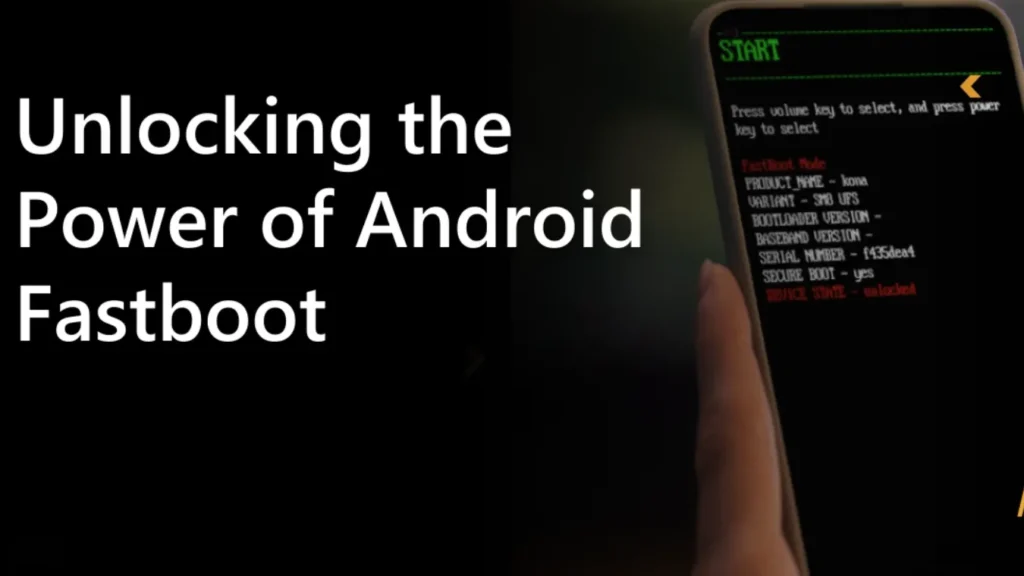
On Android, fastboot mode loads a minimal bootloader environment. You use it to flash firmware images, unlock bootloaders, or recover from software problems. It does not speed up boot directly; it provides a maintenance and repair channel.

Understanding this distinction helps you choose safe settings and avoid surprises, especially when you work with Datenwiederherstellungstools wie zum Beispiel Amagicsoft Datenrettung after a boot failure.
what is Fast Boot

How Fast Boot Shortens Startup on PCs

Modern PCs spend a lot of time on hardware checks, driver initialization, and OS startup tasks. Fast Boot reduces that time with several techniques.

Firmware-Level Fast Boot

Many UEFI firmware setups include a Schnellstart option:

  • The firmware stores hardware configuration after a successful boot.

  • Later boots skip full memory tests and long device scans.

  • The system initializes only essential controllers before handing control to the OS.

You see a shorter POST phase and fewer splash screens before Windows starts.

Windows Fast Startup

Windows adds another layer called Fast Startup:

  • When you shut down, Windows writes the kernel session and some driver state to a hibernation file.

  • On the next boot, Windows loads that cached session instead of starting from zero.

  • You get a hybrid between a cold boot and resume from hibernation.

This method feels fast, but it changes how the system handles full shutdowns, which matters for disk maintenance and Datenwiederherstellung.

Herunterladen Magic Data Recovery

Unterstützt Windows 7/8/10/11 und Windows Server


How Fastboot Mode Works on Android Devices

While PC Fast Boot focuses on speed, Android fastboot mode focuses on control.

When a phone enters fastboot:

  • The device loads a small bootloader instead of the full Android system.

  • A connected computer uses the fastboot tool to send commands over USB.

  • You can flash boot images, recovery partitions, or system images, and sometimes unlock the bootloader.

Technicians use fastboot mode to repair corrupted firmware or install clean builds.
Ordinary users usually see it only after an error or key combination.

Benefits and Risks of Fast Boot for Everyday Users

Fast boot features help most people, but they come with trade-offs.

Where Fast Boot Helps

  • Faster startup on laptops and desktops

  • Less waiting after updates

  • Better experience on systems with SSDs and UEFI

You enable Schnellstart oder Fast Startup if you start the system many times per day and rarely enter firmware settings.

Where Fast Boot Causes Problems

Fast Boot can complicate low-level work:

  • You may miss the key to enter UEFI/BIOS because the system skips prompts.

  • Dual-boot setups sometimes show inconsistent disk states.

  • External boot media may not appear in the boot menu.

  • Hibernation-style Fast Startup can lock NTFS volumes in a “dirty” state.

Für Datenwiederherstellung, this matters. When Windows uses Fast Startup, it keeps the system partition in a special hibernated state. If you attach that drive to another PC and run Amagicsoft Datenrettung, you must disable Fast Startup first or perform a full shutdown to avoid inconsistent data.

Fastboot Mode and Data Safety on Phones

Fastboot mode offers powerful control over Android firmware, but it demands care.

Typische Anwendungsfälle

  • Flash stock firmware to fix boot loops

  • Install custom recovery images

  • Lock or unlock the bootloader

  • Erase specific partitions when troubleshooting

Each action directly touches partitions that hold system images and sometimes user data.

Data Loss Risks

Fastboot commands can erase user data quickly:

  • fastboot erase userdata wipes user partitions.

  • Flashing the wrong image can corrupt the system or vendor partitions.

  • Unlocking the bootloader often forces a full wipe for security reasons.

Before you use fastboot commands, you should back up everything you can. If you lose data from an SD card or a mounted USB drive in the process, Amagicsoft Datenrettung can later scan that removable storage on a Windows PC and restore recoverable files.

Practical Recommendations for Fast Boot and Fastboot

You improve reliability and data protection with clear rules.

On Desktops and Laptops

  • Enable firmware Schnellstart only when you use stable hardware and a simple configuration.

  • Turn off Windows Fast Startup when you troubleshoot, dual-boot, or attach drives to other computers.

  • Perform an occasional full shutdown or restart to clear cached state.

  • Before disk maintenance or cloning, disable Fast Startup so tools see a consistent file system.

On Android Phones

  • Enter fastboot mode only when you understand the command you plan to run.

  • Use official images from the device vendor for flashing.

  • Expect a data wipe when you unlock the bootloader.

  • Back up media and documents to PC or cloud before any fastboot operation.

If a firmware flash goes wrong and you lose access to storage cards or external media, run Amagicsoft Datenrettung on a Windows system to scan those devices and recover files where possible.

Unterstützt Windows 7/8/10/11 und Windows Server.

Häufig gestellte Fragen


What does fastboot do?

On Android, fastboot communicates with the phone’s bootloader over USB. It sends commands to flash firmware images, erase partitions, and sometimes lock or unlock the bootloader. Technicians use it to repair or modify devices when the regular Android system cannot start or you need low-level control for maintenance.

Should fast boot be on or off?

On a PC, you turn Fast Boot or Fast Startup on if you want quicker everyday startups and you rarely change hardware. You turn it off when you dual-boot, troubleshoot, or work with disk tools and data recovery. Disabling it ensures clean shutdowns and more predictable behavior during maintenance operations.

How do I exit fastboot mode?

You usually exit fastboot mode by restarting the device. Many phones let you hold the power button until the device reboots. You can also use a USB connection and run fastboot reboot from a computer that has the Android platform tools installed. After that, the phone attempts to boot the normal Android system again.

You usually exit fastboot mode by restarting the device. Many phones let you hold the power button until the device reboots. You can also use a USB connection and run fastboot reboot from a computer that has the Android platform tools installed. After that, the phone attempts to boot the normal Android system again.

On PCs, you turn off Fast Boot in UEFI/BIOS settings and disable Fast Startup in Windows power options. On Android, you exit fastboot mode with a reboot and avoid re-entering it unless you press the required key combination or send fastboot commands. The fastboot tool itself runs only when you start that special mode.

What happens if I fastboot my phone?

When you place a phone in fastboot mode, the normal Android system stops and the bootloader listens for USB commands. Nothing changes until you run specific fastboot commands. If you flash or erase partitions, you may fix firmware issues or wipe data. Always confirm each command’s effect before you execute it.

Can fastboot unlock my phone?

Yes. Many devices support fastboot oem unlock or fastboot flashing unlock to unlock the bootloader. This process usually wipes user data for security reasons. Unlocking allows you to flash custom recoveries or ROMs, but it may reduce security and break warranty terms. Back up your data and understand the risks before you proceed.

What problems can fast boot cause?

On PCs, Fast Boot or Fast Startup can hide firmware menus, cause issues with dual-boot setups, and leave disks in a hibernated state that confuses external tools. On phones, fastboot commands can erase partitions or flash wrong images if you use them incorrectly. Both features require careful use when you handle critical data.
  • WiKi
Eddie

Eddie ist ein IT-Spezialist mit mehr als 10 Jahren Erfahrung, die er bei mehreren bekannten Unternehmen der Computerbranche gesammelt hat. Er bringt tiefgreifende technische Kenntnisse und praktische Problemlösungsfähigkeiten in jedes Projekt ein.

Beitrags-Navigation

Vorherige
Weiter

Suche

Kategorien

  • Bitlocker-Wiederherstellung
  • Wiederherstellung gelöschter Dateien
  • Formatieren der Dateiwiederherstellung
  • Festplattenwiederherstellung
  • Lizenzschlüssel-Wiederherstellung
  • Wiederherstellung verlorener Dateien
  • Wiederherstellung von Speicherkarten
  • Nachrichten
  • Foto-Wiederherstellung
  • SSD-Wiederherstellung
  • Uncategorized
  • USB-Laufwerk-Wiederherstellung
  • Benutzerhandbuch
  • Wiki

Neueste Beiträge

  • Die Vor- und Nachteile von SSDs als externe Festplattenlaufwerke
    Die Vor- und Nachteile von SSDs als externe Festplattenlaufwerke
  • Verwendung des Zieldatenträgermodus und des Freigabemodus auf Mac-Computern
    Verwendung des Zieldatenträgermodus und des Freigabemodus auf Mac-Computern: Eine vollständige Anleitung
  • Duplikat-Finder
    Duplikat-Finder

Tags

Wie man Magic Data Recovery Magic Recovery Key WiKi

Verwandte Beiträge

Duplikat-Finder
Wiki

Duplikat-Finder

2. Dezember 2025 Eddie Noch keine Kommentare

Inhaltsverzeichnis Doppelte Dateien sind keine echten Backups Viele Benutzer legen “zusätzliche Sicherheitskopien” von Dokumenten an, indem sie sie in neue Ordner oder auf externe Laufwerke ziehen, die sich mit der Zeit vervielfältigen und eher zu einem Durcheinander als zu einem Schutz werden. Doppelte Dateien verschwenden Speicherplatz, verlangsamen Backups und machen die Datenwiederherstellung unübersichtlich.Ein Duplicate File Finder hilft, redundante Kopien zu identifizieren, so [...]

Kontextwechsel
Wiki

Kontextwechsel

2. Dezember 2025 Eddie Noch keine Kommentare

Inhaltsverzeichnis CPU-Zeit als gemeinsam genutzte Ressource Moderne Betriebssysteme jonglieren mit Dutzenden oder Hunderten aktiver Threads. Da nur wenige CPU-Kerne vorhanden sind, warten die meisten Threads in Warteschlangen, während eine kleine Teilmenge läuft. Ein Kontextwechsel ermöglicht es dem Scheduler, einen laufenden Thread anzuhalten und einen anderen fortzusetzen. Dieser schnelle Wechsel erzeugt die Illusion von Parallelität [...]

Datenerfassung
Wiki

Datenerfassung

2. Dezember 2025 Eddie Noch keine Kommentare

Inhaltsverzeichnis Schauplatz eines Vorfalls: Vor der Datenerfassung gefährdete Daten Wenn ein Vorfall eintritt, besteht der erste Instinkt oft darin, sich im Live-System “umzusehen”. Ungeplante Klicks, Root-Logins oder Dateikopien können Zeitstempel, Protokolle und nicht zugewiesenen Speicherplatz verändern, bevor jemand einen sauberen Zustand erfasst. Die Datenerfassung löst dieses Problem und konzentriert sich auf die Sammlung von Daten in einem kontrollierten [...]

amagicsoft Logo-Symbol

Unsere Vision ist es, eine weltweit bekannte Softwaremarke und ein Dienstleistungsanbieter zu werden, der seinen Nutzern erstklassige Produkte und Dienstleistungen anbietet.

Produkte
  • Magic Data Recovery
  • Magic Recovery Key
Politik
  • Bedingungen
  • Datenschutzbestimmungen
  • Erstattungspolitik
  • Lizenzvereinbarung
Unternehmen
  • Über Amagicsoft
  • Kontakt US
  • Laden Sie
Folgen Sie uns

Urheberrecht © 2025 Amagicsoft. Alle Rechte vorbehalten.

  • Bedingungen
  • Datenschutzbestimmungen

