
Logical Block Addressing (LBA): So funktionieren Sektornummern
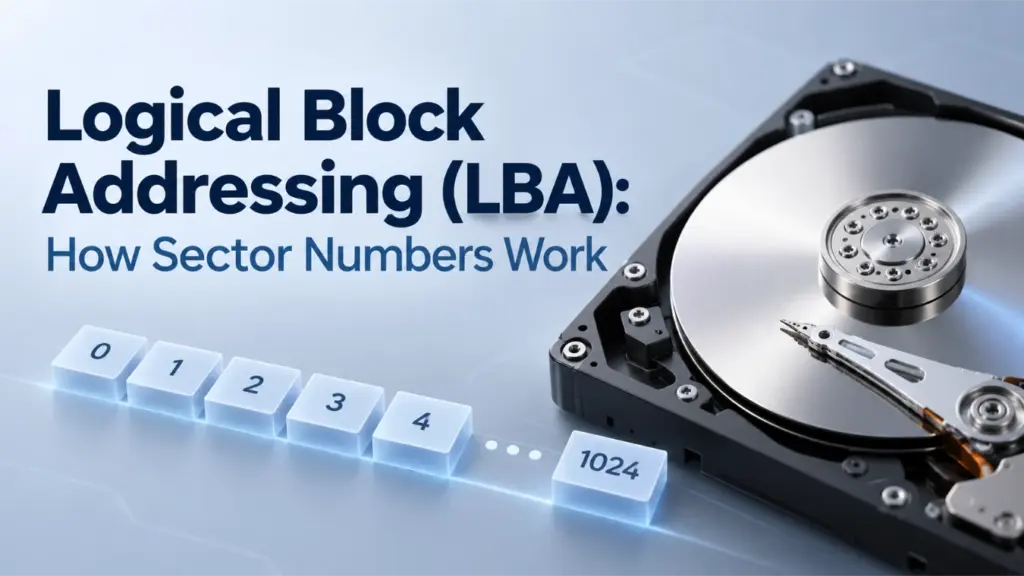
Logische Blockadressierung (LBA) ist ein Verfahren zur Identifizierung von Speicherblöcken anhand fortlaufender Nummern anstelle von Zylinder-, Kopf- und Sektor-Koordinaten. LBA 0 bezeichnet den ersten logischen Block, LBA 1 den zweiten und so weiter. Eine LBA-Nummer allein bestimmt jedoch noch keinen Byte-Offset: Dazu benötigt man außerdem die logische Blockgröße und den Ursprung des Adressraums. Das Verständnis dieser Zusammenhänge hilft dabei, Festplattenlayouts, Partitionsgrenzen sowie die Unterschiede zwischen logischen und physischen Sektoren zu erklären.
Inhaltsübersicht
LBA erklärt: So funktionieren logische Blockadressen
LBA behandelt die adressierbaren Blöcke eines Speichergeräts als lineare Abfolge. Anstatt eine Position wie bei der CHS-Adressierung (Cylinder-Head-Sector) anhand von drei Koordinaten zu beschreiben, weist es jedem logischen Block einen ganzzahligen Index zu.
Beispielsweise lauten die ersten vier logischen Blöcke:
LBA | Bedeutung |
0 | Erster logischer Block |
1 | Zweiter logischer Block |
2 | Dritter logischer Block |
3 | Vierter logischer Block |
Ein praktisches Beispiel
Stellen Sie sich einen USB-Stick vor, der logische Blöcke mit einer Größe von 512 Byte bereitstellt. Ein Festplatten-Tool fordert einen Block anhand seiner LBA-Nummer an. Wählen Sie ein Beispiel aus, um zu sehen, auf welchen Block sich die Nummer bezieht.
Die Anfrage
“Lies LBA 3.” Das Laufwerk wird aufgefordert, den Block mit der Nummer 3 auszulesen – nicht den dritten Block.
Im Klartext
LBA 3 = der 4. Block
Drei Blöcke gehen diesem voraus: LBA 0, LBA 1 und LBA 2. Da die Zählung bei Null beginnt, verweist die Adresse 3 auf Position vier.
Ein wichtiger Unterschied: LBA 3 steht für “logische Blocknummer 3”, nicht für “Dateinummer 3” und auch nicht für “physikalische Position 3”. Der oben angegebene Byte-Bereich ergibt sich aus der logischen Blockgröße des Beispiels von 512 Byte. Um festzustellen, welche Datei diesen Block gegebenenfalls nutzt, sind die Metadaten des Dateisystems erforderlich.
Diese Nummerierung beginnt bei Null. Wenn ein Gerät (N) logische Blöcke bereitstellt, lautet seine letzte gültige LBA N − 1, vorausgesetzt, der Adressraum beginnt bei LBA 0 und weist keine Lücken in der Nummerierung auf.
Ein Gerät, das beispielsweise 2.000.000 logische Blöcke bereitstellt, hat eine letzte LBA von 1,999,999. Die Anzahl der Blöcke ist daher um eins größer als die letzte LBA.
LBA ist eine Adressierungskonvention, kein Dateisystem. Es beschreibt weder Dateinamen noch Verzeichnisse noch die Dateizuweisung. Partitionstabellen verwenden logische Blockadressen, um den Anfang und das Ende von Partitionen zu beschreiben, während Dateisysteme ihre eigenen Metadaten nutzen, um Dateien innerhalb dieser Partitionen zu organisieren.
Auch die Herkunft des Adressraums spielt eine Rolle. Eine festplattenrelative LBA und eine volumenrelative Blocknummer können sich auf unterschiedliche Speicherorte beziehen, selbst wenn ihre numerischen Werte identisch sind. Stellen Sie stets fest, ob ein Tool Adressen relativ zum gesamten Gerät oder zu einer Partition angibt, bevor Sie dessen Ergebnisse mit Informationen aus der Partitionstabelle kombinieren.
So berechnen Sie den Byte-Offset einer LBA-Sektornummer
Eine LBA-Sektornummer bezeichnet einen logischen Block, doch um diese Zahl in eine Byte-Position umzuwandeln, ist die logische Blockgröße erforderlich.
Der Start-Byte-Offset wird wie folgt berechnet:
Start-Byte-Offset = LBA × logische Blockgröße
Wird die logische Blockgröße mit (B) bezeichnet, so ist der inklusive Byte-Bereich einer LBA:
Start-Offset = LBA × B
Endversatz = (LBA + 1) × B − 1
Die Subtraktion von eins ist erforderlich, da Byte-Offsets nullbasiert sind und der End-Offset den Startwert mit einschließt.
Beispiel: LBA 50 mit unterschiedlichen logischen Blockgrößen
Betrachten wir LBA 50 bei zwei gängigen logischen Blockgrößen.
Berechnung | 512-Byte-Logikblock | Logischer Block mit einer Größe von 4.096 Byte |
Startversatz | 25.600 Byte | 204.800 Byte |
Start-Offset in Hexadezimal |
|
|
Offset des letzten Bytes | 26.111 Byte | 208.895 Byte |
Letzter Offset in Hexadezimal |
|
|
Gesamtzahl der adressierten Bytes | 512 | 4,096 |
Bei einem logischen Block von 512 Byte beginnt LBA 50 beim Byte-Offset 25,600 und umfasst Bytes 25,600–26,111. Dieser Bereich umfasst genau 512 Byte.
Bei einem logischen Block mit einer Größe von 4.096 Byte beginnt dieselbe LBA beim Byte-Offset 204,800 und umfasst Bytes 204,800–208,895, insgesamt 4.096 Byte.
Es handelt sich hierbei um Beispielberechnungen, nicht um Messungen einer physischen Festplatte.
Das wichtige Ergebnis lautet, dass Ein und dieselbe LBA kann unterschiedlichen Byte-Offsets entsprechen, wenn sich die logische Blockgröße ändert.. Man kann nicht davon ausgehen, dass die Multiplikation jedes LBA mit 512 für jedes Gerät den richtigen Byte-Offset ergibt.
Bei der Berechnung wird außerdem davon ausgegangen, dass sich die LBA und die logische Blockgröße auf denselben Adressraum beziehen. Wenn ein Tool eine partitionrelative Blocknummer angibt, Sie jedoch eine festplattenrelative Adresse benötigen, müssen Sie die Start-LBA der Partition berücksichtigen und sicherstellen, dass beide Werte dieselbe logische Blockeinheit verwenden.
LBA-zu-Byte-Offset-Explorer
Ändern Sie die LBA-Nummer, um den dadurch identifizierten Byte-Bereich unter zwei gängigen logischen Blockgrößen zu vergleichen.
Mit einem logischen Block von 512 Byte
Start-Byte-Offset
Einschließender Byte-Bereich
Offset des letzten Bytes
Mit einem logischen Block von 4.096 Byte
Start-Byte-Offset
Einschließender Byte-Bereich
Offset des letzten Bytes
Berechnung: Start-Offset = LBA × logische Blockgröße
Schluss: End-Offset = (LBA + 1) × logische Blockgröße − 1
Dies dient lediglich als Lehrbeispiel. Dieser Rechner liest keine Datenträger aus. Bei der Berechnung wird davon ausgegangen, dass sich LBA und Blockgröße auf dasselbe logische Gerät beziehen, wobei die Byte-Offsets vom Anfang dieses Geräts aus gemessen werden.
LBA gegen CHS – Adressierung
LBA gegen CHS ist in erster Linie ein Vergleich zwischen zwei Arten, eine Speicheradresse auszudrücken.
CHS stands for Cylinder, Head, and Sector. It represents a location using three coordinates, while LBA assigns the location a single sequential number.
Merkmal | LBA | CHS |
Address representation | One linear block number | Cylinder, head, and sector coordinates |
Numbering | LBA starts at 0 | Traditional sector numbers start at 1 |
Address calculation | Multiply the LBA by the logical block size to obtain a byte offset | Requires geometry parameters to translate the coordinates |
Modern disk interpretation | Logical address exposed by the storage interface | May represent translated geometry rather than actual physical geometry |
Partition-table use | Explicit LBA fields are used by modern partitioning structures | Legacy fields remain in MBR entries for compatibility |
How CHS coordinates map to LBA
A traditional CHS-to-LBA conversion requires the number of heads per cylinder and the number of sectors per track.
Using zero-based cylinder and head numbers and a one-based sector number:
LBA = ((Cylinder × Heads per cylinder) + Head) × Sectors per track + (Sector − 1)
For example, suppose a hypothetical geometry has 16 heads per cylinder and 63 sectors per track. The CHS address (1, 2, 3) converts to:
LBA = ((1 × 16) + 2) × 63 + (3 − 1)
LBA = 18 × 63 + 2
LBA = 1,136
This example demonstrates the conversion formula; it does not describe the physical layout of a particular drive.
Modern drives do not necessarily expose a CHS geometry that corresponds to their actual physical tracks and heads. Legacy software may use translated CHS values for compatibility, so those values should not automatically be interpreted as physical locations.
Die UEFI specification’s MBR partition-record definition explicitly distinguishes the CHS fields from the LBA fields used by UEFI firmware to determine partition locations.
LBA is simpler to use as a linear addressing scheme, but its addressable capacity still depends on the width of the address field and the storage interface. The term LBA alone does not specify a universal address width.
Logical Block Size vs. Physical Sector Size
An LBA identifies a logical block exposed by the storage device or interface. That logical block is not necessarily the same size as a physical sector on the underlying medium.
Three common hard-drive formats illustrate the distinction:
Format | Logische Sektorgröße | Größe des physischen Sektors |
512n | 512 Byte | 512 Byte |
512e | 512 Byte | 4.096 Byte |
4Kn | 4.096 Byte | 4.096 Byte |
These are common formats, not an exhaustive list of every block size that a storage interface may report.
In a 512e drive, eight 512-byte logical sectors fit within one 4,096-byte physical sector. The operating system addresses the logical sectors, while the device manages the relationship between those sectors and the physical storage layout.
This difference matters for two reasons:
- Address calculation: Use the logical block size associated with the LBA address space to calculate the byte offset.
- Alignment and performance: Physical sector boundaries can affect how efficiently the device performs writes. If the device’s logical address zero is aligned to a physical boundary, an LBA that is a multiple of eight aligns to a 4,096-byte boundary on a 512e layout. Actual alignment can also depend on device-reported offsets and transfer-granularity requirements.
Microsoft’s documentation on Advanced Format disk compatibility explains why Windows and storage applications need to account for differences between logical and physical sector sizes.
Do not use the physical sector size as a substitute for the logical block size in the basic LBA-to-byte-offset formula. They describe different aspects of the storage layout.
How LBA Is Used in MBR and GPT
LBA becomes especially useful when examining partition tables because these structures use block addresses to describe disk layout.
LBA fields in MBR
The Master Boot Record (MBR) occupies LBA 0 on an MBR-partitioned disk. Its partition table contains four 16-byte partition entries.
Each entry includes two important 32-bit fields:
Start-LBA, at byte offset 8 relative to the beginning of the partition entry, identifies the partition’s starting logical block.SizeInLBA, at byte offset 12 relative to the beginning of the partition entry, specifies the number of logical blocks in the partition.
If the partition size is nonzero, its ending LBA can be calculated as:
Ending LBA = StartingLBA + SizeInLBA − 1
For example, a partition beginning at LBA 2,048 and containing 1,000,000 logical blocks ends at LBA 1,002,047. Die Amagicsoft MBR partition table guide explains the partition-entry layout and how the starting address and block count determine partition boundaries.
LBA fields in GPT
The GUID Partition Table (GPT) uses LBA to locate its metadata and define partition ranges.
On a conventional GPT-partitioned disk, the layout includes:
Standort | Struktur |
LBA 0 | Schutz-MBR |
LBA 1 | Primary GPT header |
Befolgung der LBAs | Primary partition-entry array |
Verfügbarer LBA-Bereich | Verfügbarer Platz für Trennwände |
Near the end of the device | Backup partition-entry array |
Letzte LBA | Backup GPT header |
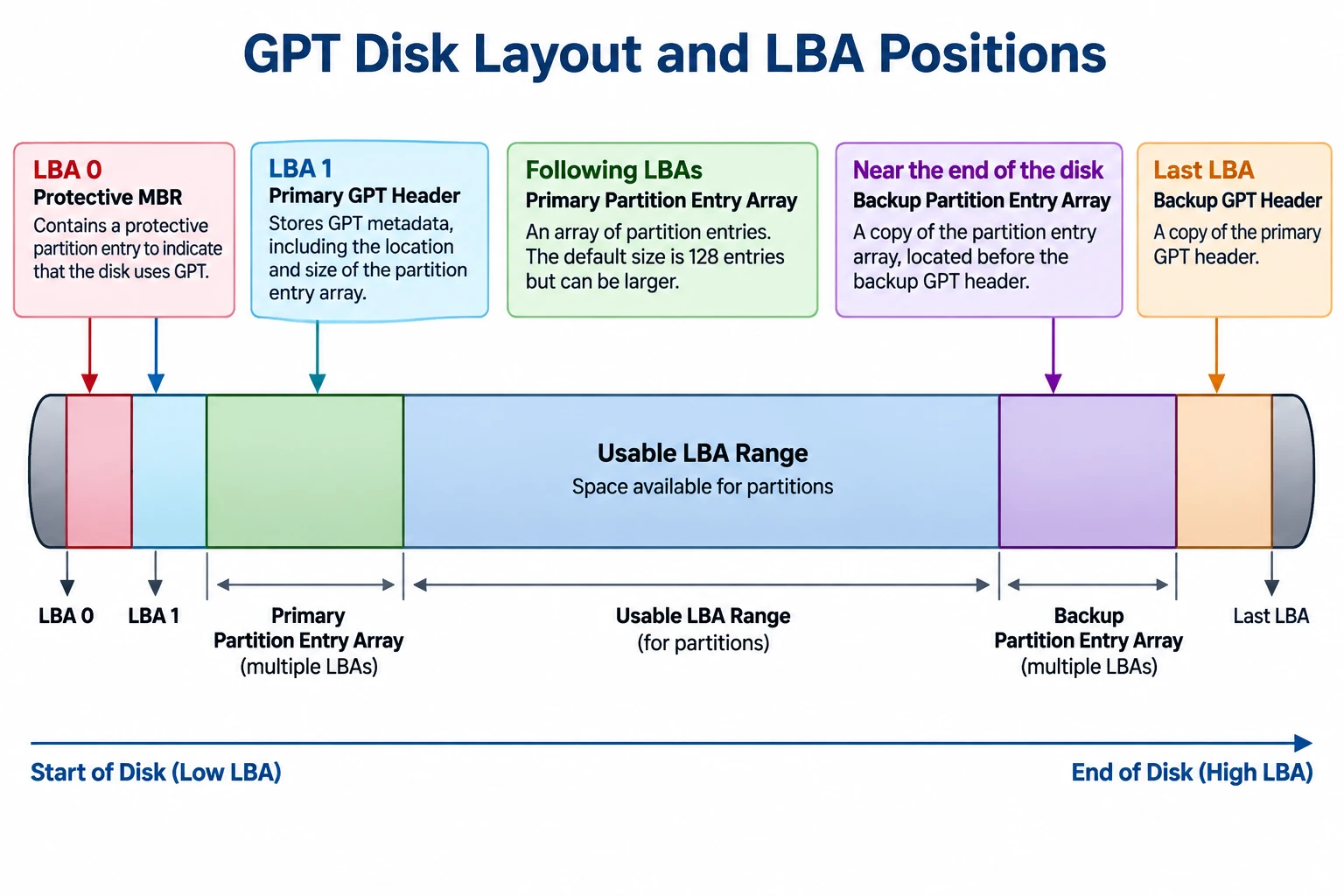
The exact usable range depends on the disk layout, logical block size, and the locations reserved for GPT metadata.
GPT partition entries contain 64-bit Start-LBA und EndingLBA fields. Both boundaries are inclusive, so the number of logical blocks in a partition is:
Partition size in blocks = EndingLBA − StartingLBA + 1
The GPT header also includes PartitionEntryLBA, which identifies the starting LBA of the associated partition-entry array.
For a field-level explanation of these addresses and the primary and backup headers, see Amagicsoft’s GPT Header guide.
Der Beamte UEFI specification, Section 5, defines the GPT layout and its address fields. It specifies 64-bit LBAs for GPT, whereas MBR partition entries use 32-bit starting-LBA and size fields.
Why MBR and GPT have different addressing limits
With 32-bit sector-address fields, MBR has a commonly encountered capacity boundary of approximately 2 TiB when logical sectors are 512 bytes.
The arithmetic is:
2³² logical blocks × 512 bytes = 2 TiB
This is approximately 2.2 trillion bytes in decimal units. The limit comes from the address-field width and the assumed logical sector size; it is not a universal limit for every device or every possible logical block size.
GPT’s 64-bit LBA fields provide a much larger theoretical address space. Actual usable capacity still depends on the operating system, firmware, drivers, device interface, and partitioning implementation.
Microsoft’s documentation on Windows support for disks exceeding 2 TB explains the relationship between the MBR addressing limitation and GPT.
How to Check Logical and Physical Sector Information in Windows
Windows provides a command for querying sector information reported by the storage device and its driver.
- Öffnen Sie die Eingabeaufforderung.
- Laufen lassen
fsutil fsinfo sectorinfo D:, replacingD:mit dem entsprechenden Laufwerksbuchstaben. - Examine the reported logical and physical sector information.
Microsoft documents this command in Fsutil fsinfo. Its example output includes fields such as Logische Bytes pro Sektor und Physikalische Bytes pro Sektor für Atomarität.
For example, if the system reports LogicalBytesPerSector : 4096, a 4,096-byte logical block size is appropriate for the corresponding LBA-to-byte-offset calculation.
Compare the logical sector size with the reported physical-sector information to understand the device’s addressing and alignment characteristics. The available fields and values may vary with the Windows version, storage device, and driver.
This command queries sector information; it does not read a particular LBA’s raw contents or identify the physical location of a file. It is a useful way to verify an input needed for the calculation, not a complete disk-structure analysis.
LBA Limitations and Common Misconceptions
LBA provides a logical address, but several conclusions cannot be drawn from the address alone.
- An LBA does not identify a file. The file system’s metadata is needed to map files and their allocated clusters to the corresponding storage regions.
- An LBA is not a physical media address. On an SSD, for example, the device’s flash translation layer manages the mapping between host-visible logical addresses and internal flash storage.
- An LBA does not establish whether data is intact. A readable address, an I/O error, or a partition-table inconsistency does not by itself prove that a file is recoverable or that a drive has physical damage.
- A byte offset depends on the correct logical block size. Using an assumed 512-byte size on a device exposing 4,096-byte logical blocks produces an incorrect result.
- Address origins must match. A partition-relative address cannot be treated as a disk-relative address without accounting for the partition’s starting position and confirming the tool’s addressing convention.
These distinctions are important when diagnosing partition layouts, interpreting disk utilities, or studying file-system structures. LBA supplies the address; additional metadata and device information are needed to interpret what is stored there.
Schlussfolgerung
Logical block addressing provides a linear way to identify logical storage blocks, but interpreting an LBA requires the correct logical block size and address-space origin. The distinction between logical and physical sectors, the differences between MBR and GPT fields, and the limitations of CHS compatibility values all affect how disk addresses should be understood. For reliable analysis, calculate offsets from verified parameters and interpret them alongside the relevant partition and file-system metadata.
FAQs
Ist die LBA dasselbe wie eine Sektornummer?
Beginnt die LBA-Nummerierung bei Null?
N − 1, nicht N.Wie berechne ich den Byte-Offset einer LBA?
Byte-Offset = LBA × logische Blockgröße. Beispielsweise beginnt LBA 50 auf einem Gerät mit logischen Blöcken von 512 Byte beim Byte-Offset 25.600. Überprüfen Sie die Größe der logischen Blöcke, bevor Sie das Ergebnis verwenden.Warum kann dieselbe LBA unterschiedliche Byte-Offsets haben?
Was ist der Unterschied zwischen LBA und CHS?
Gibt die LBA den physischen Speicherort einer Datei an?
Warum gilt für MBR eine Kapazitätsbeschränkung von 2 TiB?
Kann Windows die LBA einer bestimmten Datei anzeigen?
fsutil fsinfo sectorinfo Der Befehl gibt Sektorinformationen aus, nicht die LBA einer Datei. Um Dateidaten zu lokalisieren, müssen das Partitionslayout und die Metadaten des Dateisystems interpretiert werden, wobei das Ergebnis von der Fragmentierung und der Adresskonvention des Tools abhängen kann.
Vasilii ist ein Datenrettungsspezialist mit rund 10 Jahren praktischer Erfahrung in diesem Bereich. Im Laufe seiner Karriere hat er Tausende von komplexen Fällen mit gelöschten Dateien, formatierten Laufwerken, verlorenen Partitionen und RAW-Dateisystemen erfolgreich gelöst. Sein Fachwissen umfasst sowohl manuelle Wiederherstellungsmethoden mit professionellen Tools wie Hex-Editoren als auch fortschrittliche automatische Lösungen mit Wiederherstellungssoftware. Vasilii hat es sich zur Aufgabe gemacht, zuverlässiges Wissen zur Datenwiederherstellung sowohl IT-Fachleuten als auch normalen Nutzern zugänglich zu machen und ihnen dabei zu helfen, ihre wertvollen digitalen Ressourcen zu schützen.